Categories
Game Design Game Development Geek / Technical

Freshly Squeezed Progress Report: Profilin’ and Optimizin’

In my previous report, I got into the details of how I fixed the silly way I was storing data in my game so that it was more efficient and allowed the dungeon rendering to be faster in The Dungeon Under My House, my second Freshly Squeezed Entertainment project.

This past week, I continued optimizing my dungeon rendering code, with a goal of getting the animations to be 60 frames per second, plus figuring out why one door in the dungeon is so well lit compared to what it should be.

Sprint 2024-3: Pre-production and initialization

Unplanned and complete:

  • Defect: Door visual floats in middle of view when open and seen from the side; should appear to block view to right instead

Planned and incomplete:

  • Render dungeon based on light levels

In my last report, I said I was done with the rendering of the dungeon based on light levels, but I wasn’t satisfied with the performance, even after my changes from last week, so I decided to continue optimizing.

Even though the game isn’t meant to be played in real-time, I think the game feels a lot better when it runs at 60 FPS, and the slowness of the dungeon rendering was getting in the way of making the entire game feel crisp and smooth.

But first, this door was getting on my nerves.

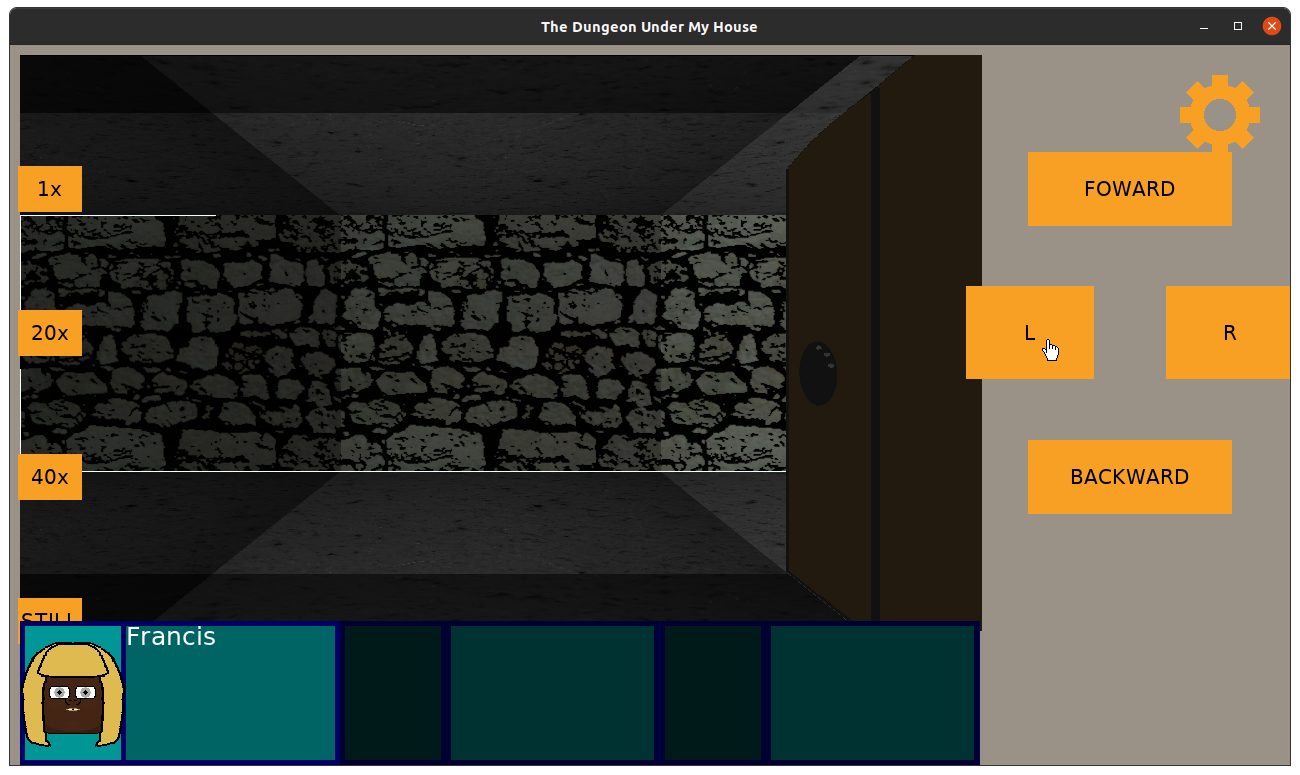
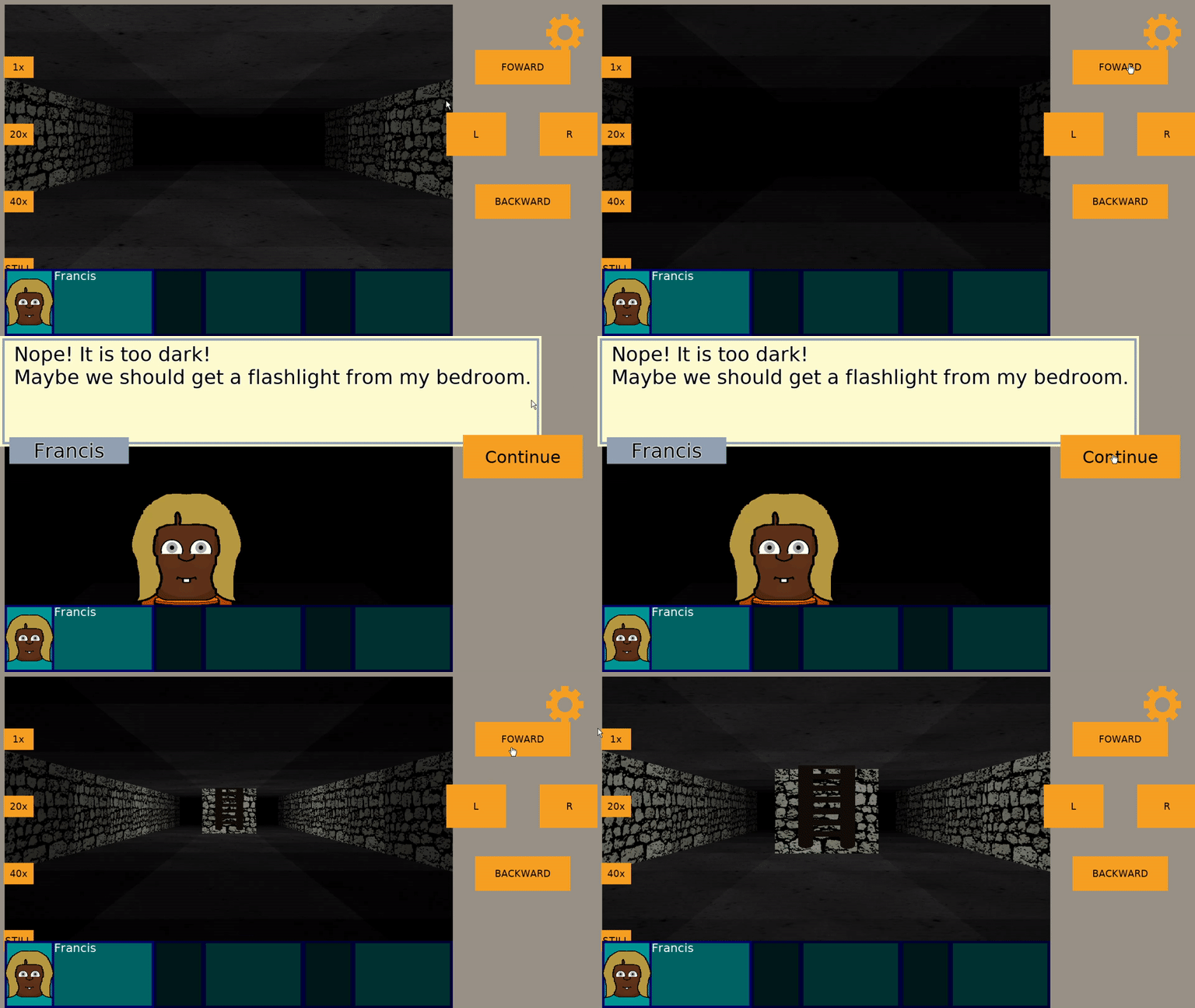
The Dungeon Under My House - lighting the dungeon walls

That image was from a few weeks ago, when I hadn’t started working on the floor and ceiling rendering code yet. I was wandering through my small test dungeon, checking how the walls got darker the farther away you were from the light source, when I discovered this very bright door and doorway.

What was going on there?

I double-checked, and I didn’t set any ambient light on that cell, and in fact, the walls next to it were darker. It was just the door and its associated doorway that was rendering so bright despite the fact that the cell it belonged to was rendering much darker.

So I kept digging and logging, and eventually I decided to set the default color of a cell to something extreme. And there was my my first clue: apparently the door wasn’t taking its color from the cell it belongs to but from an adjacent cell, and in this case, one that was out of bounds and so wasn’t paying attention to the lighting code.

After digging into the code, I discovered that the way I wrote the code and the way the door is represented means that the wrong cell’s lighting data was being used. Basically, the hinge edge and the far edge of the door is stored, and I used the hinge edge’s location to identify the cell’s position. In some orientations, this worked fine, but in others, it grabbed the next cell.

And for things like the doorway, well, those could be arbitrary dimensions. How do I generically identify which cell it should belong to?

Well, I decided that I would just store the door’s current cell as data in the door itself, so instead of trying to derive the cell based on the door’s data, I could just get the cell itself.

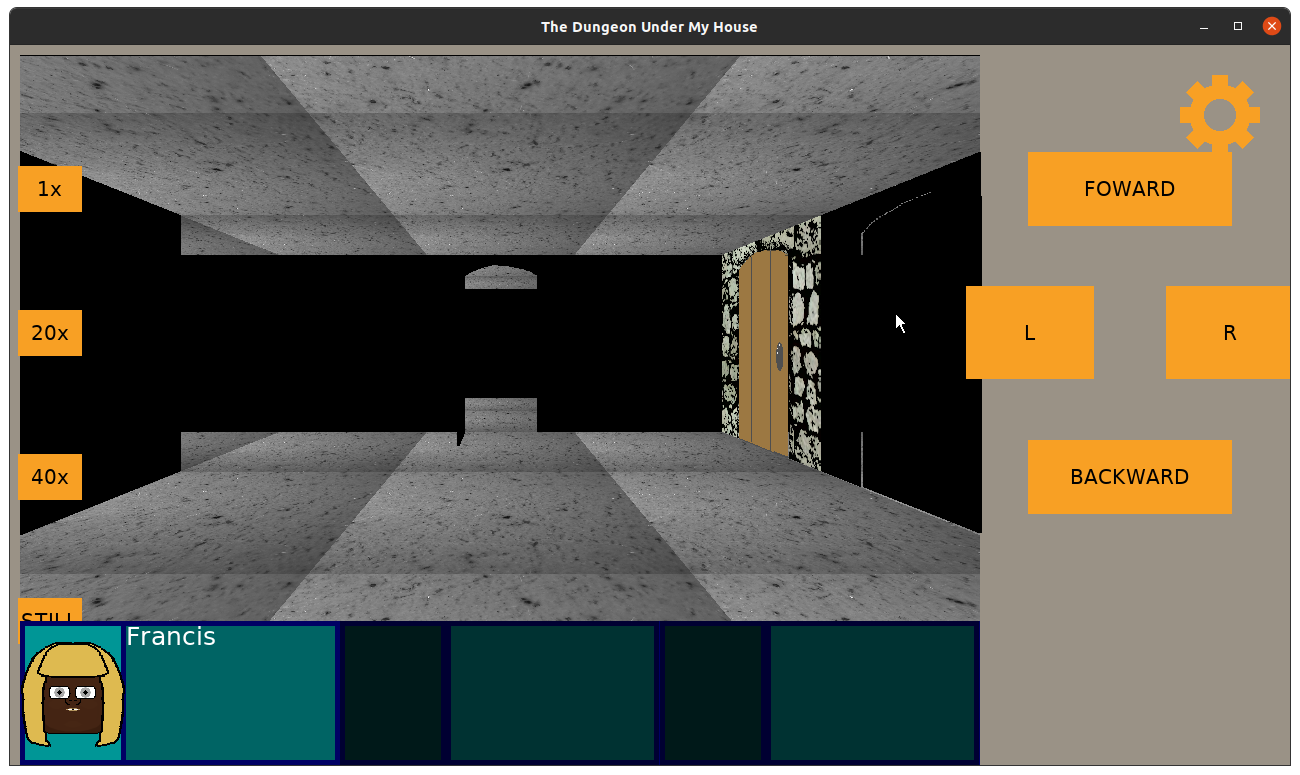
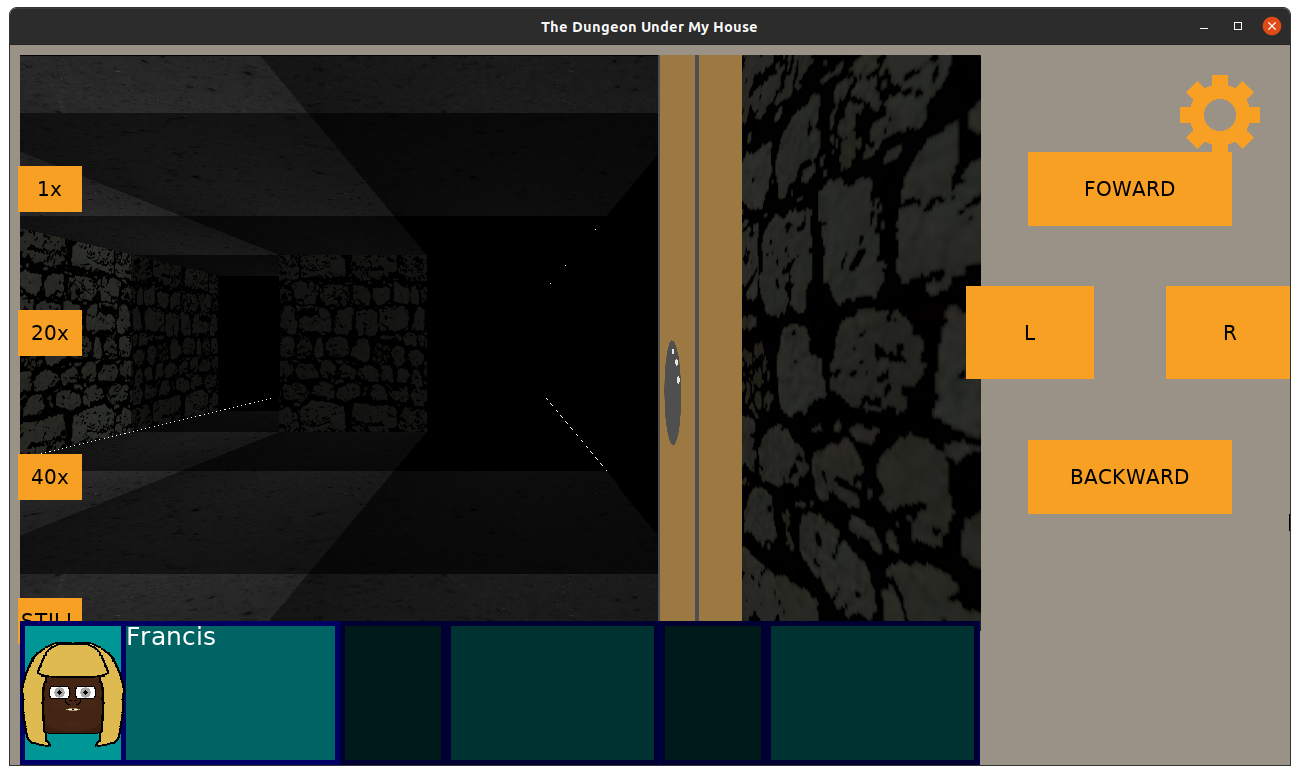
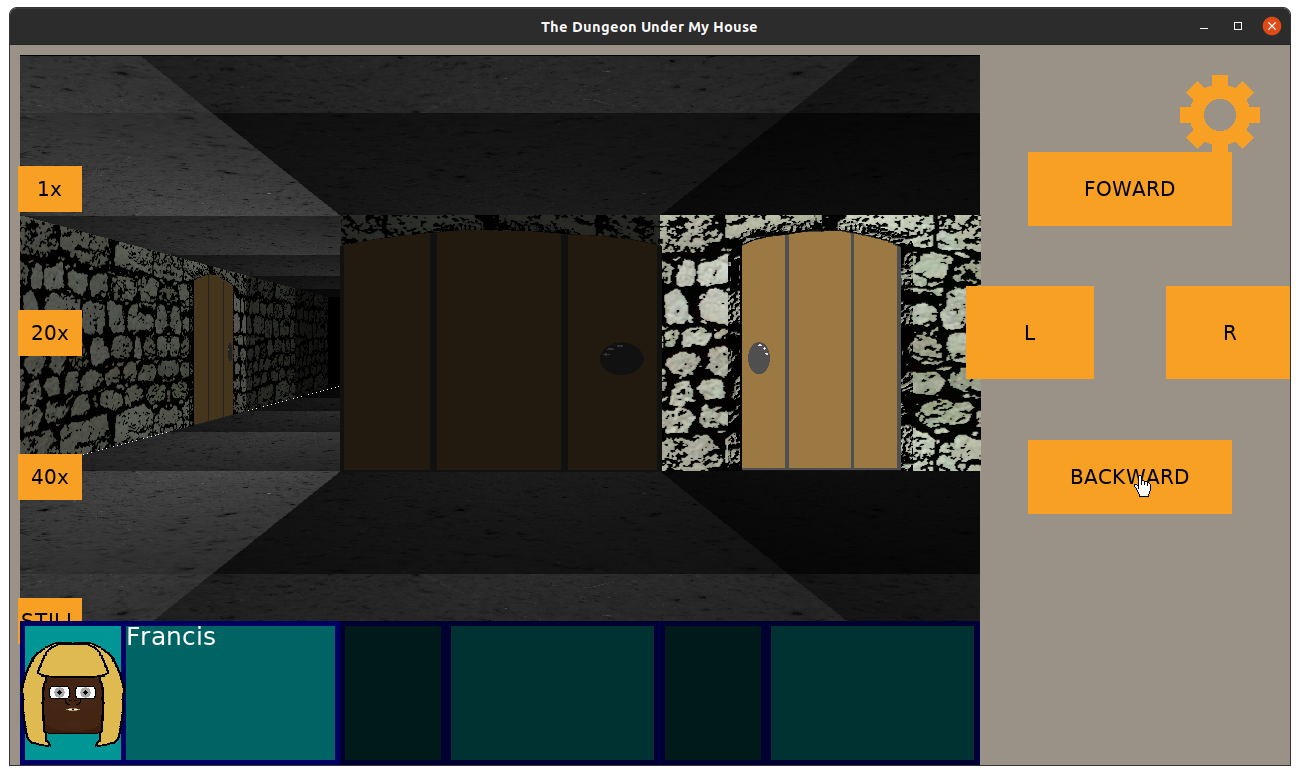
Anyway, I also had a different problem with doorways. If the door is open, and you are facing the entryway, the door will be seen on the side.

The Dungeon Under My House - open doorway

But if you are facing away from the entryway (that is, the entryway is behind you), the door should be on the other side.

And it is…except it kind of floats out in the middle of the viewport.

The Dungeon Under My House - open doorway

This is ugly, and I wanted to fix it, too. If the door is to the side, it should block your view from that side, right?

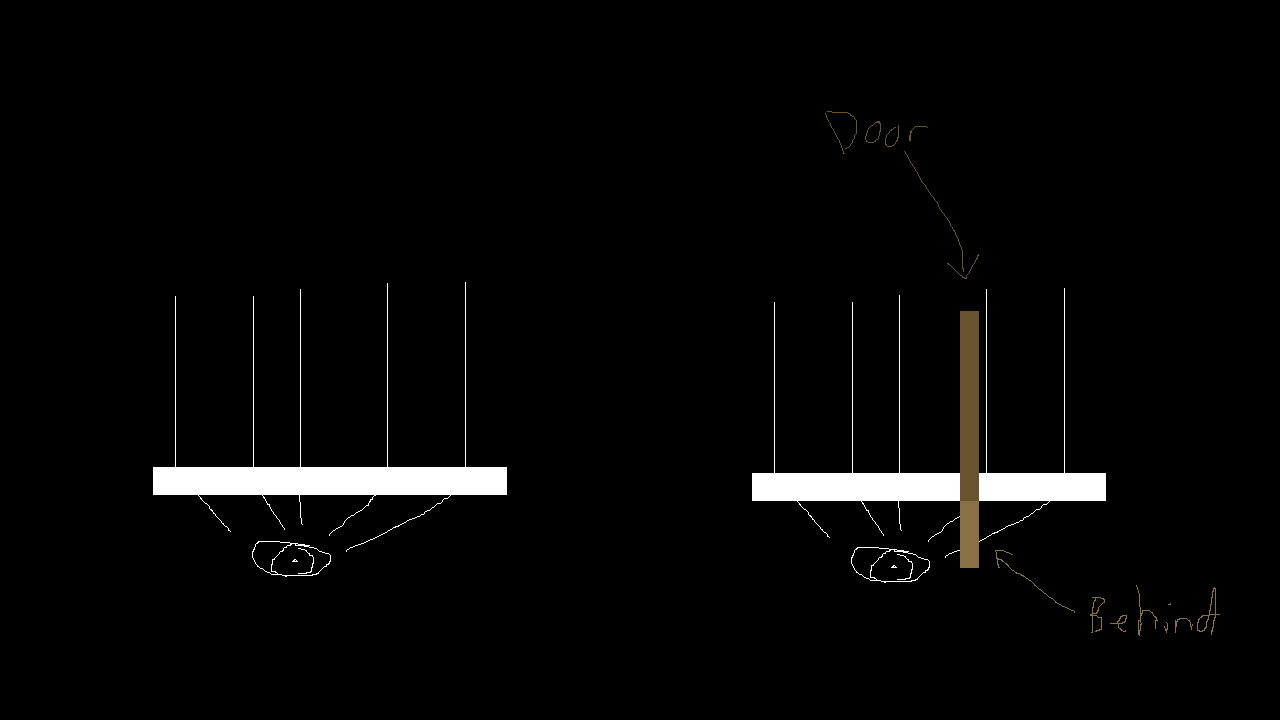
Since this is raycasted code, the best idea I had for what was going on was that the rays were going around it.

The Dungeon Under My House - Why Doors Look Wrong

So I think intuitively the rays would hit the door behind the camera plane, too, and should show that area as blocked, but the point of the camera plane is to not draw behind it, and the point of the rays being projected out was to avoid fisheye lens effects.

So, what could I do? I tried changing the field of view. I did find that if I change the FOV from 1.0 to 0.5 that the door seemed to block the far side of the view as I wanted, but the downside was that the player’s view seemed too constrained. I wanted the player to be able to stand next to a hallway and see that it exists, but too small a FOV prevents that.

But anything larger would show a floating door in certain orientations.

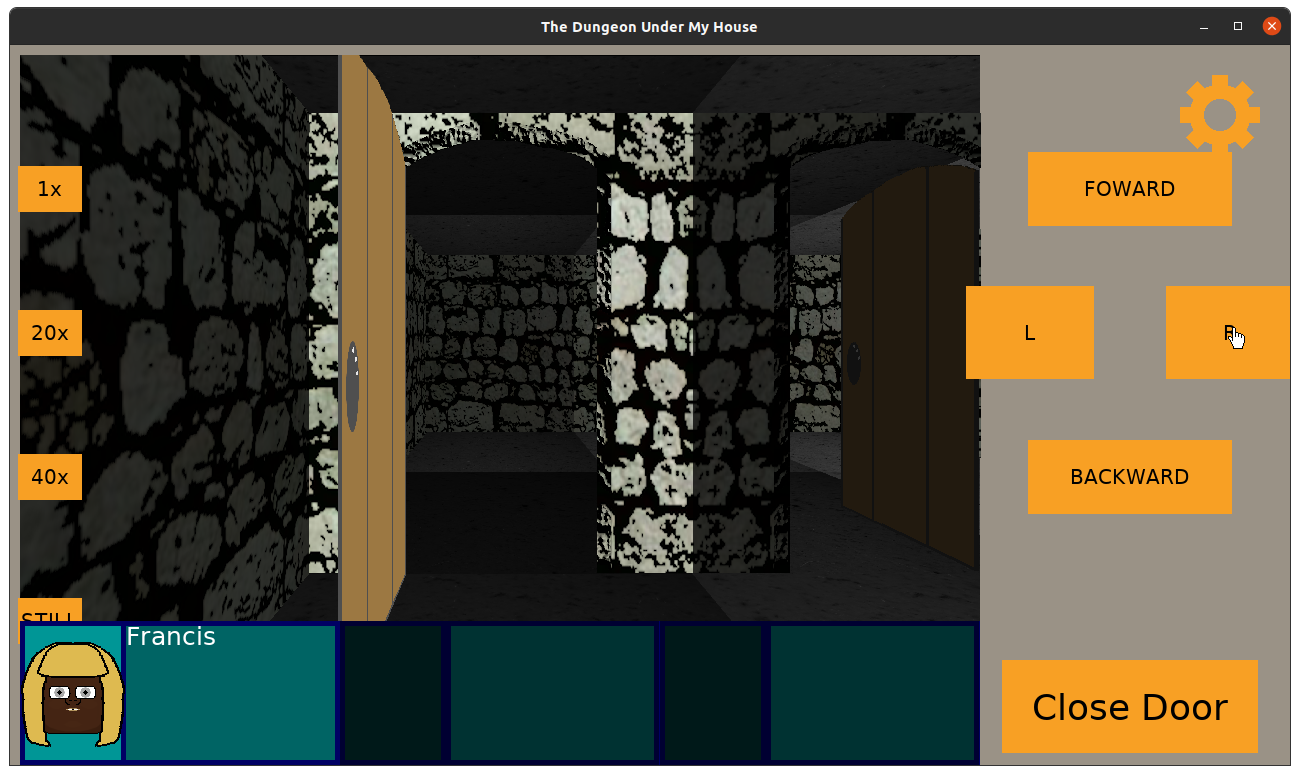
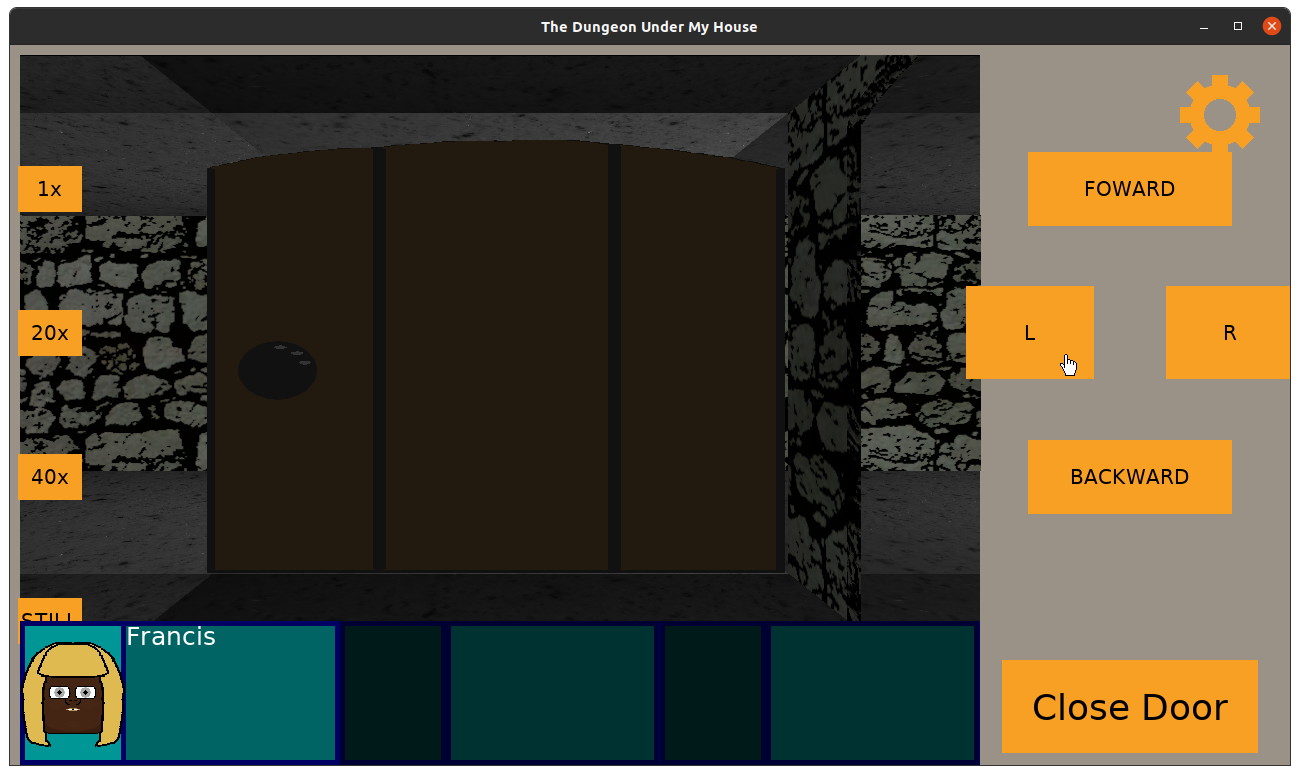
Now I loved my door and entryway, especially how it was centered in the tile, but I decided that the most straightforward thing to do is to make the door larger so that the hinge is at the far end of the tile rather than in the center.

The Dungeon Under My House - larger door

This way, when the player is facing out of the entryway, the door is seen at the far edge of the viewport rather than have the door protrude out of the middle of the camera.

The Dungeon Under My House - larger door

The Dungeon Under My House - larger door

I’m not happy that these kinds of doors now take up the entire cell, but it seemed the least bad option. And on the plus side, I think I found that having a FOV of 0.66667 looks great.

Anyway, back to optimizing. Now that walls, doors, ladders, ceilings, and floors of the dungeon are rendered based on lighting, I found that there was a definite difference between how smoothly the game seems to be responding when stationary versus when turning or moving forward or backward.

If I remove the ceiling and floor rendering code, the walls and “things” render super quickly. The game feels very smooth.

But if I remove the walls and “things” rendering code, the ceilings and floors render just a little too slowly. It’s fast enough in terms of functionality, but it feels jarring and off.

I had changed my game’s dungeon representation from an std::map to an std::vector, using fast indexing math to quickly access the data I need in constant time, but it was still slow.

And using the “poor man’s profiling” technique of interrupting the debugger and seeing what code it is sitting in most often got me pretty far before, I decided to try using a real profiler to see what I can learn.

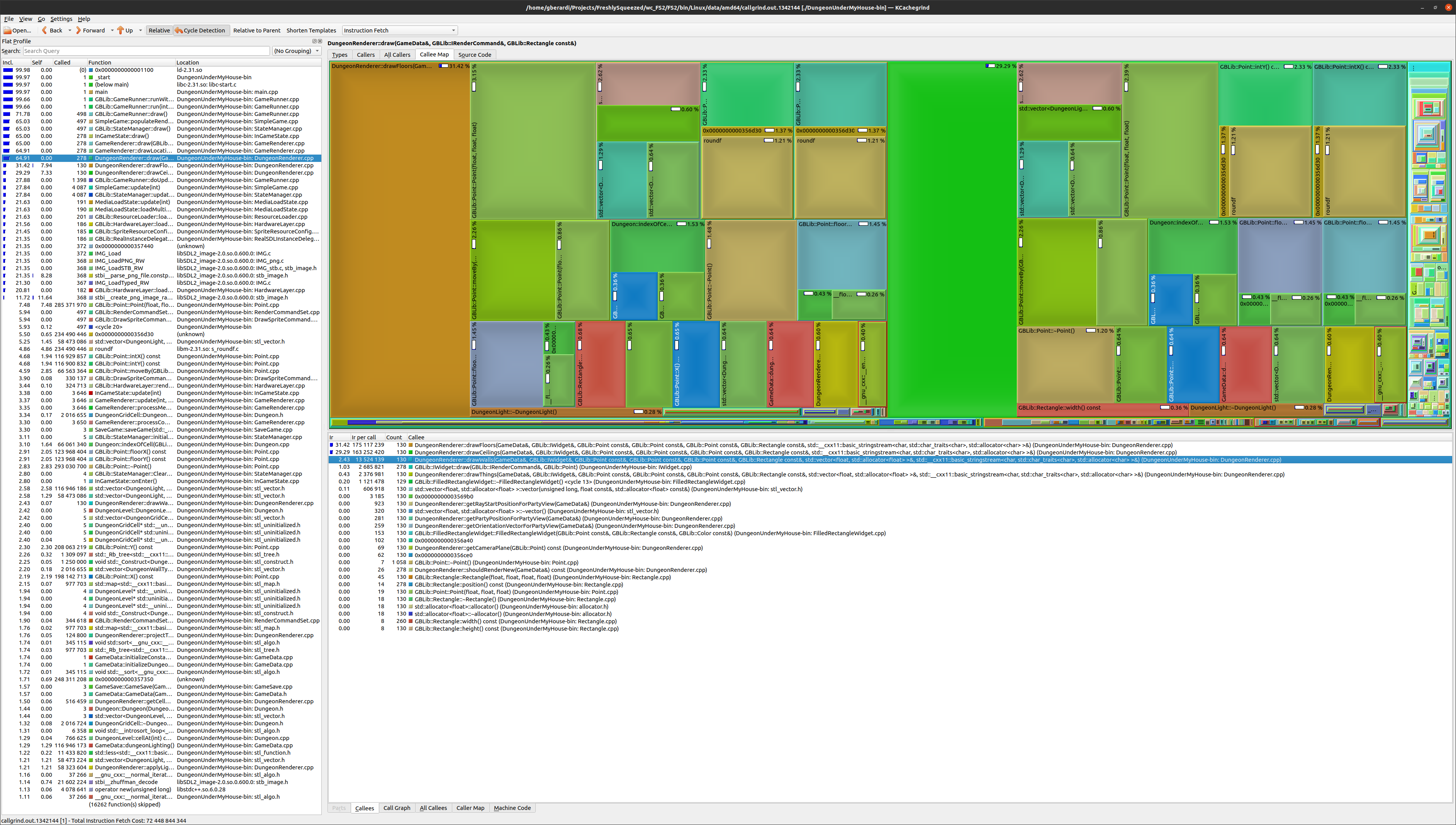
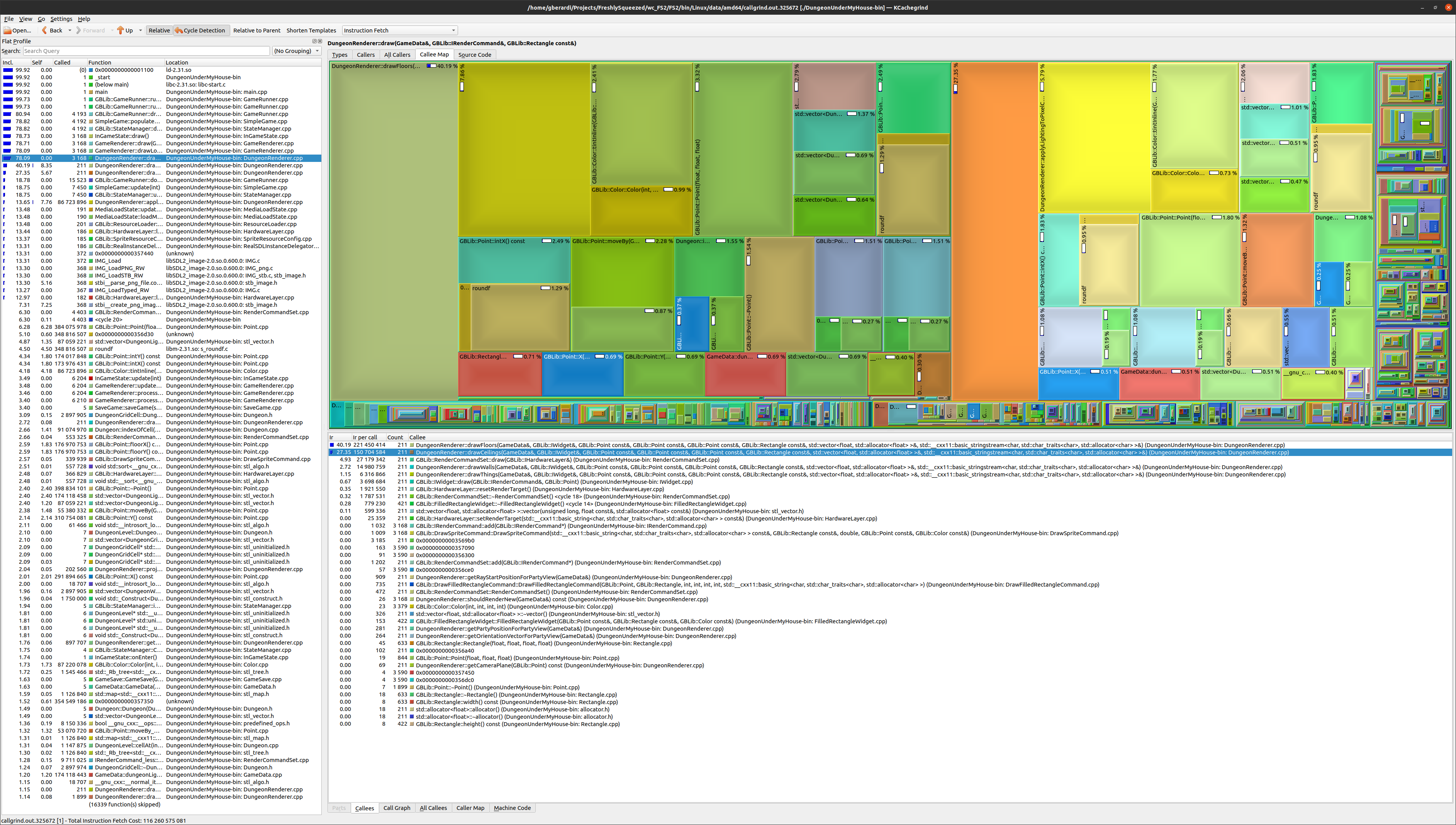
So I love valgrind, and I used the command “valgrind –tool=callgrind” on my game’s binary file. While the dungeon rendering was much, much slower when running with a profiler, I was able to collect some good data.

Then I used kcachegrind to pull up some fun visualizations.

The Dungeon Under My House - profiler output

What they told me was that my drawCeilings() and drawFloors() functions weren’t slow due to any one particular thing. There were lots of different things going on, each of which was taking up a chunk of the processing.

What this means is that while I could tackle any number of optimization opportunities that I see here, and I did gain small improvements when I did do so, there was something bigger happening.

What’s very interesting is that the drawWalls() and drawThings() functions take up so little processing compared to drawCeilings/drawFloors(). My main bottleneck with the latter wasn’t the various functions it called or objects it created. It was that it was working pixel by pixel across half a million plus pixels.

Basically, no matter how fast I get the code to render a pixel, it still has to draw a lot of pixels, and the main way I am going to speed things up is to draw fewer pixels.

I didn’t get the chance to try it before the end of the week, but my next major optimization attempt will be to draw the walls and “things” first, then scan pixel by pixel to find what hasn’t been drawn yet and draw the ceilings and floors at those points.

It should cut down significantly on pixels drawn, especially since most of those pixels were getting drawn on top of anyway with my current approach, so I anticipate that this new approach will mean most of the pixels won’t be so expensive to render.

But we’ll see.

Thanks for reading!

Want to learn when I release The Dungeon Under My House, or about future Freshly Squeezed games I am creating? Sign up for the GBGames Curiosities newsletter, and download the full color Player’s Guides to my existing and future games for free!

Categories
Game Design Game Development Geek / Technical

Freshly Squeezed Video Progress Report: More Dungeon Lighting Work

Here’s the companion video for Monday’s Freshly Squeezed Progress Report: More Dungeon Lighting Work:

Enjoy! And let me know what you think by replying below!

Categories
Game Design Game Development Geek / Technical

Freshly Squeezed Progress Report: More Dungeon Lighting Work

Last week, I reported that I had started working on adding lighting to the dungeon walls and doors in The Dungeon Under My House, my second Freshly Squeezed Entertainment project.

Since then, I’ve been working on adding lighting to the floors and ceilings.

Sprint 2024-2: Pre-production and initialization

Planned and complete:

  • Render dungeon based on light levels

Changing the brightness of the walls and doors was relatively easy: I just changed the tint when rendering each column in my raycasting code based on how dark the current cell is.

But I couldn’t do the same for the floors and ceilings, as I said last time:

While the walls draw columns of textures and can be tinted, the ceilings and floors draw individual pixels of textures, each of which represents the actual pixel color from the source texture as a Uint32 value.

Now, when I usually deal with color, I am dealing with RGBA values, with each of R, G, B, and A being a value from 0 to 255, or even using hexadecimal values if I want to match what I might see in HTML color codes. So 0xff would be equivalent to 255.

Drawing walls, the only color I deal with is my tint value, which is the dungeon light level’s color multiplied by its brightness percentage.

But drawing the ceiling, I need to directly modify the color value of the pixel in question, and I am still figuring out exactly how. The Uint32 value should correspond to RGBA-like values, and in this case, I believe it is ABGR8888 in SDL2’s representation.

I imagined that I would need to change the hex values that represented the pixel, and I didn’t know if the math was going to be complicated or straightforward.

But my colleague Joel Davis, who has helped me before with his insight and experience on this project, suggested that the way to handle it (which I later found supporting posts online that say the same) is to first change to RGBA, then change the color as usual, the change back to the Uin32 hex values.

And wouldn’t you know, it worked as expected!
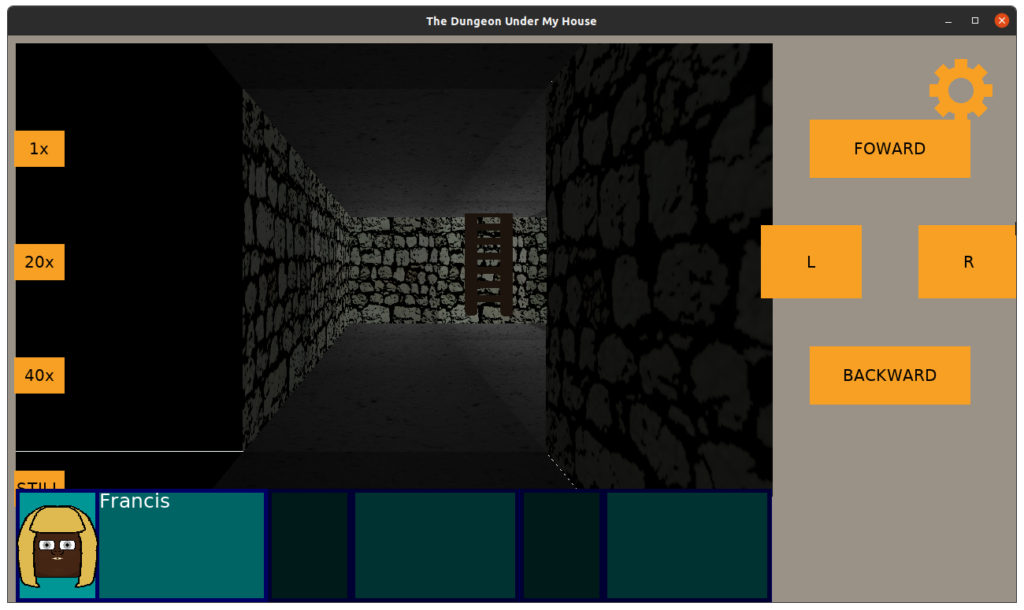
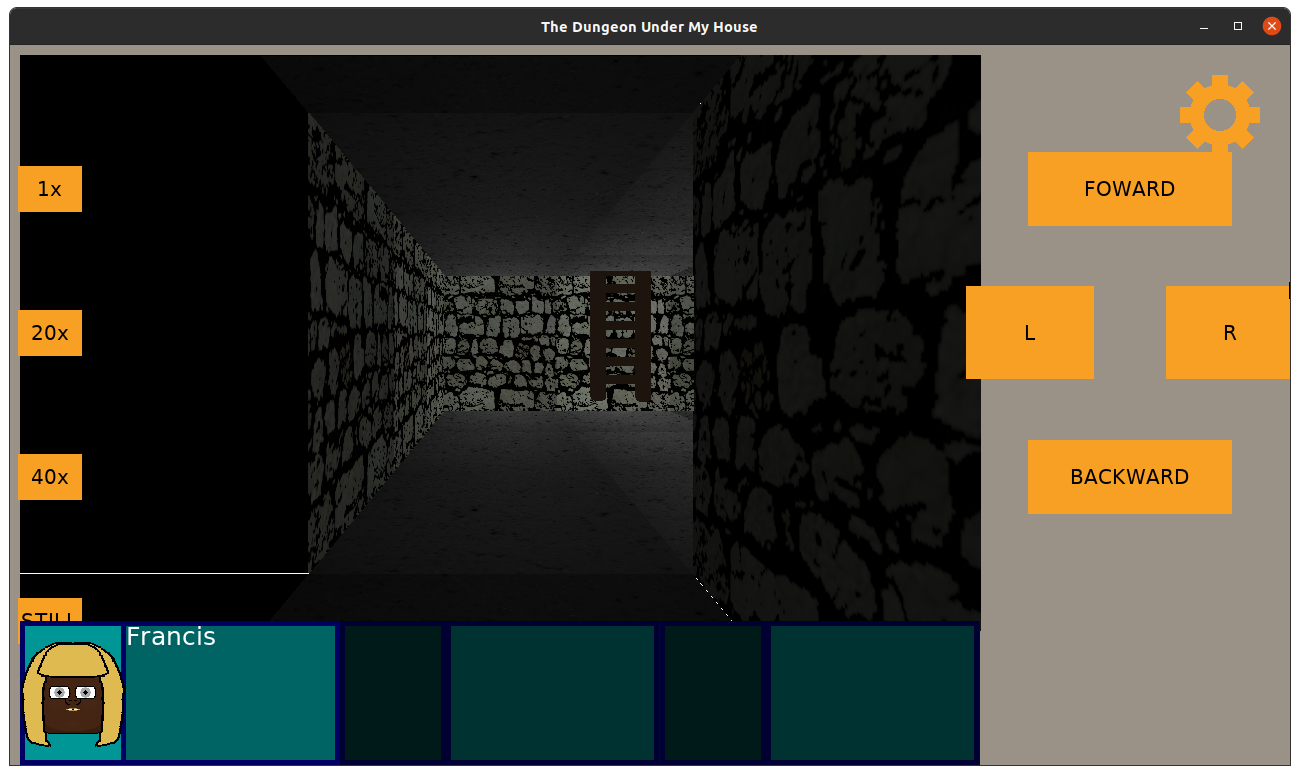
The Dungeon Under My House - applying lighting to the ceilings and floors

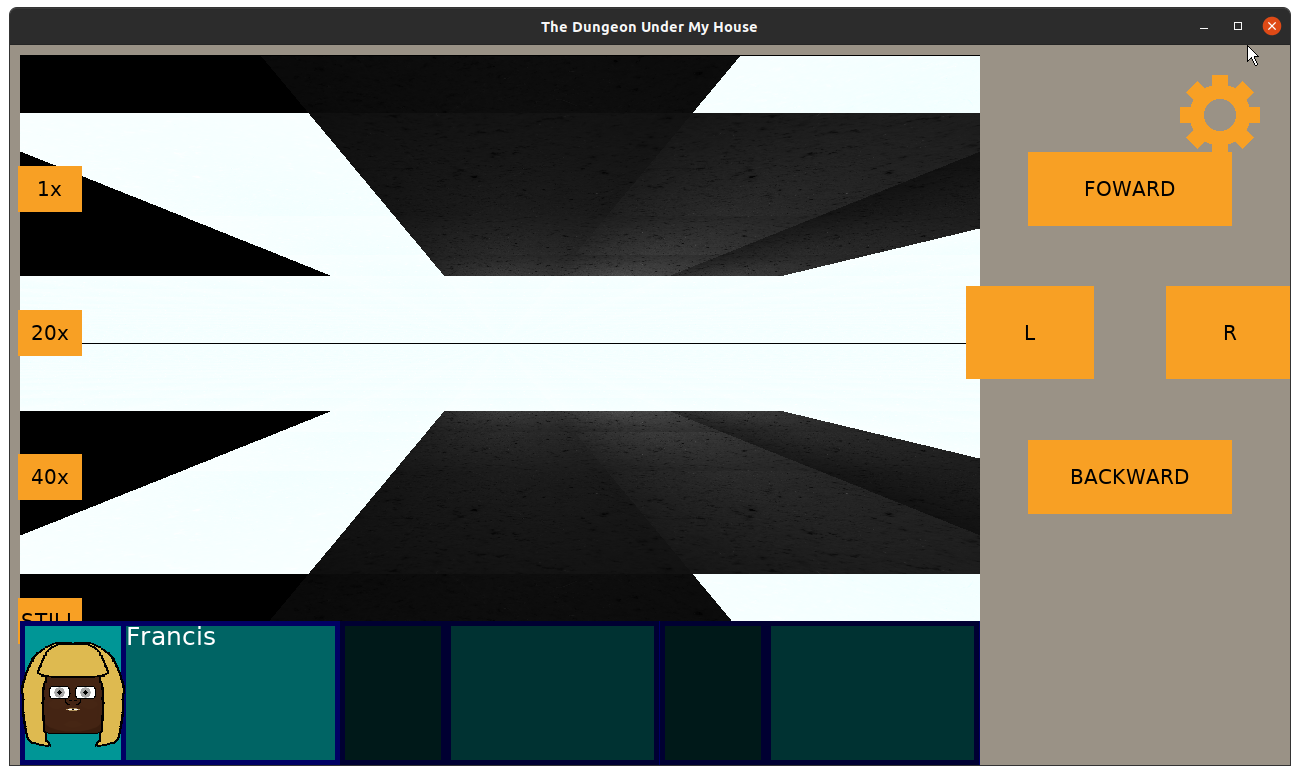
I had some strange artifacts in terms of white lines at the edges of the walls, though. When I stopped drawing walls to see what was going on, I could see that my default brightness was applying anywhere that there wasn’t an actual cell to draw:
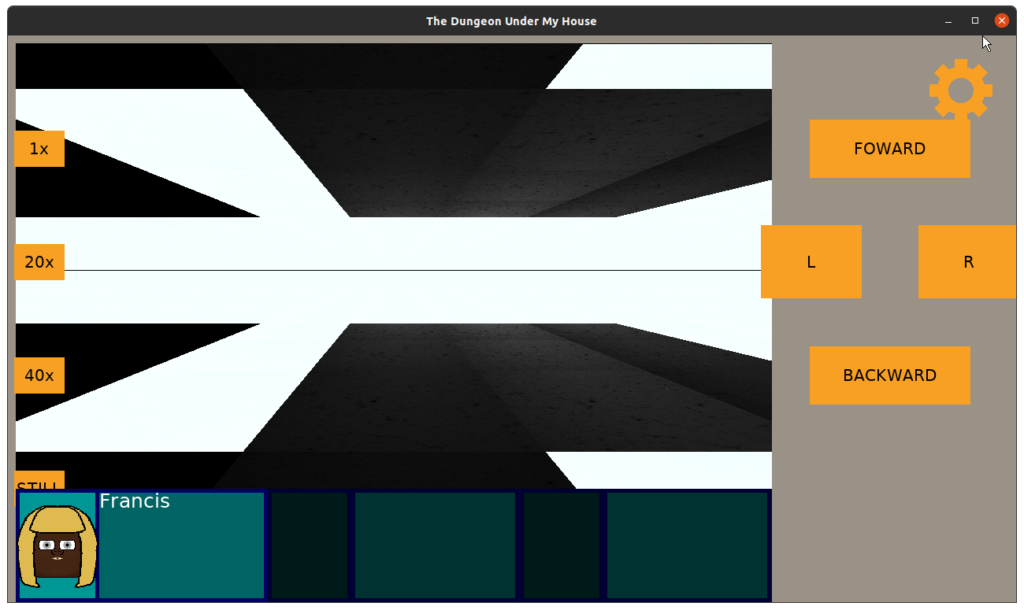
The Dungeon Under My House - applying lighting to the ceilings and floors

This seemed straightforward to solve: just change the default color to something darker.

But there were more pressing concerns. Namely, now that I was rendering the floor and ceiling with lighting data from the current cell, suddenly the game was rendering incredibly slowly, which was noticeable during transitions, such as turning or moving forward and backward:
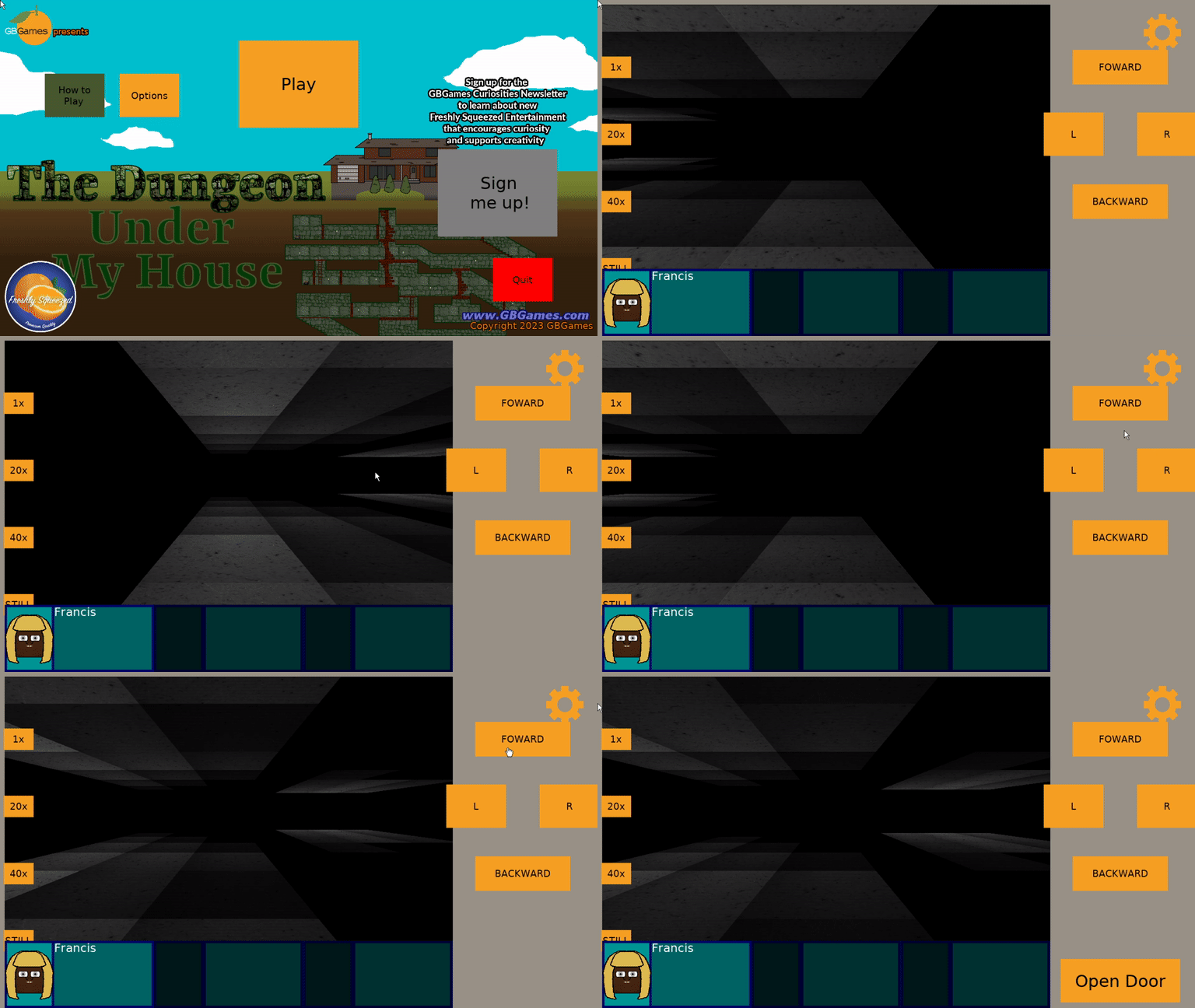
The Dungeon Under My House - rendering is too slow

It isn’t smooth at all.

I was struggling with how to optimize this code. According to my poor man’s profiling (interrupt the program in the debugger, and see what function/line it seems to be processing most often), the code was spending most of its time looking up the dungeon cell’s lighting data.

WARNING: it gets a bit technical again

Now, as a reminder, I’m doing raycasting to simulate a 1st-person 3D dungeon. My game’s viewport is 960×576 pixels, and while drawing walls is for the most part 960 columns of processing, drawing the ceilings and floors is more of a pixel by pixel situation.

Most raycasting tutorials have a viewport that mimics what computers were capable of back when raycasting was the only real technique for faking 3D aside from drawing sprites that just happened to look 3D. Those viewports were something on the order of 320×200 pixels. When you don’t have hardware acceleration and only a slow processor, having only 320×200 = 64000 pixels to draw is quite fast, especially if it is just a tutorial and leaves a lot of extra things as homework for the developer.

960×576 pixels is over half a million pixels to process. That sounds like a lot, but without processing lighting, and hardcoding the texture used, it was quite fast before.

But now that I am handling lighting, and I eventually want different textures based on the dungeon cell being drawn, I can’t really see a way around it processing them pixel by pixel.

My game isn’t meant to be a real-time one, as it is a turn-based party-based RPG, but I did have visions of using this same raycasting code in future games that might be real-time, and I was starting to worry that it wasn’t going to be possible.

I was also worried that this game was just going to feel slow and sluggish when players tried it.

So what was slowing things down? Well, my dungeon was being represented as a std::map, and when I created my lighting code, I mimicked it by creating a similar map of std::map (see last week’s report). My current test dungeon is about 30 cells, and with an arbitrary shape (it doesn’t need to be a square grid), it only takes about 30 entries in the map to represent it. Seemed efficient to me.

For each pixel, a projection was made to figure out what cell was being drawn, then I would search the map for the lighting for that cell, and I would process it to modify the color so that the pixel would be darker or lighter.

The code that I used to find the lighting data originally looked like:

gameData.dungeonLighting()[cell]

This code worked for the walls just fine: the cell always existed in the map.

But this code did not work for the ceiling and floor because the projected cell would sometimes represent a tile very, very far away near the horizon, and that cell was unlikely to be defined in my dungeon.

So here’s the fun part: accessing a map with the [] operator using a key that doesn’t exist in the map will ADD AN ENTRY TO THE MAP!

I knew this fact about std::maps, but I was careless with my coding. It was functionally correct in that rendering was, in fact, happening as expected. It was just a very suboptimal way to go about it.

According to my debugging, my map went from about 30 entries to about 10,000+ entries!
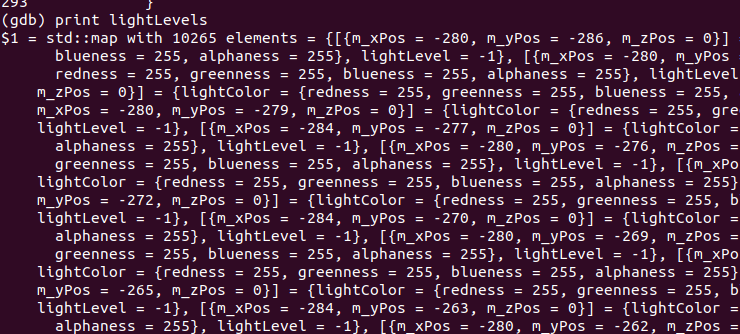
The Dungeon Under My House - accidentally adding too many entries to my data collection

Which meant for each of those 960×576 = 552,960 pixels, I was searching through potentially 10,000+ entries in a map for a cell to get lighting data from. That’s a lot of accidental extra computation! Whoops!

So my first fix was to prevent additions to the code:

DungeonLight light;
std::map<Point, DungeonLight>::const_iterator iter = lightLevels.find(cell);
if (iter != lightLevels.end()) 
{
   light = iter->second;
}
else
{
   continue;
}

std::map’s find() doesn’t add entries to the code, and it returns the map’s end() iterator if it can’t find the entry.

Instead of needing to search through potentially 10,000+ entries, it was only 30ish entries, but that’s still a lot of computation time spent looking for data, especially if most of the cells being searched for are not in the map, so it is almost always worst-case scenario.

Even with std::map’s indexing/find operations running at logarithmic time (so, better than iterating through each entry), it is still too slow.

My initial attempts to solve this problem were to draw fewer pixels. I stopped drawing about 100 pixels before getting to the horizon, and I figured that I could always draw a single hazy fog sprite at the horizon to cover up the fact that nothing is getting drawn there. While it helped, it still felt jittery and slow. There is still too much computation happening, and I am still only drawing the ceilings and floors. What happens when I add back in the walls and doors, and when I start adding more things like other characters populating the dungeon?

Luckily, Joel Davis pointed me in the right direction. Why was I using the inherently slow map to represent my dungeon and lighting data when a 1-dimensional collection works much faster?

You know why, Joel (and anyone reading this who is also wondering)? Because until this project, I have never had to worry about how fast my rendering code was.

That isn’t to say that I was purposefully careless. I am not one of those people who say, “Eh, well, computers are fast enough today to not worry about it.” I think there are plenty of good reasons to still be respectful and efficient of someone else’s computer hardware’s and/or battery usage, and I try to be efficient in general.

But this is the first project that required me to worry about trying to do too much in one frame of rendering. Most of my past projects, the bottlenecks in my code were not related to rendering at all, but in pathfinding or other calculation-heavy systems.

Anyway, what Davis suggested is typical in games. Instead of a map or a 2-dimensional collection to represent a 2-dimensional tile-based map, use a 1-dimensional array/vector. Some very simple and quick math gets you the index you need into that collection, and lookups are no longer logarithmic but constant time.

Now, I will need more space to store the dungeon. Instead of a map of 30-ish entries, I need to accommodate entries in my vector for cells that might not exist. But I think this trade-off of speed vs memory is fine, as the extra memory used isn’t too great anyway.

So I hacked in a quick std::vector of DungeonLighting, piggybacking on my previous lighting code to populate it, and when I went to draw the ceiling and floor, I calculated the index of cell by:

index = cell.X() + cell.Y() * DUNGEON_DIMENSIONS;

Now, I can quickly check if the index is within the bounds of my vector. If it is, I then get the lighting data and process the pixel. Otherwise, I stop processing the pixel and move on to the next.

Mathematically, this means that my viewport needs only 960×576 = 552,960 potential lookups to process the ceiling and floor combined, which is a substantial improvement!

Visibly, IT IS SO MUCH FASTER, even after I put the wall and door drawing code back in:
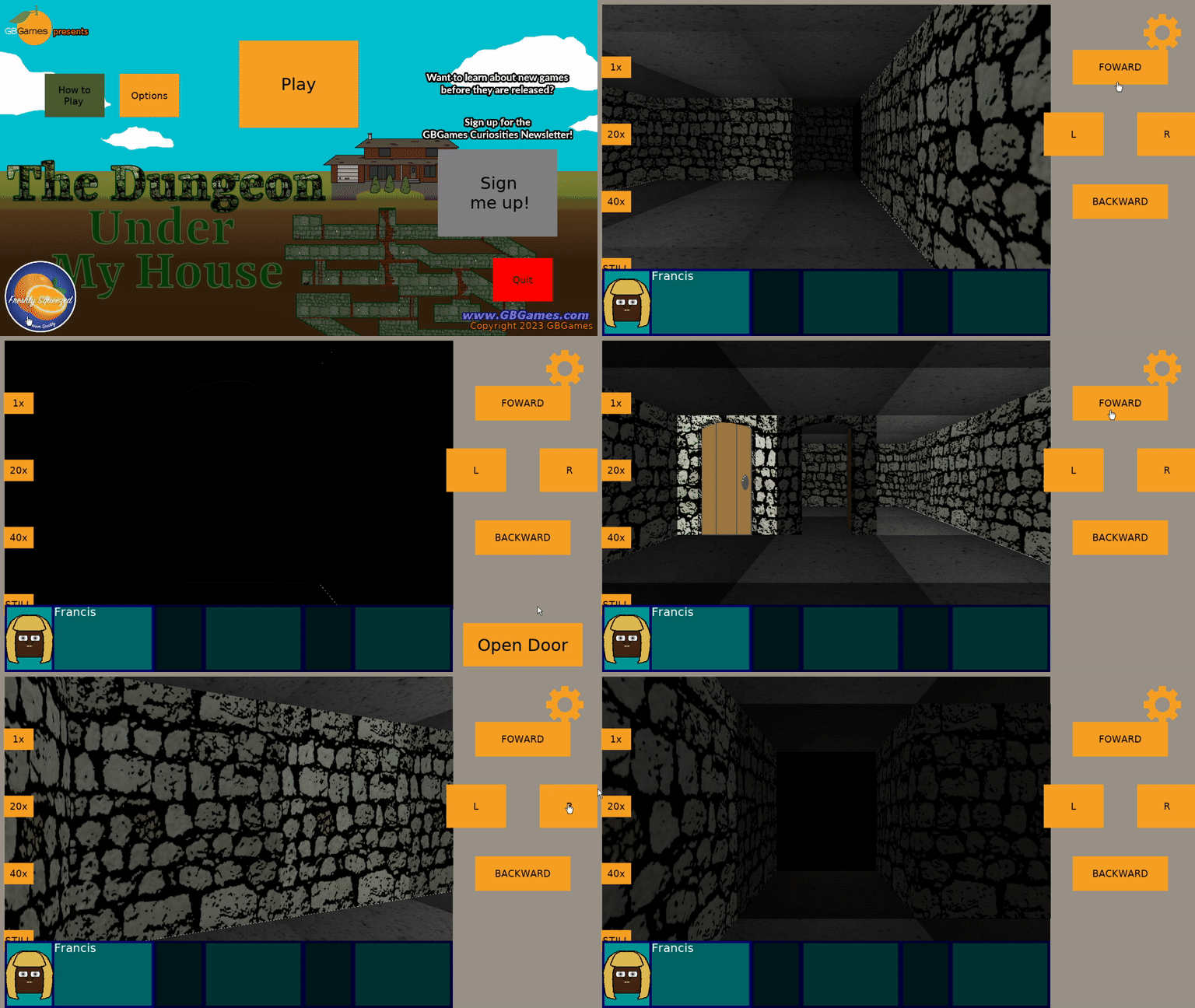
The Dungeon Under My House - rendering is much faster!

And I wasn’t done yet! There was still room for improvement in my dungeon rendering code in general. Drawing my walls and my doors still used the old map to get lighting data, so switching to the vector version there resulted in even more improvement, and in fact, I believe that my future real-time projects are likely to be a possibility!

There is still more optimization to do. Lighting data wasn’t the only thing I was looking up in a map, as the current texture to use for walls and eventually ceilings and floors is also something I searched for. Switching to a vector representation of the dungeon data should result in a much, much smoother experience for the player.

End of technical details

Anyway, I’ve been very happy to get the game to render the dungeon so much more quickly and efficiently. My previous optimization efforts prevented the rendering from occurring in the first place when it wasn’t needed, such as when the player is standing still. There’s no need to re-render the dungeon if it won’t change, after all, and I loved how putting my phone down meant that the battery life didn’t drain due to extra, unnecessary processing.

But now I can also be assured that the game will feel snappy AND avoid draining batteries even more.

I look forward to finishing up the optimization and finally solving the problem of the door that resists being rendered according to the cell’s lighting data. So far, my troubleshooting shows me that it is grabbing lighting data from a cell outside of the dungeon’s boundaries, so clearly my math is wrong somewhere when I determine which cell to use for lighting. But I haven’t figured out how it is wrong and what would be correct yet.

Thanks for reading!

Want to learn when I release The Dungeon Under My House, or about future Freshly Squeezed games I am creating? Sign up for the GBGames Curiosities newsletter, and download the full color Player’s Guides to my existing and future games for free!

Categories
Game Design Game Development Geek / Technical

Freshly Squeezed Video Progress Report: Dungeon Lighting

Here’s the companion video for Monday’s Freshly Squeezed Progress Report: Dungeon Lighting:

Enjoy! And let me know what you think by replying below!

Categories
Game Design Game Development Geek / Technical

Freshly Squeezed Progress Report: Dungeon Lighting

In last week’s report, I talked about replanning the remainder of the project backlog for The Dungeon Under My House, my second Freshly Squeezed Entertainment project.

This past week, I started work on my first set of tasks for the new year.

Sprint 2024-1: Pre-production and initialization

Planned and incomplete:

  • Render dungeon based on light levels

I took a family trip earlier in the week, but even so, I managed to get quite a bit done when it comes to handling lighting in the dungeon.

I envisioned having light sources that spread light to adjacent cells, with the brightness lowering as it goes, similar to the lighting in Minecraft. I also wanted certain dungeon environments to have an ambient light, so there is no actual light source, and those cells are just by default lit by a certain amount.

Now, that still leaves the question of how to actually represent and implement lighting in the dungeon.

Since the dungeon is represented as a collection of dungeon cells, I decided to create an associated collection of dungeon light levels.

So for a given cell at a particular location, there would be a dungeon light level at that location.

The dungeon light level is represented as a color and a value that indicates how bright the light would be.

0 would be pitch black, and 10 would be full brightness.

By default, the dungeon light levels would be whatever the ambient levels are for those corresponding cells.

Then for each light source, the light would spread while attenuating.

After manually trying a few approaches on paper, I hit upon a way to handle the light propagation and attenuation, and I wrote out my attempted algorithm before writing any code for it.

The Dungeon Under My House - manually working through lighting algorithms

And then, since I knew this code could get complicated as I was figuring out edge conditions, I test-drove it.

And I was immediately glad I did. I could very easily have written code that I thought should work but that wouldn’t have done what I wanted. To date, I wrote seven unit tests for this lighting code, with each one either adding functionality or confirming that certain functionality would work in certain cases, such as dealing with closed vs open doors.

I added some logs and I modified the code to ensure that it didn’t process dungeon cells that it didn’t need to, which saves on processing time. This kind of optimization wasn’t captured in my unit tests, but the tests did verify that the end result was correct even with fewer cells getting processed.

While I am confident that this code is fairly efficient, I also know that I don’t need to call it frequently. Unlike an action game, which might need to update lighting in real-time, this game only needs to update the lighting data when something actually changes, such as when the player enters the dungeon, toggles a light switch, or opens or closes a door or otherwise changes an obstacle that blocks light.

By the end of the week, I was confident that the lighting system worked, so the only thing left was to make use of it when rendering the dungeon.

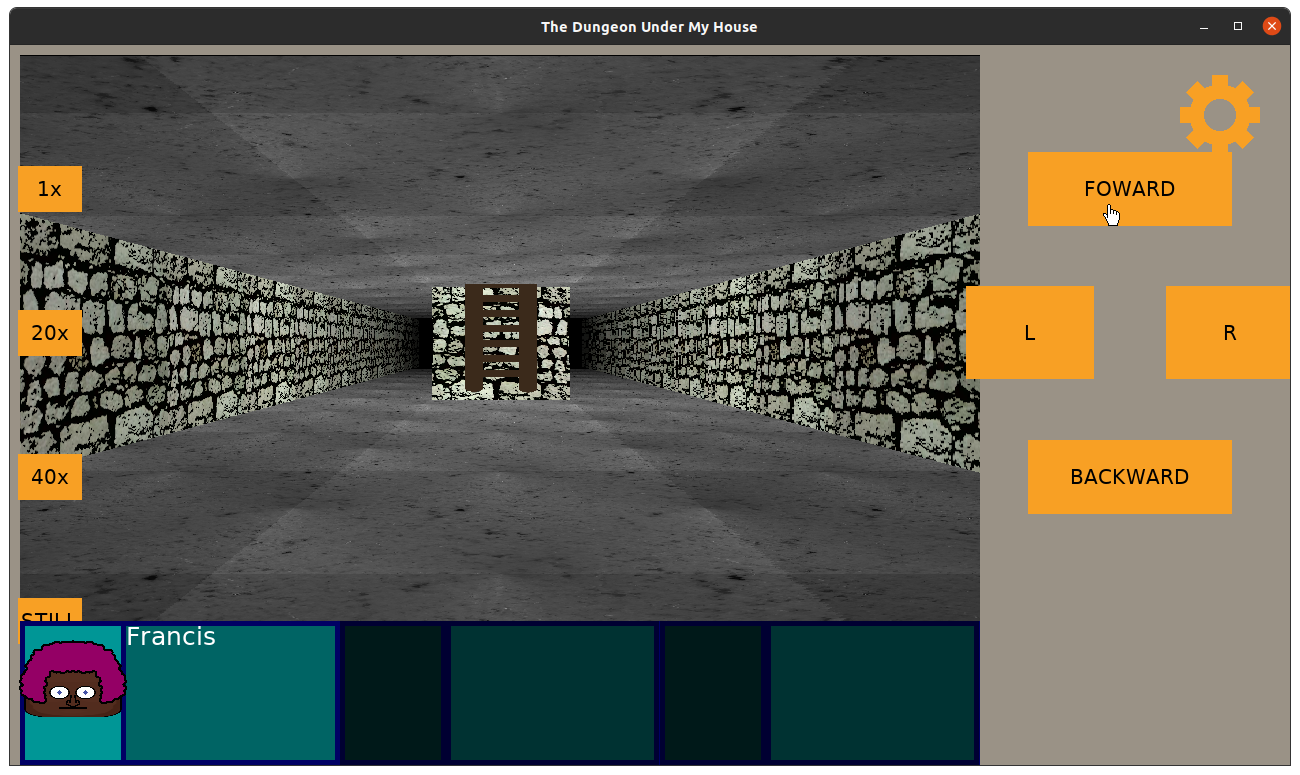
The dungeon walls and “things” such as doorways and ladders were fairly straightforward to update. Basically, for each column for my raycasting code, it would draw part of a texture and tint it by that cell’s color and brightness setting.

The Dungeon Under My House - lighting the dungeon walls

And it looks more or less fine (if a bit dark in this room). Currently I treat the brightness value as multiples of 10%, but perhaps 10% drops in brightness are too drastic, especially going from 10% brightness to 0%. Maybe instead of linear drops in brightness it should be a different curve, but perhaps brightness levels should be multiples of 5% and so the brightness level should go from 0 to 20. I’ll toy with it to see what might look good.

But first, I still need to tackle the ceiling and floors, which handle rendering a bit differently.

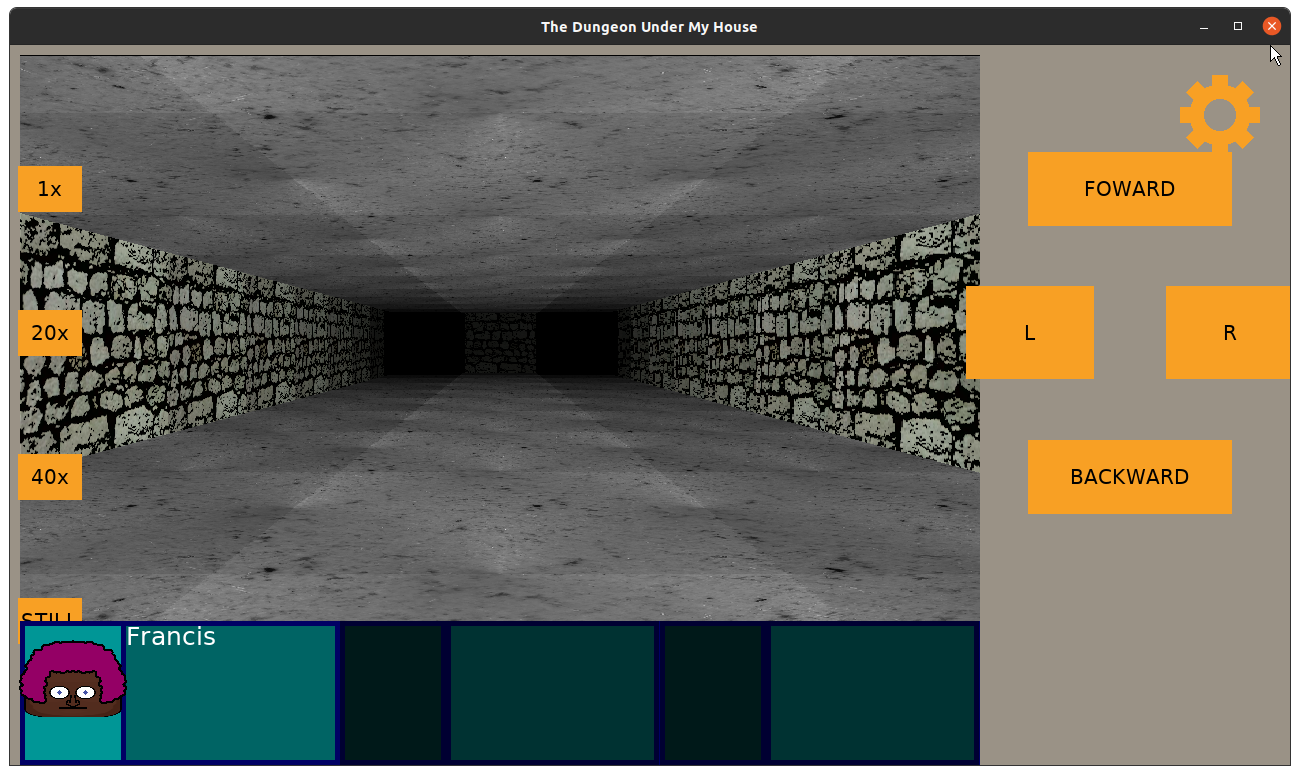
While the walls draw columns of textures and can be tinted, the ceilings and floors draw individual pixels of textures, each of which represents the actual pixel color from the source texture as a Uint32 value.

Now, when I usually deal with color, I am dealing with RGBA values, with each of R, G, B, and A being a value from 0 to 255, or even using hexadecimal values if I want to match what I might see in HTML color codes. So 0xff would be equivalent to 255.

Drawing walls, the only color I deal with is my tint value, which is the dungeon light level’s color multiplied by its brightness percentage.

But drawing the ceiling, I need to directly modify the color value of the pixel in question, and I am still figuring out exactly how. The Uint32 value should correspond to RGBA-like values, and in this case, I believe it is ABGR8888 in SDL2’s representation.

But I ran out of time before I figured out if merely bit-shifting and using my tint value directly in a similar way that I do for walls will result in something that looks right.

So that’s the first task to tackle this coming week.

Although I am also curious what is up with this doorway which is rendering at full brightness despite being in what should be a completely darkened room.

The Dungeon Under My House - lighting the dungeon walls

Thanks for reading!

Want to learn when I release The Dungeon Under My House, or about future Freshly Squeezed games I am creating? Sign up for the GBGames Curiosities newsletter, and download the full color Player’s Guides to my existing and future games for free!
Categories
Game Design Game Development Geek / Technical

Freshly Squeezed Progress Report: Refreshing the Project Plan

Welcome to the first Freshly Squeezed Progress Report of 2024!

In my last report of the 2023, I was ending a bout with COVID, I had finished some tasks to make the intro sequence more interactive, then found a need to do an assessment of my project’s needs in The Dungeon Under My House, my second Freshly Squeezed Entertainment project.

Since then, I’ve focused mainly on creating a fresh backlog of tasks for the project.

Due to the fact that I was still recovering from COVID, I didn’t make a plan for the week after my last report, and I felt like I ended the year quite poorly. You can read more in my review of 2023 and preview of 2024 post, Planning 2024: Building on the Successes of 2023

I did, however, spend some time optimizing the dungeon rendering code, mainly by removing some text logging. I’m not sure how much faster I can make the inner loops of my raycasting code, but once the logging was removed, the game ran so much smoother on both my relatively underpowered laptop and my phone.

That logging helped me debug the code as I was developing it, and while I had turned off outputting the actual logs, the act of creating the logs was still slowing things down significantly.

The next bit of optimization was to only calculate what to render when needed. That is, calculating raycasting for the floor, ceiling, and walls, plus objects such as doors, is expensive, but if the player is idle, there is no need to do all those calculations each frame. This isn’t an action FPS, after all.

So now the dungeon view only re-calculates when the player is actively moving or performing actions, and otherwise it just re-renders what it figured out the last time.

My laptop fan used to whir loudly when I was in the dungeon even if I was standing still, but now I can leave the game idle for quite a long time without any noticeable battery usage or CPU usage.

Now, while I can’t see obvious ways to optimize the rendering code that calculates what sprites to create and/or render, I think I can still improve how it stores what to render. For instance, while the floor ends up becoming a single texture that gets blitted at once, I believe the walls and objects are still a collection of single-pixel wide columns, and if I similarly turned those into a single texture, then when the game is idle it can do three draws (ceiling, floor, and walls) rather than 2 + however many columns wide the dungeon view is. And in fact, why not just create one sprite rather than three while I’m at it?

Anyway, after I spent my first week of the year making plans for the coming year, I looked at my game’s backlog and found myself still unhappy with it. Some of it was created at the beginning of the project, and they seemed to prematurely assume certain mechanics and content that I have since decided I don’t want to put in the game.

So I created a new tab in my project plan’s spreadsheet to create a new backlog from scratch.

Since this game project is already over a year old and I want to ship it sooner rather than later, another benefit to redoing my backlog is that I can focus on trying to limit new features while also honing in on game content and game play more than infrastructure code.

As I said in my last report, “But after a year, I think I need to do an assessment of what features and capabilities I still need as well as what the game content will need to be. Too much is still too vague, and I really expected that more would be defined and playable by now when I first started. ”

I have since come up with almost 40 tasks. I know this isn’t a comprehensive list. It’s impossible to anticipate everything, at least in a reasonable amount of effort and time. Plus, in the past, I have found that implementing one feature sometimes reveals the need for more player feedback or other supporting features that I might not anticipate until I have played through the game or had a playtester tell me when they got confused or lost.

But I also know that there is still more to work on that I haven’t specified, especially since many of the tasks I did identify are still capability-related: features I implement that allow me to develop game play around them later.

For example, “Render animated dungeon textures” eventually will allow me to show water flowing on the floor or spilling from the walls. “Update which texture should be shown in dungeon cells” is about allowing me to change a texture based on the state of the game, so if I have a tunnel with no water, but later I want that tunnel to feature flowing water, this feature lets me do it.

But what isn’t quite captured thoroughly yet is that kind of game content. I don’t have tasks for creating those tunnels, or for creating the player’s ability to flood a tunnel with water by turning on pumps or opening gates.

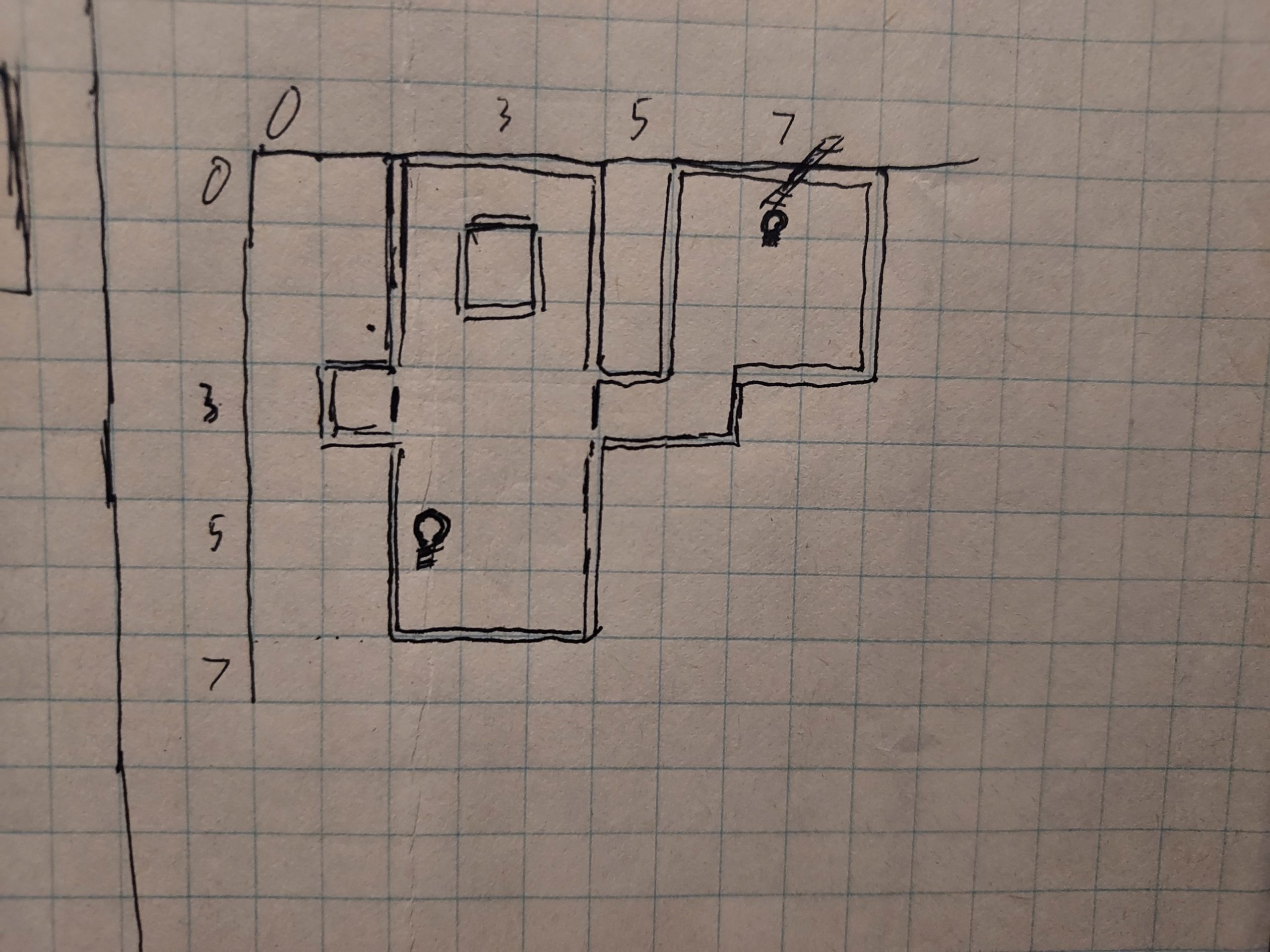
I do have some tasks for finishing out the intro sequence, which involves illuminating a too-dark passage and using teamwork to remove a heavy beam from in front of a door you immediately discover. But I need to get concrete and specific about the rest of the actual dungeon contents.

Which brings me to the other part of my work this past week: worldbuilding.

About this time last year, I had ideas and even mapped out a rough idea of the “first” level (which I have since decided will be the only level for this game’s first release). I also had ideas for interactions with entities you discover in the dungeon.

But even today, none of it was very real. It was on paper, it was in my head, but it wasn’t detailed enough to actually implement yet.

So I spent time mentally walking through what the player could do after the intro sequence completes. What happens when the player opens that barred door and finds themselves in the rest of the dungeon? Where can they go? What can they do? Who can they meet?

The Dungeon Under My House - worldbuilding

The Dungeon Under My House - worldbuilding

And then I tried to figure out how to ensure I need to implement the minimum number of new features.

I had envisioned a platform in which you can look down into a reservoir or a sewer tunnel, but with my custom raytracing code, I would need to implement a way to render floors differently based on height. It is probably easy and quick to do, but what if I just don’t do it at all? That’s even faster.

So my workaround is to allow access to reservoirs and sewer tunnels by way of hatches and ladders. That I can do with my existing features.

I have a rough idea for one particular character, and I hope to identify even more in the coming weeks. And since conversation is supposed to be such a key part of the game, I really want to continue working on the dialogue system.

But I need to capture these game content and game play tasks in my plan. I’m worried that if I only average a little over 7 hours a week like I did last year that it means I’ve already identified too much work to get done by the end of June. And that’s probably fine, it could be a little late. But I really don’t want to discover too late that this game requires another calendar year of development, so I’m hoping I can get as much of the known tasks in front of me so I can figure out how to prioritize them and how to scale them down. I’ve already decided that instead of having a special notification for some events that instead I could use the existing script/dialogue code to present information to the player, for instance.

Here’s to 2024! Thanks for reading!

Want to learn when I release The Dungeon Under My House, or about future Freshly Squeezed games I am creating? Sign up for the GBGames Curiosities newsletter, and download the full color Player’s Guides to my existing and future games for free!
Categories
Game Development Marketing/Business Personal Development Politics/Government

Planning 2024: Building on the Successes of 2023

It is time for my annual review of the previous year and preview of the coming year!

How did 2023 go for me?

Well, it was a mixed bag, but I am very excited about my successes.

Last year, I wrote in “Reviewing an Underwhelming 2022, Previewing a Better 2023”:

I normally would right-size my goals based on the previous year’s results, but I think last year was an off-year for me. I think those goals are still doable despite the fact that I didn’t get them done.

So, I’m keeping them as my goals for 2023:

  • Release at least 2 Freshly Squeezed Entertainment games by December 31st
  • Increase my newsletter audience from 25 to at least 37 subscribers by December 31st
  • Earn at least 1 sale per month by December 31st

That’s at least one new subscriber and at least one new sale each month, and I’ll need to focus on shipping as quickly as possible to get two games out.

To hit my goals, I had two priorities: game creation/development and game promotion/awareness building.

Published Freshly Squeezed Entertainment Games (Target: 2) — 0

Despite putting in significantly more game development hours than I have ever tracked before (averaging over 7 hours a week, which still isn’t much in the grand scheme of things), I released 0 new games.

That’s two years in a row in which I did not publish a new game.

Much of my current business strategy depends on releasing games in my Freshly Squeezed Entertainment line, which are polished, playable prototypes that provide complete entertainment experiences and are given away for free. The general idea is that the games are supposed to be quick to develop and have a low barrier to entry so that they are more likely to find an audience. I hope to get feedback from that audience, and if enough interest exists, I can always create a “deluxe” version of the game that I can sell.

So not releasing a game isn’t great, because there cannot be an audience for a game that doesn’t exist.

My current project, The Dungeon Under My House, is perhaps too ambitious for my goals. Or maybe the scope of it is. For example, I spent a significant amount of time developing a way to customize the main characters in the game, and perhaps if I had my producer hat or my product development hat on, I could have decided that such work was a nice-to-have that could go into a potential deluxe version of the game so I could focus on the core of the project.

I am going to continue working on it because I like the concept (a non-violent 1st-person dungeon crawler focused on conversation and relationships) and I want to see it through, but I am really going to need to identify exactly what I want in the game and be strict about recognizing nice-to-haves vs enhancements that help make the game playable.

GBGames Curiosities Newsletter subscribers net increase (Target: 12) — net 5 (+8, -3)

My goal was to increase my GBGames Curiosities Newsletter subscribers to a total of at least 37, up by 12 from the previous year. In last year’s review, I lamented that I only increased the number by 3, which was only half as much as I gained the previous year and a far cry from 12.

My newsletter (have you subscribed and gotten your free player’s guides yet?) is the core of my business strategy. As such, it is very important that I grow my audience of people who are interested enough to hear from me that they give me permission to reach out to them.

I started the year with only 25 subscribers, and I ended the year at 30.

I gained 8 subscribers, which is more than I have gained in any one year since I rebooted the newsletter in 2020, so that’s good.

But for the first time since then, I had 3 people either unsubscribe or otherwise get removed from my newsletter.

So, this goal’s metrics had a positive trend, but I didn’t hit my goal and while I expect that over time people might unsubscribe or drop from my newsletter subscribers, I hope it doesn’t become a trend itself.

Sales (Target: 12) — 13

Ok, I am seriously excited about this one!

In the past, I’ve set sales goals such as “$10,000 in sales” or “$10/month in sales” or “1 sale per week” but I’ve always fallen short. They never really motivated me to take the drastic action needed to make them happen.

In 2022, I set a goal to sell at least one game per month, which I considered both a doable yet challenging goal. I figured that if I could hit this goal, I could build upon it, and maybe I should try to hit this seemingly small goal before worrying about making enough in sales to get anywhere near full-time indie status.

But 2022 was kind of a bust, and I had only 4 sales, which I guess was good despite my lack of promotion efforts.

In 2023, I took advantage of itch.io’s various sales and Creator Days throughout the year. Things seemed promising early on when I sold 4 copies of Toytles: Leaf Raking in March through itch.io’s Creator Day sale. I had done a little promotion on social media, and it seemed to be working out well! Add to those sales the two mobile sales I got, and the first quarter of the year was telling me that I was going to make my sales target early!

And then months went by with no sales, until itch.io had a Summer Sale followed by a Creator Day sale in August. I sold one copy of my game in each sale, plus someone donated money to get my free game Toy Factory Fixer. Mathematically, I was still on track for 1 sale per month, but it was disappointing that sales had slowed down.

My biggest disappointment was the combination of the Halloween Sale and the Black Friday Creator Day sale. Despite the time and effort I put into promoting my games then, including the creation of videos, I sold no copies of my game at all.

Luckily, for some reason, I sold three copies of Toytles: Leaf Raking for mobile between November and December, bringing my total to 13 sales for the year.

So on the bright side, I not only hit my target but exceeded it!

But I wish I knew why suddenly people decided to buy my game at the end of the year. Half of my sales came from itch.io, and as that’s where my promotion efforts were aimed at, it is clear that those sales came from my efforts.

But I don’t have any way to determine how customers found the game on the other app stores, and I would much rather have a good idea for how to reproduce these results.

Analysis

I had more sales in 2023 than I had in any of the previous 11 years. In 2011 I had sold 23 copies of my first commercial game Stop That Hero! totaling $91.25 in take-home money, which includes pre-orders as well as actual sales, but ever since, I’ve had very inconsistent and much lower sales numbers.

In 2023 I earned earned $103.91 from my 13 sales. That’s what I get after the various stores take their cut (which is why Creator Day sales are so nice, as itch.io allows me to keep all proceeds from sales on those days). That’s more than I’ve earned in the past six years combined and more than I have ever earned in sales from a single year.

So, relatively speaking, 2023 was a great sales year for GBGames! I mean, I know this is barely pizza money, and I’m not quitting my day job yet, but I set a new baseline for myself and my business!

How did I do so much better than previous years? I spent more time on promotion than before.

I think a big part of my early success was taking advantage of my Facebook page for GBGames. While I always shared my blog posts on that page, I otherwise didn’t do much with it.

At the beginning of the year, I decided to post daily on it. Monday through Friday, I would make sure I had at least one post on my Facebook page. While I still had my blog post link on Mondays, I also started sharing images of my past games, with links to their pages. I also would ask people to sign up for my newsletter weekly.

I didn’t expect miracles, but I thought things would grow, if slowly. I quickly got frustrated with Facebook’s algorithms because I was in a catch-22 of Facebook not showing my posts to people because people weren’t seeing my posts.

They’ll gladly take my money to help promote it, though, or at least the promise of doing so. I paid to promote my Black Friday sale event and got way, way fewer than the estimated number of people reached, so that wasn’t great, but on top of it Facebook said that they’ll show it to more people for real this time if I spend more.

Anyway, I suspect the reason why my sales figures dropped after the initial few months was because I tapped out my friends and family, the only people who Facebook was showing my posts to.

I also have Twitter and LinkedIn accounts, but my company’s Facebook page seemed the most likely social media account I had that could target actual potential customers rather than other game developers.

Recently I had asked a colleague of mine, someone who has had great success with his game sales going back almost 30 years, how he does promotion these days. He used to do a lot of search engine optimization, but in his response he said that “Search engines don’t seem to be the main driver of traffic anymore. Everyone is on social media” and so that is a bit disappointing.

Partly because the dynamics of social media mean that instead of having something out on the web that others can find on their own time, as Cory Doctorow said in The (open) web is good, actually, “The social media bias towards a river of content that can’t be easily reversed is one in which the only ideas that get to spread are those the algorithm boosts.”

Basically, the more I rely on social media to promote my game, the more effort and/or money I need to expend for at best a temporary boost in potential traffic.

If I think of my options for promotion as part of my megaphone, I have my website, blog, newsletter, and various social media accounts, including a YouTube channel that I started using earnestly at the end of the year. None of these have a large number of followers or subscribers. My megaphone is tiny.

Which means that even when I do expend a lot of effort, my megaphone only reaches a small number of people.

As I mentioned in my 2023 Black Friday Creator Day post mortem, even though I had put in more effort than ever before, and even though the metrics showed that the result was more views of my games than ever before, it still amounted to a total of only 50 views. And none of those views turned into a sale.

I go into more in that post mortem, but my overall promotion strategy has been to leverage my own megaphone as much as possible, and to supplement things, sometimes pay small amounts to unreliably leverage the much larger megaphone of a company such as Facebook or Google.

Clearly, this strategy has its limits, or at least my available megaphone has its limits at the moment.

Some numbers

I did a total of 397 hours of game development for the year, a new record for me since I started tracking my hours in 2013 (I was a full-time indie who didn’t track my game development time between 2010 and 2012). My previous record was 299 hours in 2021.

For someone working full-time, that amounts to less than 2.5 months, assuming a 40-hour work week. So it is not a lot of time, but it’s an improvement over not even doing 2 months of full-time game development in a year. You can see why I refer to myself as a very, very part-time indie game developer.

I wrote for a total of 75 hours, which resulted in 76 blog posts published and 18 newsletter emails sent.

My weekly development blog post got paired with a second blog post sharing my new video companion devlog. I published 13 Freshly Squeezed Progress Report videos in the final three months of the year.

I try to send out a monthly newsletter, but in my last few sales I sent out multiple newsletters for the beginning, duration, and end of a sale, which accounts for the relatively large number.

As for my budget, I mentioned my earnings from sales earlier. I also earned some money from a short contract job. While I haven’t been paid for all of my sales yet, I can say that I’ve taken home over $570. Again, not quite pizza money.

I spent slightly more than the previous year, but I still kept my expenses down by resisting games, books, and other purchases. My major expense categories were web hosting (a three year plan), educational subscriptions (Pluralsight and a book club membership), and the Apple App Developer Program annual fee, something that auto-renewed on me when I was still contemplating whether or not to drop it since I wasn’t earning enough to justify the expense. All told, I spent over $2,000.

Eventually I would like to report that I’ve made more than I’ve spent, but this isn’t the year.

I pulled back on some personal goals. I used to try to do a doodle a day and do 15 minutes of focused learning a day, mainly to take advantage of my Pluralsight subscription. But I found it was stressful trying to fit everything in, so I ended up dropping a lot of them. I fantasize about getting back to full-time indie status and being able to spend more of my time on these kinds of things.

In 2022 I had hurt myself badly enough to stop doing my regular exercises. After some physical therapy, I was back to exercising regularly in the morning, but partway through 2023 I had to stop again due to leg and back pain.

Around July, I started regularly doing push-ups again, but I ended the year weighing the most I’ve ever weighed.

I read a total of 64 books. Well, some were audiobooks, and 11 were trade paperback comic books. My favorites for the year were:

  • How to Write One Song by Jeff Tweed
  • Perennial Seller by Ryan Holiday
  • This Is How They Tell Me the World Ends by Nicole Perlroth
  • A Memory Called Empire by Arkady Martine
  • We Were Dreamers by Simu Liu
  • The Long Way to a Small, Angry Planet by Becky Chambers
  • The Lies of the Ajungo by Moses Ose Utomi
  • Good Arguments by Bo Seo
  • Sandy Hook by Elizabeth Williamson
  • Magical Mathematics by Persi Diaconis and Ron Graham
  • The Name of the Rose and The Role of the Reader by Umberto Eco
  • The Making of Another Major Motion Picture Masterpiece by Tom Hanks
  • Time Travel by James Gleick
  • Collaborative Worldbuilding for Video Games by Kaitlin Tremblay
  • Y: The Last Man (the entire series)
  • and Sweat the Technique by Rakim
  • I still haven’t figured out a regular game-playing schedule for myself. As I’ve said before, since I give myself so little time to work on game development, if I find myself with time to play a game, more often than not I treat it as time to develop.

    Steam shows I only played 4 games: Homeworld: Remastered, Etrian Odyssey HD, Nowhere Prophet, and Skatebird. I also played a Etrian Odyssey II on my Nintendo DS, plus Signs of the Sojourner, Oxenfree, Battletech, AI War Collection, Pontifex, and Baba Is You.

    The last two I played a lot while I was recovering from COVID.

    Oh, yeah, I tested positive right before my holiday break and was out of commission for a couple of weeks. I caught up on a lot of TV and played some games, but mostly I slept. It was a forced break that prevented me from finishing the year strong.

    Overall, last year I focused on game development and game promotion, and in both cases I can see room for improvement. My game development focus needs to drive towards shipping sooner rather than having a continuously open ended development. My game promotion revealed to me the need for some more baseline analytics data so I know how to make better decisions and can see whether or not my efforts are effective.

    Goals for 2024

    For years I was setting goals that I thought were right-sized and could be a jumping off point for bigger and better goals.

    But I kept failing to hit them.

    So I find myself in a new position when it comes to my sales goals. I hit my target, and now I can improve! Normally, I would take my 1 sale per month goal and double it. Can I sell at least 2 games per month in 2024?

    And since I haven’t increased my subscriber count by 12 in a single year, I would just keep that goal until I manage to accomplish it.

    But as my colleague Tim Beaudet likes to point out, “goals should be things you can control.” And I can’t control sales or subscriber numbers.

    Those are lagging metrics. They are the results that might get influenced by my actions, but I can’t influence them directly.

    And frankly, I think I struggled throughout the year with these as my goals. The only goal I could control was how many games I released, and even though I didn’t accomplish it, I knew that the thing I needed to do was make a game and publish it.

    But whenever I saw my other goals, there was a vague sense of “Ok, so?” A lagging metric is one that I can look at and see what already happened, but it didn’t by itself indicate actions I should take, and I think seeing those goals always put me in a position of needing to figure out what those actions are.

    So while I like to keep those lagging metrics as outcomes that I am aiming for, they can’t be my actual goals.

    So for 2024, I have the following outcomes I am aiming for:

    • Increase my newsletter audience from 30 to at least 42 subscribers by December 31st
    • Earn at least 2 sales per month by December 31st

    As for actionable goals:

    • Release at least 2 Freshly Squeezed Entertainment games by December 31st
    • Perform at least 2 SEO activities per month by December 31st

    Ok, so make and release games is a pretty straightforward goal. I just need to focus on the shipping part.

    But SEO activities? The benefits of search engine optimization would be more traffic to my site, which means more potential customers turning into actual customers and/or subscribing to my newsletter.

    What’s risky is that the major search engines are, well, becoming worse for people. They seemed to be doubling down on AI and making the search experience kind of awful. Google used to let me see results for multiple pages, but now it seems very interested in showing me videos after the first few results, and if I don’t want videos, there doesn’t seem to be a way to avoid it. Plus, lots of websites are now dominating the search listings with poorly generated content, which makes it hard to find good stuff.

    And as my colleague above said, most people are on social media these days, so what’s the point of SEO?

    Well, I can always stand to make my website better, more effective, and easier for people to find what they want. I can do keyword research, ensure my pages are optimized, and keep my site speedy and responsive.

    More importantly, I can control my website, while I can’t control how Facebook or YouTube algorithms impact whether or not people even see my content even when they like or subscribe to do so.

    I plan to continue my weekly devlog and companion videos, my daily social media posts, and more, but I didn’t think they made sense as annual goals. They are already something I’m doing, so “keep it up” seems the default. Plus, maybe I’ll find that some of these activities need to be changed or tweaked as I find out they are more or less effective or a good use of my time.

    2 SEO activities a month might seem low. If I think of my SEO work as experiments, I think one experiment a week would give me plenty of time to see if a particular change made a difference, and if I spend money to get more traffic, I can see the impacts much more quickly.

    But I am trying to keep in mind that I am not working on this full-time yet nor am I made of money, so giving myself a couple of weeks to make each dent seems reasonable, and if I find myself able to do so more quickly and easily, I can always do more.

    As for personal goals, I liked the ones I had for last year: make my physical health a bigger priority, invest time and money into learning, and give myself time to play.

    For all three, I need to be deliberate and make some habits. I already track my exercise and my reading habits, but perhaps 2024 is the year I start tracking which games I play.

    Well, happy new year! I hope 2024 is full of creativity and that you allow yourself to follow your curiosity wherever it leads you!

Categories
Game Design Game Development Geek / Technical

Freshly Squeezed Video Progress Report: More Interactivity in Intro Sequence

Here’s the companion video for Monday’s Freshly Squeezed Progress Report: More Interactivity in Intro Sequence:

Enjoy! And let me know what you think by replying below!

Categories
Game Design Game Development Geek / Technical

Freshly Squeezed Progress Report: More Interactivity in Intro Sequence

Merry Christmas!

This is my final Freshly Squeezed Progress Report of 2023. In my previous report, I finished animating transitions and started working on making the intro sequence more interactive in The Dungeon Under My House, my second Freshly Squeezed Entertainment project.

I set out to finish the intro work.

Sprint 49: Pre-production and initialization

Planned and complete:

  • Redo intro to be more interactive

As Christmas was nearing, it also meant that I was going to have days off from the day job. While I imagined much of my time would be spent preparing for the holidays, especially with travel to visit family in Chicago, I was hoping I would also be able to squeeze in a bit of game development before the end of 2023.

Unfortunately, for the first time, I tested positive for COVID-19, which threw our plans out the window.

I wasn’t feeling well partway through the week, so I decided to test myself, got a very bright, very positive result, and immediately masked up and isolated from the family. Luckily they have tested negative, and we are privileged to have a spacious enough house that I can isolate from them.

I finished my last day of the year for the day job (I work remotely), but it was a struggle, and I needed a couple of uncharacteristic naps. I have since had fevers, a weird dry cough, spells of feeling tired, a stuffy head feeling, and having runny or stuffy nose at different times. It could be worse, but being sick on your vacation time and especially around the holidays sucks either way.

All that’s to say you should get vaccinated, mask up, and stay safe this holiday season.

As for what I was able to accomplish in game development, I would characterize it as iteratively polishing the intro.

Since the intro is now more interactive instead of just a long sequence of scripts, I needed to make sure that similar flags and triggers get set at the correct moments.

For instance, after the initiation ceremony for the new member, there needs to be a way to ensure the player goes on what I’m calling the Snack Quest. Basically, the new member suggests that they are hungry, and so a quest for snacks from the kitchen is proposed.

The Dungeon Under My House - start of Snack Quest

There are now multiple ways it can be started.

One, the original trigger than prevented the player from leaving until the ceremony is started is replaced with a trigger than prevents the player from leaving until the Snack Quest is introduced, and then starts the scripted sequence that does introduce it.

Two, if instead the player talks to the new member about the club, the same scripted sequence can occur.

And of course, once the sequence occurs, it shouldn’t happen again, so I had to make sure these sequences also include instructions/commands for changing flags and triggers to do so.

A trigger for preventing the player from leaving the bedroom can set the current script to the introduction of the Snack Quest, and the script sequence itself eventually disables that trigger, sets a new trigger for entering the kitchen, and updates the new member’s beliefs about the Explorer’s Club so that if you were to ask that character again, the response would be different.

The Dungeon Under My House - new dialogue after Snack Quest introduced

I am very quickly realizing that between triggers, flags, and script IDs, I had a number of similar-sounding names that were making things confusing on top of the fact that it was hard to visualize how they all interacted with each other.

There’s a lot of moving parts, and the game has hardly any content in it as it is! I definitely need a better way to plan, manage, and understand it than digging through my code and hoping I didn’t miss anything.

Working through this intro sequence is a bit frustrating because I am finding that there are some fundamental things I can’t do with my existing implementation. For instance, when you are in the basement, part of the interactive intro now requires the player to search for the pickles in the basement for the Snack Quest.

In my head, what happens is that the player knocks over the broom, which hits a secret brick, which opens a secret door.

The Dungeon Under My House - Basement room with secret door

In-game, for now, I still need a way to make that happen. The broom is currently just part of the background image of the main basement room. I need the broom to be a separate object, to have it animate, to have the brick in the wall be a separate object to animate, and to have the secret door appear after all of that.

So, nothing technically challenging, but it isn’t something I can just do. I need to actually have the broom be something represented in the code and as data, as well define how it gets interacted with, and how it is represented to the player.

Once I do this kind of work, however, similar things in the game could much more quickly be thrown in.

Another example is in the dungeon. Right now, all dungeon doors can just be opened or closed by the player. While I anticipated locked doors when I created them, there is no locking mechanism implemented yet.

The Dungeon Under My House - door rendering

But now I want not only a locked door but also a locked door that needs something special to open it.

Beyond just capabilities, here’s the actual game play I want to see: when the player enters the dungeon for the first time, it should be exciting to return and tell the rest of the Explorer’s Club about the discovery. But what if the player doesn’t?

Well, there should be a good reason to go back anyway. Or two.

One is to require the use of an item. So if the dungeon is too dark, then a flashlight sounds like a good thing to go back and get.

What if the player already acquired the flashlight by rummaging around earlier? Well, that’s fine. Always be prepared, right?

The Dungeon Under My House - dungeon intro design

The second reason to go back is because in order to open this door, the door bar needs to be moved, and it is too heavy to do alone. Moving it requires a full party. So if the player ran out of the bedroom without party members, then they need to go back.

What if the player got the flashlight AND also formed a party for the Snack Quest and so already has a party? Then full-steam ahead! That’s a good chunk of the Explorer’s Club doing some exploring, and they can always tell everyone else when they get back and might even have more to share when they do.

The dark dungeon and this door barrier ensures that the player knows how to talk to people, how to search and acquire items, and how to form a party. Sounds like a good intro sequence that onboards the player to figuring out how to play the game so far.

BUT, right now, I don’t have a concept of lighting in the dungeon, nor do I have doors with bars on them. Those need to implemented.

So updating this intro sequence is frustrating because I keep finding features and capabilities that I don’t have yet despite having worked on this project for the last year, but it is also helping me to identify what to work on next.

When I set out, I didn’t mean to spend a year in pre-production, but I really need to start making this game into a game that can be played, which means leveraging what has come before to actually create game play. My dungeon will turn from being a test case to being a place to actually explore, and as ideas and characters and situations get more concrete, I will need to revisit or create the code and data and art that I need to make it possible.

But after a year, I think I need to do an assessment of what features and capabilities I still need as well as what the game content will need to be. Too much is still too vague, and I really expected that more would be defined and playable by now when I first started.

But I’ll write more about it later.

For now, I hope you have a safe and merry holiday season!

Thanks for reading!

Want to learn when I release The Dungeon Under My House, or about future Freshly Squeezed games I am creating? Sign up for the GBGames Curiosities newsletter, and download the full color Player’s Guides to my existing and future games for free!
Categories
Game Design Game Development Geek / Technical

Freshly Squeezed Video Progress Report: Putting Some Bounce In Your Step

Here’s the companion video for Monday’s Freshly Squeezed Progress Report: Putting Some Bounce in Your Step:

Enjoy! And let me know what you think by replying below!