Categories
Game Design Game Development

Quick Daily Game Design Practices

Every day I have a routine. I read a chapter from a book, I do some stretches/exercises, I eat breakfast, I practice Italian lessons with Duolingo, I play Wordle and share my result with my wife, I draw a doodle, etc. All of these don’t take up a lot of time, and some are designed to help me maintain or improve some part of my life.

So how do I improve my game design skills each day?

Recently I was thinking about how having a day job means that I have very little time left in my day to work game development, business development, or anything related to GBGames. Well, I think about it a lot.

But specifically I thought about how it also means I don’t have extra time to improve my craft.

Using a sports metaphor, my game development time is game time, and I don’t usually give myself practice time.

Using a different metaphor, I don’t usually let myself sharpen the saw as I am trying to take advantage of the little time I have to chop wood.

I need better metaphors.

Anyway, years ago (uh, ok, apparently 17 years ago?!), I realized that I didn’t have a lot of game design experience/skill.

10 years later, I thought about what the soft and hard skills of game design would be, but I didn’t have much in the way of answers at the time.

Hard skills are things you can practice outside of any context. Soft skills are usually built upon the hard skills.

Basketball players can practice shooting three-pointers over and over outside of the context of a real game. During a game, knowing when to take a three-point shot is a soft skill, which depends on reading the defense, knowing the shot clock, and keeping in mind the current score.

Game design involves a lot of that latter part. Changing a similar mechanic in two different games might result in two wildly different results, because each game can have complex systems that respond to those changes in different ways. Jumping in checkers works differently from jumping in chess, and so modifying how far a piece can jump would seriously impact the games, but importantly, the change wouldn’t be the same in each game. You would need to pay attention the context of the specific game.

And when you are trying to ship a game in the form of a commercial product, there’s usually only so much time to try things like changing how the mechanic of jumping works, especially when it impacts everything from level design, animation, etc.

Even if you are working on a game without schedule and/or commercial pressure, many significant games take a relatively long time to work on from start to finish.

That’s a long feedback loop to develop your game design skills.

Rami Ismail once suggested that making a game a week as “a challenge that forces aspiring developers to create a high volume of games. That is not the only valid way to gain experience, and it is definitely not reflective of the only type of games you can make. Regardless of what you want to make, going through the full development cycle frequently will make you better at making games.”

A week seems like a good timeline for creating and finishing a small game, for building up the experience of not going making games but also shipping them. A week isn’t too long, nor is it too short, and you can get relatively quick feedback about what works and what doesn’t.

Still, I want to do something daily, not just part of something daily.

When I wanted to get better at drawing, I gave myself the challenge of doing at least one doodle a day. My early doodles are clearly very different in quality to my more recent doodles.

Each day I learned more about anatomy or shading or line weight because along with my doodle I was able to quickly assess it and wonder how to make it better, and then the next day I tried again, maybe after watching a tutorial or reading some advice.

I want a daily game design exercise analogous to the daily doodle that I did to improve my drawing skills.

Ideally, it would be something that takes between 15 minutes to an hour, but still results in something tangible.

So I wrote a list of potential exercises. Some of these come from articles I found online, books such as Challenges for Game Designers and Game Design Workshop, and suggestions from others. I challenged myself to come up with 20 of them:

  • Create as many game themes as I can in 5 minutes
  • Write up a proposed improvement to a single element of an existing game
  • 20 minutes: Create a game using only dice (with rulebook, UI/UX)
  • 20 minutes: Create a game using only cards (with rulebook, UI/UX)
  • 20 minutes: Create a game using only paper/pencil (with rulebook, UI/UX)
  • Analyze a “bad” game, write what made it bad, and propose how it could be improved
  • Keep a game journal – play a game each day and write about choices, feelings, and mechanics that support those feelings
  • Try to change a 1-player game so it accommodates 2 players (or from 2 to 3 players)
  • Revise a chance-based game to not be dependent on chance (Candy Land, War)
  • Add hidden info to a game w/ open/perfect info; analyze impact
  • Take a book/article – list systematic elements of subject (objectives, rules, procedures, resources, conflicts, skills)
  • Deconstruct a game; analyze formal, dramatic, and dynamic elements
  • Deconstruct a board game; watch people play it for the first time; analyze how they learned how to play
  • Create a playtest script – intro, warm-up, play session, discussion, wrap-up
  • Recruit play testers
  • Add a constraints to an existing game
  • Create a 1-page design (see this GDC 2010 presentation by Stone Librande)
  • Change a board game’s dimensions (10×10 vs 12×12 or 6×6 chessboard)
  • 20 minutes: grab a handful of random components from my game design prototype toolbox, play with them
  • Use today’s headline to create a 1st iteration of a game using only one type of component (tiles, dice, cards, etc)

Out of all of these, I liked the last two ideas the most. 20 minutes is a very short time, and I don’t make use of my toolbox as much as I would like. However, unstructured play might be too unconstrained.

Having a daily news headline to work with and the goal of having a 1st iteration of a game completed in that time? It focuses things, plus I can imagine that some news items will be more challenging than others. It’s kind of like xkcd’s daily geocaching hashing in a way.

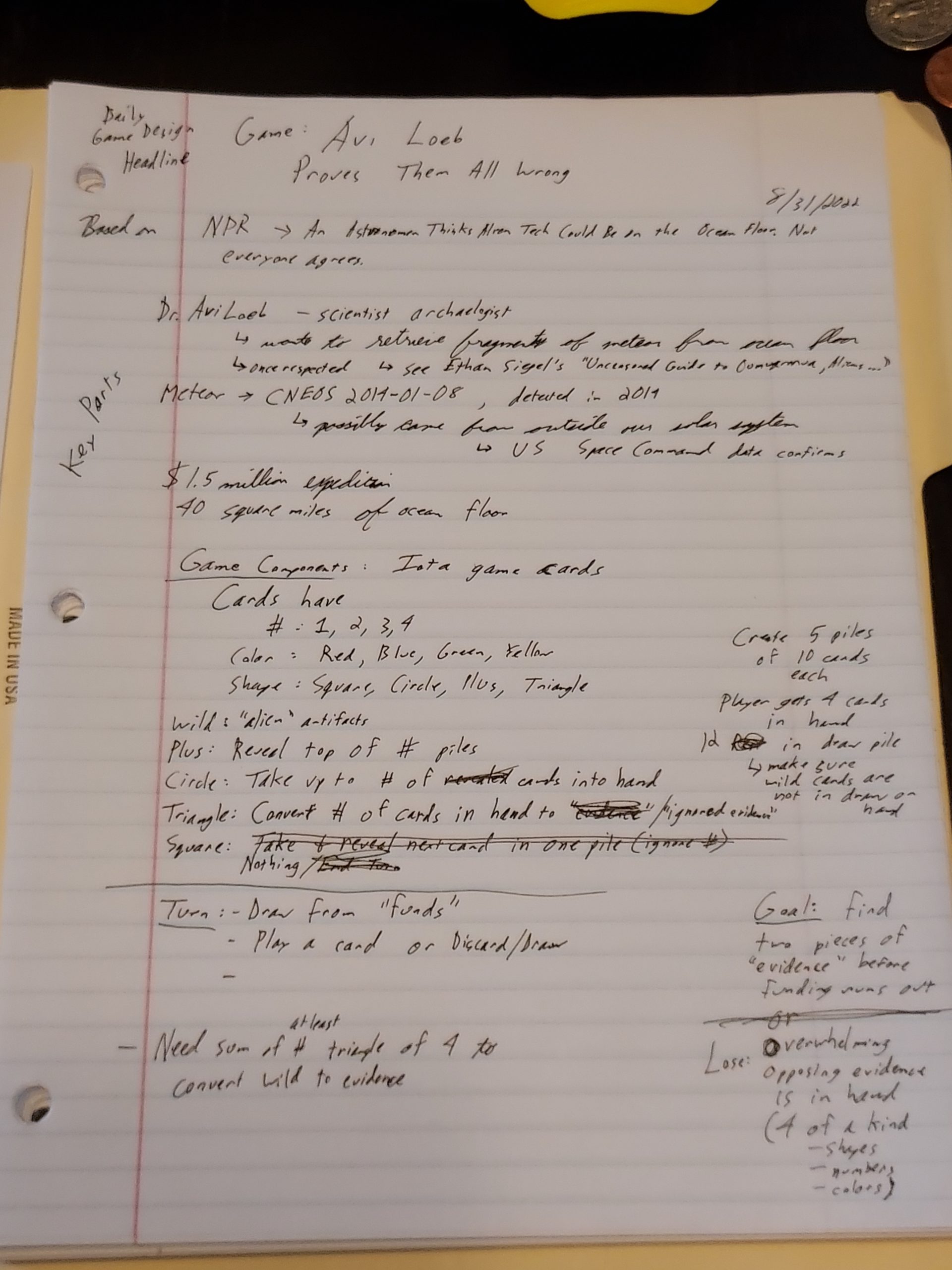
Yesterday’s news item from NPR was almost perfect as a first attempt at making a game ripped from the headlines: An astronomer thinks alien tech could be on the ocean floor. Not everyone agrees

Eight years ago, a meteor believed to have been 2 feet long entered Earth’s atmosphere at more than 100,000 miles an hour before exploding into tiny, hot fragments and falling into the South Pacific Ocean.

Some scientists believe it came from another star system, which would make it the first known interstellar object of its size to impact Earth.

Now, professor Avi Loeb, of the Harvard-Smithsonian Center for Astrophysics, is planning an expedition to retrieve fragments of the meteor from the ocean floor. By analyzing the debris, he is hoping to determine the object’s origins — even going so far as to make the extraordinary suggestion that it could be a technological object created by aliens.

Yet astronomers are wary of his claims, citing a lack of data on the object and insufficient evidence to support his bold conjectures about alien life.

If you read the entire piece, it’s got a needle in a haystack, science drama, a race against time, government/military secrets, and potentially aliens. Wow! If any news can inspire the creation of a game design, it’s this one. Thanks, Kai McNamee!

In my quick gathering of info, I also came across this excellent piece by Ethan Siegel called The Uncensored Guide To ‘Oumuamua, Aliens, And That Harvard Astronomer which talks about how Loeb is bizarrely very quick to attribute things to aliens despite the lack of evidence and seems uninterested in addressing scientific objections from astronomers.

So, I decided to make a game with highlighting and promoting actual scientific thinking as a goal. I picked the name “Avi Loeb Proves Them All Wrong” despite the fact that the game is about the lack of such proof.

The Game Design
Headline Game Design Exercise

To help me constrain the potential scope, I decided to grab the game Iota off my shelf. I could have used a regular deck of cards, but the cards in Iota have numbers, colors, and shapes, which give me some flexibility.

64 of the 66 Iota cards have a number (1 through 4), a color (red, blue, green, or yellow), and a shape (square, circle, plus, and triangle). Two of the cards are wild cards.

I wanted the player to be in the role of running Avi Loeb’s expedition, and the goal was to find pieces of the meteor and hopefully evidence of aliens.

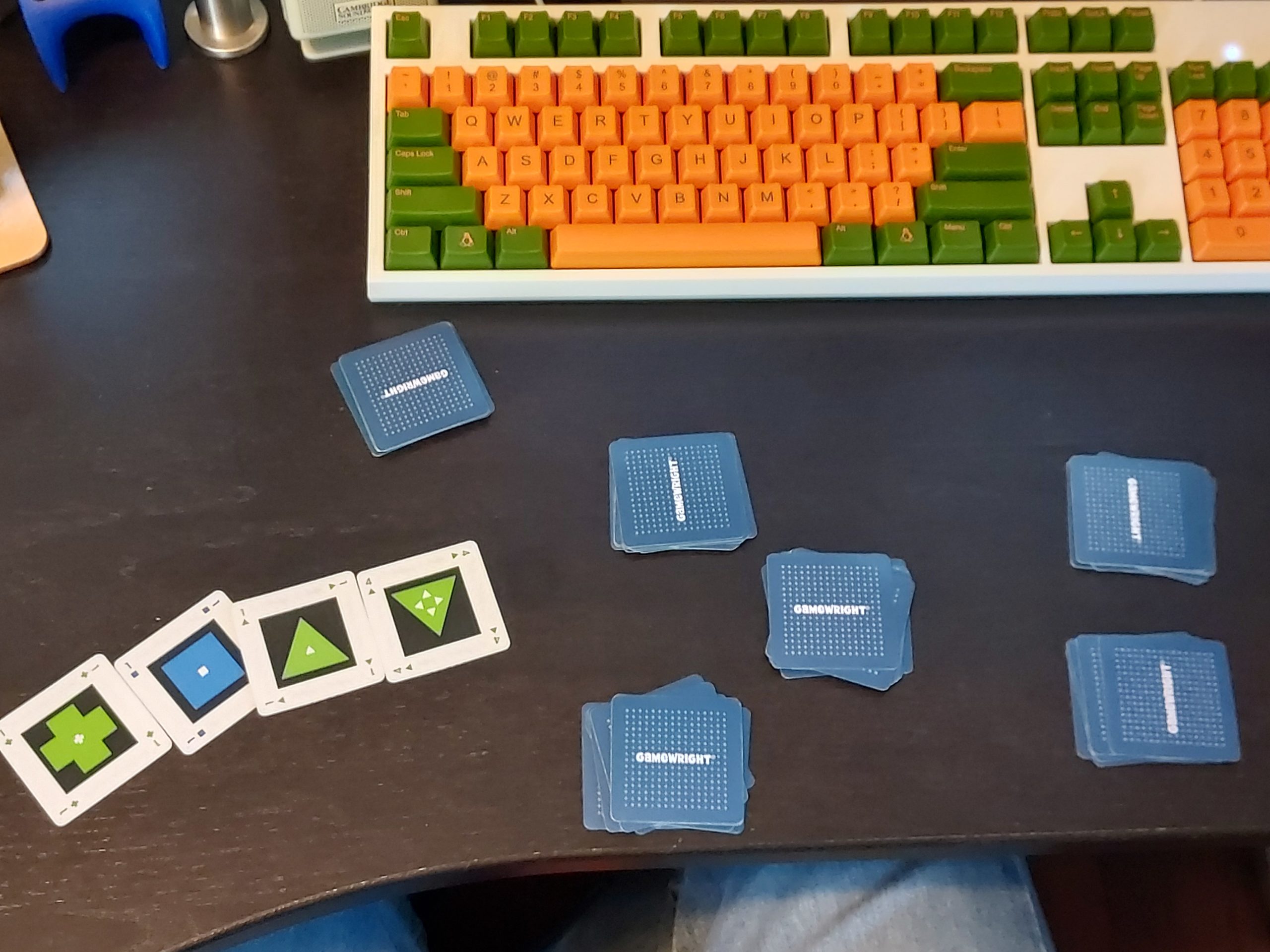
I created 5 piles of 10 face-down cards each, and these piles represented the ocean that is being explored.

I gave the player 4 cards in their starting hand, and the remaining 12 cards were the draw pile, which represented the player’s funding.
Headline Game Design Exercise

Turn order was as follows:

  1. Draw a card from the funds into your hand
  2. Play a card from your hand

I ignored colors, and focused on the shape and numbers on the cards.

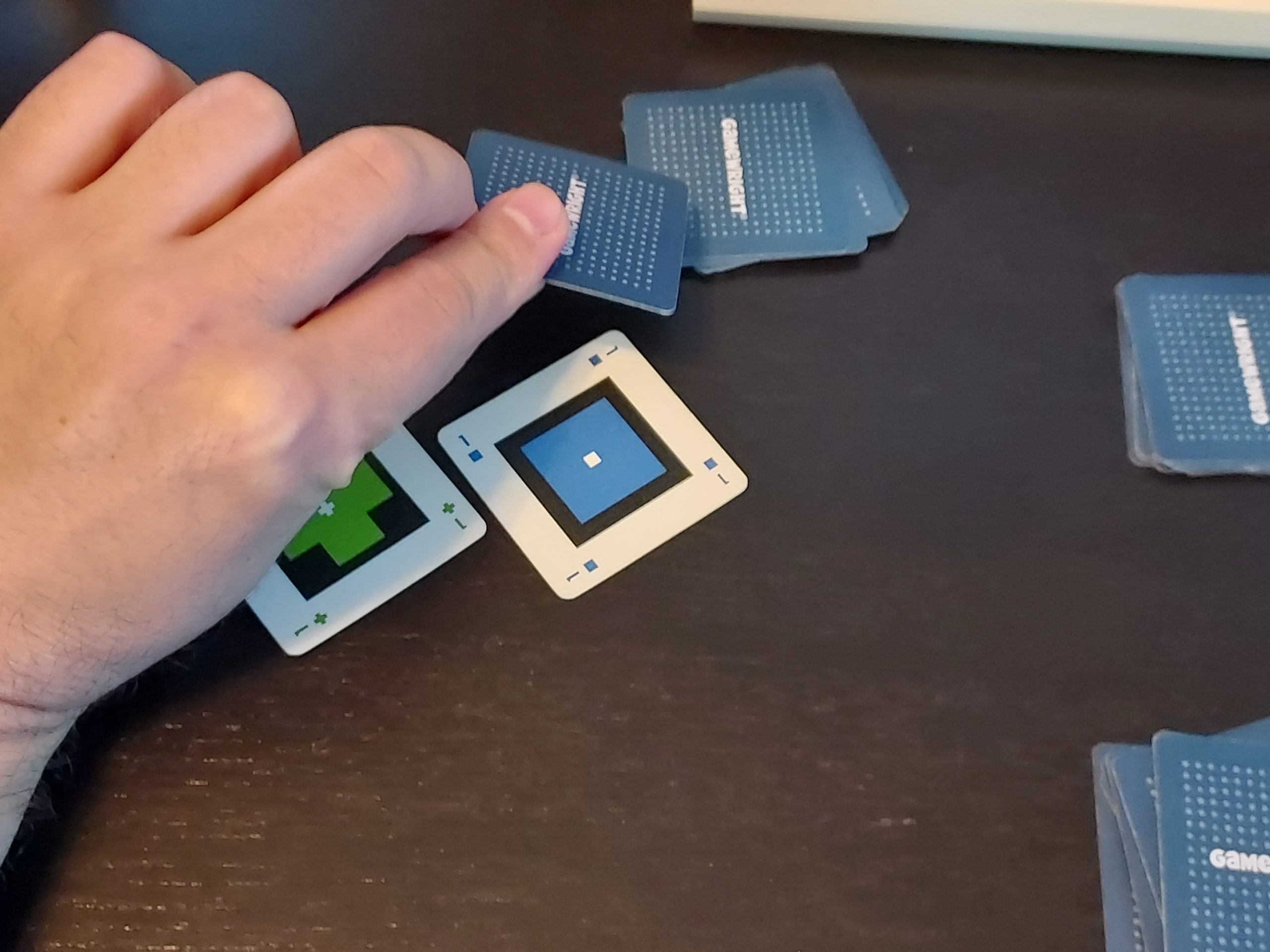
Plus cards revealed the top of the piles. A plus card with the number 3 meant that you can reveal three cards. If a pile already has a card revealed, you can’t reveal more from that pile.

Circle cards allowed you to take cards from the piles. A circle card with the number 2 meant that you could take up to two cards. Originally I restricted it to picking from different piles, but I decided to let the player explore a single pile deeply if they wanted to.

Triangle cards allowed you to “ignore evidence”, meaning that you could discard a number of cards from your hand. A triangle card with the number 4 let you discard 4 other cards from your hand.

Square cards originally let you take a card from a pile and reveal the next one, but I decided that square cards represented finding nothing, and they did nothing when in your hand. By the end, I wasn’t sure if I should make them more useful.
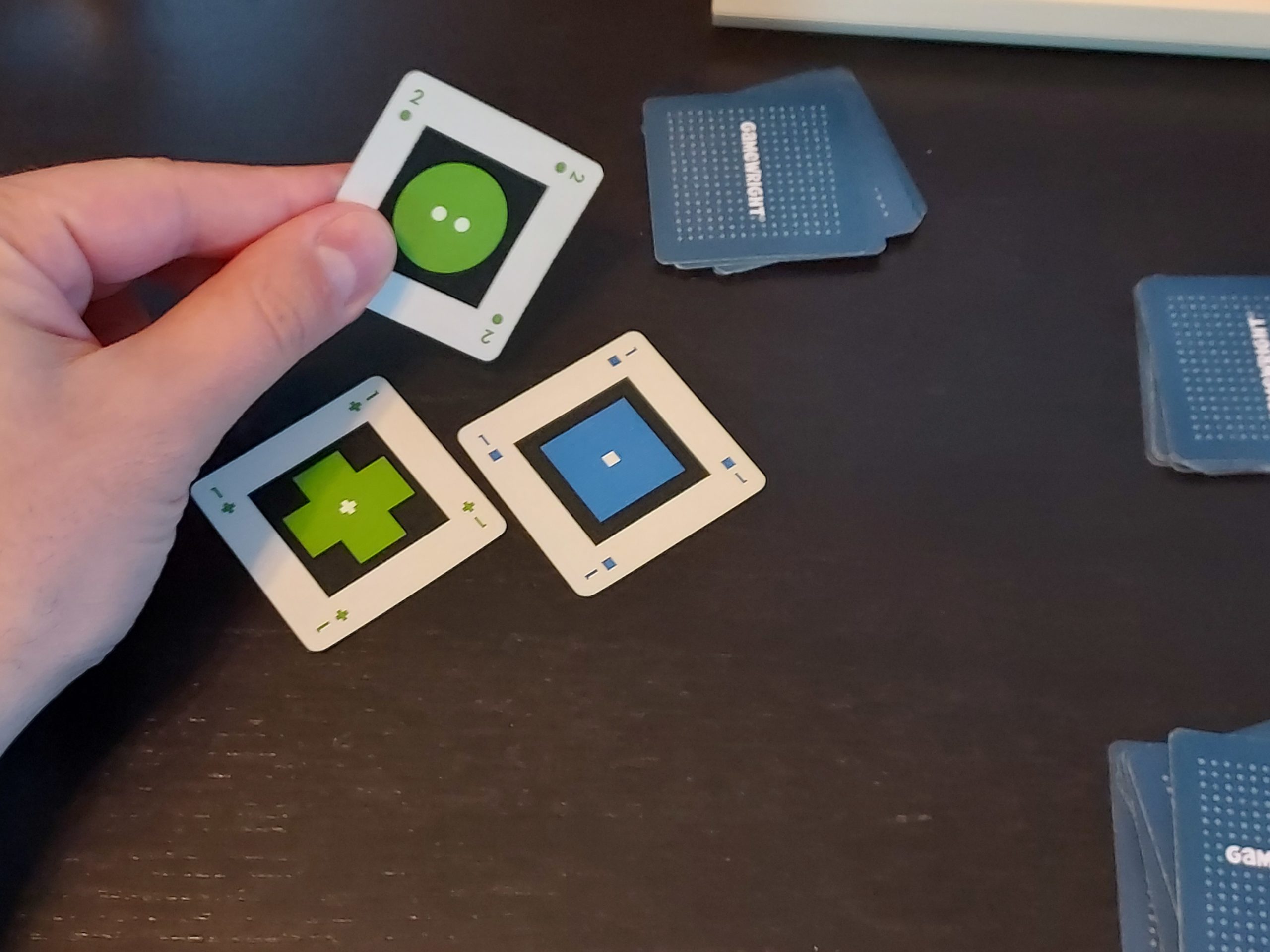
Headline Game Design Exercise

Headline Game Design Exercise

I didn’t know how to “win” or “lose” the game yet, but after a couple of playthroughs and rule changes I was reminded that there were wild cards, and so I decided to make them the actual meteor pieces. There are only two of them, so they should be hard to find. I had to ensure that the rules specified that they were shuffled into the ocean part of the deck and not in the funds or the player’s hand.

I decided on victory and loss conditions. The player wins when they collect the two meteor pieces, but loses if they use up all of their funds before then.
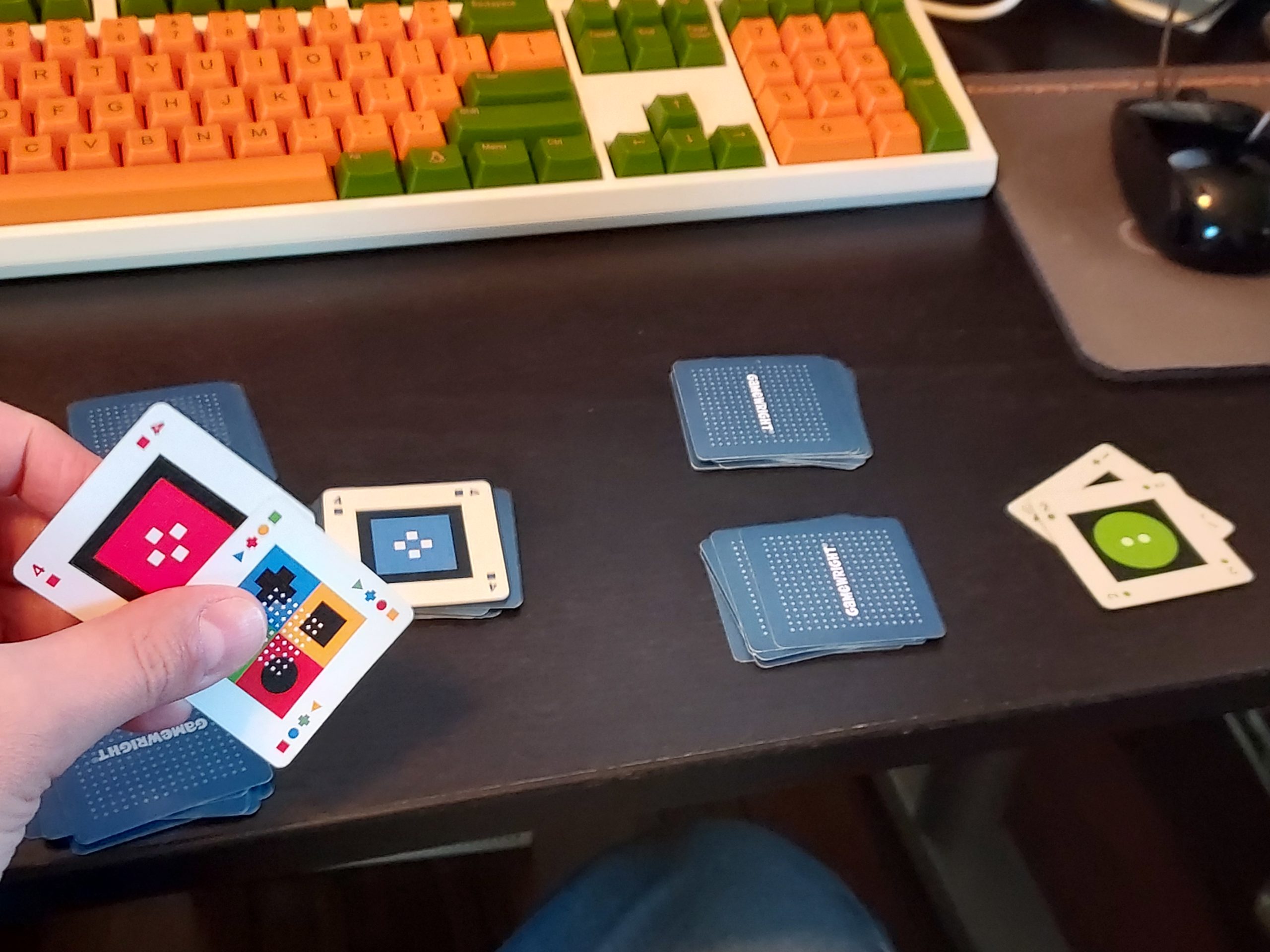
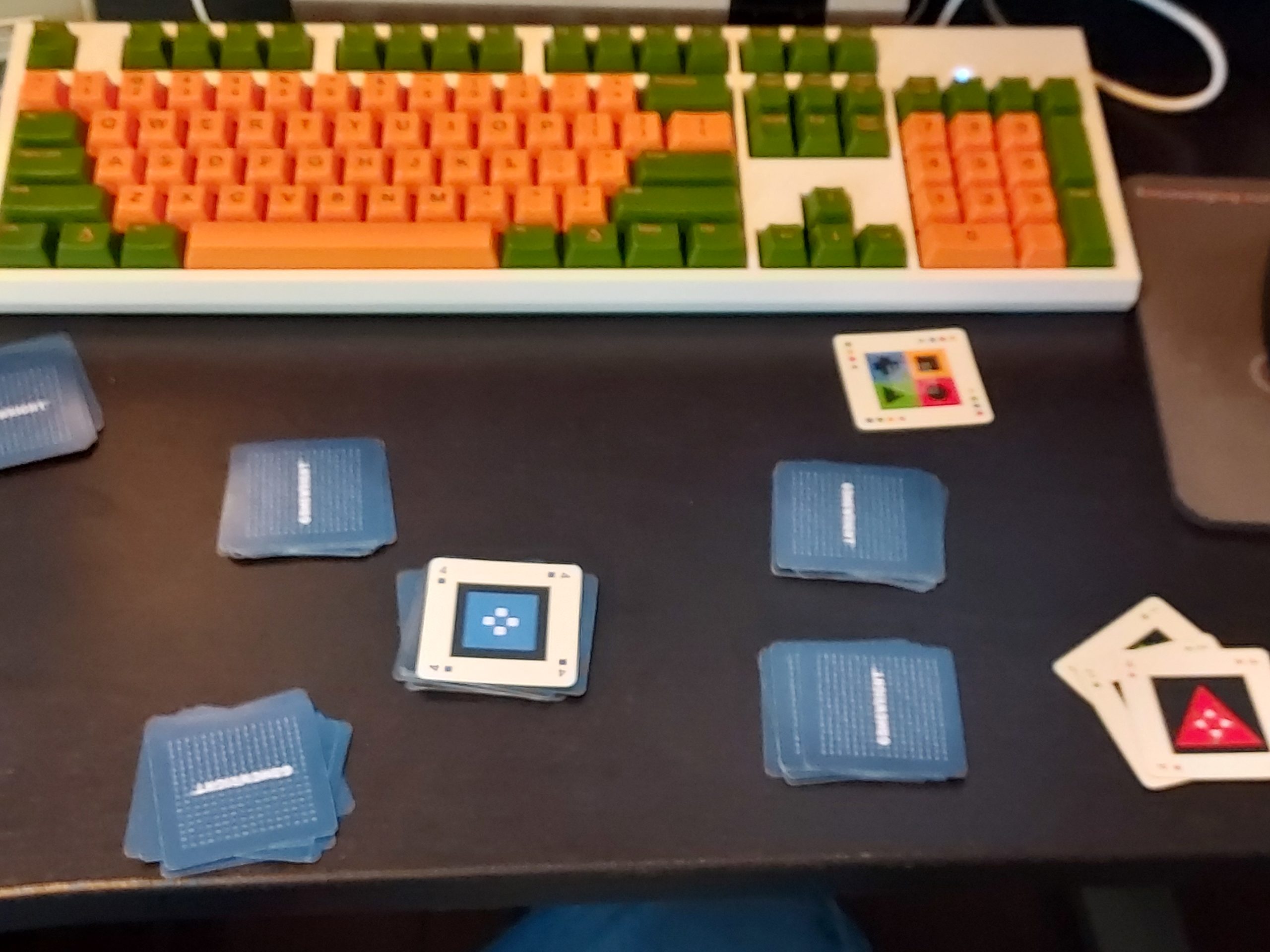
Headline Game Design Exercise

Headline Game Design Exercise

Then, to make it more in keeping with the theme about scientific rigor, I wanted the rules to require that in order to convert the wild cards to evidence, you would need to add up the sum of the numbers on triangle cards to at least 4. That is, you could use a single 4 triangle, or a combination of 1, 2, and 3 triangle cards. It required potentially more cards to accomplish and therefore was more difficult. I think.

So triangle cards served two purposes and worked slightly differently depending on if you were ignoring evidence or finding evidence.

Now, why would you use triangle cards to discard cards and ignore evidence? I tried to change the loss condition so that if you have in your hand a combination of 4 of the same number, shape, or color cards (four blue cards or four 3s, for examples), then the evidence was overwhelming and you lost.

I decided to ease up because it was too easy to collect so many cards, and instead if you end up with 4 of a kind, you automatically discard those cards, as you are ignoring the overwhelming evidence in front of you.

But you can use triangle cards to get rid of the cards you choose so that you aren’t forced to discard cards you want to keep.

So in the end, I had a game about exploring an ocean to find evidence of alien technology before your funding runs out, and the need to ignore the greater scientific community’s data to make it possible.

Game Design Lessons from Avi Loeb Proves Them All Wrong

I was able to quickly put together some mechanics that seemed straightforward enough, and the core of drawing a card and playing a card was constant. Effectively, this exercise had me explore a game based around those two actions, and primarily the second action.

On the other hand, I wish I had started with a smaller set of cards. Iota has 66 cards, and I used all of them. It was a bit unwieldy and might have obscured the dynamics because I was simultaneously dealing with figuring out my rule changes AND with the existing how it interacted with the sheer quantity of shuffled cards.

When I had what seemed like an interesting set of rules, I ran into the problem of the game not ending satisfactorily and being too random, so some games were over almost right away and some took forever to end. Having fewer cards might have helped me iterate more quickly.

I tend to start too big. In earlier tile-based games, I would have a what i now see as a massive grid, something on the order of 64×48 or whatever I could fit on a screen.

So the next time I decide to make a tile or card game, I will try to limit the quantity of cards. Maybe I will start with only 10 cards total, and I can always add more if I find it too limiting.

The game also felt too volatile. You are basically guessing what part of the ocean to explore, and while plus cards might make it easier to see what’s available, it is still a very limited view, and you might not get a lot of plus cards in your hand at any given point. I might have been able to ensure the wild cards were near the bottom half of a given pile so that they wouldn’t pop up right away, but it was still random which pile they were in, and with only 12ish turns, you aren’t likely to find them unless you get lucky with circle cards.

In the end, I spent way more time on this game than I intended. I ignored my time constraint completely, so instead of it being a 20 minute exercise, it took much longer. I don’t know, as I didn’t track my time, and part of my time was spent recording my experience here in this blog post.

I know I had a quick initial iteration, and maybe that’s where I should stop for future exercises. Perhaps I should set an actual 20 minute timer, and put my game design tools down at the end, encouraging me to make tighter iteration cycles as fast as I can in that time.

Whatever tweaks I might make to the exercise going forward, I believe I might have found a new daily habit that will help me improve my game design skills.
Categories
Game Design Game Development Geek / Technical

Freshly Squeezed Progress Report: Improving the New Player Experience

In last week’s report, I was slowly putting together updates for new Google Play requirements and anticipating some work to improve a new player’s experience in Toy Factory Fixer.

I continued the work last week.

Sprint 72: New player onboarding improvements; Google Play requirements

Planned and Complete:

  • Update Android port with new Google Play requirements
  • Make new player onboarding smoother

Unplanned and Complete:

  • Highlight craftable toys in inventory

While I only worked a little more than 5 hours throughout the entire week, I was able to get quite a bit accomplished.

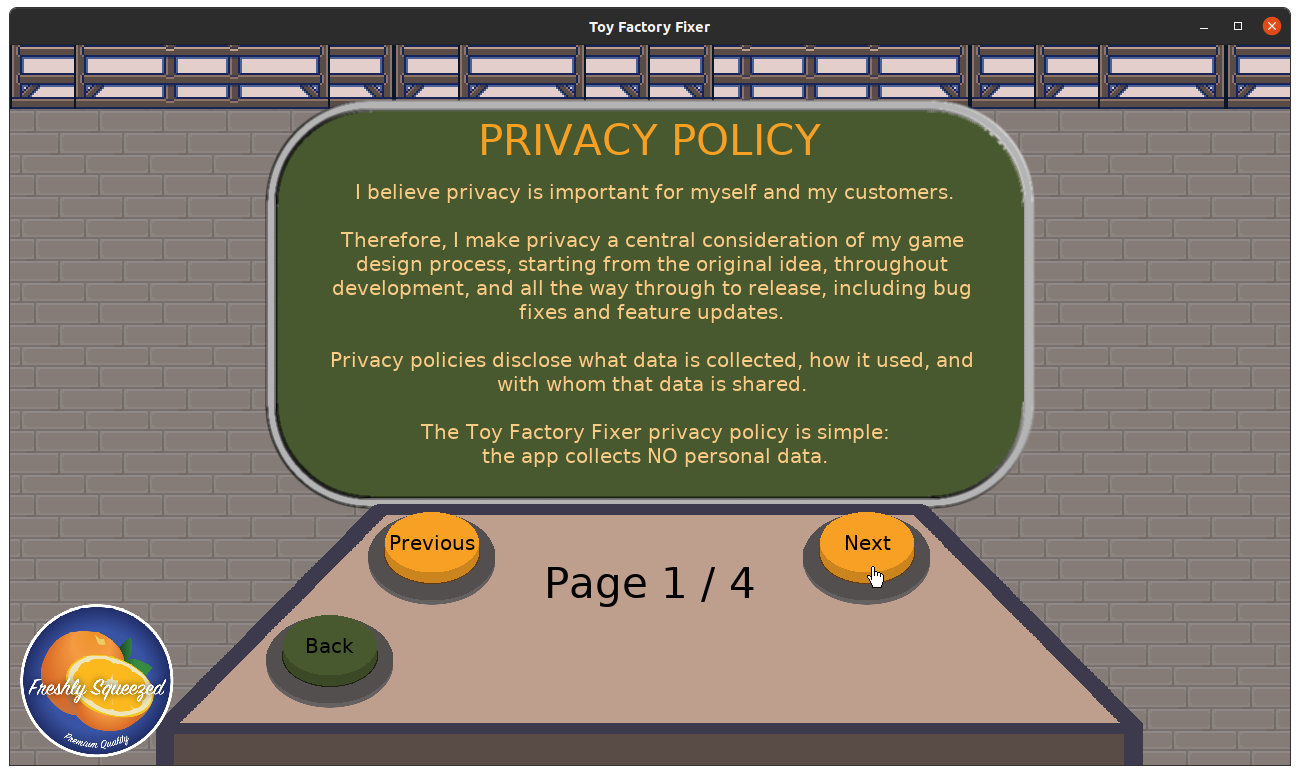
I finished adding the privacy policy into the game. I have in-game help pages, and I reused that code to also add the in-game privacy policy. Most of that work was in the previous sprint, so I basically needed to add the copy and make sure it worked properly.

Toy Factory Fixer in-game privacy policy

Next, since I’ll be putting out an update soon anyway, I wanted to make it easier for new players to know what to do at the beginning of the game.

Watching strangers play my game at 60 FPS Fest weeks ago, I noticed that at the start of a new level, players wouldn’t immediately know to click on the Hire Worker button, which is one of the only buttons that is currently available.

In hindsight, a new player wouldn’t know what part of the screen is interactive or relevant, so they had to take in the entire screen and try to make sense of it all. The Hire Worker button is a relatively small part of that screen, and it is not obvious that it is one of only three buttons that are available AND that it is the only one that is necessary to start playing.

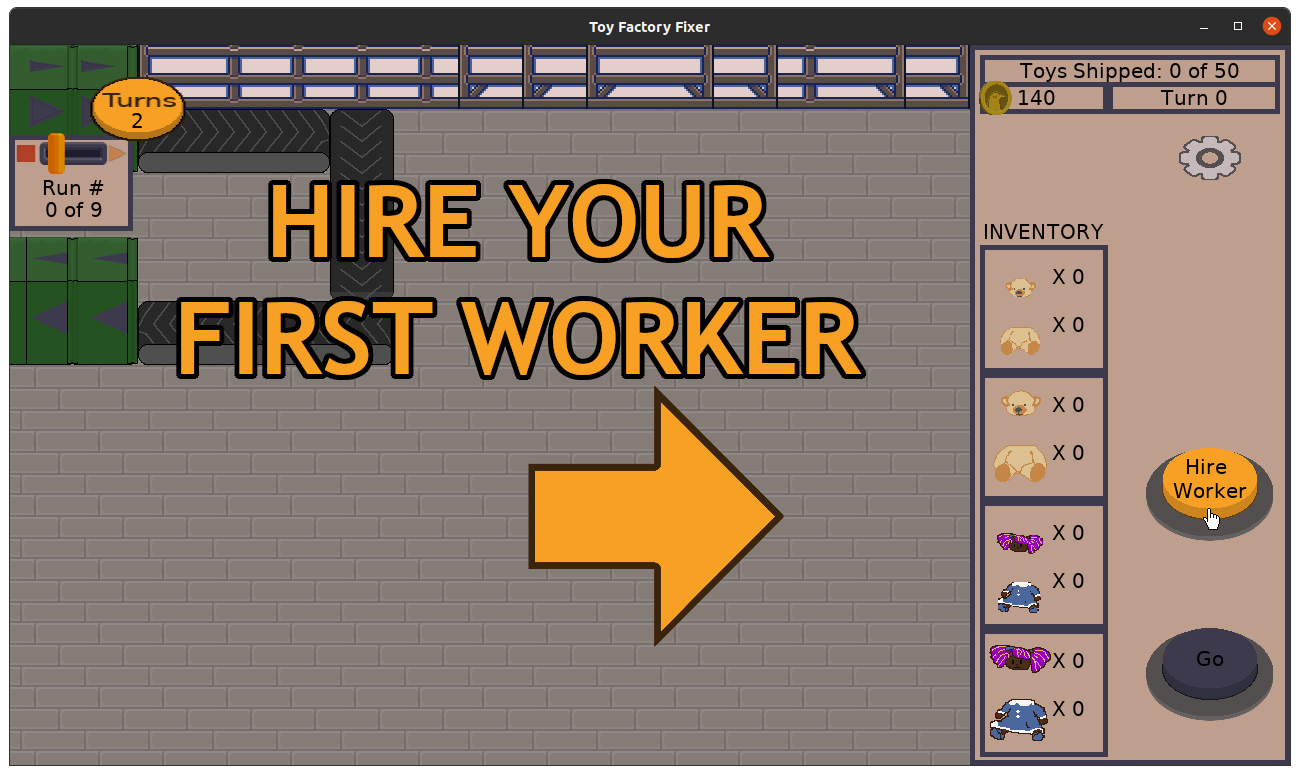
So I added something that I hope won’t be too subtle:

Toy Factory Fixer new player onboarding improvements

Originally I was going to add some text next to the cancel button that said “Hire your first worker” but I thought it would have been easy to miss, and it also wouldn’t appear if the player canceled and got back to this main menu:

Toy Factory Fixer new player onboarding improvements

Once you hire your first worker for the level, then the giant text and arrow goes away.

I keep thinking of other improvements, but they’ll have to wait.

The other observation I made was that new players would often hire workers, then watch the workers separate Bad Toys into parts, then…continue to watch.

It would be nice to have a full-fledged tutorial with triggers to show the player what to do next, but in the absence of that kind of work, I hardcoded something for the first level only.

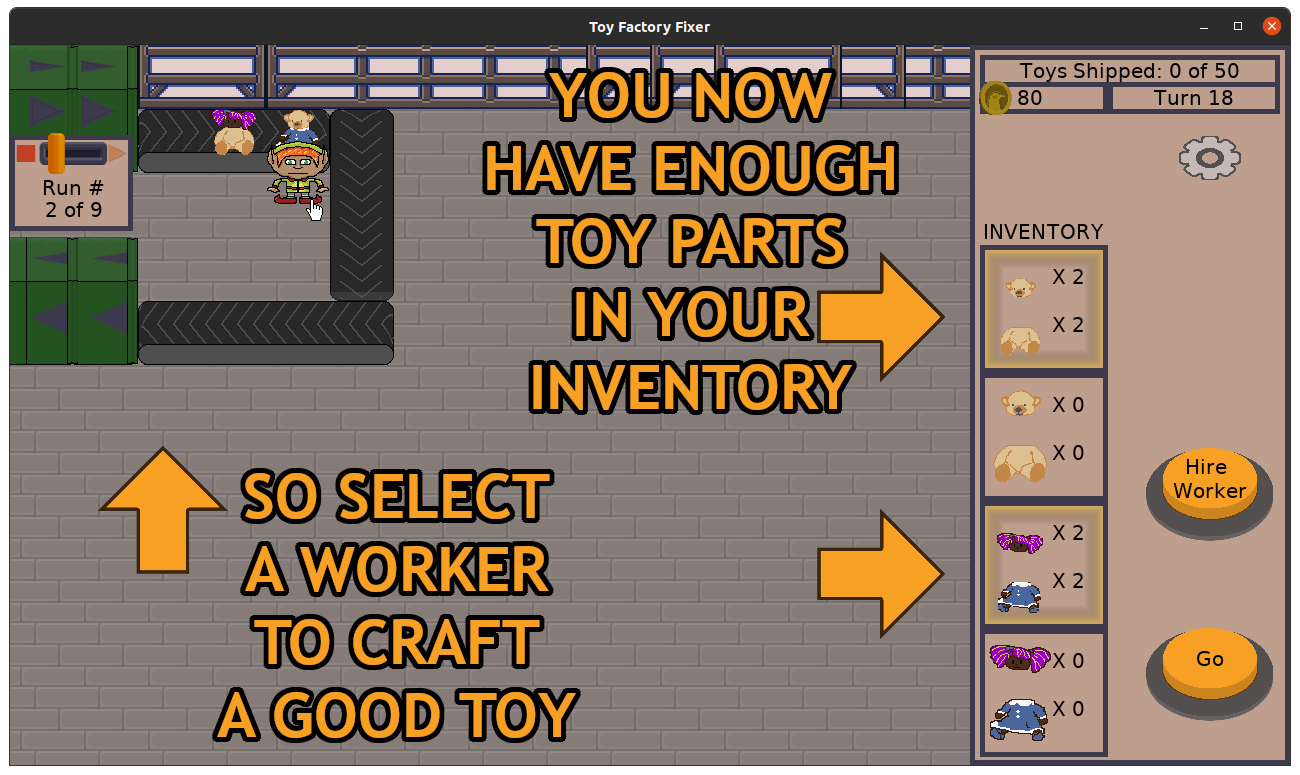
Basically, if it is the first level, and you haven’t commanded a worker to craft a Good Toy yet, and you have enough toy parts to craft a Good Toy, then you’ll see this also not-so-subtle hint:

Toy Factory Fixer new player onboarding improvements

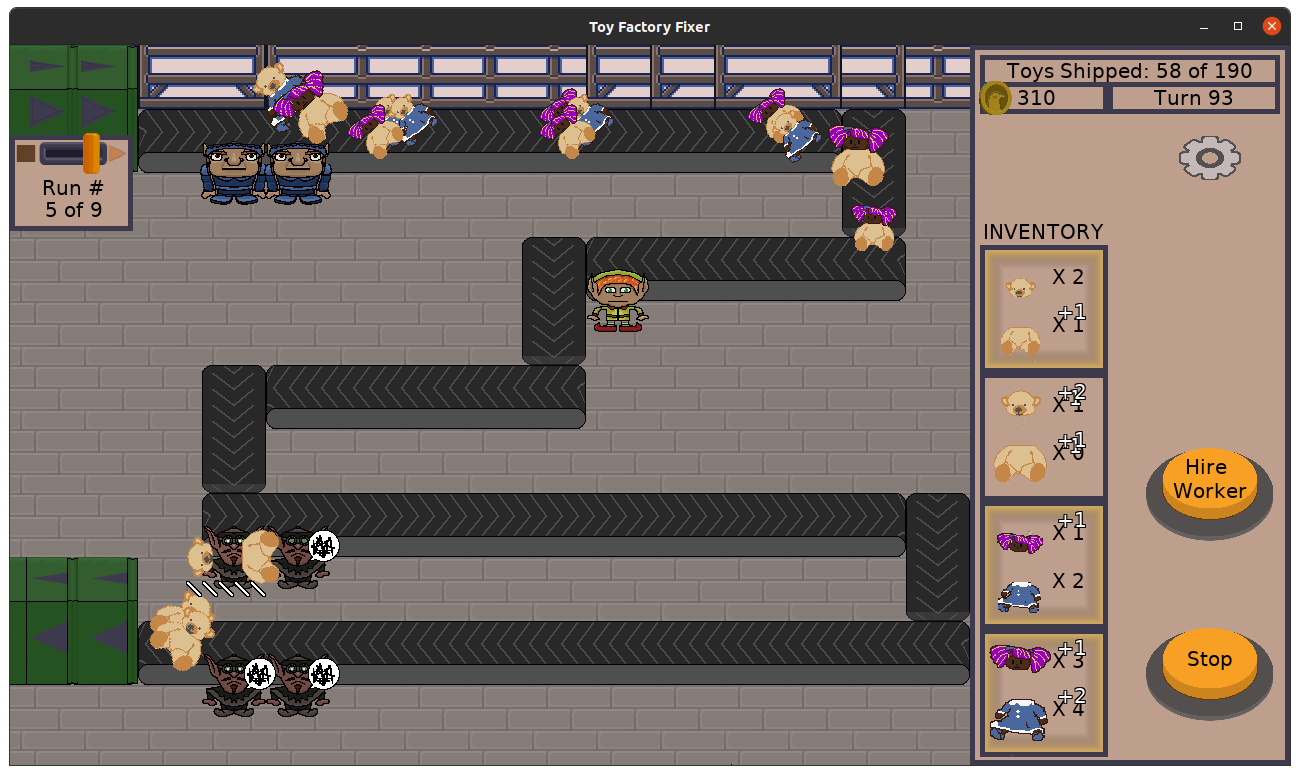
I decided to add a highlight to the inventory UI, which I hope makes it easier to see when you can start crafting toys in the middle of a more hectic level. It is much more subtle when on its own, but I think it is still helpful.

Toy Factory Fixer new player onboarding improvements

And while trying to make this small change, I discovered a couple of memory leaks and fixed them, thanks to valgrind and my unit tests.

With these changes, I am hoping that when people download and try the game, they are less likely to uninstall right away.

I still need to do a bit more manual testing to ensure I didn’t break anything, but it has been a fairly error-free experience so far, so I expect to get the next release out pretty quickly.

Thanks for reading!

Want to learn when I release updates to Toytles: Leaf Raking, Toy Factory Fixer, or about future Freshly Squeezed games I am creating? Sign up for the GBGames Curiosities newsletter, and get the 19-page, full color PDF of the Toy Factory Fixer Player’s Guide for free!

Categories
Game Design Game Development Geek / Technical

Freshly Squeezed Progress Report: Slowly Complying with New Android Requirements

In my last report a couple of weeks ago, I finished automating my Mac port work and also got some valuable feedback in the form of observing a number of random strangers play Toy Factory Fixer at a local festival.

I decided to incorporate that feedback into my next update as I prepared my app for new requirements from Google Play.

Sprints 70 and 71: New player onboarding improvements; Google Play requirements

Planned and Incomplete:

  • Update Android port with new Google Play requirements
  • Make new player onboarding smoother

As has been mentioned in mobile news, both Google and Apple have policy updates that basically say something like “Update your app, or we’ll remove it from our app store.”

For games that get frequent updates and new content all the time, it’s no big deal, but for games that are otherwise considered “finished” by their developers, it’s basically forcing work to ensure the game stays available for players despite the fact that the game would otherwise run just fine.

In my case, the main update I need to do for the Android port of TFF is to change the target SDK, and I figured that I might as well use the latest SDL2 libraries as well.

There is something Google requires related to privacy policy updates, but as my game doesn’t make use of anything that requires such disclosure, it might not apply to me.

Unfortunately, it wasn’t very clear. I had emails announcing the policy changes that said one thing, an Android developer page that said something slightly different, and the actual Google Play policy that said another.

But basically, I felt that I needed to provide my privacy policy text inside the app, not just on my website linked from the Google Play store page. I could just link to the page, but it felt like an app that doesn’t require much should just be able to tell you upfront what it is and isn’t doing.

After almost two weeks, I’m almost done with that work. That’s a long amount of clock time, but it represents very little actual development time. Between going on a short weekend vacation with my family and my father-in-law passing away as we were returning, much of my time these last couple of weeks has been spent tending to family matters.

I expect that I will eventually get the main requirements done, and then I can work on making it easier for new players to know what to do, especially when it comes to hiring the first worker and knowing to command workers to craft Good Toys from parts.

What I hope is that those improvements mean that I’ll see fewer people uninstalling the app in my Google Play and itch metrics.

Thanks for reading!

Want to learn when I release updates to Toytles: Leaf Raking, Toy Factory Fixer, or about future Freshly Squeezed games I am creating? Sign up for the GBGames Curiosities newsletter, and get the 19-page, full color PDF of the Toy Factory Fixer Player’s Guide for free!

Categories
Game Design Game Development Geek / Technical

Freshly Squeezed Progress Report: Mac Port Automation Finished, and 60 FPS Fest

In my last report, I mentioned how my back pain was preventing me from making substantial progress in the previous few weeks, and that I was working on automating my Mac port build for Toy Factory Fixer and needing to prepare for a festival.

I continued to do the work as my body let me.

Sprint 69: Ports

Planned and Complete:

  • Automate Mac port

I have been able to sit at my desk for longer periods of time, and so I was able to be a lot more productive than I have in weeks.

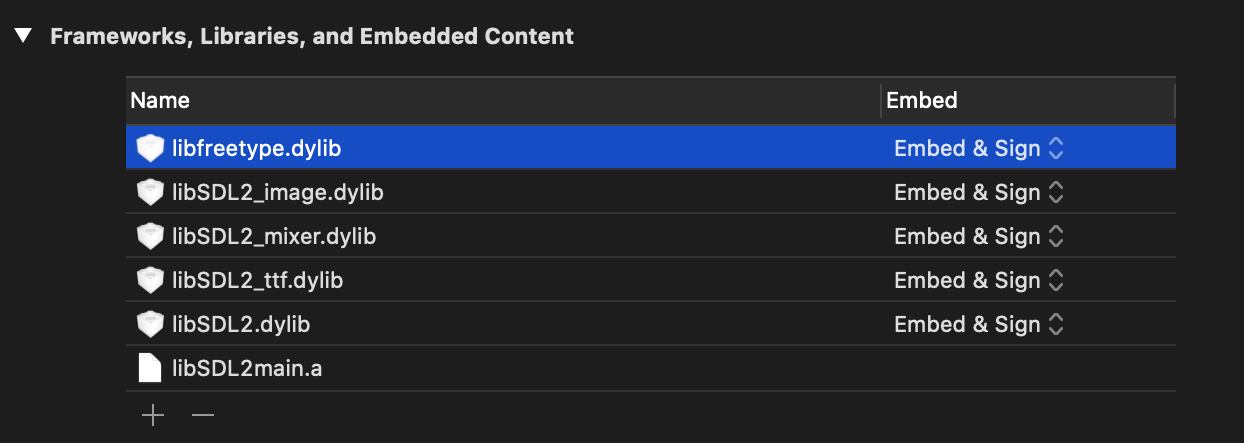
I managed to update my libSDL2 libraries so that they could be found properly by my project, but I struggled for some time trying to get CMake to configure my Xcode project so that it would embed and sign those libraries.

SET_TARGET_PROPERTIES(${GB_PROJECT_NAME}-bin PROPERTIES XCODE_LINK_BUILD_PHASE_MODE KNOWN_LOCATION)

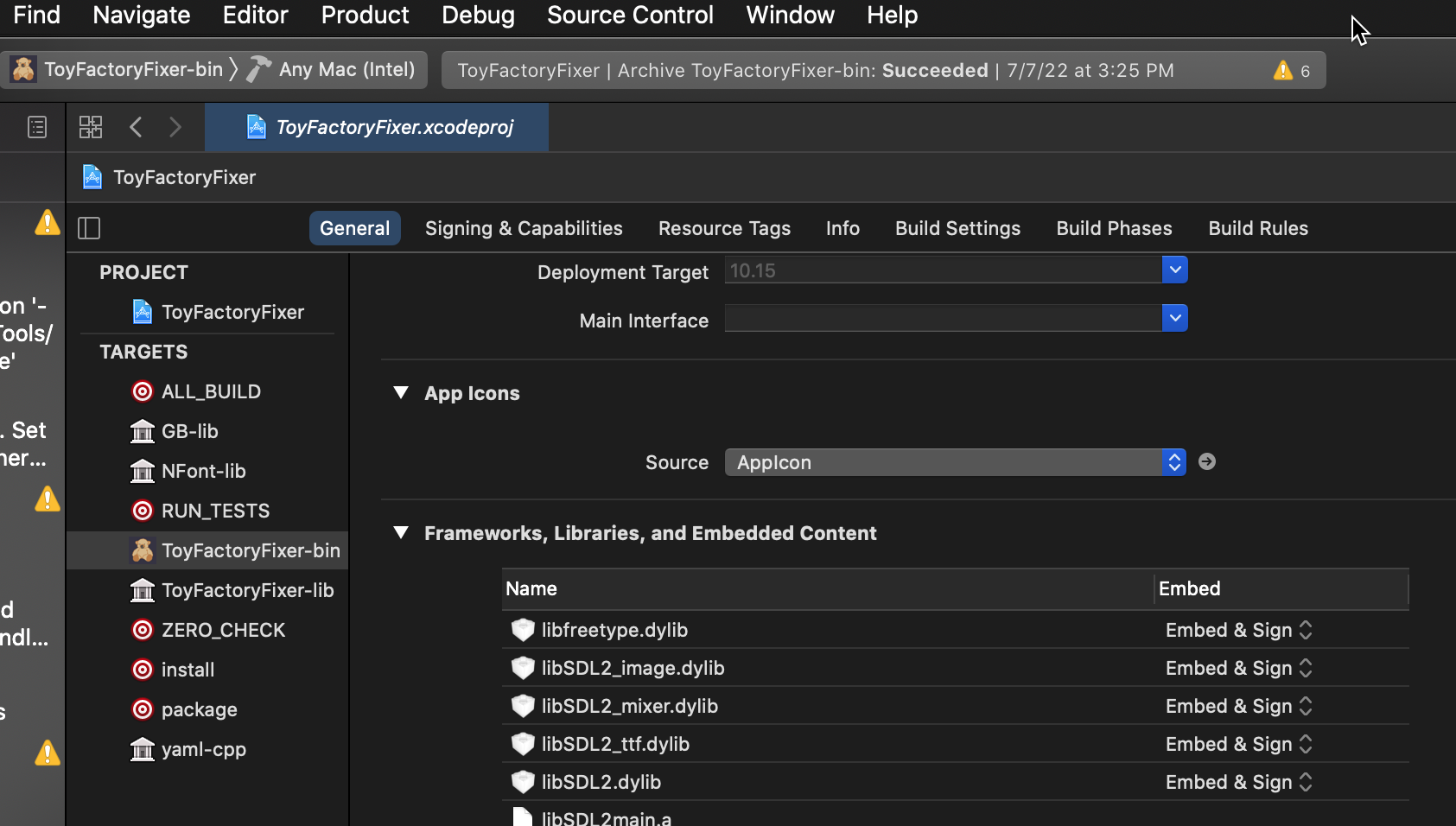
This line seems to be needed to get the libraries that are found with FIND_PACKAGE to show up in the “Frameworks, Libraries, and Embedded Content” section of Xcode. But they would be listed as “Do Not Embed”.

SET_TARGET_PROPERTIES(${GB_PROJECT_NAME}-bin PROPERTIES
    XCODE_EMBED_FRAMEWORKS_CODE_SIGN_ON_COPY ON
    XCODE_EMBED_FRAMEWORKS "${SDL2_LIB_DIRS}/libSDL2.dylib ${SDL2_LIB_DIRS}/libSDL2_image.dylib ${SDL2_LIB_DIRS}/libSDL2_ttf.dylib ${SDL2_LIB_DIRS}/libSDL2_mixer.dylib")

I found a number for forum posts, pull requests, and pieces of CMake documentation, and I felt pretty frustrated that I couldn’t get things to work properly. I made sure to have the latest version of CMake so I had the ability to set XCODE_EMBED_FRAMEWORKS and work with dylibs, but when I did the above, all I got was libSDL2_mixer to show up as “Embed & Sign” while the rest continued to be appear with “Do Not Embed” instead.

I found that no matter how I specified everything, it was always the last library in the list.

Well, luckily, someone runs a great account on Twitter, so when I was frustrated enough to end my day by complaining about my situation, I got a reply that helped me learn more about CMake:

Lists are semicolon separated?!

Now, I’ve used CMake for years, and the documentation has always felt a bit obtuse to me. It is very much a reference document and not meant to be a tutorial.

But I have never known that lists were semicolon separated before.

I mean, even the unit tests for this feature don’t feature semicolon separated elements of a list. They are separated by spaces.

But someone on IRC told me that “Semicolon separated lists is how CMake does lists. It automatically adds the semicolons if you don’t quote your items.”

So the following examples would work out in this manner:

foo bar baz --> "foo;bar;baz"
foo "bar" baz --> "foo;bar;baz"
"foo bar baz" --> "foo bar baz"

So I took some deep breaths to calm myself down, and made the following change:

SET_TARGET_PROPERTIES(${GB_PROJECT_NAME}-bin PROPERTIES
    XCODE_EMBED_FRAMEWORKS_CODE_SIGN_ON_COPY ON
    XCODE_EMBED_FRAMEWORKS "${SDL2_LIB_DIRS}/libSDL2.dylib;${SDL2_LIB_DIRS}/libSDL2_image.dylib;${SDL2_LIB_DIRS}/libSDL2_ttf.dylib;${SDL2_LIB_DIRS}/libSDL2_mixer.dylib")

And now all of the libraries show up as “Embed & Sign” like I wanted. Nice!

On a separate note, I learned that properties in CMake similarly have some flexibility in terms of what arguments can be provided.

So I have seen XCODE_EMBED_FRAMEWORKS_CODE_SIGN_ON_COPY take the argument ON in unit tests, TRUE in forum posts, and YES in examples I found on GitHub. And they are all correct, apparently.

One last thing was that I wanted to make sure I could build a release version in Xcode, but the default was Debug. Basically, I wanted to create a release by merely building the project, rather than needing to do a separate archive step.

When creating Makefiles, you can use CMAKE_BUILD_TYPE with arguments as Release or Debug, but Xcode needs you to use CMAKE_CONFIGURATION_TYPES instead.

Of course, I found that even when doing so, the release build it creates is a little different in size from the release build that gets created when using the Archive functionality of Xcode, so it might be a moot point.

Anyway, after I got the Mac port automation done, I wanted to leverage it to create the desktop ports for Toytles: Leaf Raking, but there was a game festival I needed to do some last-minute preparations for.

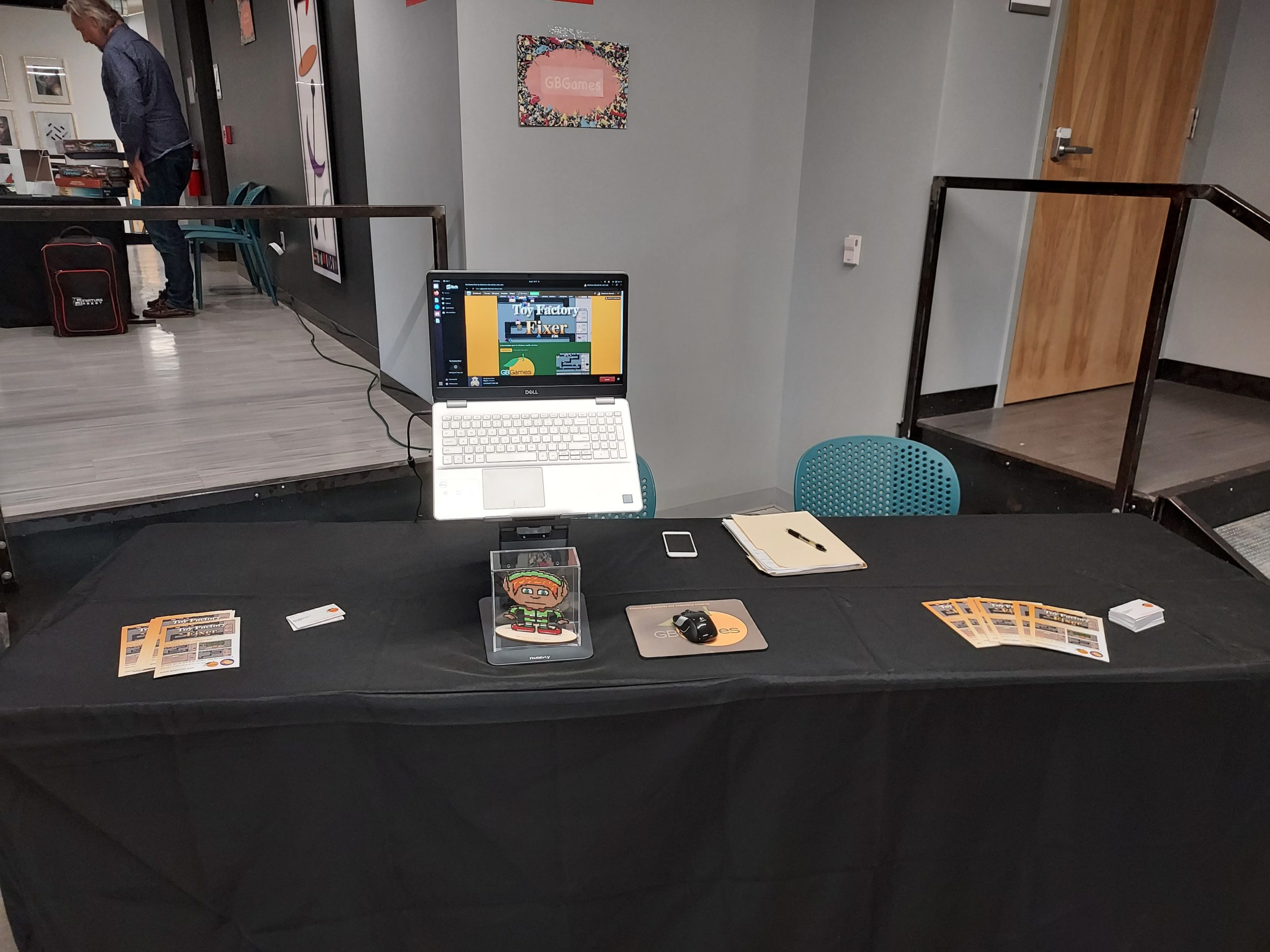
Last Friday, I had a table at the 3rd 60 FPS Fest, and it was gratifying to hear the first player, an 8-year-old, say, “This is definitely a fun game.” B-)

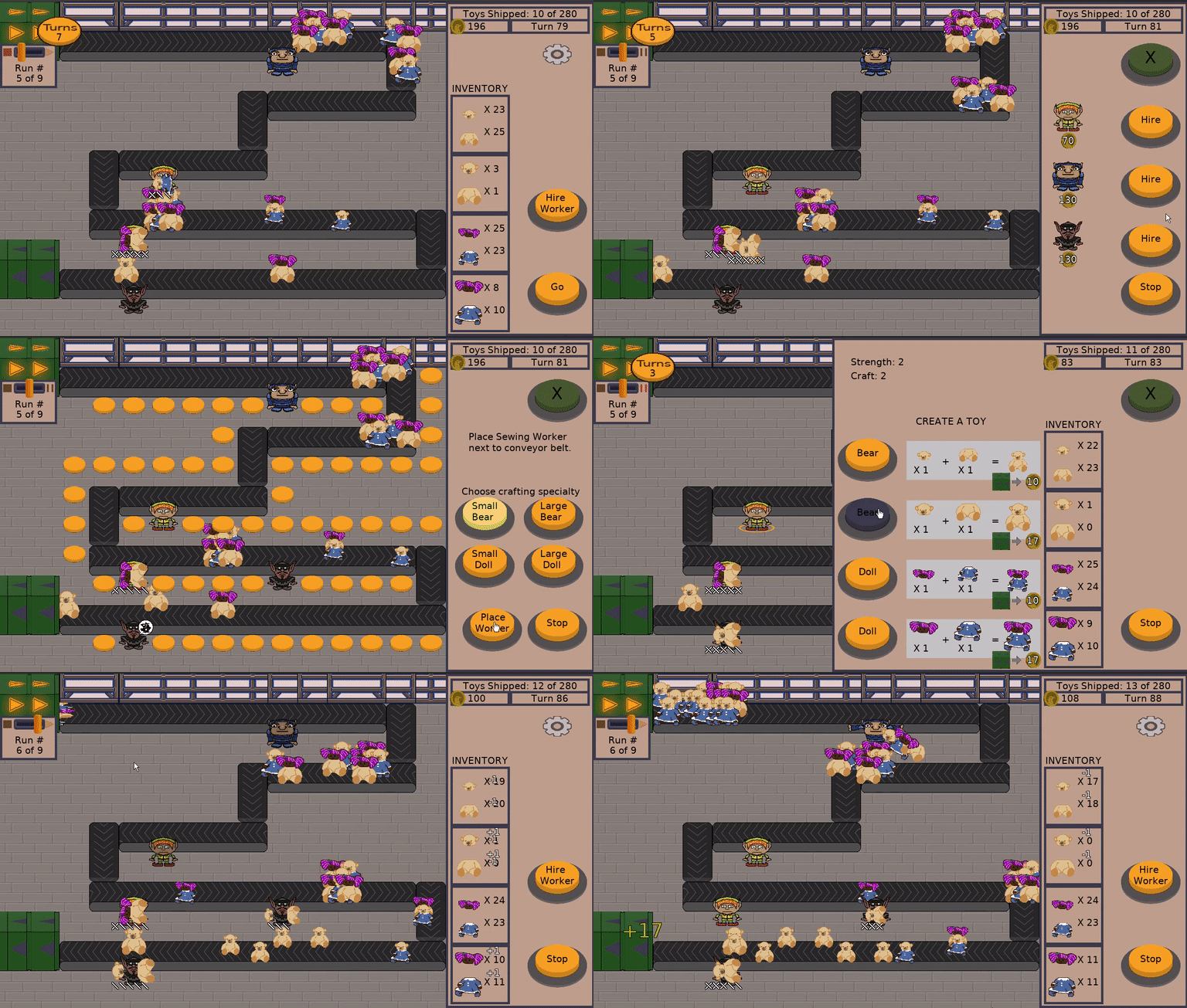
Toy Factory Fixer at 60 FPS Fest 2022

He also had a lot of ideas for how to make the game better, so I wrote some down. Thanks, Rowan!

One of my favorite pieces of feedback was hearing someone laugh about the toy parts getting “yeeted” to the inventory.

Toy Factory Fixer

I will say it was a bit humbling to see the number of people who struggled to know what to do when they started playing. I know I worked on tweaking the interface to funnel new players to what they needed to do, such as making the START button huge and obvious, or setting the default menu to the Hire Menu so you immediately know you need to hire someone. I also made the workers flash to indicate that you can tap/click on them when you have enough toy parts in inventory to create Good Toys.

And yet, it was very obvious as I watched new players struggle that I still had some work to do to make it more intuitive and easier to figure out how to play the game. Clearly whatever I’ve done so far is too subtle. I especially felt bad when a player felt incompetent or “bad at games” because it felt like a failure on my part to make it enjoyable from the beginning.

So the festival was a successful one, if only because I learned some ways to improve the game, especially for people who won’t have me standing next to them to help when asked. I also got some positive feedback from a number of new fans, including parents who were looking for non-violent, family-friendly entertainment that they could trust.

Thanks for reading!

Want to learn when I release updates to Toytles: Leaf Raking, Toy Factory Fixer, or about future Freshly Squeezed games I am creating? Sign up for the GBGames Curiosities newsletter, and get the 19-page, full color PDF of the Toy Factory Fixer Player’s Guide for free!

Categories
Game Design Game Development Geek / Technical

Freshly Squeezed Progress Report: Back Injury Setback, Automation Work

In my last sprint report a couple of weeks ago, I managed to get the Mac port of Toy Factory Fixer published and working properly with music.

I set out to automate some of the Mac port work that had been manually done before.

Sprints 67 and 68: Ports

Planned and Incomplete:

  • Automate Mac port

I mentioned that I hurt my back a couple of weeks ago. I don’t know what I specifically did, other than contort myself earlier in the week to fix a leak under the bathroom sink, and I have not been as diligent about my yoga routine recently. I might have been putting strain on my lower back by leaning forward a lot as I read or worked at my desk, or maybe I was leaning forward because I was already uncomfortable sitting and didn’t realize it.

Either way, I have not been able to comfortably work on anything for a couple of weeks.

Which is frustrating partly because I have been trying to take care of my back so that I didn’t have setbacks like this anymore, and partly because I am getting antsy about moving on to porting Toytles: Leaf Raking and wanting to work on my next project.

Also, 60 FPS Fest is this coming Friday, which is a gaming festival that is free and open to the public, and I will have a booth there. I participated in the first two iterations of the Fest, and I look forward to being part of this one. I was hoping to have a new game in development that I could show off, but it is not looking likely.

Still, it will be the first time I get to show off Toy Factory Fixer in a public venue, and being able to tell people that Toytles: Leaf Raking is available on more platforms will be great as well.

Anyway, I finally had the ability to sit for more than a few seconds without pain, and so I was able to get some automation work done on Toy Factory Fixer’s Mac port, which means that I am that much closer to automating Mac ports generally. Basically, I created a build script that builds the libSDL2 libraries and updates their internal install directory to point to “@executable_path/../Frameworks” and then spent time trying to figure out how to tell CMake to generate an Xcode project that can refer to my custom libraries in the General > Frameworks, Libraries, and Embedded Content section.

Toy Factory Fixer Mac Port

I’m still in a bit of pain, especially when I stand up after sitting for a length of time, but I seem to be getting better each day.

I think getting prepared for the Fest this week should be no problem, assuming I don’t have a setback on top of my setback.

Thanks for reading!

Want to learn when I release updates to Toytles: Leaf Raking, Toy Factory Fixer, or about future Freshly Squeezed games I am creating? Sign up for the GBGames Curiosities newsletter, and get the 19-page, full color PDF of the Toy Factory Fixer Player’s Guide for free!

Categories
Game Design Game Development Geek / Technical

Freshly Squeezed Progress Report: Mac Port Finished

In last week’s report, I discovered that my Mac port of Toy Factory Fixer had no music.

I set out to fix that issue this past week.

Sprint 66: Ports

Planned and Completed:

  • Create Mac port

About halfway through the week, I hurt my back somehow, which made it painful to sit or otherwise be at my desk, so I only did a couple of hours of work all week. In fact, I might rush through this report because it hurts enough to stand at my makeshift standing desk, which feels slightly better than sitting.

But a couple of hours of game development was enough to figure out that the SDL2_mixer I bundled with my Mac port depended upon libvorbis being installed on the player’s system, which is not what I wanted. I even tried using the configure setting that says to not use shared dynamic libraries, but I later found a forum post saying that it is explicitly disabled for MacOS, so that’s fun to discover.

However, just days before, I saw that libSDL2_mixer had a new update, v2.6.0, that used single-header libraries, so instead of depending on libvorbis, it uses stb_vorbis. I built it, bundled it, and found that the game had music!

So, if you want to get the Mac port, you can get it at itch.io below:

Now, what I still need to do is automate some of the steps, and I have been trying to figure out what notarization looks like so that people playing the game on newer Macs don’t get the scary message about how Apple can’t verify the source of the app.

But I think I have enough to get Toytles: Leaf Raking ported fairly quickly. We’ll see how my back feels after my doctor appointment.

Thanks for reading!

Want to learn when I release updates to Toytles: Leaf Raking, Toy Factory Fixer, or about future Freshly Squeezed games I am creating? Sign up for the GBGames Curiosities newsletter, and get the 19-page, full color PDF of the Toy Factory Fixer Player’s Guide for free!

Categories
Game Design Game Development Geek / Technical

Freshly Squeezed Progress Report: Mac Port Just About Finished

In last week’s report, I was figuring out how to bundle the Toy Factory Fixer binaries and dependencies for the Mac desktop port.

And the work continued.

Sprint 65: Ports

Planned and Complete (er, I thought):

  • Create Mac port

Well, it mostly continued. It was a very unproductive week, as I only managed to put in a total of 2.5 hours of game development.

I think part of the reason for the lack of hours was that I was pretty much finished with the work, and then I had trouble finding someone to help me verify that everything worked properly on a machine that wasn’t mine.

I had to change the install path of the SDL2-related libraries so that they reference “@executable_path/../Frameworks” although I annoyingly can’t set it using the configure script because it expects an absolute path.

So basically I had to do a two-step process for each library: run “configure –prefix=[install path] && make && make install”, then use the install_name_tool to change it.

And since the SDL2_image, SDL2_mixer, and SDL2_ttf libraries also refer to the SDL2 library, I had to change each of their paths to that library, too.

Once I had the libraries setup correctly, then it was a matter of telling Xcode to bundle the libraries. Ideally I could get CMake configured to do it for me, but for now I found that I can add the libraries manually to the “Frameworks, Libraries, and Embedded Content” section, AND I can get it to handle embedding and signing for me.

Toy Factory Fixer Mac Port

And as far as I can tell in my testing, it works!

The problem is, I didn’t know if it would run properly on a machine that didn’t have my development libraries installed, or even if it would run on a Mac due to the app not being signed properly for it.

Well, it turns out that as I write this, someone was able to verify that the game runs on their machine. So, good!

Unfortunately, there was no music and some sound effects were missing. So, not as good.

My best guess is that while in the previous week I was able to fix the libSDL2_mixer dependency on libvorbis so that it can provide support for loading and playing OGG files, the library still depended on using the system-installed libvorbis to actually do so at runtime.

And I don’t bundle libvorbis, so it is essentially missing on someone else’s computer if they don’t have it installed, which means no OGG support in my game again.

As far as I can tell, I don’t have this same issue with the Linux version. When I check the dependencies on my game’s binary and on my SDL2_mixer library, I don’t see libvorbis mentioned, but then again, I don’t see it mentioned in the dependencies on my Mac either.

So either something weird is going on with the Mac port, which might be as simple as needing to bundle libvorbis or some other dependency, or something is wrong with my Linux port as well that I didn’t detect in my own testing.

If someone is running into something similar, I will throw out that I recently learned about libSDL_sound, which uses a lot of single-header libraries and should not run into this problem. I am not sure if I want to switch from SDL2_mixer to SDL_sound, though.

Anyway, the Mac port is done in that it runs and you can play the game, but it isn’t done in that somehow I need to make sure it plays music properly, which I only just discovered wasn’t working.

After I fix this issue, I’ll port Toytles: Leaf Raking next.

Thanks for reading!

Want to learn when I release updates to Toytles: Leaf Raking, Toy Factory Fixer, or about future Freshly Squeezed games I am creating? Sign up for the GBGames Curiosities newsletter, and get the 19-page, full color PDF of the Toy Factory Fixer Player’s Guide for free!

Categories
Game Design Game Development Geek / Technical

Freshly Squeezed Progress Report: More Mac Porting Work

In last week’s report, I mentioned being frustrated with CMake’s documentation as I tried to port Toy Factory Fixer to the Mac desktop.

I continued the work last week.

Sprint 64: Ports

Planned and Incomplete:

  • Create Mac port

Shortly after my last report, I actually got the game to run!

Well, it ran, but the screen was black. Using some strategic mouse clicks, I determined that the game was, in fact, working as I was able to maneuver through menus and quit the game, so the problem was that the game didn’t have any art assets to load.

I had to determine what was different between the iOS configuration and the Mac configuration to get my art and audio resources into the bundle. For instance, storyboards aren’t supported, so I didn’t need to worry about using them.

Toy Factory Fixer Mac Port

So eventually I got the graphics and sounds in the game, but I noticed that some sound effects and all the music was missing. It turned out that the custom-built SDL2_mixer didn’t know where to find libvorbis, so it didn’t have support for .ogg files. I would get an error along the lines of “Unrecognized audio format.”

So this sounds familiar! I ran into this when I created my Linux port, and the way to solve it was by installing libvorbis-dev using my distro’s package manager.

Well, I had homebrew installed on my Mac, but I couldn’t find libvorbis-dev as a package. Was I out of luck?

No, strangely, I just installed libvorbis, and everything worked. Go figure.

Then I needed to get the app icon set. On iOS, I provide the app icons in Images.xcassets/AppIcons.appiconset. Basically, there are a bunch of PNG files that correspond with the expected app icons needed.

After trying a few different things in my build configuration, I eventually figured out that inside AppIcons.appiconset I had a Contents.json that was specifying all of my icons as iphone or iPad icons. In Xcode, I could check a box that said I wanted Mac icons, and so I created a new Contents.json with only Mac icons specified, then created the icons in the dimensions at the Mac app icons expect.

Now it was at this point that I was trying to figure out why everything seemed fine AND the .app was only a few MBs.

Well, it turned out that the app has a dependency on my custom SDL2 libraries, and specifically where I built them (as opposed to where I placed them), and they are not getting bundled. So that’s the big thing that is left to do is to make the application standalone and not require third-party libraries to placed in arbitrary places.

And as I expect to put this .app on itch.io, I believe I don’t need to worry too much about certificates and signing unless I also want to distribute it on the App Store.

Assuming all goes well, I expect to have a Mac port finished soon.

Then I think it makes sense to port Toytles: Leaf Raking and finally, finally start work on my next Freshly Squeezed Entertainment game.

Thanks for reading!

Want to learn when I release updates to Toytles: Leaf Raking, Toy Factory Fixer, or about future Freshly Squeezed games I am creating? Sign up for the GBGames Curiosities newsletter, and get the 19-page, full color PDF of the Toy Factory Fixer Player’s Guide for free!

Categories
Game Design Game Development Geek / Technical

Freshly Squeezed Progress Report: Mac Porting Work

In my last report, I was working on a Windows port of Toy Factory Fixer, and I created a page on itch.io, preparing to publish.

I did not have a report for last week due to being on vacation with my spouse (we celebrated our 10 year anniversary), but shortly before that trip, I did publish the game officially.

Since then, I have been focused on creating a Mac port.

Sprints 62 & 63: Ports

Planned and Incomplete:

  • Create Mac port

Between one week getting cut short due to the start of my vacation and the next week starting late due to the end of my vacation, I had about the equivalent of a single week’s worth of effort available. Even so, I managed to make some decent progress, I think.

My project uses CMake, and while I love how I can have one set of scripts produce builds on multiple platforms, getting there is frustrating.

The CMake documentation is a great reference document if you already know what you need, but if you don’t, it’s hard to navigate, search through, and quickly figure out what you need to do.

Each time I wanted to find what I could about Mac-specific commands and arguments, the results I found through discovering a completely different website mentioning them just don’t turn up.

For example, for my iOS build, I have a toolchain file that sets CMAKE_OSX_SYSROOT to “iphoneos”, and I figured that I needed it to be set to something that indicated the Mac desktop. The only thing is, I don’t know what to specifically set it to.

Looking at the docs for it, it says:

Specify the location or name of the macOS platform SDK to be used. CMake uses this value to compute the value of the -isysroot flag or equivalent and to help the find_* commands locate files in the SDK.

Now, one of the benefits of using CMake is that you don’t generally need to know how to do things on every single platform. It abstracts away certain concepts, such as defining a library and saying where to find the source files that should be built to make that library, and then it produces the platform-specific build scripts to do it.

But one of the challenges with using CMake when you need to use a platform-specific piece of it is that you now do, in fact, need to know how the platform in question works. In this case, the docs won’t tell you what the valid values could be. That’s going to require homework on your part to figure it out from the MacOSX docs.

It turned out that the value for CMAKE_OSX_SYSROOT should be “macosx”, but I had tried “macos” first before figuring it out.

Granted, part of this is that I am not a native Mac developer, so there is a lot I don’t know about Apple’s developer ecosystem, and frankly, the less time I spend inside Xcode, the happier I find myself.

Luckily, a lot of my iOS-related CMake scripts seem to still be relevant on the Mac port, so I don’t have to start completely from scratch, but I am looking forward to when I can run the cmake command with my MacOSX toolchain file, produced my Xcode project with all of the code signing and configuration setup for me, then simply build and archive the project.

But to get there, I need to figure out how the Mac Info.plist is different from an iOS app Info.plist, which configuration options are required, which ones are a good idea to have entries for if optional, and what code needs to change.

I have very limited platform-specific code, and I hope any Mac-specific code can leverage the iOS work I have already done. This past weekend I found that the iOS code that opens a URL uses UIKit, but UIKit isn’t available on a Mac, so I had to write similar code using AppKit instead.

Toy Factory Fixer Mac Port

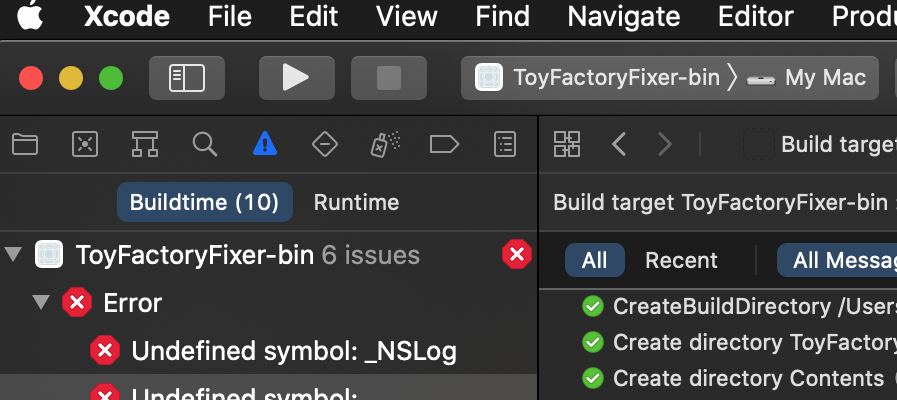
Each day I’ve been slowly and steadily making progress, between figuring out how to build custom libSDL2 and related libraries (it turns out I can also use configure && make && make install the way I do on my Linux system), getting the Xcode project to generate, and getting the project to attempt to build. I have fixed some compiler errors, and I am currently fixing linker errors, so maybe I’ll have this thing figured out sooner than I think.

Thanks for reading!

Want to learn when I release updates to Toytles: Leaf Raking, Toy Factory Fixer, or about future Freshly Squeezed games I am creating? Sign up for the GBGames Curiosities newsletter, and get the 19-page, full color PDF of the Toy Factory Fixer Player’s Guide for free!

Categories
Game Design Game Development Geek / Technical

Freshly Squeezed Progress Report: Windows Port and Preparing to Publish

Last week, I reported that I finally finished my Linux-based port of Toy Factory Fixer.

This past week, I set out to focus on the work of actually publishing it.

Sprint 61: Ports

Planned and Complete:

  • Create Windows port
  • Create itch.io page

It’s always a good feeling to finish all of the work I set out to do.

I didn’t know how long the Windows port work would take, and since the Linux port was finished, I wanted to get that into the hands of players as soon as I could.

I wanted to publish my games on itch.io, the open marketplace for independent digital creators with a focus on independent video games. I already have an account there due to some major charity bundles they hosted, and I like how the organization is so creator-friendly and also proactive about keeping the site toxic-free, so I started by learning what it takes to create a page.

And then…I made a page for the game.

The itch.io page editing tools were for the most part quite intuitive, and other than needing to shrink some of my animated GIFs to fit their 3MB limit, it made me wish there was an itch.io-inspired theme for WordPress because I love the way my game’s page looks and would love to match it on my own website.

I’ll be announcing the game’s release quite soon (as in, this week), so sign up for the newsletter (see below) if you want to hear about it first!

In the meantime, I found that creating the Windows port was fairly straightforward, but I also discovered that some code had to be changed that was causing some compatibility issues.

Specifically I have code using std::fabs, which I changed to abs, but it turned out that I was using the C version of it that only handles integers rather than the floating point version that comes from specifying std::abs from <cmath>.

I also realized that my Linux port had no music-playing capability, namely due to the custom SDL2_mixer library not being able to find OGG Vorbis in my docker container. The docs only mention that it needs OGG/Vorbis libraries installed on the system, but until I installed the libvorbis-dev package, I was struggling to figure out exactly which of the handful of libraries to install. So, hopefully that helped you if you ran into something similar.

The main problem with my Windows build was investigating what it takes to sign the executable. Basically, if the executable isn’t signed, then Windows likes to put up a scary modal dialog informing the player that this could be something dangerous from the Internet.

From what I could tell, it sounds like I could sign it with my own credentials, but since no one has my certificate, it might as well not be signed at all. I could pay for a certificate, but it isn’t cheap, especially for a free game, and on top of it all, I am reading that unless a critical mass of users downloads and runs the game, Microsoft’s Defender SmartScreen will see that the game doesn’t have a positive reputation and still flag it anyway.

So, I decided not to sign it for now. Maybe I’ll come back to figuring this piece out if my players worry about it.

Anyway, itch provides a tool called butler, so I spent time figuring out how itch prefers you to upload your distributables. I was expecting to provide .tar.gz files for Linux or an installer for Windows, but with butler, you simply point at your extracted directory and say which “channel” it is in (linux, windows, mac, etc), and it uploads everything in a nice way that allows you to upload updates in simple patches.

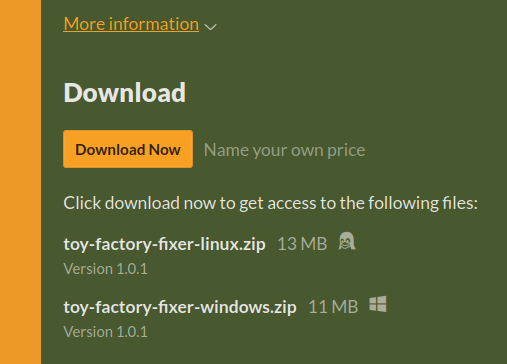
On the player’s side, they see .zip files, with the version specified.

Toy Factory Fixer downloads on itch.io

What I don’t like is that when you unzip the file, it extracts the contents directly into whatever director you’re in, as opposed to providing a root directory.

On the other hand, due to how butler and the itch.io’s app work, when you download the game through their app, it automatically creates a root directory with the name you provide for the page. It’s just a poorer experience (I think) for anyone who does a direct download from the page, and providing a root directory myself means a poorer experience for those who use the app.

I will say that the experience with the itch.io app is nice. You say download, then you hit the Launch button, and despite the fact that I didn’t specify a manifest or anything, they figured out which file was the executable so the game just works.

So now I have a Linux port AND a Windows port ready to go, and I’ll soon launch the itch.io page for the game (again, sign up for the mailing list to be the first to know!).

Next up is to create the Mac port, which I worry will not be as straightforward.

Thanks for reading!

Want to learn when I release updates to Toytles: Leaf Raking, Toy Factory Fixer, or about future Freshly Squeezed games I am creating? Sign up for the GBGames Curiosities newsletter, and get the 19-page, full color PDF of the Toy Factory Fixer Player’s Guide for free!