Categories
Game Design Game Development Geek / Technical Linux Game Development

June #1GAM: Islands and Messages

The other day, I had merely a walking Castaway demo for Shipwrecked, my June One Game a Month project.

I spent a little more time on the controls than I thought I would. It didn’t feel right. I tried something simple at first:


if (an arrow key has been pressed since the last update)
{
velocity = 1.0
player.setDirection(the direction of the arrow key)
}
if (an arrow key has been released since the last update)
{
velocity = 0.0
}

It worked well enough. The Castaway moves at a constant speed until the key is released, then he comes to a complete halt.

The problem was that if you are switching directions periodically, sometimes the velocity drops to 0 even if you feel like you should keep moving.

So I changed it. Now, instead of checking for key release, I check the status of all four arrow keys. If none of them are currently pressed, THEN set the velocity to 0.0. Otherwise, allow the movement to continue.

It feels much better.

I’ve also added some message routines. Basically, if there is a message to display to the player, it will end up in a queue with a timer. When the message is visible, the timer ticks down to 0, and it removes the message from the queue for the next one. It took me all of 15 minutes to implement.

And instead of a giant purple emptiness, I added some tiles.

In this Shipwrecked message queue video demo, you can see all of the elements of the project in action, including being able to read a few lines in the Castaway’s diary:

I simply painted the tiles down using for-loops, so the Castaway could walk on water right now if I let him.

So the next big things to do:

  • Add a map. A big one that spans more than a single screen.
  • Make the camera center on the Castaway as we explore the map.
  • Give the player something to do other than explore the map.

My worry is that I’ll get to the end of the month without any game play. I still haven’t exactly figured out what actions the player has, nor what the ending looks like.

It’s partly because I’m worried that I’ll be too ambitious. For instance, if I implement the ability to get heat stroke, it means the player needs to be able to avoid it, which means finding or building shelter. Do I have time to implement the ability to collect resources and build a lean-to (as well as draw one that looks half-decent)?

These last few things have come together quickly. Maybe I’ll get lucky and won’t have to compromise entirely on the concept of a Castaway surviving on a desert island after a shipwreck.
Categories
Game Design Game Development Geek / Technical Linux Game Development

June #1GAM: We’re Walking, Here!

Last time, I introduced the Castaway for my One Game a Month project for June. I’ve since created a few more poses and some basic walking animations.

Here’s a June #1GAM video demo I quickly put together:

Next up is giving the player direct control through the arrow keys, which means changing directions and needing to set the right frame when standing still.

And after that, I think I’ll add some basic text displays. I like the idea of tooltips and descriptions popping up when you are exploring the world. Maybe it will tell you if you’re getting hungry, similar to how NetHack does it. Or maybe I’ll be more direct than that. B-)

Soon after, I’ll create the world to explore, and I’m thinking about cutting back on line-of-sight since I might not have enough time to really play with it.

Categories
Game Design Game Development Geek / Technical Linux Game Development

June #1GAM: We Need a Castaway

In my last post about my June project for One Game a Month, I talked about the general ideas I had, plus I created a mock-up.

Since then, I’ve thought about what kinds of tiles I’ll need. I’ve decided to set it on an island in an ocean, so it will have standard sand, rocks, water, and palm trees.

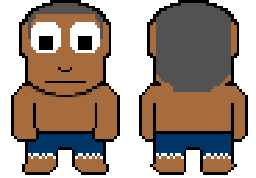
The game is called Shipwrecked, and we’re going to need a castaway. Here’s what I created during yesterday’s Game Dev Co-Op Hour:

June #1GAM castaway

I still need to provide left and right versions, plus walking animations, but I’ll keep them simple. I’m fairly pleased with my programmer art.

After that, the next task is to give this character a world to walk around in.

Then I can work on line-of-sight algorithms. I’ve been thinking about having the player’s vision deteriorate if he/she is too hungry or sick, so the edge of the fog might be closer than usual if the player is reckless.

I’m pretty excited. I hope my enthusiasm and productivity lasts. B-)

Categories
Game Design Game Development Geek / Technical Linux Game Development

June #1GAM: I Think I’ll Do Line-Of-Sight

Four days into June, and I hadn’t thought about what to make for the One Game a Month challenge for June.

I searched online for interesting mechanics to play with, but nothing really jumped out at me. If you want to see some ridiculous concepts, try out the Game Idea Generator. B-)

At some point, I thought about the idea of being shipwrecked and needing to survive. Maybe you’re on an deserted island in the ocean. Maybe you’re on a deserted planet in the far reaches of space.

I liked it. The player has to deal with hunger, weather, injuries, disease, wildlife, environmental hazards, all while trying to survive. Maybe help is coming if you wait long enough? Maybe you need to explore the island and build something to find your own way to freedom? Maybe there are others in the same predicament?

I don’t know. But exploring sounded like it had to be a big part of this game. You’re stranded, and you don’t know where you are, so you better get a handle on your surroundings.

And since I decided to do a tile-based grid, it seems like a good opportunity to do line-of-sight fog of war.

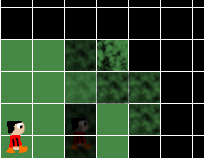
I like the idea that the player can see his/her immediate surroundings but needs to explore to see more. I like the idea of multiple levels of fog. One tile away is visible. Two tiles away is a little foggy. Three tiles away is more foggy. Four tiles is opaque.

Below is a mock-up demonstrating experiments with some fog made in the GIMP to see how it might look with different levels.

June #1GAM Mock-up

I’m not sure I’m happy with it, as I want it to be more difficult to see what’s behind the fog. Maybe I can experiment with different ways to render or create fog. We’ll see.

I also have to think about explored areas vs areas the player is immediately able to see. I’m reminded of Fate of the Dragon‘s fog of war, which returned to opaque if you weren’t in an area after a period of time. I think I’ll follow the normal RTS convention of graying out explored areas you can’t currently see.

Perhaps I’ll use Zelda-like controls. I was thinking about using the mouse and doing click-to-move/interact for simplicity, but I wonder if there might be some advantages to using the keyboard in terms of how expressive the player can choose to be. Maybe there are good reasons to crawl, sit, rest, walk, run (which takes a lot of precious energy), swim, jump, climb, open inventory, use items.

But then again, I can probably do all of the above with the mouse as well as the keyboard. Spacebar can be used to toggle sitting/standing, CTRL+click could be used to crawl, while Shift+click could be used to run.

Either way, I’ll probably find that I won’t add all of this due to only having the rest of June to finish this game. B-)

Categories
Game Design Game Development Geek / Technical Linux Game Development

May #1GAM Entry: Hungry Frogs

The updates have been coming in quickly towards the end of the month, but my May project for One Game a Month is finished.

Download Hungry Frogs for Linux 64-bit (352 kb tar.gz file)

May #1GAM

Rather, it is finished enough. You can control the frog by jumping and turning around. If you fall in the water, the frog slowly swims back to the nearest lily pad. Flies will move across the screen in a straight line from left to right, and you need to jump to eat them. If you miss half of them in a given round, the game is over. Otherwise, the flies move faster each round, making it more difficult to catch them.

I didn’t take many screenshots as I thought the rectangles made for an uninteresting still shot, but I did make videos to demonstrate progress of the game’s development.

First, getting the jumping physics to work:

Then, landing on lily pads and swimming when you fall in the water:

Then, some game play, with edible flies:

And the final version, with faster flies each round and a game over screen if you miss too many:

I moved the frog’s tongue down as I realized it looked strange at the top of the head and I wasn’t going to have time to replace the white rectangle with a nice animated frog image. I would have liked to have flies moving in fly-like ways instead of straight lines. I really appreciate how the developers of Frogs and Flies nailed it in the constraints of an Atari 2600’s memory and processing power.

I’m not sure I’m happy with how easy it is now. Originally it was difficult to catch flies, so I expanded the tongue’s collision detection to include the frog’s body as well as a space around the tongue. Now it might be too forgiving, although there’s a gap if the frog is moving fast enough that from one frame to the next the collision box goes around the fly’s location. I’d fix that next if I had more time.

I’ve never made a platformer before, and this project was a good start. I am pleased with the jumping physics, although I need to figure out a better way to determine the maximum heights of jumps.

All in all, it was a fun project to make, even if it is once again another project with scope cut drastically to make the deadline.

Categories
Game Design Game Development Geek / Technical Linux Game Development

My May #1GAM: Now You Can Eat Flies

During the GBGames Game Dev Co-Op Hour this morning, I added flies and the ability to eat them, as you can see in this Hungry Frogs progress video:

I realized that the tongue’s dimensions were too small and made it too difficult to eat flies, so I increased the dimensions beyond what the tongue’s visuals would indicate, and I eventually even added the frog’s body as part of the “did the frog eat this fly” collision detection.

I noticed while making this video that sometimes the frog’s tongue looks like it should eat a fly as it falls, but it must be falling too fast since the fly remains, meaning that the collision detection happened above and below the fly but not in-between, where the fly actually is. One way to solve it is to do a more complex collision detection in which I keep track of where the frog was in the previous frame and check for the space in between as well. Another is to reduce the speed that the frog currently moves so that such checks don’t have to happen. The latter would be easier in my limited time.

My next step is to provide a way to end the level and start a new one.

And animation would be a nice way to finish it before the end of the month, although I’m not optimistic that I’ll be able to dedicate the time.

Categories
Game Design Game Development Geek / Technical Linux Game Development

My May #1GAM: Now with Lily Pads and Water Hazards

Last week, I wrote about my May #1GAM project’s progress, explaining that I haven’t been able to dedicate a lot of time this month to the project, partly due to day job crunch and partly due to travel and events going on around this time.

I was able to tweak the jumping physics a bit, and I’m much more satisfied with it. I like the idea of short hops getting the player into position to take a large leap and landing safely on the other lily pad.

As you can see in this updated May #1GAM demo video, I’ve split the lily pad into two, and now I’ve made the water a hazard:

If the frog falls in, it automatically swims to the nearest lily pad. It’s a constant speed, unlike the swimming motion that was mimicked so well in Frogs and Flies, but it’s in.

Since the player can’t control the frog when it is swimming, it means the player has less time to eat the flies before the sun goes down, and so therefore landing in the water means less points will be earned.

The next biggest thing to implement: flies and the eating of them. In hindsight, this aspect should have been implemented first, as it impacts how much I like the jumping physics, but I really wanted the swimming aspect in.

And I’ll follow it up with a score indicator and a timer to represent a day of fly-eating.

If I have time, maybe I’ll be able to replace the square with an actual animated sprite of a frog.

How’s your One Game a Month project going?

Categories
Games Geek / Technical Linux Game Development

The Linux Game Tome Is Shutting Down

A few months ago I wrote about how it is so difficult to submit games to Linux gaming sites, based on my experience with trying to spread the word about the latest update of Stop That Hero!

One of those sites is The Linux Game Tome. It was one of my favorite Linux gaming sites, and had an active forum for developers and players, as well as an IRC channel.

In recent times, it has been plagued with spam and hardware issues. Twice it had been down for months due to a faulty hard drive, for instance. These problems resulted in a lack of activity when it was finally back up. When they updated their forums last summer, it broke the ability to submit games to their database. To this day, Summoning Wars was the last game with an update in June of 2012.

Last month, there was a new post, however, and it wasn’t good news for fans.

The Linux Game Tome will shut down on April 13. Those of us who have maintained happypenguin.org over the years now lack both the time and the ambition to do what is necessary to keep the site afloat.

A later update provided a link to a dump of the game database, all 300+ MB of it, with the idea that someone might be able to recreate the site if they so choose to do so.

Since then, two forums have popped up about how to carry on without the original site operators. One is Resurrecting the Tome, and the other is The Linux Game Tome Ideas and Discussion. I’ll be interested in seeing what comes out of these discussions.

While my new favorite site is the active Gaming on Linux, The Linux Game Tome holds a special place in my heart. I thank Bob Zimbinski, aka bobz, for all he had done, and I wish him luck in whatever his future ambitions are.

Categories
Game Development Games Geek / Technical Linux Game Development Personal Development

February #1GAM Entry: Electomagnetic Play

I managed to put my February entry for One Game a Month together mostly in the last couple of weeks, sometimes with only 15 minutes at a time to dedicate to working on it. It’s amazing how much comes together in 15 minutes.

Electromagnetic Play is currently only available for 64-bit Linux as I wanted to get it in under the deadline. I’ll work on ports later when I have some time.

Download Electromagnetic Play for Linux 64-bit (1.5MB tar.gz file)

A quick description of the evolution of the game.

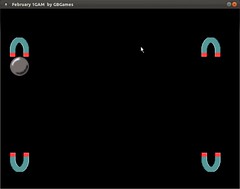
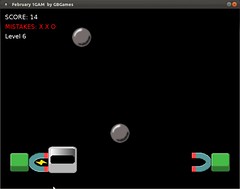
I thought of having magnets that you use to move metal balls around an arena.

February 1GAM

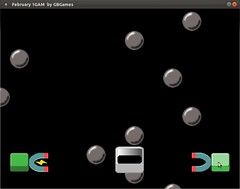
Eventually I decided on a simple game in which you have to catch the balls in a metal bucket, and you can only move the bucket by charging magnets on either end.

February 1GAM

Once I had balls dropping and magnets charging when you clicked on the green buttons, I had something that was basically finished.

February 1GAM

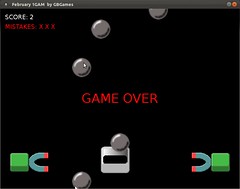
Add some scoring and lose conditions…

February 1GAM

…and tweak the challenge a bit by level, and we have a game.

February 1GAM

Categories
Game Design Game Development Geek / Technical Personal Development

January #1GAM Entry: Walls and Armies

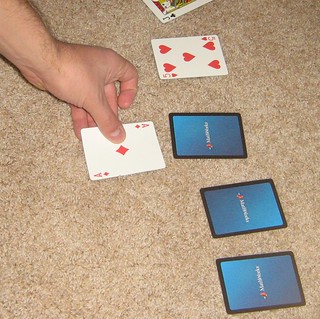
I’m in crunch at the day job, and so I didn’t have weekends like I had hoped to work on a game project. Luckily, I had finished the design of this two-player card game, and it counts. I call it “Walls and Armies”, and the rules are below.

CardGameDemonstration

Setup:
Take a standard 52 card deck of cards. Remove the jokers from the deck and leave them out of the game.
Shuffle all cards into a main deck.

For each player:

  • Determine how many “walls” and “army” cards you get. For each type,
  • Flip the top card from the main deck to determine the number of cards to deal
  • If it is a face card (Jack, Queen, King, Ace), then place that card down in front of the player face-up and sideways to indicate that it is a “shield”.
  • If it is a number card, discard the card and deal the indicated number of cards face-down in front of the player. For example, if the top card was a 3, then discard the 3 and deal three cards.
  • The wall cards and shield cards are laid out individually in front of the player. The army cards are placed in a deck, and the player should not look at them.

Play:
The first player is the one who has the fewest wall cards, or if tied, the one with fewest shields, or if tied again, the one with the fewest army cards. In case of a tie across all three sets of cards, flip a coin.

For each player:

  • Pick one of the opponent’s wall or shield cards to attack, then flip the top card from your army deck. If the target card is face-down, flip it over to reveal it. You cannot attack wall cards until your opponent’s shield cards are eliminated.
  • If your card is higher, then discard both the target card and the army card.
  • Otherwise, your opponent can choose to leave it alone or counter-attack:
  • If left alone, you may stack your next army card on top of any of your in-play army cards, adding the number of the armies together to attempt to eliminate the target card.
  • Your opponent may choose to counter-attack by playing one of his/her own army cards.
  • If the counter-attack is higher than your army card, then the counter-attack is discarded, and each of the stacked armies are added to the opponent’s wall cards.
  • Otherwise, both the counter-attack and the stacked armies are discarded.
  • Repeat until you run out of army cards.
  • Replace all face-up shield and wall cards with face-down cards.
  • Replenish your army deck by flipping the top card from the main deck. If it is a face card, add it to your shields. Otherwise, deal yourself the number of cards indicated into your army deck.
  • Play continues until either player has run out of wall cards. The other player is declared the winner.