Categories
Game Design Game Development Geek / Technical Linux Game Development Personal Development

LD32: Art for “A Giant Weapon” #LDJam

After I got a working build of my project, which didn’t take too long, I started doodling some monster faces.

LD #32 Giants And Ogres

I love how goofy the faces are. I want the monster’s face to be expressive so that it can give clues to the player about what it is thinking.

But just how giant is this character going to be? It can’t be so huge that you can only see its feet. I suppose it would cut down on asset creation, but I envision a very emotive monster which requires a visible face. I want it to be seen as a huge monster, so being merely a head taller than all of the other characters in the game isn’t enough.

But what if there is no player character? That is, the player can interact with the world without having a representative in the world. Then the monster can fit on the screen, and any characters can be incredibly tiny. After all, their faces aren’t as important as the fact that they are running from a marauding monster coming through town.

Maybe they are very tiny stick figures in comparison.

I’m not completely sold on the idea of having no player character. I like the idea of the player running around, trying to get the monster’s attention while avoiding the chaos and destruction.

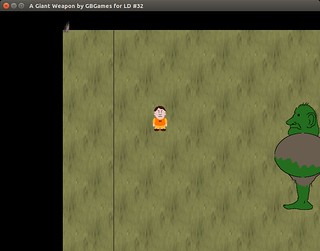
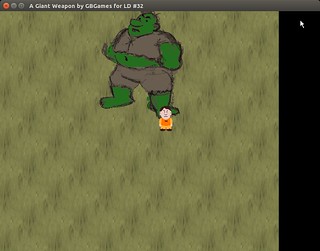
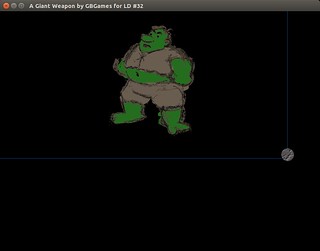
LD #32  Moving Monster On Screen

That mock up image of the monster now moves about the screen on its own, although the AI is basically “bounce off the walls” and will need to be replaced.

I realized I was falling asleep as I was coding, so I think I’ll go to bed.

Categories
Game Design Game Development Geek / Technical Linux Game Development Personal Development

LD32: Weapon Ideas #LDJam

Ok, it’s two hours later. I had leftover green olive and onion pizza for dinner:

LD #32 First dinner

And my wife came home from an event with a red velvet cupcake for me:

LD #32 Red velvet cupcake

I came up with a number of ideas for this theme, especially as people on IRC bounced quite a few around:

  • The Bourne Identity: remember that scene when Bourne used a rolled up newspaper to hit the other guy? And then he stabbed him with part of a pen that was lying around? A game with a lot of random stuff that requires the player to be resourceful and clever.
  • Infectious Agent: a restaurant owner is trying to poison the right spy without killing customers.
  • Kite a Giant: lure a large monster toward a city/castle/friend’s cooler treehouse/etc, while ensuring it doesn’t get bored or killed.
  • Sunlight Focused: kill a neighbor’s flowers with beams of concentrated sunlight in order to win the local horticultural contest.
  • Food Fight: a cafeteria featuring students with ridiculous weapons, such as mashed potato guns and banana missiles.
  • Toys: inspired by the Robin Williams movie, in which wind-up toys fight (I recall this is a multi-decade old game already).
  • Information Warfare: choose which important papers to shred in order to leak secrets.
  • Books: check out books from a library before your coworker does to prevent him/her from learning and getting that promotion.
  • Excruciatingly Severe Body Odor: your odor is repellent. Make use of it!
  • Numbers vs Letters: it’s a battle between the higher level and abstract thoughts!
  • Shapes: an RTS inspired by the different shapes in Flatland.
  • Monopoly: use market pressures to defeat your competitors.
  • Avalanche/Cave-in: cause a disaster to trap other people.
  • Cactus vs Balloon: inspired by some art in my room.
  • Nanotechnology: tiny invaders that destroy your enemies from the inside out.
  • Mind Control: make your opponents do self-destructive things.
  • Fear: scare people towards disaster (for them, obviously).
  • Vampire Hunter: use blood disease to kill vampires.
  • Eggs: birds hatch and peck at opponents.
  • Plunger: you’re a plumber, and you have to save the day.
  • Hopes, Dreams, Aspirations, and Fears: you work in HR at Large Corporation, Inc.

I also tried to come up with a list of potential weapons:

  • Gravity Wells
  • Vacuum cleaner
  • Air guns
  • Summon beings, such as demons
  • Weather
  • Ever increasing mass
  • Sex appeal
  • Paper cuts
  • Bullying
  • Embarrassment
  • Candy
  • Innocence
  • Music
  • Laundry (dirty or otherwise)
  • Humor
  • Banana peels
  • Kisses

Out of all of them, Kite the Giant is the one I keep thinking about. I like the idea of indirectly influencing a destructive force.

I think I’ll go ahead and call it. That’s my game idea, and I’m moving forward with it.

Categories
Game Design Game Development Geek / Technical Linux Game Development Personal Development

LD32: An Unconventional Weapon #LDJam

The theme has been announced, and it’s An Unconventional Weapon.

I think I’ll start by exploring that theme quite a bit, and I’ll get back to you about what I’ll do. I’ll think about this theme over a quick dinner.

My goal will be to have something playable, or at least controllable, before the first 12 hours are up.

Since I’m not using something like Unity or Unreal Engine, I won’t be able to whip something up in mere moments, but I know I’ll be able to leverage some of my own code as I have in the past. Each Ludum Dare gave me something new to make use of.

My strategy for this Ludum Dare is to doodle a lot whenever I’m not programming. I’m not very good with digital art programs, but I can put pencil to paper decently enough, and I can just digitize it after the fact.

Categories
Game Design Game Development Geek / Technical Linux Game Development Personal Development

Ludum Dare #32 Is About to Begin #LDJam

I’ll be participating for the first time in two years, when I made a simpler-than-I-would-have-liked game for Ludum Dare #24: Evolution.

Before that, I participated in #11 (Minimalist), #12 (The Tower), #13 (Roads) #14 (Advancing Wall of Doom), #15 (Caverns), #18 (Enemies as Weapons), and #20 (It’s Dangerous to Go Alone. Take This!). I also have a number of MiniLDs under my belt. I’ve gained enough experience to attain Veteran status, so I get +1 to the category of my choice, I think.

I’ll be using libSDL2 and related libraries, NFont, Gimp, Audacity and SFXR, C++, vim, and my Ubuntu system for a development environment.

My past self posted a handy checklist on my blog: https://www.gbgames.com/blog/2012/08/pre-compo-checklist-for-ludum-dare-ld48/ Thanks, Past Self!

As always, I’ll try to cross-post my progress both on the Ludum Dare website and on my own blog.

Oh, and here’s my office pic:

My Office for LD32

Good luck, everyone! I’ve missed you.

Categories
Geek / Technical

Calling CMake commands within CMake with execute_process

Hypothetically, you’re using CMake and want to do something that CMake documents as one of its list of commands it provides that can be used across different systems:

-E: CMake command mode.

For true platform independence, CMake provides a list of commands that can be used on all systems. Run with -E help for the usage information. Commands available are: chdir, compare_files, copy, copy_directory, copy_if_different, echo, echo_append, environment, make_directory, md5sum, remove, remove_directory, rename, tar, time, touch, touch_nocreate. In addition, some platform specific commands are available. On Windows: comspec, delete_regv, write_regv. On UNIX: create_symlink.

Ok, so you know that you can use the -E command line argument, but you’re not running this command from the command line. You’re trying to run it as part of the configuration step of your build.

That is, you have a CMakeLists.txt file, and within it, you want to add a command to do something at configuration time, such as create a symlink.

So, how do you do so?

Well, it’s not clear from the documentation, but it turns out that the way you are expected to do so is by using execute_process. Here is an example in which I link to my project’s resources directory from my Android project’s assets directory:

EXECUTE_PROCESS(COMMAND ${CMAKE_COMMAND} -E create_symlink “${PROJECT_SOURCE_DIR}/resources” “${PROJECT_BINARY_DIR}/android-project/assets/resources”)

Hopefully this tip helps you save some of your hair from being pulled out.

Also, if you would prefer it to happen at build time instead, use add_custom_target.

Categories
Game Development Geek / Technical

More Game Mechanic and Algorithm Visualizations

Sometime back, I wrote about GameMechanicExplorer, which was a new site that allowed you to explore game mechanics interactively.

Seeing a new technique represented in a visual space can help make it easier to understand, especially if the math or algorithm is complex.

If you’ve ever done searches online for game development, you’ve probably come across Amit Patel’s website, which acted as a public set of bookmarks for various game development resources.

RedBlobGames 1

In the last year, he started posting interactive visualizations to explain topics such as lighting and visibility, A* pathfinding, probability, and using noise to make procedural generation look natural, among others.

RedBlobGames 2

I enjoyed his article on procedural map generation in the past, but being able to see (and hear) how noise works and learning about the different kinds of noise in one place is amazing.

In general, you can find a lot of great game development resources at Red Blob Games, but these new visualizations add a lot of value. Thanks for posting these, Amit!

Categories
Games Geek / Technical General Politics/Government

Why Does Your Game App Need My Browser History and Photos?

Years ago, I started paying attention to the usage of so-called digital rights management (DRM) in games and made my purchasing decisions accordingly. I might have missed out on some major cultural impacts, but I wasn’t going to passively accept what I thought was a draconian form of copy protection. A form of protection that, by the way, doesn’t even work most of the time, so only legitimate customers get punished.

In practice, it meant not buying many major games. Spore is one very famous example, and I wrote a bit about it in this post about it’s reception in the market. Reading it today, I can see I was a bit angry about the DRM:

Do I like the game? I haven’t played it. Apparently Spore has some crappy so-called DRM solution attached to it, and it’s definitely not available for Gnu/Linux, so my choice is to boot up Windows AND suffer this DRM crap, or play a different game on my preferred system. It’s too bad. If things were different, I’m sure I would have liked Spore, too, but I refuse to pay for a steak dinner delivered on a garbage can lid.

Ooh, burn!

It was my attitude, and it still is today, partly because DRM is fundamentally flawed and partly because it’s a system that makes it easier to be a criminal.

But this post isn’t really supposed to be about DRM. Today, I find myself concerned about downloading free-to-play games on my smartphone that require bizarre permissions.

Recently, I was looking for a good strategy or simulation game to play on my Android smartphone. I found some that seemed promising and popular, and I found myself stopped when I clicked the install button because the requested permissions were ridiculous.

Why does this game need access to my browser bookmarks and history? Or why does that game need access to my photos?

Actually, it seems that Google’s API just doesn’t allow very fine-grained control of what is and isn’t allowed to be accessed by an app. According to this What’s on Dave’s Droid? post, if an app needs access to the state of the phone to know when to minimize if a call is coming in, it has to get that information from the same permission that gives it access to the identity of who is calling.

And this isn’t a new story. I’ve just only become aware of the problem myself.

I get that the permissions section can’t be too complex for the user experience. People don’t read EULAs as it is, and I’m sure many apps are perfectly safe, but is it weird that we’re being so trusting of apps by hoping that they don’t cross a line we’ve given them permission to cross? Especially in a world where we know we’re being spied on?

For now, I feel that I need to treat some apps just as I treated games packaged with so-called DRM. I’ll ignore the ones that ask too much or that are made by someone I have no reason to trust. Maybe I miss out on a gem, but I’ve survived without Sony’s rootkits and the pain of not being able to install a game I’ve legally purchased in the past. I think I’ll survive not playing a game that may or may not be compiling a list of my contacts and recording my location.

Categories
Geek / Technical Personal Development

Learn Computer Science, Not Coding

When I was in college, I was in the computer science program. Some of the classes were about learning programming.

I enjoyed programming, but I didn’t always enjoy the classes. Part of the reason was that we were learning how to program in Visual C++ 6.0.

For anyone who remembers it, 6.0 was…OK. That is, if you wanted to code and compile and run a project, it worked more or less as expected.

But it had a reputation for not supporting the C++ Standard very well. As I didn’t know the Standard very well myself, I had no idea, but in hindsight, it explained why my professors almost universally ran into difficulties teaching certain aspects of it.

Eventually the school’s official language switched to Java. I recall hearing it was because a professor started talking about linkers and object code and got a bunch of stares from confused students who were used to doing nothing more than clicking the “Build” button in a UI.

Similarly, my classes that were ostensibly about teaching database concepts almost always were really classes about using Microsoft Access. Even before I started using GNU/Linux as my main OS and cared about cross-platform compatibility, it seemed wrong to me that the tool we were supposed to use to practice what we learned was so proprietary.

I found I preferred classes in which I learned concepts and theories that could be applied in many contexts. I always liked general principles rather than specific solutions.

Now, when I neared graduation and was worried about finding a job, suddenly my disinterest in specific tools such as Microsoft Access turned out to be a liability, but I was looking for programming jobs in particular, and most of them seemed to want people who knew not only how to work with databases but with specific types of databases.

On the other hand, if I cared, learning Access, or Oracle, or MySQL were all within my grasp if I applied myself. My issue wasn’t skill but experience. I understood how databases worked, and I could apply my knowledge to most of them. And in fact, my knowledge of how they worked could be applied outside of formal databases. When I was creating a component-based entity system for my game objects, I was basically creating my own database system. It’s been said that video games are just databases with pretty front-ends.

So I preferred being able to think generally about solutions rather than learn specific tools. I still hate picking up a game development book and discovering that it’s actually a Windows-specific game development book, or a Game Maker-specific development book, or a Game Salad-specific development book, or a Unity-specific development book.

A few days ago, I enjoyed reading Don’t Learn to Code, Learn to Think. The author is railing against the confusion that computer science is nothing more than programming, against learning a tool as an ends in itself. Computer science is a way of thinking, and programming is how you apply that thinking. The former is more general and has broad applications, the latter…well, creates specific applications. B-)

Not everyone needs to learn how to write code in the same way that not everyone needs to learn how to fly a plane, but knowing logic and information theory helps you in life the same way that knowing physics and math would.

If you want to learn something that also has broad applications, you should check out the online course Model Thinking led by Scott E. Page at the University of Michigan.

In these lectures, I describe some of the reasons why a person would want to take a modeling course. These reasons fall into four broad categories:

  • To be an intelligent citizen of the world
  • To be a clearer thinker
  • To understand and use data
  • To better decide, strategize, and design

Sounds good to me.

Being able to improve my ability to think about problems has wide-ranging benefits. For one, I have more tools. I don’t learn to use a hammer and treat everything as a nail. I learn the screwdriver, the ax, the jigsaw, and more, and I apply the right tool to the problem, and I can even combine tools in ways that make sense.

Similarly, if I learn programming but don’t learn the concepts, I’ve basically learned how to use a hammer. While you could hammer a screw into a board, you can’t use a hammer to remove the screw, or to cut the board. When problems arise, such as compiler or linker issues, or logic bugs, I have almost no frame of reference for how to solve them if I haven’t learned about compilers or De Morgan’s Law.

Categories
Geek / Technical

Ooh, Some Pixel Art Tutorials!

I’m a pretty good programmer, but I’m a self-taught artist. That said, I think I make fairly decent programmer art.

July #1GAM

It’s not beautiful, but it’s not strangely proportioned stick figures either.

I used to draw all the time when I was a child, but aside from taking a drawing class in high school, I haven’t had any formal training.

So I’m always on the lookout for ways to improve my craft, especially when it comes to creating better 2D graphics.

A long time ago, I found Alexey Garkushin’s page of pixel art tutorials.

While I’m sure there are more up-to-date documents out there, the page hosts tutorials from a variety of artists, including “So You Want to Be a Pixel Artist?” by Tsugumo which starts out with the ubiquitous grass tile and takes you through multiple lessons on coloring and shading to make your tiles look much more pleasing. Eventually the lessons take you through animating a fighting game brawler sprite.

Also available are tutorials on animating water flow, creating a pixelated portrait, and working with isometric views. They are easy-to-follow and give some insight on how to create the kind of art seen in some of your favorite classic games, such as Final Fantasy 3 (or 6 if you didn’t play it on the SNES).

There are even a few tutorials on non-pixel art, such as using Photoshop to render human hair and a general art tutorial that is appropriate for anyone interested in learning more about how light and shadows play on objects.

If you want to see how some amazing examples of pixel art, check out PixelStamps, “a collection of stamps pixelated by the pixel artists of the world.” When people click on stamps, the stamp price goes up to indicate the popularity of it. It’s a pretty neat site that gives you an idea of what’s possible with a few strategically-placed colors.

Do you know of other pixel art tutorials? Or art tutorials in general? What’s your favorite?

Categories
Game Design Game Development Geek / Technical

Explore Game Mechanics Interactively At This New Site

Flocking on GameMechanicExplorer.com

If you’re new to game development, or even if you are a veteran making a game of a type you’ve never made before, you might find yourself doing research on how to best implement the mechanics. Whether it is figuring out how best to implement ballistics or how to move a rocket ship, it’s not just the math but the approach you might be looking for.

For instance, last year I made a Frog and Flies clone called Hungry Frogs for One Game a Month. I remember spending quite a bit of time on the jumping mechanic as this was the closest I’ve ever come to implementing a platformer. In the end I wasn’t completely happy with what I had. My main complaint was that it wasn’t easy for me to identify the maximum height of the frog’s jump without tweaking variables and seeing what happens. But considering the few hours I spent on it, I delivered something that worked well enough.

Still, if GameMechanicExplorer.com had been around then, it would have saved me some time.

The site offers you a list of common game mechanics, each of which has at least a handful of examples with an in-browser demo and a JavaScript code example written using the Phaser framework.

Each example focuses on one concept and includes the source code for the implementation. They aren’t meant to be extremely polished or to represent a complete game. They aren’t highly optimized. They may not even be the best way to implement the mechanic being demonstrated! (They’re certainly not the only way.) They are written for clarity so that it is easier to understand the underlying concepts and apply them to your own work in your own engine. I expect that some of these examples will evolve as I gain experience. But hopefully you’ll find them useful and you can use them as a jumping off point for your own games.

At the time I am writing, there are examples for bullets, spaceship movement, following, homing missiles, raycasting, lighting, effects, easing movement, and even walking and jumping.

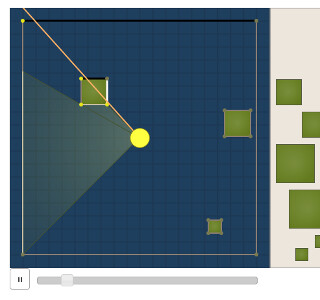
Line-Of-Sight on GameMechanicExplorer.com

The walking and jumping examples start out by showing you the naive approach, which has the on-screen character either stationary or moving at full speed. It’s functional, but it doesn’t feel right. The next example introduces the concept of acceleration to make the movement smoother, but it identifies a problem that is introduced. The next example introduces the concept of drag.

The next few examples take you through basic jumping mechanics, including double jumps and variable jump heights, the latter of which I needed for my hungry frog game.

I enjoyed spending time exploring different mechanics, such as seeing how various easing functions compare to each other, or how to use raycasting to do line-of-sight checks. I remember someone once posted a comparison of jumping mechanics of Mario, Meat Boy, and Mega Man among others, but I can’t find it today. GameMechanicExplorer.com is filling that void nicely.

I’m looking forward to seeing the implementation of some of the upcoming mechanics, including camera controls and the advanced platformer ones.

John Watson, you have provided aspiring game developers a great service.