Categories
Game Design Game Development Geek / Technical

Toytles: Leaf Raking Progress Report – Refactoring, Testing, and Vacationing

Last week’s report indicated that I didn’t get as much done as I would have liked. I managed to add a bunch of new random dialogs for weekends, but I didn’t get to grumpy client dialogs, which I pushed into the next sprint.

Sprint 5: More personality injections; streamline waiting for rain

Last week’s sprint plan was:

  • Give each neighbor unique text as unhappy clients
  • Streamline “Wait for Rain” option

In the last report, I said:

So this week’s sprint I will definitely get to the unhappy client dialog. I have some marketing screenshots to update, partly due to the copyright date, and I want to streamline the way you wait for rain to end so you can get back to raking as it is currently a bit clunky.

I did 2.25 hours of game development, but I did not actually work on any of the above.

So what did I do? Well, last week’s report also said:

I am kicking my Past Self for not spending more time on automated tests so I didn’t have to verify that I didn’t break anything each time I make a change. I’m slowly improving the code as I go along so that it is easier for Future Self, but Past Self is a short-sighted jerk.

This codebase is a few years old, and it has gotten fairly unwieldy. When I work on a 48-hour game development competition such as Ludum Dare, it’s fine for almost all of my game code to be in a single file. It is quick and dirty, and so long as I am mindful and focused, as I would be in a concentrated weekend development effort, I can make a game and then be done with it.

But when I have a commercial project that I am maintaining for years, something I come back to once in awhile, I need to break it up into well-tested pieces so that I don’t need to worry about forgetting how it works.

So I invested in my code quality last week. The rest of this report gets fairly technical, so feel free to skip to the end for my plans for the next sprint.

Code quality and its improvement

To give an idea of what I am dealing with, I have a class called InGameState which handles all of the game play logic and rendering. The class itself only has six functions:

virtual void onEnter();
virtual void update(int timeElapsed);
virtual GBLib::IRenderCommand * draw(); 
virtual void onExit(); 
virtual void onSuspend();
virtual void onUnsuspend();

This class is the workhorse of pretty much all of my games. That is, when you start a new game, the Main Menu state changes to the In Game state. It calls onEnter(), which is where things get initialized, including loading saved games or creating default values for variables.

Then update() and draw() get called over and over until the player exits, which calls onExit(), and the state machine calls onEnter() on whatever other state, either the main menu state again or the exit state in preparation for shutting down the game.

But as I said, I like to throw as much as I can into a single file when I work on a quick game project. If you looked at InGameState.cpp from nine months ago, it was 4,148 lines of code, and my work in the last month has added another 100 lines of code or so.

In a well-written codebase, I’d argue that most class implementations shouldn’t be more than a few hundred lines of code.

Now onSuspend() and onUnsuspend() are meant to help with pausing and unpausing, usually by delegating to a different state, but in this game, they merely set a boolean value to true and false respectively, so they aren’t very interesting. So how are over 4,000 lines of code distributed among four functions?

Well, they aren’t really. There may be four major class member functions, but each one is implemented using inline code as well as non-member functions strewn throughout the file.

I don’t know offhand how many of those non-member functions are in the code base. There’s a lot. But I know my bias is towards lots of small, well-named functions. But this codebase is also a few years old, so some of those functions are not as small as I would like.

So why didn’t I add them to InGameState.h and make them part of the class? Well, as with my protoytpe projects, it is a lot easier to delete all of the .cpp file and copy the header into a new project than it is to remember which functions to keep and which ones are project-specific.

Why didn’t I create a project-specific class and leave InGameState as a generic class to be used across projects? Because I didn’t.

In any case, there is so much code in this class that handles everything from initializing variables, dialog management, time and date changes, weather updates, input processing, screen updates and changes, and more.

An example: generateNeighborhoodScreenBG()

There’s an entire function dedicated to figuring out how to render a particular part of the neighborhood.

This function is over 50 lines long. What may not be obvious is that it takes what is called a NeighborhoodScreen, iterates over the tiles at the x and y positions, and adds the sprite that corresponds with the tile to the spriteWidget.

Ostensibly, that is ALL it does. But when you look at the code, it looks like it is doing a lot more. In fact, most of the code was actually figuring out how to put sidewalks down based on where streets are located.

void generateNeighborhoodScreenBG(SpriteWidget * spriteWidget, NeighborhoodScreen * screen)
{
	for (int x = 0; x < MAX_NEIGHBORHOOD_TILE_WIDTH; ++x)
	{
		for (int y = 0; y < MAX_NEIGHBORHOOD_TILE_HEIGHT; ++y)
		{
			int tileType(screen->tiles.at(x).at(y));
			SpriteWidget * tileWidget = new SpriteWidget(TileTypesToSprites[tileType], Point(x * TILE_WIDTH, y * TILE_HEIGHT, ZORDER::BG));
			if (STREET_TILE == tileType)
			{
				if (y != 0 && screen->tiles.at(x).at(y-1) != STREET_TILE)
				{
					tileWidget->add(new SpriteWidget(SideWalkHorizontalSprite, Point(0, 0, ZORDER::FG)));
				}
				else 
				{
					tileWidget->add(new SpriteWidget(SideWalkCornerSprite, Point(0, 0, ZORDER::FG)));
					tileWidget->add(new SpriteWidget(SideWalkCornerSprite, Point(TILE_WIDTH - 27, 0, ZORDER::FG)));
				}

				if (y != MAX_NEIGHBORHOOD_TILE_HEIGHT - 1 && screen->tiles.at(x).at(y + 1) != STREET_TILE)
				{
					tileWidget->add(new SpriteWidget(SideWalkHorizontalSprite, Point(0, TILE_HEIGHT - 27, ZORDER::FG)));
				}
				else
				{
					tileWidget->add(new SpriteWidget(SideWalkCornerSprite, Point(0, TILE_HEIGHT - 27, ZORDER::FG)));
					tileWidget->add(new SpriteWidget(SideWalkCornerSprite, Point(TILE_WIDTH - 27, TILE_HEIGHT - 27, ZORDER::FG)));
				}

				if (x != 0 && screen->tiles.at(x - 1).at(y) != STREET_TILE)
				{
					tileWidget->add(new SpriteWidget(SideWalkVerticalSprite, Point(0, 0, ZORDER::FG)));
				}
				else
				{
					tileWidget->add(new SpriteWidget(SideWalkCornerSprite, Point(0, 0, ZORDER::FG)));
					tileWidget->add(new SpriteWidget(SideWalkCornerSprite, Point(0, TILE_HEIGHT - 27, ZORDER::FG)));
				}

				if (x != MAX_NEIGHBORHOOD_TILE_WIDTH - 1 && screen->tiles.at(x + 1).at(y) != STREET_TILE)
				{
					tileWidget->add(new SpriteWidget(SideWalkVerticalSprite, Point(TILE_WIDTH - 27, 0, ZORDER::FG)));
				}
				else
				{
					tileWidget->add(new SpriteWidget(SideWalkCornerSprite, Point(TILE_WIDTH - 27, 0, ZORDER::FG)));
					tileWidget->add(new SpriteWidget(SideWalkCornerSprite, Point(TILE_WIDTH - 27, TILE_HEIGHT - 27, ZORDER::FG)));
				}
			}
			spriteWidget->add(tileWidget);
		}
	}
}

There isn’t anything wrong with this function. It does what is intended. Well, presumably. Since I have no tests around it, who knows what that intention was originally or if it continues to work when I’m changing code or even sneezing near it. But let’s assume with maybe only a little anxiety that the code works.

What I hate about it is that this code mixes levels of abstraction. I’m iterating through tile types and adding corresponding tile sprites to some parent sprite. But in one special case, I suddenly need to figure out how to add child sprites to the tile sprite. It’s important, but not so important that it takes up the lion’s share of the function! It just makes the entire thing harder to comprehend. So, a quick “refactor” changes the above code to:

void generateNeighborhoodScreenBG(SpriteWidget * spriteWidget, NeighborhoodScreen * screen)
{
	for (int x = 0; x < MAX_NEIGHBORHOOD_TILE_WIDTH; ++x)
	{
		for (int y = 0; y < MAX_NEIGHBORHOOD_TILE_HEIGHT; ++y)
		{
			int tileType(screen->tiles.at(x).at(y));
			SpriteWidget * tileWidget = new SpriteWidget(TileTypesToSprites[tileType], Point(x * TILE_WIDTH, y * TILE_HEIGHT, ZORDER::BG));
			if (STREET_TILE == tileType)
			{
				addSidewalksToTileWidget(tileWidget, screen, x, y);
			}
			spriteWidget->add(tileWidget);
		}
	}
}

I simply extracted that giant collection of if/else chunks into a separate function called addSidewalksToTileWidget().
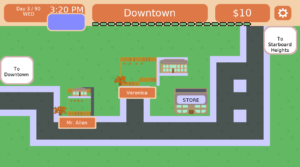
Sidewalks on streets

Now, you’ll note I said “refactor” above. Why the quotes? Well, as said, there are no tests around most of these non-member functions. I have no idea if I subtly broke something with this change. I think it looks fine, and when I play test the game, it still seems to be rendering sidewalks on streets as expected, but does it do the exact same thing as it did before? I have no way of verifying it. So it’s not really refactoring, because refactoring requires that I know with some confidence that I didn’t change the behavior when I changed the structure of the code.

You might also wonder what the above change bought me. Did I not just add more lines of code to InGameState.cpp?

Yes, yes I did. But as I said, the original function mixed layers of abstraction and was hard to read. It is now easier to read and understand. Future Me will be so pleased that Current Me didn’t get in his way when it comes to future updates.

Another example: getTimeText()

Ok, how about one that actually shrunk InGameState AND resulted in an increase in testing, giving me more confidence that the code works and will continue to work correctly in the future?

getTimeText() takes a TimeOfDay object and produces a string that I can render in the clock at the top left of the screen.

TimeOfDay handles dates, but for the purposes of this function, know that it has two important members: hour and minute. TimeOfDay uses 24 hours, and so based on the hour, getTimeText() needs to show a 12-hour clock and let you know if it is AM or PM.

The minute isn’t an actual count of minutes. Time passes in Toytles: Leaf Raking in 10 minute increments, so TimeOfDay’s minute can have values 0 through 5. So getTimeText() will need to convert minute to one of the 10 minute increments to render.

For example, if getTimeText() takes a TimeOfDay object with an hour of 14 and a minute of 3, it will return the string “2:30 PM”.

The TimeOfDay struct was already in a separate file called Gamedata.h, mixed with other miscellaneous classes. But the following code was in InGameState.cpp:

std::string getTimeText(const TimeOfDay & timeOfDay)
{
	std::stringstream timeText;
	int currentHour = (timeOfDay.hour == 0) ? 12 : timeOfDay.hour;
	std::string periodString = (timeOfDay.hour >= 12 ) ? "PM" : "AM";
	
	if (currentHour > 12)
	{
		timeText << currentHour - 12;
	}
	else
	{
		timeText << currentHour;
	}

	if (timeOfDay.minute == 0)
	{
		timeText << ":00";
	}
	else
	{
		timeText << ":" << timeOfDay.minute * 10;
	}

	timeText << " " << periodString;

	return timeText.str();
}

Since it is so intimately tied to TimeOfDay, I decided to make it a member, and I wanted to be able to test this class, so I put it in its own .h and .cpp files.

There was a bit of hesitation on my part to add this function as a member of TimeOfDay. The struct is just a value, and getTimeText() outputs a particular rendering of that value in a certain way. How it gets rendered should be independent of what it represents, much like how CSS can let you style the same HTML differently based on your needs. What if a future project needs a 24-hour clock rendered? Or what if I don’t want to render text but will instead render an analog clock?

So good design tells me that getTimeText() is more of a rendering helper than an intrinsic part of the TimeOfDay struct, and therefore it should be separate.

But incremental and iterative change tells me that I can move it into the struct, then add tests to it, as well as other TimeOfDay functionality that wasn’t related to rendering, and I can worry about creating separate renderer utilities in the future. Future Me might wish he had them, but he’ll be appreciative that the improved test quality allows him the option to create them much more easily.

I have a function that generates the store’s hours that makes use of getTimeText(). It changed from

hoursOfOperationText << getTimeText(openingTime) << " - " << getTimeText(closingTime);

to

hoursOfOperationText << openingTime.getTimeText() << " - " << closingTime.getTimeText();

It’s not a big difference, which is part of the point. I wanted it to be an easy change that improved things, a simple step forward.

I don’t like that TimeOfDay is in charge of figuring out how to render its time, but for now, I’ll take well-tested, refactorable code over trying to fix all of the design problems at once without a test suite to catch breaking changes.

Oh, and TimeofDay.cpp is 63 lines of code. It’s super easy to read and understand.

I frankly don’t have the hours to spend trying to remember everything I might break while making a large change, so I make smaller changes that I can handle in a single session between the day job and taking care of the kids.

Also, I went on vacation

I meant to work on actual features to continue to inject personality into the project, but I spent almost 2 hours writing a blog post and an email newsletter to announce the most recent update to Toytles: Leaf Raking, and the remainder of my time on changes like the ones above to make future changes easier and safer.

And then I left town for a birthday vacation at a log cabin in northeastern Iowa. It’s easy to social distance when you are living in a forest with no AC. I had a great time with my family.

But that vacation is also why I haven’t written up this report for Monday like I planned. Next week’s report should be on the regularly scheduled day.

Next time, less random work

So my previous sprint got cut short, and my current sprint started late. I should probably commit to less getting done as a result.

I should ALSO stop myself from working on random “improvements” unrelated to what I committed to working on. I want more automated tests to give me confidence in what I am changing. I want to make the code easier to work within. I want to make Future Me happy.

But I also need to recognize that I didn’t get anything player-facing accomplished. I didn’t even address any bugs. I just restructured some code. There’s no actual value in doing so. In fact, Future Me might not even find any improvement in his situation from the changes I did make since I made them without any thought toward what he was going to work on next.

On the one hand, I’m the boss. I can give myself time to work on nothing but code quality improvement. No one is going to give me a hard time about slowing down my next release. On a whim, I can decide to work on a completely different project if I wanted, or not work on a project at all if I need the break.

But on the other hand, I’m the boss, and I need to keep my eye on continually adding value for players. No one else is responsible for ensuring that what I’m working on is the highest priority, and I need to hold myself to a higher standard. I need to be more deliberate.

You might think that I am chastising myself, but I’m not. I’m just taking this opportunity to analyze how the past sprint went and how I would like to change things going forward to improve future sprints. Future Me is going to have the benefit of hindsight, as well as a project that has steadily been improving in quality both from a game play perspective as well as a codebase perspective.

So going forward, code quality improvements should always correlate to work that adds value to the game in the eyes of my customers.

InGameState.cpp has a lot of low-hanging fruit along the lines of long functions I can shorten and classes I can pull out into their own files, so the temptation is going to be to tackle these all at once. I love refactoring code, even if I am just “refactoring” code carefully without the benefit of tests. And ultimately I’d like to get most of the code covered by tests, which requires pulling out more and more into separate modules.

But I’m also running an indie game development business. No one is going to be convinced to purchase a game because its internal code is easier for the developer to work with. There is value in Future Me having an easier time supporting and updating this and other projects, but Future Me is smart and capable enough to make the changes he needs when he needs them. Current Me will make the changes I need as I need them today.

I’ll waste less time on guessing what might be useful and actually work on what I see would be useful now.

Toytles: Leaf Raking Player's Guide

Want to learn when I release updates to Toytles: Leaf Raking or about future games I am creating? Sign up for the GBGames Curiosities newsletter, and get the 24-page, full color PDF of the Toytles: Leaf Raking Player’s Guide for free!

Categories
Game Development Games Marketing/Business

Play Toytles: Leaf Raking v1.4.1 – Now with More Personality!

I’ve published another update for Toytles: Leaf Raking, my family-friendly leaf-raking business simulation available for iPhones, iPads, and Android devices.

Learn how to get it at the Toytles: Leaf Raking page.

Version 1.4.1 is part of what I am calling the “Personality Injection” updates. It builds upon the previous update to give the neighbors even more things to say when you visit them.

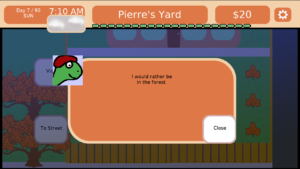
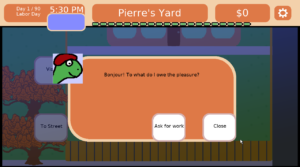
Your neighbors are now starting to show their individual personalities. For example, Pierre seems friendly when you first meet him:

Pierre's initial greeting

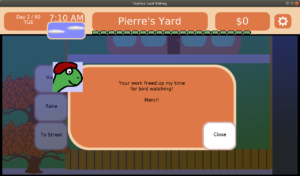
Once he becomes a client, you learn that he is a birdwatcher!

Pierre's a birdwatcher!

Eventually future updates will allow Pierre to demonstrate his love of birds as well as potentially a few of his other interests.

Of course, if you neglect his lawn and get fired, Pierre will find that he wishes he had his free time back:

Pierre's disappointment

Your neighbors are film fans, students, painters, animal lovers, day dreamers, and more.

I hope you enjoy getting to know the neighbors as much as I have been. I can’t wait to find out what Pierre discovers.

Toytles: Leaf Raking Player's Guide

Get the 24-page, full color PDF of the Toytles: Leaf Raking Player’s Guide for free by signing up for the GBGames Curiosities newsletter!

Categories
Game Design Game Development Geek / Technical

Toytles: Leaf Raking Progress Report – A Little More Conversation

Last week, I reported on the progress of my first few sprints to create updates for my leaf-raking business simulation Toytles: Leaf Raking.

Sprint 4: More personality injections

Last week’s sprint plan included:

  • Give each neighbor unique text as unhappy clients
  • Add variation to weekend flavor text

I was able to work 5.25 hours, but unfortunately part of that time was used to create the v1.4.1 release for both the App Store and Google Play.

Unfortunately, it’s not yet an automated process. Well, the Android build is mostly automated. I can run a single command and have a release APK ready to install on my own devices to test with or to upload.

But due to Apple changing requirements every so often, breaking old scripts and how-tos, I unfortunately can only get so far before I need to fiddle with things in Xcode in order to create a publishable release for iOS.

I have it mostly down to only a few manual steps related to getting the app icons setup at this point, but it’s still tedious and annoying that I need to do so.

I decided to work on the weekend flavor text, which is all I finished for this sprint unfortunately.

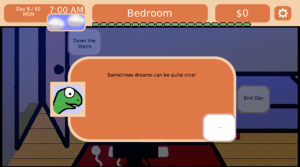
There were originally two random dialog sequences that occurred when you woke up on a weekend, telling you about a dream you had. Now there are 11 more.

New dream

Part of the time was rewriting some of the code so it was easier for me to add a dialog sequence. I think ultimately it would be best if I could change the code to load the scripts from a text file. For now, I’m adding the scripts in code, which requires a recompile to test each time. But it works.

None of these events make a difference to the game play. That is, they don’t help or hinder your progress towards earning enough money to purchase the Ultimate Item(tm).

So why do it? It’s all part of my attempt to inject some personality into the game.

And eventually I would like to add weekend events that allow the player to make a decision that could, in fact, make a difference. So for now, I’m laying the groundwork.

Until next sprint

So this week’s sprint I will definitely get to the unhappy client dialog. I have some marketing screenshots to update, partly due to the copyright date, and I want to streamline the way you wait for rain to end so you can get back to raking as it is currently a bit clunky.

I’d also like to invest in getting the release builds a bit more automated, and I am kicking my Past Self for not spending more time on automated tests so I didn’t have to verify that I didn’t break anything each time I make a change. I’m slowly improving the code as I go along so that it is easier for Future Self, but Past Self is a short-sighted jerk.

Toytles: Leaf Raking Player's Guide

Want to learn when I release updates to Toytles: Leaf Raking or about future games I am creating? Sign up for the GBGames Curiosities newsletter, and get the 24-page, full color PDF of the Toytles: Leaf Raking Player’s Guide for free!
Categories
Game Design Game Development Geek / Technical

Toytles: Leaf Raking Progress Report – Having a Dialog

A few weeks ago, I started working on a new set of updates for my leaf-raking business simulation Toytles: Leaf Raking, originally released in 2016.

I wanted to focus on making the neighborhood come to life by giving it some personality and character. I plan to do so by allowing your neighbors to talk about story lines happening in their lives.

My current project plan is in a spreadsheet I manage through LibreOffice, and with the COVID-19 pandemic, it took me quite a few months before I could focus on it. It mostly came together in June.

The original plan was broken down into weekly sprints, and I decided to continue to do so despite not having nearly as much capacity to get much done in a given sprint. Still, having a plan did wonders for my productivity.

What follows is a quick report on how the last few weeks have been.

Sprint 1: Start of personality injection

The first sprint was from June 21st to June 27th, and I wanted to get a few things done:

  • Give player option to accept a client when visiting a neighbor
  • Update copyright date on title screen
  • Chat w/ Mr. Matt at General Store
  • Give each neighbor unique chat text

Before that sprint, visiting a neighbor was the same as asking for work. Effectively, it meant you never visited anyone because you didn’t want to take on too many clients, which meant most of the neighborhood was pointless. This change should open up the way towards future work which will allow the neighbors to have more personality and give the player a reason to chat with them that doesn’t involve cold calling them for business.

I wanted to add the ability to talk to the store owner for the same reason. He doesn’t even exist in the game except for his name being on the store, and I want to make him a living, breathing character, too.

I wanted to update the copyright date to make it dynamic instead of baked into the title screen art, which should make it easier to update in the future. It was a fairly straightforward change.

And once you can visit a neighbor without asking for work, I wanted the ability to hear each neighbor say something unique when you call upon them. This change should mean that the neighbors are no longer essentially interchangeable numbers in a simulation, even if it is only one piece of dialog.

For that sprint, I did 2.5 hours of game development. It may not sound like much, but…well, it isn’t much. But again, we’re in a pandemic, I have kids, and there was some turmoil at my day job, so all in all, I think 2.5 hours sounds like plenty. Well, not really. I still worry when I don’t get much done in any given week, lamenting that if I was focused full time on it that I could probably get it all done in a day, but I’m trying not to dwell on it.

Unfortunately, I only got the copyright update and the visit option done.

Sprint 2: Start of personality injection (continued)

It took the next sprint to get the other two pieces of work accomplished, and that took me 7.75 hours of work, which included putting together the v1.4.0 release for both Android and iOS.

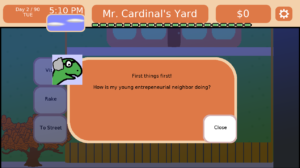
Mr. Cardinal's greeting

Sprint 3: Start of personality injection (continued)

Ok, so my first update to Toytles: Leaf Raking has introduced the tiniest amount of personality to the neighbors. To build upon it, last week’s sprint from July 5th to July 11th focused on writing more dialog:

  • Give each neighbor unique text as clients
  • Give each neighbor unique text as ex-clients

There are 19 neighbors currently in the game. The v1.4.0 release has the neighbors say something unique, and now I wanted them to say one thing as a prospective client, one thing as a client, and one thing if they become an ex-client.

For example, Mrs. Smith is a sweet neighbor who loves it when you visit, so she says, “It’s always a pleasure to see you.”

Once she hires you, she says, “I’m so proud of you. It’s a joy to see you work hard. I’m sure you’ll go far in life.”

And if she has to fire you for doing a poor job of raking her leaves, she says, “Well, not everything works out. I’m sure you’ll bounce back.”

Not all the neighbors are so nice.

Last week I did 3.75 hours of game development, finishing the sprint very late on Saturday night. Considering I also spent 2 hours writing a blog post and a newsletter mailing to announce the published update from earlier in the week, I felt like I did well to make time for the project, all things considered.

I also gained a greater appreciation for the work of game writers.

Sprint 4: More personality injections

Which brings me to this week’s sprint:

  • Give each neighbor unique text as unhappy clients
  • Add variation to weekend flavor text

Currently, if a client is not happy with you, you will learn about it in the morning from your mother. She will inform you which clients are worried that their lawns are not being taken care of, often when over half of the lawn is covered in leaves.

Mom about to tell you bad news

But if you talk to those clients, they will continue to say the same thing they said before. Giving them something to say when they are still clients but are also concerned about your work is once again adding a little more personality and character into the game. Eventually I’d like to get to the point where the way they say something is impacted by your reputation with them, the weather, and possibly anything that is happening in their lives unrelated to your work.

Another area of the game that could use some variety is the weekend text. On weekdays, you wake up, go to school, and then come home to start your day. On weekends, however, you currently get to hear about one of two dreams you have. I want to add at least one more weekend dialog for each week.

Eventually that weekend dialog should have random events, such as a neighbor willing to pay double for getting to their lawn that day, or perhaps you learn that a client has a nephew in town who raked their leaves for them so you aren’t needed that day. But that kind of feature will be for a future update.

Until next sprint

I hope you enjoyed this behind-the-scenes report of my progress on Toytles: Leaf Raking’s Personality Injection updates. I plan to provide a weekly report going forward.

While I would love to have a huge big bang update to release with a ton of changes, I will instead be working slowly but surely, adding a little character each time. Eventually, the game will feel completely different, but I will get there one step at a time.

Toytles: Leaf Raking Player's Guide

Want to learn when I release updates to Toytles: Leaf Raking or about future games I am creating? Sign up for the GBGames Curiosities newsletter, and get the 24-page, full color PDF of the Toytles: Leaf Raking Player’s Guide for free!
Categories
Game Development Games Marketing/Business

Say Hello to Toytles: Leaf Raking v1.4.0

I just released a new update for Toytles: Leaf Raking, my family-friendly leaf-raking business simulation available for iPhones, iPads, and Android devices. Learn how to get it at the Toytles: Leaf Raking page.

Version 1.4.0 is a small update that allows the neighbors to express themselves in unique ways.

Toytles: Leaf Raking

Before this update, the neighbors were all mostly interchangeable. They had a unique picture and name, and each had their own house in the neighborhood, but otherwise they were identical in terms of behavior. They could hire you, but then you would never hear from them again unless they fired you.

Mr. Cardinal's greeting

Now you have the option to visit with your neighbors, and they will each have a unique greeting for you.

Even the store owner, Mr. Matt, has something to say, whereas before he only existed in the name of the store and otherwise made no appearance in the game.

Mr. Matt's greeting

This latest version is the first of what I refer to as the “Personality Injection” updates.

My plan is to slowly add multiple storylines for each of the 20 or so neighbors and provide ways for your actions to potentially impact them. For example, Mr. Cardinal, your first client, is an inventor, and one of his storylines will follow his attempts at creating something that gives him the prestige he has always desired.

It’s my attempt to give the game more character, and I look forward to exploring the hopes, dreams, aspirations, and fears of the town’s inhabitants.

Toytles: Leaf Raking Player's Guide

Get the 24-page, full color PDF of the Toytles: Leaf Raking Player’s Guide for free by signing up for the GBGames Curiosities newsletter!

Categories
Game Development Games Marketing/Business

Announcing: Toytles: Leaf Raking, Now Available on iOS

I’ve finally gotten around to porting Toytles: Leaf Raking, my family-friendly leaf-raking business simulation, to iOS so now you can get it for your iPhones and iPads.

Download Toytles: Leaf Raking on the App Store!

Download on the App Store

Toytles: Leaf Raking

I originally created the game in 2016, and I’ve updated it a few times since then. My original announcement for the Android release of Toytles: Leaf Raking on Google Play was met with some enthusiasm (thanks, Mom), and I have been slowly making improvements and plans for newer features since its release.

I was quite proud of the game, and I had plans to update it sooner, but I had a few changes in my life occur. One request I received was to get the game out for iOS, and and I am happy to say that after only a few short years, it is now available.

I hope you enjoy it!

Toytles: Leaf Raking Player's Guide

Get the 24-page, full color PDF of the Toytles: Leaf Raking Player’s Guide for free by signing up for the GBGames Curiosities newsletter!

Categories
Game Development Geek / Technical Linux Game Development

Screenshots Made Easy with Window Resizing Tool wmctrl

I needed to create screenshots for the iOS port of Toytles: Leaf Raking, my leaf-raking business simulation. My game doesn’t have a built-in screenshot shortcut key, and I needed screenshots that were 2688×1242, 2208×1242, and 2732×2048.

Immediately I knew I didn’t want to resize windows by hand, as it would be annoying and error-prone. Was there a tool that let me do it in a much more controlled manner?

I did a search, and I came across this Ask Ubuntu question about resizing windows to a particular width and height.

That’s when I learned about wmctrl. It is a tool that allows you to interact with the X window manager, which is the main windowing system used by GNU/Linux desktops.

I ran the following command to find the window of the running game:

wmctrl -l

It output a bunch of windows and showed me that I had:

0x0320000f 2 [machine name] Toytles: Leaf Raking

And then I used the ID corresponding to the game to resize that window:

wmctrl -i -r 0x0320000f -e 0,10,10,2688,1242
wmctrl -i -r 0x0320000f -e 0,10,10,2732,2048
wmctrl -i -r 0x0320000f -e 0,10,10,2208,1242

And then I just navigated around my game, found a good spot to take a screenshot, pressed Ctrl+PrtScn to take the screenshot, then resized and repeated for the various iOS sizes.

I then used Gimp to remove the top 30 pixels which was just the title bar of the window. I think I should be able to take screenshots without the window decorations, but I haven’t researched it yet.

I think I’d like to create a script to handle resizing, taking the screenshot, cropping the top 30 pixels, and placing into the appropriate screenshot folder, but I’ll probably create it next time I need to make screenshots, which might be sooner than I think.

Categories
Game Development Geek / Technical General Personal Development

Derek Yu’s Updated Pixel Art Tutorial

In ancient times, around 2005, Derek Yu of Spelunky fame created a 10-step pixel art tutorial. It took you through the process of creating a cartoonish lucha lawyer, including brief discussions on lines, shading, dithering, and more.

Derek Yu's pixel art luchador
As seen in archive.org’s history of Derek’s old site.
Also, Derek, please don’t sue me.

Yu recently tweeted that he’s rebooted the tutorial, which can now be found at https://derekyu.com/makegames/pixelart.html and takes you through drawing an orc.

Derek Yu's orc from start to finish
Who would win, this orc or the law?

It’s a more detailed tutorial, and it shows what Yu has learned about teaching pixel art with almost 15 years more experience since the original was created.

There’s also a tutorial about common pixel art mistakes to go with it, so you can see what you’re doing wrong as you try to follow along.

Thanks for contributing to the world of game making, Derek Yu!

Categories
Game Development Marketing/Business Personal Development

Get Energized and Stay Motivated with Slides from my April 18th IGDA Des Moines Presentation

Most indies pay little attention to their purpose, mission, and vision, but then again, most indies don’t have sustainable businesses. The vast majority don’t make $500 in a year.

Rolling the dice and hoping for a hit, or at least something that earns enough to fund the development of another game, is not a serious strategy.

And there are a lot of new new indie game developers struggling with motivating themselves to work on their projects for more than a few days at a time before the pain of the creative effort overwhelms any enthusiasm they had to be a game developer. There are always posts online asking for tips of staying motivated.

At the most recent IGDA meeting, I presented an updated version of my 2014 talk Playing the Long Game: The Vital Importance of Purpose, Mission, and Vision to Your Indie Game Development Business.

I’m running my business part-time as I have a day job, but doing a poor job of running GBGames as a full-time independent game developer from 2010 to 2012 taught me some major lessons about running a business. Other indie game developers could benefit from my experience.

While there is no video of the presentation, I uploaded the slides with notes in a few formats:

Knowing who you are and what you stand for will go a long way towards reducing the stress and pain and fear that can otherwise be a regular part of running your own indie game development business.

At the very least, it will give you the energy and motivation to keep working on your projects for the long haul.

Categories
Game Development Personal Development

See Me Present at IGDA Des Moines on Tuesday, April 18th

The Des Moines chapter of the International Game Developers Association meets every third Tuesday of the month, usually at the Gravitate offices, a workplace community for entrepreneurs, freelancers and remote workers.

At this Tuesday’s meeting, I’m excited to be presenting an updated version of my 2014 talk Playing the Long Game: The Vital Importance of Purpose, Mission, and Vision to Your Indie Game Development Business, sharing lessons that can be drawn from my experience running an independent game development business full-time between 2010 and 2012, and talking about what I’ve done with my business since then based on those lessons.

Many indie game developers dive into the business head-first with nothing much more than a vague dream and some hope, and often with disastrous results. My aim is to help you clarify your Why, your What, and your How so that your efforts are clear, focused, and more decisive, both immediately and in the long term.

I hope to see you at this free event, whether you’re an established game developer, an aspiring one, or someone who is interested in learning about the behind-the-scenes of games.

You can register for the IGDA Des Moines April meeting, mainly to ensure we’ll have enough pizza and drinks for everyone. B-)