Categories
Game Design Game Development Geek / Technical

Toytles: Leaf Raking Progress Report – Yard-Coverage-Based Dialogue

Here’s this week’s progress report for new updates to Toytles: Leaf Raking, my family-friendly leaf-raking business simulation available for iPhones, iPads, and Android devices.

Get it at the Toytles: Leaf Raking page.

In last week’s sprint report, I talked about finishing up screen transitions and fixing some defects. I finally started to work on adding the new dialogue.

Sprint 21: Time-based dialogue

  • Story progression when finishing a yard (unique monthly client dialogue w/ difference between clear/uncleared yards

I did 6.5 hours of game development this past week, and while a significant amount of it was geared towards the new dialogue functionality, I did find I had accidentally introduced a major, game-breaking defect, so I also spent time investigating and fixing it.

The Defect

Originally, the game had no screen transitions. When I switched from one screen to the next, it was immediate, which meant that I could save the state of the game immediately whenever the player made a decision.

For example, if you moved from one neighborhood to another, it took 10 in-game minutes, and that was a decision I didn’t want you to pretend didn’t happen by shutting down the game and then reloading it.

Similarly, choosing to go to sleep to end your day is a decision that gets saved.

However, once I added transitions, I had to delay changing the screen you see until after the fade out, then I would fade the new screen in.

The defect got introduced because I shouldn’t save until the screen change occurs, but it saved before the fade out, which meant that the old screen was saved.

If you kept playing the game, it would be no big deal. The game works just fine.

But if you close the app, then when you reload it, you could be on the wrong screen.

For a non-game-breaking problem, you could visit the kitchen to talk to your parents. If you close the game and reload your save, you would still be in the front foyer and not in the kitchen, and yet the dialogue from your parents would still be on screen. This issue is no big deal because there is no in-game impact from seeing dialogue in the wrong part of the house.

However, what IS a big deal is going to sleep at the end of the day. The game saves while you are on the sleep screen, then on normal weekdays you go to school, then at 3:00pm you in the front foyer. If you shut down the game and reload it, it would reload the game at 3:00pm but on the sleep screen. And the entire point of the sleep screen is that you don’t do anything but wait for time to pass until you wake up. But since you aren’t supposed to be on the sleep screen, time isn’t passing.

My personal favorite manifestation of this defect was discovering that if you saved up $1000 and went to the store, purchased the Ultimate Item(tm), and shut down the game while the screen was transitioning to the You Won screen, then when you reload the game, you would be back in the store, only without $1000. The game saved the fact that you spent it.

Interestingly, the game also saved the fact that you bought the Ultimate Item(tm), but it won’t register that you’ve won. You have to attempt to purchase any item in the store for the code that checks for the victory condition to run. So this specific problem isn’t technically game-breaking, but it would probably have upset players when they thought the game cheated them out of the game-winning money which they spent the entire time earning.

I fixed these issues by ensuring that anytime there is a screen transition that the save occurs only after the transition has ended.

The Dialogue

After taking the detour to fix the fairly major defect I introduced with screen transitions, I finally got back to writing dialogue. I’m actually pretty excited about the way my dialogue system is coming together.

I finished adding new dialogue tags for determining which month it is based on the current date as well as tags for yards being clear or yards being not clear.

In code, they are the following new tags:

    IS_SEPTEMBER_TAG,
    IS_OCTOBER_TAG,
    IS_NOVEMBER_TAG,                         
    IS_YARD_CLEAR_TAG,
    IS_YARD_NOT_CLEAR_TAG 

As a reminder, the way the tags are used is in two parts. First, I get a list of possible tags based on the current game state. So if Mr. Cardinal is my client and I am in his yard on the day before Thanksgiving and his yard has any leaves covering it, then the tags that would be generated by the current game state are IS_CLIENT_TAG, IS_NOVEMBER_TAG, and IS_YARD_NOT_CLEAR_TAG.

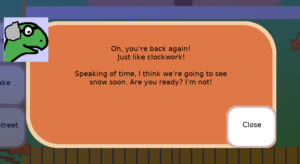
The second part is that each piece of dialogue in the game is tagged, and so I can now tailor the messages that any neighbor says to you based on a number of tags. So I can write some dialogue and tag it with all three of the above tags, and in the game when you visit him, the game state-based tags will match all of the tags for that piece of dialogue, and so he’ll say something unique and topical:

Mr Cardinal's dialogue in November

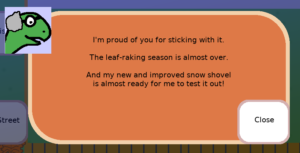
And once you rake all of the leaves in his yard, the IS_YARD_CLEAR_TAG would need to match a different piece of dialogue, which furthers the story of Mr. Cardinal being an inventor:

Mr Cardinal's dialogue in November

As I said, I’m pretty excited about the possibilities, especially as I add more tags. The combinations of tags, and so the dialogue that matches various combinations, can be endless.

So when can you play it?

I took off a few days from the day job this week, so I expect to put in some time to finish writing all of the dialogue and create the new version of the game for review in the App Store and Google Play.

But I wish I had a release sooner.

I underestimated how much work it would be to write 6 new lines of dialogue (2 x each of the 3 months) for each neighbor. I didn’t want to make a new release until I had new dialogue in the game, as I didn’t think screen transitions alone would make for a compelling update.

I think in hindsight I realize that I should have worked on the new dialogue first so that there was always potential to release a new version of the game.

But hey, it’s a mistake I can learn from. Next time I plan a release, I will make sure that I work on the must-haves first rather than last.

Thanks for reading!

Toytles: Leaf Raking Player's Guide

Want to learn when I release updates to Toytles: Leaf Raking or about future games I am creating? Sign up for the GBGames Curiosities newsletter, and get the 24-page, full color PDF of the Toytles: Leaf Raking Player’s Guide for free!

Categories
Game Design Game Development Geek / Technical

Toytles: Leaf Raking Progress Report – Transitions & Starting Dialogue

Here’s this week’s progress report for new updates to Toytles: Leaf Raking, my family-friendly leaf-raking business simulation available for iPhones, iPads, and Android devices.

Get it at the Toytles: Leaf Raking page.

Last week, I reported that I quickly prototyped a fade-out/fade-in screen transition to get a sense of how it felt, then worked on the production version once I determined that I liked it.

Sprint 20: Screen transitions & time-based dialogue

  • Create screen transitions when entering/leaving yard
  • Story progression when finishing a yard (unique monthly client dialogue w/ difference between clear/uncleared yards
  • Defect: Visiting a neighbor causes unsightly refresh
  • Defect: Reloading from the store loads a store with no items and no visit button.

I did 6.25 hours of game development last week. I finished the scene transition fades quickly enough, and then I fixed a couple of defects I found.

With the transitions in place, it is clear that the yard screen gets recreated each time you visit your neighbor. It has not been an issue, and it doesn’t affect the play of the game, but the unnecessary redraw is now distracting. So I fixed it.

More importantly, however, was finding out that there was a problem with reloading the game if you were in the store. Normally the game reloads and regenerates the screen you were on, but if you exit the game by way of the main menu, it behaved differently than if you merely shut down the app.

The problem was that the game code didn’t anticipate that you would ever be in the store on loading a game. I think the idea at the time was that it was difficult to save the game for whatever reason, plus it wasn’t strictly required. If you exited the game while in the store, the last automatically saved data would put you in the same neighborhood as the store, so when you load the game, you’d just enter the store. No in-game impact occurs.

But what I discovered was that if you reloaded the game in the store, the store screen would be empty. So you’d have a “Leave” button, but it would otherwise have no store items. It was eerily empty. If you left the store, it would transition you back to Midtown, which meant you lost 10 minutes of game time due to the neighborhood movement.

Since that impacted you as the player negatively, I needed to fix it. If you’re interested in some of the details, I initially had a false start where I tried to prevent the game from saving if you exited to the main menu, which seemed to work.

But as I tried a bunch of things, I eventually found out that it broke the game even worse: If you exited to the main menu while sleeping, on reload, you would perpetually sleep. The game didn’t load something properly and so while time didn’t advance, it offered no menu options, so you were forever sleeping at 3:00pm.

So I reverted that changed, and instead I decided to go with it and had the game generate the store screen properly. The reason I didn’t do this at first was because I was convinced that the save game data had the wrong data for the store, but it turned out that I was wrong.

The last thing I worked on was finally getting started on dialogue based on which month it was. I started with September, and it’s going smoothly.

The other piece was changing the dialogue based on whether or not the yard is clear. So the end result will be that your neighbor with say one thing before you rake their yard and another thing entirely after you do so.

Eventually, I want each day to offer multiple conversation paths based on who your other clients are, what time of day it is, and more. I won’t get there all at once, though, but I can still build incrementally up to it with each release.

But there is no new release yet. It has been over a month since v1.4.4 was released with holiday dialogue. I feel a bit behind schedule, even though I don’t really have a schedule. But expect the next release soon.

Thanks for reading!

Toytles: Leaf Raking Player's Guide

Want to learn when I release updates to Toytles: Leaf Raking or about future games I am creating? Sign up for the GBGames Curiosities newsletter, and get the 24-page, full color PDF of the Toytles: Leaf Raking Player’s Guide for free!
Categories
Game Design Game Development Geek / Technical Politics/Government

Toytles: Leaf Raking Progress Report – Scene Transitions

Here’s this week’s progress report for new updates to Toytles: Leaf Raking, my family-friendly leaf-raking business simulation available for iPhones, iPads, and Android devices.

Get it at the Toytles: Leaf Raking page.

I talked about fixing some typos and adding screen transitions in last week’s sprint report.

Sprint 19: Screen transitions & time-based dialogue

  • Create screen transitions when entering/leaving yard
  • Story progression when finishing a yard (unique monthly client dialogue w/ difference between clear/uncleared yards

I did only 3 hours of game development last week.

I think I expected that I would accomplish a lot more. I had even taken a day off from the day job.

But in case you missed it, last week coincided with the U.S. Election. Normally we can call it the night of, or we wait for the Supreme Court to tell us who won, but we spent the better part of a week paying attention to the news.

The memes have been great, by the way.

I look forward to not worrying that my kids see the President’s behavior as something to emulate.

Anyway, I decided to quickly hack together fade out/fade in transitions between screens.

Why did I hack it? I didn’t want to spend the time and effort to create a high-quality implementation until I knew how it was going to look and feel.

So I treated it as an experiment. And I liked the result! It felt nice, and added a sense of polish to the game. And the investment on my part to find out that it would work out was minimal.

Experiments like this are the kind of thing I want to feel comfortable doing more often, especially early in a project when there are so many questions to answer about a potential game’s design space.

Once I had determined that I liked the look and feel of the fade out/fade in transition, I threw out the hack and started over, only this time test-driving my solution and being mindful of wanting something solid to build upon. I even managed to refactor out part of the neighborhood-transition code so that it relies on my new general transition code.

I only got to put in about an hour or so of effort into it. I expect to finish up the work this week, and then I’ll get started on the new dialogue. I don’t know if I’ll finish it all this week, but once the dialogue is done, I’ll cut a new release.

Thanks for reading!

Toytles: Leaf Raking Player's Guide

Want to learn when I release updates to Toytles: Leaf Raking or about future games I am creating? Sign up for the GBGames Curiosities newsletter, and get the 24-page, full color PDF of the Toytles: Leaf Raking Player’s Guide for free!
Categories
Game Design Game Development Geek / Technical

Toytles: Leaf Raking Progress Report – Scene Transitions

Here’s this week’s progress report for new updates to Toytles: Leaf Raking, my family-friendly leaf-raking business simulation available for iPhones, iPads, and Android devices.

Get it at the Toytles: Leaf Raking page.

Last week, I reported that I took a bit of a break due to moving my website.

Sprint 18: Screen transitions & time-based dialogue

  • Fix mistakes for Thanksgiving dialogue
  • Create screen transitions when moving about town
  • Create screen transitions when entering/leaving yard
  • Story progression when finishing a yard (unique monthly client dialogue w/ difference between clear/uncleared yards

I did 7.75 hours of game development last week, which is almost 3 hours more than average. All of those extra hours came on the day my household lost Internet access. I decided that it was a forced PTO day for the day job, and I worked on game development for 4 hours.

It felt great to get done in one day what would have taken me an entire week normally.

I fixed a few mistakes in dialogue that I caught after releasing v1.4.4, which were mainly typos or weird visual problems in which text overflowed the box it was supposed to be in. These fixes took almost no time.

But implementing screen transitions between the neighborhoods took up the lion’s share of the time:

Originally, clicking on one of the navigation buttons instantly took you to the neighborhood, but now with the sliding transition, I think it helps to give the player a sense of space in the town.

It might seem subtle, but I think it has a huge impact on the feel of the game. And I am happy that I was able to focus on it instead of spreading the work throughout the week.

Years ago, I was given feedback that the button presses themselves need to give the player feedback, and it is in my backlog list of enhancements. Other backlog items include animations when earning money, changing time, sliding in/out the modal overlays, changing the brightness of the screen (and lights and shadows) based on the time of day, and showing the player’s character on the screen. All in due time.

I did not get to work on the transition between the street-view screen and the yard screen, nor did I work on the new dialogue, but they are what I intend to work on this coming week. You know, assuming the U.S. Presidential Election this week doesn’t result in civil unrest.

Thanks for reading!

Toytles: Leaf Raking Player's Guide

Want to learn when I release updates to Toytles: Leaf Raking or about future games I am creating? Sign up for the GBGames Curiosities newsletter, and get the 24-page, full color PDF of the Toytles: Leaf Raking Player’s Guide for free!
Categories
Game Design Game Development Geek / Technical

Toytles: Leaf Raking Progress Report – Taking a Break, Kinda

Here’s this week’s progress report for new updates to Toytles: Leaf Raking, my family-friendly leaf-raking business simulation available for iPhones, iPads, and Android devices.

Get it at the Toytles: Leaf Raking page.

In the previous sprint report, I finished up holiday dialogue and fixed a few defects.

That was two weeks ago. What happened to last week’s report?

Sprint 17: Holiday-specific dialogue

Two weeks ago, the sprint plan was:

  • Write blog post for release
  • Write newsletter to announce release
  • Fix mistakes for Thanksgiving dialogue

I wrote for 1.75 hours to create a couple of blog posts and a newsletter (want to sign up for it? See below for details!).

And as that third bullet point says, there were some mistakes I carelessly introduced into the game related to Thanksgiving dialogue. Namely, one neighbor’s dialogue is too long and extends outside of the modal overlay, and another neighbor’s dialogue has a typo.

I’m super unhappy about these careless mistakes. I can easily fix them, but it’s kind of annoying to create a new release to address just these issues.

I met Nivia Henry when she presented at dsmAgile 2019, and she pointed out something that helped me feel better about these mistakes:

It definitely helped me to stop worrying about them. They’ll get fixed for the next release.

Oh, and I spent 0 hours working on game development.

GBGames moved. I hope you don’t notice.

My time instead was focused on moving my website to a new webhost.

Around 2004, I was a regular on the Indie Gamer forums and spoke with other indies, aspiring or established. I found myself perusing the classifieds section and saw an ad for shared webhosting. There was a discount code, and I signed up, getting my site off of the free web hosting I was using before.

The company eventually changed its name from LizardSoft to Tilted Pixel, and I’ve been with them ever since. The company has long been focused on being a full-service web development shop, but I was grandfathered into the basic shared hosting plan.

I was always impressed that the few times I had a support request almost always went through the owner, Matt Inglot.

Well, in August, he sent me an email saying that they were upgrading servers and were no longer going to be able to offer support for email addresses or WordPress, both of which I depend on. So, after all this time, I decided to find a new host.

And I knew I wanted to focus on this move since, you know, I’m not a web master by trade, so I did no game development. I didn’t track exactly how much time it took me, but I was pleasantly surprised that the move went very smoothly.

Not that smoothly

At least…at first. I was in the middle of writing this post and expected to write it for last week, but the new webhost I chose was an inexpensive option that advertised itself as being so cheap due to not handling silly support issues. The idea is that you should know what you’re doing, and in exchange, they won’t charge a bunch. If there is a legitimate support request, they’ll deal with it, but otherwise, you’re on your own.

I was fine with this arrangement, except I lost access to my website for 12 hours. Apparently it was still up, but my own home IP address was no longer able to access it.

And of course, no one replied to my support requests during that time, and I didn’t know if anyone would.

I was frustrated because I was completely ready to provide my own tech support, but there was very little I could do on my own in this situation. I couldn’t tolerate this level of service going forward.

So I reverted my website back to my old host and told Matt Inglot about my renewed sense of gratitude for the amazing and personal support he provided.

I have no hard feelings towards the new host. I got what I paid for, and I am glad the problem manifested so early.

I have since found a new host, one that provides support. It’s a bit more expensive than what I was paying before, but not by much.

And I had practice, so setting up the new site on the new new webhost didn’t take me long.

I was easily able to update the WordPress theme and setup plugins, import content, and upload images and other media. I had to manually tweak a few things, and I made a note of what they were for next time.

I’d love to be able to make my website a one-click deployment instead of a multi-day effort. That way, if a disaster were to happen, I could restore everything immediately.

But one nice thing about the move to the new webhost? I’m starting with an almost clean slate.

No stale plugins. No privacy-invading analytics or ads. The site is way faster, and aside from perhaps one thing that is purposefully different, I think you would otherwise have no idea that the website is on a new host if I didn’t say so here.

If you notice anything that seems off or broken, please let me know, either below in the comments or using the contact form in the About GBGames page.

Er, and the fixes?

I had time to work on game development, but I decided not to. While creating a release isn’t terribly stressful, and I average only about 5 hours a week for game development, it is still nice to take a break.

And rather than wait for me to feel exhausted, I purposefully decided to give myself time to focus on other things. The website move took longer than I wish it had due to the issues I ran into with the 1st new webhost, so I was glad I didn’t try to do too much at a time.

I did spend a little time thinking about the design of a completely different game. More on that one in the next newsletter, I think…

Thanks for reading!

Toytles: Leaf Raking Player's Guide

Want to learn when I release updates to Toytles: Leaf Raking or about future games I am creating? Sign up for the GBGames Curiosities newsletter, and get the 24-page, full color PDF of the Toytles: Leaf Raking Player’s Guide for free!
Categories
Game Design Game Development Geek / Technical

Toytles: Leaf Raking Progress Report – Holiday Talk Finished

Here’s this week’s progress report for new updates to Toytles: Leaf Raking, my family-friendly leaf-raking business simulation available for iPhones, iPads, and Android devices.

Get it at the Toytles: Leaf Raking page.

Last week, I wrote in my report for sprint 15 that I expected it would only take a couple of hours more to get the rest of the holiday-specific dialogue into the game.

Sprint 16: Holiday-specific dialogue

Last week’s sprint plan was:

  • Create holiday-specific dialogue
  • Fix holiday text being cut off next to weather window
  • Fix time advancing incorrectly when loading a game in a neighborhood other than Midtown.

I did a total of 4 hours of game development, but that includes the time spent creating and testing the Android and iOS releases and uploading them to the app store. I was actually finished with the dialogue after 2 hours of work, as I predicted, and the rest of the time was spent fixing the two defects and creating the releases.

Amy's dialogue on Thanksgiving

Fixing the text issue was straightforward. I’ve mentioned before that I use JonnyD’s NFont to handle a lot of my text rendering, and I was rendering the text in a box that was too small. I don’t know how long it had been that way, but I modified the box so that the text wrapped around nicely and fit better.

The time issue was similarly straightforward. I don’t know if I introduced this defect when I was moving code around in the last few months, but here’s a summary of what was happening. There are two variables: one is your current neighborhood, and the other is the last neighborhood you were in. Your current neighborhood is saved and loaded. Your last neighborhood is not, and it is just a variable that is used during the game.

The idea is that if you navigated to the neighborhood screen, you either moved there from another neighborhood and should therefore use 10 minutes of time, or you were on a house screen and making your way to the street in the same neighborhood, using no time at all. The game determines which situation you are in by comparing the last neighborhood variable to the current neighborhood variable.

But apparently I forgot to set the last neighborhood variable to the current neighborhood variable after you load a game. So if you start out in a neighborhood other than Midtown, when you visit a neighbor’s house and leave back to the neighborhood view, the last neighborhood (Midtown) and the current neighborhood (not Midtown) do not match, and so time advances. There was another problem: navigating from a different neighborhood to Midtown does not advance time because the last and current neighborhoods are both Midtown, when you were obviously not in Midtown before traveling to Midtown.

The fix is simple: when loading a game, I set the last neighborhood to the value of the current neighborhood that was loaded. Now time advances (or doesn’t) correctly.

Creating the releases was actually the most painless it has been. I don’t have it quite automated yet, but the Android build is pretty much a one-liner script. The iOS build is almost there, except I still have quite a few manual steps after using CMake to create the XCode project, such as adding the Images.xcassets to the project and then specifying that it should handle signing automatically and which team. I am sure these things can be automated, but I haven’t figured it out, and I wonder if Apple will change things yet again and break whatever I do anyway.

I’ll be announcing the new v1.4.4 update tomorrow in my newsletter, so sign up below to get the news as well a curiosity and a free player’s guide.

Thanks for reading!

Toytles: Leaf Raking Player's Guide

Want to learn when I release updates to Toytles: Leaf Raking or about future games I am creating? Sign up for the GBGames Curiosities newsletter, and get the 24-page, full color PDF of the Toytles: Leaf Raking Player’s Guide for free!
Categories
Game Design Game Development Geek / Technical

Toytles: Leaf Raking Progress Report – Holiday Talk

Here’s this week’s progress report for new updates to Toytles: Leaf Raking, my family-friendly leaf-raking business simulation available for iPhones, iPads, and Android devices.

Get it at the Toytles: Leaf Raking page.

In last week’s report, I said I was almost finished with adding holiday-specific dialogue to the game. I predicted that it would be a matter of a couple of hours at most to finish the work, then I could create a new release and get it published.

Sprint 15: Holiday-specific dialogue

Last week’s sprint plan was:

  • Create holiday-specific dialogue
  • Fix holiday text being cut off next to weather window

I only worked on game development for 45 minutes last week, a far cry from the 5 hours per week I’ve been aiming for.

As such, while I finished adding dialogue for Halloween, I only barely got started on the next holiday and made no further progress.

Luciana's dialogue on Halloween

Why didn’t I spend more time on the game? The rest of my life had a higher priority on my time.

My parents are celebrating 40 years of marriage, and so I’ve been talking with my sister about last-minute preparations. My wife is celebrating her birthday, so I’ve been finishing up plans for it. And I’ve been working very long hours at the day job, getting on early and staying on late, which means I lose the opportunity to do game development when I normally would and I am sapped of energy after the kids go to bed, which is the next opportunity.

In terms of game development, last week was mostly lost. Which is too bad because the work is straightforward, and I still believe that it will only take a few hours more before I could publish a new update.

One positive thing is that I found a defect in the game while testing out the Halloween dialogue in those 45 minutes I did dedicate to making progress on this project. The defect isn’t the positive thing, but the fact that I found out that it exists is, because I can address it before publishing a release.

It turns out that if you load a save game and are in a neighborhood other than Midtown, which is the default one, then when you go to a neighbor’s yard and leave back to the neighborhood screen, the clock advances 10 minutes. It should only advance 10 minutes if you move from one neighborhood to another.

I suspect that the reason that it is happening is that when I load the game, I don’t set the current neighborhood correctly somewhere, and so when you leave a yard and return the neighborhood screen, the game detects that the neighborhood has changed when it hasn’t.

As far as impact is concerned, it’s not a huge deal…except when it is. In my case, I was visiting neighbors to see if the dialogue was formatted correctly, and I currently need to reload the game when I change it to see if the changes look better. Each time I did, I advanced the clock without realizing it, until it was past the time when visiting neighbors is considered polite. Then I had to reload the game entirely and reset the clock to the correct holiday in order to continue testing.

It was kind of annoying for me as a developer, but I can also see it being a problem for a player. If you saved the game during Mr. Matt’s store opening hours, then discovered that after you loaded you accidentally advanced the time so that the store was closed, it would mean that you can’t you can buy emergency yard bags or a replacement rake until the store is open again.

Time management is a key part of the game, and this defect makes the game a bit unfair to people who try to get to the store at a decent time.

So that defect needs to get fixed before I create the next release as well.

Thanks for reading! Please sign up for the mailing list (see below!) to hear about new Toytes: Leaf Raking releases as they are published, news about the work I am doing, and curiosities that I find interesting about the world.

Toytles: Leaf Raking Player's Guide

Want to learn when I release updates to Toytles: Leaf Raking or about future games I am creating? Sign up for the GBGames Curiosities newsletter, and get the 24-page, full color PDF of the Toytles: Leaf Raking Player’s Guide for free!
Categories
Game Design Game Development Geek / Technical

Toytles: Leaf Raking Progress Report – Holiday Talk

Here’s this week’s progress report for new updates to Toytles: Leaf Raking, my family-friendly leaf-raking business simulation available for iPhones, iPads, and Android devices.

Learn how to get it at the Toytles: Leaf Raking page.

During the previous week’s report, I talked about how my existing system for choosing which dialogue text to display needed to be updated to handle dates. I thought about all sorts of ideas that required a solution which allowed for them, and then ultimately remembered that I can always build up to a more complex solution and should go with a simple one for now.

Sprint 14: Holiday-specific dialogue

Last week’s sprint plan was:

  • Create holiday-specific dialogue
  • Fix holiday text being cut off next to weather window

I did 4 hours of game development last week. It’s not as much as I would have liked, but once again I had some long hours at the day job and I found myself feeling exhausted especially near the end of the day when I might otherwise have been productive.

The following “holidays” are currently in the game:

  • Labor Day (also known as “Day 1”, the start of the game)
  • Talk Like a Pirate Day
  • State Fair
  • Halloween
  • Harvest Festival
  • Thanksgiving

It’s a bit U.S.-centric, I know, and I might need to make some tweaks. For instance, are there any State Fairs that take place in Autumn? If not, I might need to change that day to maybe “Fall Fair” or something like that.

Anyway, I expected that with 19 neighbors x 6 holidays = 114 unique scripts of dialogue that I wouldn’t be able to get all of it done this week. So I set a goal of getting dialogue written for the first four holidays.

Early in the week I spent a little over an hour getting knowledge of the calendar into the components that would need to determine if there is a holiday-specific dialogue in the first place.

After that, it was mostly adding new dialogue tags related to those holidays and writing the dialogue, so basically the majority of the time was spent on adding content.

Mr Cardinal dialogue on Labor Day

In terms of my internal debate of either creating a general holiday dialogue tag that takes arguments or just making a tag for each holiday, I am glad I did the latter because within the first day I was already adding dialogue, whereas I expect that if I had gone the other route, I might have found that I was spending the entire week on making it possible to add dialogue. As I said, I can always refactor if it makes sense in the future. In fact, I had predicted that I was going to refactor fairly quickly, but I haven’t yet and don’t see a reason to do so yet.

I managed to write dialogue for the first three holidays, and if I had another 30 minutes to an hour, I probably could have gotten Halloween finished as well. Instead, I only have three of the neighbors saying anything unique on Halloween.

One thing I realized was that I had a defect I noted back in June:

Holiday text getting cut off

“Talk Like a Pirate Day” is getting cut off at the top of the screen. It should be an easy fix, but I wonder how many other pieces of text are not fitting into their assigned box and causing issues like this.

I am using NFont by JonnyD, and I recall that there was a way for it to do the detection for me. That is, I should be able to set it up so that if there is any text that doesn’t fit correctly that I can either have it render differently or log to a file or something. I’ve done something similar either in this project or a previous project, I can’t recall which. I just don’t do it at this time.

In any case, I think I did a decent job anticipating how much work this holiday dialogue feature was going to be, and I expect to get the rest of the dialogue into the game and published in a new release this coming week.

I am very pleased at the progress despite my lack of time dedicated to working on it this sprint. I think my Personality Injection updates are definitely making the game world feel like more than mere stats and variables, especially now that the neighbors have more than a couple of things to say to you throughout the game.

Thank you for reading!

Toytles: Leaf Raking Player's Guide

Want to learn when I release updates to Toytles: Leaf Raking or about future games I am creating? Sign up for the GBGames Curiosities newsletter, and get the 24-page, full color PDF of the Toytles: Leaf Raking Player’s Guide for free!

Categories
Game Design Game Development Geek / Technical

Toytles: Leaf Raking Progress Report – Holiday Talk

Here’s this week’s progress report for new updates to Toytles: Leaf Raking, my family-friendly leaf-raking business simulation available for iPhones, iPads, and Android devices.

Learn how to get it at the Toytles: Leaf Raking page.

Last week I reported that I finished adding the neighbor status indicators into the game.

All that remained to do was to create a new release for iOS and Android, test it, and publish it.

Sprint 13: Holiday-specific dialogue

Last week’s sprint plan was:

  • Create iOS release
  • Write blog post announcing release
  • Write email announcing release
  • Create holiday-specific dialogue

At the end of the previous week, I had created an Android build. I spent the earlier part of this week on creating the iOS build. In both cases, I installed the game on a physical device, then played the game until I was satisfied that things seemed to work more or less fine.

Then once I felt it was ready, I submitted it for review at the respective app stores, and then I published the announcements once they were ready to go live. Read more about it at the Toytles: Leaf Raking v1.4.3 announcement post.

Then I could start working on the current sprint’s actual goal, which was adding dialogue related to the current date of the calendar if it was special somehow.

I ended up not doing much. I worked long hours at the day job due to commitments at both the top of the morning and the late afternoon, which meant I did not work on game development at the times I normally would.

I did only 1.5 hours of game development, most of which was spent on getting the release published. I found that I had effectively taken most of the rest of the week off, even though I hadn’t wanted to. I found myself exhausted and needing to rest each day, and so I listened to my body.

In the future, I think I need to plan and make time for a periodic break instead of letting it happen.

I did finish the week my looking at my code related to dialogue and the calendar. Currently, I have an enum called DialogTag (I’m clearly still struggling with picking either dialogue or dialog, which depending on who you ask are both acceptable in North America. Alternatively I’m using dialog when I should be using dialogue). Each neighbor has a collection of things they say, each of which is tagged based on whether they are clients, ex-clients, prospects, etc.

Now I want to add dialogue that is tagged based on a calendar event. While I could add a tag for each holiday, I’d like to have one tag type for holidays, and then I would have a separate piece of data indicating which one.

There are 6 holidays, but I can create more, such as birthdays for the neighbors. Still, it isn’t like I’ll be adding hundreds of holidays, so it wouldn’t be so bad to hardcode a separate enum value for each holiday.

But then I start thinking about a neighbor getting excited the day before a holiday. Or being sad the day after.

Of course, what this kind of scope creep tells me is that there is still a lot of interpretation for how to handle the immediately work, and I need to remember that I can put something together that works now and slowly change it to do something that works later.

So hardcoded for now.

The other big thing I need to figure out is how to decide which dialogue to show. Up until now, a neighbor can say only one thing based on their status as a client. Since you can’t have a neighbor be both a client and a prospect or an ex-client, there was no choice to make. Only one option filtered out.

With dialogue based on the current date, however, now two options can be available at once. Perhaps clients and prospects should say the holiday-specific dialogue, and ex-clients say their normal ex-client dialogue? Or maybe only happy clients (clients who have no leaves in their yard) say more interesting things? Or perhaps holiday dialogue is said first, then followed by regular dialogue? Or regular dialogue followed by holiday dialogue? Or randomly choose among options, so sometimes a neighbor might talk about a holiday and sometimes they might not?

There’s clearly more I need to think about, but for now, thanks for reading!

Toytles: Leaf Raking Player's Guide

Want to learn when I release updates to Toytles: Leaf Raking or about future games I am creating? Sign up for the GBGames Curiosities newsletter, and get the 24-page, full color PDF of the Toytles: Leaf Raking Player’s Guide for free!
Categories
Game Development Games

Watch the 4th Annual Black in Gaming Awards

On September 13th, the Black In Gaming Awards honored the outstanding achievements and contributions to video games by black game developers and corporate allies.

You can watch the ceremony at: https://www.twitch.tv/videos/740532074

Learn more about the awards at https://www.blackingames.com/

Blacks in Games is a community dedicated to cultivating, supporting, and promoting black professionals in the game industry. BIG is actively working on creating opportunities for Black people in the video game industry while also developing action plans to combat systemic institutionalized racism that manifests itself in unsafe spaces, microagressions and hidden discrimination in the workplace.

The award looks amazing, and it honors pioneer Jerry Lawson, who developed the first cartridge-based game console.

Congratulations to all the award-winners!