Categories
Game Design Game Development Geek / Technical

Freshly Squeezed Progress Report – Optional Deadlines and Deeper Insights

In last week’s sprint report I started taking steps to make the game Toy Factory Fixer releasable at least to play testers.

There are things as a developer I could tweak in code, but I want to give the player options to make changes, and so I continued that work in last week’s sprint.

Sprint 16: Make publishable

Completed:

  • Create way to choose if game has deadline or not

Not completed:

  • Create production-ready level
  • Create sound effects

I only managed to work a little over 2 hours on the game last week. Between a few deadlines at the day job and needing to investigate my son setting up his own Minecraft server using a website we explicitly told him he couldn’t do, I found myself using the time I normally would work on game development to do other urgent things.

In a way, I’m frustrated because while I know there is still quite a bit to do to really finish Toy Factory Fixer, it feels like I am letting my foot off of the gas pedal right when I’m nearing the end.

I have averaged a little over 5 hours a week on game development these last three months, and it is noticeable when I put in less time last week.

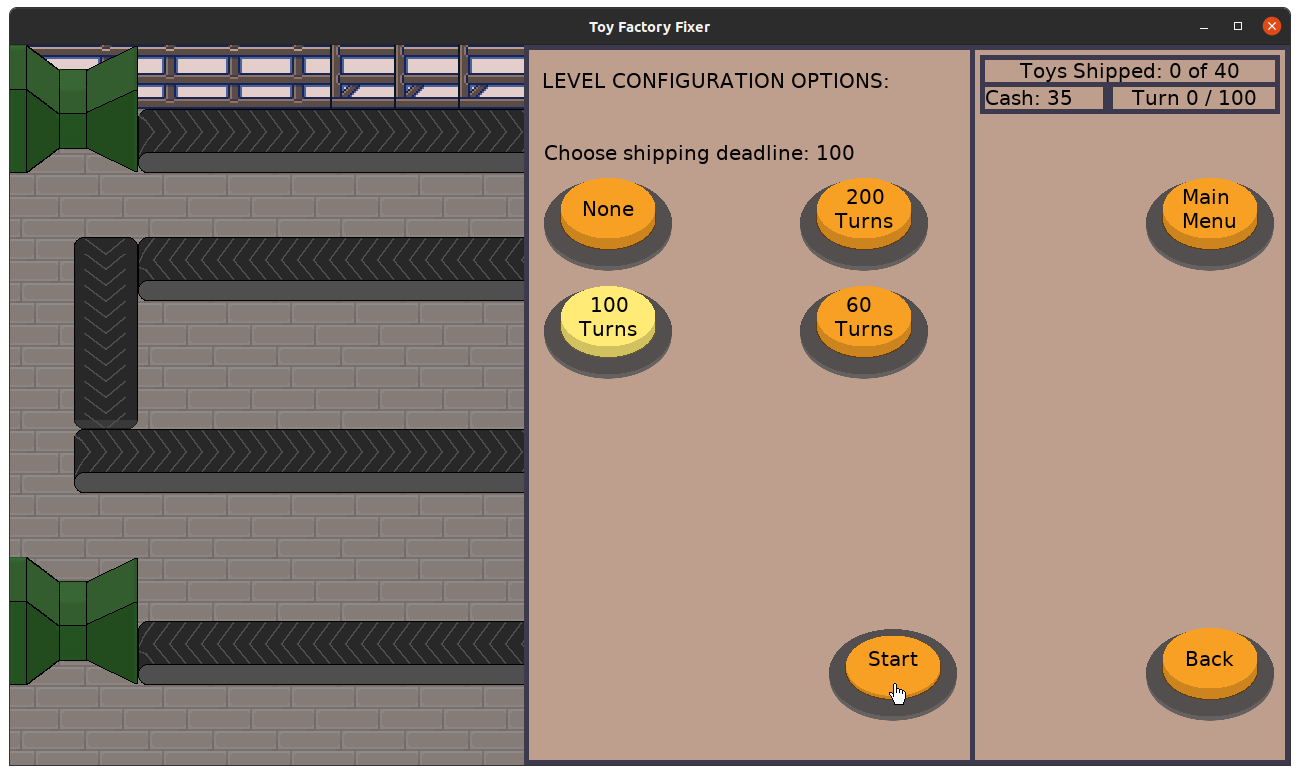
I managed to implement a configuration for the player to choose whether or not to play with a shipping deadline, which is kind of like providing a way to choose an Easy or Challenging mode.

The game is still completely silent, and even though I’ve been listening to some music that may or may not make it into the game, I think at the very least there should be sound effects to give the player feedback when something happens or when they perform an action.

At the very least, I don’t want play testers to say, “You should add sound effects” when they could be focused on any of the other things I haven’t considered instead. B-)

As for putting together a good production-ready level, I spent some time doing some deep thinking about the dynamics of the game, and I was blown away when I realized that an assumption I made about the best location for a worker was completely wrong.

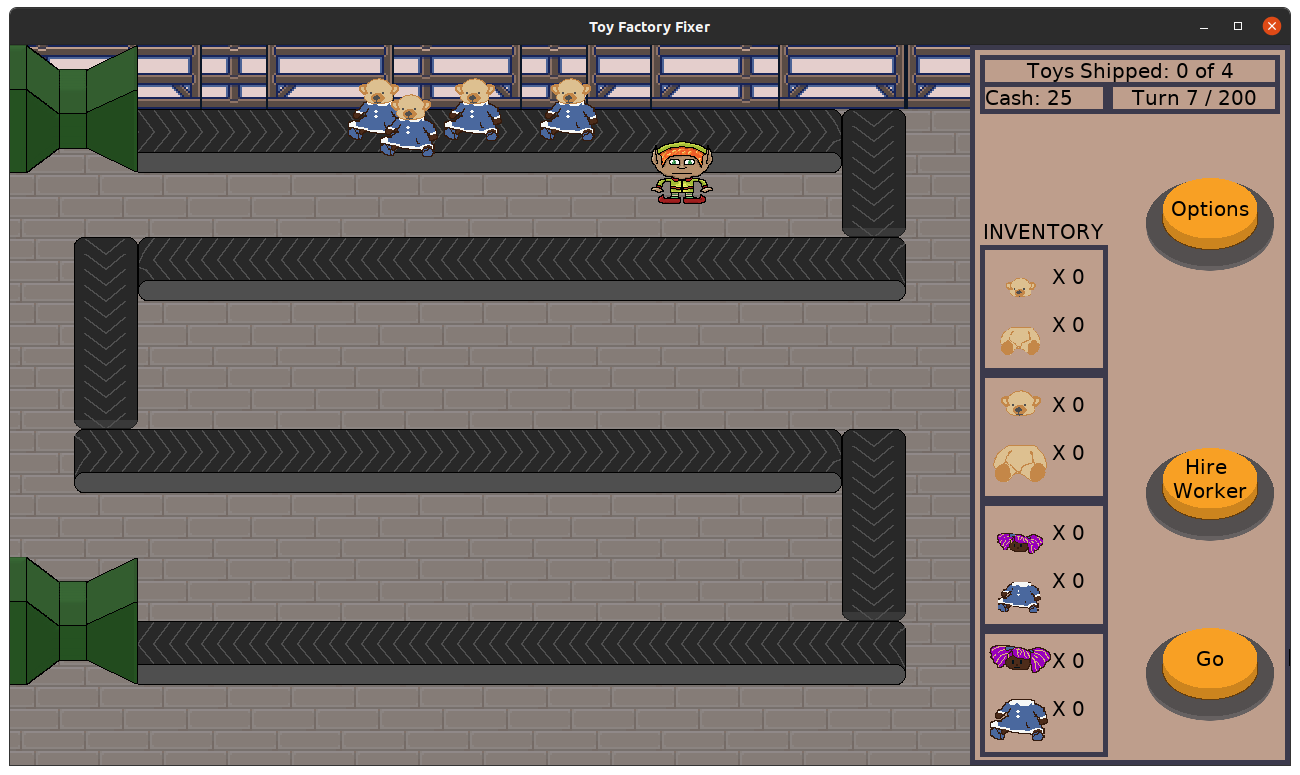
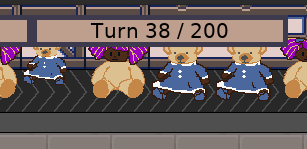
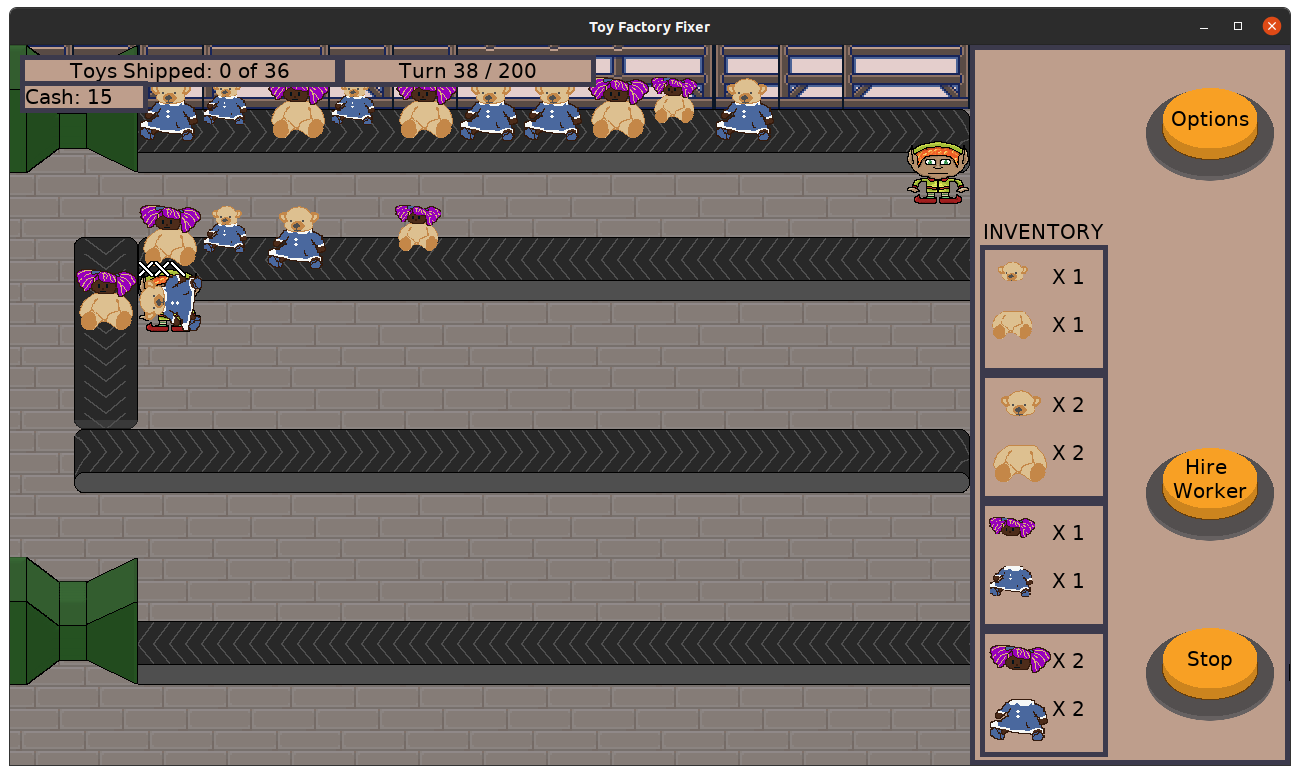
Toy Factory Fixer - Worker placement

I figured that a worker placed so that it was near the greatest number of conveyor belt locations was the best. I figured it meant more opportunities to pick up Bad Toys.

But it turns out that the best location is a function of the worker’s toy separation rate, the toy’s health, and the distance between opportunities to pick up a toy. In the screenshot above, a Bad Toy will pass by above and below the worker. If a worker picks up a Bad Toy, during the time spent working on separating that toy, other toys will continue along the line.

When the worker is finished and becomes idle, another Bad Toy within reach can be picked up. It is possible for the next Bad Toy to have moved on too far for the worker to reach if the worker is too close to the turn.

I am still working on balancing numbers such as the number of stitches a toy has or how much strength a worker has, but this kind of analysis hasn’t been done yet, and it is already giving me insights into what makes for a challenge, what is too easy, and what might be impossible.

Now I just want to spend more time on actually making it.

Thanks for reading!

Want to learn when I release updates to Toytles: Leaf Raking or about future Freshly Squeezed games I am creating? Sign up for the GBGames Curiosities newsletter, and get the 24-page, full color PDF of the Toytles: Leaf Raking Player’s Guide for free!
Categories
Game Design Game Development Geek / Technical

Freshly Squeezed Progress Report – Almost Done?

Last week’s sprint report for Toy Factory Fixer focused on the work of allowing toys to occupy the same conveyor belt tile without overlapping and making the dispenser put out more than one toy at a time, which opens up ways to change the flow of the toys in the game.

Next up was letting the player start production runs of toys earlier.

Sprint 15: create an economy

Completed:

  • Allow player to start production run early
  • UNPLANNED: Create Android app icons

Not completed:

  • Create way to choose if game has deadline or not

Stretch if above got done:

  • Create sound effects

I originally wanted to release this game within one month, but it didn’t happen. Between working very, very part-time on it and it still taking longer than expected, I haven’t been doing all of the other things I anticipated doing after this project was released.

As such, I realized it has been a few months since I last put something out in the Google Play or Apple App Stores, and it is entirely possible that they changed something on their end that might require me to update my own build and release process to be compatible.

Up until this past week, all development and testing has occurred on my main Ubuntu desktop system. At the very least I can put the game on my Android phone and ensure it works there.

So I created some basic app icons, which feature the toy bear. It’s not the typical angry man yelling face that you see in almost every other game’s app icons, but I am sure it will pass review.

The game seems to work fine on my phone, although I noticed some issues with the ways buttons look when you use the touch press instead of a mouse cursor. Basically, the mouse cursor is invisible, and so buttons look like you are pressing them even when you are not. I think I remember fixing this issue in a previous game, so I will see if I can steal my own fix for it.

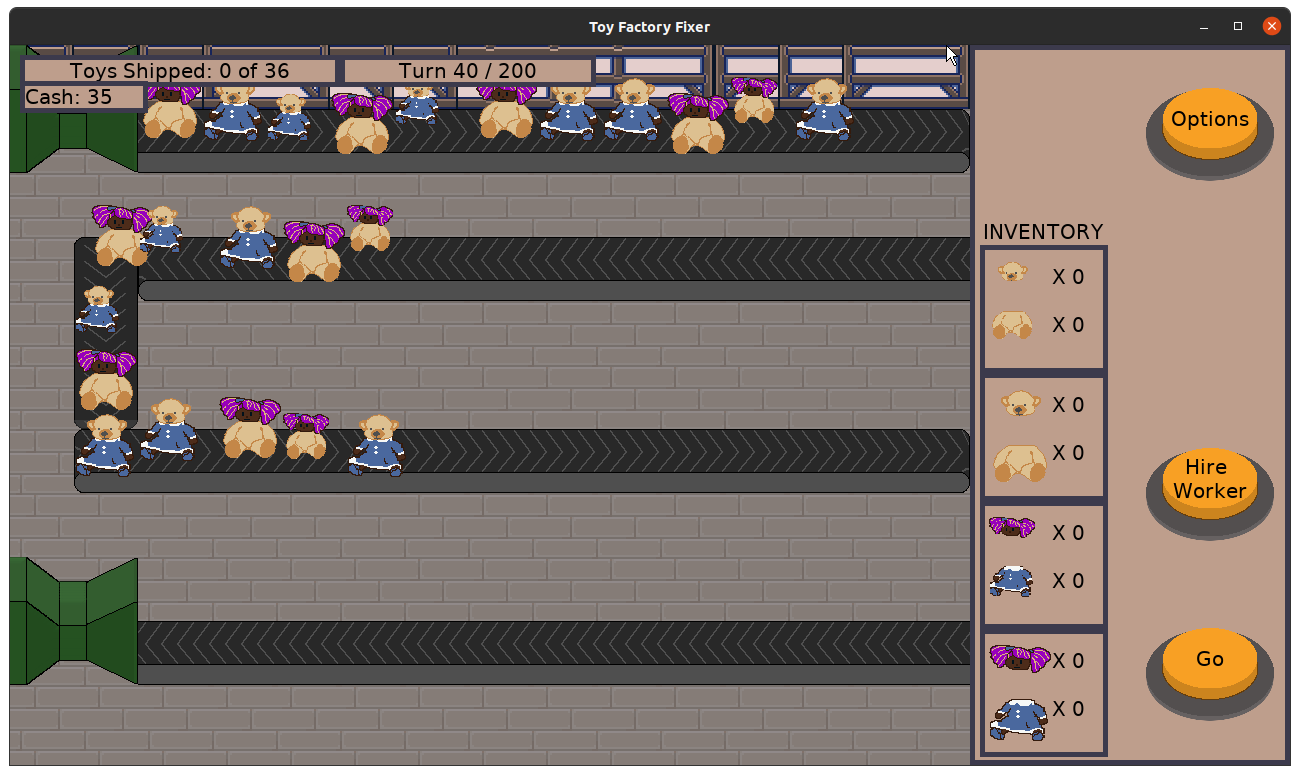
Otherwise, the other major piece of work allows the player to start a production run earlier. Before, the details about the next production run would appear when you have less than 10 moves left before it starts. Now, you get a simple button that tells you the number of turns, and if you click it, it opens up the detailed view.

Toy Factory Fixer - Start Production Run Early bonus

You are now presented with the option to start the run immediately, with a note that explains that you get a money bonus if you do so.

So now you have the choice of starting the production run early and getting rewarded for it, or waiting it out, which you might choose if your workers are currently overwhelmed with the existing toys.

As you can see, I also rearranged the UI and changed the level layout slightly so that everything is visible. It feels a lot better, and I spent way too long with the old look that covered up parts of the game.

I started work on adding a screen to let you configure the game. The only option at the moment is to let you play with or without a shipping deadline. I like the deadline since it provides pressure on the player to get your workers crafting Good Toys earlier even as Bad Toys still need to be handled, as I’ve described in previous reports. But I also recognize that some players might prefer not having that pressure.

But once this option is available, I think there’s only one other thing I want in the game before I would say it is finished enough to release.

Well, a few things. I let my wife and my son play on my phone, and I got some feedback about UI and what is hard to understand or what looks strange. So I want address some things.

I also want to add a cost to having a lot of workers. My son successfully finished the game level by hiring lots and lots of workers. Which is fine, but it shouldn’t be so easy, and I’m sure even if I spend time balancing the numbers it won’t be much more challenging.

So I want to add something to the game that discourages hiring too many workers. My current thinking is an end of level wage that needs to be paid, so you can pay to hire a lot of workers, but then you have to pay them at the end of the level based on the current shift’s wages. If you can’t afford the wages, you lose.

I like it since it gives the player another victory/loss condition to worry about, but I worry that the feedback for the player is too late. I don’t want people to get frustrated when they feel like they did well only to lose in the end because it wasn’t clear how to pay attention to the wages. And I’m not sure I like the message it sends about labor and pay.

So perhaps there needs to be some kind of arbitrary limit to hiring that you can impact in-game, such as needing to pay to upgrade the factory’s worker capacity. “Expand Restroom Size” and “Create Larger Breakroom” and things like that? Maybe it will be more intuitive and immediate for the player.

It merits some exploration. And maybe I’ll do both.

I should also spend time creating levels for the player to advance through. Right now there is only the one level. I’d prefer to have it generate levels, but maybe that’s a future feature. For now, I want to have at least a few levels that increase in challenge and variety as you play through them. And level design isn’t something I can just churn out in mere minutes.

And of course, it would be good if there were some sound effects.

And I keep thinking about how the game needs more juiciness, some character. The general art direction is lacking in any kind of personality or consistency. In my head there were named workers, people to relate to, but that’s not implemented. It feels like extra, but maybe that’s the kind of extra a game needs to avoid feeling lifeless.

So maybe I’m not almost done after all. It feels like I have at least another month of work on it. But the game is definitely playable already, and I look forward to sharing it with play testers.

Thanks for reading!

Want to learn when I release updates to Toytles: Leaf Raking or about future Freshly Squeezed games I am creating? Sign up for the GBGames Curiosities newsletter, and get the 24-page, full color PDF of the Toytles: Leaf Raking Player’s Guide for free!
Categories
Game Design Game Development Geek / Technical

Freshly Squeezed Progress Report – Dispensing More Toys At Once

Today is the 15th anniversary of GBGames, LLC being founded!

It would have been an awesome day to launch a new game, but alas, Toy Factory Fixer is not ready for release. However, I will be asking people on my mailing list if they want to sign up to try the game early.

Interested in being one of those people? Sign up for the GBGames Curiosities newsletter today!

In last week’s sprint report, I created an indicator to show details about the new production run of toys coming down the conveyor belt as well as created a shipping deadline to encourage the player to have some urgency when it comes to creating Good Toys earlier in the game.

Last week, I focused on making it possible for more than one toy to exist in a single conveyor belt location at once.

Sprint 14: create an economy

Completed:

  • Allow multiple toys to occupy same belt space
  • Defect: Fix Z-ordering so mouse goes over the HUD

Not completed:

  • Create way to choose if game has deadline or not
  • Allow player to start production run early

Stretch if above got done:

  • Create sound effects

Because early on I wasn’t sure how large the play area or tiles were going to be, I made toy positions based on tiles instead of the screen area. This worked great in terms of being able to render them anywhere since I could just multiply their position by the size of the tiles. That is, a toy located at position (3, 1) with tiles of 64×64 pixels square would be at (3 * 64, 1 * 64) or (192, 64).

The fun thing is that their positions were already floating point numbers, so I could make it look like they were a bit more randomly placed by adding a small offset that is less than one. I can find out which tile they were on by taking the floor of the number, so a toy at (3.25, 1) would still be on the tile at (3, 1), but it would get rendered at (3.25 * 64, 1 * 64) or (208, 64) instead of (192, 64).

Just jiggling the offset of toys being placed on the conveyor belt with -0.25, 0, or 0.25 in both the X and Y directions made for a pleasing visual:

Toy Factory Fixer - Jiggled toy offsets

Well, a relatively pleasing visual. I saw that some toys overlapped other toys visually when they shouldn’t. For instance, in the image above, you can see the small bear-headed doll looks like it is on top of the large doll-headed bear when really it should be drawn behind it.

I realized it was due to the toy sprites drawing centered from their top left instead of the bottom center. It required changing offsets for the toys being rendered, but it made it a lot easier for everything to Z-order correctly.

Toy Factory Fixer - Z-ordering toys correctly

But just drawing a toy slightly off didn’t change anything in terms of the game mechanics. Toys were still allocated 1:1 to a conveyor belt location. Well, it wasn’t strictly true, because it was possible for a worker to place a toy on a belt location that was already occupied, resulting in two toys in the exact same location. With the jiggled offsets, it looks less bad most of the time, but it still occasionally looked like one toy instead of two. Also, most of the game still operated under the assumption that only one toy could occupy a space at time.

For instance, the money you earned from shipping a good toy? You got that bonus based on whether or not there were more good toys shipped since the last check, which meant that shipping two or more toys still gave you the same money bonus as when you shipped one toy.

I wanted the game to recognize that multiple toys can be placed in the same tile, and that required creating the concept of “tracks” on the belt.

I created 9 tracks, and each track is associated with a rendering offset. Think of a 3×3 grid, with (0, 0) in the center, and everything else some combination of either 0.25, 0, or -0.25.

So when a toy gets dispensed, I find out which of the tracks is still open on a particular conveyor belt location, and I assign the toy to that track. This track system prevented the problem of toys being placed in the same exact location.

Instead of preventing workers from putting crafted Good Toys down on occupied belts, they checked if the belt had any unoccupied tracks to place the toys in.

And once everything worked well with one toy, I changed the dispenser so that it could dispense more than a single toy at once.

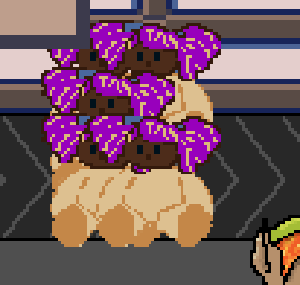
Here’s a close-up of a belt tile with five toys on it:

Toy Factory Fixer - Crowded Belt

I ended up not getting anything else accomplished this week other than fixing a defect in which the mouse cursor appears under the HUD, something that you wouldn’t see in the mobile app anyway.

So why did I spend all this time on getting multiple toys to occupy the same location?

A big part of the challenge of the game is in managing the flow of Bad Toys coming down the conveyor belt. A single worker can only work on a single toy at a time, so any other toys will continue moving down the line.

With only one toy per belt location, I only had so much room to manage that challenge. I could manage the conveyor belt layout, and allow the player to make strategic decisions about where to place a worker so that the worker can pick up multiple toys as they pass in either direction.

Now with up to 9 toys occupying the same location, other strategies will need to be deployed because one worker or two workers might not be enough to handle it all.

It sounds like a simple strategy: hire as many workers as you can. Done.

And I will need to balance the game play in terms of how the Good Toys earn you revenue and how much workers cost, but I came up with some ideas about how to handle the victory/loss conditions, too. If each worker hired also results in an end-of-shift payment owed, and if spending more money than you earn can result in a loss, it might provide the opposing pressure to avoid that simple strategy above. And if you keep your workers through multiple shifts/levels, then not only do you need to anticipate the end of the shift but also your long-term likelihood of surviving.

I need to figure out how to communicate it to the player so they know to anticipate it rather than get surprised by it, but I think it provides a much more elegant way to end the game instead of merely failing you if you shipped any Bad Toys.

Thanks for reading!

Want to learn when I release updates to Toytles: Leaf Raking or about future Freshly Squeezed games I am creating? Sign up for the GBGames Curiosities newsletter, and get the 24-page, full color PDF of the Toytles: Leaf Raking Player’s Guide for free!
Categories
Game Design Game Development Geek / Technical

Freshly Squeezed Progress Report – Production Run UI and Shipment Deadlines

I added money, a way to spend money to hire workers, and a way to schedule multiple waves of toys to get dispensed in last week’s sprint report, which helped Toy Factory Fixer feel more like a game. I continued that trend last week.

Sprint 13: create an economy

Completed:

  • Create dispenser queue
  • Create a shipping deadline
  • Defect: Fix crash when rendering toys

Not completed:

  • Allow multiple toys to occupy same belt space

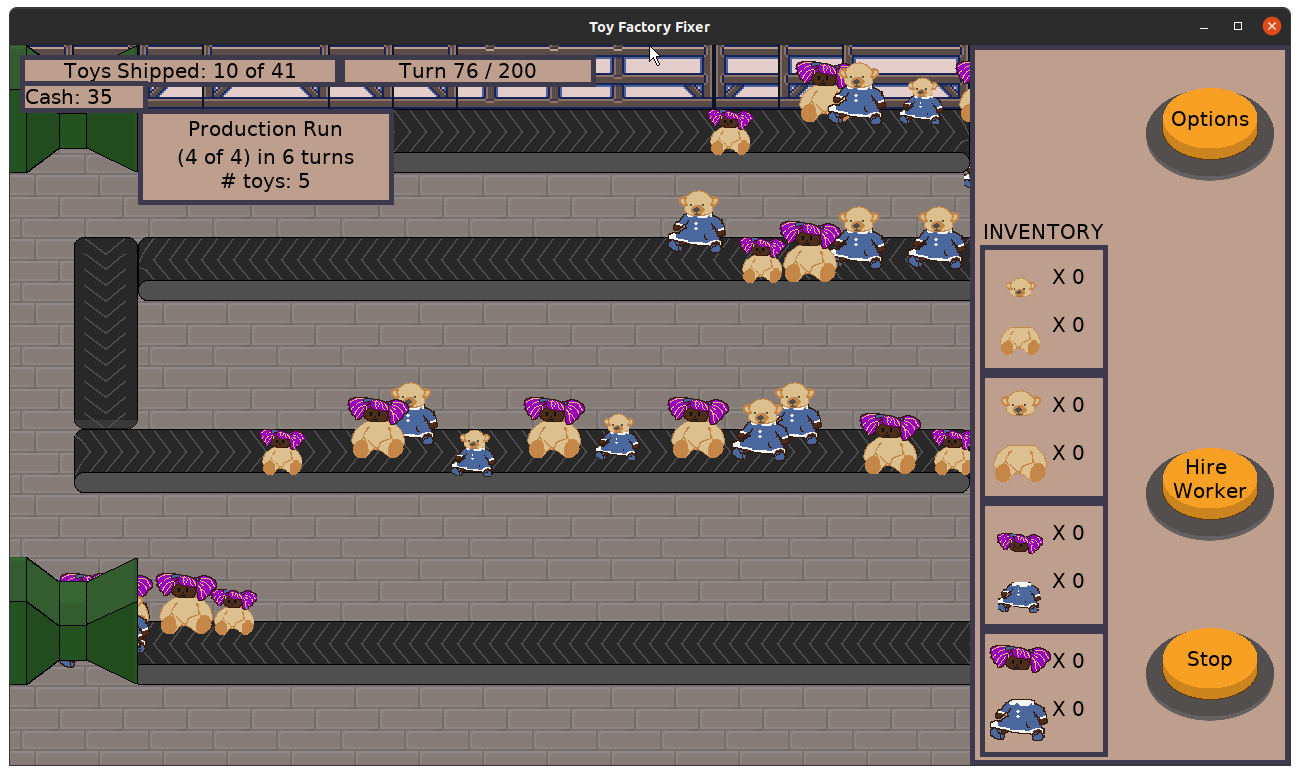
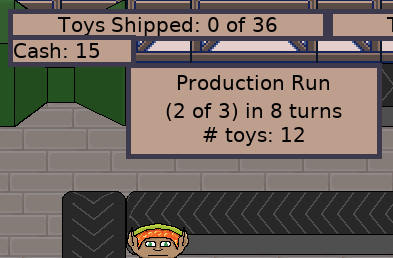
The dispenser already had scheduled productions runs, but the player didn’t know when they were coming or what to expect. In the last sprint I added a simple indicator that counts down the number of turns left until the next run starts, as well as informing you how many toys there will be.

Toy Factory Fixer - Dispenser Queue UI

I might need to experiment with the UI. The frame and the text takes up quite a bit of the screen, covering up the nearby conveyor belts. Perhaps I can provide a smaller frame that only indicates the number of turns, and if the player taps on it, then it opens up into a more detailed view.

I also added a shipping deadline. That is, in a given level, you have until a specific turn to ship all of the toys you need to ship. If the shipment is late, you lose.

Toy Factory Fixer - Shipping Deadline UI

The idea is to discourage the player from waiting until after the Bad Toys are all separated to direct the workers to craft Good Toys.

Right now, it is possible to play the game with a deadline or without one. It occurred to me that I could also track the number of turns it took you to ship all of the toys and then assign the player a grade based on how well they did. So instead of merely winning or losing, the player can win or win better or win awesomely depending on how much effort they want to put into it. So that’s an idea to go into the backlog.

The game periodically crashed on me, and it turned out it was due to how I was moving toys. You can tell a worker to craft a Good Toy, which means that a new toy is added to the game’s collection of toys. It is possible to do so while a turn is still resolving, which I need to address because it causes other side-effects that I don’t like, but this crash was annoyingly disruptive so I wanted to address it immediately.

I changed how toy movement is handled so that it doesn’t depend on some state that is only set at the beginning of the turn. Not only did it fix the crash, but it also meant the code was simpler.

What I didn’t get to was ensuring toys can occupy the same space on a conveyor belt. Technically, they already can. The problem is that they occupy the exact same location, so the player can only see one of the toys at a time. I wanted to make it easier for the player to see multiple toys on the same belt, and once I do that, I want to have the dispenser place multiple toys on the belt at once.

To start, I decided to shrink the size of the toys. Initially I thought that all toys should just be 75% of their original size, but then I realized that I could have the original size as well as small toys.

Well, of course the effort went from merely making a one line change in order to render the toys at a smaller scale to modifying the inventory and dispenser and UI to handle two sizes of toy parts.

Toy Factory Fixer - Small and Large toys

I think the smaller toys are adorable.

I still need to change the crafting menu to allow the player to create small versions of Good Toys, but I also want to change the number of stitches large and small toys have as well as changing the reward for small toys versus large toys.

It’s a bit of a detour from the original plan of allowing multiple toys to occupy the same location, but I think it helps give some needed depth to the game.

And maybe multiple smaller toys can occupy the same conveyor belt tile, but larger toys can’t. But then I need to figure out what to do if a worker tries to place a crafted toy on a belt that is already occupied. They normally try to find the first one that isn’t, but if all of the nearby spots are already filled, what should happen?

Maybe they hold onto the toy until a space opens up, which wastes precious time? Perhaps they bump off a toy onto the floor, which requires the player to tap on it to make a worker pick it up?

I don’t know, and maybe it isn’t that important to figure out yet. I have more pressing game play questions to answer.

Thanks for reading!

Want to learn when I release updates to Toytles: Leaf Raking or about future Freshly Squeezed games I am creating? Sign up for the GBGames Curiosities newsletter, and get the 24-page, full color PDF of the Toytles: Leaf Raking Player’s Guide for free!
Categories
Game Design Game Development Geek / Technical

Freshly Squeezed Progress Report – Money and Production Runs

In last week’s sprint report, I started adding an economy to Toy Factory Fixer. Toys can only be crafted if you have the required toy parts, and the game tracks how many Good Toys and Bad Toys you ship. Next up was adding money to the game.

Sprint 12: create an economy

Completed:

  • Create cost to hire worker
  • Create reward for shipping Good Toy

Not completed:

  • Create dispenser queue

I didn’t spend as much time on game development this last week as I would have liked. I did less than 5 hours, which is below my average for a week.

That said, I was able to add money to the game. Now workers cost money, so you can’t hire an infinite amount, and shipping Good Toys also gives you money.

Toy Factory Fixer - Game Play

The starting amount of money, the cost of hiring workers, and the money you can earn each time a toy ships are all numbers I need to play around with to see if I have something that can be challenging and enjoyable rather than either impossible or inevitable.

While I didn’t get the dispenser completely done, I did manage to change the way toy dispensers work. I just didn’t get around to adding the UI elements that would let the player know what they are doing.

Originally, dispensers would be provided with a bunch of toys, and each turn a new toy would get dispensed onto the conveyor belt.

Now, dispensers have multiple production runs. Each production run has a collection of toys and a turn countdown. So a dispenser will wait the specified number of turns before starting to put toys on the belt, then once all the toys for that run are dispensed, it will start counting down the turns until the next run starts.

I think this change will help to control the flow of toys so that it won’t overwhelm the player.

Coming up next

The next time I change the dispenser, I want to add ways to make it more overwhelming, such as being able to put multiple toys on the same conveyor belt space. So I can slow down the flow or I can increase it, requiring the player to figure out a better way to address it through their hiring strategy.

One of the issues threatening the enjoyment of the game is that the player could just sit back and wait for workers to get all of the toy parts possible, then start crafting only at the end. I think it sounds like it would be a bit boring, so I think adding a shipping deadline would help. You would then need to craft Good Toys while also separating Bad Toys because otherwise you will not ship all of the Good Toys by the turn deadline. And since workers can’t craft and separate toys at the same time, there will need to be decisions about when to do one or the other.

And of course, I’d like to make sure the UI is intuitive and is readable.

Thanks for reading!

Want to learn when I release updates to Toytles: Leaf Raking or about future Freshly Squeezed games I am creating? Sign up for the GBGames Curiosities newsletter, and get the 24-page, full color PDF of the Toytles: Leaf Raking Player’s Guide for free!
Categories
Game Design Game Development Geek / Technical

Freshly Squeezed Progress Report – UI, Tracking, and Designing

In last week’s report I not only finished all of the tasks for the sprint but also got a complete game loop that I could playtest.

So for the last week, I’ve been building upon that foundation.

Sprint 11: create an economy

Completed:

  • Only allow crafting when parts available
  • Show toys shipped indicator
  • Create game over screen

Not completed:

  • Create cost to hire worker

The core loop of hiring workers who can separate Bad Toys into parts automatically and of commanding workers to put together Good Toys from those parts is done, but there was nothing that actually connected the concept of a parts inventory to the crafting of toys.

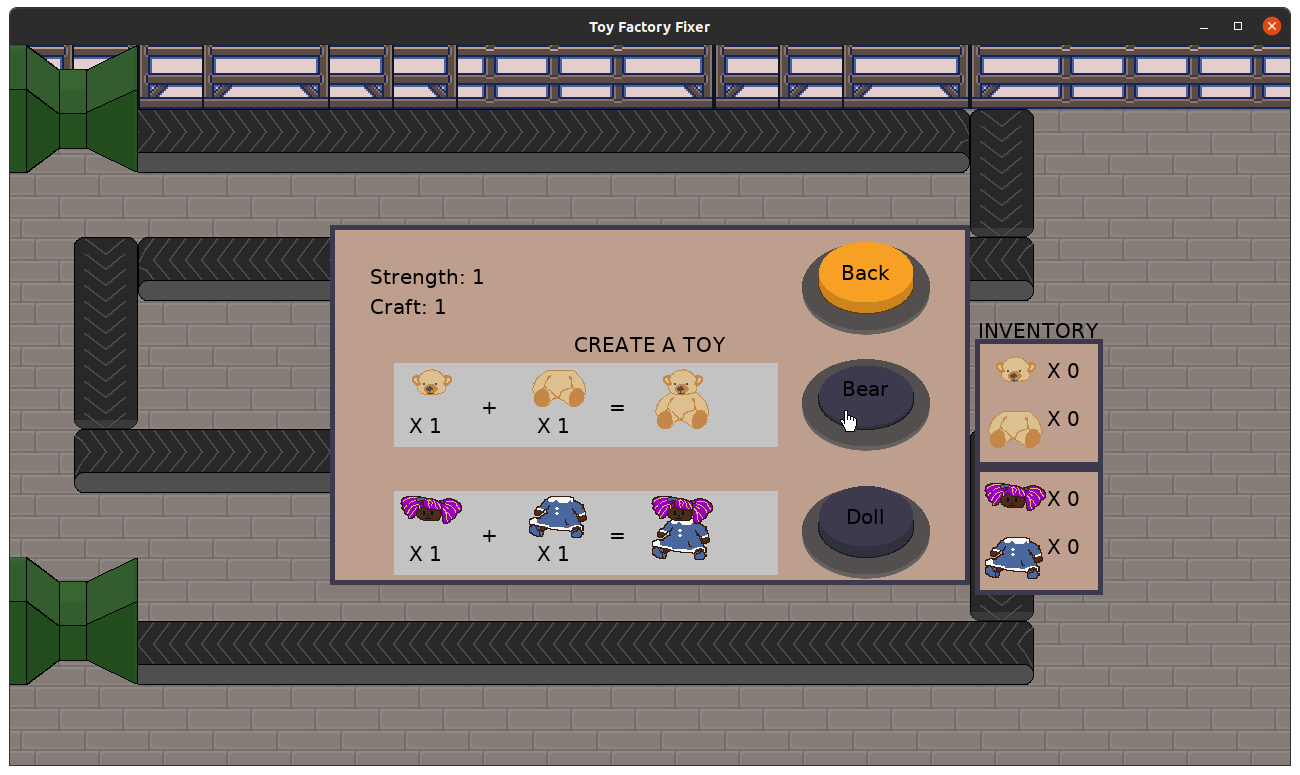
So I made sure that toys can only be crafted when parts are available. If they aren’t available, the buttons are darkened.

Here’s the original “just get something working” worker menu:

Toy Factory Fixer - Old worker menu

And here’s the updated one. I added formulas, and I moved the inventory closer so that you could compare what you need to what you have more easily:

Toy Factory Fixer - Updated worker menu

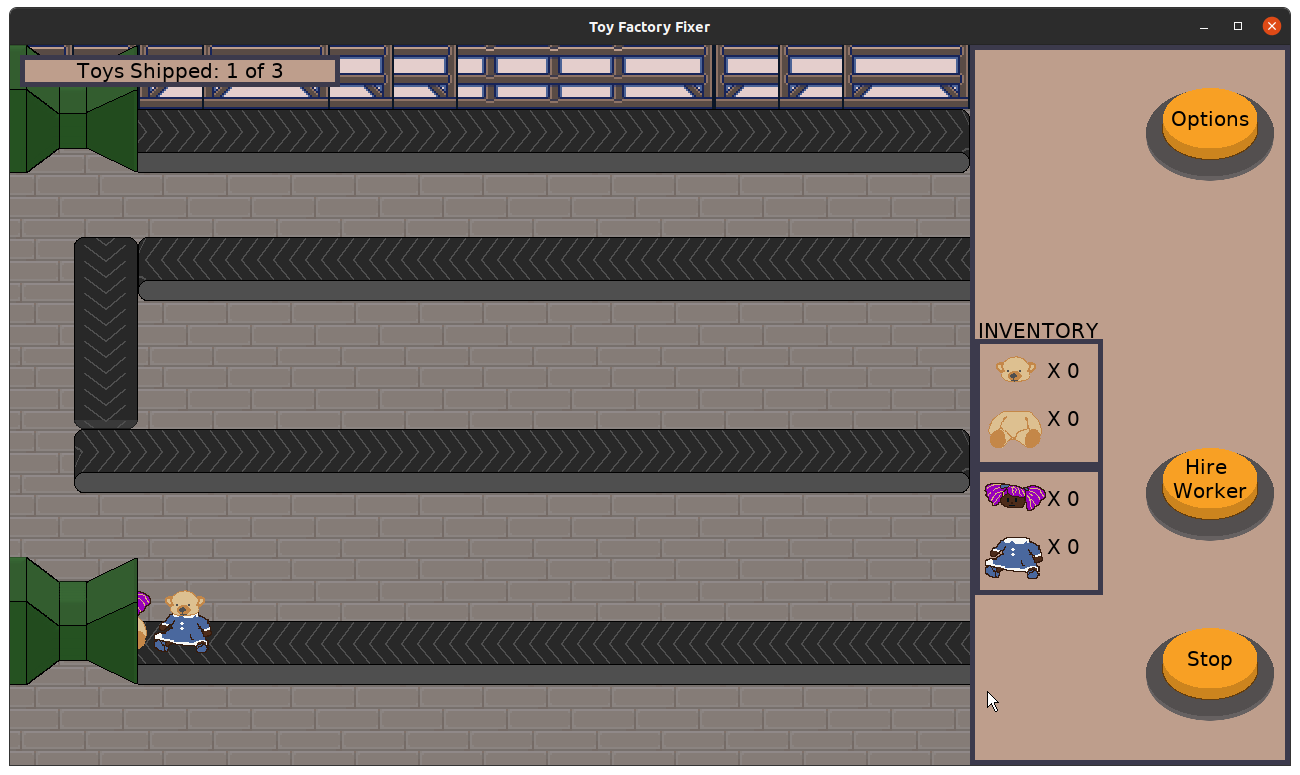
Similarly, I wanted to add something to indicate to the player how much progress has been made in terms of shipping toys:

Toy Factory Fixer - Toys Shipped Progress

It’s funny how a small UI element like this one can result in a bit of work under the hood to support.

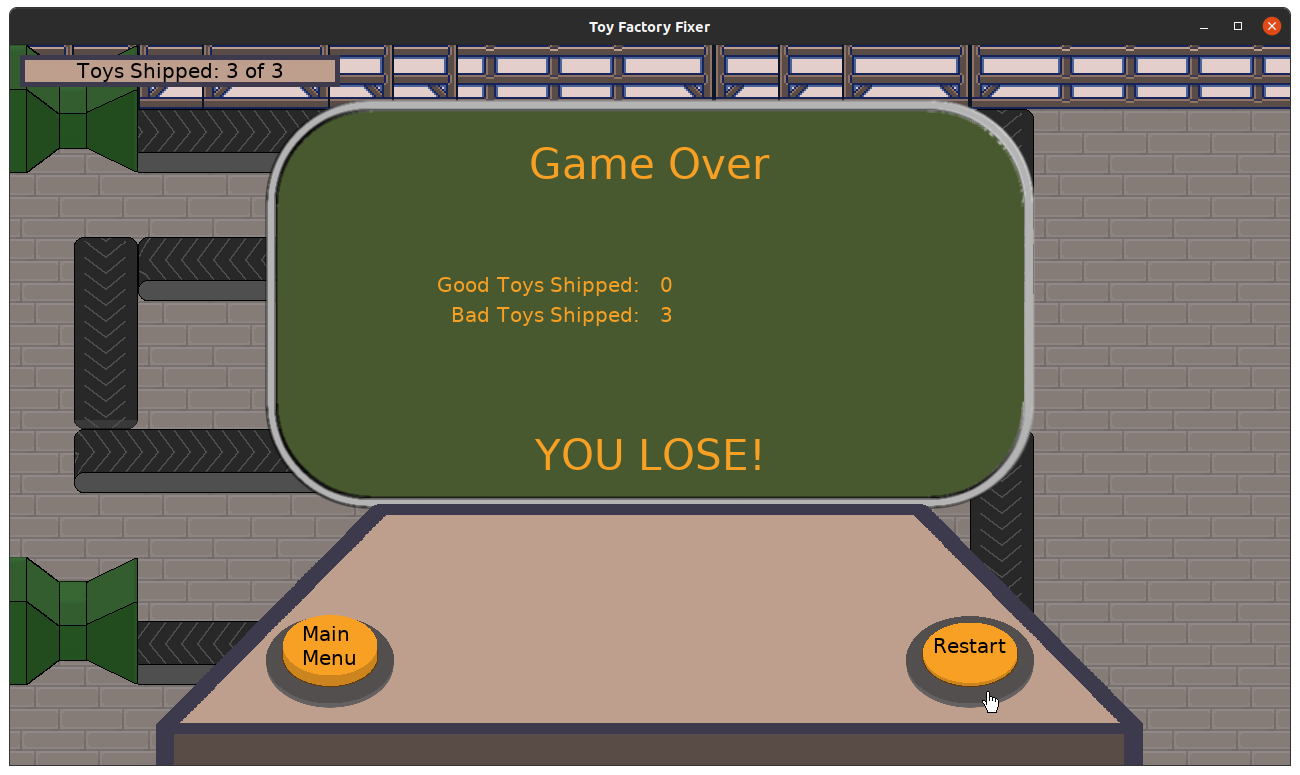
Lastly, I updated the game over screen so that it showed some statistics about toys you shipped. The game used to end immediately upon shipping a Bad Toy, but now I want to allow the game to end when all toys are shipped. Currently, the “YOU WIN” or “YOU LOSE” text appears based on whether any Bad Toys have shipped, but I think if I am going to allow you to ship all toys then there should be some other win/loss criteria.

Toy Factory Fixer - Game Over screen

I’m thinking that you can earn money for each Good Toy shipped, so you can lose but have more money for your next try. Maybe.

Speaking of money, the one thing I didn’t get to was adding the concept of money to the game and requiring it to hire workers.

I need to remember that there is a difference between implementing something that functions and tweaking to get the balance right. I probably could have gotten the last task done if I wasn’t also worried about how to make it enjoyable right off the bat.

In this case, I could have added currency to the game, then made it cost some of your money to hire a worker. Only then should I worry about how much money to start the player out with and how much it should cost to hire a worker. And in fact, I might not even need to start worrying about it until I have more of the components of the economy implemented.

Besides worrying about balance prematurely, I was addressing some quirks I was discovering as I played the game. Due to the way the turns get resolved simultaneously, I found it was possible for two workers to place a toy on the same section of conveyor belt. Since the current implementation expects only one toy on a belt tile at a time, this is a bug that needs to be addressed.

But I am also spending time thinking about the various ways I could explore the game design space. and one of them was making it possible to have more than one toy on a belt tile. My thinking is that the dispenser can spit out more than one toy at a time in order to allow flexibility in the flow of toys to make the player deal with, but it would mean that the above bug wouldn’t be a bug anymore.

Which goes back to not wanting to prematurely balance the game before I’ve got more things implemented.

Thanks for reading!

Want to learn when I release updates to Toytles: Leaf Raking or about future Freshly Squeezed games I am creating? Sign up for the GBGames Curiosities newsletter, and get the 24-page, full color PDF of the Toytles: Leaf Raking Player’s Guide for free!
Categories
Game Design Game Development Geek / Technical

Freshly Squeezed Progress Report – Finally, a Main Game Loop!

For sprint 9’s report, I created a crafting menu for workers to create Good Toys from the parts of Bad Toys that were separated.

Sprint 10: main game loop

  • Process a single turn sequence
  • Allow player to command worker to put toy parts together
  • End game when last Good Toy enters shipping container
  • STRETCH: Create active pause

This past week, I actually managed to accomplish all of the tasks I wanted to!

Workers can be commanded to craft a Good Toy. Each worker now has a Crafting stat that indicates how many “stitches” they can work on per turn.

When a worker is done stitching together a new Good Toy, they will put the toy on the conveyor belt. Now, ideally they would find the “best” location to put the toys down on, but in the interest of speed, I basically used the heuristic of finding a free space on the conveyor belts that are lowest and to the right. It works well enough, but I can see revisiting it in the future to ensure that the chosen spot is the one that is the latest in the belt line.

Finally, the game ends when the last Good Toy enters the chute for the shipping container. I needed to essentially figure out how many toys total are in the game, and it is basically a function of how many toys are dispensed.

I also spent some time speeding up the movement of the conveyor belts, and I added what I refer to as “active” pause.

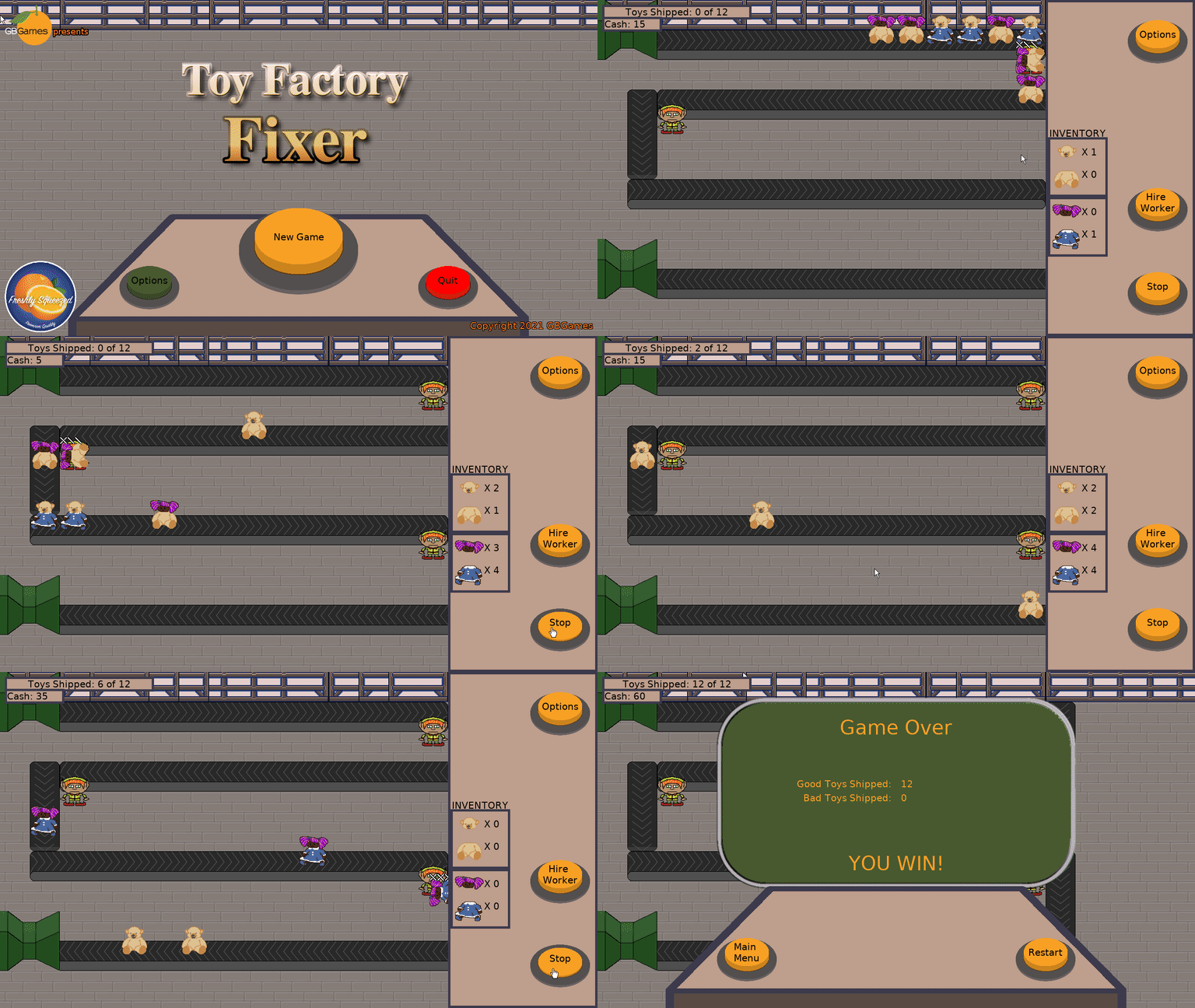
Toy Factory Fixer - Active Pause

Basically, instead of pressing the Advance button to move the game ahead one turn, and then requiring the player to do so repeatedly, the player can now press the Go button, which turns into a Stop button. So now turns will continue until the player stops them by either hitting the Stop button or selecting a worker. In truth, any of the actions available while the Stop button is active will stop turns from advancing once the current turn finishes.

Toy Factory Fixer - Main Game Play Loop

So what’s exciting is that I now (finally!) have the core of a game that I can playtest. There are things that aren’t implemented yet that I plan to get to in the coming week or two, such as adding a cost to hiring workers which requires a currency. In fact, crafting Good Toys should take away from your inventory of parts but doesn’t at the moment.

It might seem like the game is broken, but it just means I need to self-enforce any new rules I come up with before I implement them, similar to what you would do with a paper prototype.

And of course, the game’s graphics need work. At the very least I need some indicators to let the player know they can select a worker, but I also want to make it clearer when a worker is idle, when a worker is done crafting a toy, when a toy ships, and things like that.

Thanks for reading!

Want to learn when I release updates to Toytles: Leaf Raking or about future Freshly Squeezed games I am creating? Sign up for the GBGames Curiosities newsletter, and get the 24-page, full color PDF of the Toytles: Leaf Raking Player’s Guide for free!
Categories
Game Design Game Development Geek / Technical

Freshly Squeezed Progress Report – Inventory and Worker Menu

In the previous week’s sprint report, I got workers to pull apart Bad Toys that they pulled off the conveyor belts.

Sprint 9: main game loop

  • Process a single turn sequence
  • Allow player to command worker to put toy parts together
  • End game when last Good Toy enters shipping container

I managed to make it clear that separated toy parts get added to the player’s inventory instead of just disappearing. I’m not completely happy with how the toy parts merely fall to the bottom of the screen in a straight line, but it’s functional.

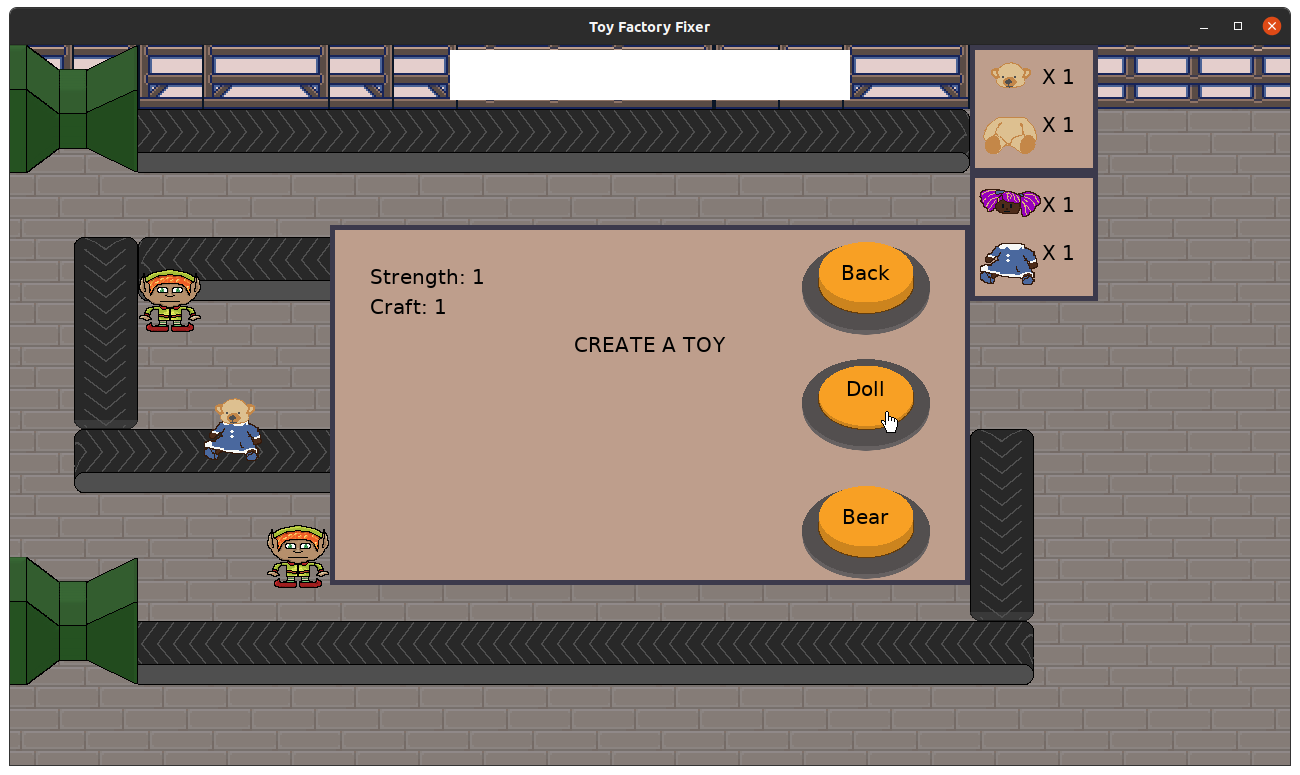
I started the process of making it possible for the player to direct a worker to put together toy parts. My initial attempt was fairly minimal, but then I went back to my notebook and sketched out a few attempts at some modal dialogs. My current approach gives the player the information needed to make a decision, and it is a lot clearer for me to implement.

Toy Factory Fixer - Crafting

It’s basically a crafting menu, showing you which Good Toys you could create based on what inventory you have.

I managed to do a lot more game development than usual in the earliest part of the week, but then long meetings at the day job on multiple days prevented me from getting much done in the latter part of the week, so I need to finish the implementation this coming week.

I also sketched out a rough idea of a new game, but I don’t plan to work on it until Toy Factory Fixer is released. Still, feel free to sign up for my newsletter below if you want to get a sneak peak at it when I do finally share it.

Thanks for reading!

Want to learn when I release updates to Toytles: Leaf Raking or about future Freshly Squeezed games I am creating? Sign up for the GBGames Curiosities newsletter, and get the 24-page, full color PDF of the Toytles: Leaf Raking Player’s Guide for free!
Categories
Game Design Game Development Geek / Technical

Freshly Squeezed Progress Report – Workers Working

Last week’s sprint report talked about getting workers into the game, as well as my focus on getting something playable as quickly as I can.

Sprint 8: main game loop

  • Process a single turn sequence
  • Create player inventory of toy parts
  • Allow player to command worker to put toy parts together
  • End game when last Good Toy enters shipping container

Last week I managed to get the workers to pull a Bad Toy off of the conveyor belt, then spend a few turns working on separating the pieces.

I tried to focus on fast implementation, but I also thought it would be good to make it obvious what state everything was. I found rotating the toy to be on its side when being worked upon and showing the worker’s progress in the form of stitches were quick ways to make it clear what was happening.

Toy Factory Fixer - Stitches

I also implemented an inventory of toy parts. There are currently two types of toys, dolls and bears, and each has a head and a body. I’m not a user experience expert, but I thought it would be helpful to group the inventory parts so it is clear when you have at least of each part to create a particular toy.

Toy Factory Fixer - Separating toys, with inventory

I did not get to the point of actually telling workers to craft Good Toys out of parts, so there are still no Good Toys in the game or a way to win.

I think some of the work went more smoothly this week. I had vague ideas of how the toy separating and putting together would operate, but I finally managed to get the details hashed out mentally.

But it also means that there was a lot more to do than I originally anticipated. It seems straightforward to separate toy parts across turns, but there are multiple steps to implement. Just collecting the toy off of the belt means first finding idle workers, figuring out if there is a toy adjacent to them, then kicking off animations to make it clear that the worker is picking up the toy.

And then of course testing it. What happens if there are two workers next to each other? I had a humorous bug in which a worker would steal the toy from an adjacent worker because I did not mark the toy as being worked upon.

But I’m finally playtesting a bit. Even though the core of the game is still incomplete, I found myself experimenting with changing the order of operations for a single turn. Does the worker collect a Bad Toy off the conveyor belt first, or do the toys move first? Should a worker be able to pick up a toy immediately after separating a toy, or should they wait until the next turn?

Putting together a Good Toy is next up, and I think I can really get into playtesting. I am pretty excited.

Thanks for reading!

Want to learn when I release updates to Toytles: Leaf Raking or about future Freshly Squeezed games I am creating? Sign up for the GBGames Curiosities newsletter, and get the 24-page, full color PDF of the Toytles: Leaf Raking Player’s Guide for free!
Categories
Game Design Game Development Geek / Technical

Freshly Squeezed Progress Report – Placing Workers

In last week’s sprint report for my new game project Toy Factory Fixer, I talked about moving toys down the conveyor belt and spending potentially too long creating new art for the worker in the toy factory. I also worried about the lack of progress towards getting something playable, and I wanted to renew my efforts on prioritizing work that allows me to play test the game rather than merely look at it.

Sprint 7: main game loop

  • Create a way to hire and place a worker
  • Create player inventory of toy parts
  • Allow player to command worker to put toy parts together
  • Process a single turn sequence
  • End game when Bad Toy enters shipping container
  • End game when last Good Toy enters shipping container

I knew I probably added too many things to this sprint when I started, but I still left them all in the plan.

It took me a couple of days to get the worker hiring menu in. It ostensibly should have been easy, but I ran into a strange Z-Ordering issue, plus a problem with the menu code that was surprisingly frustrating. Otherwise, the work was straightforward but required some thought as it was a multiple-part problem that wasn’t obvious until I started working on it, such as needing to identify what was adjacent to the conveyor belt and what was still available once you place other workers down.

Now you can select the worker to hire, place the worker next to the conveyor belt, and confirm the placement of the worker there.

Toy Factory Fixer - Hire a Worker

Toy Factory Fixer - Hire a Worker

The little orange buttons are meant to be available locations to place a worker, but I think there should be a more subtle way to indicate those locations if I keep the mechanic in the future.

I managed to create a game ending when a Bad Toy enters the shipping container. It’s a simple screen that merely says “GAME OVER” for with a button to restart and a button go back to the main menu. I have ideas for improving it thematically, but I just needed a way for the game to end. It was quick and easy.

I did not add a similar ending when the last Good Toy enters the shipping container because there are no Good Toys in the game yet.

And there are no Good Toys in the game because workers don’t currently create toy parts by separating Bad Toys, so there is no need for a toy part inventory.

I ended the week by figuring out what the turn sequence should look like. Right now, toys are dispensed from the dispenser, toys are moved down the conveyor belts, and now there is a check to see if a Bad Toy made it into the end of the line.

Next, I want to add the following:

  • Find all unoccupied workers.
  • For each unoccupied worker, find an adjacent Bad Toy as pick-up-able by this worker.
  • For each tagged Bad Toy, have associated worker pick it up.

A worker who is holding a toy is “occupied” with the work of separating its parts, which also has a turn sequence.

And this is why I want to get the game play implemented as quickly as possible: I want to see whether or not this will feel as clunky as it sounds like it might turn out to be, and I want to change direction sooner if that is the case.

I am very aware that I am barely getting to the game play while I reach the end of yet another month. I’ve spent about 55 hours since the beginning of December, and while part of the work last month was spent figuring out a design and doing paper prototypes and doing some hopefully one-time setup for future Freshly Squeezed games, that’s a lot of time to go without a game to show for it. My Ludum Dare entries have been put together in less time.

There is very much a difference between 5 hours spread across an entire week and 5 contiguous hours. Besides focusing on the right work, I need to figure out how to be faster about the work I do choose to focus on.

The game ending screen above, for instance, was fast because I didn’t spend much time trying to make it look great, whereas the effort to create the worker sprite in the previous sprint was probably overkill for what basically amounts to a placeholder, even if I am proud of what I created.

But I feel like I am finally going to have something playable soon. I just hope it won’t be another month before anything interesting happens in the game.

Thanks for reading!

Want to learn when I release updates to Toytles: Leaf Raking or about future Freshly Squeezed games I am creating? Sign up for the GBGames Curiosities newsletter, and get the 24-page, full color PDF of the Toytles: Leaf Raking Player’s Guide for free!