Categories
Game Development Geek / Technical Linux Game Development Marketing/Business

Gearing Up for Release: Platform-specific Issues

I started a three-month project at the beginning of the year, and I’m now in the eighth month. I reported on the reasons why it was taking so long last month.

But I’m feeling pretty good about it, and while I still have some balance issues to work out, and it’s a bit ugly, I’m preparing for the actual release.

The thing is, I haven’t really done a serious release before, and since I want to do a simultaneous cross-platform release, I’m finding issues unique to each platform.

The platforms I currently support:

  • GNU/Linux
  • Android
  • Windows

What I want to support:

  • Mac OS X
  • iOS

I’ll start with Apple platforms, then talk about the environment I use natively. Other platforms will be discussed in the next post later this week.

Mac/iOS: no development or testing environments

I would love to create a Mac port. I know it is theoretically possible to create a cross-compiler to generate a Mac version, but it seems I need Mac-specific libraries, which requires owning a Mac.

I don’t own a Mac, and while I know of virtual Mac services you can subscribe to online, I haven’t bothered to look too seriously into them. I would also like to be able to test the game, and so I would need to use a Mac in order to see how it really runs, especially after running into the Windows-specific issues above.

As for iPhone or iPad, I’m in a similar position. I don’t own an iOS-based device. As I’m using libSDL2, I know it is possible to port to it, even without a Mac, but I would need to look into how to do so, and I would still need to invest in the devices to test on.

I am saving up for these things, but at the moment I don’t have them and I don’t want to spend time on them until I know what I’m doing.

And in the past it’s been difficult to hear back from people willing to be paid for porting a game for me, and volunteers have had difficulty figuring out how to put my project together on their system. I might look into it again, because that was years ago, and it’s a different world today.

GNU/Linux: distributing dependencies and architecture compatibilities

I develop and test the game on my Ubuntu GNU/Linux system, and the main thing to worry about there is that I can distribute the game and have it work out of the box on other distributions.

My game uses libSDL2 and related libraries. While I installed them on my system using my package manager, I can’t assume that my customers will have them installed as well.

Basically, I need to build custom dependencies, as per Troy Hepfner’s excellent article series on Linux Game Development, and then distribute them with my game.

Quite frankly, rather than worry about an installer to put everything in the correct locations on someone’s system, I think providing a basic tarball might be fine. Rather than provide .deb or .rpm or customer shell installers for each type of system, and then worrying about following the correct Linux Filesystem Hierarchy Standard, you allow the player to put the game in the directory of their choosing, extract it, and play.

But then I need to worry about how the tell the system to load the libraries. Running an application on Windows, the system generally looks in the local directory for libraries to depend upon. Unfortunately, Linux-based systems don’t do so, and while there is a way to point it towards your libraries using the LD_LIBRARY_PATH environment variable, I also know that it is frowned upon to do so due to the security and compatibility issues it can introduce.

On the other hand, many popular commercial games on my system do just that. For instance, looking at the directory for Don’t Starve, I see:

$ cat bin/dontstarve.sh
#!/bin/bash
export LD_LIBRARY_PATH=./lib64
./dontstarve

The fact that it is in this shell script wrapper is better than the original concern of changing the default environment variable in a more or less permanent way, which can cause version conflicts and such. It’s your program. You know what it needs, and any other applications that run will not be affected.

Still, supposedly the better way is to tell your binary at build time where to look, which isn’t very difficult. It requires -rpath=\$ORIGIN/[directory where you put your libs]. $ORIGIN expands into the directory that your binary is located.

So if the extracted tarball would have the following structure:
– foo-bin
– libs
– libfoo.so
– libbar.so

Then I would build foo-bin with -rpath=$ORIGIN/libs.

Of course, now foo-bin MUST be in the same directory as libs, but in practice, it’s fine. When was the last time you moved parts of a game’s files to different relative locations and expected it to continue to work?

I’m sure there’s issues with this approach as well, but with these two approaches, there’s plenty of precedent.

The only unknown I have is dealing with 32-bit vs 64-bit systems. Ubuntu has multiarch support, but I’ve seen comments on forums about people not being able to run an application due to architecture issues.

Don’t Starve distributes separate 64-bit and 32-bit builds. FTL, on the other hand, distributed both the 64-bit and 32-bit binaries and libraries together, and using a shell script, it determined which platform you were on at runtime to point LD_LIBRARY_PATH to the appropriate directory.

And other games distribute all desktop platforms together in one file, so if you bought the game, you bought it for Windows and Linux and Mac, whichever one you wish to play on. I like this option, especially since I hate the idea that I have to pay for a game twice in order to play on two different platforms.

I know some companies make their living by porting games and then selling them directly, but it’s not a business model I prefer.

Next time

In the next post, I will talk about issues specific to Android and Windows.

Categories
Games Geek / Technical

Becoming an Accidental Fan

When I was a child, I had an allowance.

I had an interest in Archie comics, so sometimes my $2 per week would go towards an Archie Double Digest, but other times I would save up until I had enough money to buy myself a Nintendo game.

At the time, for you young ones who didn’t know, the games would go for about $50. If you do the math, that’s a long time to wait, but there was always birthday money, some of which I got to spend on what I wanted before the rest was thrown into savings for me, so it wasn’t always interminable until I could get my next game.

But as a child, and probably before I had Nintendo Power to tell me what games were being released, I didn’t always have a game in mind to buy. I just knew that by the time I saved up the money, I would go into the store with my parents and look at the walls of the video game aisle until I found something that looked like what I wanted.

I recall one time seeing a blue box with pock-marked fighter plane shooting through a hole in the sky with a space background behind it, guns blazing and everything. I thought it was an F-15 flight simulator that I had seen an ad for in a really old issue of Electronic Gaming Monthly.

I was a kid. I didn’t know what an F-15 was. I just knew it was a plane that shoots other planes, and that I wasn’t playing Top Gun at my friend’s house with its incredibly difficult carrier landing sequences. So I thought I was getting another cool shooty-plane game.

It turned out to be Thunderbirds.

I had never heard of Thunderbirds, but I remember really enjoying the game with its various ships in different environments. You only had so many in-game days to fight your way through your choice of different areas to defeat Hood’s plan to rain destruction on the world, and that extra layer of mechanics made an impression on me.

Then I discovered that the game was based off of a television show from the 60s involving marionettes who spoke and made their emotions clear on their faces using “SUPERMARIONATION!” Not to be confused with Super Mario Nation.

It was exciting for me to know that I can enjoy this world in another way, especially when I was in college and TechTV aired the series with a pop-up-video-esque bits of trivia about how the scenes were made or how the characters interacted.

When the Thunderbirds live-action movie was released, starring Bill Paxton and Ben Kingsley, in the summer of 2004, close to my birthday, I tried to arrange an outing to go see it. Unfortunately, when my birthday arrived, I found it was no longer in theaters, due to how terrible it was performing. I still haven’t seen it, although even knowing it is supposed to be bad and that the creator of Thunderbirds hated it, I still would watch it.

What’s even more disappointing was that at the time, Team America: World Police was being advertised, and when I first saw the trailer for it, I immediately thought, “Oh! They’re making a Thunderbirds movie!” And then it revealed it wasn’t Thunderbirds at all. I haven’t seen it, either.

But the point was that buying a game without any idea of what I was getting into was a gateway into a world I didn’t know existed. Every so often the theme music gets stuck in my head, despite the fact that it has been years since I played game or watched an episode of the show, and my favorite ship is still the Thunderbird 2.

I accidentally became a fan because of a somewhat misleading piece of box art.

Another game I bought with my allowance money without knowing what I was getting into was Wizardry: Proving Grounds of the Mad Overlord. I saw the skeletons with swords and the very cool looking dragon on the cover, and I thought, “Yep, I’ll get that.”

And then found that I didn’t understand how to play. At the time, I might have been 9 or 10 years old, and I was used to games in which you played them and tried over and over to get through. I had no concept of the idea of building up experience and exploring a maze, mapping it out manually as you went because it was too much to try to memorize.

It was years later when I gained a new appreciation for the game, and it became one of my favorite RPGs. At some point, I discovered used copies of NES and Super NES games in the series, and when I discovered Interplay had published The Ultimate Wizardry Archives, which includes the DOS versions of Wizardry I, II, III, IV (in which you play as the villain Werdna from the first game), V, VI, and VII. It also had Wizardry Gold, which was basically Wizardry VII prettied up for Windows.
What’s funny is that despite liking Wizardry and owning every game in the main series, most of these games I only played a little bit. I never finished the first one, and I thought I should do so before moving on to the next. So aside from trying them out, and being somewhat disappointed that the music and graphics from the NES version were missing from the DOS versions, I’ve made these games wait for me.

And then there was Wizardry 8. I remember reading that it was being made, and that Sir-Tech was looking for a publisher.

And then I remember reading that they couldn’t find a publisher.

And then it was years of periodically learning that they still hadn’t found a publisher. I remember one article claiming that while the game would be highly polished due to the extra time the developers have, the graphics engine was going to look dated by the time it found a way to be released.

And then it was released! And I got my copy!

And then I learned that Japan has a huge fanbase for Wizardry, partly because the original developers had the technical foresight to make it easy to translate the text of Proving Grounds. What it means is that the Japanese periodically continued to get new games related to that world, including an MMO, which lasted all of a month when it was available in the US.

Even today, I periodically look up Wizardry in case I learn any new bits of trivia. I enjoyed The Digital Antiquarian’s history of the Making of Wizardry and Jay Barnson’s Wizardry 8 playthrough complete with developer interviews. I remember finding out that there’s a We Love Wizardry album which recreates the NES music with an orchestra, which I am of course listening to right now.

Let’s be clear. I’m a fan of Wizardry, but I feel like I don’t have enough playtime with the series to be a huge fan.

But still. Because I thought swords and skeletons looked neat as a child, I got to become a fan ready to explore entire worlds. And get the theme music stuck in my head out of nowhere.

It’s funny, because today I would be afraid to admit that I bought and played a game sight unseen. With so many games, and so many reviewers, it seems strange to not at least ask someone about a game or to look it up before handing over my money on an unknown.

On the other hand, sometimes it is great to discover a gem on your own, and then to discover that there’s an entire collection of jewels to enjoy that come along with it.

Categories
Geek / Technical

Creating Good Commit Messages for Your Project’s Repo

I never thought too much about the commit messages I write. There’s the obvious idea of writing clear messages, much like writing a good headline for a blog post or a good subject line for an email. Otherwise, I did whatever made sense.

Many years ago, I remember learning about CVS and version control in general. I didn’t start using it until I learned Subversion, and eventually I switched to Git.

As a primarily lone wolf indie game developer, I don’t think too much about how other people might read my source repository. I think about how I might use it, and my repo is mainly a place to make sure that major mistakes aren’t going to cost me a ton of time to figure out how to revert.

Basically, the evolution of my project is bookmarked at key points along the way. As I write more code and find I introduced a problem, I can check the diff to see how I did so. If I can’t figure it out, I have the option to throw away what I’ve done and start from a known state.

It works better if I bookmark my progress frequently and not have large commits containing what is actually a bunch of different changes.

And frequent bookmarks mean that I can give concise yet specific names to those bookmarks. I think I’m pretty good at naming what I’ve just done.

But then I found How to Write a Git Commit Message by Chris Beams, and I like what he had to say on this topic.

First, there’s the idea of the context of the change. At my day job, I think the issue I flag most often in code reviews for my teammates is naming their tests, variables, and functions in a way that gives context to what they’re doing. I especially hate test names that essentially tell me what the code already tells me.

WhenFooIsClickedThenCouponCode3IsCalled is not a good test name because it doesn’t tell me why. It just tells me what a reading of the code would tell me. What is calling CouponCode3 supposed to accomplish? THAT’S the thing that I want the test name to tell me.

WhenFooIsClickedThenItemIsPurchasedWithEmployeeDiscount would be much better. It does so by using the CouponCode3 function, which is also terribly named in this contrived example so fix that issue, too, please.

When it comes to commit messages, I see similar naming problems, but I haven’t thought much about it. But if you’re looking for a previous change, which is better:

Fixed crash bug

or

Fix crash when handling sprite rotation

Obviously the second one communicates more context. If I had to read through commit logs to find a past change, I want more commit messages that read like it.

He provides 6 other tips, and one of them is to write your commit subject line in the imperative.

It’s the reason why I found the article in the first place as this tip was shared on Twitter:

A properly formed git commit subject line should always be able to complete the following sentence:

If applied, this commit will your subject line here

For example:

If applied, this commit will refactor subsystem X for readability
If applied, this commit will update getting started documentation
If applied, this commit will remove deprecated methods
If applied, this commit will release version 1.0.0
If applied, this commit will merge pull request #123 from user/branch

Notice how this doesn’t work for the other non-imperative forms:

If applied, this commit will fixed bug with Y
If applied, this commit will changing behavior of X
If applied, this commit will more fixes for broken stuff
If applied, this commit will sweet new API methods

A lot of the article deals with writing entire bodies for commit messages. Other than maybe having a separate line to indicate who reviewed the code at the day job, I’ve never found a need to write more than a one-liner for my own projects. It would be overkill to expect myself to give that much context to myself.

But I’ve otherwise been winging it up until I read this article, and the general style guidelines make sense to me, so I’ve started to adopt it.

Here’s some commit messages from early on in my raking game project:

  • Android seems to not truly restart app; clear containers on startup.
  • Changed to higher resolution; using brighter 3rd-party grass sprite.
  • Added damping factor to individual entities to allow for custom friction.

And here’s some recent ones:

  • Provide background for Ultimate Item speaker image.
  • Fix weather generator so Stormy days result in Windy days more often.
  • Warn player when yards are filling up with too many leaves.

They could still be better, but keeping in mind the imperative style and finishing that sentence above means my commit messages are more consistent, which makes it easier for me to write them in a way that gives context to what the change is doing and makes it easier for me to read them later when I am trying to find the one past changeset that is relevant to whatever I am working on at the moment.

Categories
Game Design Game Development Geek / Technical

A Book on Procedural Content Generation

Sometime back, I discovered Procedural Content Generation for Games, a book about using the computer to create or help to create game content such as levels, landscapes, rules, story lines, or any number of things.

The chapters are available in PDF form on the website for free. Each corresponds with a lecture for a university course the book was designed for, so it is a bit academic. It’s also a little rough, as the point of it being released for free online is to get feedback. These chapters are drafts and not necessarily how they’ll be when officially published.

The book hasn’t been released yet in hardcover, but Amazon’s link shows it as a 2017 edition. And since textbooks are like cars (I once had an accounting textbook that said it was an edition for a year that hasn’t arrived yet), apparently it means it might be released later this year?

I don’t know. There isn’t too much current info on the book. The latest blog post announcing new chapters was from 2013, and the link to the course website is broken.

But the chapters drafts are still available, and they offer some good insight into the algorithms and approaches used in existing games such as Rogue, Spelunky, Elite, Spore, and Minecraft.

Whether you’re interested in the Mario AI framework they describe, or learning how race tracks can be generated to appeal to certain player types, or how to use L-systems and formal grammars in general to generate plants and other features of your games, you could do worse than read through this freely available resource.

Categories
Game Development Geek / Technical Linux Game Development

A Better Way to Write Platform-specific C++ Code

Gaming on Linux reported that Linux porter Ethan Lee’s SteamOS & Linux talk at MAGFest has slides and audio available.

Ethan Lee has ported a number of games to GNU/Linux, and his talk gives some insight into what people can do to make the porting process easier.

Some of it is obvious, such as not accidentally introducing proprietary dependencies. Just because you like using Visual Studio, it doesn’t mean you need to force anyone who wants to build your project to need Visual Studio to do so.

He dug into coding patterns that make it easier or harder for someone to port, and while the slides are annotated, having the audio makes it easier to understand the context.

What I found funny was that the day before I saw these slides, I wrote code that looks almost exactly like what he had on slide 20 under “Bad Idea”.

I was basing my code off of Aquaria‘s, which has a long function filled with #ifdef #else #endif lines to get the path to the user’s save directory, providing a different path depending on if you are using Windows, Mac OS X, or GNU/Linux. While I wrote my version a bit more simplistically, it seemed like a decent approach.

Here’s what my code looked like:

std::string Persistence::getUserDataDirectory()
{
    #if defined (__WIN32__)
    const char *environment = std::getenv("APPDATA");
    std::string homeDirectory = (environment ? environment : ".");

    #elif defined (GB_ANDROID_BUILD)

    std::string homeDirectory = RealInstanceDelegator().SDL_AndroidGetInternalStoragePath();

    #else
    // IF ON LINUX

    std::string homeDirectory(".");
    // See https://specifications.freedesktop.org/basedir-spec/basedir-spec-latest.html
    const char *environment = std::getenv("XDG_DATA_HOME");
    if (NULL == environment || std::strcmp(environment, ""))
    {
        const char *home = std::getenv("HOME");
        homeDirectory = (home ? home + std::string("/.local/share") : ".");
    }
    else
    {
        homeDirectory = environment;
    }
    #endif

    return homeDirectory + "/" + Version::PROJECT_NAME + Version::DEMO_STATUS;
} 

Ick. I would have to have to dive back into it and debug it if there is a problem later. Hopefully I got it right the first time.

But Lee’s presentation made me wonder how the “Good Idea” slide works and what was so different about it.

Here’s the code example in his slide:

char path[PLATFORM_MAX_PATH];
const char* GetSavePath()
{
   PLATFORM_GetSaveDir(path, "save.sav");
   return path;
}

It definitely looks cleaner without the preprocessing code, but even with the audio of the talk I didn’t understand what he was actually doing here. To me, it looked like his GetSavePath() was just delegating to a platform-specific version of the call, but how does this code know which one to use?

So I emailed him and asked.

His response:

The idea is that the way you write portable code separates the different paths from each other in a clear way while also being able to debug each path in a way where reading the path is trivial to do. The big problem with defs is that they often make things _crazy_ hard to read and are just error-prone in general, so I try to separate them in a different way.

Basically PLATFORM_* is just a blanket C namespace I make for separating everything; you just have a platform.h that all of the otherwise #ifdefy stuff will go to, then you write different platform.c files. In the case of the slide example I would write a platform_win32.c and a platform_linux.c, and of course you can mix and match if you really need to (linux.c and osx.c might both share a unix.c), and that’s a lot easier to reason about and is easier to share in places where platform code might be the same in certain places. It’s also a lot easier to know what you need to implement later when the linker points to exactly what PLATFORM_* calls it couldn’t resolve for a new port.

Ohhhhhh.

Ok, I get it.

So basically in, say, your CMakeLists.txt, you know which platform you care about, so you’ll build the project with the platform-specific .c file and ignore the rest, and when you read through the code, you don’t have the #if define #elif #endif mess to read through because they’re separated into different files that never collide with each other in the same build.

Nice! Oh, and also nice is that each of these implementations can easily be unit tested because you can create a separate test for each implementation.

So I got to work. I create one header file called Persistence.h and three different .cpp files: Persistence_ANDROID.cpp, Persistence_LINUX.cpp, and Persistence_WIN32.cpp. My project’s CMakeLists.txt would create a list of .cpp files to build. Now I make sure that list includes the platform-specific version of the .cpp file in the project’s sources. So if I am building an Android version of my game, it would build Persistence_ANDROID.cpp and ignore the Linux and Windows versions of the file.

FILE (GLOB GBLIB_SOURCES *.cpp)
IF(GB_ANDROID_BUILD)
    FILE (GLOB PLATFORM_SOURCES PlatformSpecificImplementation/*_ANDROID.cpp)
ELSEIF(GB_LINUX_BUILD)
    FILE (GLOB PLATFORM_SOURCES PlatformSpecificImplementation/*_LINUX.cpp)
ELSEIF(GB_WINDOWS_BUILD)
    FILE (GLOB PLATFORM_SOURCES PlatformSpecificImplementation/*_WIN32.cpp)
ENDif(GB_ANDROID_BUILD)
ADD_LIBRARY (GB-lib ${GBLIB_SOURCES} ${PLATFORM_SOURCES})

And look at it!

std::string Persistence::getUserDataDirectory()
{
	std::string homeDirectory = RealInstanceDelegator().SDL_AndroidGetInternalStoragePath();

	std::string userDataDirectory = homeDirectory + "/" + Version::PROJECT_NAME + Version::DEMO_STATUS;

	return userDataDirectory;
}

It’s straightforward to read and tweak, especially compared to the ugly mix of code in the original version. New platforms would be easy to support by changing the build script and adding a source file.

Thanks for the pro tips, Ethan Lee!

Categories
Geek / Technical

Hamburger Menus Are Annoying and Terrible

A few weeks ago I posted a screenshot of my current project on Twitter for #ScreenShotSaturday.

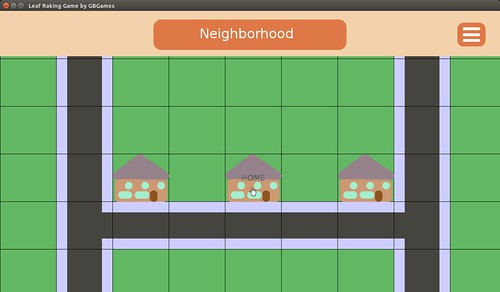
Here’s the image I used with lots and lots of placeholder art:

Leaf Raking Game

And I immediately got some great feedback on my user interface:

Wait, what’s a hamburger menu?

Oh.

Oh, that three-lines menu thing has a name? And it’s “hamburger menu?”

I guess that’s apt.

So I looked it up and found a few good articles about why hamburger menus are terrible and should not be used anymore.

Why and How to Avoid Hamburger Menus by Louie A. digs into the problems with this kind of menu, including how it has low discoverability, and provides some alternative solutions, which requires reviewing your information architecture to see what is most appropriate.

I’m not a UX person, but I had a human-computer interaction major as a roommate in college, so I’m at least familiar with some of the terms. There’s more research to do, clearly.

Brent Jackson’s An Update on the Hamburger Menu was written as a follow-up to an article in which he argues that the hamburger menu never seems to be a good solution. He points out that since his first article many major apps have removed it, and when a major organization added it to their website, they seemed to have found a need to not only label it with the text “MENU” but also to pop up a notification to let people know that it is, in fact, a menu button. Ick.

So, no, hamburger menus still don’t seem useful, and now people have done A/B tests and have some experimental data about how less useful they are.

Basically it comes down to interface design patterns. Patterns rely on familiarity and emerge slowly over time. Most of the ones we use on the web today have been around for many years.

Users have plenty of new things to learn without adding contrived navigation patterns into the mix. Let’s stop trying to innovate device-specific interactions and leave it to the device manufacturers.

I recall when I first encountered a hamburger menu.

I hated them.

I hated them for all the reasons Louie A. says in his article.

I think it was on some artist’s fancy website which was trying to be super minimalist (a trend I hate) while being well designed. I just wanted to know who the artist was. Where was the About page?

Eventually I noticed the three thin lines in the corner of the screen, but I remember thinking, “Is that a minimalistic logo of some kind?”

Eventually I realized those lines were clickable, and I clicked. OH! There’s the navigation bar!

…What the heck? How was I supposed to know that those three lines are supposed to equate to navigation?

Then it showed up in Firefox and Thunderbird. It was subtle. I didn’t know it existed until I couldn’t find a way to do a somewhat common task when sending an email. There used to be a button to click at the top of the browser window. A quick search online later, and I shook my fist at the screen again.

And then it started showing up elsewhere and seemingly everywhere, and I felt resigned to it.

I’m wondering why I decided to use it in my own game’s interface. Maybe I was thinking, “Well, the kids are doing it these days…” but that’s no excuse for thoughtlessly throwing stuff onto a screen that my players will need to interact with.

I plan to replace the hamburger icon with another one. I’ve seen games use a gear or tools icon, which might be more appropriate here.

Or maybe I’ll find that those are annoying and terrible, too.

Categories
Game Development Geek / Technical Personal Development

Interview with Scott Anderson of Sledgehammer Games

Scott “Impossible” Anderson is an engineer at Sledgehammer Games, having worked on Call of Duty: Advanced Warfare, and was recently interviewed at We Are Game Devs, a site that highlights the various unsung and underrepresented talent who help create some of the fastest growing interactive entertainment on the planet.

Aside from his day-to-day responsibilities and advice for people who want to learn how to be programmers, he talked about his time as an indie game developer.

He touched on being part of Chicago’s early indie game development scene before his time as co-founder of Enemy Airship, working with Steve Swink on Shadow Physics.

And did that bring back memories!

I remember going to the Chicago Indie Game Dev meetings and Chicago-chapter IGDA meetings starting back in 2005. Reading my blog posts from that time is kind of embarrassing, but I guess that means I have grown.

Back then, Anderson was part of the duo that was Maw!soft, and I remember him as one of the key fixtures in the scene. If there was a game developer event in town, he was likely to be there.

During those years, he always had advice to share, a lot of which I ignored at my own peril, such as his comments on my goal for trying to use the IGF submission deadline as my project’s deadline or that I should release early and often with quick prototypes to find the fun.

I always enjoyed our meet-ups because if there was a fun idea to discuss, it was probably his, such as what a casual FPS would look like.

I hadn’t been keeping track of what the members of the old indie scene have been doing, but every so often I’d see Anderson’s name pop up in industry news, usually with me thinking, “Oh, I didn’t know he was doing that now.”

And now it sounds like Anderson will be working for Funomena soon?

Good luck, Impossible!

Categories
Geek / Technical

User Poetry: But Not Me

While cleaning and rearranging my office, I found an old tech support email from a job I had many years ago. I printed it because I was amused with how the author spaced out the lines and capitalized the first letter of each line. It almost looked like poetry.

By the end, I think it starts to feel like it would fit into a techy version of “Where the Sidewalk Ends.”

So I labeled it “User Poetry” and titled it “But not me”. I’ll change the author’s name and other identifying info to protect the innocent.

Attn. Unix Guys,

I can log into Unix session by telnet to dvap8 with my userid (jsmith) and my password.

However, I can not get to it by Hummingbird Exceed session. I go to Hummingbird Exceed session

In my Computer and put my userid and password successively and Hummingbird session takes it but clocking

And clocking with its welcome window screen. When others login with their userid and password in Exceed

In my computer, they get everything but not me.

Categories
Game Design Game Development Geek / Technical Personal Development Post-mortem

LD33: Free Me, You Idiots! Post-mortem #LDJam

Ludum Dare #33 is months old, and the next Ludum Dare is about to begin. It’s about time I wrote a post-mortem about the game I submitted.

The theme was “You Are the Monster”, which, as usual, caused a lot of panic among the participants who worried that it was impossible to make a game based on that theme in two days. And once again, despite such worries, there were almost 2,000 entries submitted, so people found a way to do it.

I ended up making a fairly compelling, somewhat humorous, non-violent strategy game about being an imprisoned evil using its influence to escape. I called it Free Me, You Idiots!

What Went Right

  1. Quantity Over Quality: Fleshing Out Concepts and Designs Early

    It’s easy to want to get started right away. You only have 48 hours, and every second counts. But I also knew from experience that it helps to spit out as many concepts as possible early on, then pick the one that seems most promising. You are more likely to have a good idea picking the best of a thousand ideas versus the best of ten ideas.

    So I spent the first couple of hours thinking, doodling, and discussing with people on IRC.

    The theme had a lot of obvious and not-so-obvious applications. The obvious choice is to harvest ideas from classic movie monsters, such as vampires, werewolves, and ghosts. It’s direct, and you could have monsters who are genuinely scary or you could have them be misunderstood by the populace.

    The next-most-obvious choice is to think about metaphorical monsters, such as people who have the most evil and disturbing thoughts. It could be a psychological thriller in game form.

    I thought about characters, origin stories, and settings, and I had a lot of fun thinking up ideas as varied as space aliens and beings frozen in the Arctic for centuries.

    I went with the idea of the incarnation of evil imprisoned in a tree for centuries. With no previous story, I was free to write my own with no preconceptions.

    I fell in love with the idea, which really helped me drive the development of the game. If I hadn’t spent time upfront thinking, I might have settled for a merely OK idea, and I might not have found myself as passionate to work on it.

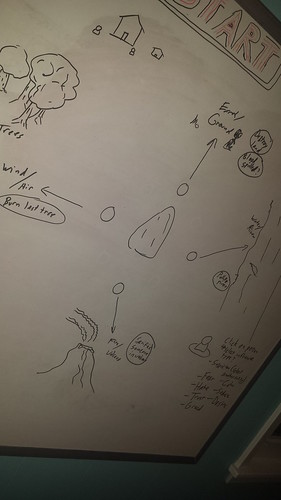
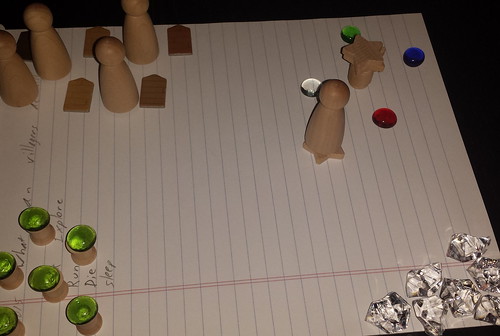
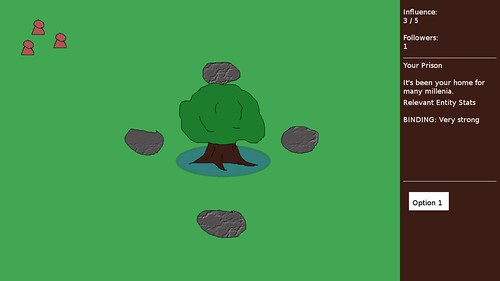
    I spent quite a bit of time thinking about this concept. I threw out a lot of ideas early on and managed to find the core of the game. I had originally thought about having a bunch of stones surrounding the tree that you were imprisoned in that had to be removed by the nearby villagers under your influence. I mocked them up and played with the idea for awhile.

    Concept: An imprisoned evil

    Imprisoned Evil prototype

    Imprisoned Mock Up

    The idea was that rock-gathering was an activity for the villagers, and the villagers would grab these forbidden rocks.

    I’m glad I threw it out because I ended up having entities that did hardly anything but explore and pray. I would have run out of time without a way to remove those rocks and finish the game.

    I think if I had more than two days that those rocks would still be in the game and the entities would be mining, chopping down trees, and more, but because I had a wealth of ideas to choose from, discarding some didn’t feel like I was gutting the game of its essence.

  2. Iterate Like You Mean It

    In the previous Ludum Dare, I spent a lot of my time on animations and art, but not much at all on game play. By the end of that compo, which had a theme of “An Unconventional Weapon”, I had a monster that could chase around the player when you got his attention either by shouting at him or by crossing his line of sight. I wanted the monster’s head to turn separately from the body, and there was going to be this idea that the monster can trip over itself when it is moving in the opposite direction that it was looking. I spent a too much time creating the complex animation system when I could probably have gotten away with something simpler, and as a result, what I submitted wasn’t anywhere near a finished game.

    I didn’t want to make that mistake again in Ludum Dare #33. Even so, I didn’t start writing code until the compo was well underway. While I was worried that I wasn’t going to make everything I wanted by the deadline, my approach meant I was always going to have something to submit.

    My first focus was on interactivity. If the player can do something, I can build upon it, even if I have to cut most features or change the direction of the game design completely.

    It meant I was also playing the game frequently. I would make a change and immediately see how it felt. I can identify things that may be buggy or hard to understand, and I can fix them immediately or prioritize them.

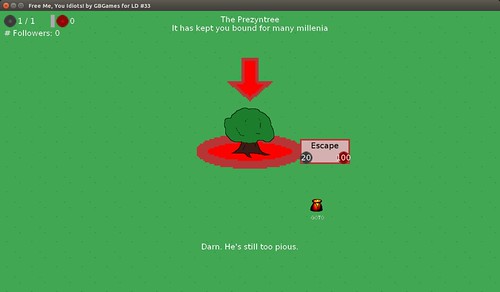
    For instance, when clicking on an entity in the game, an arrow appears over them. This was a simple bit of polish that I thought seemed important enough to add early on. With a bunch of entities moving about, this arrow meant it was easy to identify which entity you were looking at.

    But moving around the world was a bit jarring. You click, and the camera centers to that location. I knew I wanted to add interpolation to smooth the camera’s movement, but I also knew that what I had was passable and could be fixed if I had time for polish later. So the working yet jarring camera movement stayed throughout the rest of the game’s development.

    What was exciting was that by making small yet meaningful changes, it allowed me to add a relatively complex economy without much effort.

    LD#33 Game Play

    The game features a few variables that are interdependent and make it feel quite rich to explore. For instance, the player has Evil Energy to use to influence villagers. Evil Energy replenishes one point every second.

    The number of followers influences the amount of maximum Evil Energy a player has. More followers meant more maximum Evil Energy, which opened up options for the player.

    When you have followers, they will pray to you. When the total amount of prayer time exceeds 10 seconds, the player gets an extra point in Prayer Energy, which can be spent on upgrades and ultimately on the ESCAPE option, which ends the game in victory.

    I originally didn’t intend to add so much because I was worried about spending too much time on balancing all these variables, but without all of these different values and their interactions with each other, the game felt very simplistic.

    I’ll admit feeling worried that I might find that the whole thing was unworkable and would result in nothing but wasted time. Learning about and playing with game economies from the book Game Mechanics: Advanced Game Design by Ernest Adams and Joris Dormans gave me some confidence I could pull it off by adding pieces of it throughout development and building upon them iteratively. Each addition was relatively risk free and easy to fiddle with.

    I was very pleased with the results, and so were the people who played the game. I was surprised by how many actually played it all the way to completion!

  3. A Goal for Being Cool

    I realized that back in pre-20 Ludum Dare compos, it was easy for me to play almost everyone’s games because there was less than 100 entries. There would be a burst of game development activity for a weekend, and then maybe a week of playing and rating games, and then going back to regular life. Plus, back then you didn’t need to rate games to get your game rated.

    Today, with thousands of entries, it takes much more of a commitment. Your game won’t show up in the random sampling for entrants to rate if you don’t also rate other games. It’s a fair system.

    After the compo, I was on vacation from the day job and so I spent the next few weeks playing games. I set myself a Coolness goal. I figured that if I played a handful of games a day consistently for the next couple of weeks, I would be able to hit it.

    And when I rate games, I like to give feedback to the developer. I don’t just post “Nice!” or leave no comment at all, so I wasn’t going to allow myself to speed through reviews in order to quickly increase my Coolness. I was going to play games, give them a fair shot, and give an honest review with constructive feedback.

    LD33 Coolness Result

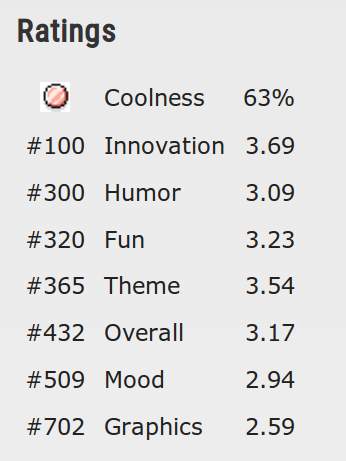
    I only got 63% Coolness, but it was enough to earn me a bronze medal. I don’t understand how that percentage is calculated. I know I didn’t rate anywhere near 63% of the nearly 1,199 games submitted, yet it seems like I could have hit 100% with only a few more handfuls of rated games if my math was correct.

    But I know that if I hadn’t set a Coolness goal, I would have either made the mistake of not rating enough games, resulting in my own game not getting rated by many participants as in past recent compos, or I would have spent a lot of my waking hours doing nothing but playing LD games, ignoring my other responsibilities. I think I had the balance mostly right.

What Went Wrong

  1. No Polish and No Sound Effects Again

    In an effort to speed development along, I did the opposite of what I did in the previous Ludum Dare compo and ignored animation and polish as much as I could. It wouldn’t matter how cool something looked if the player had nothing interesting to do.

    As a result, the game lacks life. The entities move around without turning or animating, and there is no indication when a player successfully influences someone. The grass tiles had markings which were too subtle and resulted in a sea of green that made it difficult to tell if the player was actually moving the camera.

    Now, it wasn’t completely bad. The prayer bubbles added a nice touch, as did the Evil Energy ball in the HUD scaling quickly when it replenishes. The flavor text had some humor and lore.

    But no sounds, no animations, and no special effects left the game feeling like a lot was missing.

  2. Buggy Engine Code

    There were a few problems with the custom engine I was using. One was something I saw in the last Ludum Dare in which tiles would seem to separate as you moved the camera around. It turned out to be a floating point error that resulted in me accidentally scaling the tiles so they would sometimes be one pixel smaller in width and/or height. I must not have pulled in the fix when I was putting the project together, so I easily fixed it, but it still took me some time to figure out what exactly I was missing.

    Early on I noticed that entities seemed to walk over the tree. They should look like they are in front of the tree when standing in front of it and behind the tree when they were behind it.

    So why were they always appearing on top of the tree no matter where they were?

    I recently ported my code from libSDL to libSDL2, and sprite rendering was done differently to accommodate scaling and rotation. Unfortunately, I introduced a Z-ordering bug which, after spending time on figuring out what was going on, I decided to ignore for this compo rather than spend more time trying to fix it.

    The risks of using your own code instead of a ready-to-go engine such as Unity or Game Maker is that infrastructure bugs like this are not only likely but also might be something you feel inclined to fix immediately. If Unity had a bug, I’d work around it because I’d have no other choice. If my own code has a bug, I’d feel like I could fix it while working on my game and might underestimate the effort it would take to do so.

    So while it wasn’t fatal, I had buggy infrastructure code that slowed me down and prevented me from making a better game.

  3. Missing: Some Features and Any Challenge

    One of the upgrades in the game is CAUSE FEAR. Do you know what it does?

    If you guessed it caused the villagers to be afraid, you would be wrong.

    It does nothing. Why?

    Because I never got around to it. I had ideas for what CAUSE FEAR would do, but since so much of the game didn’t get made, such as the mining and wood cutting I mentioned earlier, there was no real reason to cause villagers to be afraid. Maybe it would make them pray harder for a bit, and so CAUSE FEAR was similar to trading Evil Energy for Prayer Energy but in an indirect way.

    I had a few ideas, but none of them got implemented. Unfortunately, I left the option in even though it did nothing. Whoops. B-(

    Similarly, because there was no real conflict in the game, there was no challenge. There is nothing in the game that prevents you from converting every villager, getting all of the energies you need, and winning the game.

    I wanted the good villagers to try to convert back your followers. I wanted different kinds of villagers, such as priests and acolytes, and have their presence force you to change your tactics. Perhaps if your followers got numerous enough, the other villagers would go to war with them.

    Something. Anything.

    But instead, there’s nothing. There’s enough economy and variety that it seems to hide this lack of conflict, but without conflict, I can’t really say I have a complete game.

What I Learned

  1. A Design Document Is Key

    Throughout the compo, I set myself goals. I set an initial goal of settling on a concept within two hours. I set a goal of having interactivity early on instead of waiting until the end. I set a goal for rating games after the compo.

    Each goal gave me some control over the outcome. I was able to focus on what was needed and ignore what wasn’t. While the lack of polish hurt, it wouldn’t have hurt nearly as much as having a fairly incomplete experience.

    What really helped in setting goals was having a design document for the project. Now, I’m not talking about a 300 page document that no one reads. I’m talking about a living document that changed throughout the 48 hours I used it to help guide me.

    Everything I thought of went into that document, which allowed me to assess what was a priority and what was nice to have and what didn’t need to be there at all.

    I could see what was left and compare it to how much time I had left, and I could make intelligent decisions about feature cuts and what had to be there no matter what.

    I credit Hybrid Mind’s Ludum Dare #29 timelapse for In the Black for showing me how effective a design document can be for even a short 48-hour project. Thanks, Dave!

  2. A Game’s Economy Can Have a Big Impact on the Game’s Appeal

    I was glad I decided to risk adding more to the economy of the game. Evil Energy and Prayer Energy play off each other in an intuitive way, which makes the game more compelling.

    I think people kept playing because throughout the game there was always something to aim for. Converting a follower resulted in an upgrade being made available, which required Prayer Energy to attain, which in turn allowed more followers to be converted more easily, all with the aim of using ESCAPE to end the game.

    I could have had a simpler economy. If I eliminated Prayer Energy and made things more directly available, it could have worked, but it might have felt too simplistic.

    What I’m not happy about is that the richer economy hides a lack of challenge. I don’t want to use economic designs to act as a bandage on a fundamentally broken game.

    But I did learn that doing a decent job designing an economy can result in a great return on investment.

  3. Keep Your Nose to the Grindstone

    During the 48 hours of Ludum Dare #33, I slept, I ate, I showered, I talked with my wife, and I blogged.

    But most of my time during the 48 hours was spent on design and implementation.

    According to my records, I did a little over 24 hours of game development between Friday and Sunday. Just over half of the time spent on the compo was spent doing actual game development, and I’m pretty sure that because I lived and breathed this project, I was even making progress while showering or eating.

    Even with the failings I mentioned, I can see that this laser focus was the real reason why I was able to get a decent game finished.

    I’ve done compos in which I was distracted, and they didn’t always end well. Either I was dealing with poor health, in which I couldn’t sit at my desk for long periods of time, or I was going to a party or a soccer match.

    For this Ludum Dare, I made sure that I was 100% focused on the compo with no outside commitments to keep me from doing anything but game development that weekend.

    It was grueling and exhausting, but that concentrated effort made things move along so much more quickly than if I had spread out the development effort with frequent and potentially long breaks.

    I’m not saying breaks are bad. I took breaks.

    I am merely saying that my mind was focused on game development and not on how to interact with other human beings in a social situation or how frustrating it is when your team is losing due to the same blunders they always make.

    I rested when I needed to rest, but I didn’t allow myself to procrastinate or do much of anything other than participate in this compo.

Summary

The results of this compo were very encouraging to me:

LD33 My Results

Out of 1,199 entries, my game was rated in the top 36% overall and top 8% in innovation. My only rating that was in the bottom half of the group was for graphics, and even then it was at the top of the bottom half. B-)

I credit my ability to focus that weekend on game development almost exclusively, and all of the tools that allowed me to leverage that focus, such as my design document and setting milestones.

The main complaint from players is that there was a lack of music and sound, followed by the noticed lack of challenge. For future compos, I’ll want to focus on not only interactivity but also adding real conflict.

I may want to experiment with adding audio iteratively. Normally I add it at the end, and an informal survey indicated that a lot of other game developers add it at the end as well. I wouldn’t want to spend time on something that might get thrown out before the end.

Still, the idea is that if I can have a playable game early on in a compo, I can also have a playable game with audio early on in a compo, too.

Categories
Game Design Game Development Geek / Technical

Visualize Markov Chains in Action

Sometime back I took the Coursera online course “Model Thinking” offered by Professor Scott Page.

It covered modeling to help make sense of our complex world. Since models are often simplifications about what really happens, having multiple models that you can apply means you are better able to make sense of the world. I would highly recommend taking the class if you want to be a better citizen and a better thinker.

At one point the class covered very familiar ground. John Conway’s Game of Life and Stephen Wolfram’s cellular automota studies made an appearance, which got me much more enthusiastic about learning how to combine simple methods for complex procedural generation. Along the way came Markov Processes.

Wikipedia says, “A Markov process is a stochastic model that has the Markov property.” Let’s break that down into something resembling everyday language.

Stochastic essentially means random. We’re dealing with a probability. So a Markov process is a model that involves a random element.

And the Markov property? All this part says is that in order to determine what state you are going to be in, the only thing that matters is what state you are currently in. How you got to your current state, otherwise known as your history, is irrelevant. Your past does not determine your future except to the extent that it somehow got you to your present circumstances.

So the simpler definition of a Markov process is that it is a state machine in which how you get to the next state is randomly determined with probabilities based on your current state.

Why is this idea valuable to know?

Let’s say you have weather play a role in your strategy game. If it is raining, your players can’t launch aircraft.

The thing about real weather is that it’s hard to predict. Weather reports tell you that it will be partly cloudy with a 15% chance of rain instead of saying that it will definitely not rain. Because sometimes even if they think it isn’t likely, it happens. Sometimes when they think there will be 4 inches of snow, we find that it is more like half an inch and the predicted snowpocalypse will hit some other city instead. People can talk about the weather as if it is completely random and wonder why meteorologists can keep their jobs when they are wrong so often.

If you wanted to model weather in your game, you could probably use a random number generator. Let’s say that for each day represented in the game, you create a weather report by getting a random number to represent the chance of rain:

int chanceOfRain = rand() % 100;

So when it comes to determining if it actually should be raining or not, you can create a random number and see if it falls within the value:

bool didItRainToday()
{
    return (rand() % 100) < chanceOfRain;
}

It would work well enough. Players can make plans based on the forecast, but there are problems.

First, you can’t prevent streaks of certain values from appearing. If you have aircraft in the game, but the weather system prevents you from using them, they become less useful. One day of bad weather might be a minor setback for your war plans, but having weeks of bad weather could be seen by the player as ridiculous. With random number generators, it’s possible to get into this situation, and your players can get frustrated with the bad luck.

Second, you can’t prevent initial values from being “bad” either. The beginning of the game is when you are trying to pull new players into your game’s world. If the game immediately starts with bad luck, it might leave a bad taste in the player’s mouth.

Third, it’s not as realistic to have a day of sunny weather followed by a day of stormy weather followed by a day of sunny weather. As unpredictable as the weather can be, and as possible as the wild swings are, people expect good weather to follow good weather, and bad weather to follow bad weather, and that we’ll have good weather days more often than bad weather days.

You can mitigate the above issues by hardcoding non-rain values for the first few days and also keeping a count of bad weather and forcing good weather if that count goes above a certain threshold, but it’s a clunky solution that still leaves a lot out of your control as a game designer.

Enter Markov chains

Instead of treating each day as completely independent of the next, you can keep track of your current day’s weather state.

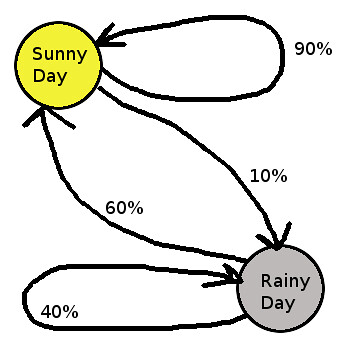
Let’s say that a non-rainy day today has a 90% chance of producing another non-rainy day tomorrow, and that a rainy day has a 60% chance of a sunny day following it.

Weather In Markov Chain Form

So almost all of the time a sunny day predicts a sunny day to follow, but every so often it will predict a rainy day. Rainy days might stay rainy for days at a time, but most of the time it will become sunny again the next day. So players can get a feel for how likely rain is to occur and make decisions based on their own mental model of the system, which makes rain an ever present threat without making it an overwhelming or unfair one.

And as a game designer, you can tweak the probabilities of each state until the weather acts how you want it to without having to hardcode everything, create a hacky bandage for it, or give up control to a random number generator completely. You could add more states, such as partly cloudy days and overcast days, which will have different probabilities for moving to other states. Overcast days can result in rainy days more often than sunny days, just like in real life.

You could also put Markov chains to work for you in other areas of games. What if the population of your city simulation has mood swings? That is, if people are content, they are likely to stay content, but sometimes a situation occurs in which enough people get upset that they influence other people to become upset as well. That is, you could have a Markov chain in which content people are likely to be content but sometimes become discontent, and if they are discontent, they are likely to stay discontent but sometimes become content again, mimicking what happens in real life when there is outrage that dies down after the news cycle stops covering the political scandal. In the city simulation, it might drive the player to take actions to address the population’s concerns before real damage occurs.

Or you could create random terrain with roads. Roads tend to want to go straight, but sometimes they turn 90 degrees. Your terrain generator can start creating a road with a particular direction, and each step it adds another tile of road next to the previous one. 90% of the time the next road tile will be placed by continuing in the current direction, 5% of the time it could turn left, and 5% of the time it could turn right.

If you want to play with Markov chains, learn more about them, and see them in action, then see Victor Powell’s visual explanation of Markov chains.