Categories
Game Design Geek / Technical

10 Years Later: Look Inside the Source of Terry Cavanagh’s VVVVVV

Last week, Terry Cavanagh made an announcement with the post VVVVVV’s source code is now public, 10 year anniversary jam happening now!

Collectors of commercial indie game source code have another project to add alongside games such as Aquaria and Gish.

And people are swarming all over it.

A lot has been made of the apparently low quality of the code, with people remarking on the very large case switch statement. To be fair, this is code that was converted from Flash to C++, but it’s apparently quite horrifying and fascinating to read through.

Others are more pragmatic about it:

https://twitter.com/mikeBithell/status/1215939170079821824

In contrast, and as a personal story, I just found some old notebooks of mine from around 2005, and I was very concerned about writing code “the right way.” Now, I wasn’t demanding perfection, but I did have in mind that I didn’t want to just hack together something and hope it worked. I wanted to know it would work. And I apparently wanted to learn UML.

I never shipped that project. But I was also pretty early in my career as a programmer, and I didn’t know much of anything.

Today, I know that I would put something together that works, and then I would iterate and build upon it. I mean, I believe in creating high quality code and using test-driven development to help get me there, but I also don’t spend a lot of time focused on up-front design so much as ensuring my code base is easy to refactor and modify without a lot of pain.

And I know that years of not learning UML hasn’t hurt me.

Cavanagh went on to say:

A decade on, I still feel the same way. I’m incredibly proud of VVVVVV, and grateful for everything. I want to thank everyone who helped me along the way – Magnus for his incredible soundtrack, Ethan and Simon for all their work to bring the game to more people, Bennett for naming the rooms, Stephen for helping me get that mac build out late in launch day. This game is special to me – thank you to everyone who played it and supported me over the past ten years. It’s meant so much. <3

Congratulations, Terry!

Categories
Game Development Geek / Technical General Personal Development

Derek Yu’s Updated Pixel Art Tutorial

In ancient times, around 2005, Derek Yu of Spelunky fame created a 10-step pixel art tutorial. It took you through the process of creating a cartoonish lucha lawyer, including brief discussions on lines, shading, dithering, and more.

Derek Yu's pixel art luchador
As seen in archive.org’s history of Derek’s old site.
Also, Derek, please don’t sue me.

Yu recently tweeted that he’s rebooted the tutorial, which can now be found at https://derekyu.com/makegames/pixelart.html and takes you through drawing an orc.

Derek Yu's orc from start to finish
Who would win, this orc or the law?

It’s a more detailed tutorial, and it shows what Yu has learned about teaching pixel art with almost 15 years more experience since the original was created.

There’s also a tutorial about common pixel art mistakes to go with it, so you can see what you’re doing wrong as you try to follow along.

Thanks for contributing to the world of game making, Derek Yu!

Categories
Geek / Technical

Fixed SDL2 Android App Issue When Suspending and Resuming

Months ago, I needed to update the SDL2 libraries I was using in order to gain access to a new piece of functionality in SDL2 that lets me load SVG vector graphic file and create textures out of them. But then I found a problem was introduced. The app would hang whenever I would leave it to look at a different app. I posted about it on the libSDL Discourse site, but I did not receive a response. I finally had a chance to investigate this issue and I think I have solved it.

When an SDL2-based Android app needs to suspend and resume, there are events that need to be handled immediately, before your main event loop: SDL_APP_WILLENTERBACKGROUND and SDL_APP_DIDENTERFOREGROUND.

So you create an event filter, register it with SDL_SetEventFilter(), and it is here that you need to handle things like music. If your app enters the background, but music is still playing, the app will crash. So, in your event filter, you would have code that looks something like the following:

int EventHandler::eventFilter(void * userData, SDL_Event * event)
{
    int whatToDoWithThisEvent(ADD_TO_QUEUE);

    IHardwareLayer * hardwareLayer = static_cast<IHardwareLayer *>(userData);
    if (hardwareLayer != 0) 
    { 
        switch(event->type)
        {
            case SDL_APP_WILLENTERBACKGROUND:
                {
                    hardwareLayer->pauseMusic();
                    whatToDoWithThisEvent = DO_NOT_ADD_TO_QUEUE;
                }
                break;

            case SDL_APP_DIDENTERFOREGROUND:
                { 
                    hardwareLayer->resumeMusic();
                    whatToDoWithThisEvent = DO_NOT_ADD_TO_QUEUE;
                }
                break;
        }
    }

    return whatToDoWithThisEvent;
}

In my case, I have a wrapper around SDL that I call IHardwareLayer, and it will delegate the calls to SDL as well as do some other useful things.

The above code worked fine. Before I added this event filtering, my music-playing Android app would become unresponsive whenever the app would get suspended. With SDL2 and SDL2_mixer, the music plays on a separate thread, but most of the time you don’t need to know about it. In this case, however, you need to stop the music before your app gets suspended in order to prevent it from trying to play music in a bad state.

Ok, great! But then I updated my libraries in order to handle the ability to load SVGs, and the above code started failing. Except suspending worked just fine. It was the resume functionality that was broken now. How bizarre!

So the symptom is that when the app is suspended, everything is fine, but bringing the app back to the foreground would cause it to become unresponsive.

By adding logs and using adb logcat, I could trace the code all the way until it called Mix_ResumeMusic(), and it never returned from the call. What gives?

After trying a number of different approaches, including updating SDL2_mixer to the latest release, I finally tried to resume the music in the main event loop.
I presume the issue has to do with threading, as I learned I couldn’t call functions that would let me query the pause state of the music in the event filter without the app becoming unresponsive.

The way the event filter works, it gets called before your main event loop, giving you a chance to handle an event beforehand. You can, of course, ignore an event, and in my code above, the default return value ADD_TO_QUEUE is an int that has a value of 1, which has the effect of allowing the event to get handled later in my main event loop when I call SDL_PollEvent().

So I changed the above code so that it no longer tries to resume music and it no longer returns DO_NOT_ADD_TO_QUEUE (otherwise known as the return value of 0) when the filter receives the event SDL_APP_DIDENTERFOREGROUND. Then I added the following code to my main event loop, which is in my HardwareLayer wrapper class:

SDL_Event event;
while (1 == SDL_PollEvent(&event))
{
    switch (event.type)
    {
        case SDL_APP_DIDENTERFOREGROUND:
            {
                resumeMusic(); 
            }
            break;

...

So now I pause the music when handling the SDL_APP_WILLENTERBACKGROUND event in the event filter, and I resume music once my app is up and running the main event loop again. No more crashes or unresponsive app!

I am a bit bothered by the lack of symmetry in terms of how to handle suspending and resuming an app, but software development is often about compromise. B-)

Categories
Geek / Technical Personal Development

Come See Me Speak at dsmAgile on September 28th

dsmAgile is a one day Agile conference in Des Moines, Iowa, and I’ll be presenting at it this year.

On Friday, September 28, 2018 from 8:30 AM to 4:30 PM, you can discuss, discover, and learn more about Agile software development from people who have been practicing and living it. And it only costs $100, a great deal.

My presentation is called “You’re Not a Code Monkey, So Stop Acting Like One!” You can read more about in the dsmAgile session descriptions, but the main idea is that software developers can and should do more than write code.

You are responsible for not only creating value through technology but also for maintaining that capability, and you don’t get to pretend that “they won’t let me” is a valid excuse.

Merely slinging code is not enough. You are not a code monkey following orders. You are a first-class citizen in the organization, more than capable of driving value as well as delivering it. Let’s discuss how you (and your organization) can start acting like it.

I have enjoyed attending dsmAgile in the last few years, and I look forward to being part it. Will I see you there?

Categories
Game Development Geek / Technical

Book Review: Behavioral Mathematics for Game AI by Dave Mark

Behavioral Mathematics for Game AI Book

Intrinsic Algorithm’s Dave Mark, a fixture at the Game Developer Conference’s AI Summit, is also the author of Behavioral Mathematics for Game AI.

Most game AI literature covers the basics in a general way, such as finite state machines, flocking and steering to control movement, pathfinding algorithms such as Djikstra’s or A*, goal-oriented action planning (or GOAP), and more.

Mark’s book, however, covers a specific topic in great depth: game AI decision-making.

You might have a character that can do interesting things such as hunt, flee, eat, track, alert nearby allies, etc, but if you don’t create a good system that allows that character to make decisions between those behaviors, it may not convince your players that it is intelligent at all.

The goal is to create behavioral algorithms to get computer-controlled agents responding to their environment in believable and sensible ways. To get there involves a journey through the subjects of psychology, decision theory, utilitarian philosophy, and probability and statistics, among others.

Mark was great at walking you through each step of this journey, combining theory with detailed explanations and examples, including code. Sometimes I felt the detailed explanations were a bit too detailed, but at no point did I feel like I was lost.

He never made a leap in logic that left me behind because he was holding my hand at every step of the way. Sometimes I appreciated that hand-holding, especially for the more involved statistics, but there were a couple of times when I found myself getting a bit impatient and wanting to run ahead.

And it is probably partly due to the fact that it’s a long journey. At one point, I realized I was over 300 pages into the book without feeling like I knew how to integrate and apply all of the individual tools I was learning into a cohesive system.

The examples he used to illustrate his point were sometimes bizarrely relatable. I have never tried to create a model of my behavior related to when I decide to replace my older razor blades with newer ones, but Mark did, and I actually found myself nodding with recognition that I do tend to use my last blade in the refill pack for way longer than my other blades.

Other examples demonstrate how his utility-based decision-making system can address problems with past games, such as the strategy game AI that kept sending its attack force towards the most vulnerable target. Savvy players can keep defensive forces outside of city walls, then place them in the city at the last moment and moving units out of a city far away. By doing so, they could keep the AI units moving back and forth, unable to carry out an attack, for as long as they want.

Solving this issue involves giving the AI the ability to have decision momentum by making decisions include all of the relevant information. The AI isn’t just deciding what city to attack. A single decision is what city to move to AND attack, which incorporates the time it takes to travel to a target city. Suddenly, the decision to change course in order to attack a different city is a bit more painful, and so the current target is more likely to be maintained.

I appreciated that he covered the problem of having the AI always making the best decision. While academic researchers might love that result, players are likely to find such AI as unrealistic and, worse, uninteresting. And if there are multiple AI agents that do exactly the same thing simultaneously, it’s even more of a problem. So there’s an entire chapter on ways to ensure that the game AI can be reasonable yet still interesting from one play session to the next.

The book was published in 2009, and so you would think it means that any information you could glean out of it would be obsolete after almost 10 years of advances and progress in the field. And yet, the basic decision-making system that drives behaviors is still relevant.

One of the benefits of reading an older book is seeing the ideas of that book illustrated in front of you in other media.

You can see Mark’s talks with Kevin Dill from GDC 2010 and 2012 in the GDC Vault. Improving AI Decision Modeling through Utility Theory and Embracing the Dark Art of Mathematical Modeling in AI both introduce the use of this utility-based system in games.

In 2013, Mark’s portion of the panel Architecture Tricks: Managing Behaviors in Time, Space, and Depth introduced the Infinite Axis Utility System, which takes the concepts from the book and puts them together into a simple yet powerful architecture.

In 2015, Mark and Mike Lewis presented Building a Better Centaur: AI at Massive Scale, in which they describe the Infinite Axis Utility System that was the architecture behind an MMO.

I’ve seen these videos before, but having now read the book, I found that upon rewatching them that I understand the sections on response curves and how they apply to the actions the IAUS chooses.

Behavioral Mathematics for Game AI is not a beginner’s book at all, but if you are interested in learning how to give your AI powerful reasoning abilities that produce rich, believable behaviors for your players and want it to be easy to understand and design with, I’m not aware of another book on the subject that is as accessible as this one.

Categories
Geek / Technical Politics/Government

How Much Do You Value Privacy and Security in the Apps You Use?

I tend to dislike relying on third parties to provide me with services I find indispensable.

If I can help it, I prefer having control over my own services, even if it means having a poorer experience than a flashier, proprietary solution might provide .

Staying in Control of my Mental Food Sources

For instance, years ago I used Google Reader quite a bit to keep up with news on the game industry, on blogs I followed, and more. It was a great service.

And then I imagine with the rise of social media my own usage dropped without me realizing it, so when they announced they were discontinuing it in 2013, I learned about it probably on Twitter.

There were plenty of tech-oriented news sites putting out articles on replacement services, such as Feedly, which I know lots of people recommend.

But I was curious about creating my own personal Google Reader-like site. It’s just collecting a bunch of RSS feeds and showing them, right?

Before I got too far wondering how to do it myself, I learned about Tiny Tiny RSS, open source web-based news feed (RSS/Atom) reader and aggregator.

Open source means I don’t have to worry about a third party disappearing or pulling the service for one reason or another. I also don’t have to worry about said third party collecting data on my reading habits.

It was years before I got around to setting it up on my own web host. In fact, I didn’t do so until last December. But now that I have, I feel like kicking my past self for not doing so sooner. It’s incredibly useful, especially as I can’t trust various algorithms (and the algorithm writers) at Twitter and Facebook to show me what I specifically wanted to see.

And the best part is that I am in control. I can backup my data and take it to another web host. I can use my own desktop computer to act as a server if I want. I can see everything without filtering or some company deciding that NOT showing me what I subscribed to is somehow better.

I just hope I never need to ask for support, unless I want to deal with the developer equivalent of the Soup Nazi. Reading through the support requests I did see when I was trying to figure out how to set up the software left a bad taste in my mouth. Yeesh.

But since Tiny Tiny RSS is open source, I technically have the ability to take my support requests elsewhere. Again, I have more control and more options.

My Any.Do Woes

More recently, I ran into a frustration with an app I depended upon to manage my todo lists. A few years back, a friend recommended the Android app Any.Do to me, and I’ve used it ever since.

It was intuitive, allowed me to setup recurring items, and showed me my items in the order I liked, separating things that are to be addressed today from the things of tomorrow or in the vague future.

I of course used it for one-off items. Maybe someone recommended a book to me in a conversation. I would pull out my phone, open up Any.Do, and add an item to remind me to look up the book later.

But the ability to set recurring tasks was a huge feature. I set reminders for mundane things like watering my plants every week or cleaning the litter boxes each morning. I used it for regular habits, such as writing a daily summary of the prior day each morning and using my evenings to plan for the next day. I even used it to remind me to write blog posts or update my finances.

At one point it started trying to get me to install their calendar companion app, but I was fine with my current situation, and I learned I could disable the reminder.

It also kept asking me to get the pro version, but as I had no interest in syncing between devices, I was fine with the free version.

And everything was fine. Well, mostly. It had a few minor bugs I got used to over the years. Every once in awhile, the UI would get glitchy. Sometimes the tasks would look like they were reloading on top of each other, and eventually I think there would be a conflict that would prevent me from swiping a task to completion or adding new tasks. Closing and reopening the app usually cleared it up, though.

The bigger, scarier one was when I would open Any.Do only to find a blank screen. My task list, the one that that I live by, was gone!

The first time, I had a moment of panic because, hey, free version, meaning no syncing, and therefore no backups existed. But then I not only closed the app but shut it down. When I launched Any.Do again, there was my list. Whew! Every critical bug with a workaround becomes a minor bug. B-)

So, I happened to see that Any.Do had an update in Google Play, and I went to check the changelog, and all it said was “Every update is a boost to the app’s stability, speed, and security…” Maybe they finally fixed the bugs?

So I update the app, and now I find out that the syncing feature of the pro version is required in the free version.

Required.

Now when I launch Any.Do, I see a screen asking me to create an account by linking the app with my Facebook, Google, or personal email account in order to keep my tasks and lists in sync across all of my devices.

And there is no way to get past this screen so I can see my list again if I want to avoid creating an account I don’t need.

I’ve learned that Any.Do is also integrating with Alexa and will have a chatbot to help you with your to-do items. I’m sure those are great features for people who like them, but I’m decidedly not an early adopter, and I think I prefer my to-do list app to be sans A.I.

TODO: Find Another To-Do List App

So the changelog lied, and now my choice is to comply and lose a bit (or a lot?) of my privacy, search for older APKs of Any.Do and worry about where they came from and whether or not it is safe to install them, or find another app.

I decided to look for another app, but I wanted to be more careful this time. I already hate it when seemingly simple apps ask for way too many permissions.

Unfortunately, almost all of the apps I could find that focus on privacy and limited permissions were too simple. Recurring tasks are almost never available as a feature.

Privacy Friendly To-Do List by the SECUSO research group would otherwise have sounded perfect in terms of limiting permissions and providing control.

I did find an app called To Do List & Widget. It had limited permissions, which boiled down to “it needs to read and write to files”, and it lets you back up your lists manually.

It’s only downside besides a UI that is somewhat less intuitive than Any.Do’s is that there’s almost no information about who made it and where it came from. It’s definitely not open source. While the permissions allow it to do only so much, I still found myself being a bit uneasy about trusting it on my device. And besides, what happens in the future? Will it continue to be updated?

So ultimately I settled on Taskwarrior, which is a GUI app wrapping the command line tool of the same name.

The underlying system is incredibly powerful, and so unfortunately I found the UI requires me to learn how to use it. Recurring tasks aren’t as easy to setup, for instance, but I can do more interesting schedules than what Any.Do restricted me to.

And if I ever do setup my own Taskwarrior server, I can get syncing on my own terms.

I was surprised that it requires a lot of permissions, but it boils down to the app needing to create and use an account on the device and needing access to the network to do the syncing. There are no in-app purchases or ads, and the source is available so I can build it myself and read through it to verify that nothing nefarious is happening under the hood. I also have the ability to continue updating it if the original maintainer disappears.

The user interface is awkward for me at the moment. Any.Do showed me my tasks for today, tomorrow, and later, and it even had a separate category for unscheduled stuff as “Someday”. A recurring daily task I completed would show up in the Tomorrow list automatically.

Taskwarrior’s default views are showing me everything, and while they are in date order, it’s not cleanly separated. Also, recurring tasks are automatically synthesized from the template task, and so I find I can have multiple instances of the task at once in my list.

Then again, these issues might be due to me not knowing how to use Taskwarrior properly.

What’s Important to You?

Some people might balk at the idea of investing time into learning how to use an app when a more intuitive one is available.

And that’s fine. I get it.

But I’ve been starting to value my privacy and my security even more these days.

And it’s not an absurd paranoia. Recently there was news about a popular makeover app with privacy red flags. Pokemon Go was a concerning app until they changed the scope of the permissions it required to run.

I already know that Google tracks where my phone goes, which means it knows where I go. I should really turn off the GPS when I’m not actively using the map functionality, in fact. It’s always disconcerting to see the notification telling me that it is using it because none of the running apps in the background should care where I’m at.

I mean, when I took a picture at my mother-in-law’s house during a party, I got a request to upload the picture and attach it to the search results of the nearby public park. Ick.

Artificial intelligence is huge these days, and with chatbots and intelligent personal assistants such as Siri, Google Now, Cortana, and Alexa, we’re seeing a lot of benefits in the way of convenience.

To get that convenience, though, we’re handing over our data to the people behind our devices. And yet, security is rarely treated as a priority, which means that even if we trusted our data to those people, it might also be getting to people we don’t trust.

And so, because I value my privacy and security, often it feels like my choice is to opt-out or roll my own solution.

And since everything is getting artificial intelligence integrated in, it often means tolerating third parties getting access to data more or using alternatives. And if I am going to use alternatives anyway, they may as well be ones I have the most control over.

Thank goodness for free (as in speech) software, eh?

Categories
Geek / Technical Politics/Government

Where To Donate Some Money Before the End of 2016

There’s only so much time left for your charitable contributions to count towards your 2016 taxes.

If you’re looking for recommendations, here’s two organizations I have contributed to because I believe in what they do.

Electronic Frontier Foundation

“Defending Your Rights in the Digital World” is the EFF‘s tagline, and I’m unaware of another organization focused on our rights and liberties in the context of our digitally-enhanced age.

Founded in 1990, EFF champions user privacy, free expression, and innovation through impact litigation, policy analysis, grassroots activism, and technology development. We work to ensure that rights and freedoms are enhanced and protected as our use of technology grows.

When the Digital Millenium Copyright Act was passed in 1998, there was a lot of abuse potential.The DMCA is overly restrictive in what it allows people to do legally with their own technology, and it allows large companies to abuse the system.

Yet the DMCA has become a serious threat that jeopardizes fair use, impedes competition and innovation, and chills free expression and scientific research. If you circumvent DRM locks for noninfringing fair uses or create the tools to do so you might be on the receiving end of a lawsuit.

In one high-profile example, Dmitry Sklyarov, working for ElcomSoft, was arrested by the FBI while he was in the United States on a trip where he spoke at DEF CON about ebook security, specifically Adobe Systems’ technology. Why?

Because…well, it wasn’t clear at the time, but Adobe Systems thought that his published research and software was a violation of the DMCA’s circumvention of their copy protection systems.

The thing is, Sklyarov is from Russia. The DMCA has no jurisdiction there, so what he or his company did wasn’t illegal.

Also, while Adobe’s software didn’t allow people to exercise Fair Use, ElcomSoft’s software did.

Throughout the years, the EFF has been leading the charge against abuses such as this one.

I like my copyright law to be used to promote the useful arts and sciences, not to allow copyright owners complete control over all potential uses just because there happens to be a DMCA-covered copy protection scheme to prevent my otherwise fair use.

I also like my privacy to be protected, and I don’t like finding out that my technology is forced to have backdoors or introduced a rootkit onto my computer.

So, I support the EFF’s work, including their projects such as HTTPS Everywhere which is aimed at helping to make our web browsing more secure, and recommend you do the same.

Contribute to the EFF and become a member.

The Internet Archive

I’ve been blogging for over 10 years, and a lot of the blogs and news sites I’ve linked to in the past are no longer around. Sometimes, I want to reread an article, but the link I have is dead.

Another issue that could arise on the Internet is that someone’s stance may have silently changed. You were pretty sure that politician was pro a few years ago, and yet they insist that they are con and always have been.

So I go to Archive.org‘s Wayback Machine and find the article from around the time it was originally published and prove that the politician has flip-flopped.

The Internet Archive not only has the history of over 279 billion web pages, it also has a library of books, movies, music, and software.

Did you want to watch The Great Train Robbery, the 1903 silent film with the terrifying surprise ending? Well, it’s not really all that terrifying, but back when it was originally in theaters, it made audiences jump out of their seats to safety because no one had seen anything like it before.

It revolutionized certain film-making techniques, and you can watch it for yourself thanks for the Internet Archive:

Or maybe you miss playing certain games on your Apple II computer, such as the classic game Lemonade Stand:

Oh, wow, does that take me back!

I believe in the importance of preserving our history and ensuring free and open access to knowledge is available to millions of people for many years to come, and I’m happy to support the Internet Archive in its efforts to be the most trustworthy and important non-profit library for the world.

Contribute to the Internet Archive today, and your donation will be matched 1-to-1 to double your impact.

Those are my two recommendations. What are yours?

Categories
Games Geek / Technical

Geek Out with Me: A News Feed for Sim City 4

If I love anything more than a good game, it’s people writing about their experiences with a good game.

The stories we tell about games are often more fascinating than the stories made for games.

I’m thinking of Fansy the Famous Bard of EverQuest, or a riveting story I can’t find now about a player in EVE Online who decided to go straight to nullsec space with nothing but the cheapest ship and see how long he could survive (if anyone knows which story this is, let me know. I’d love to find it and reread it again).

I’m thinking about great gaming moments like my first experience encountering The Beast in Homeworld: Cataclysm or the time I discovered how to trap a police officer in Lock ‘n’ Chase.

And now my friend Jim Boyd has created the Midlandia Internet Gazette, “an online news feed for the SimCity 4 region Midlandia, established in 2015.”

Midlandia as of December 2016 is comprised of 23 interconnected cities, with an overall population of 881,000. Among its highlights are an international airport, two Major League baseball teams, several universities, two movie studios, three television stations, and numerous radio outlets. Midlandia is a growing region, and is looking to break 1,000,000 in population by the beginning of 2017.

There are only a few posts as of this writing, but I look forward to reading about the development of Apia and the rest of Midlandia.

Categories
Geek / Technical Personal Development

Open Source Taxes

Flash game developers may remember Flixel, the open source game dev library created by Adam “Atomic” Saltsman.

HaxeFlixel is the Haxe-based port that eventually became its own full-featured, mature library that allows for deployment across not only Flash but many other platforms.

The five-year-old project is an open source project using the MIT License. That license, unlike the GPL, does not require code changes to be released to the public.

While the MIT License is appealing to developers who want to leverage freely available code for their own projects, there is nothing to encourage contributions to the source code of a project that is under that license.

The terms of the GPL requires any modifications to be released, so it solves the problem of people taking advantage of the code but not contributing back. But if a project’s developers don’t want to make that requirement, would prefer to have the MIT License applied instead, and still have people contribute to the project, whether in monetary terms or source code, what can be done?

How We Paid Our Open Source Taxes documents how the HaxeFlixel project was able to “collect its open source taxes with smiles on all sides.”

In this case, the core contributors realized that the project founder lives in an area where the cost of living is much, much less than it would be in, say, San Francisco. Just $6,000 would be enough.

So rather than having a vague fundraiser and hoping to make a bunch of money to meter out as needed, they were able to make a hyper-focused plea with their IndieGoGo campaign to get enough money to gain a full-time developer rather than require the project to continue to be supported by an all-volunteer base of contributors.

It’s kind of like when you talk to people about how much money they wish they had in life. Some people talk about “a million dollars” as if it is a lot of money that they’ll never see in reality, and other people realize that they can get penthouse apartments complete with maid service in some exotic countries for less than the cost of a New York apartment, such as what Tim Ferriss described in The 4-Hour Workweek.

The trick is learning what’s really possible.

HaxeFlixel’s story gives some insight into not only how an open source project operates but also teaches the lesson that if you know exactly what you need, it’s a lot easier to ask for it.

Categories
Game Development Geek / Technical Linux Game Development Marketing/Business

Gearing Up for Release: Platform-specific Issues, Part 2

Last time, I talked about Linux-specific issues to fix before my game’s release.

This time, I’ll address the issues I’m seeing on Android and Windows platforms.

Android: manual code signing

Quite frankly, between running the game on my phone and on my tablet, I haven’t seen any issues since I first tried to get my game built and installed on this platform. The main issue I had was figuring out which directory to save to, and I solved that issue.

Oh, and code signing was another solved issue. I can build and deploy debug builds by turning on developer mode on my devices, but the release build needed to be signed. As I am not using amazing IDEs that have one-touch buttons that do all sorts of fanciness, I had to figure it out myself from the documentation.

Luckily, the Android developer documentation for signing manually was fairly straightforward in this regard. In my CMakeLists.txt, I added a custom target called sign, which requires the location of my keystore and its alias. I created a few environment variables that I pass into my build, and the following is basically what’s needed as per the documentation:

ADD_CUSTOM_TARGET(sign
"echo" "================ SIGNING WITH KEY ================="
COMMAND "jarsigner" "-verbose" "-sigalg" "SHA1withRSA" "-digestalg" "SHA1" "-keystore" "${GB_KEYSTORE}" "bin/${ANDROID_APP_NAME}-release-unsigned.apk" "${GB_KEYSTORE_ALIAS}"
COMMAND "echo" "================ VERIFYING WITH JARSIGNER ================="
COMMAND "jarsigner" "-verify" "-verbose" "-certs" "bin/${ANDROID_APP_NAME}-release-unsigned.apk"
COMMAND "echo" "================ USING ZIPALIGN ================="
COMMAND "zipalign" "-v" "4" "bin/${ANDROID_APP_NAME}-release-unsigned.apk" "${ANDROID_APP_NAME}-release.apk"
WORKING_DIRECTORY "${PROJECT_BINARY_DIR}/android-project/")

Otherwise, I found porting to Android be very straightforward thanks to using the NDK and libSDL2-based libraries. If anything, I worry about scaling to different screen resolutions and device-specific compatibility problems due to the lack of devices I have to test on.

I’ve already signed up for the Google Play developer program, so the main piece to worry about is actually submitting my app to their store. How hard could it be?

Windows: persistence and font rendering

While GNU/Linux and Android are more or less the same, Windows is the odd duck.

I can easily cross-compile to create a Win32 build, and with my limited testing I found that the 32-bit version runs smoothly on a 64-bit system, so that’s good.

Since I don’t need to use a lot of memory, there’s no real advantage I can see to building a 64-bit version of my Windows port. The main downside would be an inability to support people on 32-bit systems, requiring that I provide both 32-bit and 64-bit binaries as I might need to do for the Linux-based package.

However, I did have to fix a few issues this past week that I didn’t know were there until someone tested it for me. Thanks, Rick!

I knew of an issue with using MinGW to cross-compile to Windows in which using std::cout would result in a crash. I never looked too hard into it because I only used cout for my own logging in order to find out what is happening, so I just commented them out when I released for Windows, usually for a Ludum Dare game.

Well, it turns out that there was still a crash, and I found that if I commented out the code that saved the current game state to a file, it would run just fine.

Was the known issue applicable to file stream operations, too? Luckily, gdb can be downloaded and run as a standalone applications on Windows, so I ran my game on Windows through gdb and read through the stack trace. It pointed to yaml-cpp.

I use yaml-cpp to save and load my game data, and it works very well. But why does it crash on Windows?

I found this thread on GitHub that mentioned a similar stack trace: Crashy shared object

It was closed without really being addressed, as the original poster gave up after seeing the issue disappear when using a later version of gcc.

Luckily, someone else found a different solution involving a change to a few lines in yaml-cpp’s code, although they said more tests are needed. I tried it, and it seemed to solve the problem for me, although I am a bit wary about not knowing what the change does or how it solves it. B-(

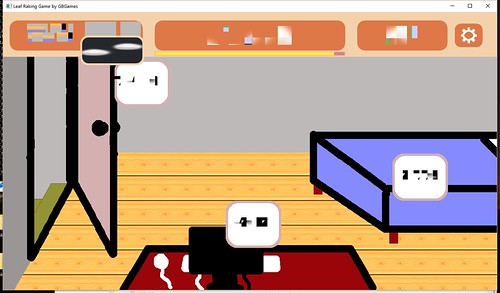
The other issue I found on Windows was that resizing the window results in the text looking completely wrong:

Leaf Raking Game Windows Text Corruption

All the other graphics look fine. Under the hood I am using SDL2_ttf, but using it directly isn’t showing this problem. I am using NFont, which does some caching, and I wonder if it is somehow being corrupted. I need to do some more tests, but this issue does not occur on my Ubuntu system, and Android doesn’t allow you to resize the screen dynamically at runtime, so it’s a Windows-specific issue so far.

I’ll continue looking into it, but updating to the latest version of NFont didn’t help. I tried updating my SDL2-related libaries next since some Windows 10-specific updates were made between the initial Windows runtime binaries and the latest release.

NFont’s creator Jonathan Dearborn has been running test apps I’ve sent him and sending back updates to try, and so far it seems we’re nearing a solution. Thanks for being so responsive, Jonny D!

The main major issue is signing my game’s binary. Windows 10’s SmartScreen puts up a warning about how they have protected your PC because they prevented the app from starting. It shows the binary as coming from Unknown Publisher.

That’s scary. I need to look into how to make it less scary. Does it require buying a code signing certificate, or is it similar to how Android’s code signing works? I don’t know yet, but I’m looking into it.

The other issue with Windows is that saving the game is sloooooow. In my game, I persist changes each time the player makes a major decision. Basically, if you click a button that switches to a different screen or causes something to happen in-game, I save so that if you shut the game down and reload it, it takes you back to where you were.

My Linux-based and Android-based builds are zippy. I can click, click, click, and any changes are instant. As a result, the game has been feeling very responsive despite the lack of a real-time need for it.

My Linux-based system does not have an SSD drive, and my wife’s Surface Pro does, and yet her system takes forever to save a file.

So on Windows, it feels less like click, click, click and more like click, wait, see screen update, then click. Because of the delay, sound effects are playing too early as well. It’s a lesser experience on Windows.

I haven’t ever needed to do multithreaded programming before as a single thread was usually plenty for the work I’ve ever done, but now I am wondering if I should spin of a thread specifically for writing to a file due to this issue that seems to be Windows-specific.

How Much Longer?

Ok, so there’s some technical issues, and some are easily surmountable, and some require some more investigation, and it’s possible there are some I haven’t run into yet.

Since Android seems the simplest to release, perhaps it goes into the Google Play store first, and I worry about the Linux and Windows versions later.

But I do not want this three month project to get to the ninth month before its first release.

The good news is that the next project will have a much clearer release plan, and many of these issues will be already solved. B-)