Categories
Game Design Game Development

Accessibility and Inclusion in Games: #AccessibilityJam Starts This Weekend

Access for skinny wheelchairs only

I just learned about Accessibility Jam, which is running from May 11th through June 1st.

The goal of this jam is to raise awareness, giving developers knowledge and experience of how to make mainstream video games accessible to gamers with disabilities, to provide good examples of what’s possible, and move accessibility towards being widely accepted good practice in the game design process.

The idea isn’t to make niche games that cater specifically to gamers with disabilities. The jam is meant to raise awareness and increase the accessibility of the kinds of games that are already being made.

I’ve written in the past on designing games to account for color-blindness. I recalled a beta test for a game in which one person complained about how hard it was to see the green vehicle on the green grass. This complaint confused me at first because the vehicle in question was blue. I eventually changed it to look significantly more interesting and give it a different color. Without that beta test, I would have inadvertently ignored a significant chunk of my audience.

Ok, so you can easily accommodate a color-blind player by using more than color to differentiate important aspects of your UI. You just need to be conscious about it and know about the tools of shape and size.

But what about players with other vision impairments, including those who have difficulties with reading? Or people who have hearing, cognitive, or motor impairments? Accessibility is a big topic, and you can’t possibly be expected to spend the time and effort here when you are trying to focus your attention on making the best game you can, right?

Well, the jam provides some awesome accessibility resources and tips, which features a number of useful links, such as the Includification Guide provided by the AbleGamers Foundation. This PDF is only a little less than 50 pages and offers practical checklists, advice, and examples, as well as numbers to indicate that there is a significant market you can reach with your efforts in accessibility.

Another link is Game Accessibility Guidelines, “a straightforward reference for inclusive game design” broken into basic, intermediate, and advanced topics. This site is a treasure-trove of information, and more importantly, it shows how easy it is to address accessibility. Basic considerations include using easy-to-read fonts and font sizes, especially as reinforcement of audio cues. Such a small effort means not just a more accessible game but a better game for everyone.

An example of an intermediate consideration is providing options in game speeds. Offering game speed configuration and the ability to prepare actions while the game is paused are some easy ways to assist those with motor and cognitive impairments. As a side-effect, it means accommodating people with different preferred play styles.

Once while demonstrating my casual real-time strategy game, Stop That Hero!, to someone, he requested that I add a game speed slider. While I’ve had requests for a way to increase speed when you just want to get your orcs across the map quickly to see what happens, this player wanted something more like a turn-based game.

Pausing the game but still allowing player interaction meant that he could take his time to make decisions about what minions to summon and where to summon them. I’m afraid I never got to that feature before I put the game on the back-burner, and while I initially didn’t like it as I thought it might ruin the feel of the game I was creating, I have since realized that allowing players to enjoy the game at their own pace allows for a much better experience for more players. That it means the game would be much more accessible to people who might not otherwise be able to enjoy the game is an exciting prospect.

So, are you planning on participating in Accessibility Jam? It sounds like a great opportunity to learn and practice ways to make your game more playable by a wider audience.

(Photo: https://www.flickr.com/photos/drdul/210641686 | CC-BY-SA-2.0)

Categories
Game Design Game Development

Game Design Pro Tip: Don’t Ban Specific Activities

Fishing ban!

In Ban the ban: essential game design advice (with examples), Nick Bentley talks about the cognitive dissonance of establishing rules and then creating special “but you can’t do X” rules to prevent problems.

Why do such rules exist? The most common reason is, during play-testing, the designer discovered players want to take an action that would hurt the experience – for example, a too-powerful action every player would take every turn if allowed. The most obvious fix is to ban it.

He then goes on to explain how doing the most obvious fix is a bad solution.

Banning otherwise-expected actions means the rules become harder to learn and the game play itself becomes awkward as you are constantly checking your planned actions against the rules.

Bentley’s post is a fascinating bit of insight into how a design problem can turn into a design success. By not banning actions, you have to allow for them. The entire point of banning a move is because it is unbalanced or otherwise ruins the game, so how do you allow it without the game suffering?

Interestingly enough, the answer can sometimes mean a much deeper and more compelling game.

Basically, take the action that you deem is too strong and assign a huge cost to it.

Bentley gives a couple of examples and a counter-example to see when it makes sense to include a ban, but the result is a choice that makes sense within the rules and can sometimes result in a more strategic game.

While Bentley is talking about boardgames, you can see how it would be applied to video games.

For example, if your game has inventory, you could limit the amount that could be carried. If a player with a full inventory comes across some new loot, the choice is to get rid of something to carry the new thing or not pick it up. Think Diablo or Minecraft.

NetHack, however, allows you to carry whatever you want, but it balances it with an encumbrance penalty. The penalties get more and more severe as you collect more things. You start off with penalties to speed and attack ability. If you carry too much, the penalties include not being able to walk up or down stairs, getting hungry faster. Carry even more, and you start taking damage for each move you take, and eventually you can get to the point where you can’t move at all.

Instead of arbitrarily deciding that a player can’t carry that much inventory, you turn it into a strategic choice. Do you want to struggle to carry all of the groceries from the car into your apartment so you can do it in one trip, or are you going to make multiple trips so it is easier?

You can see how this method of balance would apply in terms of limits on the number of units in a real-time strategy game. Some games add an upkeep cost which increases after you add so many units. Now I can choose to have too many units in my army temporarily if I’m willing to pay the cost, say for a large offensive push or to defend against the same.

“You can’t perform this quest. You don’t have a sufficient experience level.” No, by all means, try to perform the quest, but it is going to be incredibly punishing. The balance is already built in here!

Sometimes limits are technical in nature, such as the number of units you can have in your army at once. Still, you can see how allowing the player to decide if a decision is a poor one or a good one despite the cost means a deeper play experience than it would have been if you were limiting things arbitrarily.

(Photo: https://www.flickr.com/photos/jo-h/6009234100 | CC-BY-2.0)

Categories
Game Design Game Development Geek / Technical

Explore Game Mechanics Interactively At This New Site

Flocking on GameMechanicExplorer.com

If you’re new to game development, or even if you are a veteran making a game of a type you’ve never made before, you might find yourself doing research on how to best implement the mechanics. Whether it is figuring out how best to implement ballistics or how to move a rocket ship, it’s not just the math but the approach you might be looking for.

For instance, last year I made a Frog and Flies clone called Hungry Frogs for One Game a Month. I remember spending quite a bit of time on the jumping mechanic as this was the closest I’ve ever come to implementing a platformer. In the end I wasn’t completely happy with what I had. My main complaint was that it wasn’t easy for me to identify the maximum height of the frog’s jump without tweaking variables and seeing what happens. But considering the few hours I spent on it, I delivered something that worked well enough.

Still, if GameMechanicExplorer.com had been around then, it would have saved me some time.

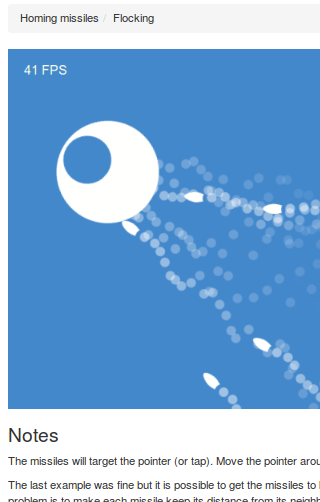
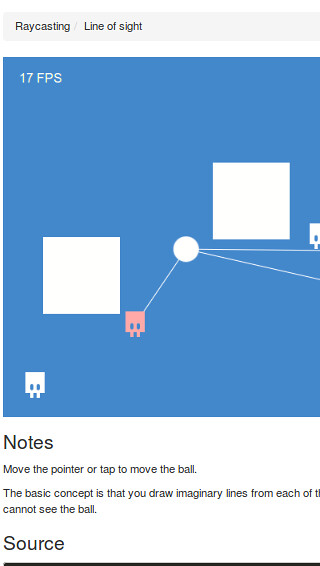
The site offers you a list of common game mechanics, each of which has at least a handful of examples with an in-browser demo and a JavaScript code example written using the Phaser framework.

Each example focuses on one concept and includes the source code for the implementation. They aren’t meant to be extremely polished or to represent a complete game. They aren’t highly optimized. They may not even be the best way to implement the mechanic being demonstrated! (They’re certainly not the only way.) They are written for clarity so that it is easier to understand the underlying concepts and apply them to your own work in your own engine. I expect that some of these examples will evolve as I gain experience. But hopefully you’ll find them useful and you can use them as a jumping off point for your own games.

At the time I am writing, there are examples for bullets, spaceship movement, following, homing missiles, raycasting, lighting, effects, easing movement, and even walking and jumping.

Line-Of-Sight on GameMechanicExplorer.com

The walking and jumping examples start out by showing you the naive approach, which has the on-screen character either stationary or moving at full speed. It’s functional, but it doesn’t feel right. The next example introduces the concept of acceleration to make the movement smoother, but it identifies a problem that is introduced. The next example introduces the concept of drag.

The next few examples take you through basic jumping mechanics, including double jumps and variable jump heights, the latter of which I needed for my hungry frog game.

I enjoyed spending time exploring different mechanics, such as seeing how various easing functions compare to each other, or how to use raycasting to do line-of-sight checks. I remember someone once posted a comparison of jumping mechanics of Mario, Meat Boy, and Mega Man among others, but I can’t find it today. GameMechanicExplorer.com is filling that void nicely.

I’m looking forward to seeing the implementation of some of the upcoming mechanics, including camera controls and the advanced platformer ones.

John Watson, you have provided aspiring game developers a great service.

Categories
Game Development Marketing/Business

95% Off for Game Development Course Bundle

A colleague told me about a deal he found online: 95% off for a bundle of game development courses.

After learning how to replicate Flappy Bird and Candy Crush, this bundle will give you an education in developing for both Android and iOS, a beginner’s guide to HTML5 game development, and a quick-start guide to creating a game with Stencyl.

Some people are turned off by the focus on essentially cloning two very popular games, but if you think about it, artists learn to create great paintings only after they all learn how to paint bowls of fruit.

I don’t plan on getting the courses myself, but then I’m not starting from scratch. I’ve made games, and I have in fact worked with Stencyl, and many of the topics I see covered are things I can look up on my own, such as how to sell apps.

Still, the idea of focused courses on topics related to making games that look very much like “real” games and even learning how to sell them is appealing.

But what do you think? Is it a good deal for beginners?

Categories
Game Development Geek / Technical Personal Development

Learning Game Software Architecture

Note: I wrote a significant amount of this post in 2011, back when I was actively working on Stop That Hero!, and enough still resonates today that I decided to publish it.

It’s only in the last few years that I’ve started to appreciate the importance of software architecture, and especially as I write the game engine for “Stop That Hero!” Before “STH!”, I haven’t had much experience with writing entire programs from scratch. Most of the code I’ve written professionally fit into an existing framework or architecture, so high level architectural work wasn’t something I had to worry about in my day-to-day work.

Beginner Programmer Woes

When I first learned how to program, I was focused on getting the syntax correct. Programs, even if they were completely original and not copied out of a book or magazine, were simple. More complex programs usually didn’t get finished before I lost interest. Any non-trivial programs that were successfully completed were the epitome of what we in the biz call “spaghetti code,” which means I was lucky to get something working at all. See my Pac-man clone in QBasic as an example of what teaching yourself how to program can result in.

Then I got to college, and I learned C++, and concepts such as recursion and stacks and objects. I was still using QBasic as a hobby, and my new code was definitely cleaner, but I struggled with putting everything together in a cohesive whole. And programming on a modern OS required a message pump, which meant I had to change the way I did things drastically. You couldn’t add empty loops if you needed a delay anymore.

Ok, so most likely, you’ve been there before, too. My story above isn’t unique. Lots of programmers went from DOS to a multitasking OS. The thing is, I think I fell behind in terms of learning how to program in this new world order. When I stopped using QBasic, I didn’t write a lot of C++ code outside of class requirements until I nearly had my degree. It turned out that I learned C++ wrong at first, which is why I didn’t enjoy programming in it as much as I did with QBasic. Once I read Accelerated C++ by Koenig and Moo, it made a lot more sense and was a joy to work with. That book is a great way to learn C++ for a beginner. Even though C++11 has since been released, I still highly recommend the book today.

Program Design Is Hard

But it still didn’t change the fact that larger applications were hard to make. If I knew what class or function was needed, I could write the code just fine. It was determining what class or function was needed that was the hard part. Or to put it another way, I struggled with “where should this code live” questions. Basically, software architecture was hard, and I didn’t know it was even a thing to be concerned about. Heck, years ago, I was concerned with how to put together a basic game loop. Solving that problem means I had everything I needed, right?

What I knew about game engines is based on what I read. Countless books and articles broke down the anatomy of a game engine by talking about its subsystems: audio, video, input, networking, etc. At the time, I believed this subsystem knowledge was enough to make a game. If you had a way to render to a screen and detect input, you had the bare basics to make a game. It’s just a matter of implementation, right?

Since I taught myself QBasic, and my first projects we isolated endeavors, I thought I knew how to put a piece of software together. I was able to put together an entire game, so how hard could it be? After all, they don’t give 70% reviews to just any QBasic games, right? I’ve even managed to put together complete Ludum Dare entries.

Why Is Everyone Else So Much Faster?

But I was also aware that some of the other Ludum Dare participants were able to make their entries way more impressive within hours of starting than my games end up by the deadline. Ludum Dare was historically a “write your game from scratch” competition, so it’s not as if they had full game engines available (although that’s changed with Unity entries). What was I missing?

Well, experience, for one. Some of those impressive entries are made by people who have been making games for way longer than I have. Even if we started at the same time, I haven’t been working on as many games as they have. They might have worked in the game industry and so know how to make games on a deadline. Even if they didn’t have game dev experience, they might have worked on financial software. Either way, they’ve likely written a lot more code than I have, so putting the software together to implement their game designs is possibly second nature.

Another thing people seem to have is boiler-plate code, such as code for menus, buttons, and sprites. XNA users have a huge advantage here, and Unity users are practically cheating. As I run and deploy to GNU/Linux, neither option is available to me, and since I work in 2D, there aren’t a lot of game engines available. A lot of the libraries that I could piece together also don’t fit my needs. Either they do things in a way I don’t want to do (GUIchan versus IMGUI), or they are not cross-platform. Instead, since my first Ludum Dare, I’ve written a lot of boilerplate code as I needed it. Each competition, I created more and more base code to leverage for the next project.

But I was oblivious to some of the fundamental architecture needs of a game engine, and so I still struggled to put together a finished, playable game in 48 hours. After all, the subsystems were everything. Just tie input to what’s happening in the game, and make sure the player can see feedback on the screen. Why is this so hard?

Learning Software Architecture

Most people will tell you to get a copy of the book Design Patterns by the Gang of Four. It’s a great book and features a number of patterns. Now, if you want to refresh yourself on what a pattern entails, it’s fine, but it isn’t great for learning about them in the first place.

I found Head First Design Patterns to be a great, easy-to-read introduction to major patterns.

But patterns knowledge isn’t enough to know how to organize a major software project. If I want to be able to provide a single interface to a bunch of disparate pieces of code, the Facade pattern is what I need. But what about determining that I need a single interface to those pieces of code in the first place?

And Test-Driven Development is supposed to be about code design. By writing tests, you already have a user of the code you’re writing, so you know how to design the functions and interfaces. TDD can help you design a single class, but it’s not going to help you drive the design of a full application. More and more, I realize that my lack of experience with writing larger applications is making my TDD efforts more of a struggle than they need to be. Uncle Bob Martin wrote about this topic in TDD Triage (the link has since died):

Here’s the bottom line. You cannot derive a complete architecture with TDD. TDD can inform some of your architectural decisions, but you cannot begin a project without an architectural vision. So some up front architecture is necessary. One of the most important up front architectural activities is deciding which architectural elements can be deferred and which cannot.

So patterns and TDD aren’t enough. Some architecture decisions are necessary, and I hadn’t made any. No wonder I had trouble in the past!

Conclusion

Ok, it’s 2014 again. Since 2011 when I first wrote this post, I’ve learned quite a bit about software architecture and designing software. Experience is one of the greatest teachers.

I’ve learned to focus on the data flow. Where does data come from, and where is it heading? I’ve learned to focus on what large pieces I need and worry about how to hook them up to each other later. I’ve learned how to separate the GUI from the internals, and that each has their own massive design decisions to worry about. I’ve learned that software architecture is less about the overall design of a software project as much as it is about the constraints on it.

I also learned that software architecture concerns don’t come into play as much if you are hacking together quick prototypes, but addressing the major software constraints can be huge if you intend to have a reusable set of code to use from project to project.

I’ll write more about the specifics in a later post, but it seemed important to document to struggle, especially as I did not identify my lack of knowledge about software architecture as an issue at first.

If you’re an indie developer, what were your major insights into software architecture? Do it come into play for you, or do you find that it isn’t anything to be concerned about in your day to day?

Categories
Game Design Game Development

The Indie Interview Series

Interview recording equipment

During the last half of 2013, Ben W. Savage conducted The Indie Interview Series “to inspire those who are considering game development” as well as those game developers looking for practical advice.

He asked the same series of questions of everyone, and prominent indies such as Christer “McFunkypants” Kaitila and Chevy Ray “Chevy Ray” Johnston spent anywhere from five minutes to a quarter of an hour answering. The topics ranged from how to get started in the game industry to who were major influences and what are major mistakes new developers make.

Adam “Atomic” Saltsman, creator of Candabalt, suggests that taking too big of a bite is a common problem. “Learning how to do a project is its own discipline … Start small, learn about the process, and then refine. That’s the key.” Nina “[insert nickname here]” Freeman of Code Liberation Foundation agrees in her own answer to the same question, repeating “simple prototypes, simple prototypes, simple prototypes” and suggests working in steps.

These are bite-sized nuggets of wisdom, and I wish there were more.

What’s your favorite interview? Did any of the answers resonate with you?

(Photo: https://www.flickr.com/photos/39781145@N00/254759786 | CC BY 2.0)

Categories
Game Design Game Development Games Linux Game Development

November #1GAM Entry: Raking Leaves

November’s One Game a Month entry is uncreatively-named Raking Leaves, a leaf raking simulator chock full of leaf-raking action!

Download Raking Leaves for Linux 64-bit (1.2 MB tar.gz file)

The object of the game is to rake all of the leaves into a single pile. The wind will blow the leaves around, however, and if you lose too many leaves off of your lawn, the game is over.

I had a lot going on this month, and so I didn’t dedicate a lot of time to making a game. Still, I wanted to make something for #1GAM. What could I make?

I recently bought a house, and with home ownership comes the oh-so-fun task of raking leaves. I decided to make a game out of that experience, and raking leaves is usually done in the Fall, which goes along with the optional theme of “Change”, so it was a perfect concept.

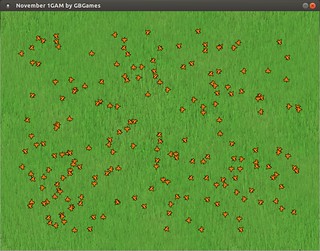
I started out making leaves and randomly throwing them about the yard.

November #1GAM

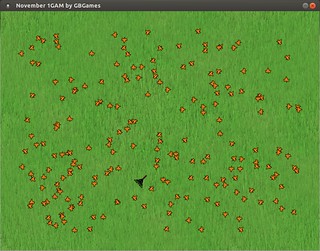
I then added a rake, which replaces the mouse cursor:

November #1GAM

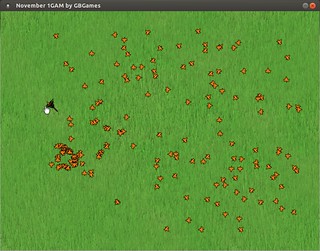
I wanted to capture the frustration of raking leaves, and so when you click and move the rake, the leaves will move, albeit a bit slower than the rake. This means you have to go rake the same leaves over and over to move them a long distance. I was pleased that it was working as well as I had planned.

November #1GAM

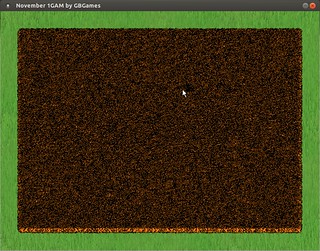
I had some funny bugs, such as this accident which features the level resetting over and over, except it wouldn’t reset the number of leaves but merely add to them. It looks like a giant set of orange hedges.

November #1GAM

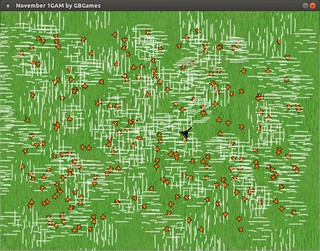
Another funny moment was after I added wind. I wanted early levels be less windy, while later levels would get more wind. Here is what it looks like to rake in a hurricane:

November #1GAM

Wind affects leaves in a radius around it, and the farther away the leaves are from the center of the wind, the less of an impact the wind will have. It works very well, but out of curiosity, I set the level to 1,100, which has over 20,000 leaves in it and has winds every second. It resulted in some cool visual effects, as you can see in this video:

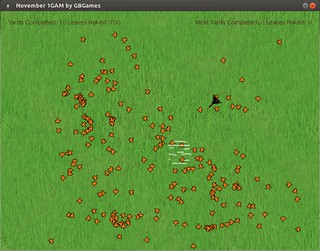
Eventually I think I achieved a good balance, complete with a scoring system to let you know how well you’ve done compared to your best raking.

November #1GAM

Considering I worked less than seven hours on this project, I’m pleased with what I came up with. I had plans for rocks, bushes, trees, and other obstacles, as well as a child running around jumping into your pile and scattering the leaves. Having sound would help, too, but for now, I think I’ve got one of the best games about raking leaves out there.

Categories
Game Design Game Development Linux Game Development Personal Development

October #1GAM Entry: Candypreneur

October’s One Game a Month entry is Candypreneur, a candy tycoon game inspired by the classic Apple II game Lemonade Stand.

Download Candypreneur for Linux 64-bit (432 kb tar.gz file)

I wish I had dedicated more time to this project. I had surgery and wasn’t able to work on it while I recuperated, and when I was able to spend time on it, I squandered it.

Still, I learned some things, such as that a best practice for representing money in software is by using integer values to represent cents rather than using doubles to represent dollars.

October #1GAM

October #1GAM

I wish I had time to theme it up a bit more. Some candy icons would have helped.

Also, the economics model is too simple. I managed to add random events that can impact the number of prospective customers, which you can sometimes prepare for if you check the reports screen for the upcoming month.

For this project, I had a much more complex simulation in mind. I wanted competitors, suppliers, customer moods, storefronts, candy ingredients, and research & development.

Even when I scaled down, I still didn’t put in things such as the rising cost of advertising or the ability to take out and pay back bank loans.

I’d say this is probably the project I’m least happiest with. I feel like there isn’t enough there, although some last minute additions make it less certain you’ll sell that candy.

Categories
Game Design Game Development Games Linux Game Development

September #1GAM: A Puzzle Game

For September’s One Game a Month project, I wanted to try to use the optional theme: hexagons.

I toyed with the idea of making a turn-based strategy game involving a hex map, but more and more I liked the idea of a hexagon-based puzzle game.

Long ago, I thought of a game involving hexagons that you can trap as they fell down shafts. The idea was that you controlled whether they continued down or got stuck at some point, but I never fleshed it out.

So I’ve been writing down ideas. Should the puzzle area be a grid that just happens to have hexagons? Do I make a hexagonal play area?

More importantly, what is the player doing in the play area? Do I make a match-3? I kind of liked the trapping mechanic, but I couldn’t think of a good way to make it fun.

Then I looked at the calendar and realized that over a week has gone by. So I thought I better steal some game play rather than try to create my own.

I recalled playing a QBasic game by Oren Bartal called Ultimate Super Stack. The point of the game was to trap stars between two objects, and I remember finding it very compelling. Maybe I can make a hexagon-based version of it.

I realized that there was a lot to the game, and I thought back to simpler puzzle games, such as Yoshi for the NES.

So I decided to try to mimic that game instead.

September #1GAM

So far, I have four platforms in an empty play area, with a switcher at the bottom.

Eventually, I will add dropping objects, most likely shapes such as circles, triangles, and squares. If two objects match on top of each other, they’ll disappear. If a hexagon’s bottom piece appears, then it’s top piece can close it, along with any objects trapped inside of it.

The player will be able to move the switcher to one of three positions to swap the platforms and any objects sitting on top of them.

It’s a simple game, but I don’t anticipate having a lot of time to create it this month, what with me going to ISVCon 2013. We’ll see how it turns out.

Categories
Game Development Games

Aim for Purposeful Artistry, or “Just Be Games”?

Jay Barnson recently wrote Art. Or Not. He drew some parallels between science fiction and indie games. He talked about how older pulp fiction was how many great authors got their start, and some of their short stories became culturally relevant, and some of the authors became bigger names.

If I understand his argument correctly, he believes that they created art without specifically trying to do so, that the designation of artistry came later, after the authors tried to create good reads for the buying public.

The point is… many of the “classics” – the “masterpieces” that are held in such high regard today were simply yarns spun to pay the rent by these authors. Between a combination of good writing, good editing, a story that resonated with the audience, and possibly a healthy dose of good luck, these stories and serialized novels went on to become standards of excellence in their respective genres. The authors certainly did their best to make a great story, but I doubt they set forth with a prevailing desire to create “Art.”

Now, he separates “art” from capital-A “Art” without explaining too much about what he means, but I think it is safe to say that there’s a judgment call being made here on what he thinks counts as legitimate art versus art made out as more important than it really is.

In any case, while Barnson says he isn’t opposed to games having deeper meaning, he is concerned that indies are aiming to make games that are less like games and more like other, more traditionally accepted art as an attempt to make games relevant to critics, such as the late Roger Ebert, who is infamous for declaring that games can never be an art form unless they become more like movies.

Creating great art is difficult, no matter what the medium, but I don’t believe there are any problems with people trying to create art out of game mechanics.

I think one of the things that is difficult as an indie game developer trying to make culturally important works is that there is a perception that games are supposed to be fun, time-wasting playthings for children. To purposely make games that aren’t meant to be fun is hard for a lot of people to get their heads around. Games that aren’t fun sound like bad games to many players.

If you expect to play a game like Brenda Romero’s Train and think you’ll have the type of entertaining experience as when playing Ticket to Ride, you are going to be incredibly disappointed.

But the idea that video games can be more than merely fun is not a new one. Chris Crawford once gave a GDC talk about how, at a higher abstraction, entertainment is what games should aspire to. Fun is just one way to entertain.

As for aiming for art as opposed to letting “games be games”, why does it matter what purpose someone has for creating a game? Why does it matter who they try to please? If you’re an indie, who do you have to answer to but yourself?

F. Scott Fitzgerald was once quoted as saying “An author ought to write for the youth of his own generation, the critics of the next, and the schoolmasters of ever afterward.” He wasn’t writing to make money and leaving the question of his artistry to others.

So what about the idea that you don’t purposely try to create art, that it merely become so later? I don’t think it is necessarily the best way to go if you want to use the medium of games to create art. And some people specifically want to use the medium of games to create art. Or Art.

I’m with Jay on the idea that games are their own medium, that you don’t have to try to make them seem like other types of art. Games have their own strengths, and ignoring them would be much like how early filmmakers tried to record live theatre productions and not realizing how much more they could aspire to.

If you’re trying to make a commercially successful game, go ahead and try to please people, specifically your customers. But in most other endeavors, trying to please other people is a sure-fire way to kill what you’re trying to do with compromises.

If the creator of a game designs it to be art, it’s hard for me to argue that they are not trying to please their true audience.