Categories
Game Design Game Development Geek / Technical Personal Development

January #1GAM Entry: Walls and Armies

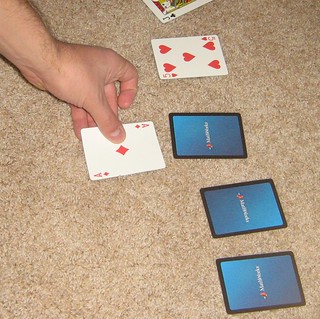
I’m in crunch at the day job, and so I didn’t have weekends like I had hoped to work on a game project. Luckily, I had finished the design of this two-player card game, and it counts. I call it “Walls and Armies”, and the rules are below.

CardGameDemonstration

Setup:
Take a standard 52 card deck of cards. Remove the jokers from the deck and leave them out of the game.
Shuffle all cards into a main deck.

For each player:

  • Determine how many “walls” and “army” cards you get. For each type,
  • Flip the top card from the main deck to determine the number of cards to deal
  • If it is a face card (Jack, Queen, King, Ace), then place that card down in front of the player face-up and sideways to indicate that it is a “shield”.
  • If it is a number card, discard the card and deal the indicated number of cards face-down in front of the player. For example, if the top card was a 3, then discard the 3 and deal three cards.
  • The wall cards and shield cards are laid out individually in front of the player. The army cards are placed in a deck, and the player should not look at them.

Play:
The first player is the one who has the fewest wall cards, or if tied, the one with fewest shields, or if tied again, the one with the fewest army cards. In case of a tie across all three sets of cards, flip a coin.

For each player:

  • Pick one of the opponent’s wall or shield cards to attack, then flip the top card from your army deck. If the target card is face-down, flip it over to reveal it. You cannot attack wall cards until your opponent’s shield cards are eliminated.
  • If your card is higher, then discard both the target card and the army card.
  • Otherwise, your opponent can choose to leave it alone or counter-attack:
  • If left alone, you may stack your next army card on top of any of your in-play army cards, adding the number of the armies together to attempt to eliminate the target card.
  • Your opponent may choose to counter-attack by playing one of his/her own army cards.
  • If the counter-attack is higher than your army card, then the counter-attack is discarded, and each of the stacked armies are added to the opponent’s wall cards.
  • Otherwise, both the counter-attack and the stacked armies are discarded.
  • Repeat until you run out of army cards.
  • Replace all face-up shield and wall cards with face-down cards.
  • Replenish your army deck by flipping the top card from the main deck. If it is a face card, add it to your shields. Otherwise, deal yourself the number of cards indicated into your army deck.
  • Play continues until either player has run out of wall cards. The other player is declared the winner.

Categories
Game Design Game Development Games Geek / Technical Personal Development

12 Games in 12 Months #OneGameAMonth

OneGamePerMonth

It’s mid-December, which means people are remembering their New Year’s resolutions and rushing to accomplish them before 2013 rolls around.

Last year, I managed to release the Stop That Hero! alpha after many months of delay. This year, I similarly managed to get the next update out a few months ago after many months of delay, and it still hasn’t been ported to the Mac. Otherwise, I have a couple of Ludum Dare games under my belt. One of my aspirations is to be a prolific game developer, and this is not a good track record.

Ludum Dare has three main compos during the year (one is this weekend!), but each month in between features a miniLD with custom rules by whoever is hosting. I have been considering making it a goal to participate in each of these miniLDs if only to get 12 games in any given year.

Chris Kaitila, aka McFunkypants, wrote 12 games in 12 months about his experience in the last year attempting to make at least one game a month, so it seems I’m not the only one with such aspirations.

I set out this year to prove to myself that not all game projects need to stretch on for months or years. It was a battle against the featurecreep and code bloat that I’d suffered from for years as an indie gamedev. I’ve started so many more games than I’ve finished in the last 20 years.

From assembly language “hello worlds” to BASIC choose-your-own-adventures without an ending. From to Turbo Pascal Tron lightycles games, to Visual Basic prototypes so woefully buggy and half baked they weren’t even worth backing up. From unpolished (but complete!) C++ openGL shooters with only one level to Adobe Director (shockwave) horse-racers with no finish line. From php sports simulators with broken AI to html4 multiplayer chat worlds with server problems.

Looking in my Projects directory, I see that my unfinished 0h Game Jam about a horse race with no finish line. Hmm.

Now, Kaitila has a broader range of experience with tools and engines than I do. I could probably stand to get outside of my C++/SDL comfort zone, but the risk is taking the time to learn something new versus using what I know to work on games.

But he found that it’s easy to get sucked into a never-ending project, one that quickly stops being fun to develop, and so becomes one that never gets finished. I’m sure we’ve all been there. There’s a lot of discipline involved in game development, which isn’t obvious to anyone who hasn’t done it before.

So what can you do? Reduce scope! But feature creep is always a problem. Set short deadlines! But projects always have a way of taking more time than you planned.

Kaitila’s answer to both: game jams.

Instead of getting involved in a long marathon of game development which might force you to choose between your health/family/friends and your project, you run little sprints. Ludum Dare’s 48 hour compos and miniLDs are perfect. There are also other game jams throughout the year, such as Meaningful Game Play Game Jam and 0h Game Jam held during a missing hour due to Daylight Savings, so there are plenty of options.

Like daily workouts, each game project made me stronger. Faster. Better.

You can do this too. Challenge yourself to make a game a month this next year. Let this be your new year’s resolution. I’m going to do it all again in 2013. One game per month, on average, and a dozen finished products by the end of the year.

I’m issuing a challenge to all my gamedev friends: join me in the epic quest. It CAN be done. You don’t have to be hardcore, insane, or obsessed. Join me in the gameamonth challenge. We can help encourage each other.

If you have a Twitter account, you can sign up for the One Game A Month challenge. It’s like a game for game development. You get XP for each new game you post, and people who sign up before January 1st get 100 early adopter bonus points.

I’m in. Are you?

Categories
Game Design Game Development Geek / Technical

The 2012 0h Game Jam

For a lot of people in the world, it is time to set the clocks back an hour. Thanks, Benjamin Franklin.

During the daylight time change, there’s an hour between 2AM and 2AM on Sunday, but due to the fact that it looks like no hours have passed, the question remains: can you make a game in 0 hours?

You can check on the hashtag #0hgame to see how development has gone around the world. Europe has finished their 0h Game Jam. You can see completed games at http://0hgame.eu/games.php. In 0 hours, you can expect some simple yet off-the-wall stuff to be made.

The “keynote” is a bit odd as well:

I’m getting ready for 0h game development by seeing Wreck-It Ralph tonight. Even if it doesn’t help provide any inspiration, it should be a fun time with friends.

Are you participating? How are you preparing?

Categories
Game Design

Breaking Down the Design of Final Fantasy 6

On Google+, Todd Barchok (thedaian) shared a link to a critical analysis of Final Fantasy 6 (or Final Fantasy 3 for those of us who played the SNES version and refuse to assign it a different number out of stubbornness). The author also held a successful KickStarter to critically analyze Chrono Trigger earlier this year.

Years ago, Greg Costikyan wrote Game Criticism: Why We Need It and Why Reviews Aren’t It. It was an article in response to the idea that game reviews (“they give you three stars. Good or bad, that’s all that reviews are concerned about”) and game criticism (“an informed discussion, by an intelligent and knowledgeable observer of a medium, of the merits and importance (or lack thereof) of a particular work”) are the same thing.

Reviews are about making you an informed customer. Do you want to purchase this game? Is it worth your time?

Criticism is more than whether or not a game is a good purchase. Costikyan says that there are many valid ways to critique a game. You can compare a game to others in the same genre. You could compare the game to others in its series. You could think about the game’s mechanics and whether or not they succeeded in the way the designer intended. You could analyze how the mechanics support a certain play style.

As Ian Schreiber says in the Game Criticism and Analysis level of his online Game Balance Concepts course he ran in 2009:

I have mentioned before that an important game design skill to have is the ability to critically analyze other people’s games. I think about half of the reason why I am as far along as I am in my career, personally, is that I have the ability to play a game and offer direct constructive feedback that is useful to another designer.

When I play a game, I find great enjoyment in pulling back the curtain and figuring out how it was put together. I’ve learned that I should make sure that the person I’m playing a new board game with knows this beforehand. Otherwise, it can be very frustrating for them as I nitpick and dwell on the “Why?” of a particular rule. To my wife: once again, I apologize. B-)

The last major analysis I did was about Jason Rohrer’s Gravitation as an artistic game back in 2008. It helped me not only appreciate the game more, but helped me see just how purposeful a game’s design can be.

I enjoyed reading Well Played 1.0: Video Games, Value and Meaning since it was full of articles discussing about games done well . The book is a series, and I realize now that I should buy the next two volumes.

When was the last time you critically analyzed a game?

Categories
Game Design Game Development Games Geek / Technical Linux Game Development Personal Development

LD24: Evolution Game Post Mortem #LD48

My last few Ludum Dare entries have missed the main compo deadline and had to be submitted to the Jam, but my entry for Ludum Dare #24 was finished in time to get judged along with the other 1,000+ entries. That was a big win for me, since my game development in general has felt quite slow.

The theme for LD24 was Evolution, which always makes it to the final round and has never won as a theme until now. I ended up creating a simplistic side-scrolling shooter. It definitely wasn’t my best entry, but health problems made it difficult to do better in the 48 hours.

What Went Right

  1. Leveraging existing tech

    Since LD#18 (“Enemies as Weapons”), I’ve been slowly building up a game engine for Stop That Hero!, my casual strategy game that lets you summon minions to fight heroes who want to put a stop to your evil empire. As I am using test-driven development to work on that game, I ended up with code that is relatively loosely coupled and cohesive. It was quite simple to gut out the STH! parts and leave behind a way for me to immediately create a menu, game play screen, and ending. Instead of spending the first six or twelve hours trying to get an SDL window to shut down properly, I could concentrate on more important things.

    My engine isn’t super powerful. People using Unity or Flash had a huge advantage since so many components are fully-formed and well-designed. Still, I had code that I was able to use in multiple games, and I knew how to use it. I was able to put together my game fairly rapidly.

  2. Better familiarity with tools

    My art program of choice is GIMP. While I’ve been known to doodle on paper since I was a child, I haven’t been very practiced with pixel art or image manipulation. I don’t know how to do 3D modeling very well, but if I did, I would use Blender.

    Over the years, I’ve learned how to use GIMP to create some decently functional art and ads. Selecting shapes, making use of layers, and knowing how to manipulate color goes a long way. What I create is not production-quality, but it works for an LD48.

    Evolution Game Play

    Sound effects were made using DrPetter’s sfxr. Even though it is really easy to use if you just want to generate random sound effects, knowing how the various parameters can be tweaked helps a lot in getting an effect to sound just right.

  3. Iterating fairly well

    My biggest victory came from iterating, even if I could have approached it more intelligently.

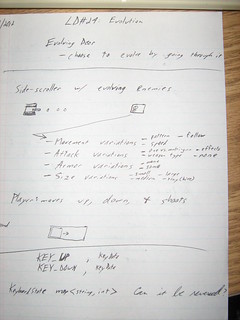
    After working out some ideas on paper, I had a basic design for a shooter.

    Initial Design of Evolution game for LD#24

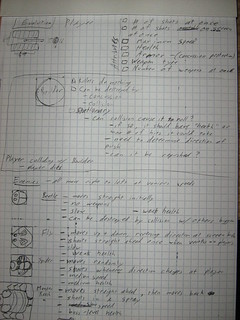
    I wanted the controls to be simple. I came up with some different ways for how enemies would evolve, as well as ways the player’s tank might evolve.

    I wanted different kinds of enemies that came in different sizes, used different movement patterns, and attacked the player in different ways. I even had an idea for a boss character.

    Design Notes of Evolution game for LD#24

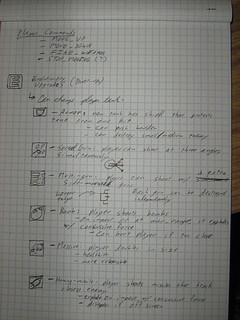
    I also thought of Evolutionary Upgrades, aka Power-ups, for the player. Some impacted the tank’s weaponry, such as a spread gun or homing missiles, while others affected the tank’s size or armor.

    Design Notes of Evolution game for LD#24

    Once I had an idea of the kind of game I wanted, I set to work. My initial list of tasks:

    – get the player’s character in the game
    – make it controllable
    – add obstacles (most likely boulders)
    – make collisions between the player and obstacles deadly
    – add an enemy
    – create a wave of enemies
    – create a way to modify the wave of enemies so each enemy evolves in some way

    First, I got a scrolling background. In hindsight, maybe this part could have been left until later. My next goal was to get a controllable tank on the screen, complete with the ability to fire bullets. Having something controllable that early meant that throughout the development of the rest of the game, I could get a feel for the controls. As the game came together, the tank’s controls were updated a few times. I originally had the tank’s movement a bit slow to accelerate, as switching a tank’s directions is probably really hard, but I found it was more annoying than fun. It felt too sluggish. I made it more responsive in the end, and it was better for it.

    Next, I added boulders, followed up with collision detection between the tank and boulders. Now tanks have to avoid obstacles, making the side-scrolling environment a bit more maze-like. In terms of the theme, however, perhaps these obstacles were not the best thing to add earlier, although I did have plans for enemies to interact with boulders by pushing them toward the player if they collided with them.

    Finally, I added killable enemies. The enemy was pretty basic. It moved in a straight line toward the player, didn’t attack, and moved through boulders.

    I realized that I was not going to get all of the enemy types and upgrades in, so I focused on making sure what I had was as finished as I could make it. I added enemy waves, which added more enemies and made them harder to kill as the player progressed. I added a score so you could see how well you’re doing, and I even had time to make some points visibly pop up when you kill an enemy. That last bit was a small aesthetic change, but I think it polished the game up quite nicely. Great bang for buck.

    Now, there are some things I spent time on that I could probably have left until later. The scrolling background wasn’t really necessary, was it? And the enemies were supposed to be the main focus of the design, so why did I work on boulders first? I definitely could have prioritized much better.

    Still, what’s key here is what I didn’t spend time on. I didn’t spend time making tank upgrades, which is good because I didn’t have a need to upgrade the tank. I didn’t spend time making lots of enemy types, which is good because I didn’t have the time to intelligently figure out how they should be introduced. I didn’t spend time to figure out boulder/entity interaction, which is good because who knows if it would have added anything?

    By getting something playable and iterating, I was in a position to reduce scope to finish the game by deadline. Along the way, I almost always had something playable that I could submit by the deadline.

What Went Wrong

  1. Dealing with Back Pain
  2. Shortly before the theme was announced, I was working to get the next release of my casual strategy game Stop That Hero! out the door. Between that project and my responsibilities as President of the Association of Software Professionals, I was sitting at my desk a lot, and it was taking its toll on me. I could feel some tightness in my hip, and so I decided to try to setup my environment so I was standing more.

    I placed a container under my keyboard, and it was raised to the perfect height to let me stand while I work. Everything was great, until I had to use the mouse for some reason, which was still on the desk. I leaned to the right to reach for it, and I didn’t realize I was going to be mousing like that for long. Standing in such an awkward way, coupled with the tightness I was experiencing from sitting for so long for days on end, I ended up with some very, very annoying back pain.

    The Friday before the compo, I went to a massage therapist since I figured it was just tightness that needed to be massaged away. After the compo, I went to a chiropractor because it clearly wasn’t getting better and in fact felt worse.

    But during the compo, I was taking a lot of breaks. I could sit or stand for a period of time, but when the pain started getting distracting, I’d go lie down on my back for a time before I could start working again.

    I lost a lot of productivity to that pain, and I’m still recovering from whatever happened to cause it.

  3. Being Uncool

    My entry didn’t get a rating. It seems that in the time since my last LD, there was a change that if you don’t have a high enough cool rating, you don’t get a listed rating. As I was a bit busy and couldn’t dedicate the time to reviewing other games post-compo, I didn’t get many reviews done. Reviews translate into coolness. With over 1,000 entries, people aren’t expected to review everyone’s games, but there is an expected minimum you should rate. I rated a few immediately after the competition, but between not being able to play Unity-based games and having other priorities, I didn’t get back to it. My only listed rating is Coolness, and I was ranked #986 with a rating of 22% cool.

    There were quite a few 100% Coolness ratings, and those people are awesome. Or they just have a lot of time. Either way, I’m glad they exist.

  4. Doing a poor job of including the theme

    Evolution is always a contender for the finals of theme selection, and I was caught off-guard when it actually won.

    I could have tried to design something involving random genetic changes in entities and seeing which one adapts better to changing circumstances, but it sounded too obvious and also too open-ended. I wanted to try to keep my entry simple and straight-forward since I wanted to submit an entry to the compo instead of the Jam.

    While I had some design notes that I called “evolution,” such as tweaking variables to create new enemy behaviors and types, it really wasn’t evolving so much as creating variations, the kind of thing you’d see in any shooter and most games in general.

    Perhaps I should have thrown a few more ideas at the wall before settling on this side-scrolling shooter. My wife suggested the idea of an “evolving door” which has the benefit of being pun-tastic, but I couldn’t find a good way to incorporate it into my existing design. Judging by the variety of entries, I could have been a bit more creative.

What I Learned

  1. Iterate like you mean it. This is where Agile software development experience really comes into play. If you can create the simplest bit of value, and then build on it, you’re going to ship. If instead you build up scaffolding code to prepare to provide some unknown, vague value, you’re probably going to get mired in delays.

    In previous competitions, I’ve found that I didn’t introduce basic interactivity until a bunch of other things were ready, and I’ve suffered as a result. By getting something player-controllable right away, I was able to not only get a game around it much more quickly, but I was also able to make small changes to the controls until it felt right.

  2. Having good tools and knowing how to use them is great for productivity. To iterate quickly, you need to be able to produce functionality quickly.

    I used to try to create decent art, but between not having much practice and not being familiar with GIMP, I would spend way too much time on art, and in the end, it still looked really bad. I wasn’t getting the return on investment.

    Now, my art skills are still not production-quality, but they are passable, and I am able to create decent programmer art in minutes when it used to take me hours.

    Also, experience counts in general. I write way better code today than I did just a few years ago, and I do so much faster. I terrify myself when I look back on earlier Ludum Dare compos and read through my code.

  3. I need to take care of myself. Up until the compo, I had been doing yoga and taking regular walks. However, poor posture in front of the computer and sitting for way too many hours at a time in those postures did me in. It’s over a month later, and I’m just now feeling fine enough to start stretching and taking walks again. Maybe I need to seriously investigate the standing desk option and even look into a much better office chair.

Summary

If I could do LD#24 over again, what would I do differently? I’d spend more time upfront trying to create a design better suited for the theme that is also simple enough for me to make. I’d make sure my list of tasks was prioritized so that at all times I was working on implementing something that served the core design. And I’d make sure that I had set aside time after the compo and Jam to rate other games. People worked hard on their entries, and with over a thousand of them submitted, it’s unfortunately easy to get buried. I think the coolness rating does a great job of making things fair, and the name is perfect. I want to be cooler next time.

Being able to get a game submitted is still a great feeling, though. In 48 hours, I created a game where there once wasn’t one. Next time, I should hopefully be healthier and able to focus more on game development, and my next entry should be not only minimally complete, but actually enjoyable to play. I’m still aiming for getting #1 in the Overall category, and while it feels like I’m a long way away from challenging other entrants for that position, I’m definitely way closer than I was when I was participating in LD#11 four years ago.

How did your LD#24 go?

Categories
Game Design Game Development Geek / Technical Personal Development

Join Me in the Weekly GBGames Game Dev Co-op Hour

Last week, I decided to try something new. Every week, I’ll do an hour of game development in a Google Hangout, and you’re invited to come along.

Synchronize Your Watches

What: Weekly GBGames Game Dev Co-Op Hour, an hour of game development with you, me, and anyone else who shows up.
When: Every Wednesday morning at 6:00 AM (Central Time) for an hour.
Where: In a Google Hangout. The link will be posted on Twitter and on my Google+ profile a few minutes before the hour starts.

It’s a bit early here, and depending on where you are in the world and your schedule, it may or may not be convenient for you, but I hope you’ll join me. We can discuss game design, talk about what you’re working on, or simply work silently together. I see this weekly hour of public-facing work to be an opportunity to connect with other indie game developers. We’ll laugh. We’ll cry. We’ll become better game developers.

Do you plan to attend the Co-Op Hour?

Categories
Game Design Game Development Geek / Technical Linux Game Development Personal Development

LD24: Development Timelapse, or The Evolution of My Game #LD48

48 hours of game development has been condensed into a little over a minute and a half of video.

It looks as if a lot of the creating parts happened in small bursts of a few seconds, done around IRC and eating. B-)

Categories
Game Design Game Development Geek / Technical Linux Game Development Personal Development

LD24: FINISHED! #LD48

It is done.

It doesn’t have nearly as much as I wanted. I had design notes for different enemies with different movement patterns, weapon types, power-ups evolutionary upgrades, and bosses.

What I do have is a basic enemy that gets more and more health and moves faster and faster in each wave. You have three lives. And each killed enemy gives you 10 points.

It has some basic sound effects.

Evolution Game

And you can get the files here:

Windows .zip 5.2 MB
Linux tar.gz 4.7 MB
Source .zip 4.0 MB

And now, I will celebrate with a peanut butter covered chocolate chip cookie.

Peanut butter covered chocolate chip cookie

Categories
Game Design Game Development Geek / Technical Linux Game Development Personal Development

LD24: Bug-killing Game Play #LD48

I managed to get a lot accomplished in a couple of hours.

– get the player’s character in the game
– make it controllable
– add obstacles (most likely boulders)
– make collisions between the player and obstacles deadly
– make collisions between bullets and boulders result in bullets disappearing
– add an enemy
– make collisions between bullets and enemies result in damaged enemies
– make collisions between player and enemies result in killed player
– create a wave of enemies
– create a way to modify the wave of enemies so each enemy evolves in some way

Right now, you can shoot enemies as they approach, and when they die, they become harmless and visibly destroyed. If you crash into an enemy that is still alive, you both die.

Evolution Game Play

Enemies are mindless right now. They simply move forward in a straight line to the left. While I have a bunch of random enemies that looks like a wave, I don’t really have waves as a concept in the game. And with less than four hours left, I don’t think I’ll be adding lots of visibly different enemies and power-ups. We’ll see.

Oh, and my wife was nice enough to bring me something to snack on.

Got any gwapes?

Grapes

Categories
Game Design Game Development Geek / Technical Linux Game Development Personal Development

LD24: Sub Sandwich and Enemies #LD48

I woke up with a sore back. I was lying down on the floor with my legs up on the ottoman since that’s supposed to help your muscles relax if you do it for about 30 minutes. Then I went back to bed, and I didn’t wake up for a few hours. Then it was time to go to church with my wife, and we had lunch:

Planet Veggie Sub sandwich

That’s a Planet Veggie from Planet Sub. It has provolone, cheddar, fresh red peppers, artichoke hearts, sun-dried tomatoes, and a tangy olive spread. I washed it down with lemonade.

I wish I can say I’ve made progress, but sitting at the computer has been incredibly uncomfortable. But lying on the floor seemed to have helped, so I’ll be back at this project today.

A reminder of what I’m doing:
– get the player’s character in the game
– make it controllable
– add obstacles (most likely boulders)
– make collisions between the player and obstacles deadly
– make collisions between bullets and boulders result in bullets disappearing
– add an enemy
– create a wave of enemies
– create a way to modify the wave of enemies so each enemy evolves in some way

There’s a little over 6 hours left in the compo. I can do this.