Next up is giving the player direct control through the arrow keys, which means changing directions and needing to set the right frame when standing still.
And after that, I think I’ll add some basic text displays. I like the idea of tooltips and descriptions popping up when you are exploring the world. Maybe it will tell you if you’re getting hungry, similar to how NetHack does it. Or maybe I’ll be more direct than that. B-)
Soon after, I’ll create the world to explore, and I’m thinking about cutting back on line-of-sight since I might not have enough time to really play with it.
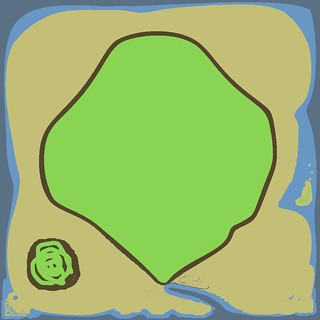
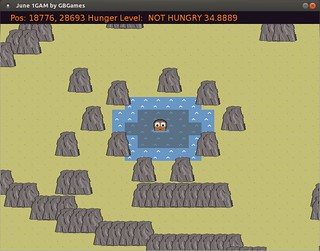
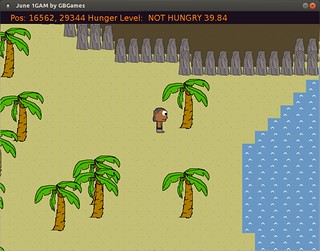
Since then, I’ve thought about what kinds of tiles I’ll need. I’ve decided to set it on an island in an ocean, so it will have standard sand, rocks, water, and palm trees.
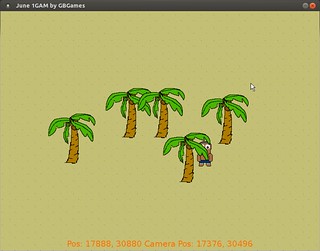
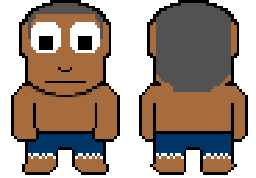
The game is called Shipwrecked, and we’re going to need a castaway. Here’s what I created during yesterday’s Game Dev Co-Op Hour:
I still need to provide left and right versions, plus walking animations, but I’ll keep them simple. I’m fairly pleased with my programmer art.
After that, the next task is to give this character a world to walk around in.
Then I can work on line-of-sight algorithms. I’ve been thinking about having the player’s vision deteriorate if he/she is too hungry or sick, so the edge of the fog might be closer than usual if the player is reckless.
I’m pretty excited. I hope my enthusiasm and productivity lasts. B-)
Four days into June, and I hadn’t thought about what to make for the One Game a Month challenge for June.
I searched online for interesting mechanics to play with, but nothing really jumped out at me. If you want to see some ridiculous concepts, try out the Game Idea Generator. B-)
At some point, I thought about the idea of being shipwrecked and needing to survive. Maybe you’re on an deserted island in the ocean. Maybe you’re on a deserted planet in the far reaches of space.
I liked it. The player has to deal with hunger, weather, injuries, disease, wildlife, environmental hazards, all while trying to survive. Maybe help is coming if you wait long enough? Maybe you need to explore the island and build something to find your own way to freedom? Maybe there are others in the same predicament?
I don’t know. But exploring sounded like it had to be a big part of this game. You’re stranded, and you don’t know where you are, so you better get a handle on your surroundings.
And since I decided to do a tile-based grid, it seems like a good opportunity to do line-of-sight fog of war.
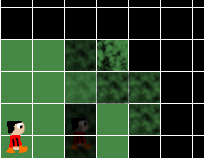
I like the idea that the player can see his/her immediate surroundings but needs to explore to see more. I like the idea of multiple levels of fog. One tile away is visible. Two tiles away is a little foggy. Three tiles away is more foggy. Four tiles is opaque.
Below is a mock-up demonstrating experiments with some fog made in the GIMP to see how it might look with different levels.
I’m not sure I’m happy with it, as I want it to be more difficult to see what’s behind the fog. Maybe I can experiment with different ways to render or create fog. We’ll see.
I also have to think about explored areas vs areas the player is immediately able to see. I’m reminded of Fate of the Dragon‘s fog of war, which returned to opaque if you weren’t in an area after a period of time. I think I’ll follow the normal RTS convention of graying out explored areas you can’t currently see.
Perhaps I’ll use Zelda-like controls. I was thinking about using the mouse and doing click-to-move/interact for simplicity, but I wonder if there might be some advantages to using the keyboard in terms of how expressive the player can choose to be. Maybe there are good reasons to crawl, sit, rest, walk, run (which takes a lot of precious energy), swim, jump, climb, open inventory, use items.
But then again, I can probably do all of the above with the mouse as well as the keyboard. Spacebar can be used to toggle sitting/standing, CTRL+click could be used to crawl, while Shift+click could be used to run.
Either way, I’ll probably find that I won’t add all of this due to only having the rest of June to finish this game. B-)
Rather, it is finished enough. You can control the frog by jumping and turning around. If you fall in the water, the frog slowly swims back to the nearest lily pad. Flies will move across the screen in a straight line from left to right, and you need to jump to eat them. If you miss half of them in a given round, the game is over. Otherwise, the flies move faster each round, making it more difficult to catch them.
I didn’t take many screenshots as I thought the rectangles made for an uninteresting still shot, but I did make videos to demonstrate progress of the game’s development.
First, getting the jumping physics to work:
Then, landing on lily pads and swimming when you fall in the water:
Then, some game play, with edible flies:
And the final version, with faster flies each round and a game over screen if you miss too many:
I moved the frog’s tongue down as I realized it looked strange at the top of the head and I wasn’t going to have time to replace the white rectangle with a nice animated frog image. I would have liked to have flies moving in fly-like ways instead of straight lines. I really appreciate how the developers of Frogs and Flies nailed it in the constraints of an Atari 2600’s memory and processing power.
I’m not sure I’m happy with how easy it is now. Originally it was difficult to catch flies, so I expanded the tongue’s collision detection to include the frog’s body as well as a space around the tongue. Now it might be too forgiving, although there’s a gap if the frog is moving fast enough that from one frame to the next the collision box goes around the fly’s location. I’d fix that next if I had more time.
I’ve never made a platformer before, and this project was a good start. I am pleased with the jumping physics, although I need to figure out a better way to determine the maximum heights of jumps.
All in all, it was a fun project to make, even if it is once again another project with scope cut drastically to make the deadline.
During the GBGames Game Dev Co-Op Hour this morning, I added flies and the ability to eat them, as you can see in this Hungry Frogs progress video:
I realized that the tongue’s dimensions were too small and made it too difficult to eat flies, so I increased the dimensions beyond what the tongue’s visuals would indicate, and I eventually even added the frog’s body as part of the “did the frog eat this fly” collision detection.
I noticed while making this video that sometimes the frog’s tongue looks like it should eat a fly as it falls, but it must be falling too fast since the fly remains, meaning that the collision detection happened above and below the fly but not in-between, where the fly actually is. One way to solve it is to do a more complex collision detection in which I keep track of where the frog was in the previous frame and check for the space in between as well. Another is to reduce the speed that the frog currently moves so that such checks don’t have to happen. The latter would be easier in my limited time.
My next step is to provide a way to end the level and start a new one.
And animation would be a nice way to finish it before the end of the month, although I’m not optimistic that I’ll be able to dedicate the time.
Last week, I wrote about my May #1GAM project’s progress, explaining that I haven’t been able to dedicate a lot of time this month to the project, partly due to day job crunch and partly due to travel and events going on around this time.
I was able to tweak the jumping physics a bit, and I’m much more satisfied with it. I like the idea of short hops getting the player into position to take a large leap and landing safely on the other lily pad.
As you can see in this updated May #1GAM demo video, I’ve split the lily pad into two, and now I’ve made the water a hazard:
If the frog falls in, it automatically swims to the nearest lily pad. It’s a constant speed, unlike the swimming motion that was mimicked so well in Frogs and Flies, but it’s in.
Since the player can’t control the frog when it is swimming, it means the player has less time to eat the flies before the sun goes down, and so therefore landing in the water means less points will be earned.
The next biggest thing to implement: flies and the eating of them. In hindsight, this aspect should have been implemented first, as it impacts how much I like the jumping physics, but I really wanted the swimming aspect in.
And I’ll follow it up with a score indicator and a timer to represent a day of fly-eating.
If I have time, maybe I’ll be able to replace the square with an actual animated sprite of a frog.
I’ve been trying to use my participation in One Game a Month to take each game project and try to learn one new aspect of game development in its development.
One thing I’ve never done is make a platformer. I figured that it would take some time to figure out the jumping physics and timings and collision detection with the ground versus a wall versus a floating platform, and I had no interest in pursuing it during a Ludum Dare compo.
That said, my project for May was meant to be an attempt at capturing the feel of a game I used to play a lot as a child. Frogs and Flies for the Atari 2600 used to keep my sister and me occupied for many an afternoon. Looking at Google Image Search, I can see that I’m not the only one who has ever wanted to make a game like it.
Oh, well. The important thing is that this is an opportunity to limit the scope of the game while I try to code up some jumping physics. The ground is static. There are no platforms to leap onto.
Unfortunately, due to day job crunch and various other responsibilities, I’ve only been able to dedicate a few hours to this project all month.
You can see the current status in this May #1GAM demo video, as it would be more interesting to see a box jumping around than a still screen:
I had some trouble with the jumping being inconsistent. Since I was using fixed-time steps, it made no sense to me why one jump would reach a different height than another.
Then I found that I wasn’t handling the jump states very well.
Jumping has three states: NOT_JUMPING, JUMPING, and FALLING.
In my code, if you hit and hold the spacebar, the state would be JUMPING and you could control how high you jump by how long you hold the key down.I f you let go of the spacebar, the state would change to FALLING. Once you hit the ground, the state changed to NOT_JUMPING.
For some reason, holding the spacebar down for the entire jump resulted in inconsistent heights reached. Imagine playing Super Mario Bros and getting frustrated that taking the same action results in randomly not being able to jump high enough to get to the next platform. What gives?
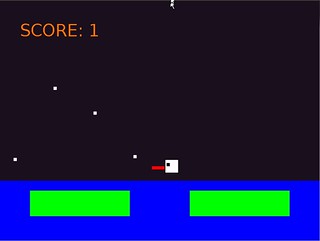
The video shows a white and gray box on the left side to indicate the max jump height and the last jump height respectively as I tried to figure out if it was a real or merely perceived problem.
I realized what the problem was eventually. Gravity was always being applied to the vertical velocity of the frog, even when it was on the ground. So in one update, the frog’s position hasn’t changed, but it’s velocity has. The next update, the position would change due to the velocity, and so when it fell below the ground, I’d reset the velocity and the position.
So while the player wouldn’t see any change in position, as it is a static box, there’s a 50% chance that the spacebar would be pressed while the player’s velocity is lower than 0, and the velocity of a jump was added to the player’s velocity instead of being assigned to it, which would have masked the issue (or solved it in the first place, if you prefer).
I changed the code so that gravity is only applied if the player is not in the NOT_JUMPING state, and everything worked much more consistently.
Then I added a direction and provided horizontal impulse as well, so each jump not only moves the frog up but also left or right. I want the player to use small jumps to move about, and bigger jumps to try to catch flies, similar to the advanced mode on the Atari 2600 game.
I’m pleased with how the jumping feels, although I find it awkward to figure out how to manipulate the relevant variables to get the jump how I want it. Gravity, initial jump impulse, additional jump impulse if you continue holding the spacebar during a jump, and time all conspire to say how fast and how high you jump, and I’ve been under time constraints to do the probably simple parabolic math that I’m sure it involves.
Like my past few months, I’ll probably have to limit the scope of this project significantly if I want to get it completed before the end of the month. I still need to add flies and way to catch them. I probably won’t have time to implement falling off the lily pad or day/night cycles. Even though I have a week left, it’s a rough week.
For my April project for One Game a Month, I liked the idea of making a game for my nieces to play to learn colors and shapes. I thought of having animals to click on, and initially it was frogs, but when I settled on turtles, it all clicked together.
I figured such a game would need to have more pizazz than my typical projects have, so I wrote up an animation class quickly, and then I used the Gimp to create some animated legs for the turtles. It’s not too bad.
I wasn’t able to dedicate as much time to it as I would like to this project. I was going to have the player try to click on matching colors as well as shapes, but I ended up scrapping the shapes.
I was pleased with the cartoony turtles I threw together, although the scale left something to be desired.
I added some color picking criteria and made sure the player could click on a turtle with the right color.
The final game awards you a point for each turtle you click correctly, and even helpfully lets you know which color you’re looking for.
I had plans for particle effects and audio to celebrate and inform you when you clicked on the wrong turtle (“That’s not blue! That’s red!”), but I’ll have to address those next time I pick this project up.
I thought I had a design that was a bit too ambitious, but I somehow managed to finish my March entry for One Game a Month.
“The New Worlds” is a space exploration game. Your homeworld’s star is known to go nova eventually. Evacuating everyone is the only option, and evacuation is expensive. Explore the universe, set up bases on suitable planets, and increase the wealth of your homeworld before time runs out.
I’ll have to write up how it all happened later, as I’m rushing off to see family this weekend. I had to cut back on features, such as setting up trade with alien civilizations.
There’s still at least one major issue with the game play. It’s entirely possible to run out of fuel and supplies and have the game continue to run even though you can’t do anything. You can’t go anywhere. You can’t wait to die. You can’t scrounge for supplies as it was a feature I didn’t have time to add even though I really wanted it.
I want to come back and address this issue, although the next time I touch this code I’m sure I’m in for a shock. It’s horrible and ugly and I hate myself for writing it. B-)
Still, it’s playable, and it’s possible to lose and win. And it is fun exploring and trying to survive in the universe.
Last month, I finished my One Game a Month February project on the last day, just in time to submit it and get credit for it. Whew!
February’s project was made in almost 12 hours of actual work throughout the month. That is, for about 3 hours per week, I was able to hack a game together. What surprised me was that I didn’t need a huge block of time to get something substantial accomplished. I thought that 45 minutes was the minimum amount of time I needed to concentrate and get my bearings before writing or changing code, but some of my more productive game development sessions weren’t more than 15 minutes in length.
For March, I know I am capable of throwing something together quite quickly. I’ve spent a little over four hours so far on game development this month, and while I’m worried that my game design might be a bit too ambitious, I’m pleased with the results so far.
March’s game is “The New Worlds”, a space exploration game. You’re tasked with discovering interstellar resources to bring back to your homeworld to get everyone off of the planet before the sun goes nova. Hopefully you can find a new home for everyone as well.
Along the way you might discover planets that are already inhabited, and you can setup trade. As you increase the wealth of your homeworld, your ship can be upgraded to allow you to travel farther and faster with more passengers.
Here’s some in-progress screenshots over the last ~4 hours of development:
A random star field.
Some random solar system. I changed the background from black to a purple-ish hue as I found it was a bit easier on the eyes.
More planet variety, and clicking on a planet sends your ship there.