Categories
Games Geek / Technical

Geek Out with Me: A News Feed for Sim City 4

If I love anything more than a good game, it’s people writing about their experiences with a good game.

The stories we tell about games are often more fascinating than the stories made for games.

I’m thinking of Fansy the Famous Bard of EverQuest, or a riveting story I can’t find now about a player in EVE Online who decided to go straight to nullsec space with nothing but the cheapest ship and see how long he could survive (if anyone knows which story this is, let me know. I’d love to find it and reread it again).

I’m thinking about great gaming moments like my first experience encountering The Beast in Homeworld: Cataclysm or the time I discovered how to trap a police officer in Lock ‘n’ Chase.

And now my friend Jim Boyd has created the Midlandia Internet Gazette, “an online news feed for the SimCity 4 region Midlandia, established in 2015.”

Midlandia as of December 2016 is comprised of 23 interconnected cities, with an overall population of 881,000. Among its highlights are an international airport, two Major League baseball teams, several universities, two movie studios, three television stations, and numerous radio outlets. Midlandia is a growing region, and is looking to break 1,000,000 in population by the beginning of 2017.

There are only a few posts as of this writing, but I look forward to reading about the development of Apia and the rest of Midlandia.

Categories
Geek / Technical Personal Development

Open Source Taxes

Flash game developers may remember Flixel, the open source game dev library created by Adam “Atomic” Saltsman.

HaxeFlixel is the Haxe-based port that eventually became its own full-featured, mature library that allows for deployment across not only Flash but many other platforms.

The five-year-old project is an open source project using the MIT License. That license, unlike the GPL, does not require code changes to be released to the public.

While the MIT License is appealing to developers who want to leverage freely available code for their own projects, there is nothing to encourage contributions to the source code of a project that is under that license.

The terms of the GPL requires any modifications to be released, so it solves the problem of people taking advantage of the code but not contributing back. But if a project’s developers don’t want to make that requirement, would prefer to have the MIT License applied instead, and still have people contribute to the project, whether in monetary terms or source code, what can be done?

How We Paid Our Open Source Taxes documents how the HaxeFlixel project was able to “collect its open source taxes with smiles on all sides.”

In this case, the core contributors realized that the project founder lives in an area where the cost of living is much, much less than it would be in, say, San Francisco. Just $6,000 would be enough.

So rather than having a vague fundraiser and hoping to make a bunch of money to meter out as needed, they were able to make a hyper-focused plea with their IndieGoGo campaign to get enough money to gain a full-time developer rather than require the project to continue to be supported by an all-volunteer base of contributors.

It’s kind of like when you talk to people about how much money they wish they had in life. Some people talk about “a million dollars” as if it is a lot of money that they’ll never see in reality, and other people realize that they can get penthouse apartments complete with maid service in some exotic countries for less than the cost of a New York apartment, such as what Tim Ferriss described in The 4-Hour Workweek.

The trick is learning what’s really possible.

HaxeFlixel’s story gives some insight into not only how an open source project operates but also teaches the lesson that if you know exactly what you need, it’s a lot easier to ask for it.

Categories
Game Development Geek / Technical Linux Game Development Marketing/Business

Gearing Up for Release: Platform-specific Issues, Part 2

Last time, I talked about Linux-specific issues to fix before my game’s release.

This time, I’ll address the issues I’m seeing on Android and Windows platforms.

Android: manual code signing

Quite frankly, between running the game on my phone and on my tablet, I haven’t seen any issues since I first tried to get my game built and installed on this platform. The main issue I had was figuring out which directory to save to, and I solved that issue.

Oh, and code signing was another solved issue. I can build and deploy debug builds by turning on developer mode on my devices, but the release build needed to be signed. As I am not using amazing IDEs that have one-touch buttons that do all sorts of fanciness, I had to figure it out myself from the documentation.

Luckily, the Android developer documentation for signing manually was fairly straightforward in this regard. In my CMakeLists.txt, I added a custom target called sign, which requires the location of my keystore and its alias. I created a few environment variables that I pass into my build, and the following is basically what’s needed as per the documentation:

ADD_CUSTOM_TARGET(sign
"echo" "================ SIGNING WITH KEY ================="
COMMAND "jarsigner" "-verbose" "-sigalg" "SHA1withRSA" "-digestalg" "SHA1" "-keystore" "${GB_KEYSTORE}" "bin/${ANDROID_APP_NAME}-release-unsigned.apk" "${GB_KEYSTORE_ALIAS}"
COMMAND "echo" "================ VERIFYING WITH JARSIGNER ================="
COMMAND "jarsigner" "-verify" "-verbose" "-certs" "bin/${ANDROID_APP_NAME}-release-unsigned.apk"
COMMAND "echo" "================ USING ZIPALIGN ================="
COMMAND "zipalign" "-v" "4" "bin/${ANDROID_APP_NAME}-release-unsigned.apk" "${ANDROID_APP_NAME}-release.apk"
WORKING_DIRECTORY "${PROJECT_BINARY_DIR}/android-project/")

Otherwise, I found porting to Android be very straightforward thanks to using the NDK and libSDL2-based libraries. If anything, I worry about scaling to different screen resolutions and device-specific compatibility problems due to the lack of devices I have to test on.

I’ve already signed up for the Google Play developer program, so the main piece to worry about is actually submitting my app to their store. How hard could it be?

Windows: persistence and font rendering

While GNU/Linux and Android are more or less the same, Windows is the odd duck.

I can easily cross-compile to create a Win32 build, and with my limited testing I found that the 32-bit version runs smoothly on a 64-bit system, so that’s good.

Since I don’t need to use a lot of memory, there’s no real advantage I can see to building a 64-bit version of my Windows port. The main downside would be an inability to support people on 32-bit systems, requiring that I provide both 32-bit and 64-bit binaries as I might need to do for the Linux-based package.

However, I did have to fix a few issues this past week that I didn’t know were there until someone tested it for me. Thanks, Rick!

I knew of an issue with using MinGW to cross-compile to Windows in which using std::cout would result in a crash. I never looked too hard into it because I only used cout for my own logging in order to find out what is happening, so I just commented them out when I released for Windows, usually for a Ludum Dare game.

Well, it turns out that there was still a crash, and I found that if I commented out the code that saved the current game state to a file, it would run just fine.

Was the known issue applicable to file stream operations, too? Luckily, gdb can be downloaded and run as a standalone applications on Windows, so I ran my game on Windows through gdb and read through the stack trace. It pointed to yaml-cpp.

I use yaml-cpp to save and load my game data, and it works very well. But why does it crash on Windows?

I found this thread on GitHub that mentioned a similar stack trace: Crashy shared object

It was closed without really being addressed, as the original poster gave up after seeing the issue disappear when using a later version of gcc.

Luckily, someone else found a different solution involving a change to a few lines in yaml-cpp’s code, although they said more tests are needed. I tried it, and it seemed to solve the problem for me, although I am a bit wary about not knowing what the change does or how it solves it. B-(

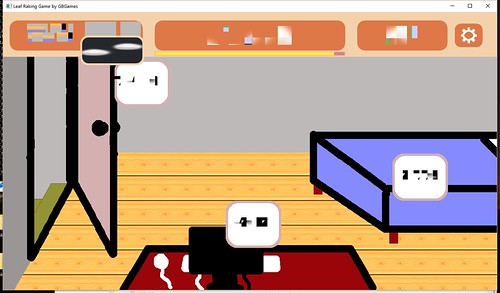
The other issue I found on Windows was that resizing the window results in the text looking completely wrong:

Leaf Raking Game Windows Text Corruption

All the other graphics look fine. Under the hood I am using SDL2_ttf, but using it directly isn’t showing this problem. I am using NFont, which does some caching, and I wonder if it is somehow being corrupted. I need to do some more tests, but this issue does not occur on my Ubuntu system, and Android doesn’t allow you to resize the screen dynamically at runtime, so it’s a Windows-specific issue so far.

I’ll continue looking into it, but updating to the latest version of NFont didn’t help. I tried updating my SDL2-related libaries next since some Windows 10-specific updates were made between the initial Windows runtime binaries and the latest release.

NFont’s creator Jonathan Dearborn has been running test apps I’ve sent him and sending back updates to try, and so far it seems we’re nearing a solution. Thanks for being so responsive, Jonny D!

The main major issue is signing my game’s binary. Windows 10’s SmartScreen puts up a warning about how they have protected your PC because they prevented the app from starting. It shows the binary as coming from Unknown Publisher.

That’s scary. I need to look into how to make it less scary. Does it require buying a code signing certificate, or is it similar to how Android’s code signing works? I don’t know yet, but I’m looking into it.

The other issue with Windows is that saving the game is sloooooow. In my game, I persist changes each time the player makes a major decision. Basically, if you click a button that switches to a different screen or causes something to happen in-game, I save so that if you shut the game down and reload it, it takes you back to where you were.

My Linux-based and Android-based builds are zippy. I can click, click, click, and any changes are instant. As a result, the game has been feeling very responsive despite the lack of a real-time need for it.

My Linux-based system does not have an SSD drive, and my wife’s Surface Pro does, and yet her system takes forever to save a file.

So on Windows, it feels less like click, click, click and more like click, wait, see screen update, then click. Because of the delay, sound effects are playing too early as well. It’s a lesser experience on Windows.

I haven’t ever needed to do multithreaded programming before as a single thread was usually plenty for the work I’ve ever done, but now I am wondering if I should spin of a thread specifically for writing to a file due to this issue that seems to be Windows-specific.

How Much Longer?

Ok, so there’s some technical issues, and some are easily surmountable, and some require some more investigation, and it’s possible there are some I haven’t run into yet.

Since Android seems the simplest to release, perhaps it goes into the Google Play store first, and I worry about the Linux and Windows versions later.

But I do not want this three month project to get to the ninth month before its first release.

The good news is that the next project will have a much clearer release plan, and many of these issues will be already solved. B-)

Categories
Game Development Geek / Technical Linux Game Development Marketing/Business

Gearing Up for Release: Platform-specific Issues

I started a three-month project at the beginning of the year, and I’m now in the eighth month. I reported on the reasons why it was taking so long last month.

But I’m feeling pretty good about it, and while I still have some balance issues to work out, and it’s a bit ugly, I’m preparing for the actual release.

The thing is, I haven’t really done a serious release before, and since I want to do a simultaneous cross-platform release, I’m finding issues unique to each platform.

The platforms I currently support:

  • GNU/Linux
  • Android
  • Windows

What I want to support:

  • Mac OS X
  • iOS

I’ll start with Apple platforms, then talk about the environment I use natively. Other platforms will be discussed in the next post later this week.

Mac/iOS: no development or testing environments

I would love to create a Mac port. I know it is theoretically possible to create a cross-compiler to generate a Mac version, but it seems I need Mac-specific libraries, which requires owning a Mac.

I don’t own a Mac, and while I know of virtual Mac services you can subscribe to online, I haven’t bothered to look too seriously into them. I would also like to be able to test the game, and so I would need to use a Mac in order to see how it really runs, especially after running into the Windows-specific issues above.

As for iPhone or iPad, I’m in a similar position. I don’t own an iOS-based device. As I’m using libSDL2, I know it is possible to port to it, even without a Mac, but I would need to look into how to do so, and I would still need to invest in the devices to test on.

I am saving up for these things, but at the moment I don’t have them and I don’t want to spend time on them until I know what I’m doing.

And in the past it’s been difficult to hear back from people willing to be paid for porting a game for me, and volunteers have had difficulty figuring out how to put my project together on their system. I might look into it again, because that was years ago, and it’s a different world today.

GNU/Linux: distributing dependencies and architecture compatibilities

I develop and test the game on my Ubuntu GNU/Linux system, and the main thing to worry about there is that I can distribute the game and have it work out of the box on other distributions.

My game uses libSDL2 and related libraries. While I installed them on my system using my package manager, I can’t assume that my customers will have them installed as well.

Basically, I need to build custom dependencies, as per Troy Hepfner’s excellent article series on Linux Game Development, and then distribute them with my game.

Quite frankly, rather than worry about an installer to put everything in the correct locations on someone’s system, I think providing a basic tarball might be fine. Rather than provide .deb or .rpm or customer shell installers for each type of system, and then worrying about following the correct Linux Filesystem Hierarchy Standard, you allow the player to put the game in the directory of their choosing, extract it, and play.

But then I need to worry about how the tell the system to load the libraries. Running an application on Windows, the system generally looks in the local directory for libraries to depend upon. Unfortunately, Linux-based systems don’t do so, and while there is a way to point it towards your libraries using the LD_LIBRARY_PATH environment variable, I also know that it is frowned upon to do so due to the security and compatibility issues it can introduce.

On the other hand, many popular commercial games on my system do just that. For instance, looking at the directory for Don’t Starve, I see:

$ cat bin/dontstarve.sh
#!/bin/bash
export LD_LIBRARY_PATH=./lib64
./dontstarve

The fact that it is in this shell script wrapper is better than the original concern of changing the default environment variable in a more or less permanent way, which can cause version conflicts and such. It’s your program. You know what it needs, and any other applications that run will not be affected.

Still, supposedly the better way is to tell your binary at build time where to look, which isn’t very difficult. It requires -rpath=\$ORIGIN/[directory where you put your libs]. $ORIGIN expands into the directory that your binary is located.

So if the extracted tarball would have the following structure:
– foo-bin
– libs
– libfoo.so
– libbar.so

Then I would build foo-bin with -rpath=$ORIGIN/libs.

Of course, now foo-bin MUST be in the same directory as libs, but in practice, it’s fine. When was the last time you moved parts of a game’s files to different relative locations and expected it to continue to work?

I’m sure there’s issues with this approach as well, but with these two approaches, there’s plenty of precedent.

The only unknown I have is dealing with 32-bit vs 64-bit systems. Ubuntu has multiarch support, but I’ve seen comments on forums about people not being able to run an application due to architecture issues.

Don’t Starve distributes separate 64-bit and 32-bit builds. FTL, on the other hand, distributed both the 64-bit and 32-bit binaries and libraries together, and using a shell script, it determined which platform you were on at runtime to point LD_LIBRARY_PATH to the appropriate directory.

And other games distribute all desktop platforms together in one file, so if you bought the game, you bought it for Windows and Linux and Mac, whichever one you wish to play on. I like this option, especially since I hate the idea that I have to pay for a game twice in order to play on two different platforms.

I know some companies make their living by porting games and then selling them directly, but it’s not a business model I prefer.

Next time

In the next post, I will talk about issues specific to Android and Windows.

Categories
Games Geek / Technical

Becoming an Accidental Fan

When I was a child, I had an allowance.

I had an interest in Archie comics, so sometimes my $2 per week would go towards an Archie Double Digest, but other times I would save up until I had enough money to buy myself a Nintendo game.

At the time, for you young ones who didn’t know, the games would go for about $50. If you do the math, that’s a long time to wait, but there was always birthday money, some of which I got to spend on what I wanted before the rest was thrown into savings for me, so it wasn’t always interminable until I could get my next game.

But as a child, and probably before I had Nintendo Power to tell me what games were being released, I didn’t always have a game in mind to buy. I just knew that by the time I saved up the money, I would go into the store with my parents and look at the walls of the video game aisle until I found something that looked like what I wanted.

I recall one time seeing a blue box with pock-marked fighter plane shooting through a hole in the sky with a space background behind it, guns blazing and everything. I thought it was an F-15 flight simulator that I had seen an ad for in a really old issue of Electronic Gaming Monthly.

I was a kid. I didn’t know what an F-15 was. I just knew it was a plane that shoots other planes, and that I wasn’t playing Top Gun at my friend’s house with its incredibly difficult carrier landing sequences. So I thought I was getting another cool shooty-plane game.

It turned out to be Thunderbirds.

I had never heard of Thunderbirds, but I remember really enjoying the game with its various ships in different environments. You only had so many in-game days to fight your way through your choice of different areas to defeat Hood’s plan to rain destruction on the world, and that extra layer of mechanics made an impression on me.

Then I discovered that the game was based off of a television show from the 60s involving marionettes who spoke and made their emotions clear on their faces using “SUPERMARIONATION!” Not to be confused with Super Mario Nation.

It was exciting for me to know that I can enjoy this world in another way, especially when I was in college and TechTV aired the series with a pop-up-video-esque bits of trivia about how the scenes were made or how the characters interacted.

When the Thunderbirds live-action movie was released, starring Bill Paxton and Ben Kingsley, in the summer of 2004, close to my birthday, I tried to arrange an outing to go see it. Unfortunately, when my birthday arrived, I found it was no longer in theaters, due to how terrible it was performing. I still haven’t seen it, although even knowing it is supposed to be bad and that the creator of Thunderbirds hated it, I still would watch it.

What’s even more disappointing was that at the time, Team America: World Police was being advertised, and when I first saw the trailer for it, I immediately thought, “Oh! They’re making a Thunderbirds movie!” And then it revealed it wasn’t Thunderbirds at all. I haven’t seen it, either.

But the point was that buying a game without any idea of what I was getting into was a gateway into a world I didn’t know existed. Every so often the theme music gets stuck in my head, despite the fact that it has been years since I played game or watched an episode of the show, and my favorite ship is still the Thunderbird 2.

I accidentally became a fan because of a somewhat misleading piece of box art.

Another game I bought with my allowance money without knowing what I was getting into was Wizardry: Proving Grounds of the Mad Overlord. I saw the skeletons with swords and the very cool looking dragon on the cover, and I thought, “Yep, I’ll get that.”

And then found that I didn’t understand how to play. At the time, I might have been 9 or 10 years old, and I was used to games in which you played them and tried over and over to get through. I had no concept of the idea of building up experience and exploring a maze, mapping it out manually as you went because it was too much to try to memorize.

It was years later when I gained a new appreciation for the game, and it became one of my favorite RPGs. At some point, I discovered used copies of NES and Super NES games in the series, and when I discovered Interplay had published The Ultimate Wizardry Archives, which includes the DOS versions of Wizardry I, II, III, IV (in which you play as the villain Werdna from the first game), V, VI, and VII. It also had Wizardry Gold, which was basically Wizardry VII prettied up for Windows.

What’s funny is that despite liking Wizardry and owning every game in the main series, most of these games I only played a little bit. I never finished the first one, and I thought I should do so before moving on to the next. So aside from trying them out, and being somewhat disappointed that the music and graphics from the NES version were missing from the DOS versions, I’ve made these games wait for me.

And then there was Wizardry 8. I remember reading that it was being made, and that Sir-Tech was looking for a publisher.

And then I remember reading that they couldn’t find a publisher.

And then it was years of periodically learning that they still hadn’t found a publisher. I remember one article claiming that while the game would be highly polished due to the extra time the developers have, the graphics engine was going to look dated by the time it found a way to be released.

And then it was released! And I got my copy!

And then I learned that Japan has a huge fanbase for Wizardry, partly because the original developers had the technical foresight to make it easy to translate the text of Proving Grounds. What it means is that the Japanese periodically continued to get new games related to that world, including an MMO, which lasted all of a month when it was available in the US.

Even today, I periodically look up Wizardry in case I learn any new bits of trivia. I enjoyed The Digital Antiquarian’s history of the Making of Wizardry and Jay Barnson’s Wizardry 8 playthrough complete with developer interviews. I remember finding out that there’s a We Love Wizardry album which recreates the NES music with an orchestra, which I am of course listening to right now.

Let’s be clear. I’m a fan of Wizardry, but I feel like I don’t have enough playtime with the series to be a huge fan.

But still. Because I thought swords and skeletons looked neat as a child, I got to become a fan ready to explore entire worlds. And get the theme music stuck in my head out of nowhere.

It’s funny, because today I would be afraid to admit that I bought and played a game sight unseen. With so many games, and so many reviewers, it seems strange to not at least ask someone about a game or to look it up before handing over my money on an unknown.

On the other hand, sometimes it is great to discover a gem on your own, and then to discover that there’s an entire collection of jewels to enjoy that come along with it.

Categories
Geek / Technical

Creating Good Commit Messages for Your Project’s Repo

I never thought too much about the commit messages I write. There’s the obvious idea of writing clear messages, much like writing a good headline for a blog post or a good subject line for an email. Otherwise, I did whatever made sense.

Many years ago, I remember learning about CVS and version control in general. I didn’t start using it until I learned Subversion, and eventually I switched to Git.

As a primarily lone wolf indie game developer, I don’t think too much about how other people might read my source repository. I think about how I might use it, and my repo is mainly a place to make sure that major mistakes aren’t going to cost me a ton of time to figure out how to revert.

Basically, the evolution of my project is bookmarked at key points along the way. As I write more code and find I introduced a problem, I can check the diff to see how I did so. If I can’t figure it out, I have the option to throw away what I’ve done and start from a known state.

It works better if I bookmark my progress frequently and not have large commits containing what is actually a bunch of different changes.

And frequent bookmarks mean that I can give concise yet specific names to those bookmarks. I think I’m pretty good at naming what I’ve just done.

But then I found How to Write a Git Commit Message by Chris Beams, and I like what he had to say on this topic.

First, there’s the idea of the context of the change. At my day job, I think the issue I flag most often in code reviews for my teammates is naming their tests, variables, and functions in a way that gives context to what they’re doing. I especially hate test names that essentially tell me what the code already tells me.

WhenFooIsClickedThenCouponCode3IsCalled is not a good test name because it doesn’t tell me why. It just tells me what a reading of the code would tell me. What is calling CouponCode3 supposed to accomplish? THAT’S the thing that I want the test name to tell me.

WhenFooIsClickedThenItemIsPurchasedWithEmployeeDiscount would be much better. It does so by using the CouponCode3 function, which is also terribly named in this contrived example so fix that issue, too, please.

When it comes to commit messages, I see similar naming problems, but I haven’t thought much about it. But if you’re looking for a previous change, which is better:

Fixed crash bug

or

Fix crash when handling sprite rotation

Obviously the second one communicates more context. If I had to read through commit logs to find a past change, I want more commit messages that read like it.

He provides 6 other tips, and one of them is to write your commit subject line in the imperative.

It’s the reason why I found the article in the first place as this tip was shared on Twitter:

A properly formed git commit subject line should always be able to complete the following sentence:

If applied, this commit will your subject line here

For example:

If applied, this commit will refactor subsystem X for readability
If applied, this commit will update getting started documentation
If applied, this commit will remove deprecated methods
If applied, this commit will release version 1.0.0
If applied, this commit will merge pull request #123 from user/branch

Notice how this doesn’t work for the other non-imperative forms:

If applied, this commit will fixed bug with Y
If applied, this commit will changing behavior of X
If applied, this commit will more fixes for broken stuff
If applied, this commit will sweet new API methods

A lot of the article deals with writing entire bodies for commit messages. Other than maybe having a separate line to indicate who reviewed the code at the day job, I’ve never found a need to write more than a one-liner for my own projects. It would be overkill to expect myself to give that much context to myself.

But I’ve otherwise been winging it up until I read this article, and the general style guidelines make sense to me, so I’ve started to adopt it.

Here’s some commit messages from early on in my raking game project:

  • Android seems to not truly restart app; clear containers on startup.
  • Changed to higher resolution; using brighter 3rd-party grass sprite.
  • Added damping factor to individual entities to allow for custom friction.

And here’s some recent ones:

  • Provide background for Ultimate Item speaker image.
  • Fix weather generator so Stormy days result in Windy days more often.
  • Warn player when yards are filling up with too many leaves.

They could still be better, but keeping in mind the imperative style and finishing that sentence above means my commit messages are more consistent, which makes it easier for me to write them in a way that gives context to what the change is doing and makes it easier for me to read them later when I am trying to find the one past changeset that is relevant to whatever I am working on at the moment.

Categories
Game Design Game Development Geek / Technical

A Book on Procedural Content Generation

Sometime back, I discovered Procedural Content Generation for Games, a book about using the computer to create or help to create game content such as levels, landscapes, rules, story lines, or any number of things.

The chapters are available in PDF form on the website for free. Each corresponds with a lecture for a university course the book was designed for, so it is a bit academic. It’s also a little rough, as the point of it being released for free online is to get feedback. These chapters are drafts and not necessarily how they’ll be when officially published.

The book hasn’t been released yet in hardcover, but Amazon’s link shows it as a 2017 edition. And since textbooks are like cars (I once had an accounting textbook that said it was an edition for a year that hasn’t arrived yet), apparently it means it might be released later this year?

I don’t know. There isn’t too much current info on the book. The latest blog post announcing new chapters was from 2013, and the link to the course website is broken.

But the chapters drafts are still available, and they offer some good insight into the algorithms and approaches used in existing games such as Rogue, Spelunky, Elite, Spore, and Minecraft.

Whether you’re interested in the Mario AI framework they describe, or learning how race tracks can be generated to appeal to certain player types, or how to use L-systems and formal grammars in general to generate plants and other features of your games, you could do worse than read through this freely available resource.

Categories
Game Development Geek / Technical Linux Game Development

A Better Way to Write Platform-specific C++ Code

Gaming on Linux reported that Linux porter Ethan Lee’s SteamOS & Linux talk at MAGFest has slides and audio available.

Ethan Lee has ported a number of games to GNU/Linux, and his talk gives some insight into what people can do to make the porting process easier.

Some of it is obvious, such as not accidentally introducing proprietary dependencies. Just because you like using Visual Studio, it doesn’t mean you need to force anyone who wants to build your project to need Visual Studio to do so.

He dug into coding patterns that make it easier or harder for someone to port, and while the slides are annotated, having the audio makes it easier to understand the context.

What I found funny was that the day before I saw these slides, I wrote code that looks almost exactly like what he had on slide 20 under “Bad Idea”.

I was basing my code off of Aquaria‘s, which has a long function filled with #ifdef #else #endif lines to get the path to the user’s save directory, providing a different path depending on if you are using Windows, Mac OS X, or GNU/Linux. While I wrote my version a bit more simplistically, it seemed like a decent approach.

Here’s what my code looked like:

std::string Persistence::getUserDataDirectory()
{
    #if defined (__WIN32__)
    const char *environment = std::getenv("APPDATA");
    std::string homeDirectory = (environment ? environment : ".");

    #elif defined (GB_ANDROID_BUILD)

    std::string homeDirectory = RealInstanceDelegator().SDL_AndroidGetInternalStoragePath();

    #else
    // IF ON LINUX

    std::string homeDirectory(".");
    // See https://specifications.freedesktop.org/basedir-spec/basedir-spec-latest.html
    const char *environment = std::getenv("XDG_DATA_HOME");
    if (NULL == environment || std::strcmp(environment, ""))
    {
        const char *home = std::getenv("HOME");
        homeDirectory = (home ? home + std::string("/.local/share") : ".");
    }
    else
    {
        homeDirectory = environment;
    }
    #endif

    return homeDirectory + "/" + Version::PROJECT_NAME + Version::DEMO_STATUS;
} 

Ick. I would have to have to dive back into it and debug it if there is a problem later. Hopefully I got it right the first time.

But Lee’s presentation made me wonder how the “Good Idea” slide works and what was so different about it.

Here’s the code example in his slide:

char path[PLATFORM_MAX_PATH];
const char* GetSavePath()
{
   PLATFORM_GetSaveDir(path, "save.sav");
   return path;
}

It definitely looks cleaner without the preprocessing code, but even with the audio of the talk I didn’t understand what he was actually doing here. To me, it looked like his GetSavePath() was just delegating to a platform-specific version of the call, but how does this code know which one to use?

So I emailed him and asked.

His response:

The idea is that the way you write portable code separates the different paths from each other in a clear way while also being able to debug each path in a way where reading the path is trivial to do. The big problem with defs is that they often make things _crazy_ hard to read and are just error-prone in general, so I try to separate them in a different way.

Basically PLATFORM_* is just a blanket C namespace I make for separating everything; you just have a platform.h that all of the otherwise #ifdefy stuff will go to, then you write different platform.c files. In the case of the slide example I would write a platform_win32.c and a platform_linux.c, and of course you can mix and match if you really need to (linux.c and osx.c might both share a unix.c), and that’s a lot easier to reason about and is easier to share in places where platform code might be the same in certain places. It’s also a lot easier to know what you need to implement later when the linker points to exactly what PLATFORM_* calls it couldn’t resolve for a new port.

Ohhhhhh.

Ok, I get it.

So basically in, say, your CMakeLists.txt, you know which platform you care about, so you’ll build the project with the platform-specific .c file and ignore the rest, and when you read through the code, you don’t have the #if define #elif #endif mess to read through because they’re separated into different files that never collide with each other in the same build.

Nice! Oh, and also nice is that each of these implementations can easily be unit tested because you can create a separate test for each implementation.

So I got to work. I create one header file called Persistence.h and three different .cpp files: Persistence_ANDROID.cpp, Persistence_LINUX.cpp, and Persistence_WIN32.cpp. My project’s CMakeLists.txt would create a list of .cpp files to build. Now I make sure that list includes the platform-specific version of the .cpp file in the project’s sources. So if I am building an Android version of my game, it would build Persistence_ANDROID.cpp and ignore the Linux and Windows versions of the file.

FILE (GLOB GBLIB_SOURCES *.cpp)
IF(GB_ANDROID_BUILD)
    FILE (GLOB PLATFORM_SOURCES PlatformSpecificImplementation/*_ANDROID.cpp)
ELSEIF(GB_LINUX_BUILD)
    FILE (GLOB PLATFORM_SOURCES PlatformSpecificImplementation/*_LINUX.cpp)
ELSEIF(GB_WINDOWS_BUILD)
    FILE (GLOB PLATFORM_SOURCES PlatformSpecificImplementation/*_WIN32.cpp)
ENDif(GB_ANDROID_BUILD)
ADD_LIBRARY (GB-lib ${GBLIB_SOURCES} ${PLATFORM_SOURCES})

And look at it!

std::string Persistence::getUserDataDirectory()
{
	std::string homeDirectory = RealInstanceDelegator().SDL_AndroidGetInternalStoragePath();

	std::string userDataDirectory = homeDirectory + "/" + Version::PROJECT_NAME + Version::DEMO_STATUS;

	return userDataDirectory;
}

It’s straightforward to read and tweak, especially compared to the ugly mix of code in the original version. New platforms would be easy to support by changing the build script and adding a source file.

Thanks for the pro tips, Ethan Lee!

Categories
Geek / Technical

Hamburger Menus Are Annoying and Terrible

A few weeks ago I posted a screenshot of my current project on Twitter for #ScreenShotSaturday.

Here’s the image I used with lots and lots of placeholder art:

Leaf Raking Game

And I immediately got some great feedback on my user interface:

Wait, what’s a hamburger menu?

Oh.

Oh, that three-lines menu thing has a name? And it’s “hamburger menu?”

I guess that’s apt.

So I looked it up and found a few good articles about why hamburger menus are terrible and should not be used anymore.

Why and How to Avoid Hamburger Menus by Louie A. digs into the problems with this kind of menu, including how it has low discoverability, and provides some alternative solutions, which requires reviewing your information architecture to see what is most appropriate.

I’m not a UX person, but I had a human-computer interaction major as a roommate in college, so I’m at least familiar with some of the terms. There’s more research to do, clearly.

Brent Jackson’s An Update on the Hamburger Menu was written as a follow-up to an article in which he argues that the hamburger menu never seems to be a good solution. He points out that since his first article many major apps have removed it, and when a major organization added it to their website, they seemed to have found a need to not only label it with the text “MENU” but also to pop up a notification to let people know that it is, in fact, a menu button. Ick.

So, no, hamburger menus still don’t seem useful, and now people have done A/B tests and have some experimental data about how less useful they are.

Basically it comes down to interface design patterns. Patterns rely on familiarity and emerge slowly over time. Most of the ones we use on the web today have been around for many years.

Users have plenty of new things to learn without adding contrived navigation patterns into the mix. Let’s stop trying to innovate device-specific interactions and leave it to the device manufacturers.

I recall when I first encountered a hamburger menu.

I hated them.

I hated them for all the reasons Louie A. says in his article.

I think it was on some artist’s fancy website which was trying to be super minimalist (a trend I hate) while being well designed. I just wanted to know who the artist was. Where was the About page?

Eventually I noticed the three thin lines in the corner of the screen, but I remember thinking, “Is that a minimalistic logo of some kind?”

Eventually I realized those lines were clickable, and I clicked. OH! There’s the navigation bar!

…What the heck? How was I supposed to know that those three lines are supposed to equate to navigation?

Then it showed up in Firefox and Thunderbird. It was subtle. I didn’t know it existed until I couldn’t find a way to do a somewhat common task when sending an email. There used to be a button to click at the top of the browser window. A quick search online later, and I shook my fist at the screen again.

And then it started showing up elsewhere and seemingly everywhere, and I felt resigned to it.

I’m wondering why I decided to use it in my own game’s interface. Maybe I was thinking, “Well, the kids are doing it these days…” but that’s no excuse for thoughtlessly throwing stuff onto a screen that my players will need to interact with.

I plan to replace the hamburger icon with another one. I’ve seen games use a gear or tools icon, which might be more appropriate here.

Or maybe I’ll find that those are annoying and terrible, too.

Categories
Game Development Geek / Technical Personal Development

Interview with Scott Anderson of Sledgehammer Games

Scott “Impossible” Anderson is an engineer at Sledgehammer Games, having worked on Call of Duty: Advanced Warfare, and was recently interviewed at We Are Game Devs, a site that highlights the various unsung and underrepresented talent who help create some of the fastest growing interactive entertainment on the planet.

Aside from his day-to-day responsibilities and advice for people who want to learn how to be programmers, he talked about his time as an indie game developer.

He touched on being part of Chicago’s early indie game development scene before his time as co-founder of Enemy Airship, working with Steve Swink on Shadow Physics.

And did that bring back memories!

I remember going to the Chicago Indie Game Dev meetings and Chicago-chapter IGDA meetings starting back in 2005. Reading my blog posts from that time is kind of embarrassing, but I guess that means I have grown.

Back then, Anderson was part of the duo that was Maw!soft, and I remember him as one of the key fixtures in the scene. If there was a game developer event in town, he was likely to be there.

During those years, he always had advice to share, a lot of which I ignored at my own peril, such as his comments on my goal for trying to use the IGF submission deadline as my project’s deadline or that I should release early and often with quick prototypes to find the fun.

I always enjoyed our meet-ups because if there was a fun idea to discuss, it was probably his, such as what a casual FPS would look like.

I hadn’t been keeping track of what the members of the old indie scene have been doing, but every so often I’d see Anderson’s name pop up in industry news, usually with me thinking, “Oh, I didn’t know he was doing that now.”

And now it sounds like Anderson will be working for Funomena soon?

Good luck, Impossible!