Categories
Game Design Game Development Games Linux Game Development

June #1GAM: Half an Hour and a Lovely Bunch of Coconut Trees

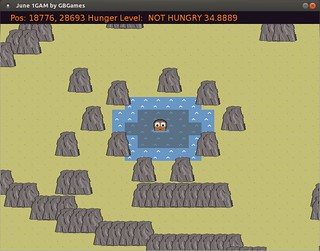
Yesterday’s post about my June #1GAM mentioned my huge island to explore and new coconut tree sprites.

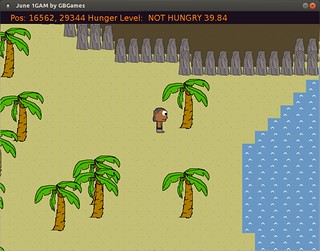
After just half an hour yesterday morning that I didn’t think I’d actually take advantage of, I have animated coconut trees:

I intend for the trees to animate when the Castaway shakes them in an attempt to knock down coconuts, but for now they dance in unison in a poor imitation of Super Mario World.

They aren’t pretty animations, but then I’m just making programmer art over here.

Categories
Game Design Game Development Geek / Technical Linux Game Development

June #1GAM: A Huge Island with Coconut Trees

In my last One Game a Month project post, I mentioned that I had message routines and created tiles for an island.

At the time, I said the next steps were:

  • Add a map. A big one that spans more than a single screen.
  • Make the camera center on the Castaway as we explore the map.

Well, I did it. And I might have gotten a bit overambitious.

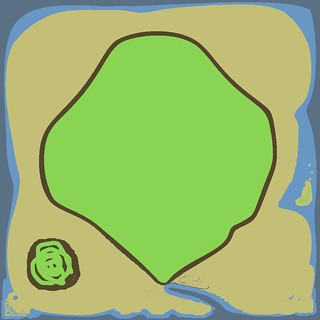
June #1GAM

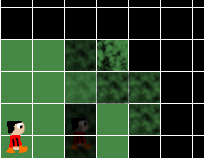
Above is an image of my 1024×1024 map so far. Each pixel represents a tile, as it does for the maps of my first major game, Stop That Hero!. I find loading images and defining tiles by colors to be quick and easy.

But I’m starting to realize how much work it is to create such a large world. I wish I had time to figure out some procedural algorithm to generate an island for me. As it is, I’m plotting things by hand, and taking shortcuts as I get bored. You can see the mess of green swirls at the bottom left as an example.

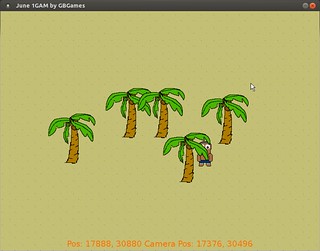
In any case, I thought I should add some other elements to the island, so now there are coconut trees:

June #1GAM

I like the way they look when they are clustered together, even if the lack of variety makes them look more cookie-cutter than would be ideal.

I am finding a problem with rendering, however. Specifically with Z-ordering. There is no concept of an obstacle yet, so the Castaway can walk through trees. When he is above a tree and walking down, he’s behind it until his feet hit about halfway down the tree, then he pops in front of it.

I think it is because the render ordering is based on the top-left corner of a blitted image and not the hotspot location, which would be the bottom of the tree and the feet of the Castaway. When the Castaway’s feet get about halfway down the tree, his head is just below the top of the tree, so now the system thinks he is in front. Hopefully that’s what it is and can be easily fixed.

I did run into one problem with the map loading that I’d like to share here. The 1024×1024 map is split into 32×32 graticules (I refused to call them “chunks”). Each MapGraticule is split into 32×32 tiles.

When I loaded a graticule from the map, I did it by getting the pixel offset and then matching tiles to colors in each pixel in the 32×32 area of the image.

When I ran the game, however, I was confused why so many graticules appeared very similar. In fact, they looked the same. What gives?

My image loading code was fine. The problem was when I created the MapGraticule objects for the island map in the first place.

I did so like so:


for (int column = 0; column < WORLD_WIDTH; ++column)
{
   std::vector<MapGraticule*> graticules(WORLD_HEIGHT, new MapGraticule(graticuleWidth, graticuleHeight, DEFAULT_TILE));
    m_map.push_back(graticules);
}

For those of you unfamiliar with C++, the above code loops through each column in the world, creates a collection of pointers to MapGraticule objects, and adds it to the world map.

For those of you very familiar with C++, you see what I did wrong. I created a single MapGraticule object, but created a vector of pointers…that all point to that same object.

So when I was populating each graticule with the right tile data, I was actually overwriting the same object’s data. When I went to render the world, I was likewise getting the data to render from the same object instead of multiple objects like I expected.

It was a simple fix. I simply added a loop to go through each row and created a unique MapGraticule object for each coordinate:


for (int column = 0; column < width; ++column)
{
    std::vector<MapGraticule*> graticules;
    for (int row = 0; row < height; ++row)
    {
       graticules.push_back(new MapGraticule(graticuleWidth, graticuleHeight, DEEP_WATER));
    }
    m_map.push_back(graticules);
}

My next task is to give the player something to do other than explore the map.

Walking around is fun and all, but the people demand drama!

They want the player to pick things up. They want the player to put things down. They want the player to eat things.

Oh, the excitement!

And I might shrink the size of the island while I’m at it.

Categories
Game Design Game Development Geek / Technical Linux Game Development

June #1GAM: Islands and Messages

The other day, I had merely a walking Castaway demo for Shipwrecked, my June One Game a Month project.

I spent a little more time on the controls than I thought I would. It didn’t feel right. I tried something simple at first:


if (an arrow key has been pressed since the last update)
{
velocity = 1.0
player.setDirection(the direction of the arrow key)
}
if (an arrow key has been released since the last update)
{
velocity = 0.0
}

It worked well enough. The Castaway moves at a constant speed until the key is released, then he comes to a complete halt.

The problem was that if you are switching directions periodically, sometimes the velocity drops to 0 even if you feel like you should keep moving.

So I changed it. Now, instead of checking for key release, I check the status of all four arrow keys. If none of them are currently pressed, THEN set the velocity to 0.0. Otherwise, allow the movement to continue.

It feels much better.

I’ve also added some message routines. Basically, if there is a message to display to the player, it will end up in a queue with a timer. When the message is visible, the timer ticks down to 0, and it removes the message from the queue for the next one. It took me all of 15 minutes to implement.

And instead of a giant purple emptiness, I added some tiles.

In this Shipwrecked message queue video demo, you can see all of the elements of the project in action, including being able to read a few lines in the Castaway’s diary:

I simply painted the tiles down using for-loops, so the Castaway could walk on water right now if I let him.

So the next big things to do:

  • Add a map. A big one that spans more than a single screen.
  • Make the camera center on the Castaway as we explore the map.
  • Give the player something to do other than explore the map.

My worry is that I’ll get to the end of the month without any game play. I still haven’t exactly figured out what actions the player has, nor what the ending looks like.

It’s partly because I’m worried that I’ll be too ambitious. For instance, if I implement the ability to get heat stroke, it means the player needs to be able to avoid it, which means finding or building shelter. Do I have time to implement the ability to collect resources and build a lean-to (as well as draw one that looks half-decent)?

These last few things have come together quickly. Maybe I’ll get lucky and won’t have to compromise entirely on the concept of a Castaway surviving on a desert island after a shipwreck.

Categories
Game Design Game Development Geek / Technical Linux Game Development

June #1GAM: We’re Walking, Here!

Last time, I introduced the Castaway for my One Game a Month project for June. I’ve since created a few more poses and some basic walking animations.

Here’s a June #1GAM video demo I quickly put together:

Next up is giving the player direct control through the arrow keys, which means changing directions and needing to set the right frame when standing still.

And after that, I think I’ll add some basic text displays. I like the idea of tooltips and descriptions popping up when you are exploring the world. Maybe it will tell you if you’re getting hungry, similar to how NetHack does it. Or maybe I’ll be more direct than that. B-)

Soon after, I’ll create the world to explore, and I’m thinking about cutting back on line-of-sight since I might not have enough time to really play with it.

Categories
Game Development Marketing/Business

Why Should I Compare My Efforts to Yours?

Often people become indie game developers the same way anyone first becomes an entrepreneur.

They fall into it and don’t realize just how big of a job they really have.

It’s one thing to be a hobbyist. You are doing game development for the love of doing it. You make games you want to play, and if anyone else likes it, it’s gratifying, but it’s gravy on top of just spending time on something enjoyable. And if you make a few bucks, so much the better. Now your hobby is helping you pay for pizza and beer.

But if you want to do it for a living, it’s harder.

You may not realize it at first. You might think, “Duh, I know that running a business is different from enjoying a hobby. I’m aware of the difference.”

But you don’t. Unless you’ve got the experience, you can’t prepare for how much pain and effort there is, how much anguish and despair you might feel, and how stressed out you can be due to spending time handling all manner of business-y things and not getting to the “real work” of game development, the whole reason you decided to pursue it full-time.

You don’t know the struggle to believe in your own self-worth when another month goes by in which you haven’t made enough income and you have a family to support, worrying that they are secretly wondering when you’re going to give up “playing with the computer,” go find a “real job,” and place your priorities in the “right” place.

You don’t know what it is like to work, work, work, only to feel like you haven’t made enough progress to justify all of the sleepless nights and bloodshot eyes and missing out on social experiences, and all you know how to do is more work.

Every once in awhile, you’ll pull yourself away from your wheel-spinning and isolation and look out into the world. There, you’ll see huge successes like Minecraft. You’ll read about Steambirds, Triple Town, and plenty of IGF-winning games getting good press. You’ll find threads about how indies need to pursue mobile or F2P or how the only way to make money on PC is through Steam (despite successes like Minecraft).

And then you look at your own efforts, and you start to compare and contrast.
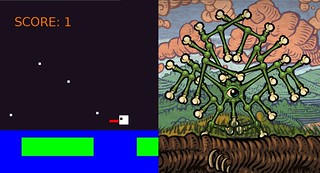
Unfair Comparison

Above: my May One Game a Month project, Hungry Frogs looks quite terrible, especially in comparison to something like Incredipede.

Am I Doing the Indie Thing Wrong?

Being an indie game developer means choosing your own path and following your own dream. In chasing it, though, sometimes it is hard to look at everyone else and not wonder if you’re missing out on some opportunities.

The mobile games space has grown to the point that we’re simply calling them games now. Free-to-play is essentially shareware taken to an extreme, but if you are trying to make a game that requires a purchase to play, good luck. Customers have the option of playing multiple new, effectively-free games per day. Everyone is having a hard time getting their games noticed, and your entire sales model might be a relic that is making it harder for yourself.

Ouya and Occulus Rift are the new hotness. It’s exciting to have another console that isn’t controlled by a company such as Microsoft or Nintendo, and finally having virtual reality headsets at a low-cost? What took so long?

Making games for tablets, creating your own alternative reality gaming, utilizing ads and in-app purchases, accepting donations, successfully driving a Kickstarter campaign, having a larger supportive network of indie friends…all of these things seem to be what all of the other indies are doing.

Why aren’t you?

Following The Money

The April issue of Game Developer magazine (R.I.P.) featured the annual salary survey. It still blows my mind how much average programmers and artists made, considering I’ve always heard how you can make more money programming bank software than working in the game industry. But of course, these numbers come from the major studios for the most part.

This salary survey also featured their fourth annual “Indie Report”, which surveyed independent developers and teams.

And found that they make almost nothing from their efforts.

Their average income was less than $25,000. Only 5% of them made over $200,000 from their games, while 78% made less than $30,000. Half made only $500 or less.

And these numbers are lower from the previous year, meaning that indies today are making less of a living than they were in the past, although to be fair there seems to be a lot of fluctuation from year to year.

But seriously, most indies surveyed (they collected data from 422 indies around the world) said they made less, sometimes much less, than what someone working a minimum wage job could earn in the United States.

Regarding the App Stores that everyone either loves or hates, we’ve all heard about how hard it is to impact your sales success there. Either you get featured or you don’t. It turns out that getting featured isn’t everything either, according to Jeff Tunnell’s post We Can’t Make It Here Anymore. At one point he talks about Color Sheep‘s success:

In spite of winning the two “app store lotteries” and getting featured by both Apple and Google along with stories in the New York Times and on huge traffic YouTube channels, their game has only sold around 50,000 copies, which has grossed $35,000 (after app store cuts). Considering that they spent $10,000 to launch and market their games at PAX, they have netted $25,000 before paying their wages.

At the other end, we have occasional successes. Awesome Guy Andy Moore recently posted Monster Loves You! By The Numbers, sharing the expectation-shattering sales numbers of the game he worked on in collaboration with Dejobaan Games and Other Awesome Guy Ichiro Lambe. Here’s a game that wasn’t really like anything else, that they nurtured from concept to delivery, and it worked out fantastically for the developers.

But even these successes make you wonder if your own efforts to make Yet-Another-Match-3-or-Minecraft-Clone is a waste of time.

Wait, You’re Not the Money?

Until I read the Game Developer salary survey, I was worried that I was missing out. Obviously most game developers wouldn’t be making enough money to do more than pay for an occasional meal, but a good number are probably doing well, right? I felt as if every time I looked up, I saw another example of an indie darling’s blood, sweat, and tears that finally got recognized and had paid off handsomely, or at least enough to pay to move out of his/her parents’ house. Every time I saw a demo of a game that people were praising, I thought I was looking at a game that was killing in the marketplace.

But the truth is, you can’t tell how well a game will sell from the look of a game, the charisma of a developer, or the amount of press dedicated to either one.

You can’t tell what the developer’s quality of life is like, and whether or not he/she is someone you really want to emulate.

And you can’t tell what a developer’s goals are. $20,000 would be plenty for someone with a lifestyle like Jason Rohrer, but is it a match for your desired lifestyle?

Everyone is making it up as they go along, so it isn’t as if some people have figured out how to live your life better than you are.

So why should you stress yourself out about not being like those other game developers?

Comparisons Add Stress

While running an indie game development business means understanding the trends and market demands, it doesn’t mean hopping on the bandwagon. Just because everyone else is doing it, it doesn’t mean you have to follow along.

When I, as an indie of many hats, put on the business owner hat, I realize that there are better things I can do than worry about how other indies are doing their starving-artist performance art. If most indies are putting their games out in Steam Greenlight, or pursuing F2P on iOS, or raising funds on Kickstarter…well, most of them aren’t making a sustainable living. No market, platform, or tool is going to magically make things all better in your struggle to earn enough to support yourself and your family while doing what you love.

And looking at the ones who actually are successful? Well, they already did it the way they did it. Following their lead might mean sharing in their success, but it often means getting scraps along with the other bajillion indies who are also going to jump into the now-open space.

Sure, you can say that some people get lucky. Notch has repeatedly claimed luck played a big part in the success of Minecraft, and I’m sure there was some luck involved in the success of Monster Loves You!, but I also think that putting love into what you do helps a lot.

Being an indie game developer is clearly not for people who should expect to make a truckload of money by churning out game-like software, so all you can do is put your heart and soul into what you’re making. Anything less is probably going to be rewarded appropriately.

On top of it, each indie has a different past. Notch has been making games for years, and some people have been doing so for decades. To compare your fledgling skills against someone who can put together a more highly-polished game in an hour than you can in a month is a good way to build an inferiority complex.

It’s fine to look at someone else’s skills and think, “I want to aspire to be that proficient and prolific.” It’s another to compare the results of your efforts to someone else’s. It will only stress you out and prevent you from being productive.


Categories
Game Design Game Development Geek / Technical Linux Game Development

June #1GAM: We Need a Castaway

In my last post about my June project for One Game a Month, I talked about the general ideas I had, plus I created a mock-up.

Since then, I’ve thought about what kinds of tiles I’ll need. I’ve decided to set it on an island in an ocean, so it will have standard sand, rocks, water, and palm trees.

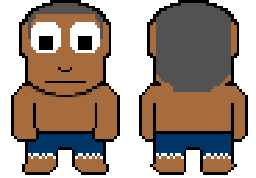
The game is called Shipwrecked, and we’re going to need a castaway. Here’s what I created during yesterday’s Game Dev Co-Op Hour:

June #1GAM castaway

I still need to provide left and right versions, plus walking animations, but I’ll keep them simple. I’m fairly pleased with my programmer art.

After that, the next task is to give this character a world to walk around in.

Then I can work on line-of-sight algorithms. I’ve been thinking about having the player’s vision deteriorate if he/she is too hungry or sick, so the edge of the fog might be closer than usual if the player is reckless.

I’m pretty excited. I hope my enthusiasm and productivity lasts. B-)

Categories
Game Design Game Development Geek / Technical Linux Game Development

June #1GAM: I Think I’ll Do Line-Of-Sight

Four days into June, and I hadn’t thought about what to make for the One Game a Month challenge for June.

I searched online for interesting mechanics to play with, but nothing really jumped out at me. If you want to see some ridiculous concepts, try out the Game Idea Generator. B-)

At some point, I thought about the idea of being shipwrecked and needing to survive. Maybe you’re on an deserted island in the ocean. Maybe you’re on a deserted planet in the far reaches of space.

I liked it. The player has to deal with hunger, weather, injuries, disease, wildlife, environmental hazards, all while trying to survive. Maybe help is coming if you wait long enough? Maybe you need to explore the island and build something to find your own way to freedom? Maybe there are others in the same predicament?

I don’t know. But exploring sounded like it had to be a big part of this game. You’re stranded, and you don’t know where you are, so you better get a handle on your surroundings.

And since I decided to do a tile-based grid, it seems like a good opportunity to do line-of-sight fog of war.

I like the idea that the player can see his/her immediate surroundings but needs to explore to see more. I like the idea of multiple levels of fog. One tile away is visible. Two tiles away is a little foggy. Three tiles away is more foggy. Four tiles is opaque.

Below is a mock-up demonstrating experiments with some fog made in the GIMP to see how it might look with different levels.

June #1GAM Mock-up

I’m not sure I’m happy with it, as I want it to be more difficult to see what’s behind the fog. Maybe I can experiment with different ways to render or create fog. We’ll see.

I also have to think about explored areas vs areas the player is immediately able to see. I’m reminded of Fate of the Dragon‘s fog of war, which returned to opaque if you weren’t in an area after a period of time. I think I’ll follow the normal RTS convention of graying out explored areas you can’t currently see.

Perhaps I’ll use Zelda-like controls. I was thinking about using the mouse and doing click-to-move/interact for simplicity, but I wonder if there might be some advantages to using the keyboard in terms of how expressive the player can choose to be. Maybe there are good reasons to crawl, sit, rest, walk, run (which takes a lot of precious energy), swim, jump, climb, open inventory, use items.

But then again, I can probably do all of the above with the mouse as well as the keyboard. Spacebar can be used to toggle sitting/standing, CTRL+click could be used to crawl, while Shift+click could be used to run.

Either way, I’ll probably find that I won’t add all of this due to only having the rest of June to finish this game. B-)

Categories
Game Design Game Development Geek / Technical Linux Game Development

May #1GAM Entry: Hungry Frogs

The updates have been coming in quickly towards the end of the month, but my May project for One Game a Month is finished.

Download Hungry Frogs for Linux 64-bit (352 kb tar.gz file)

May #1GAM

Rather, it is finished enough. You can control the frog by jumping and turning around. If you fall in the water, the frog slowly swims back to the nearest lily pad. Flies will move across the screen in a straight line from left to right, and you need to jump to eat them. If you miss half of them in a given round, the game is over. Otherwise, the flies move faster each round, making it more difficult to catch them.

I didn’t take many screenshots as I thought the rectangles made for an uninteresting still shot, but I did make videos to demonstrate progress of the game’s development.

First, getting the jumping physics to work:

Then, landing on lily pads and swimming when you fall in the water:

Then, some game play, with edible flies:

And the final version, with faster flies each round and a game over screen if you miss too many:

I moved the frog’s tongue down as I realized it looked strange at the top of the head and I wasn’t going to have time to replace the white rectangle with a nice animated frog image. I would have liked to have flies moving in fly-like ways instead of straight lines. I really appreciate how the developers of Frogs and Flies nailed it in the constraints of an Atari 2600’s memory and processing power.

I’m not sure I’m happy with how easy it is now. Originally it was difficult to catch flies, so I expanded the tongue’s collision detection to include the frog’s body as well as a space around the tongue. Now it might be too forgiving, although there’s a gap if the frog is moving fast enough that from one frame to the next the collision box goes around the fly’s location. I’d fix that next if I had more time.

I’ve never made a platformer before, and this project was a good start. I am pleased with the jumping physics, although I need to figure out a better way to determine the maximum heights of jumps.

All in all, it was a fun project to make, even if it is once again another project with scope cut drastically to make the deadline.

Categories
Game Design Game Development Geek / Technical Linux Game Development

My May #1GAM: Now You Can Eat Flies

During the GBGames Game Dev Co-Op Hour this morning, I added flies and the ability to eat them, as you can see in this Hungry Frogs progress video:

I realized that the tongue’s dimensions were too small and made it too difficult to eat flies, so I increased the dimensions beyond what the tongue’s visuals would indicate, and I eventually even added the frog’s body as part of the “did the frog eat this fly” collision detection.

I noticed while making this video that sometimes the frog’s tongue looks like it should eat a fly as it falls, but it must be falling too fast since the fly remains, meaning that the collision detection happened above and below the fly but not in-between, where the fly actually is. One way to solve it is to do a more complex collision detection in which I keep track of where the frog was in the previous frame and check for the space in between as well. Another is to reduce the speed that the frog currently moves so that such checks don’t have to happen. The latter would be easier in my limited time.

My next step is to provide a way to end the level and start a new one.

And animation would be a nice way to finish it before the end of the month, although I’m not optimistic that I’ll be able to dedicate the time.

Categories
Game Design Game Development Geek / Technical Linux Game Development

My May #1GAM: Now with Lily Pads and Water Hazards

Last week, I wrote about my May #1GAM project’s progress, explaining that I haven’t been able to dedicate a lot of time this month to the project, partly due to day job crunch and partly due to travel and events going on around this time.

I was able to tweak the jumping physics a bit, and I’m much more satisfied with it. I like the idea of short hops getting the player into position to take a large leap and landing safely on the other lily pad.

As you can see in this updated May #1GAM demo video, I’ve split the lily pad into two, and now I’ve made the water a hazard:

If the frog falls in, it automatically swims to the nearest lily pad. It’s a constant speed, unlike the swimming motion that was mimicked so well in Frogs and Flies, but it’s in.

Since the player can’t control the frog when it is swimming, it means the player has less time to eat the flies before the sun goes down, and so therefore landing in the water means less points will be earned.

The next biggest thing to implement: flies and the eating of them. In hindsight, this aspect should have been implemented first, as it impacts how much I like the jumping physics, but I really wanted the swimming aspect in.

And I’ll follow it up with a score indicator and a timer to represent a day of fly-eating.

If I have time, maybe I’ll be able to replace the square with an actual animated sprite of a frog.

How’s your One Game a Month project going?