Categories
Game Design Game Development Linux Game Development

Adding Victory and Defeat Conditions to a Game

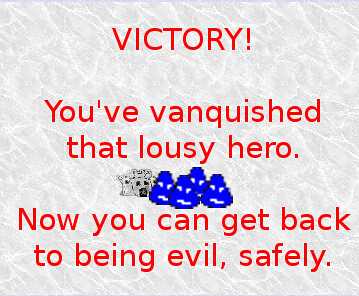
Victory Screen

Here’s a question: how long does it take for a new game project to add a way to win or lose?

I ask because I noticed in my finished 48-hour competition projects, I typically wait until the last hours to add a way to end the game, and I wonder if waiting this long is a common occurrence for other game developers.

In the last day or so, my efforts focused on providing Stop That Hero! with a way to know if the game has ended in victory or defeat for the player.

If the Hero has conquered the castle, the game knows that the player lost and ends the game with a message informing the player. If the Hero has run out of lives and is currently dead, then the game knows that the player won, and a different message is presented.

End game conditions are obvious things for a game to have, but early in a project, when you’re trying to figure out game play, it’s easy to forget that the player is going to wonder what his/her goals are. Or not. Maybe end goals are the first things game developers should implement? Maybe they should come last? See the questions at the end of this post.

Now, recognizing and handling defeat was relatively easy. I already had a way to clear towers, and I merely check if the castle is specifically cleared. Clearing is kind of hacked together, though. All clearing does is deactivate the target for a tower/castle, so my defeat condition monitor is checking whether the castle’s target is active.

I’m not happy with the abuse of targeting components in tower clearing, but it functions for now, and it is easy to change once clearing becomes a more involved. When the Hero reaches the castle, a message pops up to inform the player that the game was lost, and a button is presented. Clicking that button takes the player to a yet-to-be-implemented stats screen.

Victory was almost as easy, but there’s no combat mechanics in the game yet, and until I started worked on victory conditions, there was no concept of “lives” for an entity like the Hero. So I had to do a little more work, such as implementing entity lives and a command to kill an entity.

And in the end, the way I test that it all works correctly involves mapping the “K” key on the keyboard to the “kill entity” command. I’m keeping this one around because it seems like it would be useful for general testing.

Still, even without key parts implemented, Stop That Hero! has ways to end, and I was surprised at how quickly they came together considering all the moving parts I had to create. Ideally the victory and defeat conditions could be scripted objectives, but what I have is good enough for me to get to an initial, playable release.

Now, some questions for the veteran game developers. Is it ever too early in a project to have a way to end a game? Does it limit the possibilities for a game’s design too early, or is it a good way to keep a game project focused? Does it depend on how open-ended or specific the project is?

Categories
Game Design Game Development Games Geek / Technical Linux Game Development

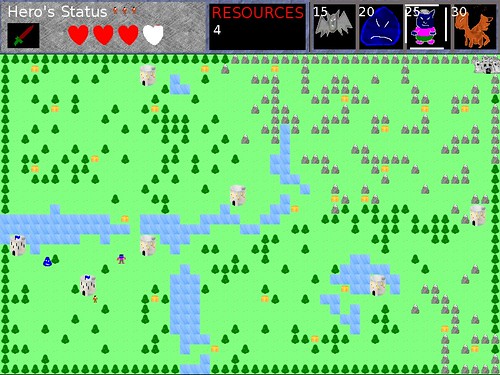
Stop That Hero! Is Apparently an RTS

At the end of the last progress update, I mentioned the realization that there could be a lot of code and logic in the player-facing parts of the game that aren’t part of the game. That is, when people talk about how complex the interface can be, they aren’t talking about particle physics, 3D culling, or fancy special effects. They’re talking about how the front end’s complexity can rival the back end’s.

And somehow I hadn’t realized it before. I knew that the interface should be separate from the game, but I didn’t know that the interface was responsible for more than merely displaying the game world and its objects. It’s a heavy-weight in its own right, handling menus, HUDs, and inputs that the simulation ultimately doesn’t even know is happening.

I used StarCraft‘s interface to illustrate the idea that the player interface is more than a mere window into the simulation. It can have complex logic that the game simulation doesn’t actually care about. As far as the simulation is concerned, it receives commands. Most of the actions you take in StarCraft do not result in commands to the simulation.

If you click on an SCV, and then click the Repair button, and then click a burning Bunker, the interface is responsible for figuring out what you’re trying to do. It isn’t until you click on that Bunker that the simulation receives a command along the lines of “SCV 1 REPAIR BUNKER 5”. Up until then, only the interface has to know you’re working with a particular SCV, what commands are available to an SCV in general, what buttons to display in the SCV menu, which SCV menu you’re looking at, etc.

Stop That Hero!’s interface

Now that I know that I can expect the interface to my game to be incredibly complex as opposed to a dumb and simple view, it actually made it much easier to realize how to proceed with my project. I don’t have to do everything within the simulation, and in fact, I can expect a huge part of the work to involve the player’s interface.

Stop That Hero!‘s interface isn’t like most games in that there is no avatar to control. You’re not directly moving an entity with the arrow keys or commanding it to jump with the spacebar. You simply create them at the appropriate towers in the world, and they’ll figure out where to go and what to do on their own.

But how do you create them at towers? The original prototype had a menu hardcoded at the top right of the screen. If you wanted to create a monster at a tower, you had to click the monster icon at the top right, then click on the tower. If you had enough resources, you summoned the monster you selected.

Stop That Hero! is finished

It was functional, but I didn’t like how it felt. Why is the selection of the monster to summon separate from the act of summoning? While it makes it easy to create a bunch of the same type of monster at once, it’s also easy to accidentally create a monster if you click on a tower without wanting to.

I wanted something more intuitive, and it turned out that pie menus are exactly what I want.

Except my GUI code is incredibly basic. I have menu screens and buttons, and everything assumes it is starting at the top left corner of the screen. In order to even simulate a pie menu, I needed a way to display menus at arbitrary locations, and it would help to be able to offset a menu from its center instead of the top left corner.

Which meant giving menus dimensions (how else can you know what the center is?) and having my IMGUI-ish system understand how to display and detect updates at arbitrary offsets.

In the end, after some research, questions, and determination, I do have this sequence working:

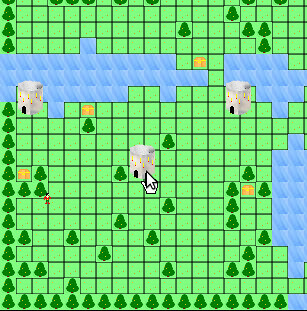
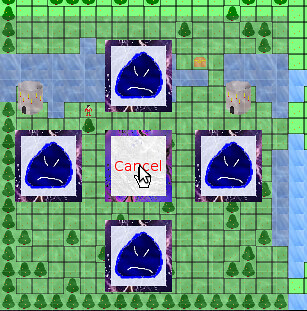
First, click on the tower you want to summon a monster at:
Summon Monster Menu: Step 1

The Monster Summoning Menu appears over that tower, which means it is right under your mouse cursor:
Summon Monster Menu: Step 2

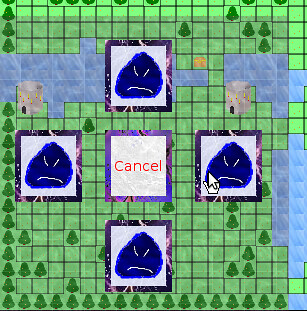
Select the monster you want to summon by moving your mouse cursor to the appropriate icon. Right now, I only have a Slime, but others will be added later:
Summon Monster Menu: Step 3

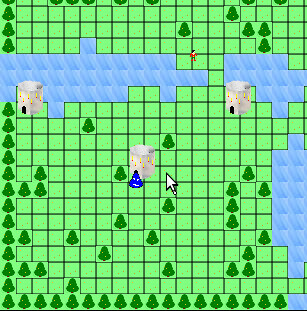
Congratulations! You’ve summoned a Slime monster!
Summon Monster Menu: Step 4

Besides the infrastructure changes to support arbitrary menu placement, configuring the menu is easy, and each button fires off whatever event I want when it is clicked.

Tricky Aspects

One of the things I still need to figure out is what to do with a tower near the edges of the screen. Right now, the menu is always centered on a tower, which means clicking on a tower near the side of the map results in a menu with icons you can’t see. They’re being displayed off screen.

It’s not such a problem if I can display the menu outside of the screen the way a game like SimCity/Micropolis does, but since I’m not using Gtk to render the menus, they have to be rendered within the screen. I could add more screen real estate around the play area, but I’m trying to keep the game at a low resolution like 800×600 to accommodate players with older computers and netbooks. I could make the play area scroll, so even if you were at a corner of the map, it would be displayed in the center of the screen, but I want the players to see everything at once. I could reduce the play area so that I have a border to work with, but I’m not sure I like losing so much level data just because of the UI.

My best option if I want to keep the pie menu is to detect if the menu is being displayed offscreen and have it adjust automatically, but I’m not sure if the menu appearing away from where you expected it becomes too unintuitive, defeating the purpose. Otherwise, I might have to get rid of the pie menu altogether.

RTS development in a vacuum

In any case, I now have a player interface that I can easily change, but one thing I didn’t anticipate was how similar it is to a real-time strategy game’s interface. I didn’t really think of Stop That Hero! as an RTS, and yet I suppose Dungeon Keeper and Populous had RTS-like interfaces, too. Or, rather, the interface is composed of icons that let you influence the world.

I discovered that while FPS or platformer development articles and tips are a dime a dozen, RTS development seems to be something that everyone must reinvent themselves since there is a lack of information out there. I know of a couple of strategy game programming books that focus on DirectX, and either people found them lacking, or they focused heavily on DirectX as opposed to the game.

Even if there was a basic breakdown of every aspect of an RTS project, leaving the research of each item as an exercise for the reader, I’d find it more helpful than figuring out what those aspects might be as I stumble across them myself.

While most games probably have a hard-coded GUI baked into a game, some games are more expandable upon release. I remembered that Total Annihilation allows player-created units, and I figured that there had to be a way to provide access to the GUI so that new units can be created by the player in game. I checked out the game’s modding tools and discovered how it handled its GUI elements. I spent an entire day perusing technical references and modding tutorials, peaking at the game’s default data files, and generally immersing myself in the internals of the game. It is fascinating how GUI images are tied loosely with the name of the unit or command.

World of Warcraft isn’t an RTS, but its GUI is supposed to be highly configurable by players, and there are interesting references explaining how the XML ties in with Lua commands and functions within the game.

Looking at how other games do it with the limited access they provide is like trying to study a map by staring at the back side. It’s hard work, and I’m sometimes limited by the games I have access to for the most part, but it is sometimes the best guidance I can get when it comes to figuring out how to implement my own game.

Categories
Game Design Game Development Geek / Technical Linux Game Development

Stop That Hero!’s End of January Progress Update

Halfway through January I gave a progress update for Stop That Hero!, and in the two weeks since, I’ve accomplished a fair bit.

Recap

In the beginning of the month, I did work to create a command system, separated the game’s simulation from the rendering of it, and even added some game play related to the Hero conquering towers. There were other things accomplished, but they were slight changes compared to these major pieces.

Treasure Collection

Since then, one of the things I worked on was treasure collection. Items can be collected, which basically means running an arbitrary command. Since I don’t have much game play in, there isn’t much implemented in this regard. Right now, if the Hero comes across a treasure chest, it just disappears. Well, actually, it has its targetable component turned off so that the Hero ignores it, and it changes its renderable component so that it draws something other than the treasure chest sprite.

Why? Because I haven’t needed to delete game objects before, so there’s no way to do it. Also, I apparently never needed to hide sprites before, so there’s no way to do that, either. The “hacks” are functional for now, so I can move on to other things. I’ll come back to change these when I need to, and I may be surprised to find that I won’t need to. I already do enough unnecessary work as it is, so there is no need to add to my burden. B-)

Enemies

The next major thing I did was create a slime monster to chase after the hero. With the command system, it was as easy as creating a new command which populates the datastore with components that make up that monster. I simply took the CreateHero command, did some copy-and-paste magic, then modified its speed and the renderable component. Now I can create a slime as easily as a Hero!

Except I had no way to interact with the game yet. How did I test that the command worked? I changed the level loading code. Any treasure chests or towers defined in the level would create slimes instead. When I ran the level, the Hero had to find his way to the Castle past an entire army of slimes slowly approaching him like zombies!

Stop That Hero! - Slimes Everywhere!

Once I was satisfied that the new Slime would work within the game, I changed the level loading code back.

Front-end Architecture

The game simulation is well-defined and is easy to update. If I want to add a feature, it can be as simple as creating a new UpdateSystem, perhaps with associated components that entities can make use of.

As happy as I am with the internals of the game, I was getting frustrated with the user-facing parts. Getting from initialization to the menu to the level selection screen to the game session was poorly-defined and hard to change. I haven’t even provided a way to quit the game outside of clicking the application window’s X. When I wanted to work on providing menus for the player to click on in-game, I realized I had to do something about the front-end if I was going to make the UI work easier on me.

Here’s how my application’s architecture looked:

Old Game Architecture

As you can see, the game took up the lion’s share of the application. There was no concept of screen transitions or anything like that. You were either in a complex menu, or you were playing the game. I had no concept that a game application was anything other than a game.

I spent a few days figuring out the approach I should take. I didn’t realize that my game isn’t everything at first. It’s a tiny part of the full application. To flesh out that application, I settled on creating a state machine. I don’t know why I didn’t think to do it before. I’ve done it for Game in a Day back in 2005.

I spent a few days coding up an implementation of a state manager, and I spent a good chunk of my time at the Global Game Jam getting individual states implemented. My application is now run by a high level state machine, which looks close to what I designed on my white board.

Stop That Hero! state machine design

In fact, something like this has been scribbled down multiple times in notebooks and scrap pieces of paper every time I stopped to think about the high level, and it is only now that the state machine is actually implemented.

Also, note that there is one state I call “In-Game Session”. It’s in this state that the game runs. In terms of number of states, it only makes up about 10% of the application!

And additions and changes are easier now. If I wanted to add an Options screen, it would have been difficult to shoehorn it in my old architecture, but now I can simply create a new state. It’s kind of like programming tiny applications that work together.

Now the application’s front-end feels as good to work with as the game code, and since it makes adding and updating application states/modes so easy, I wish I had implemented the high level state machine in the first place.

User interaction

As great as all that rearchitecting is, I still didn’t have a way for the player to interact with the game simulation. Without interaction, it’s not a game.

So how do I add interaction?

Well, it’s the part that I don’t have working yet. Here’s how I approached it so far:

I have the game running as a LevelInstance, which has a collection of UpdateSystems and the database of game objects/components. I created a View that has a collection of RenderingSystems and access to the LeveInstance object.

I didn’t use Model-View-Controller because I didn’t feel it was a very good fit based on my understanding of how it would apply to a game.

If you’re familiar with MVC, the LevelInstance is the Model. So the V part of MVC is obvious, right? Not exactly.

My View is quite dumb. All it does is get information from the model and render it. The game simulation doesn’t care how it is being rendered, and in fact, I can have multiple views attached to a running game.

Ok, so far, so good. What about the Controller?

If you read about MVC, you don’t typically put business logic in the Controller. If I was making a game where you controlled an avatar with direction keys and a jump button, I think I could make things work fairly easily. The Controller would detect button presses and send commands to my game that make sense. For example, if I press the Spacebar, the Controller maps that to the Jump command, and the model knows that the player should jump, never caring that the Spacebar or another key was pressed.

But in Stop That Hero!, you’re not controlling an avatar directly. You are clicking UI elements. Here’s how I envision the player’s interface:

Stop That Hero! Pie Menu Demo

When the player clicks on a tower he/she controls, a pie menu appears around that tower. Each of the four items represent what monster can be created.

Here’s where I’ve been struggling.

If the View knows nothing but to render what’s in the model, and the Controller simply handles input and processes commands, who owns the in-game UI? Does the Model need to provide logic for the View to know what menus to display and how to display them? How does the knowledge that a mouse click (Controller) happened over a tower (View using Model data) get turned into a menu, and then who is in charge of that menu? These struggles were why I wasn’t happy with MVC as the way forward.

Until I had a discussion with Larry, that is. He is way more knowledgeable than I am when it comes to software architecture, and he pointed out that Web MVC is different from MVC.

In Web MVC, the View is simple and dumb.

In a regular MVC, however, the View might have so much logic and data that it rivals the complexity of the Model.

I’ve never thought about the View in this way before! And yet, it seems to make sense. Using StarCraft as an example, the actual game simulation is a complex RTS. Yet, there is a bunch of code to implement the interface that the simulation doesn’t ever care about.

For instance, if you’re playing as the Terran,what happens when you click on an SCV?
StarCraft SCV Unit

  • The SCV in question gets a little circle drawn around it to let you know what unit is selected.
  • The Status Display changes to reflect information about the SCV, such as health, armor strength, how many kills it has, etc.
  • The command buttons at the bottom right change to reflect actions the SCV can take.
  • The portrait changes to static before showing the face of the SCV’s driver.

StarCraft SCV

And until I had this discussion about heavy vs light Views, it never occurred to me that all of those things happen without the game simulation knowing.

If you tell the SCV to move to a specific location, the game cares. If you command the SCV to harvest minerals, the game cares. If you make an SCV repair a bunker, the game cares. Yet, all of the logic dealing with clicking on buttons and units is in the View. It’s only when the player actually does something that results in a command to a specific unit that the game model cares, and even then, it doesn’t know you clicked anything or hit a hotkey. It merely receives a command from somewhere saying “SCV 1 MOVE TO X, Y” or something like that.

Sometimes I struggle with knowing where code should live in my game’s architecture. With the restructuring of my application into a state machine and a good discussion about MVC, the way forward seems clearer. Stop That Hero!‘s player-facing code needs to be a lot more involved than I originally expected. While the game logic is where a lot of the simulation occurs, the interface has a lot of its own logic. It was logic that I knew needed to be implemented, but now I know where the code’s home is.

Categories
Game Design Game Development Geek / Technical

Global Game Jammin’

The theme is Extinction.

The keynote was given by Keita Takahashi, the creator of Katamari Damacy.

And the Jammers here in Ames, Iowa had some pizza to start our night.

Things got off to a late start, but people were throwing around ideas for the theme. Artists and programmers discussed projects, and soon people got to work.

Some people worked on their existing projects, while others dove head-first into the Jam. No matter what, it’s great to be in close proximity to other indie developers.

It’s the kind of experience where you don’t want to go to sleep just because you’re tired.

I took a two hour nap, and as I write this, I’m the only one awake now. It’s oddly peaceful to be jamming in a large room and seeing the sun brighten the sky through the windows.

I’ve found myself wishing I had more infrastructure code so I can get to making actual games faster, but it is especially frustrating during a timed competition. But there’s still 30+ hours to go. Time to make the most of it.

Categories
Game Design Game Development Geek / Technical

Participating in the Global Game Jam

Today I’ll be participating in my first Global Game Jam and meeting local indie game developers in person for the first time.

Assuming I have a network connection, I’ll be live-blogging the event. I’ll be at Game Jam Ames, hosted at the offices of Intuition Games.

I’ve participated in 24-hour and 48-hour game development competitions in the past, but they’ve always been solo events. The GGJ will be a chance for me meet and work with people I’ve only ever chatted with online. I think it is a great opportunity to make some connections and friendships with people I can actually talk shop with.

Unlike Ludum Dare, the Global Game Jam has a rolling start time. It means that last night New Zealand Jammers were already starting, and Europeans will have already been jamming for hours before we get to start here in Iowa this evening.

48-hours, working closely with other game developers, and generally having fun? Global Game Jam should be a blast.

Are you participating? Where will you be jamming?

Categories
Game Design Game Development

Stop That Hero! Treasure Collection

You just read a summary of the work that I’ve done recently. The next thing I wanted to implement was treasure chest collection.

In the prototype, the Hero would collect treasure chests that either gave him health or weapon upgrades, depending on how that chest was defined in the level.

Hero With Treasure

Hero's Status

I realized that this aspect of the game needed to be redesigned from the ground up.

Why treasure chests? Why not have hearts and swords to make it clearer to the player what the Hero is collecting?

Even then, why have treasure at all? Is it improving the player’s experience at all? The hero can get stronger, making it more of a challenge for the player to try to stop him from progressing. Still, how can the player deal with treasure in an interesting way?

Can the player create treasure? For instance, creating a magic item that improves a Tower’s output requires a small cost that will pay off in the long run, but the hero can capture that item, making it risky.

It’s potentially an interesting player choice. Right now, chests just exist and there is no conceived way for the player to deal with them.

I’ve also been coming up with other ideas, such as natural resources in the world that need to be harvested by producing a machine on top, which the hero can destroy in order to get to the resources.

I think it is harder for me to roll up my sleeves and implement treasure collection because it is not a core mechanic. It impacts the game, but until I have a playable game, I have no idea if the impact will be wanted.

For now, though, I’ve come up with a way to create Collectable items. When a Collector object (that is, an object with a Collector component) is in the same vicinity as a Collectable object, then the Collectable object fires off an arbitrary command. In the case of a Heart, it would have a command that would give the Collector object increased health. If the treasure was a Weapon Upgrade instead, then the Collector’s weapon improves. The arbitrary command could do any number of other things that make sense, such as increasing player resources.

The original prototype hinted at how the Hero can get stronger as he progressed through the level towards your Castle by picking up treasure, but I think this entire mechanic/dynamic needs a lot of work, and I don’t think I can do it justice in a vacuum. I need more core mechanics in place. Still, the infrastructure to handle item pick-up is now there, which gives me options for improving the actual game.

Categories
Game Design Game Development

Stop That Hero! Mid-January Progress Update

The last major progress update for Stop That Hero! was in November (see Stop That Hero! November Development Summary), so I thought I’d post about my progress since then.

Between moving, prepping a new office, unpacking, and not realizing how much time was passing, I messed up my project management duties in December. Combined with Christmas and family time, there is very little to report, and I finished 2010 weakly.

January, on the other hand, is looking much better. Here’s an outline of the things I’ve worked on in just the last two weeks:

  • Integrated pathfinding system with game.
  • Created Command system to populate game world with game objects.
  • Updated level definition.
  • Re-architected the rendering system.
  • The Hero can clear towers!

Let’s dig into the details!

Integrated pathfinding system with game

The nature of working with unit tests is that a lot of features get implemented in a vacuum. The code you’re test-driving is interacting with interfaces implemented by mock objects to see if specific, isolated examples run as expected.

Sometimes surprises occur when the new features are integrated with the rest of the production code.

The pathfinding system was one such feature. Everything technically worked, but when using real data, I realized there was a problem.

In my unit tests, I would check if the path gets updated when an entity was at an exact node location.

In the game, the exact center of node (10, 10) is at position (10.5, 10.5), and I didn’t realize how it would look when an entity moved to node (10, 10) by trying to get to position (10, 10).

Even when I got things working and looking correctly, I found a problem. An entity moving through a long path would eventually miss its next target node and continue moving away in the same direction it was last moving. It was a precision problem. Again, an entity was rarely at an exact node location. The entity might be a little further away. Eventually the extra precision adds up to being completely off target.

To fix it for now, I just force the entity to jump to the exact center of a node once it reaches near it. It’s a little jumpier than I would like, but the entity is never allowed to lose precision and be off path. I can correct it later, perhaps with a better implementation for movement, but for now, pathfinding and movement is functional enough.

Created Command system to populate game world with game objects

When a level was loaded, it would make use of an image like the following:

The Tile Map

It’s blown up to make it easier to see, but the real data is a 50×33 PNG. Different colored pixels would represent the terrain, and I also used the pixel color data to create the towers, treasure chests, and hero’s starting spawn point.

However, level-loading time isn’t the only time objects can be created in the game. During a game, the player can create monsters, for instance, and I’m interested in the idea of letting the player create towers instead of being handed them at the start of a session. Also, it was awkward to have the level loader code know so much about all the different kinds of objects that could be created. There was a function to create the Hero entity, and I didn’t like the idea of lots of functions for each type of game object to create.

So I created a Command system. I suppose most game developers call them Events, but the point is that I pushed the responsibility of creating game objects to self-encapsulated pieces of code that can be created and passed around.

So now when the level loader pulls in object data, it requests commands depending on the data. For example, a white pixel specifies a basic Tower, so it requests a CreateTowerCommand. When that command is executed, the game world has a fully functioning Tower.

If I allow the player to build towers or if there is any reason why a tower should get built after the game session starts, it’s a simple matter of requesting a CreateTowerCommand.

It’s pretty powerful stuff, and I wish I had thought to do it long ago! I have commands to create the Hero entity, the towers, the castle, and treasure chests, and as new features get added, I find this command system provides an easy way to centralize and encapsulate certain activities.

I’m sure there are ways to improve it, but for now, it’s working well.

Updated level definition

If a tower is represented by a white pixel, by default the terrain around it is defined by other pixels. A tower spans multiple tiles, but the pixel’s location defines only the entrance of the tower. How do I get the terrain around the tower entrance to act like obstacles?

In the end, I didn’t solve this problem yet, but in trying to, I realized something wrong with my level definition. I was trying to use a single piece of data to define two different things.

I took the level PNG and split it into two. One PNG defines the terrain, and the other defines the objects that should exist in the level. In the image above, the white, red, black, pink, and yellow pixels are in a separate PNG associated with the level.

At the very least, now it is easy to define what the terrain around a tower looks like without worrying about the ability to define the location of the tower. I suppose I could have used the same image in a different way, but again, this works for now.

Re-architected the rendering system

At some point, I realized early architectural decisions were making it hard to separate the player’s interface with the game from the game. While I managed to get the game simulation well structured and easy to work with, I had a messy implementation for rendering, and I had no easy way to implement a UI.

I explained how I got sprites rendering in the correct screen locations based on their in-game world position in Stop That Hero! Sprite Rendering Questions, but the problem is that the sprite objects were mixed into the game’s object model.

Now, imagine switching resolutions on the fly. If the sprites are all there, they have to be replaced by more appropriate sprites. And rendering requires an updated viewport to deal with the new screen resolution.

Now, what does the simulation care about how it’s being rendered? Nothing! Or at least it shouldn’t!

It took a bit of refactoring, but not a lot. I was able to leverage what I had to get to a new solution.

I now have a concept of a View. Now, I’ve looked into Model-View-Controller, and quite frankly, I didn’t think it worked very well for what I was trying to do. This isn’t a simple application with buttons and a database.

But I did like the idea of a separate view and something to process player input. The input processor is still missing, but there is now a View that handles rendering using data from the game world but without being part of the game world.

Or at least, it will. Right now, Sprite data is still part of the entity, and I’d like to change it so that the View worries about Sprites while the game objects have RenderableComponents which merely describe what Sprite the View should get. So if a Tower has a RenderableComponent that says “Use TowerSprite”, then the View can get TowerSprite out of the 800×600 sprite collection or the 400×300 sprite collection, depending on the View’s resolution.

The Hero can clear towers!

For some time, the Hero had the ability to target Towers, find a path to the nearest Tower, and move to it. But then he’d stand there. It was still the nearest target.

It didn’t take me too long to implement a way for the Hero to change the Tower’s target status. Basically, the game had to detect that the Hero was in the Tower’s entrance, and then it requested a ClearTowerCommand. That command will get more code eventually as more features are added to the game, but for now, it takes the Tower’s Targetable component and deactivates it.

Now, the Hero moves to a Tower entrance, and then he searches for the next nearest Tower until there are no more left. While the implementation details could use some cleaning up, this mechanic is such a central part of the game, and it’s great to finally see it in action again.

Conclusion

My last two weeks have been quite productive, and I wish a screenshot could show it, but most of the work is under the hood. Still, simple infrastructure work has already paid off in implementing some game mechanics more easily. I’m pleased with my recent progress.

Categories
Game Design Game Development Marketing/Business Personal Development

Six Months As a Full-Time Indie

Mike Kasprzak wrote about his five years as a full-time indie, and it’s a fantastic read. Especially fascinating was how long it was before he made Smiles and his first real income. After years of burning through savings, suddenly things came together for him, and he was winning prizes and being pretty awesome.

In contrast, I’ve been running my business officially for almost five years, but I’ve only been full-time since the end of May. On the one hand, that means my story won’t be nearly as fascinating or interesting as Kasprzak’s, but on the other hand, existing part-time indies aspiring to make the jump to full-time might appreciate reading how things look for me in the short term.

I wrote about some of the reasons why I went full-time indie, but part of it was freedom. Spending 40-60 hours a week on stuff unrelated to my business meant I was giving my business short shrift. I spent so many years learning about game development, but I could only dedicate a few spare minutes to actually doing it? It wasn’t right. So I quit the day job.

Ah, Freedom!

Did I hit the ground running? No. The World Cup was starting, and I was going to watch as much soccer as I could!

I was even writing about it at my new website, Modern American Soccer, which actually got quite a bit of traffic in the weeks leading up to the first game due to the US Central-time specific calendar I created on Google. In fact, that site was going to advertise the soccer-based social networking game I was going to create with a colleague before that project fell through, so it was related to my games business initially.

Either way, my first month as a full-time indie game developer was spent getting used to not having a day job to worry about. I knew that it meant a month of spending my savings with nothing to show for it, but I decided at the time that it was acceptable. I was taking a break and getting my bearings (and watching soccer).

Now What?

When I finally sat down to do real work related to my business, I found it frustrating to not know what I was doing at any given moment. Not knowing when my next infusion of income was coming from made me feel a bit antsy, and yet I felt a bit overwhelmed by the number of different tasks to accomplish. I wrote about how it felt in the article Clear Goals or Trivial Pursuits, and I realized I needed to define some specific goals to tackle, or at least pave the way to learning what those goals should be.

In July, I hosted MiniLD #20 with the theme Greed and the special rule “Only One of Each”, which was meant to discourage people from reusing content and code. It was one of the more successful MiniLDs, with plenty of submissions, but my game wasn’t one of them. My project, The Old Man and the Monkey Thief, was the first game development project I started since quitting the day job, and I didn’t finish it in time.

Inventory and Treasure!

It was the first game I’ve made that involved a scrolling screen, and I remember feeling incompetent. How can I have thought that I could be a full-time indie developer when I didn’t even know how to make a game with something as basic as a scrolling background? It was a scary thought. Had I made a huge mistake? Was I not as prepared for making a go at a game development business as I thought I was?

Again, one of the reasons why I went full-time was so I could dedicate many more hours towards my games. If I felt incompetent, it is because I didn’t spend nearly as much time on it as I should have, and now is my chance to do otherwise.

Setting Monthly Goals

I decided that August would be the month that I would try to complete three small games in an attempt to learn as much as I could as quickly as I could.

My first project was my MiniLD game, which was taking me much longer than I expected, partly because of how unique everything had to be in the game. I didn’t finish it until right before Ludum Dare #18, and I didn’t feel it was worth releasing.

My second project was my LD #18 project, Stop That Hero!, which involved the most complex AI I’ve ever implemented. That is, I’ve never implemented pathfinding algorithms more complex than “go directly from point A to point B”, and in The Old Man and the Monkey Thief, I learned that there was a lot of problems with a character that couldn’t avoid obstacles well. Stop That Hero! took me three days to finish, but I was fairly pleased with how it turned out and wanted to flesh it out later.

Stop That Hero! is finished

I never did make a third project.

Still, two finished games in a month taught me a lot, and I was getting feedback from friends and colleagues. Even though I failed my August goal of making three games, I made good progress towards it and learned plenty.

Unfortunately, September started without goals set for it. In order to figure out what my goals should be, I spent a good chunk of the first week or so figuring out my options as an indie game developer. I thought it would take me a night to write down the options, but then I thought I could write up an article or two for ASPects, the Association of Software Professionals newsletter. It ended up being four full length articles, and it took me almost the entire month before I submitted all of them. If you’d like to read the articles, for now the only place they’re available is in the ASP members-only archives.

I also caught up on some reading. Business articles, audiobooks, and other literature were consumed. I would highly encourage anyone starting a business to read The E-Myth Revisited. For a long time I ignored it because I thought the E- part of the name meant it was a book about how Internet-based companies aren’t get-rich-quick schemes. I didn’t know it was a book about why most small businesses fail and what you can do to succeed.

Anyway, I spent the latter half of September analyzing the heck out of Stop That Hero! and trying to figure out what design directions to take it in. This time coincided with the creation of an organized daily schedule. It gave me some much needed structure, and I felt much more productive and focused, and I didn’t feel like I was letting anything fall through the cracks. I had time for writing, reading, organizing, and most importantly, game developing.

The October Challenge

While I wanted to flesh out and sell Stop That Hero!, I was having difficulty figuring out out how long to allow the project to run. I didn’t want to put together a skimpy game in a matter of weeks. Who would pay for it? And I didn’t want to spend six months working on it since that would be half of my burn rate. I don’t want to spend all of my savings on one game, and I don’t want to put together disposable games. I learned that Flashbang Studios used 8-week projects, but they had entire teams working on their games. Did I need longer? Could I afford to take longer?

Then Mike Kasprzak announced the Ludum Dare October Challenge, and I had my deadline. Make a game and sell it by the end of the month? I could do that! It took me only three days to make the prototype, so a full month should be plenty of time to make Stop That Hero! with multiple campaigns and different game modes. Right?

I wrote an October Challenge post-mortem, but suffice it to say that I didn’t get the game finished in time. Read the post-mortem for more details about what went right and what went wrong, but one of the biggest problems was not realizing how much technology I didn’t have to leverage.

Hacking a dinky game together virtually from scratch in a weekend is one thing, but making a full-scale game requires a lot of infrastructure and technology that I didn’t have. Rather than go without, I did research and development, which took up a lot of time. Tracking entities and game objects in a way that didn’t require a ton of dependencies was surprisingly difficult, and I wrote about my difficulties in implementing a component-based system in State of the Art Game Objects.

Of course, developing infrastructure is not developing the game. It’s just laying down the groundwork for a game. Kasprzak took time off to work on a framework after PuffBOMB HD, but it sounds like a lot of it was already in a game and he was cleaning it up and improving on it. While I had some prototype code, a lot of it needed to be reimplemented. Stop That Hero!‘s pathfinding algorithm was fairly hacked together, leaked memory like crazy, and required a few other algorithms to compensate for when it wouldn’t work well on its own. The new version is less dependent on knowledge of the entities moving through it and works very well, but it took me way longer to write than I would have liked.

Besides creating the necessary technology for the game, I’ve never worked on such a large scale before. Programming is not software engineering and hacking is not project management. I didn’t have much experience leading or creating a serious project before this one, and I found myself struggling with choices. What do I call this class? Should this be its own class in the first place? Is this overengineering or good practice? And that’s just the software architecture. There was also the question of project scope. I was behind schedule, and it wasn’t due to feature creep. What was I doing wrong?

Continuing the March Towards Completion

But if I could get the game done by Christmas, I think I’d still be doing well. The October Challenge was just a fun deadline and wasn’t a must-hit, urgent business deadline. According to the work I have identified and my actual rate of work, I thought I had a more accurate project estimate, and Christmas seemed to be a doable deadline. From what I’ve been told, there is a trend of increased sales around Christmas, so it might work out better for me. I pushed forward.

I was making decent progress at first, but the end of the month involved Thanksgiving and moving out of my apartment. To make matters worse, individual game systems weren’t working quite right, so I spent part of the last week finding and fixing bugs for work I thought was finished. I was finally hitting my weekly estimates, but there were also setbacks. Progress was still slower than I would have liked overall.

Unfortunately, near the end of November, I saw my schedule slip even more when I identified a ton more work. When hacking a prototype together, there can be missing menus, level selectors, data permanence, or any number of other aspects of a game. A full game missing these features isn’t a full game, by and large. When I initially planned out the project, I glossed over a lot of these kinds of details. I wanted multiple game modes, but I didn’t plan for them, nor did I figure out how I wanted the player to access them. Suddenly my project ballooned to almost twice its size, with a likely deadline in February or March, which made Stop That Hero! the six month project I wouldn’t have started if I knew.

Burn down towards February

The Future!

It was demoralizing to miss the October Challenge deadline, but this new estimated deadline was frustrating. I initially hoped to make my first sale at the end of October, and now I might not do so until after winter? And that’s assuming anyone is interested in buying it in the first place!

All this time, my savings account has been slowly reducing in size, and it will continue to do so. I’m well aware that I don’t make money producing a game. I can only make money selling a game. I could shelve Stop That Hero! temporarily while I work on something smaller, but I fear I’ll simply end up in the same situation writ small. That is, a smaller game still requires a lot of technology and infrastructure that I don’t currently have. Plus, I don’t like the idea of dropping a project midway and starting a new one. I’m tired of unfinished projects on my résumé.

I read a lot of things that get me second-guessing my choices. Is Stop That Hero! too complex and hard to make? Should I focus on “evergreen” mechanics, as suggested at Lost Garden? Is TDD inappropriate for getting games finished quickly, or is it necessary for getting games finished quickly? Am I expecting too much from my first project, or should I take the problems I’ve encountered as a sign? Am I running into the same kind of problems everyone runs into, or do I need to scale down my ambition until I have more experience? Do I need to work on smaller projects to build up my technology and code base, or can I continue building what I need when I need it for this project? And before you ask, yes, I have made a Pong clone, among other simple games, so it isn’t like I was jumping into a very large project without any experience at all. Or, maybe the problem actually is that I don’t have enough of these simple games under my belt.

There’s a lot of uncertainty, and it would be easy to panic or freak out (and I have at certain points!), but it is good to have some perspective. In six months, I’ve done more and learned more than I have in the last five years prior. While I expected to learn a lot during this time, my existing knowledge wasn’t as helpful as I thought it was. I’m taking on roles that I never had experience with before. Before I went full-time indie, I didn’t make decisions that would have a major impact on my business, and it’s an enormous responsibility.

And yet it isn’t a crippling responsibility. It’s exhilarating!

While I have the added burden of figuring out what specifically is important, I get to focus on it as much or as little as I want. While it’s a little scary to think that my decisions can make or break my business, they’re my decisions, and part of the fun of running your own business is in learning how to make better ones. The stakes are high, but at least I’m not settling for less out of a need for security.

Six months ago, I had very little idea that I’d make the progress I have and face the challenges I did. I knew it wouldn’t be a cake walk, but I also knew it wasn’t impossible. If I could change anything, I’d have tried harder to produce results while working part-time. I wish I had more direct experience working closely with other people making games so I didn’t have to figure out nearly as much on my own.

Still, I’m only six months out, and I’m in it for the long haul. In 2015, I hope I’m writing my own five year retrospective with plenty of good news to report.

If you are a veteran game developer, do you have any specific wisdom to share or regrets to warn against? If you are an aspiring game developer, do you have any questions about what the future might hold? Please post them below!

Categories
Game Design Game Development Linux Game Development

Stop That Hero! November Development Summary

I wrote up a October challenge post-mortem at the end of the previous month, and almost an entire month has gone by. I haven’t written much, partly because I went off of my self-imposed schedule to do more game dev work at the expense of writing and reading time.

What progress have I made with Stop That Hero! in the month since?

First, I implemented my own component-based object system. I know, I know. I wrote about the frustrations of trying to implement state of the art game objects and said I would give up, but eventually I found my own way. In trying to proceed with the game’s development and putting the frustration behind me, I found that I was very close to doing the same kind of work anyway. I’ll write more about the details of my implementation in another post.

Even after I had the infrastructure for the object system, I still had to figure out how to use it. In a running game session, I understand that the game’s systems will make use of the object system and components, querying and updating them as needed, but what about initialization? Specifically, how does the hero get created? Should that object and all of its relevant components get created when the level is loaded, when the level is initialized, or as part of the first update to a new game?

Some entities will get created during the course of a game session, such as when the player creates a monster at a tower, but the hero is there from the beginning, and I was having trouble trying to figure out how to treat his creation.

I already have a number of components:

  • Position (current location data)
  • Sprite (the current sprite image to display)
  • Spawn Point (a position where an entity will be initialized when created)
  • Movement (speed and direction data)
  • Targeting (a list of potential target type IDs and the current object ID targeted)
  • Targetable (a target type ID)
  • Pathfinding (a list of traversable terrain IDs and the current path)

With the above components, I can already see the hero moving from a start location (the spawn point) to a target, which is an object made up of only Targetable and Position components. The hero picks the nearest object with a target ID matching the set of IDs he is allowed to target, avoids obstacles such as trees and water, and moves along the path generated by the pathfinding system.

The pathfinding system was surprisingly difficult. A* is such a common algorithm, and there are plenty of code examples around. Essentially, it’s a solved problem, right? The problem was that all of the code examples and most tutorials and pseudocode were node-based, whereas I was looking for something that gave much more focus to the connections. That is, it should be possible to get from one node to another in more than one way. For example, if you have a bridge, you can jump off of it very easily but you wouldn’t be able to get back up unless there was a ladder, and climbing the ladder would cost more than jumping down. Or, if the height is great, climbing down the ladder would be less risky than jumping and potentially hurting yourself.

The book “Artificial Intelligence for Games” has a focus on connections, but the pseudocode was a little difficult to follow. When the pseudocode makes use of whitespace, it’s hard to tell what code block you’re in when the source spans multiple pages. While the book says that there is a working code example on its website, I couldn’t find any code related to the pathfinding chapter. I emailed this error but the website still doesn’t reflect it, and I haven’t heard back from anyone about it.

I thought I had my pathfinding system working since my unit tests passed. Obstacles were avoided, and short paths seemed to finish as expected. It wasn’t until I gave the hero a target about a quarter of the map away that I saw a problem:

Debug Path

The hero’s path is specified by the multiple hero sprites and the black line. The dotted yellow line is what I think a more appropriate path should be if the pathfinding algorithm was working correctly. I found it very odd that the path was complete yet so suboptimal. I eventually realized that part of the problem was a bug in my node sorting, and here’s the relevant line:

lessThan == costSoFar < r.costSoFar

I didn't see the problem for a long time, but I eventually posted the code online. Phil Hassey pointed out that I was testing equality instead of assigning a value. Doh! Sometimes you just need a fresh pair of eyes.

There was also another bug in that line. "Artificial Intelligence for Games" argues that you should be using the costSoFar value to sort nodes in the open list, saying it is the only value that isn't a guess. I didn't quite understand why, but I figured such a thick text book written by experts who have worked on more games than I have would know better than I would. So, here's a lesson: never implement an algorithm without understanding it. Everyone else in the world argues you should use the estimated total cost to sort nodes. After all, you're trying to guess which one will get you to the target node in the fastest way. Sorting by cost so far means that there will be a bunch of nodes, possibly in multiple directions, that can be first. Once I changed the value checked from costSoFar to totalEstimatedCost, my paths were straighter and shorter.

Still, my pathfinding system isn't working quite as I expected. The hero can only walk on grass, but other entities could fly over everything. While they might prefer flatter areas, they should still be able to fly over trees, mountains, and water. I created a hero with the ability to move over all of these different terrain types, and I was disappointed to find that the path didn't change. He was still avoiding them as obstacles.

I realized that part of the problem is how I mapped the world representation to the pathfinding graph. Does the terrain have an absolute cost, or should terrain costs be entity-specific? That is, is a mountain always harder to traverse than grass, or should a mountain troll bias towards mountains while a slime prefer the plains? If every entity had the same kind of movement restrictions, it makes sense to have absolute terrain costs. An obstacle for one will be an obstacle for another. But if some can move through water or fly in the air, does it make sense for terrain to have an absolute cost? If I give each entity weights for terrain types, why not just get rid of the absolute costs entirely since the weights are what ultimately matter? How does a game such as Advance Wars handle it?

Other issues I had to deal with included problems with using floating points versus ints. I was using floats to represent world positions for objects, which is fine, but when I was integrating different aspects of the system together, I found that other data structures were implemented using ints. I was losing all of the precision I needed, and it wasn't until I was printing out text every few lines that I could see the problem. Unit tests didn't catch this issue because separate objects and components worked just fine.

But with pathfinding and targeting working fairly well, Stop That Hero! is much further along. Once I can move an entity to an expected target, the rest of the game will hopefully come together much more quickly. Hopefully.

Categories
Game Design Game Development Linux Game Development Personal Development

Stop That Hero! Development Continues

With the Ludum Dare October Challenge over, I am still working on Stop That Hero!. Even though I had said that the Challenge deadline wasn’t important to me, I still had this desire to meet it, and I think I had a lot of competing thoughts in my head since I never made a firm decision to hit the date or ignore it. On the one hand, it’s mentally freeing to not have a deadline breathing down my neck. On the other hand, I don’t want to take forever working on the game.

Project Estimation

My old project schedule estimates were based on a few key pieces of data. I had a deadline I wanted to meet, which was October 31st. I had the number of estimated story points for the entire project, which came out to 75 points total. Going backwards, if I did 20 points of work each week, I’d hit the date with some time to spare. Putting together a sample iteration, I felt 20 points was reasonable at the time.

In the last month, I found that I added new stories each week, so now the project’s total story points have increased to 89 points. I’ve also found that 20 points per iteration was overly optimistic, and it seems 10 points per iteration might be more doable. With this new data, I decided to estimate the project with a different set of data, and you can see the project comparison below.

Burn Plan Comparison

The flat lines to the right are basically projecting into the future based on no work being done, so you can ignore them. The blue line indicates the ideal. In the first case, I was expecting to hit 0 points on October 27th. In the new schedule estimates, I’m likely to be finished by December 8th.

What’s nice about these graphs is how much they can show you in an instant. So long as my actual burn rate and the actual backlog stay under or at the blue line, my project is healthy and progressing nicely. If they cross over to the top of the blue line, something has gone wrong. In the first case, you can see that the project was in trouble from the start. I thought that if I could start hitting 20-point iterations that it wouldn’t be that bad, but I couldn’t do it.

With the new estimates, those weak iterations were actually relatively strong, even though the last week was very poor. I only managed 2 points of work then, and I ended up adding 6. I hit a snag in development, but I am recovering from it. Still, you can see that over the life of the project, I’ve been adding to the backlog, and with the previous week, my backlog matches the estimated backlog at this time. It doesn’t give me much room to add more to the backlog, but it isn’t scary yet. If it is mid-November and my backlog is far on the upper-left side of the blue line, however, then I’ll have to question what’s going wrong.

My main concern is that there will be many more stories added to the backlog, especially since I was surprised to learn how much of the basic technology I needed to build in the last month. Also, I worry about not being able to dedicate all of my time to the project that I normally would. Besides the fact that Thanksgiving and Christmas are coming, I’m also moving at the end of the month. I’m more than certain that my project’s schedule will be negatively impacted, but since I am aware of it now, I can take steps to plan for it.

The Game’s Status

What’s implemented so far? I have a menu system which allows me to select what level I want to load. A level loader will populate a level instance with map data from a PNG file. The level uses that map data on initialization to know where to place towers and treasure chests, as well as what type for each, and it also knows where the hero’s initial spawn point is. The level loader also sets the hero’s starting lives to a hard-coded value.

There’s still a lot left to do, but the biggest thing missing is the concept of an entity.

Near the end of the previous month, I ran into trouble when it came to actually implementing the hero. The large number of added points were partly because I took a vague story for implementing an Entity and broke it down into multiple, specific stories related to various aspects of the creation of an Entity. Now instead of trying to create an entity and all of its behaviors at once (and not knowing when I’m finished or how to start), I will be working on rendering an entity, moving an entity according to its speed and direction, and other very specific tasks that are easy to understand and focus on.

Other major components include pathfinding and player actions. The prototype had a poor-but-workable pathfinding solution. While I was happy with it in terms of a weekend project, I knew it wasn’t as good as it could be, and I learned a bit more about A* implementations since then.

While the main activity for the player involves picking a monster type and deciding which tower to create it at, I’d like to investigate other things the player can do to impact the game. In previous posts I’ve mentioned ideas such as banners that all monsters will gravitate towards or clicking on resources at controlled towers in order to collect them. I’ll hold off until I get the fundamental activities implemented, but I think they could change the feel of the game in a positive way.

Once I have the ability to create entities and some way for them to move, fight, and die, the rest of the game will fall into place relatively easily. Victory and defeat conditions depend on the entities actually doing things, animation requires things to animate, and there are details and balance issues that can only be addressed when I have something to detail and balance in the first place.

Of course, I’ll continue to write about the game’s development. B-) Is there any aspect of the game’s development that you’d like for me to explain in the coming weeks? Let me know by leaving a comment!