Categories
Game Design Game Development Geek / Technical Linux Game Development Personal Development

LD18: Let’s Be Agile!

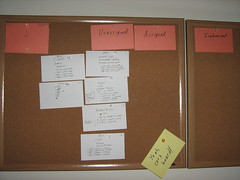
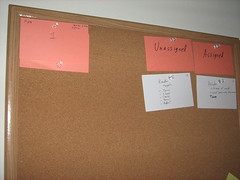
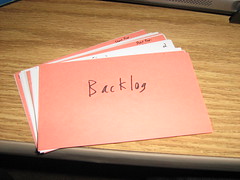
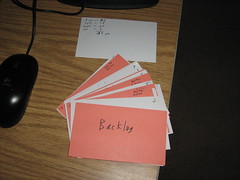
I took some time to figure out what features I’ll need to implement, what art and sound I’ll need to create, and what the complexity of it all will be, and I’ve come up with a backlog of 103 Agile story points.

Agile backlog

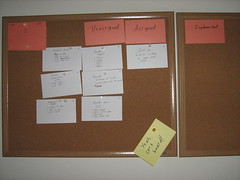
First iteration

Now, iterations are going to be kind of loosely based on “Whenever I get it done” as opposed to time-bound sprints. Still, having all of the work figured out up front helped me figure out that I was missing some features. For instance, an instruction screen! Also, I feel that the rest of LD will be much more focused. I’ll always have a piece of functionality assigned to me that I should be working on.

Categories
Game Design Game Development Geek / Technical Linux Game Development Personal Development

LD18: Time for Breakfast!

I started my day right: with a banana!

A banana to start the day!

After reading for a bit, catching up on LD posts, and awarding some trophies, I finally made myself a full breakfast!

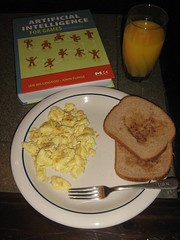
Scrambled eggs, buttered toast with cinnamon, and OJ

As you can see, I had scrambled eggs, buttered toast with some cinnamon sprinkled on top, and a glass of orange juice! I also have my unread “Artificial Intelligence for Games” book handy. I have a feeling I’m going to need it.

But first, a quick shower! Then I can get back to working on my game in earnest. In the meantime, I’ve realized that my hero is going to need to know how to fight an enemy. I had a couple of states as Fight or Flee, but what does Fight mean? I think I’ll change them to Chase/Evade, and Attack is a completely different state.

My plan: when the hero is chasing an enemy, it tries to get adjacent to it. Then it can attack. The attack occurs, damage is calculated, and then the hero has to wait a few moments before he can attack again. Hmm…maybe the hero should be put into another state after an attack: rest mode. This way, he can’t attack and flee immediately. He has to stick around long enough to be attacked himself.

Ok, Self, don’t panic. I’m sure the AI isn’t going to be THAT overwhelming.

Categories
Game Design Game Development Geek / Technical Linux Game Development Personal Development

LD18: Digital Mock Up

Another mock up!

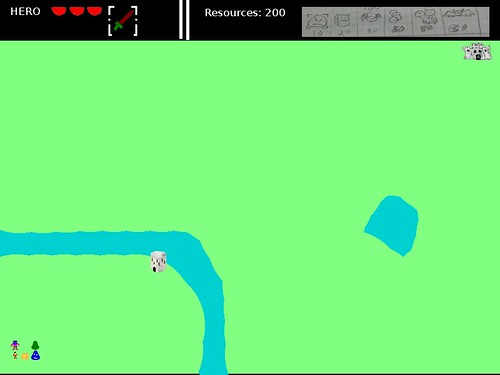
Mock Up

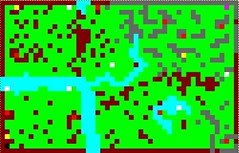
I still don’t have code, but I’ve decided that the individual squares/tiles of the game will be 16×16. It’s tiny, but that means the graphics don’t have to look terribly great. The hero is 8×11.

I wish I knew a better color scheme to use, though. Colorblind players, let me know if you can’t see anything because the greens, blues, and reds blend in together. B-(

My next task is to actually create real tiles and sprites, and then I can get started on some code to render it correctly.

But first, I think I’ll go to sleep. Good night, LD!

Categories
Game Design Game Development Geek / Technical Linux Game Development Personal Development

LD18: Prototyping Goodness

After thinking about ways to play as the hero and using enemies as weapons, I decided that I would make the player a villain who summons and sends out minions to attack the AI-controlled hero.

I created a mock-up of the UI:
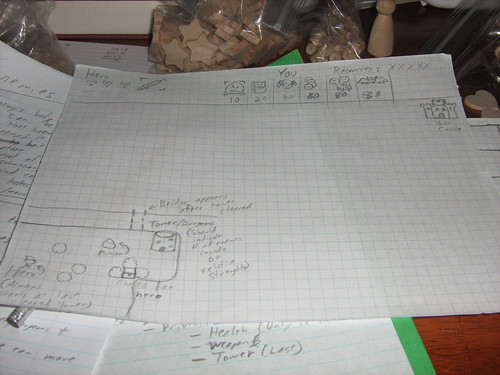
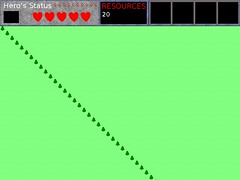
UI layout

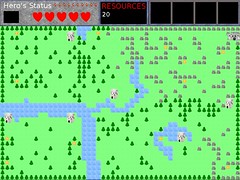
You can see that the hero’s status is listed at the top, and the player can see how many resources are currently available, along with what minion types can be produced. They will have different costs and varying abilities. Or, at least I’m planning that they will now. When the deadline looms, I might have to limit the variety.

You can also see the world map. I didn’t spend too much time drawing out everything, but the basics are there. The hero is visible and moving around the world, searching for weapons, health, dungeons, and your castle. There will be obstacles, such as trees, mountains, and water. There will be towers/dungeons. Whenever a tower/dungeon is cleared, the hero gains access to new areas. Eventually, the hero will find your castle, and you’re done for.

Unless, of course, you can get your minions to do their job, hunt down the hero, and kill him first!

I mocked up a close-up of that first area as well:
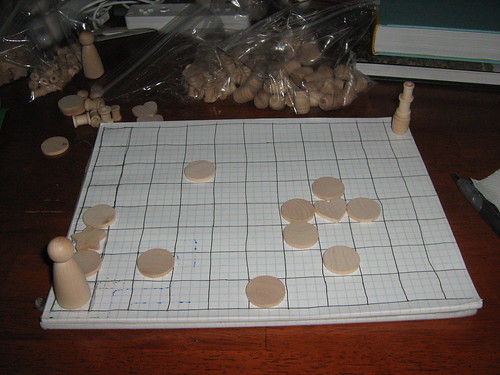
More prototyping

The star is a weapon upgrade. The heart is health. The barrel/spindle thing is supposed to be the tower. Circles are obstacles. I moved the man around, imitating what I expect the AI should look like. In doing so, I realized that I needed to figure out what visibility the hero will have. It wouldn’t be right for him to make a direct line to the castle. He’d have to explore, so I think he’ll have a fog of war to deal with. He’ll normally be in exploration mode and can see a few squares around him in any direction. If he spots a location with a weapon, health, dungeon, or castle, he’ll switch to “Move me there in the fastest way possible” mode. If he encounters an enemy, he’ll go into Fight mode, unless he has low health, in which case he’ll be in Flee mode.

I also realized that I needed to decide what happens if he sees a target, starts moving toward it, but spots a new target on the way. Should he move to the new target? Should he ignore new targets? I decided he should have a queue of targets, and then I realized a prioritized queue would be best. If he sees a weapon upgrade, he’s going for it first. If he spots health, he’ll only go to it first if his health is low. If he has perfect health, he’ll ignore it. Towers/dungeons/castles will be the last targets he’ll go for. This way, if he has low health, sees a weapon upgrade and a tower, he will head towards the weapon. If he then sees a health upgrade, he’ll go to the health upgrade first, then go back to the weapon, then head to the tower.

But what should the player be doing? I want the player’s main action to be clicking on locations to place enemies for the hero. At the top of the screen, you’d click on the enemy you want to purchase, then you’d click on the world map to place the enemy. Obviously you shouldn’t be able to overwhelm the hero with enemies right away, so your limited resources would stop you. Also, do I want the player to be able to place enemies anywhere, or should they only be placed in specific areas/spawn points? If the player can place the enemies anywhere, then the hero is simply going to be fighting them right away. If, however, there are going to be specific spawn points, such as the tower/dungeons, then the enemies will need to explore and find the hero, and it gives more importance to the fact that the hero is not only getting to new areas but also eliminating your spawn points whenever a tower/dungeon is cleared.

With a few hours of prototyping, I think I understand my game design that much better.

Categories
Game Design Game Development Games Geek / Technical Linux Game Development Personal Development

LD18: Prototyping and Ideas

It’s time to prototype some ideas! I have a chance to play with my new barrels and hearts!

Prototyping!

But let’s take a step back and try to come up with some ideas. Assuming you play as the hero in the game, what are the various ways you could use enemies as weapons?

1) You could use the enemy’s body as a projectile. Your attack might send Enemy A flying, but when A hits B, B is hurt. Maybe A is immobile, especially if they are somehow stuck together now, as below:

Enemy's body is a projectile

2) You could force the enemy to use its own projectiles, which happen to be damaging to all entities in the game, including other enemies. Somehow, you have to provoke the enemy into attacking. In this example, you can see that the enemy throws out its spines, leaving it naked and vulnerable. It would probably need to head home to reload, and the other enemies in the vicinity were killed.

Force enemy to use projectiles

3) You could pick up the enemy, causing it to panic and flail. Until it can get itself free from your grasp, you can move it close to other enemies and let it destroy them.

Pick up enemy and let it flail

4) You could use bait to lure enemies into combat with each other. When they see the steak in this example, the two enemies can’t help themselves. They love steak! Unfortunately, only one of them can have it, so they end up in a dust cloud. Only one will survive. And get steak.

Force enemies to fight over bait

5) You could take control of the enemy in various ways. First, you could attack an enemy, bring it under submission, and train it to fight for you. It’s kind of like a Pokemon or the monsters in Rune Factory, if you’ve played that one. Second, you might have the ability to control an individual enemy’s mind or take possession of it’s body. It’s kind of like the game Space Station Silicon Valley for the N64. Third, maybe the enemies all follow whoever holds a certain token or item, like a wand or staff. If you are in control, now the enemies are yours to command! Fourth, you can find a way to mount and ride an enemy. If you can do so, you can then use it to ram into other enemies.

Take Control

So these are some of the ideas I have running through my head. Even though I’ve been thinking about sending enemies after an AI hero for much longer, I’m starting to like the mechanics listed here. Any thoughts?

Categories
Game Design Game Development Geek / Technical Linux Game Development Personal Development

LD18: Theme Is Enemies As Weapons

I was hoping that “Enemies as Weapons” would be the theme. I normally do not think about game ideas or concepts before the compo starts, but this time, I couldn’t help but think about how I would approach this one.

In Super Mario Bros, it’s common to use Koopa shells to take out enemies, so I tried to think about how the hero could somehow change the state of a foe to make it harmful to its allies. Could you pick them up, which causes them to lash out? Could you simply hit one, which makes it do something to protect itself instinctively, but its defensive weapons happen to be harmful to enemies as well?

But then I thought: what if I allowed the player to generate enemies for an AI hero? Imagine having a bird’s eye view of a world, and you can see the hero approaching your domain, but you can select an appropriate type of enemy, create it, and send it to meet the hero. At first it might be easy, but the hero has multiple lives, so you’d have to send more and varied enemies to stop him/her.

I liked the idea of generating enemies to go after an AI hero. I’ve never had very interesting AI in my previous games, but I’ve recently been reading “AI for Game Developers” and was getting a bit inspired. Ludum Dare is usually a chance for me to learn something new, so maybe this time around I’ll be learning how to implement some AI capable of avoiding obstacles, evading other entities, and figuring out how to get through the world.

Or, I should realize I only have 48 hours to implement the entire game and I might not want to spend too much time figuring out something as huge as advanced artificial intelligence. Simple AI is sometimes good enough.

Categories
Game Design Game Development Games Geek / Technical

LD18: My Previous Ludum Dare Montage

Ludum Dare Montage

I did five Ludum Dare competitions in a row, starting with LD #11. I missed out on a couple, but now I’m back for #18!

I’m excited! Only a couple more hours to go.

Categories
Game Design Game Development Games Geek / Technical Linux Game Development Personal Development

Ludum Dare 18 Starts Today!

Everyone’s favorite 48-hour solo game development competition, Ludum Dare, is running in its 18th iteration starting tonight at 9PM Central Time (US).

As always, I’ll be updating my game development progress here and on the LD blog.

Currently, the final round of theme voting has contenders such as Technology in the Wrong Time Period, Cooperation, Enemies as Weapons, and Evolution.

Oh, and Double ZOMBIE Rainbow is another theme.

Categories
Marketing/Business

Why a Lower Cost of Living Matters

Sales

When I quit my day job, I moved from the big city of Chicago to Des Moines, IA. There were a number of reasons, but one was the lower cost of living. People have argued back, “Yeah, you’re spending less per month, but you’re living in Des Moines!” While Des Moines isn’t Chicago, it’s similar enough. It has culture, art, technology, friendly people, and a downtown full of events. It even comes complete with disappointed Cubs fans.

With a lower cost of living, I was hoping to make my savings last longer, giving me more time to make my game development company successful before worrying about other funding sources, including another day job.

Now, saying that there is a lower cost of living is one thing, but when you’re living it day to day, you might not notice it as much. Granted, buying a beer at the bar is definitely cheaper here than in any bar in Chicago, but I don’t drink that often. And it’s hard to see how my grocery bill is any different, especially since I don’t buy things like meat, cheese, milk, and butter. I buy fresh fruits and vegetables, which means I don’t get to take advantage of coupons and savings as people on a standard diet might.

But recently I saw that my latest credit card statement is out, and my latest bill was half of the bill from the previous month! Of course, I had a lot of moving expenses then, so maybe it wasn’t a good month to check against. So I checked my GnuCash reports, and I created an expense bar chart from January 1st, 2008 until the end of this month. Here is the result:

Expenses Over Time

See that little blue box? It identifies the bar representing the expenses for this last month, and as you can see, that bar is much shorter than any of the months from the previous two years.

Is that spending level sustainable? I don’t know. This last month, I spent most of my time getting settled in, looking into health insurance and business checking accounts, rolling over my 401(k) into an IRA, and getting my office in order. I ate lunch at home most of the time, rarely went out, and if I did, most likely someone else was treating me to meals. I don’t think this month will be typical for me, especially once I start spending money for game development, specifically on contractors.

Still, this past month means I’ve extended my estimated burn rate by half of a month, and I don’t anticipate my regular expenses, such as groceries, utilities, and rent, changing that much. Some of my bigger purchases were a new laptop battery and a laptop riser, and so I don’t anticipate needing to spend that money again anytime soon. Basically, if I can avoid spending money on new things I don’t need, I can expect to see lower monthly expenses regularly.

Can I mend clothes instead of throwing them away when they get holes in them? Can I go to the library and check out books instead of buying them? Can I prepare more interesting meals at home than I can find in restaurants?

Other questions are a bit harder. Can I hold off on getting a new smartphone? Considering the capabilities of my current phone, I might get a lot more out of my monthly bill if I had a pocket computer. Being able to see my calendar and docs on my phone when I’m away from home would be awesome. How about a Roomba, or one of those litter boxes that cleans itself? These aren’t just expenses. They’re improvements to standard of living. The deal I’m making with myself, however, is that I need to earn the money to pay for these things before I pay for them.

But getting back to what this post is about, the lower cost of living is allowing me to think about these things. Seeing that smaller expense bar makes me feel better about my current lack of income.

I’m not the only one to find moving to be a good way to save money. Many indies have moved not only to less expensive cities but also to less expensive nations! Living in certain Asian cities, for example, you’d find that your money lasts way longer.

Have you considered moving to reduce your expenses? Would a different suburb, city, state, or country be a possibility for you?

(Photo: Sales, solden soldes…. by antwerpenR | CC-BY-2.0)

Categories
Geek / Technical Marketing/Business

How to Use PayPal to Pay for a Flickr Pro Account

Head Desk

If you’re experiencing the frustration of not knowing why Yahoo! is being so obtuse about what’s wrong with using PayPal to pay for a Flickr Pro Account, I hope this article helps.

I have a Flickr Pro Account that I used for my business, especially for this blog. Since it is a business expense, I wanted to use my business checking account to pay for it. The easiest way to do so was through PayPal, which Flickr claims is available as a payment option.

I go through the steps, log into Flickr twice, log into PayPal once, and finally I can click on the button to submit my order.

Then I get this error message:

Yahoo Error
Click to see the full message

For those of you who can’t see the image, the error reads as follows:

An Error has Occurred.
There is an error with the payment method information. Please check the information and re-enter it or use another payment method. If the problem persists, please contact Yahoo! Customer Care.

There is no link to the Yahoo! Customer Care page. There is a link that takes you to Yahoo!’s main website, but why would I want to go there from this page? There is a link to go to the help page, and from there, it’s a mess.

In the end, I found “Product and Service Specific Help” under Yahoo! Wallet Help Topics, and then I found a section titled Why am I seeing errors when ordering with PayPal?. It says to check that you have enough funds in your account, that your funds are tied to a funding source, and that your account information is up-to-date. The other suggestion was to essentially reboot by deleting PayPal from your Yahoo! wallet and entering it in again. If none of those options work, Yahoo! suggests you contact PayPal. “Since the errors are with their system they will have the best information.”

PayPal’s message boards have a few people who are experiencing the same frustration I am, and there was no resolution for any of them, so I called PayPal. If you are wondering, on your main account page, at the bottom you’ll find a Contact Us link, and then you’ll need to go to a different link for contacting them by phone, which gives you a network PIN you’ll need when you call. When I did get through to an agent after a few phone menu items, I was told that the error message on their end is that a Flickr Pro Account requires immediate payment.

My PayPal account isn’t tied to my bank’s debit card, and my expectation was that a $24.95 Flickr Pro Account payment would take the $12 I had in my PayPal account and then pull the remaining amount from my checking account. I had this expectation because when I set up the PayPal account in the wallet, I was able to specify that order of operations. Also, it’s how it works when I make eBay purchases. It turns out, however, that Flickr wants the payment immediately, which means I need all of the money in my PayPal account or a credit or debit card that the funds can be pulled out of.

The solution: transfer the remaining money to my PayPal account, wait for it to get there, then pay for the Flickr Pro Account.

Alternatively, I could pay for it using a credit or debit card, but I’m still waiting for a new one from my bank, so it’s not an option for me currently.

When Yahoo! claims that the “errors are with” PayPal, apparently they mean that the error messages are secret and they have no way to tell you what’s happening. When they say that you need to ensure you have enough funds, they mean in your PayPal account NOW.

What’s frustrating is that their help and error messages don’t tell you any of that. At no point in the regular transaction did I learn that PayPal payments must be immediate. I had to talk to a PayPal representative to learn this information. Why wouldn’t Yahoo! tell me since I’m making a payment for their service? Also, normally when I make a payment with PayPal, the other person gets a message saying that the payment is processing, and it might take a few days. I don’t use PayPal for much, so the idea that I had to have enough money right now in order to make a payment was foreign to me. PayPal usually makes the process pretty easy since they’ll pull the funds from my bank account if I don’t have enough readily available.

Lesson learned: This situation with Flickr wouldn’t be so frustrating if expectations were set properly. Just tell me up front that I needed to ensure I could pay immediately! And in my own business dealings, I hope I also do well to set expectations appropriately to avoid needless frustration.

Have you had frustrations with Flickr, Yahoo!, and PayPal? Do you find that the error messages and explanations are too vague and useless? Did this article help?