Categories
Game Development Geek / Technical Linux Game Development

Linux Game Development: Frustrations with GLIBC_2.4 and Ubuntu

I have already written about the solution to GLIBC_2.4 dependencies. The solution is still valid, but I wanted to share this bit of frustration that made me question if it worked in Ubuntu.

This past weekend, I participated in the 48 hour game development competition known as Ludum Dare #11. You can see my submission.

I found out that my submission had a GLIBC_2.4 dependency. How embarrassing! Since I wasn’t using my laptop at the time, I used my Debian-based desktop and built the game. No dependency existed in this build, so I uploaded it. I wasn’t sure why the previous build didn’t work since the build scripts and code should all be the same.

When I used my laptop, which runs Ubuntu, I found that the binary that gets produced has the GLIBC_2.4 dependency. I can see that it has the dependency using objdump -x BINARY_NAME | grep GLIBC_2\.4. You can see it in the following output:


$ objdump -x source/ld11-minimalist.bin | grep GLIBC_2\.4
0x0d696914 0x00 10 GLIBC_2.4
00000000 F *UND* 00000046 __stack_chk_fail@@GLIBC_2.4

I double and triple checked, and I am using -fno-stack-protector in all of the right places. The build still works on my Debian system just fine. What else could be going wrong?

After spending a few hours gutting out all of the code and making it link to the bare minimum of game classes and libraries, I found that it kept requiring GLIBC_2.4, and I was getting frustrated. I compared my Ludum Dare project’s build scripts with my Killer Kittens from Katis Minor build scripts, which should be roughly the same. The only major difference was that my LD entry wasn’t using the Kyra Sprite Engine. I didn’t see anything else that was different.

Getting desperate, I added Kyra to see if it might help. It didn’t.

I learned that the .o files didn’t have the dependency, so the problem gets introduced when it is all linked together. After another hour or two, I finally saw something odd:

LIBS := -static-libgcc -L. -L${LIB_INSTALL_DIR}/lib $(shell ${LIB_INSTALL_DIR}/bin/sdl-config --libs) -lSDL_image -lSDL_mixer #-L/usr/X11R6/lib -lX11

Do you see the “-L.” right after “-static-libgcc”? What’s the purpose of it? Well, it turns out that my build scripts provide a link to the static libstdc++.a library file, so -L. allows it to link. When I remove -L., it still builds the game, but now the game depends on libstdc++.so.6. While I don’t have GLIBC_2.4 symbols, I now have CXXABI_1.3 and GLIBCXX_3.4 symbols.

I learned that when I built my Killer Kittens project on my laptop, it also has those dependencies. See, for some reason Kyra prevents it from linking to libstdc++ statically, so it has a dependency on libstdc++. On my Debian system, the dependency doesn’t exist. It builds it just fine.

When I run objdump -x BINARY_NAME I see different results depending on the system I built the game on:

My Debian Testing system:

Dynamic Section:
NEEDED libkyra.so.0
NEEDED libSDL-1.2.so.0
NEEDED libpthread.so.0
NEEDED libSDL_mixer-1.2.so.0
NEEDED libm.so.6
NEEDED libc.so.6
NEEDED ld-linux.so.2
NEEDED libengine.so.0

My Ubuntu Feisty system:

Dynamic Section:
NEEDED libkyra.so.0
NEEDED libSDL-1.2.so.0
NEEDED libpthread.so.0
NEEDED libSDL_mixer-1.2.so.0
NEEDED libstdc++.so.6
NEEDED libm.so.6
NEEDED libc.so.6
NEEDED libengine.so.0

Why is there a discrepancy? It turns out that Ubuntu and Debian differ in their implementation in terms of using stack protection when building software. Debian’s default is “Do not use stack protection.” Ubuntu’s maintainers decided that stack protection was better even if things wouldn’t be completely compatible with Debian.

In my case, since I am trying to link to the system’s libraries statically, my binary is taking in stack protection and so depends on GLIBC_2.4. If I don’t statically link to libstdc++, my binary now depends upon my system’s version of libstdc++.so. Since -fno-stack-protector is a compile-time flag, it has no effect at link time when the system’s GLIBC_2.4-depending libraries are linked in to my binary.

Essentially, Ubuntu’s decision to use stack protection by default has made it very difficult for me to create a binary compatible build for older systems on my laptop. I would like for my build to work the same across systems, but I guess until I find a better way, I will need to make sure I deploy my games from my Debian-based desktop system.

I guess this example is just one more reason why people have a tough time creating games for GNU/Linux, or at least why C++ isn’t as popular as C or Python.

For more information:

Categories
Game Development Geek / Technical Linux Game Development Marketing/Business

Linux Game Development: GLIBC_2.4 Errors Solved

Last week, I wrote about the `GLIBC_2.4′ not found errors your game might get when an application built on a new distribution is run on an older distribution, such as Debian Stable and Slackware 11.

Judging from my search logs, this problem seems to be common enough to warrant a follow-up post. I have since solved the problem and haven’t added new dependencies, and it doesn’t involve using strange, mysterious scripts or older compilers.

In my last article, I referred to a compiler flag that was supposed to use a specific C++ ABI. I found some success with it, but it would add X11 dependencies to my libraries. Ideally you would like to remove these dependencies along with the dependency on GLIBC_2.4.

The Solution

While researching this issue, I found multiple websites referring to an entirely different compiler flag. This flag disables a feature that is specific to GLIBC_2.4 and higher, and so programs would no longer depend on 2.4 if the flag was used.

I spent way too much time trying to figure out what I was doing wrong when I discovered that each of these websites spelled the compiler flag wrong!

It is NOT -fnostack-protector! It is -fno-stack-protector!

In my custom library build scripts, I have:


export CC=gcc
export CXX=g++
export CFLAGS="-fno-stack-protector"
export CXXFLAGS="-fno-stack-protector"

In my game build script, I just add -fno-stack-protector to the beginning of my CFLAGS variable in the Makefile.

The Results

When my custom libraries are built using these flags, they no longer depended on GLIBC_2.4.

Unfortunately, I saw that libSDL did have a new dependency on libvga. I fixed that issue quickly enough! When I passed parameters to the configure script for libSDL, I added “–disable-video-svga”, and the dependency no longer exists.

If you’re curious, my full configure parameters for libSDL are:


--prefix=$LIB_DIR --enable-X11-shared --disable-rpath --disable-ipod --disable-video-directfb --enable-sdl-dlopen --disable-video-svga

where LIB_DIR points to wherever my project is installing the custom libs. If you’re curious about why I have custom libraries or how I chose these parameters, I can’t recommend Troy Hepfner’s Linux Game Development series enough.

GLIBC_2.4 No More!

By using the compiler flag -fno-stack-protector for my custom libraries and my game, I remove the dependency on GLIBC_2.4, allowing my game to run on newer systems and older systems alike. So far my beta testers inform me that my game continues to run fine on newer systems, and the people with older systems are now able to play my game, too.

If you’re concerned about what -fno-stack-protector does, it removes checks that help protect against stack-smashing attacks. Ideally if everyone was using up-to-date systems with stack protection on, you wouldn’t need to worry about trying to make your game run on older systems. If you are concerned about security, you could provide two binaries, one for the older systems and one for the newer systems, and have a script dynamically determine which to use.

For more information on this issue:

[tags] linux, game development, business, programming [/tags]

Categories
Game Development Personal Development

Thousander Club Update: April 21st

For this week’s Thousander Club update:

Game Hours: 409.25(previous two years) + 68 (current year) = 477.25 / 1000
Game Ideas: 710 (previous two years) + 35 (current year) = 745 / 1000

This past week is the first time I managed to work over 20 hours. From 42 hours last week to 68 hours this week, I did 26 hours of game development!

And of course, most of it was this past weekend’s Ludum Dare #11 competition. You can see a time lapse of my desktop during that time below.

If you have a Linux-based system, you can try out my entry. Download https://www.gbgames.com/downloads/ld11/ld11-minimalist-gbgames-linux-x86-r12.tar.gz, a 1.3MB download.

Extract it with


tar xzf ld11-minimalist-gbgames-linux-x86-r12.tar.gz

and run the script in the directory:


cd ld11-minimalist-gbgames-linux-x86-r12
./ld11-minimalist

[tags]game, game design, productivity, personal development, video game development, indie[/tags]

Categories
Game Design Game Development Games Geek / Technical Linux Game Development Personal Development

LD#11: GBGames presents Minimalist – the final version

I did it! I finished a game for Ludum Dare #11!

You can see my final post at the Ludum Dare blog.

https://www.gbgames.com/downloads/ld11/LD11-Minimalism-GBGames.zip is a 12.4MB download.

It includes the entirety of my project’s source in a zip file (LD11-Minimalism-GBGames-source.zip) and a GNU/Linux-ready tar.gz file (ld11-minimalist-gbgames-linux-x86-r12.tar.gz).

The source is ready to be used to build a linux-x86 distributable tar.gz. I created it using my Ubuntu system. I am sure it can be made to build a Win32 version without too many changes, if any.

EDIT: mrfun was kind enough to create a Windows version of my game. You can get it at the official final version post.

I’ll write a post-mortem after I’ve had some sleep and cleaned my apartment. If I learned anything, it is that the kitchen goes to entropy during Ludum Dare.

Categories
Game Design Game Development Games Geek / Technical Linux Game Development Personal Development

LD#11: My Grandma’s Birthday Won’t Slow Me Down

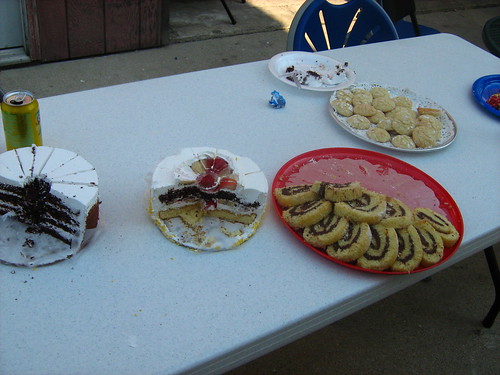
But I will eat some food while I am there.

LD11 Birthday dinner

Dessert was a bit better, especially those Nutella-filled spiral thingies:

LD11 Birthday dessert

I’m back, and I have a few hours to add sound and upload a completed entry.

Happy birthday, Nana!

Categories
Game Design Game Development Games Geek / Technical Linux Game Development Personal Development

LD#11: Break for Grandma

My grandmother’s birthday is today, so I’ll be taking a bit of a break to go to her house and help everyone celebrate it.

I was thinking of bringing my laptop, but there probably wouldn’t be anywhere I could work with it, and knowing how things would go, there would likely be something spilled on it before I got back home.

So I’m cutting it down to the wire. As of this writing, there are 6 hours, 36 minutes left in the competition. All I want to do is add sound effects, and then I can submit the game. Will it take me long to add the sound effects? Will it take me long to package up my submission, source code and all? Stay tuned for my next entry, possibly titled “Blue wire or red wire? THERE’S NO TIME!”

Categories
Game Design Game Development Games Geek / Technical Linux Game Development Personal Development

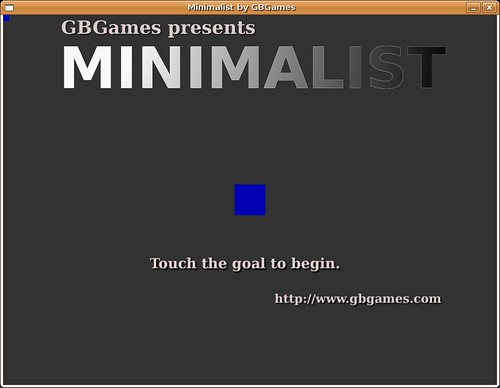
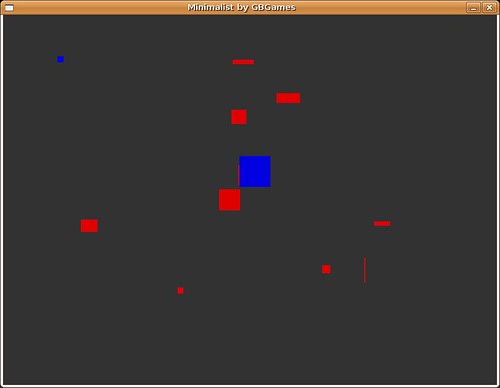
LD#11: GBGames presents Minimalist

I have a main menu:

LD11 Minimalist by GBGames

And gameplay:

LD11 Minimalist by GBGames

I need sound effects, but I have made a game for Ludum Dare!

Categories
Game Design Game Development Games Geek / Technical Linux Game Development Personal Development

LD#11: New screenshot

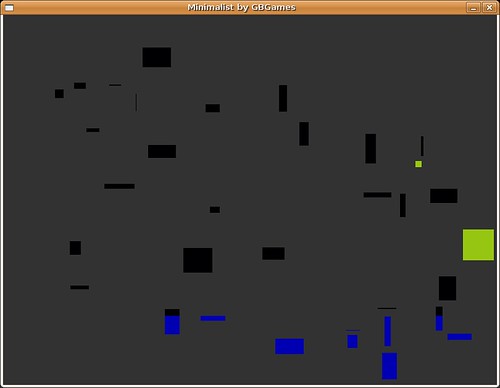
I have gameplay now:

LD11 Minimalist screenshot

Er, you can’t tell from the screenshot, but the small square is your mouse cursor. The large square that is the same color is the goal. There are as many obstacles as the level number, so level #5 will have five obstacles.

The rectangles are obstacles you need to avoid to get to the goal. If you touch an obstacle, you go back to the beginning. They vary in size, so sometimes a single pixel can trip you up. Be careful!

Categories
Game Design Game Development Games Geek / Technical Linux Game Development Personal Development

LD#11: Minimal Sunday Breakfast

Today’s breakfast was minimal:

LD11 Sunday Breakfast

That’s orange juice with extra pulp right there. Mmm, hmm!

Categories
Game Design Game Development Games Geek / Technical Linux Game Development Personal Development

LD#11: Bed Time!

It’s 3AM, and I’m going to sleep.

I have a mouse cursor image, and I have a second image, and I can determine when the two are colliding. I’m getting close to a game.