Here’s the companion video for Monday’s Freshly Squeezed Progress Report: Faster Dungeon Rendering At Last?:
Enjoy! And let me know what you think by replying below!
 GBGames
Here’s the companion video for Monday’s Freshly Squeezed Progress Report: Faster Dungeon Rendering At Last?:
Enjoy! And let me know what you think by replying below!
Last week, I reported I was optimizing the dungeon rendering code using a profiler for The Dungeon Under My House, my second Freshly Squeezed Entertainment project.
I continued optimizing, with an eye toward reducing the number of calculations that needed to occur when rendering the floors and ceilings, my main bottlenecks.
Sprint 2024-4: Pre-production and initialization
Planned and incomplete:
Two weeks ago, I reported that while I could light up the dungeon, it was too slow, but then I fixed a silly architectural representation issue that was slowing things down needlessly and it was much faster.
In the next week, I continued optimizing because while it was faster and rendering much more efficiently (and so uses fewer hardware resources and costs less electricity and saves battery usage on mobile devices), I wasn’t satisfied and wanted even more performance improvement.
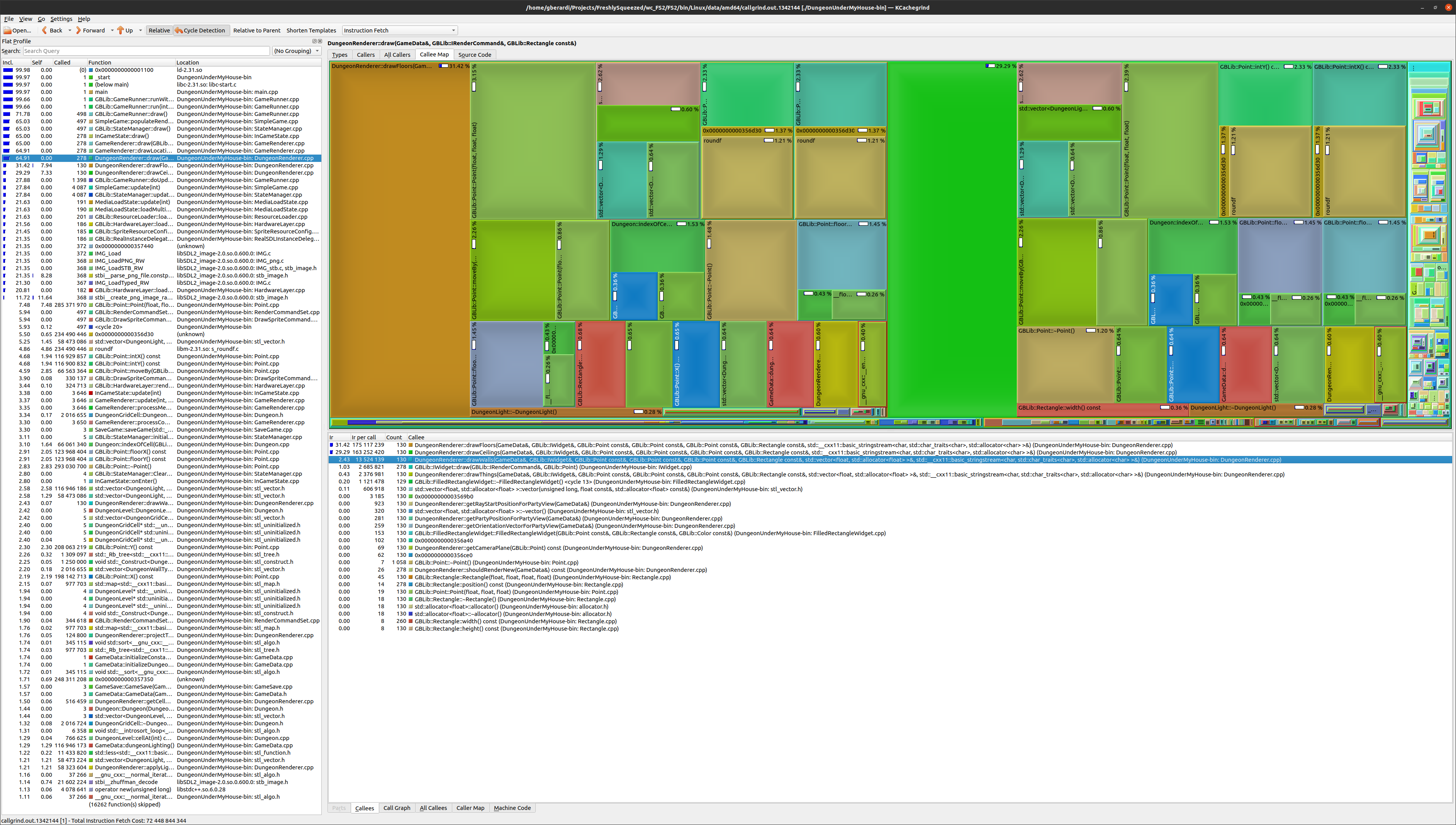
Thanks to the use of an actual profiler, I could see the bottlenecks were specifically drawing the floors and ceilings, but I could also see that there wasn’t any one thing within those functions that was the bottleneck. There were a lot of different things that contributed to the slowness, and the main culprit was that so many pixels needed to be drawn each frame, each of which uses all of that processing capacity.
This past week, I got a late start on my game development efforts, but I managed to make some changes to draw pixels only when needed, which helped a lot, plus some other improvements.
At first, I thought I was going to need to draw the walls and doors and such to a buffer, then scan through the buffer to find pixels that weren’t drawn to yet, then draw the ceilings and doors for only those pixels.
But as I was working with SDL2’s textures, and textures by and large are not optimized to be read from, I was worried that this approach was going to be too slow even if I did cut down on the number of pixels I needed to process.
Instead, it turns out that I already had the information I needed when I drew the walls, so there was no need to read each pixel.
See, when I raycast walls, I keep track of the depth at each column. If I hit a wall, I know how far away from the camera it is.
This depth information was helpful for drawing things like doors and ladders around the existing walls, and it can now be helpful to draw the ceilings, which used to be drawn first and flood filled the background.
When I attempt to draw a ceiling pixel, I can check the projected distance associated with that pixel, compare it to the known depth of the wall, then draw only if the depth of the pixel is closer.
I was making many of my optimizations just for the drawCeilings() function, mainly so I can compare it to the drawFloors() function. Before optimization efforts started, those two functions looked very similar, so comparing their performance tells me if I am making actual improvements.
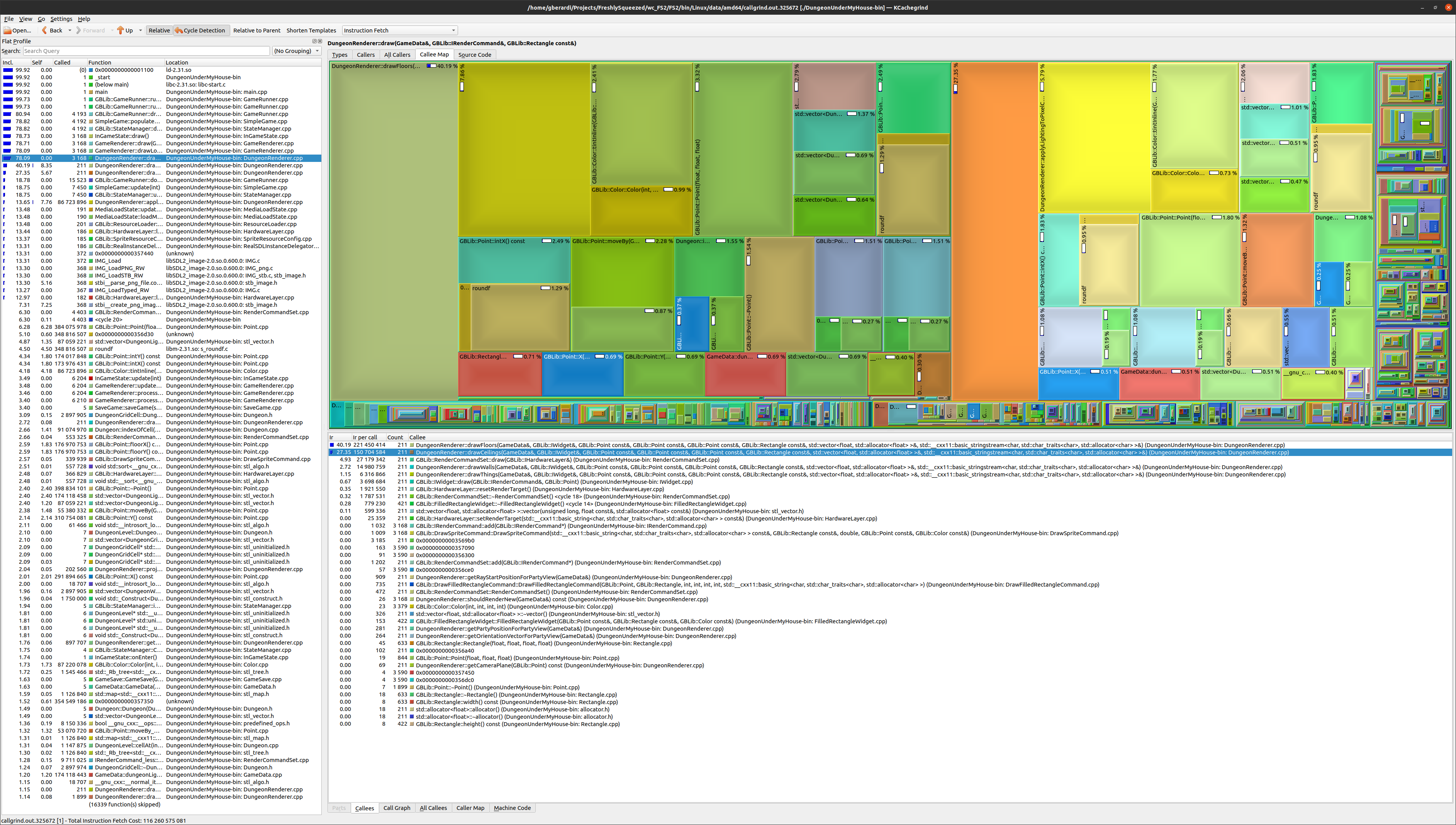
And it was an improvement, but it wasn’t as nice of an improvement as I was hoping for, mainly because the only calculations I skip are related to grabbing the texture and lighting data.
Many of the optimizations I did earlier were to move as much of the calculation out of the inner loop as I could, and I suppose now that the inner loop might be processed fewer times that it might make sense to move those calculations back, but I suspect the inner loop still does too much work and things will slow down again. After all, a smaller percentage of a lot of pixels is still a lot of pixels, relatively.
However, the profiler helped me to find that I was needlessly creating and deleting objects, so I did more inline calculations at the bottlenecks, and it helped get the performance of drawCeilings() significantly more efficient compared to drawFloors().
When I animate transitions normally, it feels very smooth, even without making the same kind of improvements to drawFloors() yet. However, if I increase the length of time to animate transitions, I can tell that my mouse cursor doesn’t render as often as when the screen is stationary.
It’s tolerable, I suppose, especially for this game which does not rely on real-time twitch muscles to play, and the mouse cursor isn’t relevant when playing on a mobile device, but I hate that it feels noticeably laggy at times.
That said, I should finish up my optimization work soon and move on to more game content work, such as creating a real dungeon level to replace the test dungeon I have come to know and love. The rest of the game needs attention, and I think I could spend forever on optimization code if I allow myself to.
Thanks for reading!
—
Want to learn when I release The Dungeon Under My House, or about future Freshly Squeezed games I am creating? Sign up for the GBGames Curiosities newsletter, and download the full color Player’s Guides to my existing and future games for free!
Here’s the companion video for Monday’s Freshly Squeezed Progress Report: Profilin’ and Optimizin’:
Enjoy! And let me know what you think by replying below!
In my previous report, I got into the details of how I fixed the silly way I was storing data in my game so that it was more efficient and allowed the dungeon rendering to be faster in The Dungeon Under My House, my second Freshly Squeezed Entertainment project.
This past week, I continued optimizing my dungeon rendering code, with a goal of getting the animations to be 60 frames per second, plus figuring out why one door in the dungeon is so well lit compared to what it should be.
Sprint 2024-3: Pre-production and initialization
Unplanned and complete:
Planned and incomplete:
In my last report, I said I was done with the rendering of the dungeon based on light levels, but I wasn’t satisfied with the performance, even after my changes from last week, so I decided to continue optimizing.
Even though the game isn’t meant to be played in real-time, I think the game feels a lot better when it runs at 60 FPS, and the slowness of the dungeon rendering was getting in the way of making the entire game feel crisp and smooth.
But first, this door was getting on my nerves.
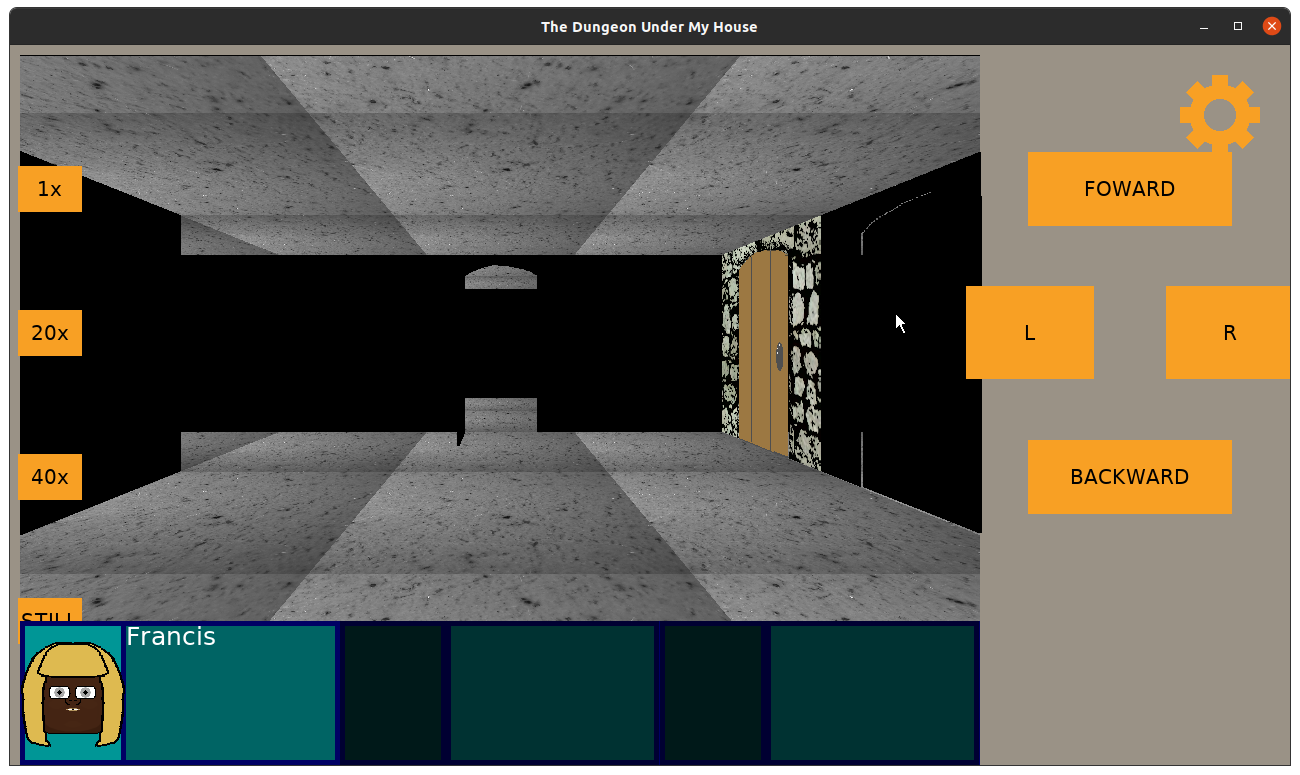
That image was from a few weeks ago, when I hadn’t started working on the floor and ceiling rendering code yet. I was wandering through my small test dungeon, checking how the walls got darker the farther away you were from the light source, when I discovered this very bright door and doorway.
What was going on there?
I double-checked, and I didn’t set any ambient light on that cell, and in fact, the walls next to it were darker. It was just the door and its associated doorway that was rendering so bright despite the fact that the cell it belonged to was rendering much darker.
So I kept digging and logging, and eventually I decided to set the default color of a cell to something extreme. And there was my my first clue: apparently the door wasn’t taking its color from the cell it belongs to but from an adjacent cell, and in this case, one that was out of bounds and so wasn’t paying attention to the lighting code.
After digging into the code, I discovered that the way I wrote the code and the way the door is represented means that the wrong cell’s lighting data was being used. Basically, the hinge edge and the far edge of the door is stored, and I used the hinge edge’s location to identify the cell’s position. In some orientations, this worked fine, but in others, it grabbed the next cell.
And for things like the doorway, well, those could be arbitrary dimensions. How do I generically identify which cell it should belong to?
Well, I decided that I would just store the door’s current cell as data in the door itself, so instead of trying to derive the cell based on the door’s data, I could just get the cell itself.
Anyway, I also had a different problem with doorways. If the door is open, and you are facing the entryway, the door will be seen on the side.
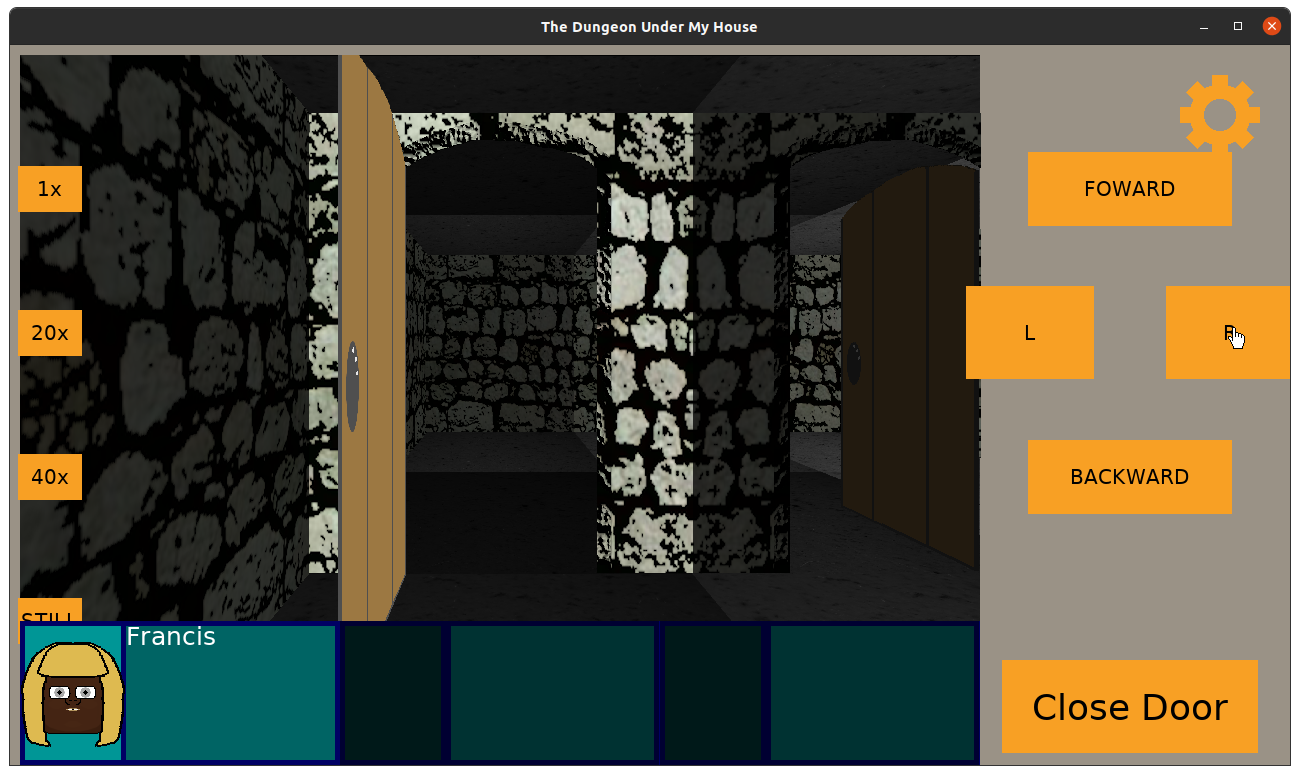
But if you are facing away from the entryway (that is, the entryway is behind you), the door should be on the other side.
And it is…except it kind of floats out in the middle of the viewport.
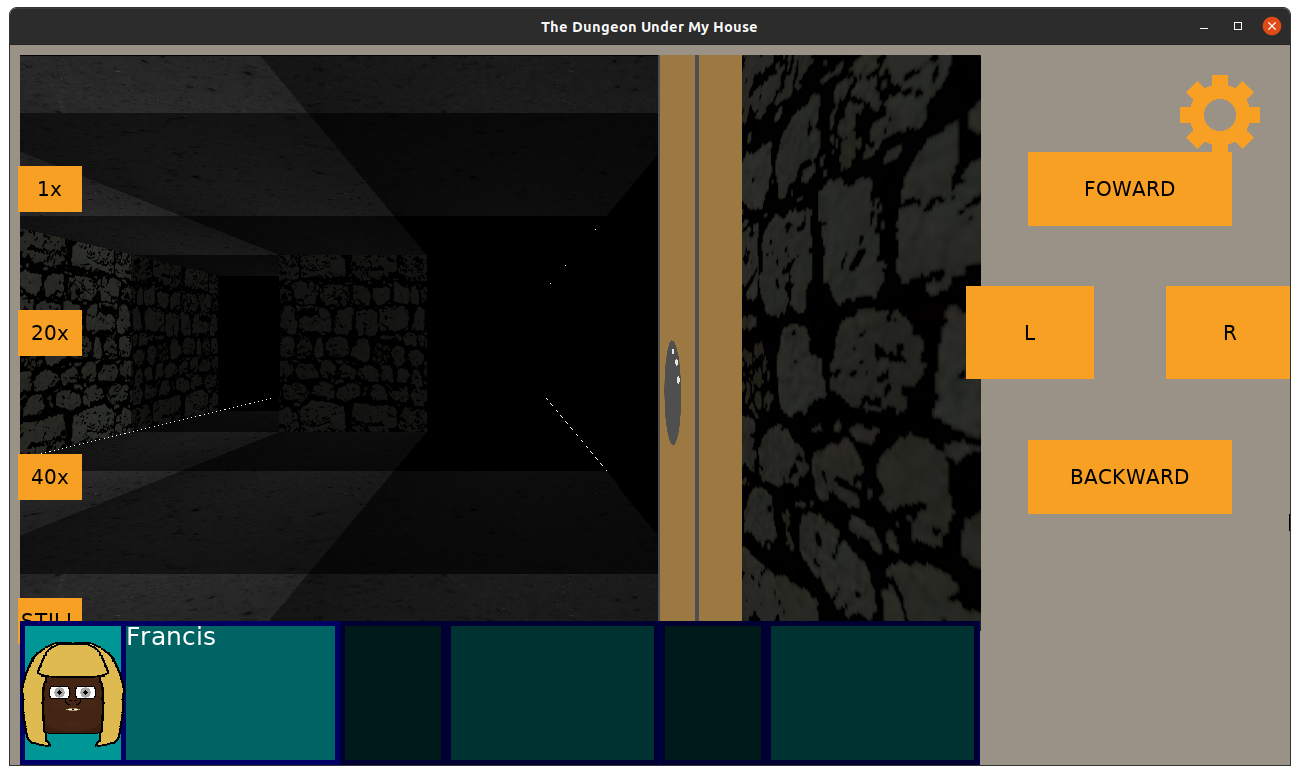
This is ugly, and I wanted to fix it, too. If the door is to the side, it should block your view from that side, right?
Since this is raycasted code, the best idea I had for what was going on was that the rays were going around it.
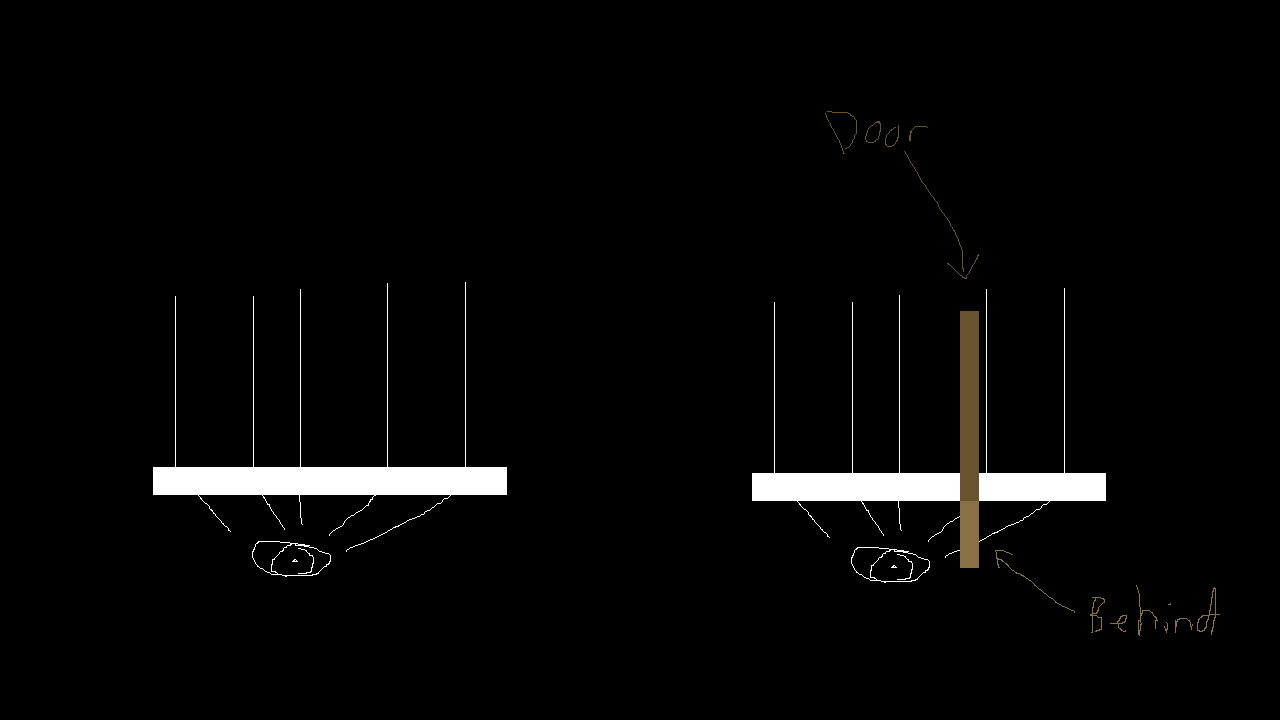
So I think intuitively the rays would hit the door behind the camera plane, too, and should show that area as blocked, but the point of the camera plane is to not draw behind it, and the point of the rays being projected out was to avoid fisheye lens effects.
So, what could I do? I tried changing the field of view. I did find that if I change the FOV from 1.0 to 0.5 that the door seemed to block the far side of the view as I wanted, but the downside was that the player’s view seemed too constrained. I wanted the player to be able to stand next to a hallway and see that it exists, but too small a FOV prevents that.
But anything larger would show a floating door in certain orientations.
Now I loved my door and entryway, especially how it was centered in the tile, but I decided that the most straightforward thing to do is to make the door larger so that the hinge is at the far end of the tile rather than in the center.
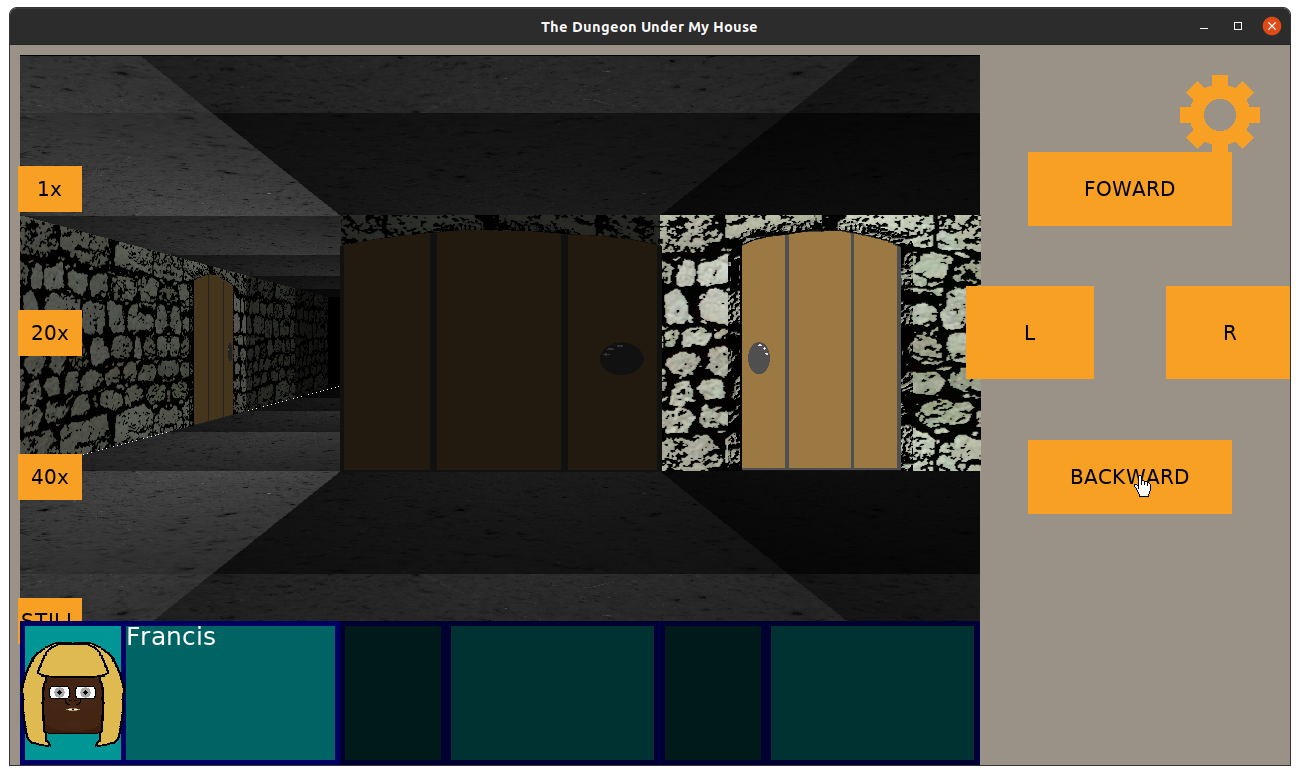
This way, when the player is facing out of the entryway, the door is seen at the far edge of the viewport rather than have the door protrude out of the middle of the camera.
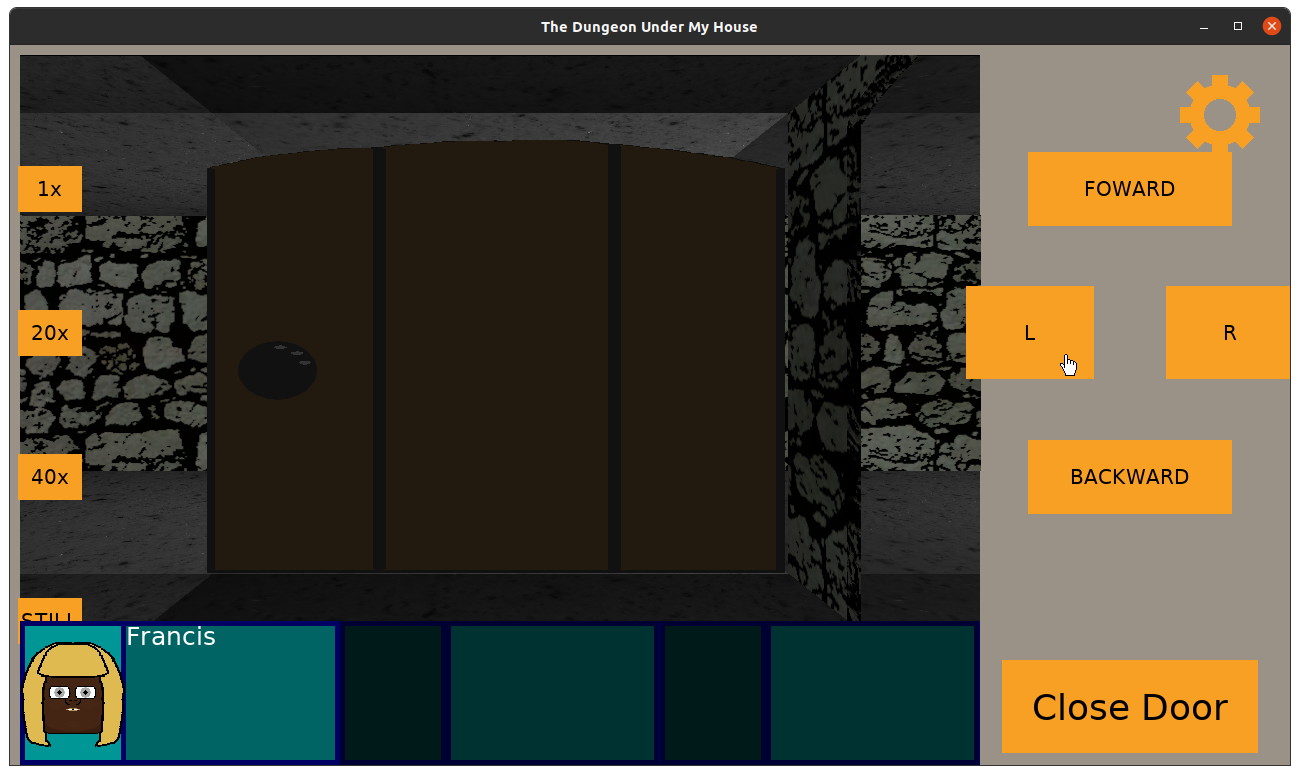
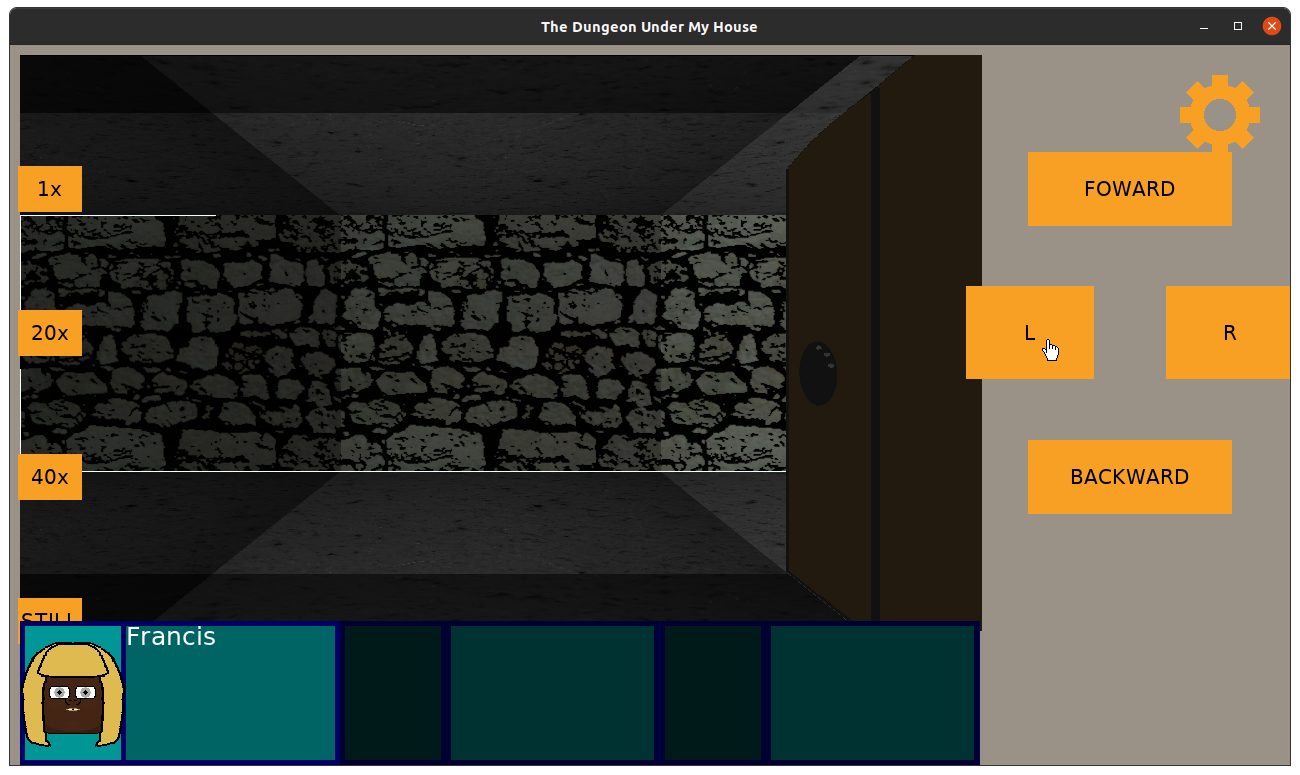
I’m not happy that these kinds of doors now take up the entire cell, but it seemed the least bad option. And on the plus side, I think I found that having a FOV of 0.66667 looks great.
Anyway, back to optimizing. Now that walls, doors, ladders, ceilings, and floors of the dungeon are rendered based on lighting, I found that there was a definite difference between how smoothly the game seems to be responding when stationary versus when turning or moving forward or backward.
If I remove the ceiling and floor rendering code, the walls and “things” render super quickly. The game feels very smooth.
But if I remove the walls and “things” rendering code, the ceilings and floors render just a little too slowly. It’s fast enough in terms of functionality, but it feels jarring and off.
I had changed my game’s dungeon representation from an std::map to an std::vector, using fast indexing math to quickly access the data I need in constant time, but it was still slow.
And using the “poor man’s profiling” technique of interrupting the debugger and seeing what code it is sitting in most often got me pretty far before, I decided to try using a real profiler to see what I can learn.
So I love valgrind, and I used the command “valgrind –tool=callgrind” on my game’s binary file. While the dungeon rendering was much, much slower when running with a profiler, I was able to collect some good data.
Then I used kcachegrind to pull up some fun visualizations.
What they told me was that my drawCeilings() and drawFloors() functions weren’t slow due to any one particular thing. There were lots of different things going on, each of which was taking up a chunk of the processing.
What this means is that while I could tackle any number of optimization opportunities that I see here, and I did gain small improvements when I did do so, there was something bigger happening.
What’s very interesting is that the drawWalls() and drawThings() functions take up so little processing compared to drawCeilings/drawFloors(). My main bottleneck with the latter wasn’t the various functions it called or objects it created. It was that it was working pixel by pixel across half a million plus pixels.
Basically, no matter how fast I get the code to render a pixel, it still has to draw a lot of pixels, and the main way I am going to speed things up is to draw fewer pixels.
I didn’t get the chance to try it before the end of the week, but my next major optimization attempt will be to draw the walls and “things” first, then scan pixel by pixel to find what hasn’t been drawn yet and draw the ceilings and floors at those points.
It should cut down significantly on pixels drawn, especially since most of those pixels were getting drawn on top of anyway with my current approach, so I anticipate that this new approach will mean most of the pixels won’t be so expensive to render.
But we’ll see.
Thanks for reading!
—
Want to learn when I release The Dungeon Under My House, or about future Freshly Squeezed games I am creating? Sign up for the GBGames Curiosities newsletter, and download the full color Player’s Guides to my existing and future games for free!
Here’s the companion video for Monday’s Freshly Squeezed Progress Report: More Dungeon Lighting Work:
Enjoy! And let me know what you think by replying below!
Last week, I reported that I had started working on adding lighting to the dungeon walls and doors in The Dungeon Under My House, my second Freshly Squeezed Entertainment project.
Since then, I’ve been working on adding lighting to the floors and ceilings.
Sprint 2024-2: Pre-production and initialization
Planned and complete:
Changing the brightness of the walls and doors was relatively easy: I just changed the tint when rendering each column in my raycasting code based on how dark the current cell is.
But I couldn’t do the same for the floors and ceilings, as I said last time:
While the walls draw columns of textures and can be tinted, the ceilings and floors draw individual pixels of textures, each of which represents the actual pixel color from the source texture as a Uint32 value.
Now, when I usually deal with color, I am dealing with RGBA values, with each of R, G, B, and A being a value from 0 to 255, or even using hexadecimal values if I want to match what I might see in HTML color codes. So 0xff would be equivalent to 255.
Drawing walls, the only color I deal with is my tint value, which is the dungeon light level’s color multiplied by its brightness percentage.
But drawing the ceiling, I need to directly modify the color value of the pixel in question, and I am still figuring out exactly how. The Uint32 value should correspond to RGBA-like values, and in this case, I believe it is ABGR8888 in SDL2’s representation.
I imagined that I would need to change the hex values that represented the pixel, and I didn’t know if the math was going to be complicated or straightforward.
But my colleague Joel Davis, who has helped me before with his insight and experience on this project, suggested that the way to handle it (which I later found supporting posts online that say the same) is to first change to RGBA, then change the color as usual, the change back to the Uin32 hex values.
And wouldn’t you know, it worked as expected!
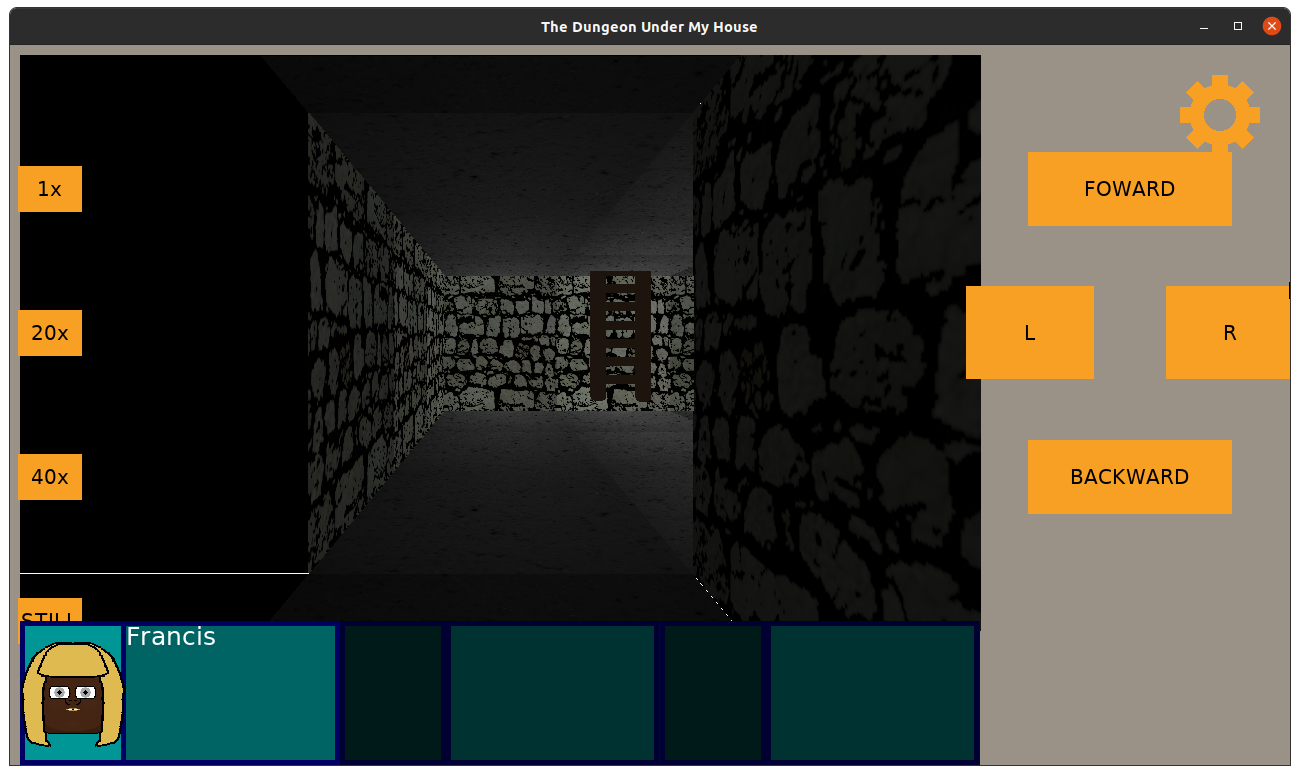
I had some strange artifacts in terms of white lines at the edges of the walls, though. When I stopped drawing walls to see what was going on, I could see that my default brightness was applying anywhere that there wasn’t an actual cell to draw:
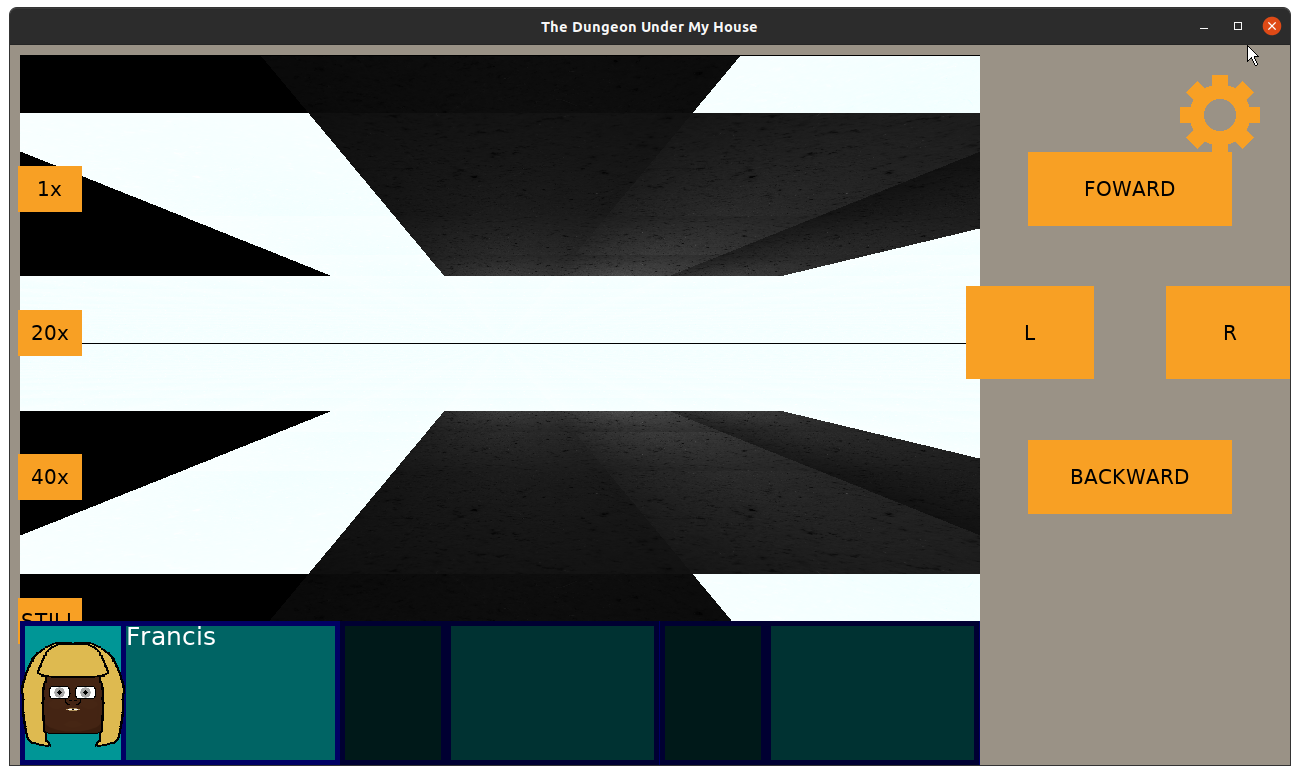
This seemed straightforward to solve: just change the default color to something darker.
But there were more pressing concerns. Namely, now that I was rendering the floor and ceiling with lighting data from the current cell, suddenly the game was rendering incredibly slowly, which was noticeable during transitions, such as turning or moving forward and backward:
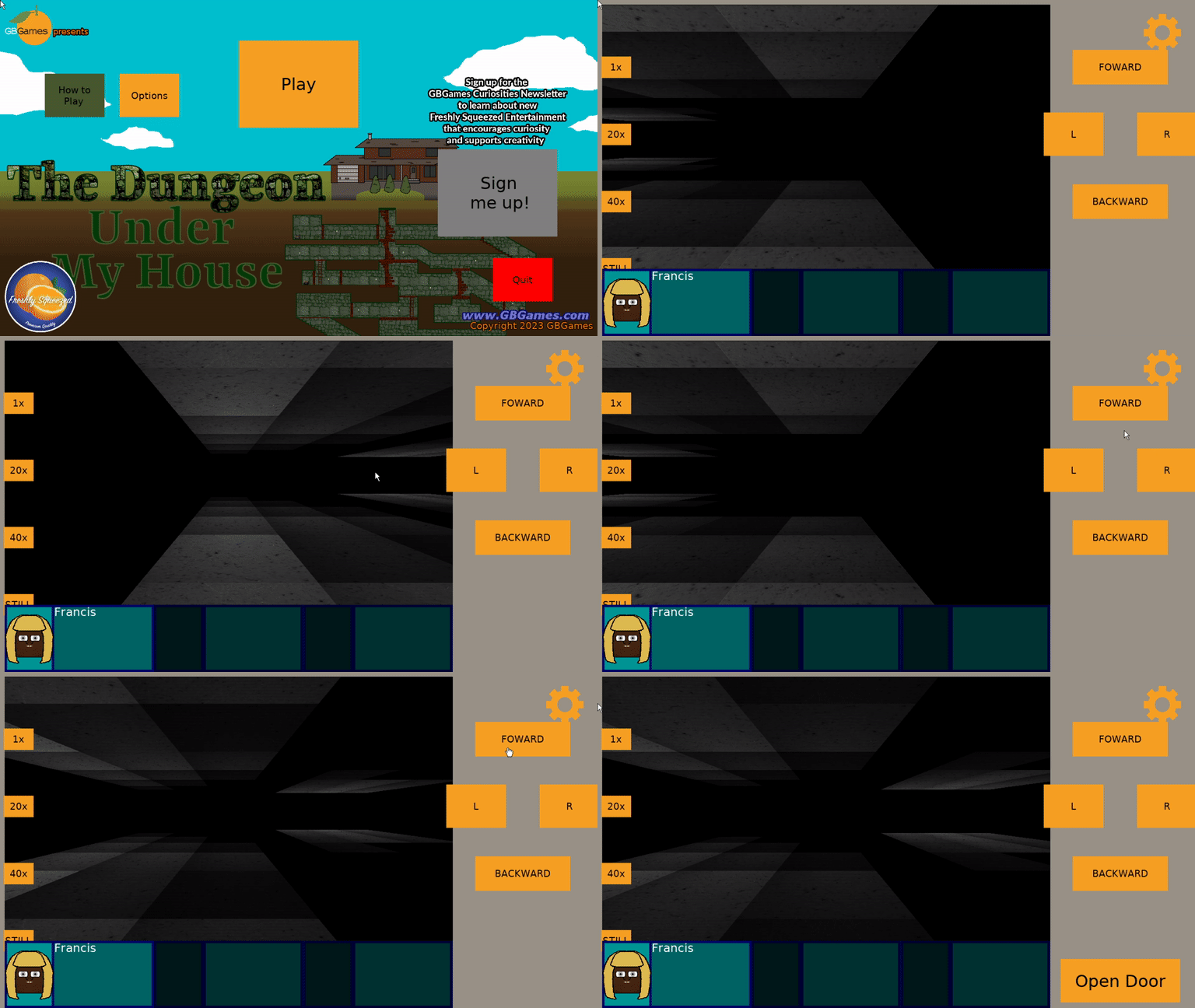
It isn’t smooth at all.
I was struggling with how to optimize this code. According to my poor man’s profiling (interrupt the program in the debugger, and see what function/line it seems to be processing most often), the code was spending most of its time looking up the dungeon cell’s lighting data.
WARNING: it gets a bit technical again
Now, as a reminder, I’m doing raycasting to simulate a 1st-person 3D dungeon. My game’s viewport is 960×576 pixels, and while drawing walls is for the most part 960 columns of processing, drawing the ceilings and floors is more of a pixel by pixel situation.
Most raycasting tutorials have a viewport that mimics what computers were capable of back when raycasting was the only real technique for faking 3D aside from drawing sprites that just happened to look 3D. Those viewports were something on the order of 320×200 pixels. When you don’t have hardware acceleration and only a slow processor, having only 320×200 = 64000 pixels to draw is quite fast, especially if it is just a tutorial and leaves a lot of extra things as homework for the developer.
960×576 pixels is over half a million pixels to process. That sounds like a lot, but without processing lighting, and hardcoding the texture used, it was quite fast before.
But now that I am handling lighting, and I eventually want different textures based on the dungeon cell being drawn, I can’t really see a way around it processing them pixel by pixel.
My game isn’t meant to be a real-time one, as it is a turn-based party-based RPG, but I did have visions of using this same raycasting code in future games that might be real-time, and I was starting to worry that it wasn’t going to be possible.
I was also worried that this game was just going to feel slow and sluggish when players tried it.
So what was slowing things down? Well, my dungeon was being represented as a std::map
For each pixel, a projection was made to figure out what cell was being drawn, then I would search the map for the lighting for that cell, and I would process it to modify the color so that the pixel would be darker or lighter.
The code that I used to find the lighting data originally looked like:
gameData.dungeonLighting()[cell]
This code worked for the walls just fine: the cell always existed in the map.
But this code did not work for the ceiling and floor because the projected cell would sometimes represent a tile very, very far away near the horizon, and that cell was unlikely to be defined in my dungeon.
So here’s the fun part: accessing a map with the [] operator using a key that doesn’t exist in the map will ADD AN ENTRY TO THE MAP!
I knew this fact about std::maps, but I was careless with my coding. It was functionally correct in that rendering was, in fact, happening as expected. It was just a very suboptimal way to go about it.
According to my debugging, my map went from about 30 entries to about 10,000+ entries!
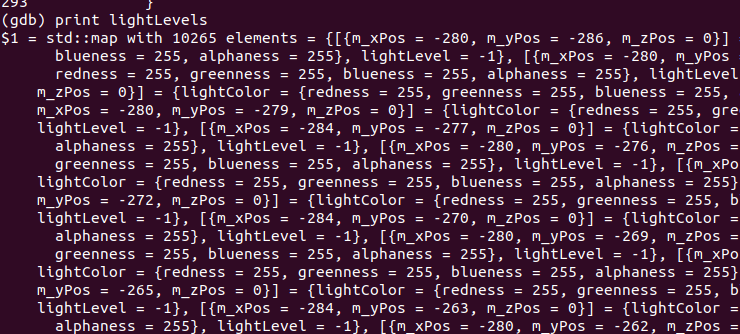
Which meant for each of those 960×576 = 552,960 pixels, I was searching through potentially 10,000+ entries in a map for a cell to get lighting data from. That’s a lot of accidental extra computation! Whoops!
So my first fix was to prevent additions to the code:
DungeonLight light;
std::map<Point, DungeonLight>::const_iterator iter = lightLevels.find(cell);
if (iter != lightLevels.end())
{
   light = iter->second;
}
else
{
   continue;
}
std::map’s find() doesn’t add entries to the code, and it returns the map’s end() iterator if it can’t find the entry.
Instead of needing to search through potentially 10,000+ entries, it was only 30ish entries, but that’s still a lot of computation time spent looking for data, especially if most of the cells being searched for are not in the map, so it is almost always worst-case scenario.
Even with std::map’s indexing/find operations running at logarithmic time (so, better than iterating through each entry), it is still too slow.
My initial attempts to solve this problem were to draw fewer pixels. I stopped drawing about 100 pixels before getting to the horizon, and I figured that I could always draw a single hazy fog sprite at the horizon to cover up the fact that nothing is getting drawn there. While it helped, it still felt jittery and slow. There is still too much computation happening, and I am still only drawing the ceilings and floors. What happens when I add back in the walls and doors, and when I start adding more things like other characters populating the dungeon?
Luckily, Joel Davis pointed me in the right direction. Why was I using the inherently slow map to represent my dungeon and lighting data when a 1-dimensional collection works much faster?
You know why, Joel (and anyone reading this who is also wondering)? Because until this project, I have never had to worry about how fast my rendering code was.
That isn’t to say that I was purposefully careless. I am not one of those people who say, “Eh, well, computers are fast enough today to not worry about it.” I think there are plenty of good reasons to still be respectful and efficient of someone else’s computer hardware’s and/or battery usage, and I try to be efficient in general.
But this is the first project that required me to worry about trying to do too much in one frame of rendering. Most of my past projects, the bottlenecks in my code were not related to rendering at all, but in pathfinding or other calculation-heavy systems.
Anyway, what Davis suggested is typical in games. Instead of a map or a 2-dimensional collection to represent a 2-dimensional tile-based map, use a 1-dimensional array/vector. Some very simple and quick math gets you the index you need into that collection, and lookups are no longer logarithmic but constant time.
Now, I will need more space to store the dungeon. Instead of a map of 30-ish entries, I need to accommodate entries in my vector for cells that might not exist. But I think this trade-off of speed vs memory is fine, as the extra memory used isn’t too great anyway.
So I hacked in a quick std::vector of DungeonLighting, piggybacking on my previous lighting code to populate it, and when I went to draw the ceiling and floor, I calculated the index of cell by:
index = cell.X() + cell.Y() * DUNGEON_DIMENSIONS;
Now, I can quickly check if the index is within the bounds of my vector. If it is, I then get the lighting data and process the pixel. Otherwise, I stop processing the pixel and move on to the next.
Mathematically, this means that my viewport needs only 960×576 = 552,960 potential lookups to process the ceiling and floor combined, which is a substantial improvement!
Visibly, IT IS SO MUCH FASTER, even after I put the wall and door drawing code back in:
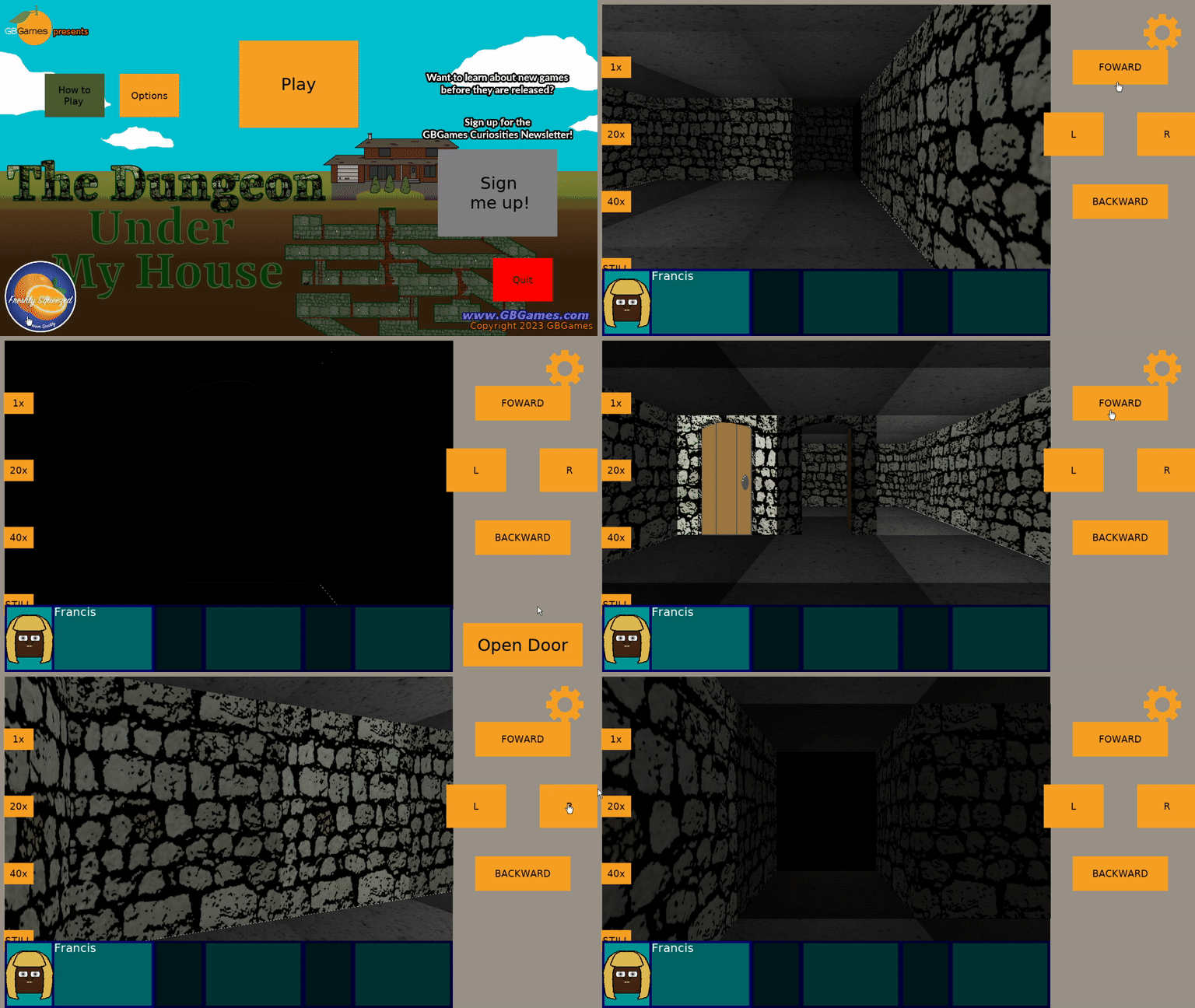
And I wasn’t done yet! There was still room for improvement in my dungeon rendering code in general. Drawing my walls and my doors still used the old map to get lighting data, so switching to the vector version there resulted in even more improvement, and in fact, I believe that my future real-time projects are likely to be a possibility!
There is still more optimization to do. Lighting data wasn’t the only thing I was looking up in a map, as the current texture to use for walls and eventually ceilings and floors is also something I searched for. Switching to a vector representation of the dungeon data should result in a much, much smoother experience for the player.
End of technical details
Anyway, I’ve been very happy to get the game to render the dungeon so much more quickly and efficiently. My previous optimization efforts prevented the rendering from occurring in the first place when it wasn’t needed, such as when the player is standing still. There’s no need to re-render the dungeon if it won’t change, after all, and I loved how putting my phone down meant that the battery life didn’t drain due to extra, unnecessary processing.
But now I can also be assured that the game will feel snappy AND avoid draining batteries even more.
I look forward to finishing up the optimization and finally solving the problem of the door that resists being rendered according to the cell’s lighting data. So far, my troubleshooting shows me that it is grabbing lighting data from a cell outside of the dungeon’s boundaries, so clearly my math is wrong somewhere when I determine which cell to use for lighting. But I haven’t figured out how it is wrong and what would be correct yet.
Thanks for reading!
—
Want to learn when I release The Dungeon Under My House, or about future Freshly Squeezed games I am creating? Sign up for the GBGames Curiosities newsletter, and download the full color Player’s Guides to my existing and future games for free!
Here’s the companion video for Monday’s Freshly Squeezed Progress Report: Dungeon Lighting:
Enjoy! And let me know what you think by replying below!
In last week’s report, I talked about replanning the remainder of the project backlog for The Dungeon Under My House, my second Freshly Squeezed Entertainment project.
This past week, I started work on my first set of tasks for the new year.
Sprint 2024-1: Pre-production and initialization
Planned and incomplete:
I took a family trip earlier in the week, but even so, I managed to get quite a bit done when it comes to handling lighting in the dungeon.
I envisioned having light sources that spread light to adjacent cells, with the brightness lowering as it goes, similar to the lighting in Minecraft. I also wanted certain dungeon environments to have an ambient light, so there is no actual light source, and those cells are just by default lit by a certain amount.
Now, that still leaves the question of how to actually represent and implement lighting in the dungeon.
Since the dungeon is represented as a collection of dungeon cells, I decided to create an associated collection of dungeon light levels.
So for a given cell at a particular location, there would be a dungeon light level at that location.
The dungeon light level is represented as a color and a value that indicates how bright the light would be.
0 would be pitch black, and 10 would be full brightness.
By default, the dungeon light levels would be whatever the ambient levels are for those corresponding cells.
Then for each light source, the light would spread while attenuating.
After manually trying a few approaches on paper, I hit upon a way to handle the light propagation and attenuation, and I wrote out my attempted algorithm before writing any code for it.
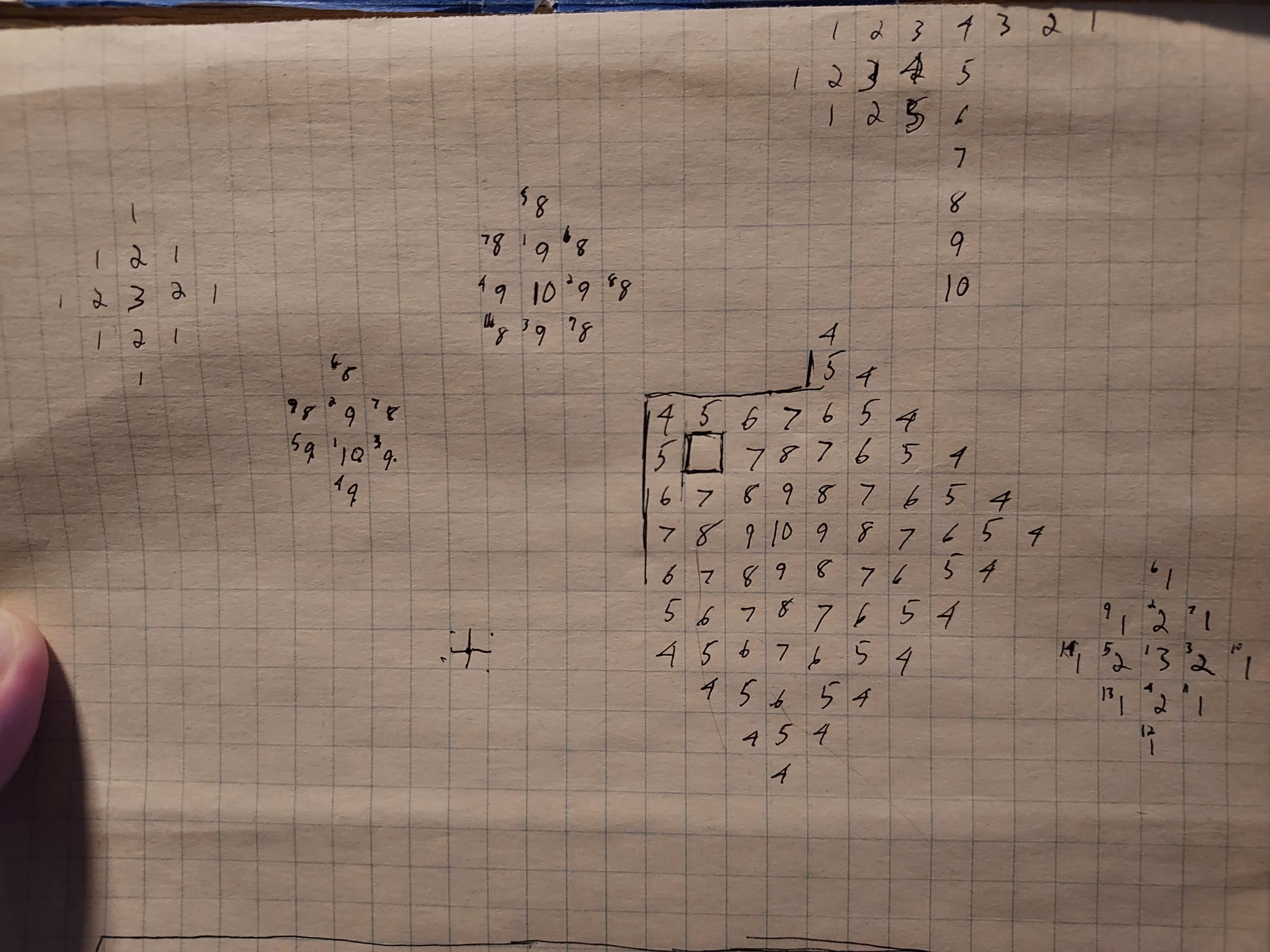
And then, since I knew this code could get complicated as I was figuring out edge conditions, I test-drove it.
And I was immediately glad I did. I could very easily have written code that I thought should work but that wouldn’t have done what I wanted. To date, I wrote seven unit tests for this lighting code, with each one either adding functionality or confirming that certain functionality would work in certain cases, such as dealing with closed vs open doors.
I added some logs and I modified the code to ensure that it didn’t process dungeon cells that it didn’t need to, which saves on processing time. This kind of optimization wasn’t captured in my unit tests, but the tests did verify that the end result was correct even with fewer cells getting processed.
While I am confident that this code is fairly efficient, I also know that I don’t need to call it frequently. Unlike an action game, which might need to update lighting in real-time, this game only needs to update the lighting data when something actually changes, such as when the player enters the dungeon, toggles a light switch, or opens or closes a door or otherwise changes an obstacle that blocks light.
By the end of the week, I was confident that the lighting system worked, so the only thing left was to make use of it when rendering the dungeon.
The dungeon walls and “things” such as doorways and ladders were fairly straightforward to update. Basically, for each column for my raycasting code, it would draw part of a texture and tint it by that cell’s color and brightness setting.
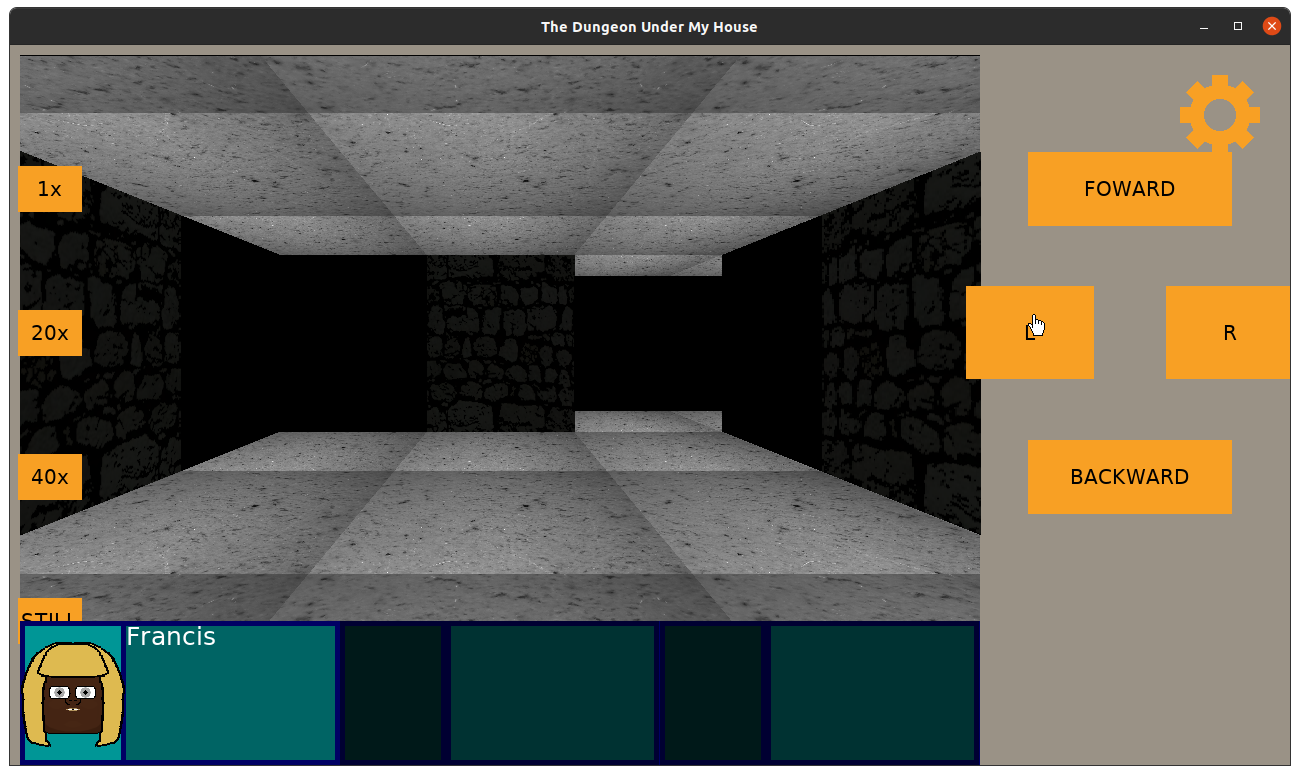
And it looks more or less fine (if a bit dark in this room). Currently I treat the brightness value as multiples of 10%, but perhaps 10% drops in brightness are too drastic, especially going from 10% brightness to 0%. Maybe instead of linear drops in brightness it should be a different curve, but perhaps brightness levels should be multiples of 5% and so the brightness level should go from 0 to 20. I’ll toy with it to see what might look good.
But first, I still need to tackle the ceiling and floors, which handle rendering a bit differently.
While the walls draw columns of textures and can be tinted, the ceilings and floors draw individual pixels of textures, each of which represents the actual pixel color from the source texture as a Uint32 value.
Now, when I usually deal with color, I am dealing with RGBA values, with each of R, G, B, and A being a value from 0 to 255, or even using hexadecimal values if I want to match what I might see in HTML color codes. So 0xff would be equivalent to 255.
Drawing walls, the only color I deal with is my tint value, which is the dungeon light level’s color multiplied by its brightness percentage.
But drawing the ceiling, I need to directly modify the color value of the pixel in question, and I am still figuring out exactly how. The Uint32 value should correspond to RGBA-like values, and in this case, I believe it is ABGR8888 in SDL2’s representation.
But I ran out of time before I figured out if merely bit-shifting and using my tint value directly in a similar way that I do for walls will result in something that looks right.
So that’s the first task to tackle this coming week.
Although I am also curious what is up with this doorway which is rendering at full brightness despite being in what should be a completely darkened room.
Thanks for reading!
—
Want to learn when I release The Dungeon Under My House, or about future Freshly Squeezed games I am creating? Sign up for the GBGames Curiosities newsletter, and download the full color Player’s Guides to my existing and future games for free!
Welcome to the first Freshly Squeezed Progress Report of 2024!
In my last report of the 2023, I was ending a bout with COVID, I had finished some tasks to make the intro sequence more interactive, then found a need to do an assessment of my project’s needs in The Dungeon Under My House, my second Freshly Squeezed Entertainment project.
Since then, I’ve focused mainly on creating a fresh backlog of tasks for the project.
Due to the fact that I was still recovering from COVID, I didn’t make a plan for the week after my last report, and I felt like I ended the year quite poorly. You can read more in my review of 2023 and preview of 2024 post, Planning 2024: Building on the Successes of 2023
I did, however, spend some time optimizing the dungeon rendering code, mainly by removing some text logging. I’m not sure how much faster I can make the inner loops of my raycasting code, but once the logging was removed, the game ran so much smoother on both my relatively underpowered laptop and my phone.
That logging helped me debug the code as I was developing it, and while I had turned off outputting the actual logs, the act of creating the logs was still slowing things down significantly.
The next bit of optimization was to only calculate what to render when needed. That is, calculating raycasting for the floor, ceiling, and walls, plus objects such as doors, is expensive, but if the player is idle, there is no need to do all those calculations each frame. This isn’t an action FPS, after all.
So now the dungeon view only re-calculates when the player is actively moving or performing actions, and otherwise it just re-renders what it figured out the last time.
My laptop fan used to whir loudly when I was in the dungeon even if I was standing still, but now I can leave the game idle for quite a long time without any noticeable battery usage or CPU usage.
Now, while I can’t see obvious ways to optimize the rendering code that calculates what sprites to create and/or render, I think I can still improve how it stores what to render. For instance, while the floor ends up becoming a single texture that gets blitted at once, I believe the walls and objects are still a collection of single-pixel wide columns, and if I similarly turned those into a single texture, then when the game is idle it can do three draws (ceiling, floor, and walls) rather than 2 + however many columns wide the dungeon view is. And in fact, why not just create one sprite rather than three while I’m at it?
Anyway, after I spent my first week of the year making plans for the coming year, I looked at my game’s backlog and found myself still unhappy with it. Some of it was created at the beginning of the project, and they seemed to prematurely assume certain mechanics and content that I have since decided I don’t want to put in the game.
So I created a new tab in my project plan’s spreadsheet to create a new backlog from scratch.
Since this game project is already over a year old and I want to ship it sooner rather than later, another benefit to redoing my backlog is that I can focus on trying to limit new features while also honing in on game content and game play more than infrastructure code.
As I said in my last report, “But after a year, I think I need to do an assessment of what features and capabilities I still need as well as what the game content will need to be. Too much is still too vague, and I really expected that more would be defined and playable by now when I first started. ”
I have since come up with almost 40 tasks. I know this isn’t a comprehensive list. It’s impossible to anticipate everything, at least in a reasonable amount of effort and time. Plus, in the past, I have found that implementing one feature sometimes reveals the need for more player feedback or other supporting features that I might not anticipate until I have played through the game or had a playtester tell me when they got confused or lost.
But I also know that there is still more to work on that I haven’t specified, especially since many of the tasks I did identify are still capability-related: features I implement that allow me to develop game play around them later.
For example, “Render animated dungeon textures” eventually will allow me to show water flowing on the floor or spilling from the walls. “Update which texture should be shown in dungeon cells” is about allowing me to change a texture based on the state of the game, so if I have a tunnel with no water, but later I want that tunnel to feature flowing water, this feature lets me do it.
But what isn’t quite captured thoroughly yet is that kind of game content. I don’t have tasks for creating those tunnels, or for creating the player’s ability to flood a tunnel with water by turning on pumps or opening gates.
I do have some tasks for finishing out the intro sequence, which involves illuminating a too-dark passage and using teamwork to remove a heavy beam from in front of a door you immediately discover. But I need to get concrete and specific about the rest of the actual dungeon contents.
Which brings me to the other part of my work this past week: worldbuilding.
About this time last year, I had ideas and even mapped out a rough idea of the “first” level (which I have since decided will be the only level for this game’s first release). I also had ideas for interactions with entities you discover in the dungeon.
But even today, none of it was very real. It was on paper, it was in my head, but it wasn’t detailed enough to actually implement yet.
So I spent time mentally walking through what the player could do after the intro sequence completes. What happens when the player opens that barred door and finds themselves in the rest of the dungeon? Where can they go? What can they do? Who can they meet?
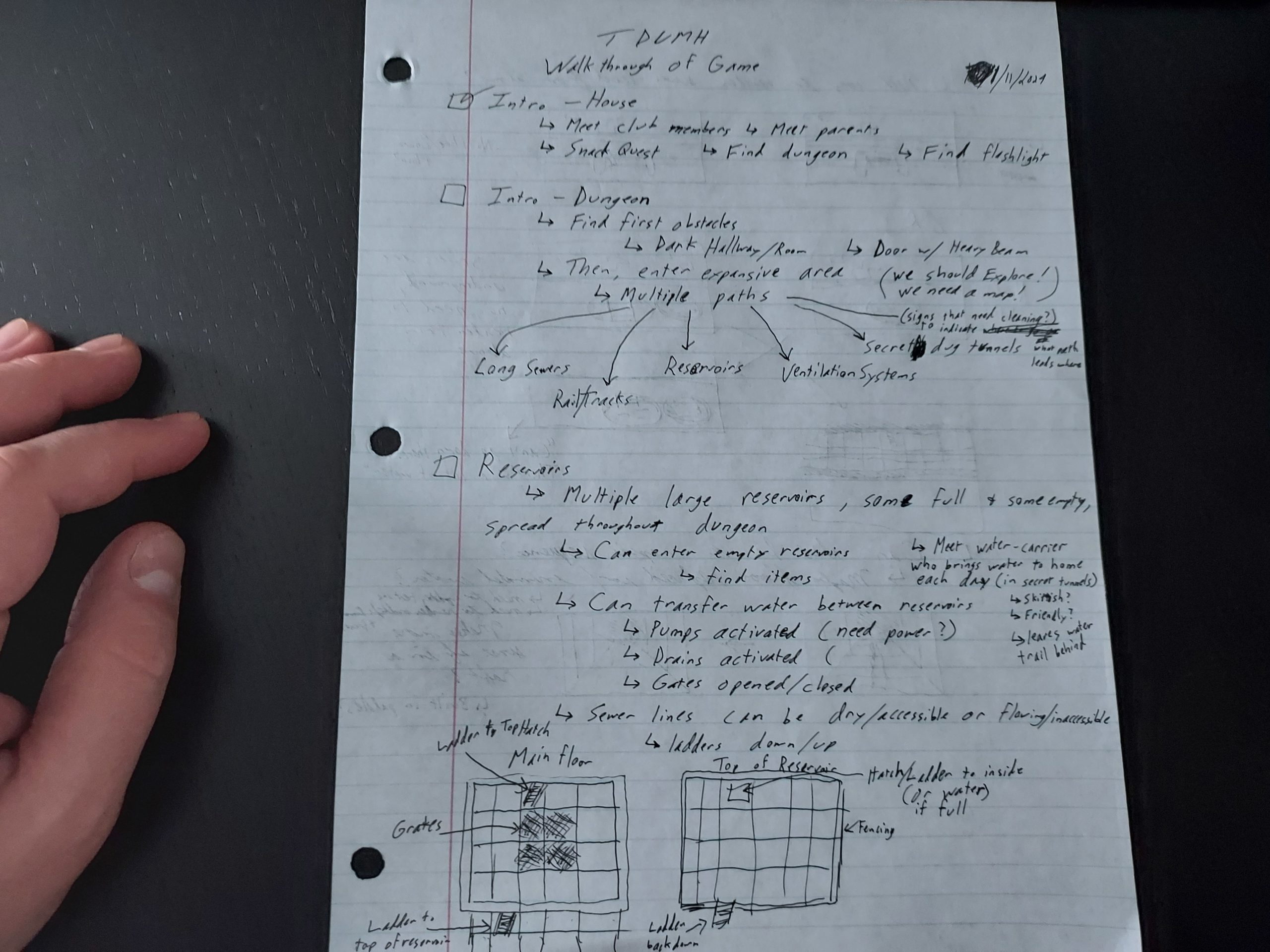
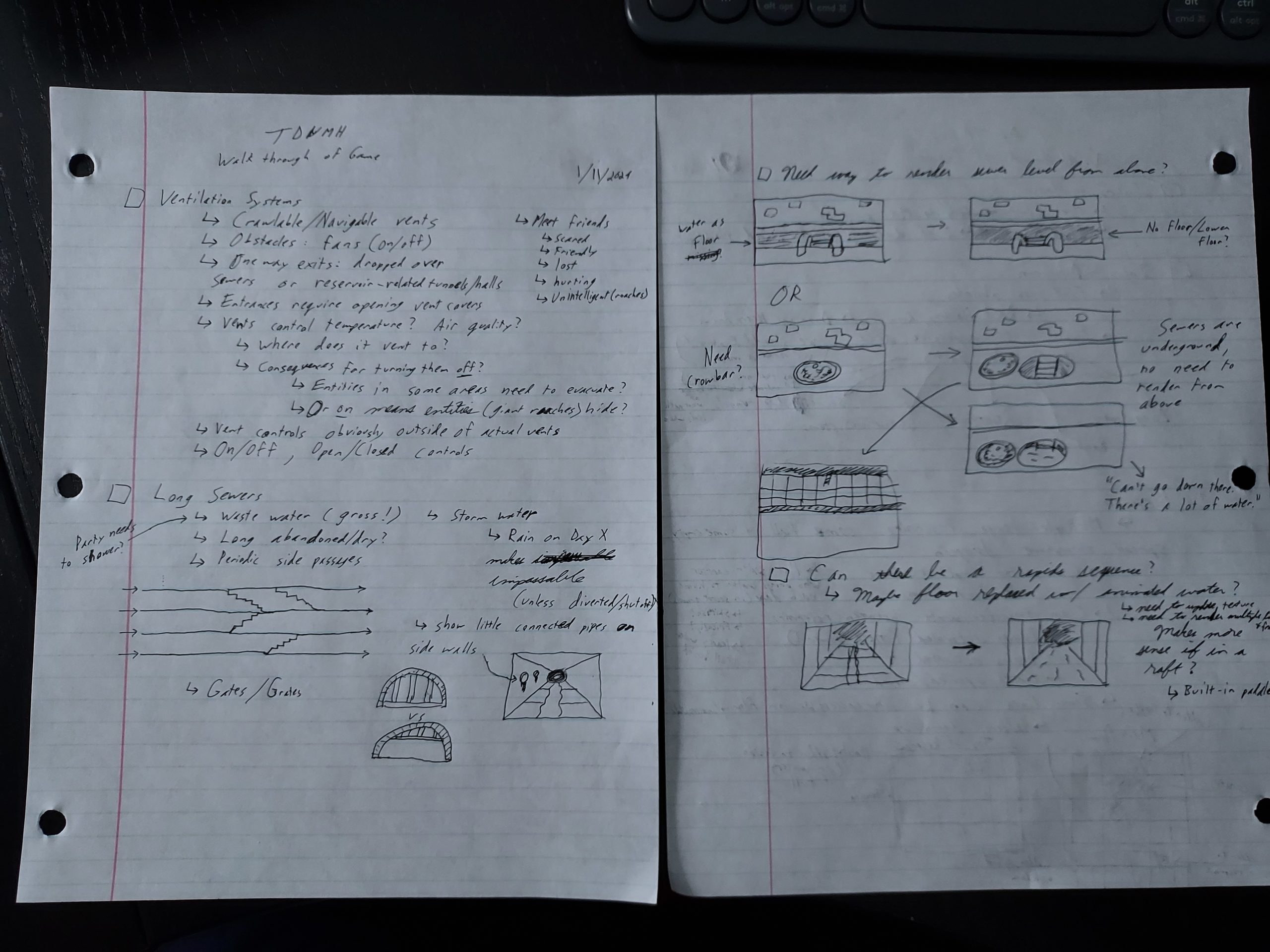
And then I tried to figure out how to ensure I need to implement the minimum number of new features.
I had envisioned a platform in which you can look down into a reservoir or a sewer tunnel, but with my custom raytracing code, I would need to implement a way to render floors differently based on height. It is probably easy and quick to do, but what if I just don’t do it at all? That’s even faster.
So my workaround is to allow access to reservoirs and sewer tunnels by way of hatches and ladders. That I can do with my existing features.
I have a rough idea for one particular character, and I hope to identify even more in the coming weeks. And since conversation is supposed to be such a key part of the game, I really want to continue working on the dialogue system.
But I need to capture these game content and game play tasks in my plan. I’m worried that if I only average a little over 7 hours a week like I did last year that it means I’ve already identified too much work to get done by the end of June. And that’s probably fine, it could be a little late. But I really don’t want to discover too late that this game requires another calendar year of development, so I’m hoping I can get as much of the known tasks in front of me so I can figure out how to prioritize them and how to scale them down. I’ve already decided that instead of having a special notification for some events that instead I could use the existing script/dialogue code to present information to the player, for instance.
Here’s to 2024! Thanks for reading!
—
Want to learn when I release The Dungeon Under My House, or about future Freshly Squeezed games I am creating? Sign up for the GBGames Curiosities newsletter, and download the full color Player’s Guides to my existing and future games for free!
Here’s the companion video for Monday’s Freshly Squeezed Progress Report: More Interactivity in Intro Sequence:
Enjoy! And let me know what you think by replying below!