Here’s the latest Freshly Squeezed Progress Report video, with footage covering the last month or so of development, including this past week’s report: Stamina, Energy, and Resting
Enjoy! And let me know what you think by replying below!
 GBGames
Here’s the latest Freshly Squeezed Progress Report video, with footage covering the last month or so of development, including this past week’s report: Stamina, Energy, and Resting
Enjoy! And let me know what you think by replying below!
In my last report, I added the concept of time plus a watch on the HUD that allows the player to track that time in The Dungeon Under My House, my non-violent, first-person role-playing game and my second Freshly Squeezed Entertainment project.
Sprint 2024-23: Stamina and resting mechanics
Planned and incomplete:
As I said in the previous report:
I decided a core part of the game would involve managing time. While the game is turn-based and wouldn’t require dexterity and perfect timing of button presses to do well, it will require the player to pay attention to the clock and to manage time as a valuable and scarce resource.
Why? Because I decided that the major theme of the game is the idea that there is too much to do and not enough time to do it all.
And with a concrete concept of time, the rest of the mechanics can work to either directly or indirectly involve time somehow.
I decided that another major resource to manage is the stamina of your party members. Taking certain actions should use up stamina, and so should walking in the dungeon.
First, I needed to show a party member’s stamina in the HUD. I spent some time thinking through how to represent it in a way that communicates everything useful to the player.
Having a meter alone tells you how much current energy exists relative to the maximum amount, such as:
“(======____)”, but I felt like it left out important information such as how much energy exactly exists. Someone with half of 10 total energy would look the same as someone with half of 100 total energy.
Having just numbers will give that information, such as “ENERGY: 3/10”, but you lose the ability to see at a glance how much energy the party member has relative to their maximum amount.
I could have both a meter and numbers, and that seems like the best of both worlds, but it risked crowding the HUD.
I eventually came up with the idea of using a row of orbs to represent energy, with smaller orbs underneath to show how much the last filled orb has left in it. The challenge right now is that I still don’t know what magnitude/scale makes sense for stamina. I didn’t want to spend time making a pretty UI widget only to find out that it doesn’t make sense when I have to change the general range of values that you can have for stamina.
Having a max of 10 energy can be represented by 10 bars in a meter or 10 orbs, but what if I decide that 5 makes sense? Or 1000 to give the player more flexibility with how they use their energy?
So for now, I went with using simple numbers, knowing I’ll want to revisit this stamina HUD representation question later when the game’s numbers are more nailed down.
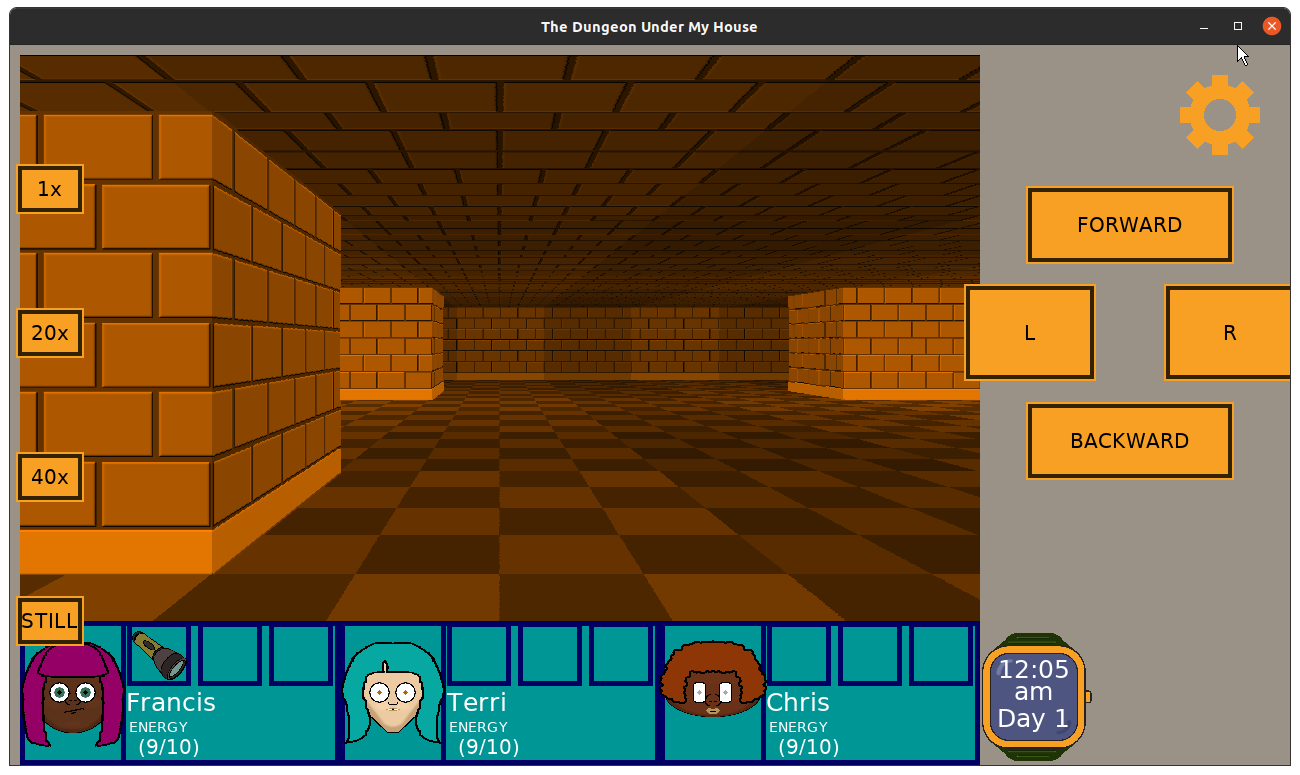
Next, I needed to use stamina when walking in the dungeon. I already had a way to add 5 minutes to the time when you walk 30 steps, so I just piggybacked off of that code to also decrease the stamina of the party members by 1.
Then, I added the ability to rest in order to recover stamina.
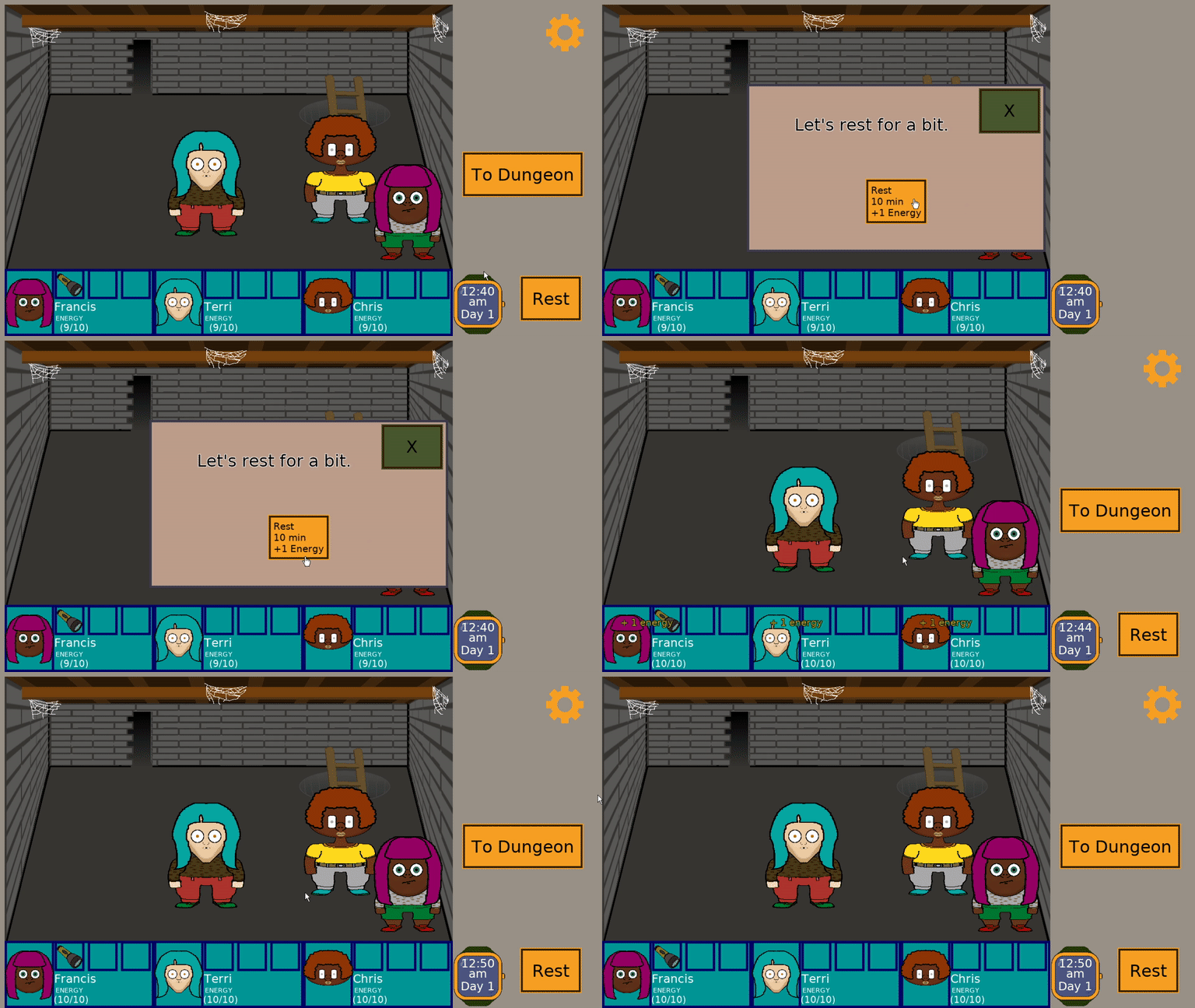
As you can see, you can choose to rest for 10 minutes in exchange for gaining back +1 energy for each party member. I also considered adding other options, such as resting for longer periods of time in exchange for more energy, but I’ll start with this one option.
I spent quite a bit of time trying to figure out where the Rest button should live, though. I originally envisioned it being part of the watch’s functionality. If you click on the watch, perhaps you can set an alarm, and one choice you can make is to rest 10 minutes.
But managing time was conceptually different from managing stamina, and I realized it would be counterintuitive to lump it in with watch utilities.
I don’t like it on the main HUD, because I think choosing to Rest won’t be as common an action as what the navigation controls provide, but similar to the choice to represent stamina with simple numbers for now, I’ll revisit this HUD question once more of the game is working together.
The last thing I needed to do was handle the situation in which the party’s stamina hits 0 energy, forcing them to rest.
If the entire party is at 0, it makes sense for force a 10 minute rest. But what happens when at least one party member isn’t at 0?
I’m thinking about being somewhat forgiving here. Maybe some dialogue pops up, offering the chance to rest or to continue on, knowing that the other party members now need to use more of then own energy to make up for it.
So for each party member at 0, the remaining party members might use up 1 extra energy when moving around. So if one party member is at 0, the other two members each use up 2 energy instead of 1 for every 30 steps. And if two members are at 0 stamina, then the remaining party member uses 3 energy. Maybe. I’ll toy with this idea for the future.
For now, though, I decided to implement one idea I came up with while sketching out some of these mechanics: Exhaustion status.
If a party member hits 0 energy, they get an “Exhausted” status, which will create a bit of scripted dialogue to that effect. If all members are similarly exhausted and out of energy, then the only option is to rest for 10 minutes.
Otherwise, if there is at least one party member who has energy, then a second option to continue without resting is available.
I’m not finished with this part. I still need to indicate on the HUD that a party member is exhausted, and I’m trying to figure out how to best convey the consequences of continuing without resting.
I’m also trying to figure out what consequences make sense for having the Exhausted status. Maybe all actions take an extra energy to perform, or twice as much energy for perform while Exhausted? Perhaps, upon returning back to the house, party members who are Exhausted cannot return to the dungeon for a day (they need to rest, after all), forcing the player to choose other party members. I like this idea because eventually I want the player to have reasons to choose some party members at different times, and avoiding exhausting your party becomes important in its own right to avoid being without a key party member for a particular task.
Since time plays such an important role, using the option to Rest should be something the player doesn’t want to do unless they have to. But I’ll need more of the game in place to see how it all plays out.
Thanks for reading!
—
Want to learn when I release The Dungeon Under My House, or about future Freshly Squeezed games I am creating? Sign up for the GBGames Curiosities newsletter, and download the full color Player’s Guides to my existing and future games for free!
Last week, I reported that I successfully loaded the level data from a file in a way that works on Android and other platforms seamlessly, then spent time on design and planning for The Dungeon Under My House, my non-violent, first-person role-playing game and my second Freshly Squeezed Entertainment project.
I worked on adding the concept of Time into the game this week.
Sprint 2024-22: Project Management
Planned and complete:
I decided a core part of the game would involve managing time. While the game is turn-based and wouldn’t require dexterity and perfect timing of button presses to do well, it will require the player to pay attention to the clock and to manage time as a valuable and scarce resource.
Why? Because I decided that the major theme of the game is the idea that there is too much to do and not enough time to do it all.
And with a concrete concept of time, the rest of the mechanics can work to either directly or indirectly involve time somehow.
To start with, the main values to worry about are the minutes, hours, and days that can pass as the player plays the game. While I want the game to end after a period of in-game time has elapsed, I haven’t decided if it will be a weekend, or a week, or an entire month.
But the player should know how much time has passed, so I created a watch that will be on the HUD and visible almost all the time.
Eventually this watch will be a button that the player can press. I envision being able to set alarms and reminders to help the player manage their time.
But for now, it just needs to display the current time and day.
I also advanced time by five minutes whenever the player walks 30 steps in the dungeon. I don’t expect that either of those numbers will be in the final game, but it is a start.

I think the watch looks pretty decent, and with time in the game, I can build more mechanics on top of it, and I can even create an ending, which is what I anticipate doing next.
Thanks for reading!
—
Want to learn when I release The Dungeon Under My House, or about future Freshly Squeezed games I am creating? Sign up for the GBGames Curiosities newsletter, and download the full color Player’s Guides to my existing and future games for free!
In my last report, I added comic strips to my scripts and worked on getting the Android build to work after adding the ability to load the level layout for The Dungeon Under My House, my non-violent, first-person role-playing game and my second Freshly Squeezed Entertainment project.
Sprint 2024-21: Project Management
Planned and complete:
As I said last time:
But ever since I added the dungeon loader to load the dungeon from a JSON file, I found my Android build crashes.
It turns out that I had a discrepancy in my build scripts that didn’t add the JSON file from my resources directory into the correct location when I built the project for Android.
Once I fixed it (and fixed the typo that prevented it from copying the file still), it still crashed. It turned out that I ran into a known issue when loading files from the Android assets directory, which you cannot simply open using std::ifstream since it is in the APK’s .zip format.
You are supposed to use the Android AssetManager, but I am under the impression that libSDL2 provides a mechanism to do so, especially since many of the assets I already load, such as images and audio, load fine using the existing image-loading functions.
SDL2 provides a mechanism to do so. If instead of using std::ifstream I used SDL_RWops, under the hood it will determine if it needs to use Android’s interface to load a file from the assets directory.
Unfortunately, the documentation for SDL_RWops isn’t terribly great, and it seems to assume you already know what you’re doing. If you really dig into the libSDL2 and related libraries such as libSDL2_image, you’ll see that there are plenty of places that SDL_RWops is used to load and write files.
For example, in SDL2_image, there is the function IMG_Load() that you might use to load any type of file, such as PNGs or BMPs. Under the hood, it delegates the work to SDL_RWFromFile() and then uses the resulting SDL_RWops to load the data for the image into an SDL_Surface object.
That’s great for images, but what about my JSON file that represents the dungeon’s level data?
I found a number of people doing strange things like copying character by character a file from the assets directory into the player’s SDCard, and I thought I was going to need to do some low-level data manipulation to eventually get the entire JSON document into an std::string. Plus, how was I going to get an SDL_RWops to know how to read my file?
But then I discovered that there is a handy function:
void * SDL_LoadFile(const char * file, size_t * dataSize);
The docs say “Prior to SDL 2.0.10, this function was a macro wrapping around SDL_LoadFile_RW.” Of course, when I look at the code, it still wraps that _RW function today.
Anyway, long story short, using this function, I can get the contents of my JSON and load my dungeon from it as usual. And re-reading the docs right now, I realize I might have a memory leak to deal with. But otherwise, my Android build runs again!
What’s next? Unfortunately, I have been struggling with this question. I have a backlog of tasks that add capabilities and features to the game. For example, items and inventory exist, but there are no items in the dungeon or a way to interact with or see them even if they did.
But I feel like I’m missing something more fundamental than a random assortment of features.
So I spent time writing down what I want the game to be about. Not just the idea of a non-violent, 1st-person role-playing game, or the idea that the game will revolve around conversations and knowledge-acquisition, but the meaning behind the game that I want to convey.
Throughout development I’ve thought about the game’s themes and even wrote down some of those thoughts, but now I’ve settled on a particular theme, and it is helping me to drive a number of mechanics that support it.
I’ve also retroactively tried to think through what it means for the game to be party-based and have a 1st-person perspective. I could make a game that is mechanically indistinguishable from a single-character RPG with a top-down perspective, or I could be deliberate about taking advantage of the strengths and avoiding the weaknesses of the specific format I picked.
I still worry that the minimum amount of work left on this project is a LOT, but I also feel like I have a better idea of what forward motion looks like. I am less concerned about random mechanics and more about what supports the theme.
And for reasons that will make sense in future posts, I think the core mechanics will all revolve around Time as a concept, something I’ve thought about putting into the game since the beginning but only now feel confident in working with.
Thanks for reading!
—
Want to learn when I release The Dungeon Under My House, or about future Freshly Squeezed games I am creating? Sign up for the GBGames Curiosities newsletter, and download the full color Player’s Guides to my existing and future games for free!
Last week, I reported that I updated the art in the titular dungeon of The Dungeon Under My House, my non-violent, first-person role-playing game and my second Freshly Squeezed Entertainment project.
I also started the work of making a part of the intro sequence clearer, and I finished that work this past week.
Sprint 2024-20: Project Management
Planned and complete:
Unplanned and incomplete:
To start with, there is a part of the intro sequence in which the player goes into the basement to look for a jar of pickles, as requested by the parents in the kitchen, and then for some reason a secret door appears.
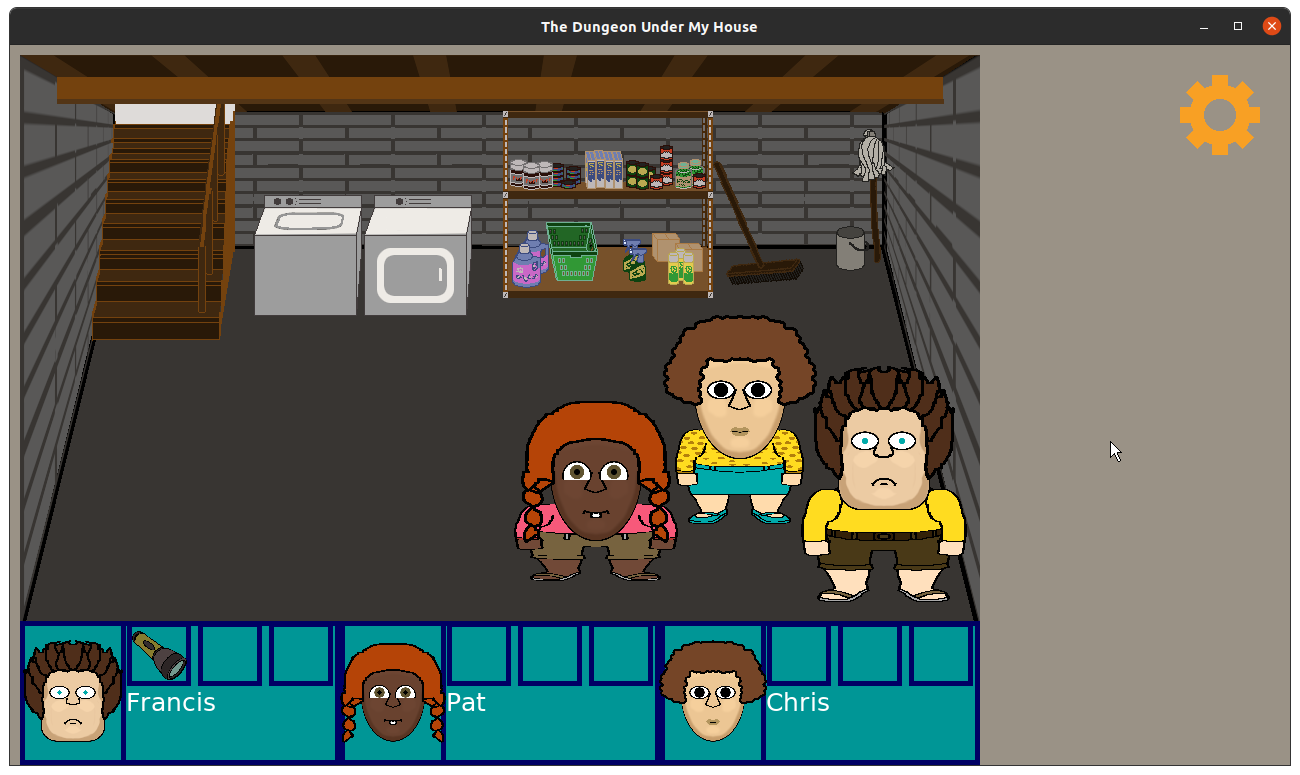
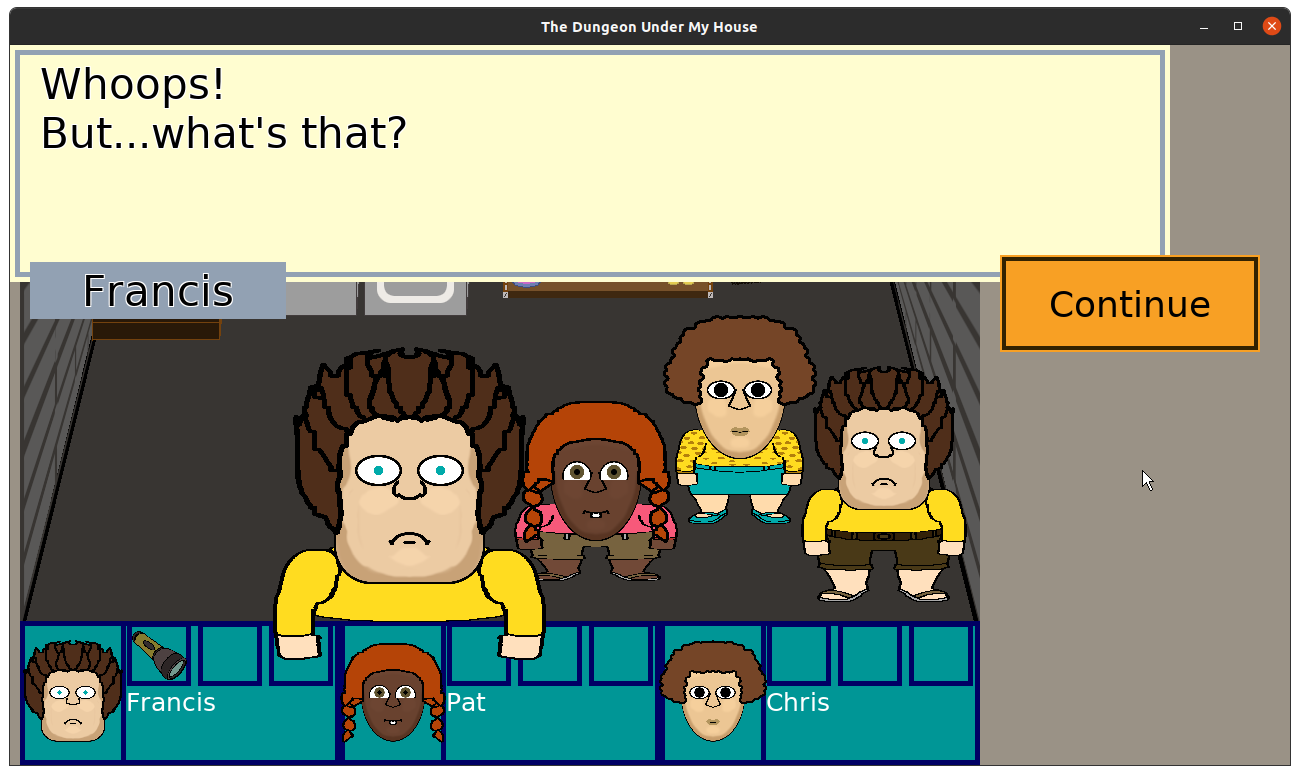
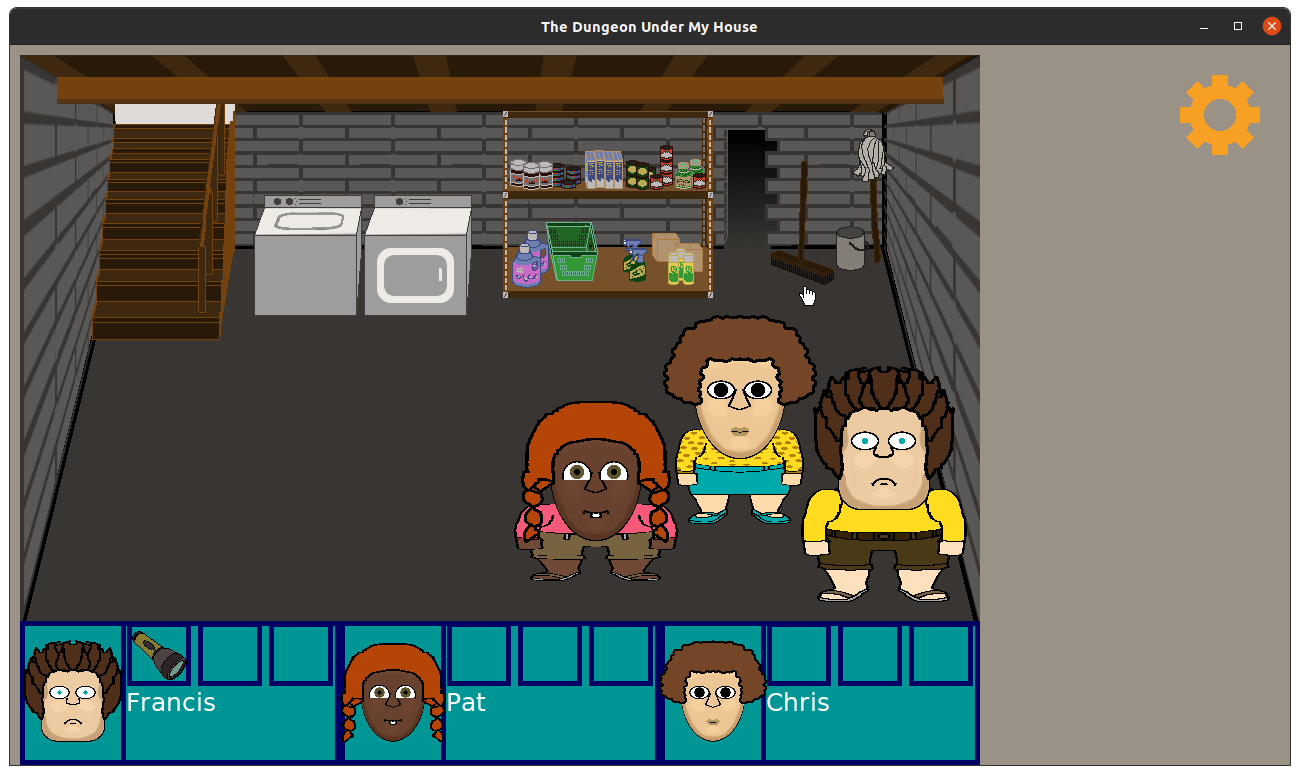
In my head, I had a somewhat elaborate series of events involving knocking over the broom, which hits a secret button in the wall, which opens the door.
But none of that was communicated to the player, so it just looked like the player clicked on the shelves, saw the main character Francis say something in shock, then suddenly there is an entryway that may or may not have been noticed as being new depending on if the player was paying attention to the scene before and after.
Now, I could have used animated sprites and effects to make it clear what was happening, but that sounded like a lot of work for a one-time situation, and I feel like this project is too big as it is.
So after a bit of thought, I came up with what I hope was an effective solution while also requiring the least amount of effort.
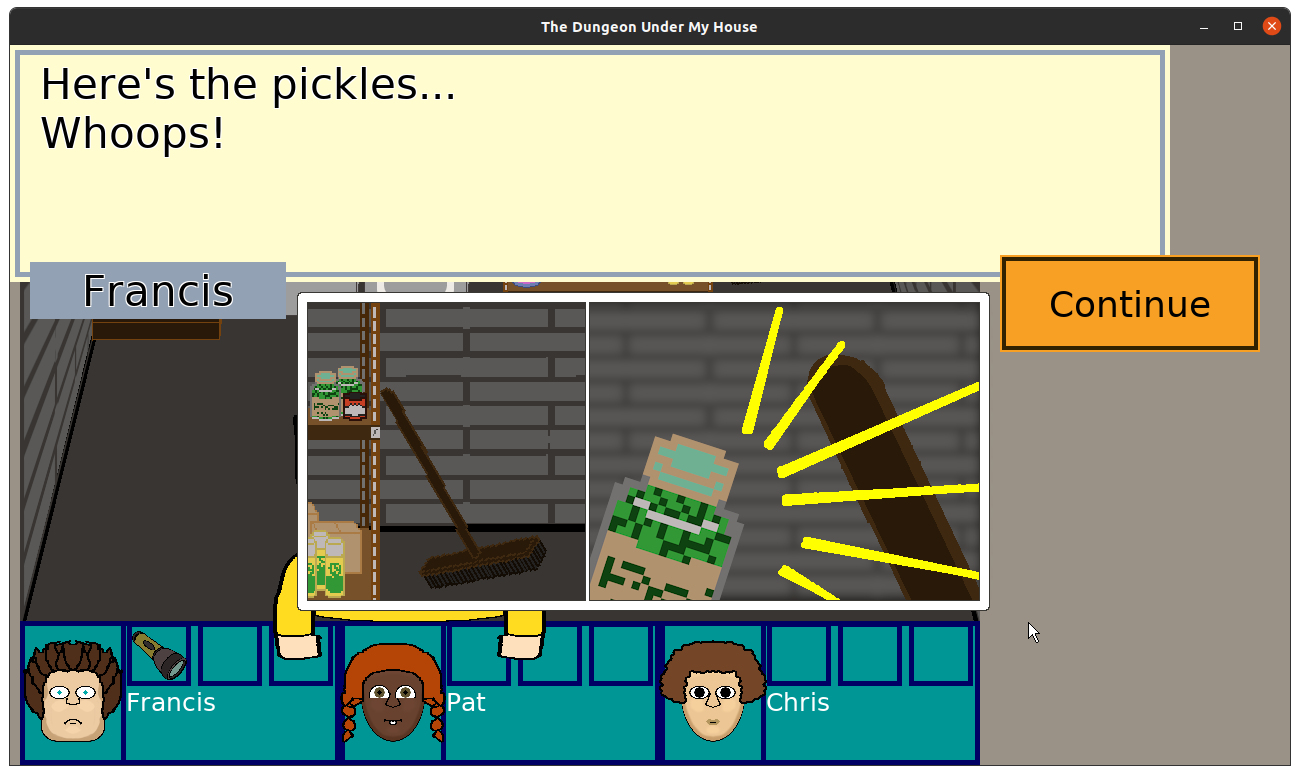
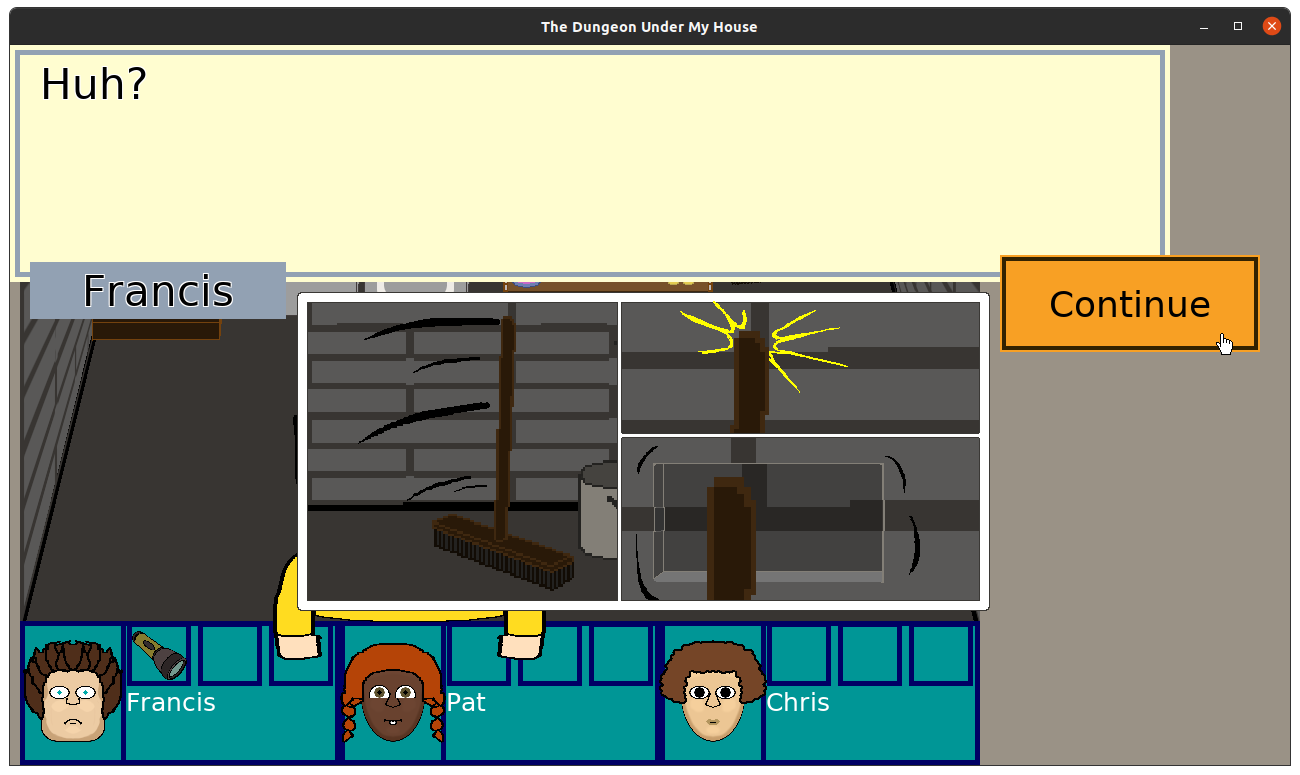
So I made some comic strips to illustrate what happened.
I’m hoping these two sets are enough, but I could always add a third showing the secret door opening to make it more obvious if it is still needed.
After that work was done, I spent time trying to identify all of the work I might have left in this project.
And it is a lot. I mean, if I was dedicating full-time effort to it, it would probably only be a few months of work, and since I’m sure I am underestimating it, maybe some small multiple of a few months.
But since I am working mere hours at a time on it in a given calendar week, I’m worried that I’m looking at another year of development, and I’m sure I’d find new features and fixes that take up time, too.
So I think my most immediate project management concern is nailing down exactly what this project absolutely needs. For example, I had ideas of entities navigating throughout the dungeon on their own based on their own agendas and time passing.
I can avoid an entire category of work involving pathfinding and decision-making if I decide that it can be in a future project or potential sequel instead. Dungeon entities might just need to be statically placed for this project if I want to finish it in a more reasonable period of time.
On the other hand, since this game is meant to be non-violent, which means I don’t get to rely on existing and tried-and-true game mechanics related to health, weaponry, armor, and combat, I wanted to focus on relationships. The entities you encounter and your interactions with your own party members NEED to be at a minimum level of complexity to make it interesting. When cutting scope, I need to be mindful that some things getting cut will reduce the richness of those interactions.
Meanwhile, I wanted to address what I thought was going to be am minor fix to ensure the project runs on my Android phone again. It makes it easy to show to people what I’ve been working on if I have the latest version available in my pocket.
But ever since I added the dungeon loader to load the dungeon from a JSON file, I found my Android build crashes.
It turns out that I had a discrepancy in my build scripts that didn’t add the JSON file from my resources directory into the correct location when I built the project for Android.
Once I fixed it (and fixed the typo that prevented it from copying the file still), it still crashed. It turned out that I ran into a known issue when loading files from the Android assets directory, which you cannot simply open using std::ifstream since it is in the APK’s .zip format.
You are supposed to use the Android AssetManager, but I am under the impression that libSDL2 provides a mechanism to do so, especially since many of the assets I already load, such as images and audio, load fine using the existing image-loading functions.
So I ended the week investigating how to load my text file into my project. Once I have the Android build functional again, I’m going to be doing some serious design and project management work.
Thanks for reading!
—
Want to learn when I release The Dungeon Under My House, or about future Freshly Squeezed games I am creating? Sign up for the GBGames Curiosities newsletter, and download the full color Player’s Guides to my existing and future games for free!
In my previous report, I finished my main intro sequence work and fixed a number of issues that were bothering me with The Dungeon Under My House, my non-violent, first-person role-playing game and my second Freshly Squeezed Entertainment project.
I also decided to update the in-dungeon art to replace the temporary art.
Sprints 2024-18 and 2024-19: Art
Planned and complete:
Unplanned and complete:
Unplanned and incomplete:
Having a map editor that allows me to specify arbitrary floors, ceilings, and walls in a particular grid cell, it was time to finally take advantage of it to have the game render those different kinds of textures.
And I focused on this work mainly because the game looks and feels more exciting now.
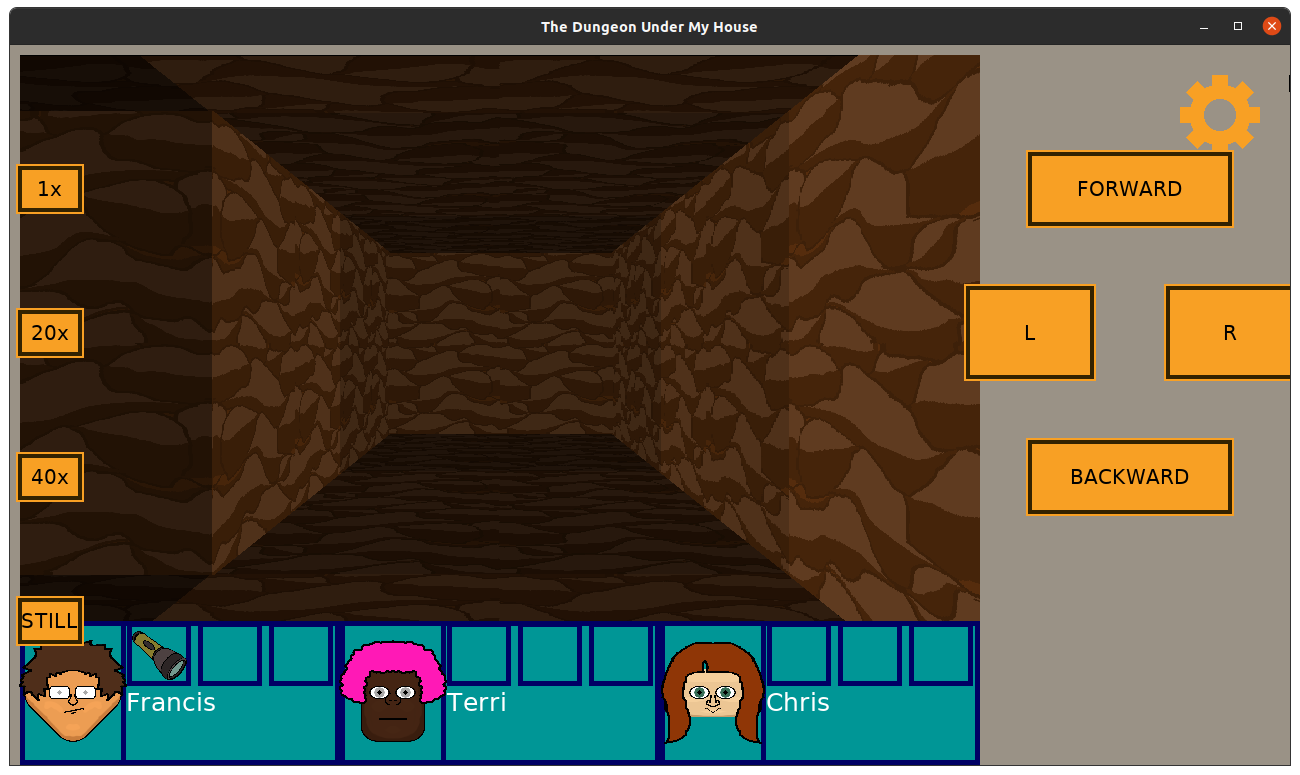
Last time, I already showed my new dirt wall texture.
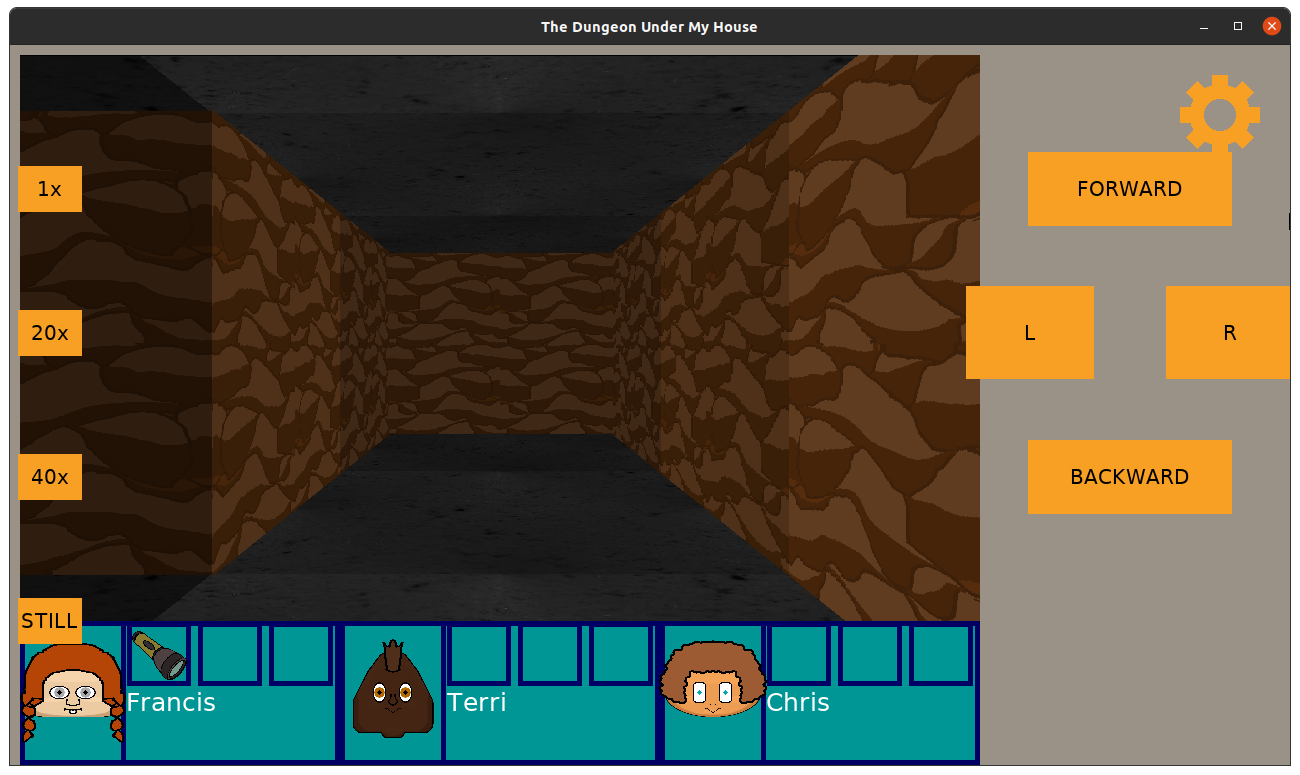
Now, you can see what the dungeon looks like when the floors and ceilings match.
In fact, I finally replaced the stone wall texture I was using everywhere (here’s a screenshot from almost a year ago):
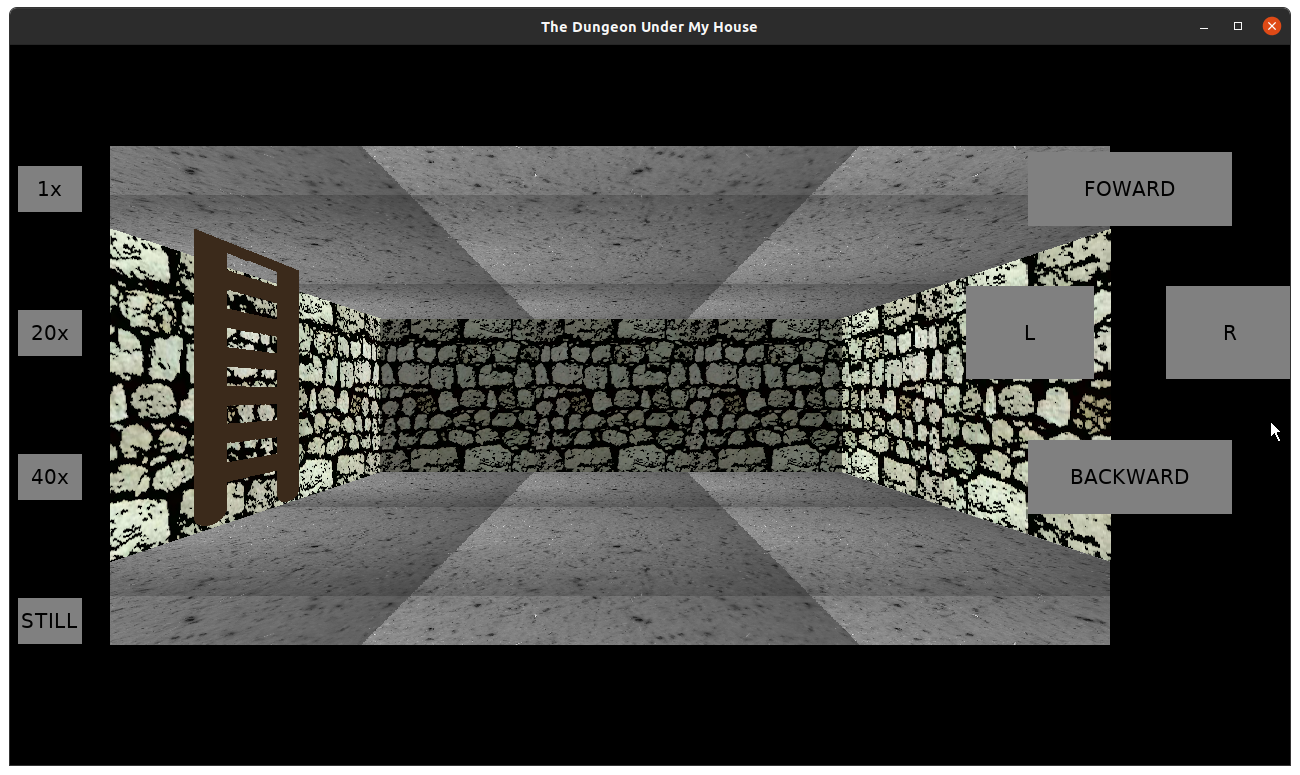
With this one:
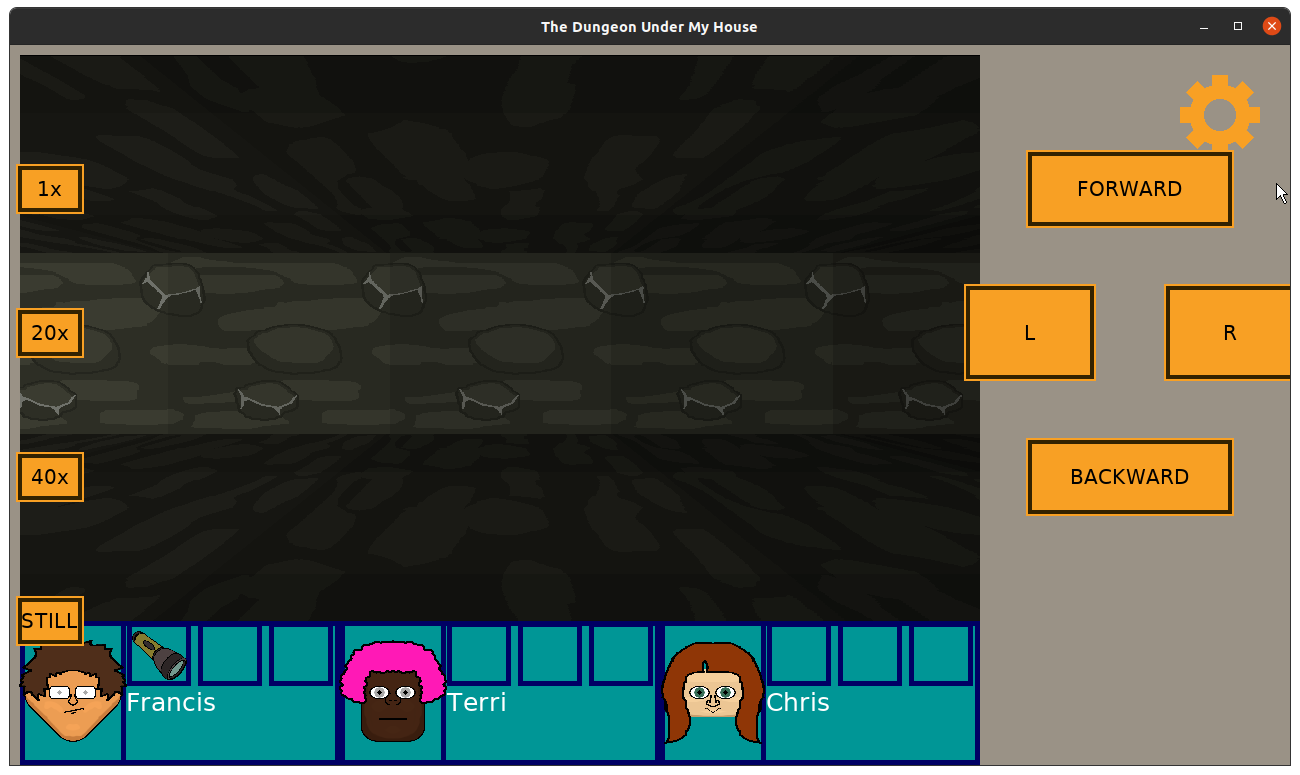
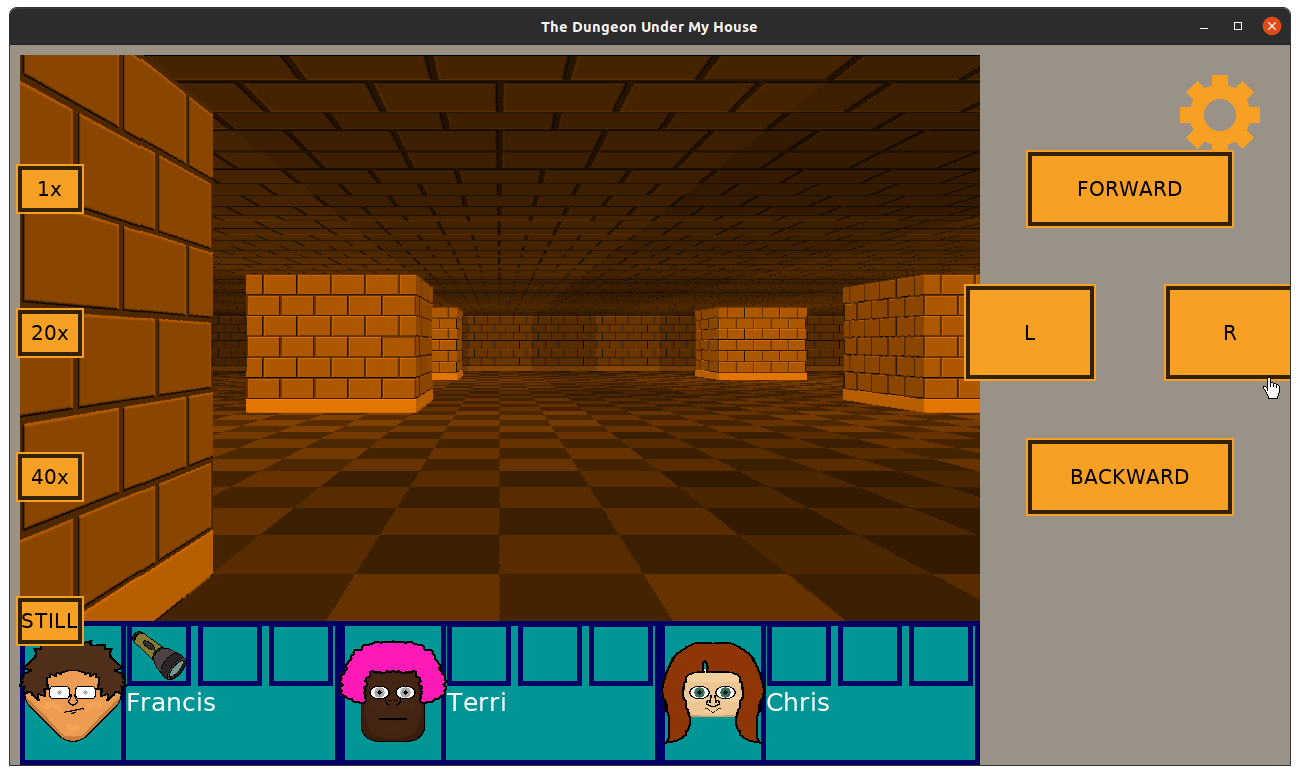
And now the large room has its own look and feel (although I still need to figure out why it is tinted orange instead of red like I expected):
Over the last couple of weeks, I spent a little bit of time looking into the architecture of buildings such as Chicago’s Union Station to get some inspiration. While I won’t be able to create multiple floors and large vertical spaces with the technology I’ve created, I do think I will need to find ways to ensure there are unique designs and identifiable landmarks, such as signs and art on walls or statuary.
But for now, I fixed a minor issue with a bit of text showing up behind some buttons, then worked on polishing up the intro sequence by going back to the part where the player discovers the secret 2nd basement room.
Right now, there is just a script that hints that something happened, and then suddenly there is a door where there wasn’t one before. So I’m working on making that more obvious. I could make an entire animated sequence, but I think I will opt for simple solutions.
Why? Well, since it is June, it means that I’m almost halfway through the year, and it has me thinking about stepping back and figuring out what will and won’t be in this game.
I feel like I am very far away from even a stripped-down, simplistic vision I have for this game. I can’t keep adding features indefinitely, and I don’t want to spend years on this one project. So I’ll be focusing on project management. It’s less about managing scope creep and more about clearly defining the scope in the first place. Too much is still too vague and open to possibility as opposed to nailed down and determined.
Thanks for reading!
—
Want to learn when I release The Dungeon Under My House, or about future Freshly Squeezed games I am creating? Sign up for the GBGames Curiosities newsletter, and download the full color Player’s Guides to my existing and future games for free!
Here’s the latest Freshly Squeezed Progress Report video, with footage covering the last few weeks of development, including this past week’s report: Scripts, Lighting, Fixes, and New Art
Enjoy! And let me know what you think by replying below!
Last time, I reported that it was a lot easier to create the level layout for The Dungeon Under My House, my non-violent, first-person role-playing game and my second Freshly Squeezed Entertainment project.
I spent the last two weeks integrating a scripted scene, then fixing a few graphical issues that had been bothering me.
Sprints 2024-16 and 2024-17: Level editor and Lighting & Art
Planned and complete:
Unplanned and incomplete:
It didn’t take me long to finish the work of adding tags to the level editor. Basically, I can have sections of the dungeon arbitrarily tagged with a string, and I can use the trigger I created last time to make something happen when the party enters that tagged area.
Which allows me to have this scripted sequence when the party enters the new large room:
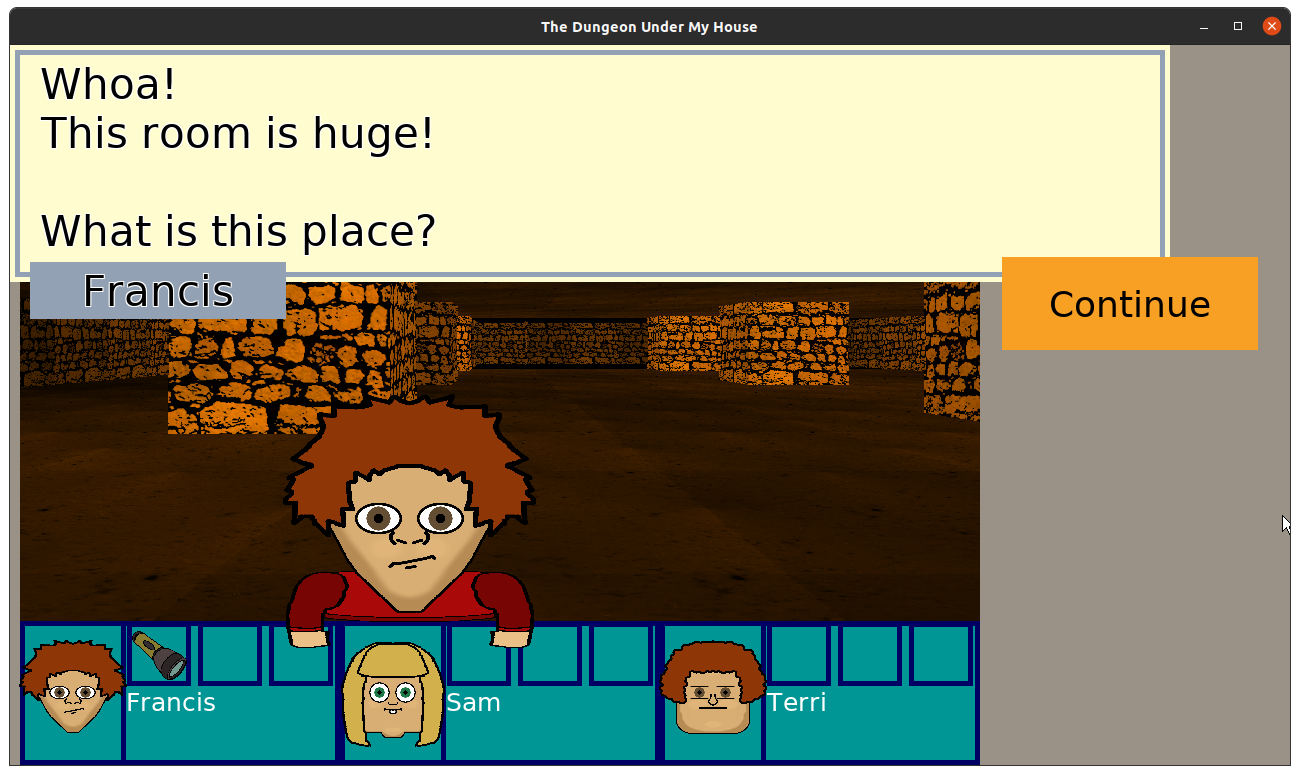
And with that task done, the entirety of the work to support the intro sequence I had planned is functionally complete!
There are some areas that need more iteration, such as the part when you first discover the secret room in the basement, but the game now supports organic conversations, scripted conversations, scripts and flags, updating room art and objects based on player actions, items and inventory, interactive furniture in rooms, lighting and dynamic lighting thanks to a flashlight, a new heavy door with a minimum party size criteria to open it, and the ability to load levels from a file so that it is easier for me to create the titular dungeon.
So…now I just make the rest of the game, right?
Well, I wanted to fix a few issues that have been bothering me.
First, I wanted to make the flashlight feel better. My initial attempt had a single beam of light project out in front of the party, and it is functional, but in practice walking through an otherwise dark area felt like walking in a narrow hallway with black walls on either side.
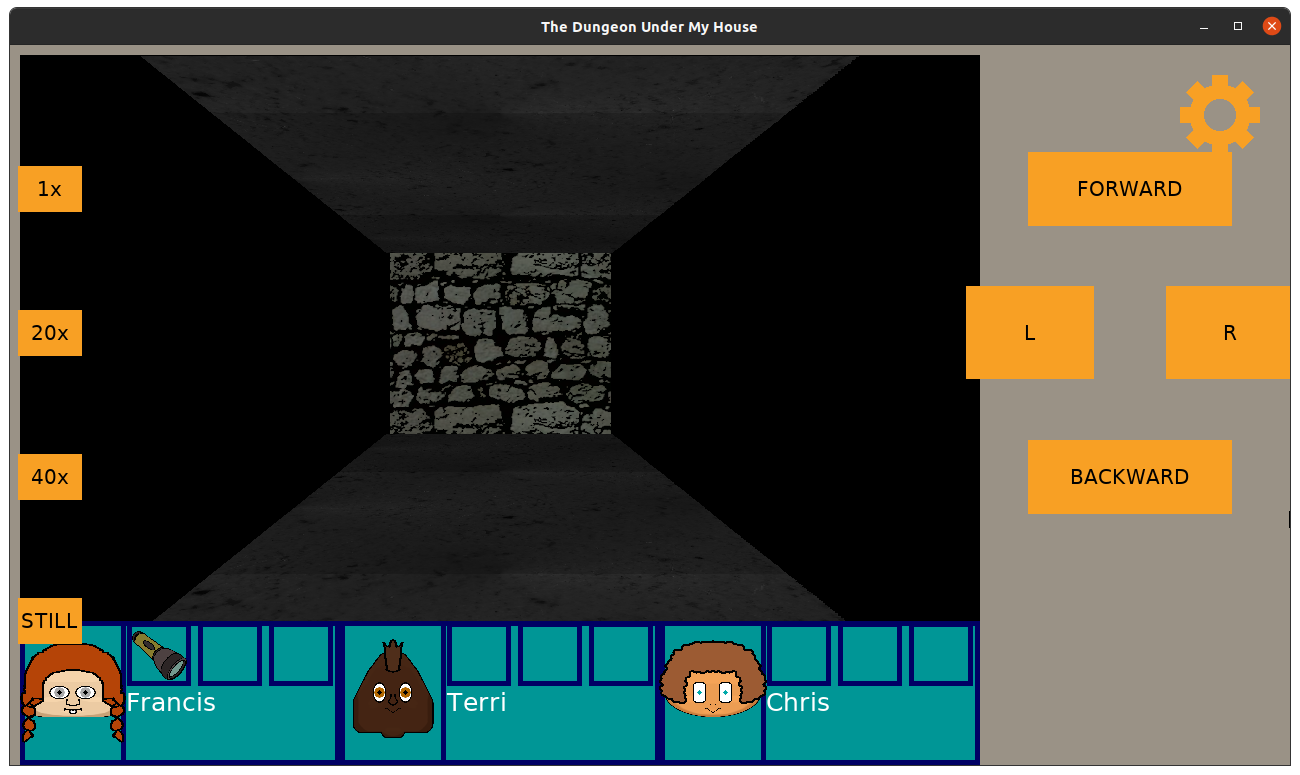
It took a bit of math and then some debugging of my bad math, but eventually I got the flashlight beam to be joined on either side with a shorter, less bright set of beams.
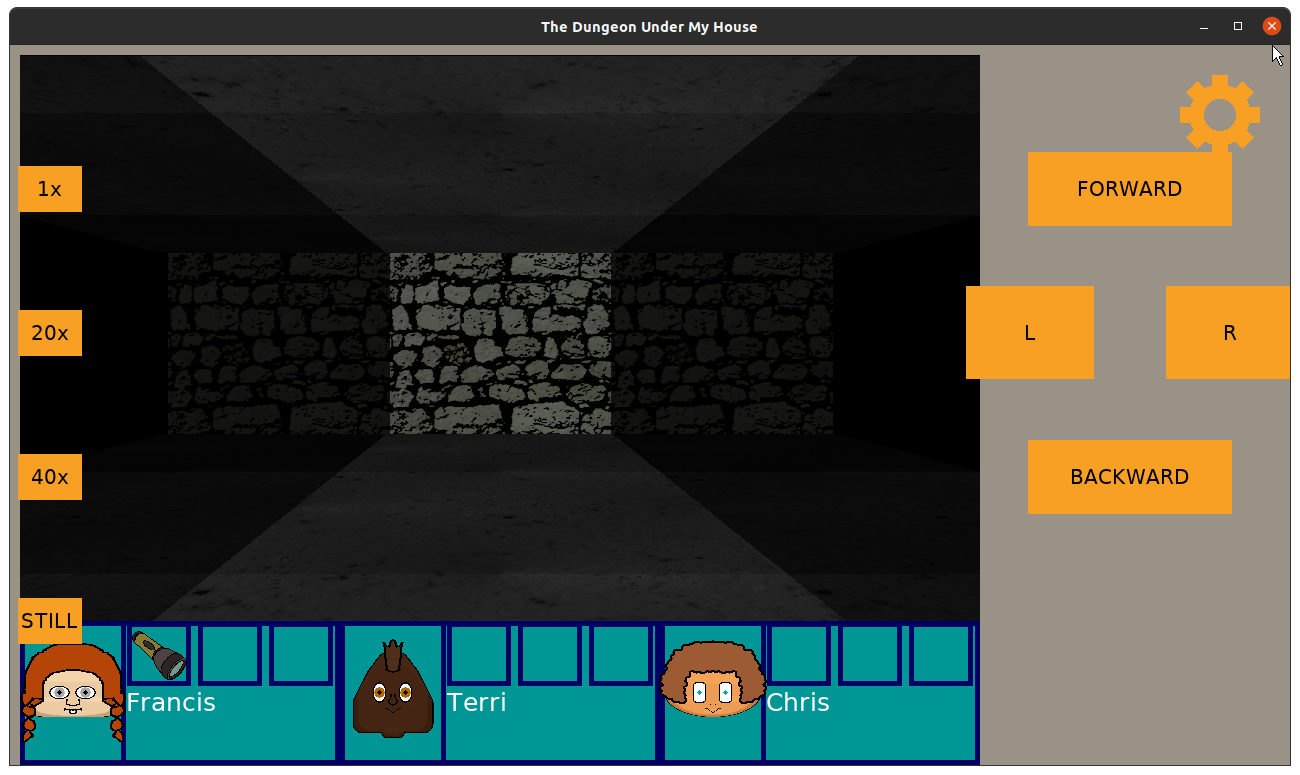
It feels a lot less claustrophobic and helps the player to notice things off to the side when they are nearby but without revealing too much of the dungeon either.
With that part finished, another thing I needed to address was a problem with rendering the walls of the dungeon.
Normally, when you are walking around, you see part of the cell you are currently in, plus any walls it would have. But if you had a cell behind you that had a wall directly behind you, due to how the camera and raycasting was implemented to allow for part of your current cell to be seen, the wall behind you would get rendered, blocking the entire screen.
I didn’t address it when I first noticed this problem shortly after getting the raycasting code finished because I could always work around it: just don’t put two cells next to each other that are divided by walls.
But I decided that it was time to figure this out because I didn’t want to limit my level layouts due to a silly rendering bug.
After all, the reason why my game has arbitrary walls inside a cell is to allow for more flexibility than having a cell itself act as a wall as you might see in my raycasting tutorials. It seems silly to throw that flexibility out.
I could get into the math, but after spending days (or mere hours, if you remember that I don’t work full-time on this project) on trying to solve it with math and not getting too far without introducing other problems, I decided to fix it with a hack. I basically figure out which cell is behind the party, then when I check for walls to render, I ignore a wall if it was found in that cell.
It worked. I can now create levels that use up all of the cells instead of needing to remember to leave gaps in between.
Since I was spending so much time maneuvering through the dungeon and debugging what I was seeing, I decided to finally add new wall types. I now have not only stone walls but also dirt walls.
I’m not an artist (or maybe it goes without saying), and I’m not entirely happy with it, but these walls will fill the dirt tunnels of the dungeon.
I expect to replace the original stone walls soon. Those were placeholder art based off of some art found on OpenGameArt.org and modified, and while they worked fine, I think I need to focus on getting a cohesive look for this game.
But I found myself thinking about the nature of the rooms and hallways that the player will be entering, and I will be creating and changing the wall, floor, and ceiling images to support it.
Thanks for reading!
—
Want to learn when I release The Dungeon Under My House, or about future Freshly Squeezed games I am creating? Sign up for the GBGames Curiosities newsletter, and download the full color Player’s Guides to my existing and future games for free!
In my last report, I had mostly finished my work of creating the level loader code for The Dungeon Under My House, my non-violent, first-person role-playing game and my second Freshly Squeezed Entertainment project.
This past week I finished the work and did more.
Planned and complete:
Unplanned and complete:
Unlanned and incomplete:
I had some small coding difficulty related to lighting color data that I was able to fix quite quickly, then I was able to swap out my hardcoded dungeon creation with my new dungeon loader code.
I had to address a few other issues related to persistence, though. Most of the dungeon is static, but there are some pieces of it that I can persist, namely the state of the doors. So I have to load the dungeon, which creates the door data as well, then if I am loading a game rather than starting a new one, I need to overwrite the dungeon door data.
This was a little trickier than it should have been, mainly due to the fact that my main game data object, which has all of the variable state of the game, is probably doing way more than merely holding state.
Anyway, once I was satisfied that I could load the dungeon without problem, I could move on.
Except I discovered that I must have introduced a problem. I found that if I was on the other side of the door that the lighting doesn’t show the wall arch properly because it belongs to the cell on the other side, so I solved it by creating a second one in the adjacent cell so that they appear lit from either side correctly.
As part of the solution, I had to offset the wall arch differently.
But apparently that offset got applied to the ladder as well, so when you face away from it, you see it in front of the camera. Whoops.

Luckily, by just changing the offset the ladder I could get it to appear where it should again.
Now what? Well, I knew the next part of the game I wanted to work on was related to what was beyond the door.
So I used Tiled to quickly create a large room with columns, added some red lights at a low intensity, and then within moments I was delighted that it was available to walk around in-game!
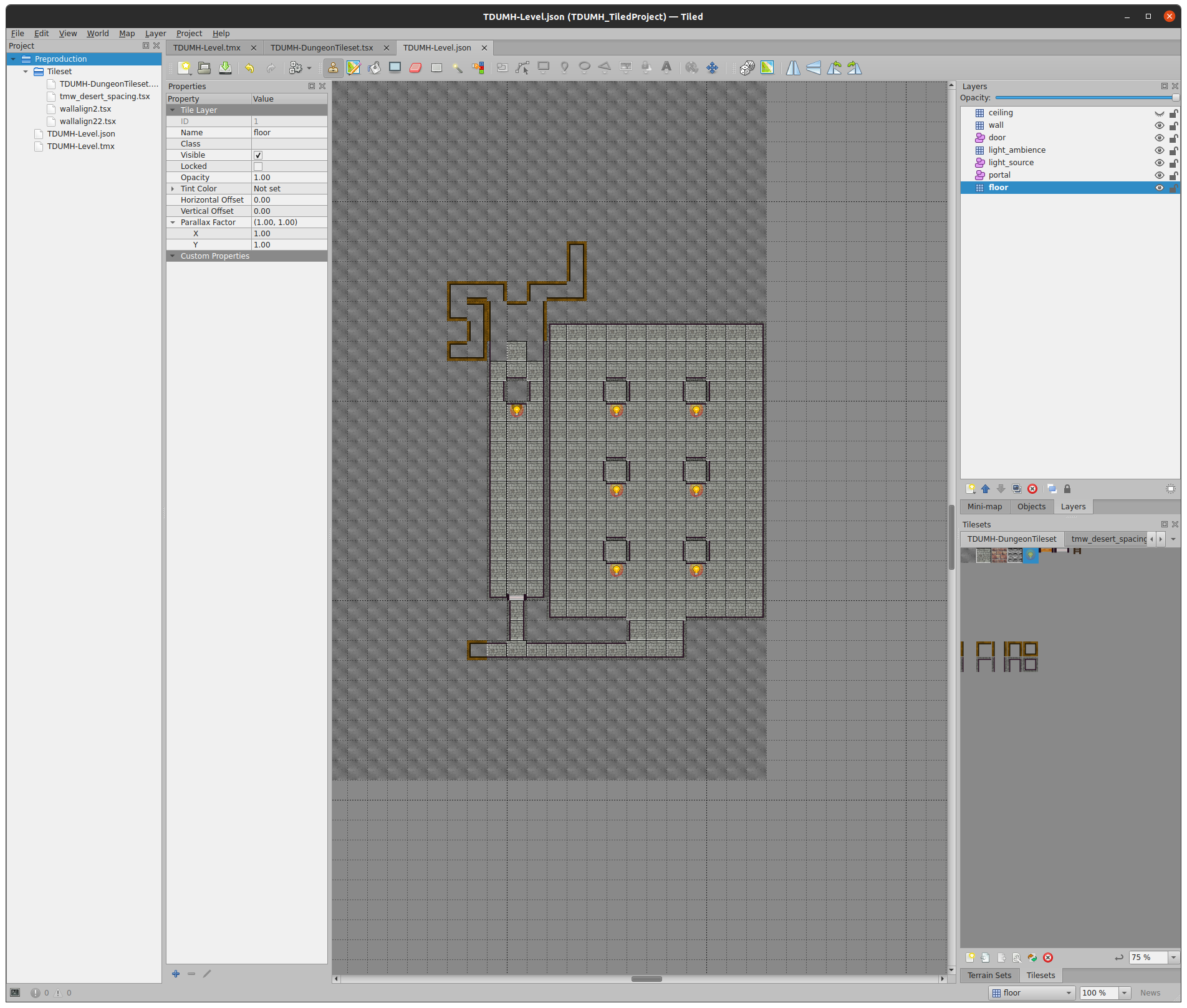
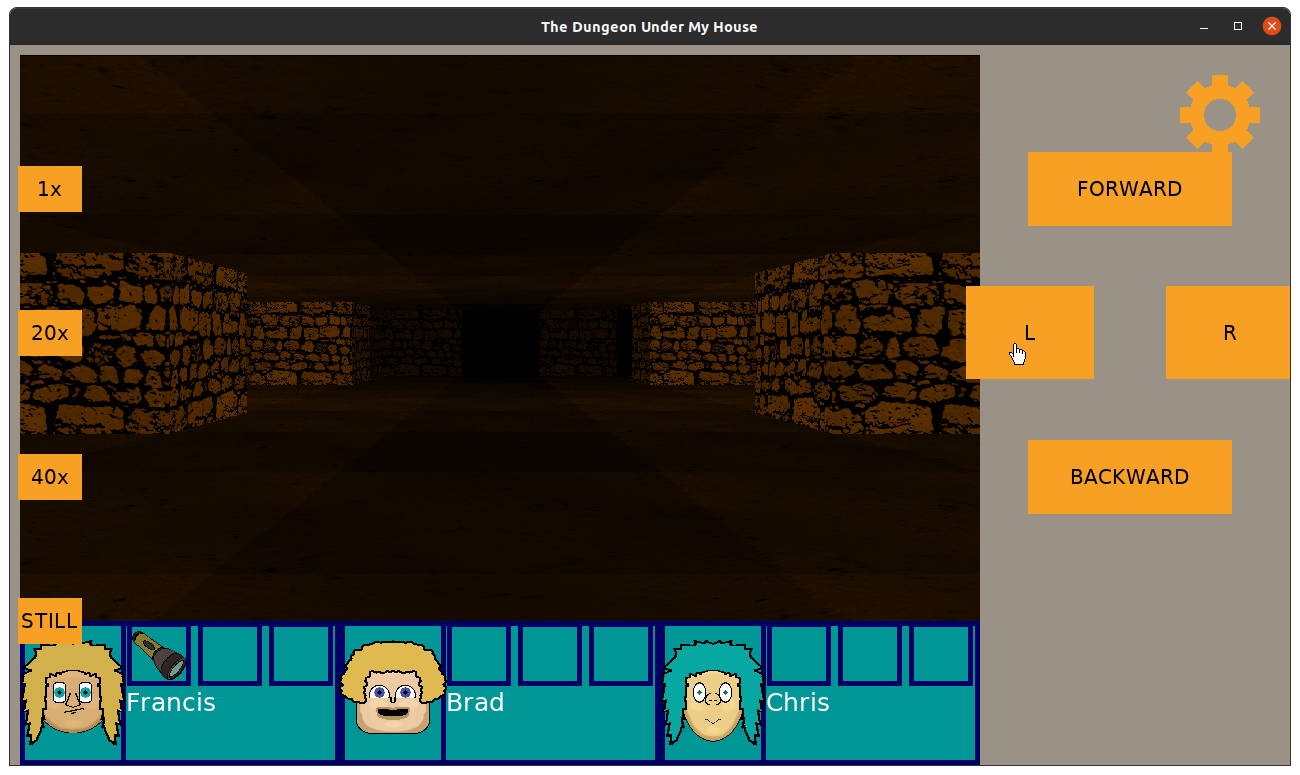
My plan was to make this large room a hub, with other areas of the dungeon splitting off from it. I want the party to enter the room and say something about it being so huge and expansive, though.
I ended the week by creating a new trigger criteria for entering a part of the dungeon that is tagged, then I started the work of adding a new layer to map so that a dungeon grid cell could have a tag associated with it.
The next step will be to create a new part of the dungeon loader to load that tag data in.
Thanks for reading!
—
Want to learn when I release The Dungeon Under My House, or about future Freshly Squeezed games I am creating? Sign up for the GBGames Curiosities newsletter, and download the full color Player’s Guides to my existing and future games for free!
Last time, I reported that I was making good progress on importing levels from a map editor for The Dungeon Under My House, my non-violent, first-person role-playing game and my second Freshly Squeezed Entertainment project.
I anticipated that I only had a few hours left to go before I could confidently use the new level loader code to load the dungeon, allowing me to easily create the dungeon layout.
Sprint 2024-14: Level editor
Planned and incomplete:
I anticipated incorrectly.
Despite putting in a relatively significant amount of time into game development this week, I have not finished the level loader code.
But I am a lot more confident that I am almost finished with it. This time.
As you recall from the last couple of reports, I’ve been trying to leverage Tiled, the general-purpose level editor, to create the dungeon layout. Up until this effort, my small test dungeons have been created in code. Just trying to add a door and a single cell room beyond it already showed me how painful and error-prone it was going to be to continue without a level editor.
Of course, using a general-purpose tool like Tiled meant learning how Tiled works, then figuring out how best to use it for my own purposes. The Tiled Discord, specifically the very knowledgeable eishiya, has been a great help.
So to recap what I’ve accomplished so far, I have a DungeonGridCell which looks like:
struct DungeonGridCell
{
    DungeonGridCell();
    ~DungeonGridCell() {}

    DungeonFloorType floorType;
    DungeonCeilingType ceilingType;
    DungeonWallTypes walls;
    OrientationToDungeonDoorIDs doors;
    DungeonPortals portals;
    DungeonLight lightSource;
    DungeonLight lightAmbience;
    bool valid;
};
The floor and the ceiling are defined by single values, but the walls, doors, and portals include not only the type but also the orientation. That is, you can have a cell with zero, one, two, three, or four walls.
So how would I represent a single grid cell in Tiled with all of that data?
I use layers.
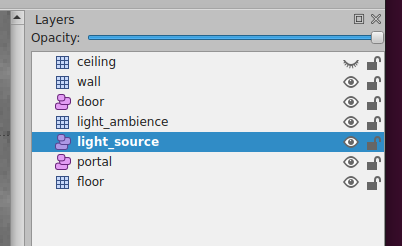
So each cell is actually split out across multiple layers of data. I have a floor layer with tiles to represent the floor type, and I have something similar for the ceiling.
Doors and portals are represented as objects in their own object layers. Basically, I can place a door like a tile, even rotating it to get it into the correct orientation, and the only interesting thing I need to do when loading it later is calculate the cell it is in using its (x,y) position.
I tried to see if I can do the same with walls. See, the DungeonGridCell allows for the possibility of different types of walls in the same cell, but to represent that in Tiled would require a ton of different kinds of transition tiles depending on how many wall types I wanted to represent.
Maybe that’s not true. I think I know enough about Tiled to be able to create a tile layer, offset it so that the tiles show up in the corners of the regular floor tiles, and place the corners, then use the automap feature to generate the correct wall tiles, but it still sounds like a lot of work.
But if walls were objects, then I can place an arbitrary wall in an arbitrary location. Except the exported JSON would balloon in size. I calculated that if even half of the tiles in a 500×500 map had at least one wall, it would take at least ~130 MB just to represent walls in the JSON file. That’s way too large, even with compression, and I want to ensure the download size is small for this project.
So instead, I decided to limit cells to only have one type of wall possible, even if the code allows otherwise, mainly to make it easier to create Tiled maps.
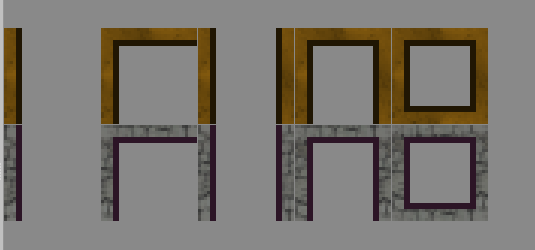
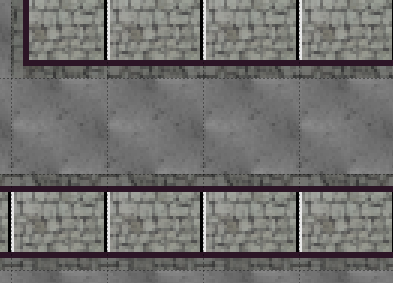
Using the above two rows of tiles, I can represent every configuration of walls for a given wall type (dirt or stone). Eventually I will add more wall types, and maybe variations of walls to break up the tedium.
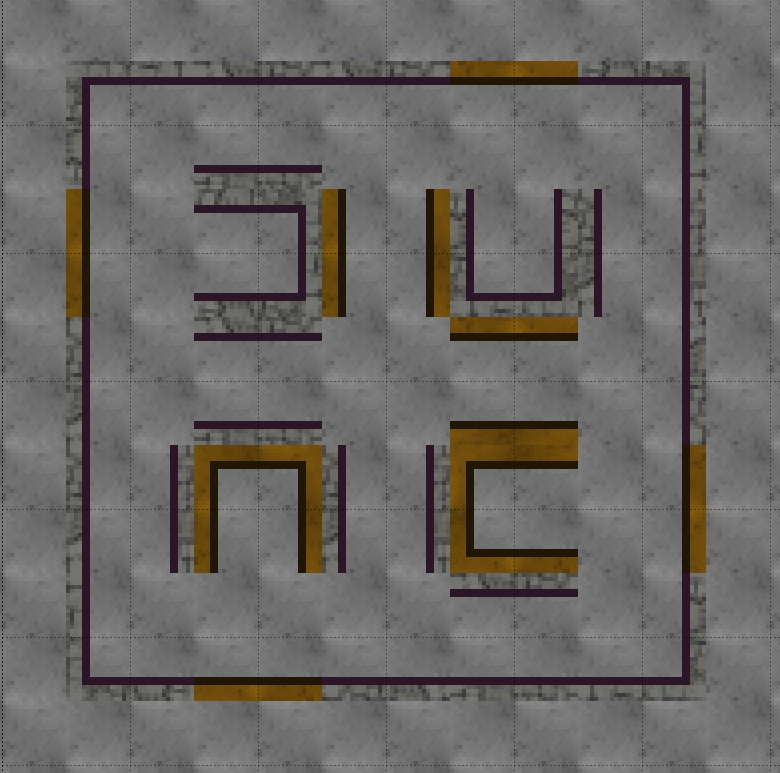
I can easily create this test dungeon which uses single walls, corners, hallways, and dead ends. I found I don’t need to create a tile that represents an enclosed cell, but maybe in the future I might have such a room with a ladder in it? So I’ll keep the tile in the tileset.
Now that I have a dungeon, I can save it as a JSON file.
But then I needed to import that JSON file and turn it into a dungeon level full of DungeonGridCell objects.
That’s what my DungeonLoader code is doing, and in the last week, I have been able to test-drive the code that can load the layers that represent everything except the dungeon light source and the light ambience.
Loading dungeon walls was slightly complicated due to needing to not only know which tile I was looking at but also what orientation the tile was in. The corner wall tile, for instance, represents west and north walls by default, but when rotated, Tiled represents that tile with some high-order bits flipped to represent horizontal, vertical, and diagonal rotations, which means I need to write code that looks at those bits and figure out which walls need to be represented.
I finished the week by almost getting the light source loading code in, which required converting from the hex representation of the light source’s color (a custom property I added to the tile in Tiled) to the Color object I have in my game. But my code isn’t working correctly, and I am starting this week by figuring out why.
Thanks for reading!
—
Want to learn when I release The Dungeon Under My House, or about future Freshly Squeezed games I am creating? Sign up for the GBGames Curiosities newsletter, and download the full color Player’s Guides to my existing and future games for free!