Categories
Game Design Games Marketing/Business

Announcing New Holiday Dialogue in Toytles: Leaf Raking v1.4.4

Toytles: Leaf Raking, my family-friendly leaf-raking business simulation available for iPhones, iPads, and Android devices, has a new “Personality Injection” update, available now in the Apple App Store and Google Play store!

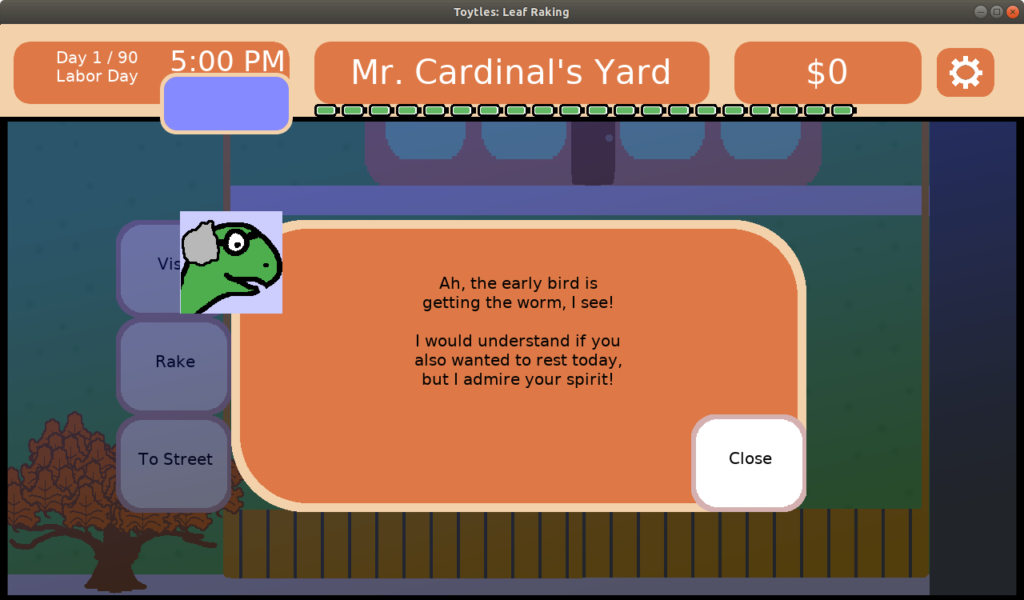
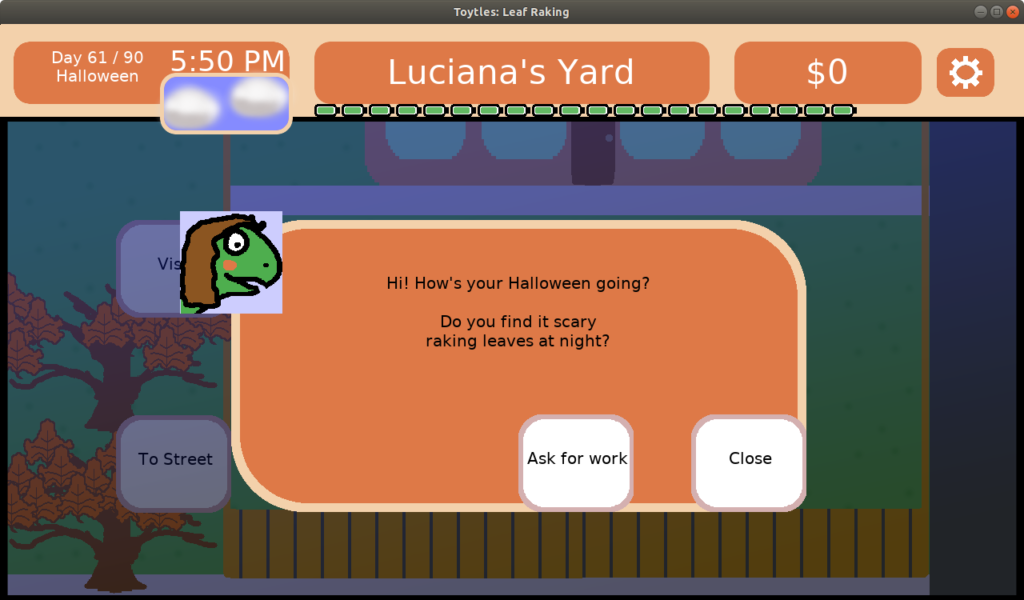
Version 1.4.4 introduces unique, holiday-specific dialogue for each of your 19 neighbors.

Mr Cardinal dialogue on Labor Day

There are currently 6 major calendar events, and when you visit your neighbors, they will have something new to say to you depending on the date.

Luciana's dialogue on Halloween

You’ll get a better sense of who your neighbors and clients are. Learn who loves being part of a crowd and who loathes a party! Understand who makes the best of a bad situation and who sees the world as glass-half-empty.

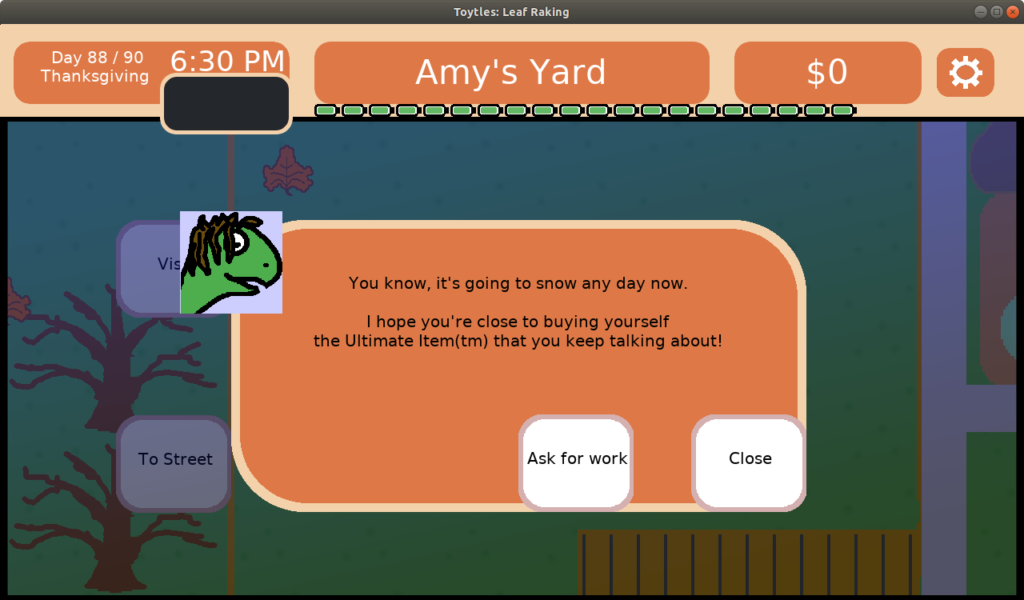
Amy's dialogue on Thanksgiving

Learn which of your clients is cheering for you as you try to earn enough money to buy yourself the Ultimate Item(tm).

Learn more about the game and where to get it at the main Toytles: Leaf Raking page.

Toytles: Leaf Raking Player's Guide

Get the 24-page, full color PDF of the Toytles: Leaf Raking Player’s Guide for free by signing up for the GBGames Curiosities newsletter!

Categories
Game Design Game Development Geek / Technical

Toytles: Leaf Raking Progress Report – Holiday Talk Finished

Here’s this week’s progress report for new updates to Toytles: Leaf Raking, my family-friendly leaf-raking business simulation available for iPhones, iPads, and Android devices.

Get it at the Toytles: Leaf Raking page.

Last week, I wrote in my report for sprint 15 that I expected it would only take a couple of hours more to get the rest of the holiday-specific dialogue into the game.

Sprint 16: Holiday-specific dialogue

Last week’s sprint plan was:

  • Create holiday-specific dialogue
  • Fix holiday text being cut off next to weather window
  • Fix time advancing incorrectly when loading a game in a neighborhood other than Midtown.

I did a total of 4 hours of game development, but that includes the time spent creating and testing the Android and iOS releases and uploading them to the app store. I was actually finished with the dialogue after 2 hours of work, as I predicted, and the rest of the time was spent fixing the two defects and creating the releases.

Amy's dialogue on Thanksgiving

Fixing the text issue was straightforward. I’ve mentioned before that I use JonnyD’s NFont to handle a lot of my text rendering, and I was rendering the text in a box that was too small. I don’t know how long it had been that way, but I modified the box so that the text wrapped around nicely and fit better.

The time issue was similarly straightforward. I don’t know if I introduced this defect when I was moving code around in the last few months, but here’s a summary of what was happening. There are two variables: one is your current neighborhood, and the other is the last neighborhood you were in. Your current neighborhood is saved and loaded. Your last neighborhood is not, and it is just a variable that is used during the game.

The idea is that if you navigated to the neighborhood screen, you either moved there from another neighborhood and should therefore use 10 minutes of time, or you were on a house screen and making your way to the street in the same neighborhood, using no time at all. The game determines which situation you are in by comparing the last neighborhood variable to the current neighborhood variable.

But apparently I forgot to set the last neighborhood variable to the current neighborhood variable after you load a game. So if you start out in a neighborhood other than Midtown, when you visit a neighbor’s house and leave back to the neighborhood view, the last neighborhood (Midtown) and the current neighborhood (not Midtown) do not match, and so time advances. There was another problem: navigating from a different neighborhood to Midtown does not advance time because the last and current neighborhoods are both Midtown, when you were obviously not in Midtown before traveling to Midtown.

The fix is simple: when loading a game, I set the last neighborhood to the value of the current neighborhood that was loaded. Now time advances (or doesn’t) correctly.

Creating the releases was actually the most painless it has been. I don’t have it quite automated yet, but the Android build is pretty much a one-liner script. The iOS build is almost there, except I still have quite a few manual steps after using CMake to create the XCode project, such as adding the Images.xcassets to the project and then specifying that it should handle signing automatically and which team. I am sure these things can be automated, but I haven’t figured it out, and I wonder if Apple will change things yet again and break whatever I do anyway.

I’ll be announcing the new v1.4.4 update tomorrow in my newsletter, so sign up below to get the news as well a curiosity and a free player’s guide.

Thanks for reading!

Toytles: Leaf Raking Player's Guide

Want to learn when I release updates to Toytles: Leaf Raking or about future games I am creating? Sign up for the GBGames Curiosities newsletter, and get the 24-page, full color PDF of the Toytles: Leaf Raking Player’s Guide for free!

Categories
Game Design Game Development Geek / Technical

Toytles: Leaf Raking Progress Report – Holiday Talk

Here’s this week’s progress report for new updates to Toytles: Leaf Raking, my family-friendly leaf-raking business simulation available for iPhones, iPads, and Android devices.

Get it at the Toytles: Leaf Raking page.

In last week’s report, I said I was almost finished with adding holiday-specific dialogue to the game. I predicted that it would be a matter of a couple of hours at most to finish the work, then I could create a new release and get it published.

Sprint 15: Holiday-specific dialogue

Last week’s sprint plan was:

  • Create holiday-specific dialogue
  • Fix holiday text being cut off next to weather window

I only worked on game development for 45 minutes last week, a far cry from the 5 hours per week I’ve been aiming for.

As such, while I finished adding dialogue for Halloween, I only barely got started on the next holiday and made no further progress.

Luciana's dialogue on Halloween

Why didn’t I spend more time on the game? The rest of my life had a higher priority on my time.

My parents are celebrating 40 years of marriage, and so I’ve been talking with my sister about last-minute preparations. My wife is celebrating her birthday, so I’ve been finishing up plans for it. And I’ve been working very long hours at the day job, getting on early and staying on late, which means I lose the opportunity to do game development when I normally would and I am sapped of energy after the kids go to bed, which is the next opportunity.

In terms of game development, last week was mostly lost. Which is too bad because the work is straightforward, and I still believe that it will only take a few hours more before I could publish a new update.

One positive thing is that I found a defect in the game while testing out the Halloween dialogue in those 45 minutes I did dedicate to making progress on this project. The defect isn’t the positive thing, but the fact that I found out that it exists is, because I can address it before publishing a release.

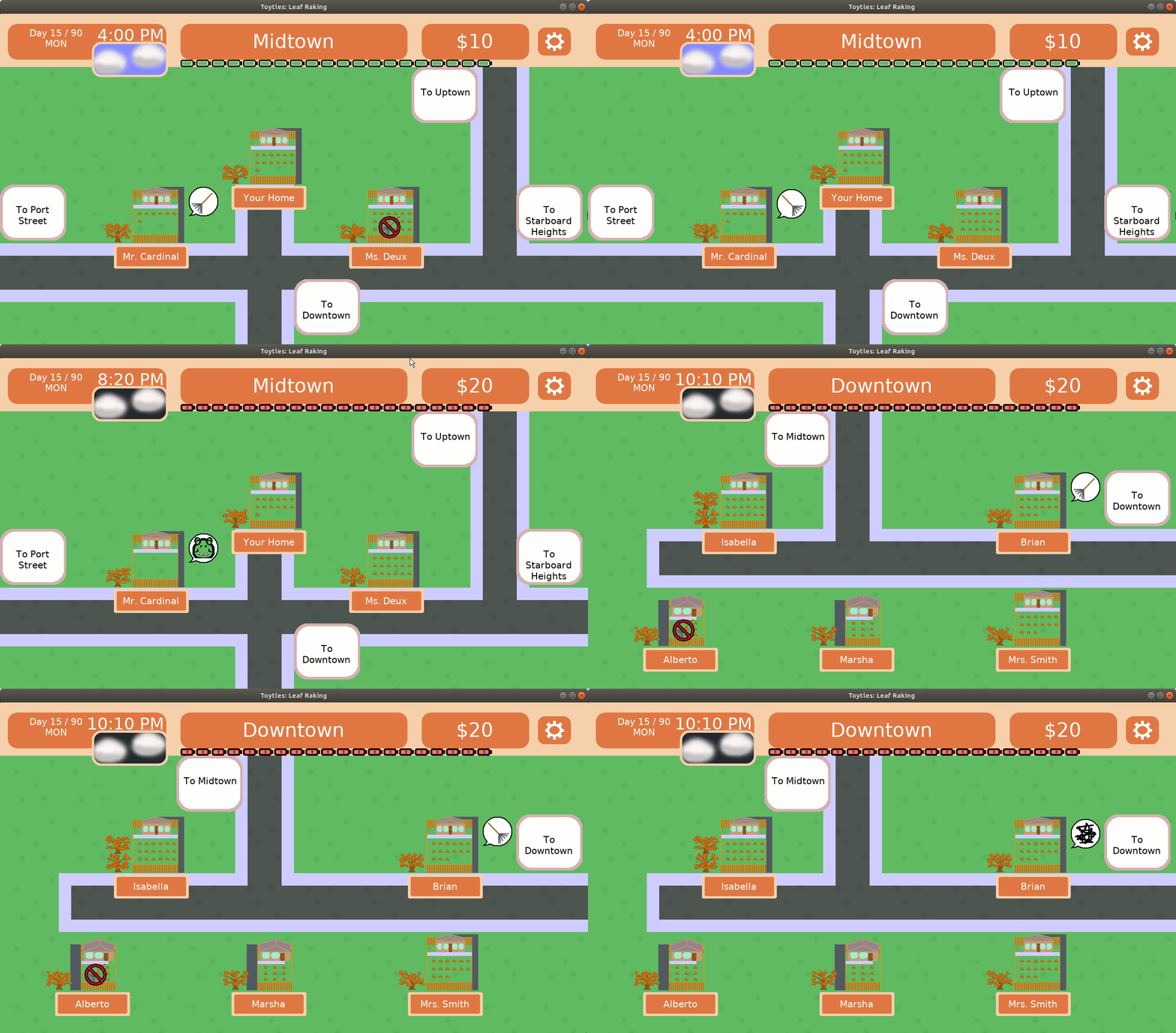
It turns out that if you load a save game and are in a neighborhood other than Midtown, which is the default one, then when you go to a neighbor’s yard and leave back to the neighborhood screen, the clock advances 10 minutes. It should only advance 10 minutes if you move from one neighborhood to another.

I suspect that the reason that it is happening is that when I load the game, I don’t set the current neighborhood correctly somewhere, and so when you leave a yard and return the neighborhood screen, the game detects that the neighborhood has changed when it hasn’t.

As far as impact is concerned, it’s not a huge deal…except when it is. In my case, I was visiting neighbors to see if the dialogue was formatted correctly, and I currently need to reload the game when I change it to see if the changes look better. Each time I did, I advanced the clock without realizing it, until it was past the time when visiting neighbors is considered polite. Then I had to reload the game entirely and reset the clock to the correct holiday in order to continue testing.

It was kind of annoying for me as a developer, but I can also see it being a problem for a player. If you saved the game during Mr. Matt’s store opening hours, then discovered that after you loaded you accidentally advanced the time so that the store was closed, it would mean that you can’t you can buy emergency yard bags or a replacement rake until the store is open again.

Time management is a key part of the game, and this defect makes the game a bit unfair to people who try to get to the store at a decent time.

So that defect needs to get fixed before I create the next release as well.

Thanks for reading! Please sign up for the mailing list (see below!) to hear about new Toytes: Leaf Raking releases as they are published, news about the work I am doing, and curiosities that I find interesting about the world.

Toytles: Leaf Raking Player's Guide

Want to learn when I release updates to Toytles: Leaf Raking or about future games I am creating? Sign up for the GBGames Curiosities newsletter, and get the 24-page, full color PDF of the Toytles: Leaf Raking Player’s Guide for free!

Categories
Games

Coming to Kickstarter: Family-friendly Coding Game Time Tails

I learned today that Snowbright Studio will soon be launching a Kickstarter campaign for Time Tails, a game about traveling through time, learning to code, and designing games.

The game follows two time traveling cats from the 80’s as they help kids learn coding and Unity game design.

According to a college friend of mine who is one of the people behind it, it’s aimed at middle and high school students, but it is a game for the entire family and anyone who wants to learn a few things about coding games and/or 80s time travel. “We’re working specifically to bring this game to girls and LGBTQ+ youth interested in computer science.”

The Kickstarter campaign is expected to launch on October 16th.

Sign up to be notified at https://www.kickstarter.com/projects/snowbrightstudio/time-tails

Categories
Game Design Game Development Geek / Technical

Toytles: Leaf Raking Progress Report – Holiday Talk

Here’s this week’s progress report for new updates to Toytles: Leaf Raking, my family-friendly leaf-raking business simulation available for iPhones, iPads, and Android devices.

Learn how to get it at the Toytles: Leaf Raking page.

During the previous week’s report, I talked about how my existing system for choosing which dialogue text to display needed to be updated to handle dates. I thought about all sorts of ideas that required a solution which allowed for them, and then ultimately remembered that I can always build up to a more complex solution and should go with a simple one for now.

Sprint 14: Holiday-specific dialogue

Last week’s sprint plan was:

  • Create holiday-specific dialogue
  • Fix holiday text being cut off next to weather window

I did 4 hours of game development last week. It’s not as much as I would have liked, but once again I had some long hours at the day job and I found myself feeling exhausted especially near the end of the day when I might otherwise have been productive.

The following “holidays” are currently in the game:

  • Labor Day (also known as “Day 1”, the start of the game)
  • Talk Like a Pirate Day
  • State Fair
  • Halloween
  • Harvest Festival
  • Thanksgiving

It’s a bit U.S.-centric, I know, and I might need to make some tweaks. For instance, are there any State Fairs that take place in Autumn? If not, I might need to change that day to maybe “Fall Fair” or something like that.

Anyway, I expected that with 19 neighbors x 6 holidays = 114 unique scripts of dialogue that I wouldn’t be able to get all of it done this week. So I set a goal of getting dialogue written for the first four holidays.

Early in the week I spent a little over an hour getting knowledge of the calendar into the components that would need to determine if there is a holiday-specific dialogue in the first place.

After that, it was mostly adding new dialogue tags related to those holidays and writing the dialogue, so basically the majority of the time was spent on adding content.

Mr Cardinal dialogue on Labor Day

In terms of my internal debate of either creating a general holiday dialogue tag that takes arguments or just making a tag for each holiday, I am glad I did the latter because within the first day I was already adding dialogue, whereas I expect that if I had gone the other route, I might have found that I was spending the entire week on making it possible to add dialogue. As I said, I can always refactor if it makes sense in the future. In fact, I had predicted that I was going to refactor fairly quickly, but I haven’t yet and don’t see a reason to do so yet.

I managed to write dialogue for the first three holidays, and if I had another 30 minutes to an hour, I probably could have gotten Halloween finished as well. Instead, I only have three of the neighbors saying anything unique on Halloween.

One thing I realized was that I had a defect I noted back in June:

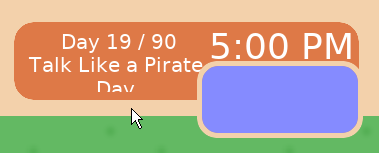
Holiday text getting cut off

“Talk Like a Pirate Day” is getting cut off at the top of the screen. It should be an easy fix, but I wonder how many other pieces of text are not fitting into their assigned box and causing issues like this.

I am using NFont by JonnyD, and I recall that there was a way for it to do the detection for me. That is, I should be able to set it up so that if there is any text that doesn’t fit correctly that I can either have it render differently or log to a file or something. I’ve done something similar either in this project or a previous project, I can’t recall which. I just don’t do it at this time.

In any case, I think I did a decent job anticipating how much work this holiday dialogue feature was going to be, and I expect to get the rest of the dialogue into the game and published in a new release this coming week.

I am very pleased at the progress despite my lack of time dedicated to working on it this sprint. I think my Personality Injection updates are definitely making the game world feel like more than mere stats and variables, especially now that the neighbors have more than a couple of things to say to you throughout the game.

Thank you for reading!

Toytles: Leaf Raking Player's Guide

Want to learn when I release updates to Toytles: Leaf Raking or about future games I am creating? Sign up for the GBGames Curiosities newsletter, and get the 24-page, full color PDF of the Toytles: Leaf Raking Player’s Guide for free!

Categories
Game Design Game Development Geek / Technical

Toytles: Leaf Raking Progress Report – Holiday Talk

Here’s this week’s progress report for new updates to Toytles: Leaf Raking, my family-friendly leaf-raking business simulation available for iPhones, iPads, and Android devices.

Learn how to get it at the Toytles: Leaf Raking page.

Last week I reported that I finished adding the neighbor status indicators into the game.

All that remained to do was to create a new release for iOS and Android, test it, and publish it.

Sprint 13: Holiday-specific dialogue

Last week’s sprint plan was:

  • Create iOS release
  • Write blog post announcing release
  • Write email announcing release
  • Create holiday-specific dialogue

At the end of the previous week, I had created an Android build. I spent the earlier part of this week on creating the iOS build. In both cases, I installed the game on a physical device, then played the game until I was satisfied that things seemed to work more or less fine.

Then once I felt it was ready, I submitted it for review at the respective app stores, and then I published the announcements once they were ready to go live. Read more about it at the Toytles: Leaf Raking v1.4.3 announcement post.

Then I could start working on the current sprint’s actual goal, which was adding dialogue related to the current date of the calendar if it was special somehow.

I ended up not doing much. I worked long hours at the day job due to commitments at both the top of the morning and the late afternoon, which meant I did not work on game development at the times I normally would.

I did only 1.5 hours of game development, most of which was spent on getting the release published. I found that I had effectively taken most of the rest of the week off, even though I hadn’t wanted to. I found myself exhausted and needing to rest each day, and so I listened to my body.

In the future, I think I need to plan and make time for a periodic break instead of letting it happen.

I did finish the week my looking at my code related to dialogue and the calendar. Currently, I have an enum called DialogTag (I’m clearly still struggling with picking either dialogue or dialog, which depending on who you ask are both acceptable in North America. Alternatively I’m using dialog when I should be using dialogue). Each neighbor has a collection of things they say, each of which is tagged based on whether they are clients, ex-clients, prospects, etc.

Now I want to add dialogue that is tagged based on a calendar event. While I could add a tag for each holiday, I’d like to have one tag type for holidays, and then I would have a separate piece of data indicating which one.

There are 6 holidays, but I can create more, such as birthdays for the neighbors. Still, it isn’t like I’ll be adding hundreds of holidays, so it wouldn’t be so bad to hardcode a separate enum value for each holiday.

But then I start thinking about a neighbor getting excited the day before a holiday. Or being sad the day after.

Of course, what this kind of scope creep tells me is that there is still a lot of interpretation for how to handle the immediately work, and I need to remember that I can put something together that works now and slowly change it to do something that works later.

So hardcoded for now.

The other big thing I need to figure out is how to decide which dialogue to show. Up until now, a neighbor can say only one thing based on their status as a client. Since you can’t have a neighbor be both a client and a prospect or an ex-client, there was no choice to make. Only one option filtered out.

With dialogue based on the current date, however, now two options can be available at once. Perhaps clients and prospects should say the holiday-specific dialogue, and ex-clients say their normal ex-client dialogue? Or maybe only happy clients (clients who have no leaves in their yard) say more interesting things? Or perhaps holiday dialogue is said first, then followed by regular dialogue? Or regular dialogue followed by holiday dialogue? Or randomly choose among options, so sometimes a neighbor might talk about a holiday and sometimes they might not?

There’s clearly more I need to think about, but for now, thanks for reading!

Toytles: Leaf Raking Player's Guide

Want to learn when I release updates to Toytles: Leaf Raking or about future games I am creating? Sign up for the GBGames Curiosities newsletter, and get the 24-page, full color PDF of the Toytles: Leaf Raking Player’s Guide for free!

Categories
Game Development Games

Watch the 4th Annual Black in Gaming Awards

On September 13th, the Black In Gaming Awards honored the outstanding achievements and contributions to video games by black game developers and corporate allies.

You can watch the ceremony at: https://www.twitch.tv/videos/740532074

Learn more about the awards at https://www.blackingames.com/

Blacks in Games is a community dedicated to cultivating, supporting, and promoting black professionals in the game industry. BIG is actively working on creating opportunities for Black people in the video game industry while also developing action plans to combat systemic institutionalized racism that manifests itself in unsafe spaces, microagressions and hidden discrimination in the workplace.

The award looks amazing, and it honors pioneer Jerry Lawson, who developed the first cartridge-based game console.

Congratulations to all the award-winners!

Categories
Game Design Games Marketing/Business

Know Who Your Clients Are in Toytles: Leaf Raking v1.4.3

I’m excited to share another Personality Injection update for Toytles: Leaf Raking, my family-friendly leaf-raking business simulation available for iPhones, iPads, and Android devices.

Learn how to get it at the Toytles: Leaf Raking page.

With v1.4.3, you can now more easily tell which of your neighbors are clients and which are ex-clients thanks to the new client status indicators.

In Game - Client Status Indicators

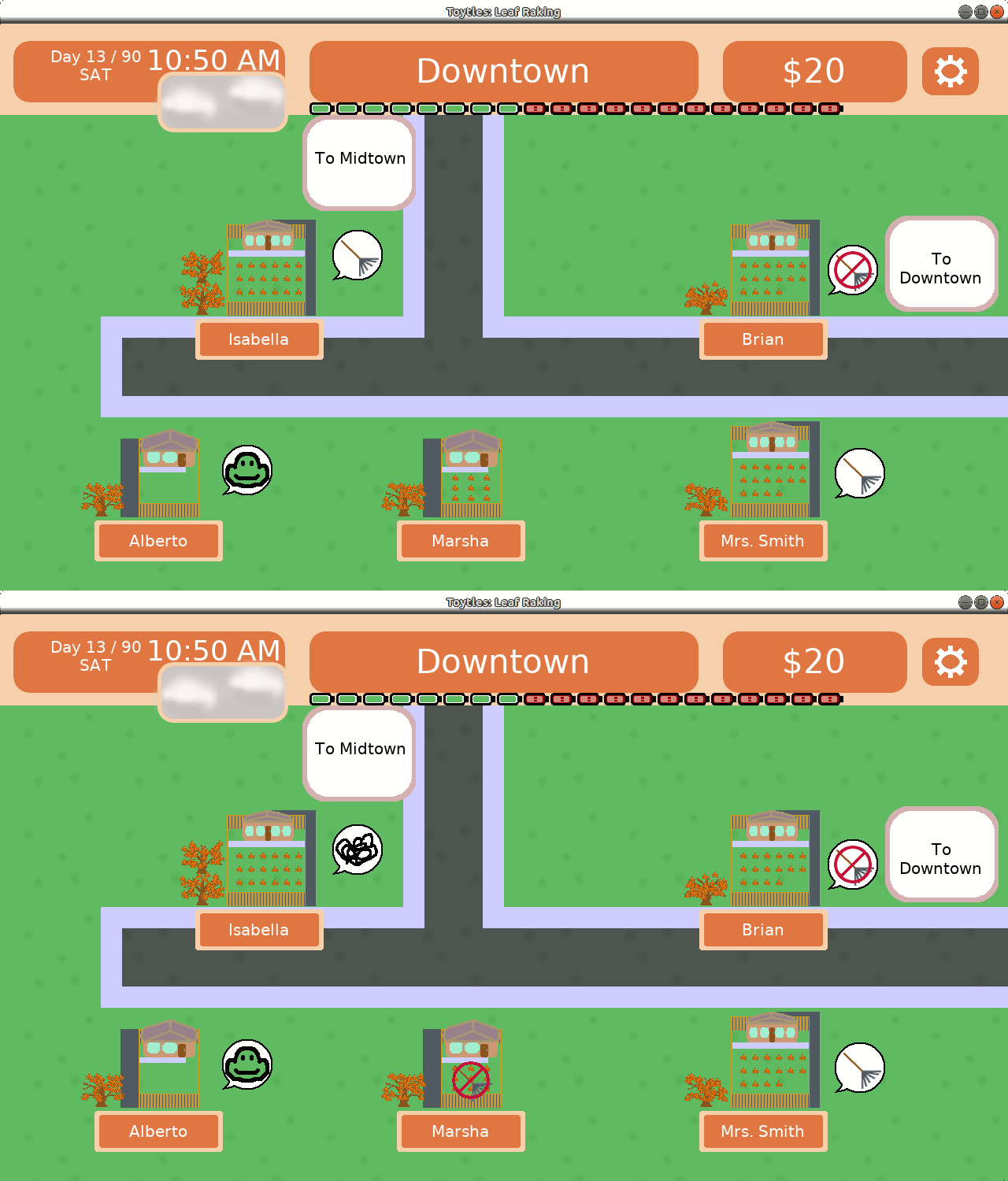
While walking around your neighborhood, you’ll now see a speech bubble next to your client’s home.

If you see a rake, it means the client is waiting for you to clear their yard of leaves.

If you see an angry squiggle, it means the client is getting worried that you are allowing too many leave sit in their yard and are not being responsible.

And if you finish raking all of the leaves in their yard, they’ll show a smiling turtle face.

But if you neglect a yard for too long and lose the client, you’ll see an icon to let you know that you can’t rake that yard anymore. You can still visit the neighbor, but do not be surprised if they are unhappy to speak with you.

Thanks to these changes, your time playing Toytles: Leaf Raking has just gotten a bit easier.

Toytles: Leaf Raking Player's Guide

Get the 24-page, full color PDF of the Toytles: Leaf Raking Player’s Guide for free by signing up for the GBGames Curiosities newsletter!

Categories
Game Design Game Development Geek / Technical

Toytles: Leaf Raking Progress Report – Status: In Game!

Here’s this week’s progress report for new updates to Toytles: Leaf Raking, my family-friendly leaf-raking business simulation available for iPhones, iPads, and Android devices.

Learn how to get it at the Toytles: Leaf Raking page.

In last week’s report, I wore my developer hat and started out trying to create a general-purpose animation system, then I put my producer hat on and decided to implement something smaller and more specific to my needs to get the next release out the door.

Sprint 12: Neighbor Status Indicators

Last week’s sprint plan was:

  • Make it clear from the map which neighbors are your clients, ex-clients, and prospects

After 10 hours of game development last week (thanks, Labor Day weekend!), I finally have the neighbor status indicators in the game!

In Game - Client Status Indicators

After testing it on my main phone, which runs Android, I started the process of creating the new release for Google Play. I did not start work on the iOS update before the end of the week, so I’ll need to do so early this week.

Ideally, I’ll have v1.4.3 available tomorrow. Phew! Finally!

What took so long?

Now, for those of you who are paying attention, it is the fourth sprint in a row with that same plan.

And each sprint I write a report like this one, explaining how things went.

To recap:

  • Sprint 9: 6 hours – creating and iterating on mock-ups for the indicators, including getting feedback from colleagues. I expected I’d get the actual implementation done in Sprint 10.
  • Sprint 10: 5.75 hours – moving code and adding tests around existing code that manages the neighborhood in order to make the project more maintainable. Performing legacy rescue took longer than I thought, and I speculated that perhaps I should have tried adding tests to new code rather than rescuing old code in order to get a release out sooner. I expected I needed only a few more hours to get the indicators implemented.
  • Sprint 11: 5.75 hours – creating an animation system, then realizing that I was still nowhere near delivering on the sprint goal, so I changed tactics to implement just enough to get what I needed for this project completed. I did not make a prediction for the next sprint, but I did make a point to focus more on doing just enough to make an indicator work for this project’s needs. It just came near the end of the week.

This feature has taken me about 28 hours of work so far, which works out to a little more than three 8-hour work days. And since one of those days was spent mostly creating and getting feedback on mock-ups before implementation, let’s say it took a couple of days to implement the work once I knew what to implement.

But it didn’t take a couple of days. As I have said before, I am a very, very part-time indie game developer. In the last couple of months I have averaged about 5 hours a week of game development time.

Which means that it took me about a month of real time to do this work and get it ready for a release.

And maybe I need to be fine with this kind of progress, but I was really expecting to have something closer to two to three weeks between updates.

So on the one hand, I might need to right-size my own expectations, but on the other hand, I think I need to figure out how to work on implementation more effectively.

I mean, I was worried about maintainability and automated testing, but once I started test-driving a less generic animated sprite widget, I had something on the screen.

My AnimatedSpriteWidget derives from SpriteWidget, and as arguments it takes a collection of Frames.

A Frame initially only specified an offset, a duration in milliseconds, and a sprite image to render. So each frame, the sprite image to render would change. And since all I needed to do was loop between two or four frames of animation, it worked well enough.

Later I needed to make the no-raking sign blink, and I just did it. I added a parameter to Frame for scaling. That way, I can change the width and height of the image to 0, and it effectively disappears.

And while it feels like it is a hack, it’s actually built up from something well-built.

The code appeared when the tests drove the need, and the tests came from me focusing on trying to get the actual indicators in the game rather than implementing a general-purpose, track-based animation system.

And I love it when it happens, and I need to trust that it will happen more often.

Thanks for reading!

Toytles: Leaf Raking Player's Guide

Want to learn when I release updates to Toytles: Leaf Raking or about future games I am creating? Sign up for the GBGames Curiosities newsletter, and get the 24-page, full color PDF of the Toytles: Leaf Raking Player’s Guide for free!

Categories
Game Design Game Development Geek / Technical

Toytles: Leaf Raking Progress Report – Animation False Starts

Here’s this week’s progress report for new updates to Toytles: Leaf Raking, my family-friendly leaf-raking business simulation available for iPhones, iPads, and Android devices.

Learn how to get it at the Toytles: Leaf Raking page.

In my previous report, I once again lamented how little capacity I have as a very, very part-time indie game developer.

And yet, I still felt optimistic.

Last week’s sprint plan was:

  • Make it clear from the map which neighbors are your clients, ex-clients, and prospects

This week I did 5.75 hours of game development. I had a few false starts, and in the end, I still don’t have the indicators in the game.

I started working on creating an animated sprite, which is basically just a regular sprite but with frames, where the frames have a length of time and an image that should show during that time.

Then I wondered if perhaps there were best practices or at least expected ways it should work, so I did a bit of research, and I remembered that CSS animations are a thing, too.

For a good part of the time, I was feeling fine. I designed and started to implement an animation system that works similarly to how the animation systems in CSS or Godot engine works. That is, if there is a property to change, I can setup “tracks” to change those properties over time. Position, scale, color, sprite image, etc, all of these can be changed independently and simultaneously.

And then I realized: my sprint goal is once again nowhere near done. I was spending a bunch of time creating a generic animation system when these indicators really just need to flip between a few frames and bob up and down.
Neighborhood indicators mockup

So after a few hours (which as a reminder is over the course of half of the week) I stopped working on the generic animation player, and I went back to my animated sprite widget.

And now I’m at the point in which I am creating an animated sprite as an indicator if a neighbor is a client. That is, I am actually starting on the work that will actually get the sprint goals accomplished.

I can see a way to do all of the above in a hacky way. That is, I’m sure I could have quickly coded up what I needed to show indicators if I didn’t care about trying to ensure the code is supportable and maintainable in the future. And after three weeks of not getting the indicators into the game, it sure feels like I made the wrong choice.

Others might argue I made the wrong choice earlier by not using an existing game engine instead of writing all of the code myself.

But I need to remember that the last three weeks of amounted to a total of about 17 or 18 hours of work. That’s not a lot of time in the grand scheme of things, especially when those hours are broken up across entire days, making it difficult to keep focused.

And I also need to remember that I want to be able to support and maintain this project in the future.

One thing I’ve learned is that the game framework code library I’ve created and updated and modified over the last 10 years still has some inconsistencies, and so working to add animation on top of the existing sprite and widget code was more confusing than it needed to be.

For example, widgets are objects that I create once and then reuse across update/draw cycles. Widgets can not only be drawn, but they can also be made interactive/clickable.

IWidget is the base class that not only provides the interface for widgets but also handles drawing child widgets. That is, any derived widget automatically gets the ability to add and render child widgets, and all a derived widget needs to provide is a way to draw itself.

IWidget provides a setOnClick() function which allows you to specify the rectangle in which it should detect a click (usually the size of the widget) as well as what option/command should occur when a click occurs.

How does it know that you clicked it? Widgets have an update() function that takes the input (mouse button presses and mouse location). I have a ButtonControl class which IWidget takes advantage of.

What does this have to do with animation? Well, how do I make sure an animated sprite changes over time? I’d use a different update() function that takes a deltaTime in milliseconds.

So throughout GBLib, which is what I call my library of general code for all of my GBGames projects, I have some update() functions that handle input and some update() functions that handle the change in time. And IWidget provides an update() that handles input, and now that I have an AnimatedWidget that derives from IWidget, I also want an update() that handles the change in time.

And while most programming languages let me have two separate update() functions that take two different sets of arguments, I think it would be confusing and is just one example of the kind of lack of cohesive design to GBLib that makes me want to sit down and figure out what I actually want this code to look like.

But it doesn’t mean I’m going to do it just yet. I’m focusing on getting the indicators in with an AnimatedWidget, and if it means it is a bit awkward, then it is a bit awkward. I can fix awkward later, especially since I have an automated test suite to support the work.

And I can eventually make a more generic animation system. The optimistic developer in me was convinced I only needed a few more hours to finish the work I started the week on.

But the producer/delivery lead in me also recognized that after a few weeks, it would be nice if I had something to show for it. I thought I was working on a compromise between quick & dirty and generic & clean, but I realized I was still doing too much for future needs.

So I’m doing the simpler work now in order to get a new release out, and I can worry about generalizing the code when I have something that needs generalizing.

Thanks for reading!

Toytles: Leaf Raking Player's Guide

Want to learn when I release updates to Toytles: Leaf Raking or about future games I am creating? Sign up for the GBGames Curiosities newsletter, and get the 24-page, full color PDF of the Toytles: Leaf Raking Player’s Guide for free!