Categories
Game Design Game Development Geek / Technical

Toytles: Leaf Raking Progress Report – Holiday Talk

Here’s this week’s progress report for new updates to Toytles: Leaf Raking, my family-friendly leaf-raking business simulation available for iPhones, iPads, and Android devices.

Learn how to get it at the Toytles: Leaf Raking page.

Last week I reported that I finished adding the neighbor status indicators into the game.

All that remained to do was to create a new release for iOS and Android, test it, and publish it.

Sprint 13: Holiday-specific dialogue

Last week’s sprint plan was:

  • Create iOS release
  • Write blog post announcing release
  • Write email announcing release
  • Create holiday-specific dialogue

At the end of the previous week, I had created an Android build. I spent the earlier part of this week on creating the iOS build. In both cases, I installed the game on a physical device, then played the game until I was satisfied that things seemed to work more or less fine.

Then once I felt it was ready, I submitted it for review at the respective app stores, and then I published the announcements once they were ready to go live. Read more about it at the Toytles: Leaf Raking v1.4.3 announcement post.

Then I could start working on the current sprint’s actual goal, which was adding dialogue related to the current date of the calendar if it was special somehow.

I ended up not doing much. I worked long hours at the day job due to commitments at both the top of the morning and the late afternoon, which meant I did not work on game development at the times I normally would.

I did only 1.5 hours of game development, most of which was spent on getting the release published. I found that I had effectively taken most of the rest of the week off, even though I hadn’t wanted to. I found myself exhausted and needing to rest each day, and so I listened to my body.

In the future, I think I need to plan and make time for a periodic break instead of letting it happen.

I did finish the week my looking at my code related to dialogue and the calendar. Currently, I have an enum called DialogTag (I’m clearly still struggling with picking either dialogue or dialog, which depending on who you ask are both acceptable in North America. Alternatively I’m using dialog when I should be using dialogue). Each neighbor has a collection of things they say, each of which is tagged based on whether they are clients, ex-clients, prospects, etc.

Now I want to add dialogue that is tagged based on a calendar event. While I could add a tag for each holiday, I’d like to have one tag type for holidays, and then I would have a separate piece of data indicating which one.

There are 6 holidays, but I can create more, such as birthdays for the neighbors. Still, it isn’t like I’ll be adding hundreds of holidays, so it wouldn’t be so bad to hardcode a separate enum value for each holiday.

But then I start thinking about a neighbor getting excited the day before a holiday. Or being sad the day after.

Of course, what this kind of scope creep tells me is that there is still a lot of interpretation for how to handle the immediately work, and I need to remember that I can put something together that works now and slowly change it to do something that works later.

So hardcoded for now.

The other big thing I need to figure out is how to decide which dialogue to show. Up until now, a neighbor can say only one thing based on their status as a client. Since you can’t have a neighbor be both a client and a prospect or an ex-client, there was no choice to make. Only one option filtered out.

With dialogue based on the current date, however, now two options can be available at once. Perhaps clients and prospects should say the holiday-specific dialogue, and ex-clients say their normal ex-client dialogue? Or maybe only happy clients (clients who have no leaves in their yard) say more interesting things? Or perhaps holiday dialogue is said first, then followed by regular dialogue? Or regular dialogue followed by holiday dialogue? Or randomly choose among options, so sometimes a neighbor might talk about a holiday and sometimes they might not?

There’s clearly more I need to think about, but for now, thanks for reading!

Toytles: Leaf Raking Player's Guide

Want to learn when I release updates to Toytles: Leaf Raking or about future games I am creating? Sign up for the GBGames Curiosities newsletter, and get the 24-page, full color PDF of the Toytles: Leaf Raking Player’s Guide for free!

Categories
Game Design Game Development Geek / Technical

Toytles: Leaf Raking Progress Report – Status: In Game!

Here’s this week’s progress report for new updates to Toytles: Leaf Raking, my family-friendly leaf-raking business simulation available for iPhones, iPads, and Android devices.

Learn how to get it at the Toytles: Leaf Raking page.

In last week’s report, I wore my developer hat and started out trying to create a general-purpose animation system, then I put my producer hat on and decided to implement something smaller and more specific to my needs to get the next release out the door.

Sprint 12: Neighbor Status Indicators

Last week’s sprint plan was:

  • Make it clear from the map which neighbors are your clients, ex-clients, and prospects

After 10 hours of game development last week (thanks, Labor Day weekend!), I finally have the neighbor status indicators in the game!

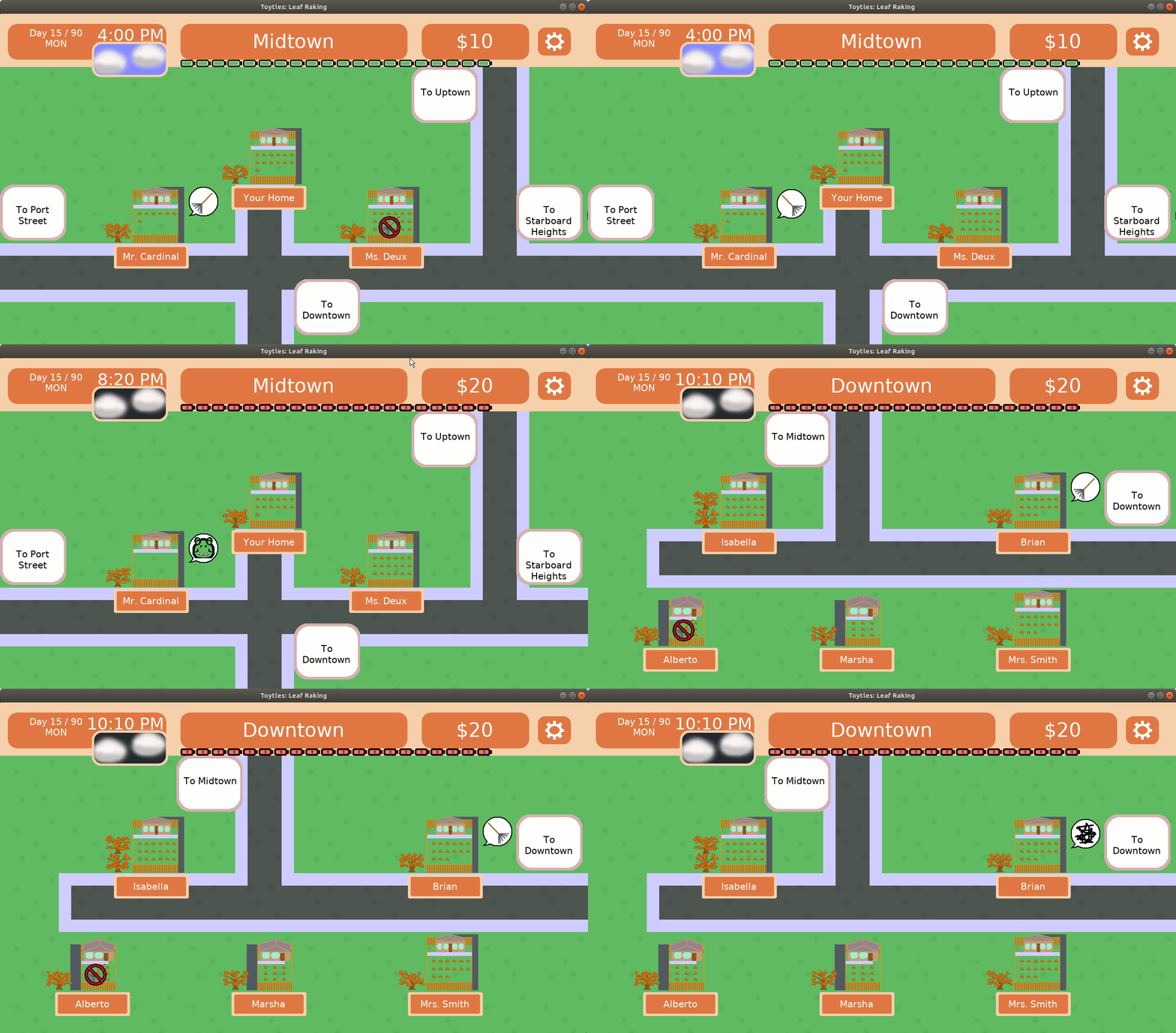
In Game - Client Status Indicators

After testing it on my main phone, which runs Android, I started the process of creating the new release for Google Play. I did not start work on the iOS update before the end of the week, so I’ll need to do so early this week.

Ideally, I’ll have v1.4.3 available tomorrow. Phew! Finally!

What took so long?

Now, for those of you who are paying attention, it is the fourth sprint in a row with that same plan.

And each sprint I write a report like this one, explaining how things went.

To recap:

  • Sprint 9: 6 hours – creating and iterating on mock-ups for the indicators, including getting feedback from colleagues. I expected I’d get the actual implementation done in Sprint 10.
  • Sprint 10: 5.75 hours – moving code and adding tests around existing code that manages the neighborhood in order to make the project more maintainable. Performing legacy rescue took longer than I thought, and I speculated that perhaps I should have tried adding tests to new code rather than rescuing old code in order to get a release out sooner. I expected I needed only a few more hours to get the indicators implemented.
  • Sprint 11: 5.75 hours – creating an animation system, then realizing that I was still nowhere near delivering on the sprint goal, so I changed tactics to implement just enough to get what I needed for this project completed. I did not make a prediction for the next sprint, but I did make a point to focus more on doing just enough to make an indicator work for this project’s needs. It just came near the end of the week.

This feature has taken me about 28 hours of work so far, which works out to a little more than three 8-hour work days. And since one of those days was spent mostly creating and getting feedback on mock-ups before implementation, let’s say it took a couple of days to implement the work once I knew what to implement.

But it didn’t take a couple of days. As I have said before, I am a very, very part-time indie game developer. In the last couple of months I have averaged about 5 hours a week of game development time.

Which means that it took me about a month of real time to do this work and get it ready for a release.

And maybe I need to be fine with this kind of progress, but I was really expecting to have something closer to two to three weeks between updates.

So on the one hand, I might need to right-size my own expectations, but on the other hand, I think I need to figure out how to work on implementation more effectively.

I mean, I was worried about maintainability and automated testing, but once I started test-driving a less generic animated sprite widget, I had something on the screen.

My AnimatedSpriteWidget derives from SpriteWidget, and as arguments it takes a collection of Frames.

A Frame initially only specified an offset, a duration in milliseconds, and a sprite image to render. So each frame, the sprite image to render would change. And since all I needed to do was loop between two or four frames of animation, it worked well enough.

Later I needed to make the no-raking sign blink, and I just did it. I added a parameter to Frame for scaling. That way, I can change the width and height of the image to 0, and it effectively disappears.

And while it feels like it is a hack, it’s actually built up from something well-built.

The code appeared when the tests drove the need, and the tests came from me focusing on trying to get the actual indicators in the game rather than implementing a general-purpose, track-based animation system.

And I love it when it happens, and I need to trust that it will happen more often.

Thanks for reading!

Toytles: Leaf Raking Player's Guide

Want to learn when I release updates to Toytles: Leaf Raking or about future games I am creating? Sign up for the GBGames Curiosities newsletter, and get the 24-page, full color PDF of the Toytles: Leaf Raking Player’s Guide for free!

Categories
Game Design Game Development Geek / Technical

Toytles: Leaf Raking Progress Report – Animation False Starts

Here’s this week’s progress report for new updates to Toytles: Leaf Raking, my family-friendly leaf-raking business simulation available for iPhones, iPads, and Android devices.

Learn how to get it at the Toytles: Leaf Raking page.

In my previous report, I once again lamented how little capacity I have as a very, very part-time indie game developer.

And yet, I still felt optimistic.

Last week’s sprint plan was:

  • Make it clear from the map which neighbors are your clients, ex-clients, and prospects

This week I did 5.75 hours of game development. I had a few false starts, and in the end, I still don’t have the indicators in the game.

I started working on creating an animated sprite, which is basically just a regular sprite but with frames, where the frames have a length of time and an image that should show during that time.

Then I wondered if perhaps there were best practices or at least expected ways it should work, so I did a bit of research, and I remembered that CSS animations are a thing, too.

For a good part of the time, I was feeling fine. I designed and started to implement an animation system that works similarly to how the animation systems in CSS or Godot engine works. That is, if there is a property to change, I can setup “tracks” to change those properties over time. Position, scale, color, sprite image, etc, all of these can be changed independently and simultaneously.

And then I realized: my sprint goal is once again nowhere near done. I was spending a bunch of time creating a generic animation system when these indicators really just need to flip between a few frames and bob up and down.

Neighborhood indicators mockup

So after a few hours (which as a reminder is over the course of half of the week) I stopped working on the generic animation player, and I went back to my animated sprite widget.

And now I’m at the point in which I am creating an animated sprite as an indicator if a neighbor is a client. That is, I am actually starting on the work that will actually get the sprint goals accomplished.

I can see a way to do all of the above in a hacky way. That is, I’m sure I could have quickly coded up what I needed to show indicators if I didn’t care about trying to ensure the code is supportable and maintainable in the future. And after three weeks of not getting the indicators into the game, it sure feels like I made the wrong choice.

Others might argue I made the wrong choice earlier by not using an existing game engine instead of writing all of the code myself.

But I need to remember that the last three weeks of amounted to a total of about 17 or 18 hours of work. That’s not a lot of time in the grand scheme of things, especially when those hours are broken up across entire days, making it difficult to keep focused.

And I also need to remember that I want to be able to support and maintain this project in the future.

One thing I’ve learned is that the game framework code library I’ve created and updated and modified over the last 10 years still has some inconsistencies, and so working to add animation on top of the existing sprite and widget code was more confusing than it needed to be.

For example, widgets are objects that I create once and then reuse across update/draw cycles. Widgets can not only be drawn, but they can also be made interactive/clickable.

IWidget is the base class that not only provides the interface for widgets but also handles drawing child widgets. That is, any derived widget automatically gets the ability to add and render child widgets, and all a derived widget needs to provide is a way to draw itself.

IWidget provides a setOnClick() function which allows you to specify the rectangle in which it should detect a click (usually the size of the widget) as well as what option/command should occur when a click occurs.

How does it know that you clicked it? Widgets have an update() function that takes the input (mouse button presses and mouse location). I have a ButtonControl class which IWidget takes advantage of.

What does this have to do with animation? Well, how do I make sure an animated sprite changes over time? I’d use a different update() function that takes a deltaTime in milliseconds.

So throughout GBLib, which is what I call my library of general code for all of my GBGames projects, I have some update() functions that handle input and some update() functions that handle the change in time. And IWidget provides an update() that handles input, and now that I have an AnimatedWidget that derives from IWidget, I also want an update() that handles the change in time.

And while most programming languages let me have two separate update() functions that take two different sets of arguments, I think it would be confusing and is just one example of the kind of lack of cohesive design to GBLib that makes me want to sit down and figure out what I actually want this code to look like.

But it doesn’t mean I’m going to do it just yet. I’m focusing on getting the indicators in with an AnimatedWidget, and if it means it is a bit awkward, then it is a bit awkward. I can fix awkward later, especially since I have an automated test suite to support the work.

And I can eventually make a more generic animation system. The optimistic developer in me was convinced I only needed a few more hours to finish the work I started the week on.

But the producer/delivery lead in me also recognized that after a few weeks, it would be nice if I had something to show for it. I thought I was working on a compromise between quick & dirty and generic & clean, but I realized I was still doing too much for future needs.

So I’m doing the simpler work now in order to get a new release out, and I can worry about generalizing the code when I have something that needs generalizing.

Thanks for reading!

Toytles: Leaf Raking Player's Guide

Want to learn when I release updates to Toytles: Leaf Raking or about future games I am creating? Sign up for the GBGames Curiosities newsletter, and get the 24-page, full color PDF of the Toytles: Leaf Raking Player’s Guide for free!

Categories
Game Design Game Development Geek / Technical

Toytles: Leaf Raking Progress Report – Still Creating Neighborhood Indicators

Here’s this week’s progress report for new updates to Toytles: Leaf Raking, my family-friendly leaf-raking business simulation available for iPhones, iPads, and Android devices.

Learn how to get it at the Toytles: Leaf Raking page.

In the previous report, I said I had spent time mocking up the indicators that tell you whether or not a neighbor is a client and getting feedback from friends and colleagues.

Neighborhood indicators mockup

I also said:

I expect it won’t take me long to actually get the indicators working in the game. I think the bulk of my time this coming week will be playing the game and getting a feel for how the indicators change the experience.

Last week’s sprint plan was:

  • Make it clear from the map which neighbors are your clients, ex-clients, and prospects

After 5.75 hours of game development, almost as much as the previous sprint, I…still do not have indicators implemented.

So what was I doing?

Well, as I said in previous progress reports, I wish my Past Self had spent more time on making the code more maintainable for me today. It’s almost entirely implemented in a single file and has very few automated unit tests, which means most changes can be difficult to make, and they might introduce bugs or make the game unplayable without anything to warn me.

So in the spirit of helping my Future Self, and in the optimism that I’ll be continuing to create updates to Toytles: Leaf Raking for years to come, I am moving old code carefully into separate files, adding automated tests to ensure they work correctly, and even playing the game to make sure that everything continues to work (since there weren’t tests already, I might miss something important that needs to be tested).

In this case, in order to add the neighbor status indicators, I wanted to make sure I can do so by test-driving a solution. The problem was that most of the code handling the logic of setting up and managing the neighborhood was split across a few otherwise unrelated functions and data structures.

So I spent last week moving all of those functions and data structures into a Neighborhood class. I did so as safely as I could considering that there were no tests to prevent me from breaking the game. I used the existing code, then moved a data structure into the class, including its related functions, then replaced the old function calls with calls into the functions of the class, then deleted the original data structures and functions. Then I repeated again with each of the remaining data structures until I had the game using the class instead of the original disparate data and functions. All in all, it was a fairly smooth, if tedious, process.

And the class has automated unit tests associated with it, which means going forward I am always going to be more confident that this code will continue to work in the future.

Now, it’s very easy to change code, run tests, see them pass, and not realize that I missed something important that prevents the game itself from running. It’s especially true when working with untested code. The main way to catch these issues is to bring up the entire game and play it. So one change I am glad I made was a very high level test that does nothing more than run a single iteration of the update() loop in my main game state (InGameState). It won’t catch everything, but it has helped me catch more than a few crash bugs as soon as they are introduced, saving me a lot of time.

The downside is that all of this work took longer than I expected. I really thought I was going to finish this work earlier in the week and then move on to adding status indicators to the Neighborhood class by test-driving them in.

And at almost 6 hours, that’s once again the equivalent of less than a full-time day’s work, another reminder that I wish I could dedicate more time to this project than I do. Another couple of hours, and I would have finished the sprint’s commitment and then probably would have created and published a new release.

Maybe I could have created the neighbor status indicators independent of the above the code changes above. That is, I could have test-driven the new code and left the old code as-is, and I would just have to deal with adding more untested code around the usage of the indicators. I probably could have gotten the feature into the game sooner and only then spend time moving code around and adding tests.

I might try that approach in a future sprint, but for now, I will say that I am pleased that I took out hundreds of lines of code from InGameState.cpp, which is now at just under 4,000 lines. I have another class that holds most of the data structures relevant to the game, GameData, and its header has shrunk from 359 lines to 190 lines. Most of these line count reductions are the result of moving the code into separate modules.

Lines of code aren’t everything, but fewer lines generally means less complexity, which means it is easier to write tests for.

And automated tests are a key investment into saving Future Self time. In fact, as I mentioned above, I am already getting benefits out of having a a more robust, automated test suite for this game. Unlike game developer Ron Gilbert, I have always found unit tests in games to be useful. I just wish my Past Self had valued it enough to bother adding them earlier.

Anyway, this week I expect to finally implement the neighbor status indicators and publish a new update of the game. Make sure to sign up for the GBGames Curiosities mailing list (see link below), and I’ll let you know about the next release.

Thanks for reading!

Toytles: Leaf Raking Player's Guide

Want to learn when I release updates to Toytles: Leaf Raking or about future games I am creating? Sign up for the GBGames Curiosities newsletter, and get the 24-page, full color PDF of the Toytles: Leaf Raking Player’s Guide for free!

Categories
Game Design Game Development Geek / Technical

Toytles: Leaf Raking Progress Report – Creating Neighborhood Indicators

Last week’s report hinted that I’d be working on making it easier to see which neighbors are your clients as you travel the neighborhood.

Sprint 9: Visualizing client status

Last week’s sprint plan was:

  • Make it clear from the map which neighbors are your clients, ex-clients, and prospects

I put in a total of 6 hours of development. I’m actually feeling relatively good about that number because out of all of the weeks in the last two months, it ranks 4th in terms of hours of effort per week. And as a very, very part-time indie game developer, roughly 5 hours a week is what I aim for.

I spent a good part of that time using pen and paper to figure out what my indicators should look like. I even created some mock-ups and posted them on Twitter and in the local chapter of the IGDA’s Slack to get feedback.

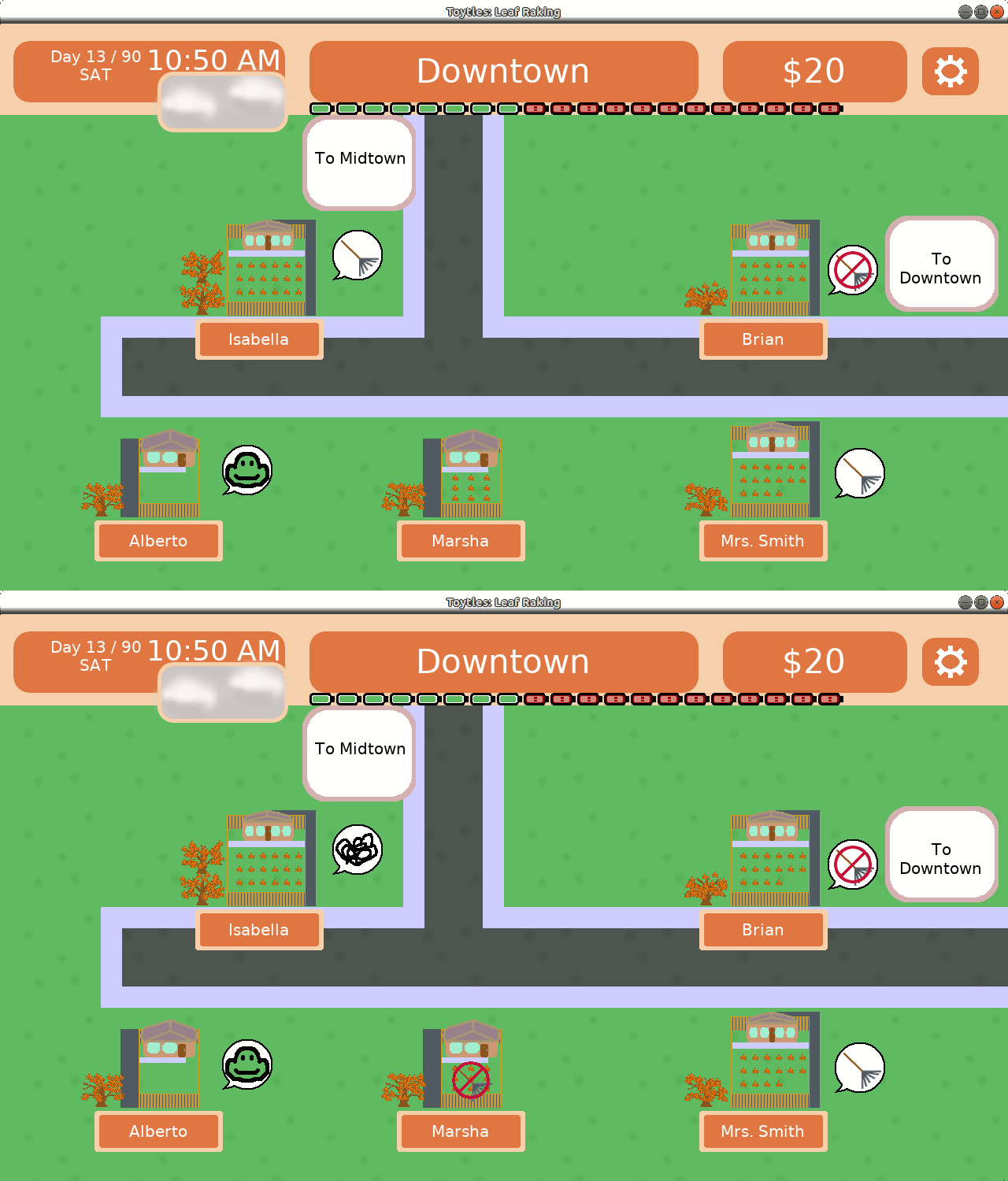
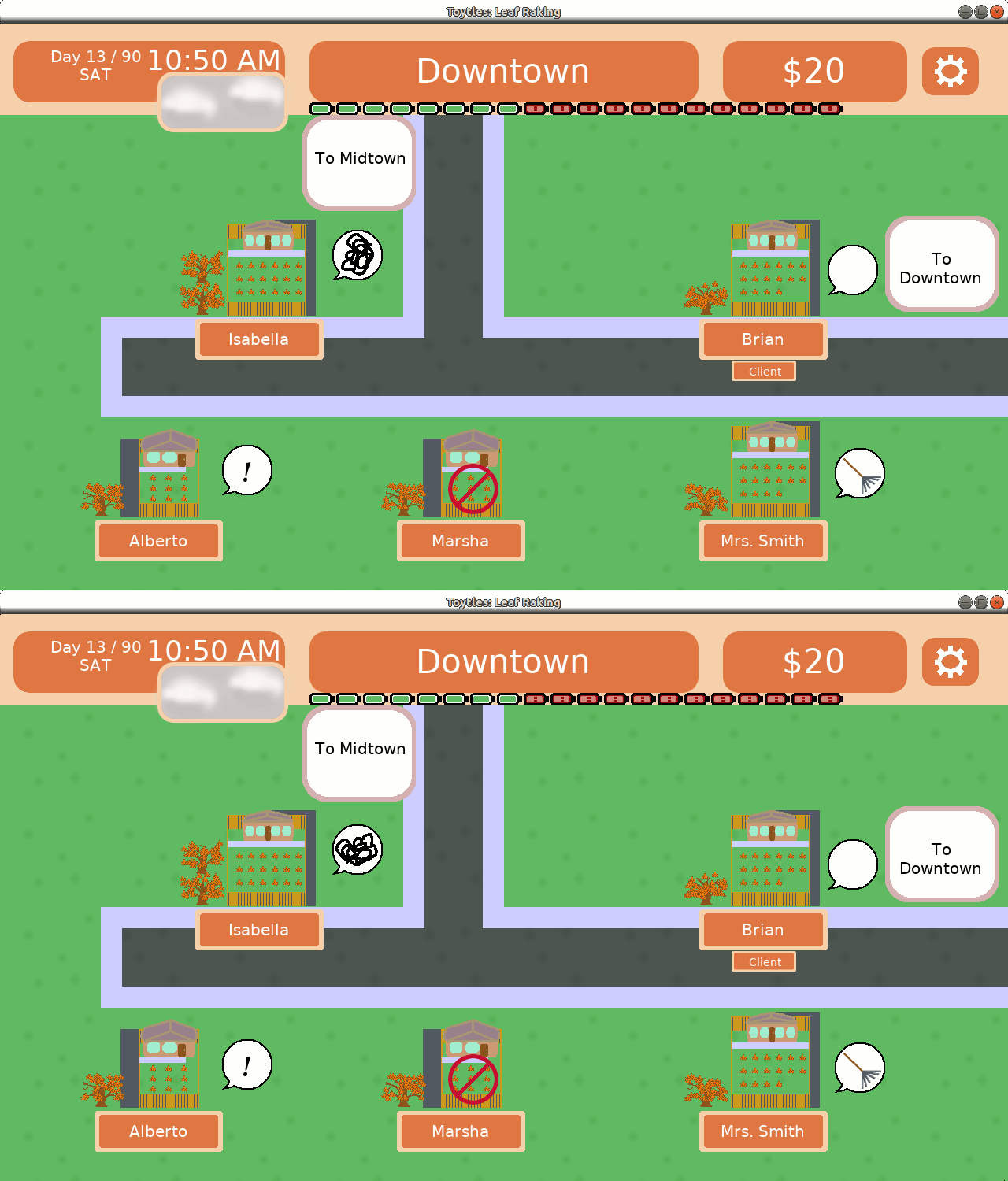
I created a speech bubble with the idea that it alone will tell you if you are looking at a client or not. What’s inside the speech bubble can indicate if the client is worried. Prospects won’t have any indicator.

In the following image:

  • Mrs. Smith is a client
  • Isabella and Alberto are both unhappy/worried clients
  • Marsha is an ex-client

You can ignore Brian’s empty speech bubble, as it was just a placeholder, although I got feedback that it was confusing, so…good then.

Neighborhood indicators mockup

I also got feedback from the image above that the exclamation point looks like someone is trying to get your attention to give you a quest. The angry scribble is playful while communicating that someone is upset, but it isn’t clear why.

I was worried that the “no entry” sign makes it look like you can’t visit Marsha, when in fact you can. My wife pointed out, “Why would your ex-client want to talk to you anyway?” which got me thinking about how much work I want to put into allowing you to visit ex-clients.

Maybe one of the consequences of losing a client is that you cut off access to all sorts of witty writing by yours truly?

I created a new iteration based on the above feedback:

  • Mrs. Smith is a client
  • Isabella is an unhappy/worried client
  • Alberto is a happy client (no need to rake the yard at the moment)
  • Brian and Marsha are ex-clients

Neighborhood indicators mockup

I don’t like Brian’s speech bubble because it goes completely against the idea that a speech bubble is a quick visual indicator that you have a client.

But the smaller blinking “no entry” over a rake symbol should make it clearer that the raking is what is prohibited, not necessarily visiting.

At least, I hope so. I realized surprisingly late that feedback from mockups only gets me so far, and that I’ll need to observe playtesters to see if it actually works the way I want it to work.

The other feedback I got was that the happy turtle face I created to indicate a happy client looks more like a frog, which is confusing in a game about turtles.

And when I look at it…yeah, it does look like a frog.

So I spent some time trying to make it look less frog-like and more turtle-like, getting feedback from local game developers as I went:

I tried making the beak more obvious:
Frog to turtle edits

I doodled a bit and experimented with a cartoony emoji-like face:
Frog to turtle edits

An artist presented a sketch with the eyes a bit farther apart and with some nostrils, which looked waaaay better than this initial version:
Frog to turtle edits

So I doodled a bit more and came up with this:
Frog to turtle edits

Frog to turtle edits

I was told that the eyes looked sleepy, so I took away the lids and thinned the smile, creating what I think looks like a pretty decent smiley turtle face:

Some of the images above were pictures I took with my phone because it was easier to do so to share on Slack, which is why they are such poor quality.

The last part of the week was spent moving the neighborhood rendering code out into its own files to make it easier for me to work with to add the indicators. I haven’t finished that work yet, which means so far last week was spent designing, iterating, and getting feedback on the indicators but no indicators are implemented yet.

Next sprint: actually implementing it

I expect it won’t take me long to actually get the indicators working in the game. I think the bulk of my time this coming week will be playing the game and getting a feel for how the indicators change the experience. Do they make it easier to understand who your clients are and which ones need urgent attention when you are looking at any given neighborhood screen?

Worries I still have:

  • Should prospects have an indicator? Will people ignore them if there is no indicator?
  • Will people avoid ex-clients because the indicator makes it look like they can’t or shouldn’t visit? Should I, in fact, make ex-clients less interesting (or beneficial) to visit as a natural consequence of losing a client?
  • Does the happy turtle face still look too frog-like?

Hopefully I’ll get some answers in the coming week.

Thanks for reading!

Toytles: Leaf Raking Player's Guide

Want to learn when I release updates to Toytles: Leaf Raking or about future games I am creating? Sign up for the GBGames Curiosities newsletter, and get the 24-page, full color PDF of the Toytles: Leaf Raking Player’s Guide for free!

Categories
Game Design Game Development Geek / Technical

Toytles: Leaf Raking Progress Report – Grumpy Dialog and Release

As I said in last week’s report, my sole focus was on adding the grumpy dialog.

Sprint 8: Grumpy dialog

Last week’s sprint plan was:

  • Give each neighbor unique text as unhappy clients

After only 2.75 hours of game development, I have finally added the ability of your worried clients to say something. Funnily enough, it took me about 40 minutes or so to write all of the new dialog, and I wish I had done so the week before.

The rest of the time was spent verifying that everything looked fine in terms of formatting, testing the game on actual hardware, and creating and uploading the releases to the App Store and to Google Play.

It was the most straightforward sprint and was done somewhat early, but I then updated some screenshots that were out of date and updated the Toytles: Leaf Raking player’s guide to reflect the changes I made related to waiting for the rain to stop.

I probably could have done more, but last week a hurricane hit Iowa.

My son once asked worriedly about hurricanes in Iowa, and I reassured him that those only happen near oceans, and we’re landlocked.

So it turns out that I am wrong. Sorta. It wasn’t really a hurricane. It’s a weather phenomenon I never heard of before called a derecho.

A derecho is a huge, sustained set of storms that can move incredibly fast. I didn’t know it was coming, and I drove right into it. One moment the world seemed fine, and the next moment, I saw horizontal rain and my car was getting buffeted by the strong winds. I learned later that the winds were going between 70 to 100 mph, so hurricane-strength.

I was driving to get a laptop activated for a client for my day job, and when I showed up at their offices, no one was around. I called security, who told me that they were sheltering in place due to the storm.

I said, “So you’re sheltering, but I’m…not?”

He said, “I don’t know what to tell you, sir.”

I ducked into a conference room with no windows off of the lobby and waited for the storm to pass.

Driving home, I saw a lot of large tress had been toppled or lost major branches. Power lines were done, and some areas looked downright dangerous to get through.

We lost power for a day and a half, as well as an 80′ tree in our backyard and some food in our fridge and freezer.

And there are still communities without power today.

I didn’t work on anything those two days we were without power. I think the combination of the COVID-19 pandemic and the disaster that affected millions of people across a number of states was too much for me to try to be “productive.”

This year really is something else.

Polish and content

One thing I found myself struggling with was knowing which neighbors were clients. You can’t tell from looking at the neighborhood view. You have to visit them and see if you have an option to rake their leaves.

So I want to add some indicators to let you know if a neighbor is your client. And if I do that, I might as well also have indicators to show you who your ex-clients and worried clients are.

I’d also like to start adding more variety to the existing dialog. Right now, for a given state of the game, a neighbor will say only one thing. I’d like to have them say one of many things.

That is, a prospective client currently only says one thing as a prospective client, but I’d like them to say enough different things that each time you visit them they have something unique to say.

It requires a little code but a lot of writing. I’ve been thinking I need to create a tool that lets me more easily create the dialog in-game so I can see what it will look like while I write it. So, more code and a lot of writing?

Let me know what you think, and thanks for reading!

Toytles: Leaf Raking Player's Guide

Want to learn when I release updates to Toytles: Leaf Raking or about future games I am creating? Sign up for the GBGames Curiosities newsletter, and get the 24-page, full color PDF of the Toytles: Leaf Raking Player’s Guide for free!

Categories
Game Design Game Development Geek / Technical

Toytles: Leaf Raking Progress Report – Dialog Tagging and Filtering

In last week’s report, I planned and started work on a new way for the game to choose and present dialog to you when you visit a neighbor.

The immediate goal, and the sole goal of last week’s sprint, is to allow neighbors who are worried about the status of their lawns to say something about it.

Sprint 7: Grumpy dialog

Last week’s sprint plan was:

  • Give each neighbor unique text as unhappy clients

I did 6.5 hours of game development, almost doing as much as I did the previous week. In fact, I could have done more, except I spent part of the weekend helping my sister-in-law move.

I was able to replace the simple dialog system based on client status with a more versatile system that is based on arbitrary tags that correspond with the state of the game.

I really enjoyed this coding effort, partly because my plan wasn’t as fully fleshed out as I would have liked. That is, I started to have an idea about dialog options based on tags, came up with a point of attack, and then took a leap of faith that the code would evolve fully formed into what I needed.

And it worked out! I’ve test-driven solutions before, but this was the first time I put so much faith into the code turning out to be what I needed. It was like putting together a puzzle that I was simultaneously jigsawing the pieces for.

Last week I explained the validators. This past week I created tags, such as IS_CLIENT_TAG and IS_PROSPECT_TAG, and I changed the collection of existing dialog text to pair with those tags instead of the client’s status.

I created a dialog filter which is initialized with a collection of tags, and when it is given a collection of tagged dialog, it will return a filtered collection based on those tags.

Where do those tags come from? They are generated based off of the current state of the game.

NeighborGreetings::DialogFilter dialogFilter(NeighborGreetings::getDialogTagsFromGameData(CurrentData));
NeighborGreetings::TaggedNeighborDialogCollection filteredDialogCollection = dialogFilter.filter(NeighborIDsToGreetings[yardData.occupantID]);

Now, the implementation to getDialogTagsFromGameData() is a bit simplistic, but it uses the validators in a sequence of if statements. For instance, it checks if the game’s current state indicates if the neighbor you are visiting is a client, and if so, it adds IS_CLIENT_TAG to the tag collection, which is returned and becomes the argument to the constructor of DialogFilter.

In the future, I can change this function to add more validators/tags. For instance, I can check the time and date and see if it is a specific holiday or a weekend or if it is early in the morning or late in the evening, and if I pair up those tags with new dialog that is relevant, it should easily allow for a variety of dialog options for a given neighbor.

Adding the grumpy dialog

So the dialog filter is able to determine if you are visiting a prospect, an ex-client, a client, or an unhappy client and find the text appropriate for that given neighbor. All that’s left is to write the text for unhappy clients.

Unfortunately, I wasn’t able to take advantage of this new dialog filter system to add new dialog for unhappy/worried clients. I might have been able to spend part of Saturday on writing that new dialog, but as I said, I was helping someone move all day.

I think I underestimated how much work there was in creating this system. I mean, all told, it only amounts to about two full days worth of work, but as I am working on this part-time, it’s spread over the course of a couple of weeks. It means that despite all of the effort, the game currently looks and behaves the same from the player’s perspective as it did before these changes.

I know that since I’m not working on the game full-time that occasionally I will take on something that might take a few hours and it will take a few days in real time, but it’s still frustrating. I feel like I could have done the last 7 weeks of work in one or two weeks if I was focused on it full-time.

So it looks like once again the grumpy dialog, and the next release, is pushed into the next sprint.

Thanks for reading!

Toytles: Leaf Raking Player's Guide

Want to learn when I release updates to Toytles: Leaf Raking or about future games I am creating? Sign up for the GBGames Curiosities newsletter, and get the 24-page, full color PDF of the Toytles: Leaf Raking Player’s Guide for free!

Categories
Game Design Game Development Geek / Technical

Toytles: Leaf Raking Progress Report – Streamlining and Planning

In the late report from last week, I went into detail about some changes I made to improve the quality of the codebase, then ended by saying that I wasn’t going to do it again unless it was related to a feature in development. That is, no cleaning up for the sake of cleaning up, as it is premature and potentially wasteful when there is more pressing work to do.

In fact, both stories meant to be completed in sprint 5 had to move to sprint 6.

Sprint 6: More personality injections; streamline waiting for rain

Last week’s sprint plan was:

  • Give each neighbor unique text as unhappy clients
  • Streamline “Wait for Rain” option

I did 7 hours of game development, which is amazing considering I was on vacation for part of this week and did more hours of work than most of the weeks since I started working on these updates.

I finished streamlining the “Wait for Rain” option. It took only 30 minutes, and yet I think it makes a big difference.

Before, if you tried to rake leaves while it was raining, you would get a message informing you that the rain was preventing you from working and asking if you wanted to wait it out.

Your options were to wait 10 minutes or to wait an hour.

Light rain is like a drizzle, and every 10 minutes, which is the smallest unit of time in the game, there is a chance that the rain will start or stop. So it makes sense to want to wait 10 minutes in this case.

But heavier rain will rain for the full hour, so you’ll want to wait that long.

If you were at the top of the hour, this is fine. But the problem is that you could try to rake at any time within an hour, so waiting an hour means that you lose out on anywhere from 10 to 50 minutes depending on when you were trying to start.

The original solution was tedious and frankly non-obvious as an optimal move: just wait 10 minutes over and over until you get to the top of the hour.

Now, you get presented with waiting for 10 minutes and waiting until the end of the hour.
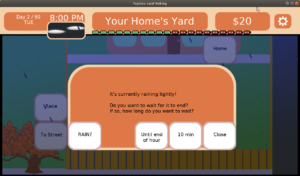
Wait for Rain options

It’s what you would want to do anyway, so now the option is there and easier to execute.

More code changes

Ok, so that was half an hour. What was I doing for the remainder of the time?

Well, I didn’t get the unhappy client text in, but I did a bunch of work to make it possible.

So wait, did I make a bunch of irrelevant code changes again?

No. This time the code changes were paving the way for this feature and not just random opportunities to make my inner technician happy.

Here’s your warning that the rest of this post will get kind of technical!

Currently, when you visit a neighbor, they have one unique thing to say to you which is based upon whether they are a prospective client, a current client, or an ex-client.

I knew the current implementation would be limiting. It’s literally a map of neighbor IDs to a map of client statuses to pieces of text.

typedef std::map<int, std::string> NeighborStatusToGreeting;

It’s a bit unwieldy, but it works for now. When it comes to adding new dialog options based on other things, such as the happiness of the client or the time of day or which date it is, well, I knew this solution wouldn’t have a long life in this codebase.

So I spent a majority of the time planning and researching a better solution. I didn’t need it to do everything possible, but I did need to make something more flexible for my immediate need.

At a high level, I need to take some criteria, then filter out any dialog text that wouldn’t match that criteria.

The current implementation is just hardcoded to pay attention to the visited neighbor’s client status, and so I need to abstract it a bit to make it handle other pieces of data.

In this case, I need to know if the client is unhappy, which isn’t actually a piece of state in the Neighbor struct. It’s related to whether or not the the yard is dangerously close to being overfilled with leaves in the case of a night of incredibly heavy leaf fall.

That is, if you are potentially one turn away from losing the client, the client is nervous, and they should say something about it when you visit them rather than pretend nothing is wrong. Which means that I need to know not only whether the neighbor is a client or not but also the amount of leaves in their yard to determine which dialog text to present to the player. Or more generally, I need more data to act as criteria to validate in order to create a filter that gives me the text I want and leaves out the text I don’t want.

I ended up moving a bunch of code into separate files, partly to make it easier to test drive my new code. As I said before, I wish my Past Self had done more of this quality work, and I don’t want to let Future Self down the way I’ve been let down.

Then I created what I called Validators, and so far I have:

    struct Validator
    {
        virtual bool validate(const ValidatorArgs & args) const = 0;
    };

    struct IsProspect : public Validator
    {
        virtual bool validate(const ValidatorArgs & args) const;
    };

    struct IsClient: public Validator
    {
        virtual bool validate(const ValidatorArgs & args) const;
    };

    struct IsExClient: public Validator
    {
        virtual bool validate(const ValidatorArgs & args) const;
    };

It should be clear that each one will return true or false based on whether or not a neighbor is a prospect, a client, or an ex-client.

Initially, each validator took a Neighbor object as a parameter, since that object had a clientStatus which was the only piece of data I needed.

In preparation for the next validator, IsUnhappyClient, I knew I needed more data to provide to it, but it felt wrong to append more arguments to the validate() function, especially if it ends up being irrelevant for most functions.

So I created ValidatorArgs, which will take all the arguments needed, and each validator can look at the piece that is relevant to it. It means that each time I add new data to be used in future validators, I don’t need to change the signature of all of the validate() functions.

For the above code, this implementation will suffice:

 struct ValidatorArgs
    {
        Neighbor * neighbor;
    };

As an example, here’s IsProspect’s validate():

bool IsProspect::validate(const ValidatorArgs & args) const
{
    return PROSPECT_STATUS == args.neighbor->clientStatus;
}

And if you are wondering what one unit test looks like:

class NeighborDialogCriteriaFixture : public Test
{
    public:  
        NeighborDialogCriteriaFixture() {}
        ~NeighborDialogCriteriaFixture() {}
    
    public: 
        NeighborDialogCriteria::ValidatorArgs args; 
};
    
TEST_F(NeighborDialogCriteriaFixture, CanValidateIfNeighborIsAProspect)
{
    Neighbor prospect(MR_CARDINAL, PROSPECT_STATUS, 0, 5, 0);
    args.neighbor = &prospect;
    EXPECT_TRUE(NeighborDialogCriteria::IsProspect().validate(args));
}

So I create a prospect, then pass it into validate() as part of ValidatorArgs, then test that it does in fact identify this neighbor as a prospect.

There’s also a couple of negative tests that check that it won’t validate if the neighbor is a client and if the neighbor is an ex-client.

What’s next? Well, I didn’t get to it yet, but the plan is to add a new member to ValidatorArgs representing yard data, which will be used in the IsUnhappyClient validator.

And ultimately, all of these validators will get used to determine which filters I should use to identify the appropriate dialog text.

So I envision each greeting text being tagged in some way, such as by client status, and those validators being used to create a list of tags to filter on, then one piece of text is selected and presented in the dialog box.

This also sets up the possibility of having more than one piece of text for a given criteria, so when you visit a neighbor, you’ll get a different greeting each day.

Normally I would love to keep things simple until they need to be more complicated. This solution feels like it is getting more complicated than I wanted it to be at this point, but I wasn’t sure how to take a smaller step to accomplish what I am setting out to do.

The downside is that this work wasn’t something I identified needing to do this sprint, and it meant that I didn’t get the grumpy text into the game yet.

Validating Personality

This coming week, I plan to finish this validator/filter work, and I expect it will open the way for me to add lots of greetings for each neighbor.

In future sprints, I’d like to add some graphical enhancements, including dynamic facial expressions. If a neighbor is greeting you grumpily, I want you to see that they are not smiling.

I’ve also been toying with the idea of enhancing the greetings so they are more like actual back-and-forth dialog with the player. That is, perhaps the player gets asked a question, then has different answers as options, and each one takes you to a different branch of dialog. Perhaps entire transactions can occur, such as giving or receiving gifts, or getting tagged in a way that opens up or closes off certain dialog options with other neighbors.

But, let’s not get ahead of ourselves. I still need to get grumpy neighbor text into the game.

Thanks for following along!

Toytles: Leaf Raking Player's Guide

Want to learn when I release updates to Toytles: Leaf Raking or about future games I am creating? Sign up for the GBGames Curiosities newsletter, and get the 24-page, full color PDF of the Toytles: Leaf Raking Player’s Guide for free!

Categories
Game Design Game Development Geek / Technical

Toytles: Leaf Raking Progress Report – Refactoring, Testing, and Vacationing

Last week’s report indicated that I didn’t get as much done as I would have liked. I managed to add a bunch of new random dialogs for weekends, but I didn’t get to grumpy client dialogs, which I pushed into the next sprint.

Sprint 5: More personality injections; streamline waiting for rain

Last week’s sprint plan was:

  • Give each neighbor unique text as unhappy clients
  • Streamline “Wait for Rain” option

In the last report, I said:

So this week’s sprint I will definitely get to the unhappy client dialog. I have some marketing screenshots to update, partly due to the copyright date, and I want to streamline the way you wait for rain to end so you can get back to raking as it is currently a bit clunky.

I did 2.25 hours of game development, but I did not actually work on any of the above.

So what did I do? Well, last week’s report also said:

I am kicking my Past Self for not spending more time on automated tests so I didn’t have to verify that I didn’t break anything each time I make a change. I’m slowly improving the code as I go along so that it is easier for Future Self, but Past Self is a short-sighted jerk.

This codebase is a few years old, and it has gotten fairly unwieldy. When I work on a 48-hour game development competition such as Ludum Dare, it’s fine for almost all of my game code to be in a single file. It is quick and dirty, and so long as I am mindful and focused, as I would be in a concentrated weekend development effort, I can make a game and then be done with it.

But when I have a commercial project that I am maintaining for years, something I come back to once in awhile, I need to break it up into well-tested pieces so that I don’t need to worry about forgetting how it works.

So I invested in my code quality last week. The rest of this report gets fairly technical, so feel free to skip to the end for my plans for the next sprint.

Code quality and its improvement

To give an idea of what I am dealing with, I have a class called InGameState which handles all of the game play logic and rendering. The class itself only has six functions:

virtual void onEnter();
virtual void update(int timeElapsed);
virtual GBLib::IRenderCommand * draw(); 
virtual void onExit(); 
virtual void onSuspend();
virtual void onUnsuspend();

This class is the workhorse of pretty much all of my games. That is, when you start a new game, the Main Menu state changes to the In Game state. It calls onEnter(), which is where things get initialized, including loading saved games or creating default values for variables.

Then update() and draw() get called over and over until the player exits, which calls onExit(), and the state machine calls onEnter() on whatever other state, either the main menu state again or the exit state in preparation for shutting down the game.

But as I said, I like to throw as much as I can into a single file when I work on a quick game project. If you looked at InGameState.cpp from nine months ago, it was 4,148 lines of code, and my work in the last month has added another 100 lines of code or so.

In a well-written codebase, I’d argue that most class implementations shouldn’t be more than a few hundred lines of code.

Now onSuspend() and onUnsuspend() are meant to help with pausing and unpausing, usually by delegating to a different state, but in this game, they merely set a boolean value to true and false respectively, so they aren’t very interesting. So how are over 4,000 lines of code distributed among four functions?

Well, they aren’t really. There may be four major class member functions, but each one is implemented using inline code as well as non-member functions strewn throughout the file.

I don’t know offhand how many of those non-member functions are in the code base. There’s a lot. But I know my bias is towards lots of small, well-named functions. But this codebase is also a few years old, so some of those functions are not as small as I would like.

So why didn’t I add them to InGameState.h and make them part of the class? Well, as with my protoytpe projects, it is a lot easier to delete all of the .cpp file and copy the header into a new project than it is to remember which functions to keep and which ones are project-specific.

Why didn’t I create a project-specific class and leave InGameState as a generic class to be used across projects? Because I didn’t.

In any case, there is so much code in this class that handles everything from initializing variables, dialog management, time and date changes, weather updates, input processing, screen updates and changes, and more.

An example: generateNeighborhoodScreenBG()

There’s an entire function dedicated to figuring out how to render a particular part of the neighborhood.

This function is over 50 lines long. What may not be obvious is that it takes what is called a NeighborhoodScreen, iterates over the tiles at the x and y positions, and adds the sprite that corresponds with the tile to the spriteWidget.

Ostensibly, that is ALL it does. But when you look at the code, it looks like it is doing a lot more. In fact, most of the code was actually figuring out how to put sidewalks down based on where streets are located.

void generateNeighborhoodScreenBG(SpriteWidget * spriteWidget, NeighborhoodScreen * screen)
{
	for (int x = 0; x < MAX_NEIGHBORHOOD_TILE_WIDTH; ++x)
	{
		for (int y = 0; y < MAX_NEIGHBORHOOD_TILE_HEIGHT; ++y)
		{
			int tileType(screen->tiles.at(x).at(y));
			SpriteWidget * tileWidget = new SpriteWidget(TileTypesToSprites[tileType], Point(x * TILE_WIDTH, y * TILE_HEIGHT, ZORDER::BG));
			if (STREET_TILE == tileType)
			{
				if (y != 0 && screen->tiles.at(x).at(y-1) != STREET_TILE)
				{
					tileWidget->add(new SpriteWidget(SideWalkHorizontalSprite, Point(0, 0, ZORDER::FG)));
				}
				else 
				{
					tileWidget->add(new SpriteWidget(SideWalkCornerSprite, Point(0, 0, ZORDER::FG)));
					tileWidget->add(new SpriteWidget(SideWalkCornerSprite, Point(TILE_WIDTH - 27, 0, ZORDER::FG)));
				}

				if (y != MAX_NEIGHBORHOOD_TILE_HEIGHT - 1 && screen->tiles.at(x).at(y + 1) != STREET_TILE)
				{
					tileWidget->add(new SpriteWidget(SideWalkHorizontalSprite, Point(0, TILE_HEIGHT - 27, ZORDER::FG)));
				}
				else
				{
					tileWidget->add(new SpriteWidget(SideWalkCornerSprite, Point(0, TILE_HEIGHT - 27, ZORDER::FG)));
					tileWidget->add(new SpriteWidget(SideWalkCornerSprite, Point(TILE_WIDTH - 27, TILE_HEIGHT - 27, ZORDER::FG)));
				}

				if (x != 0 && screen->tiles.at(x - 1).at(y) != STREET_TILE)
				{
					tileWidget->add(new SpriteWidget(SideWalkVerticalSprite, Point(0, 0, ZORDER::FG)));
				}
				else
				{
					tileWidget->add(new SpriteWidget(SideWalkCornerSprite, Point(0, 0, ZORDER::FG)));
					tileWidget->add(new SpriteWidget(SideWalkCornerSprite, Point(0, TILE_HEIGHT - 27, ZORDER::FG)));
				}

				if (x != MAX_NEIGHBORHOOD_TILE_WIDTH - 1 && screen->tiles.at(x + 1).at(y) != STREET_TILE)
				{
					tileWidget->add(new SpriteWidget(SideWalkVerticalSprite, Point(TILE_WIDTH - 27, 0, ZORDER::FG)));
				}
				else
				{
					tileWidget->add(new SpriteWidget(SideWalkCornerSprite, Point(TILE_WIDTH - 27, 0, ZORDER::FG)));
					tileWidget->add(new SpriteWidget(SideWalkCornerSprite, Point(TILE_WIDTH - 27, TILE_HEIGHT - 27, ZORDER::FG)));
				}
			}
			spriteWidget->add(tileWidget);
		}
	}
}

There isn’t anything wrong with this function. It does what is intended. Well, presumably. Since I have no tests around it, who knows what that intention was originally or if it continues to work when I’m changing code or even sneezing near it. But let’s assume with maybe only a little anxiety that the code works.

What I hate about it is that this code mixes levels of abstraction. I’m iterating through tile types and adding corresponding tile sprites to some parent sprite. But in one special case, I suddenly need to figure out how to add child sprites to the tile sprite. It’s important, but not so important that it takes up the lion’s share of the function! It just makes the entire thing harder to comprehend. So, a quick “refactor” changes the above code to:

void generateNeighborhoodScreenBG(SpriteWidget * spriteWidget, NeighborhoodScreen * screen)
{
	for (int x = 0; x < MAX_NEIGHBORHOOD_TILE_WIDTH; ++x)
	{
		for (int y = 0; y < MAX_NEIGHBORHOOD_TILE_HEIGHT; ++y)
		{
			int tileType(screen->tiles.at(x).at(y));
			SpriteWidget * tileWidget = new SpriteWidget(TileTypesToSprites[tileType], Point(x * TILE_WIDTH, y * TILE_HEIGHT, ZORDER::BG));
			if (STREET_TILE == tileType)
			{
				addSidewalksToTileWidget(tileWidget, screen, x, y);
			}
			spriteWidget->add(tileWidget);
		}
	}
}

I simply extracted that giant collection of if/else chunks into a separate function called addSidewalksToTileWidget().

Sidewalks on streets

Now, you’ll note I said “refactor” above. Why the quotes? Well, as said, there are no tests around most of these non-member functions. I have no idea if I subtly broke something with this change. I think it looks fine, and when I play test the game, it still seems to be rendering sidewalks on streets as expected, but does it do the exact same thing as it did before? I have no way of verifying it. So it’s not really refactoring, because refactoring requires that I know with some confidence that I didn’t change the behavior when I changed the structure of the code.

You might also wonder what the above change bought me. Did I not just add more lines of code to InGameState.cpp?

Yes, yes I did. But as I said, the original function mixed layers of abstraction and was hard to read. It is now easier to read and understand. Future Me will be so pleased that Current Me didn’t get in his way when it comes to future updates.

Another example: getTimeText()

Ok, how about one that actually shrunk InGameState AND resulted in an increase in testing, giving me more confidence that the code works and will continue to work correctly in the future?

getTimeText() takes a TimeOfDay object and produces a string that I can render in the clock at the top left of the screen.

TimeOfDay handles dates, but for the purposes of this function, know that it has two important members: hour and minute. TimeOfDay uses 24 hours, and so based on the hour, getTimeText() needs to show a 12-hour clock and let you know if it is AM or PM.

The minute isn’t an actual count of minutes. Time passes in Toytles: Leaf Raking in 10 minute increments, so TimeOfDay’s minute can have values 0 through 5. So getTimeText() will need to convert minute to one of the 10 minute increments to render.

For example, if getTimeText() takes a TimeOfDay object with an hour of 14 and a minute of 3, it will return the string “2:30 PM”.

The TimeOfDay struct was already in a separate file called Gamedata.h, mixed with other miscellaneous classes. But the following code was in InGameState.cpp:

std::string getTimeText(const TimeOfDay & timeOfDay)
{
	std::stringstream timeText;
	int currentHour = (timeOfDay.hour == 0) ? 12 : timeOfDay.hour;
	std::string periodString = (timeOfDay.hour >= 12 ) ? "PM" : "AM";
	
	if (currentHour > 12)
	{
		timeText << currentHour - 12;
	}
	else
	{
		timeText << currentHour;
	}

	if (timeOfDay.minute == 0)
	{
		timeText << ":00";
	}
	else
	{
		timeText << ":" << timeOfDay.minute * 10;
	}

	timeText << " " << periodString;

	return timeText.str();
}

Since it is so intimately tied to TimeOfDay, I decided to make it a member, and I wanted to be able to test this class, so I put it in its own .h and .cpp files.

There was a bit of hesitation on my part to add this function as a member of TimeOfDay. The struct is just a value, and getTimeText() outputs a particular rendering of that value in a certain way. How it gets rendered should be independent of what it represents, much like how CSS can let you style the same HTML differently based on your needs. What if a future project needs a 24-hour clock rendered? Or what if I don’t want to render text but will instead render an analog clock?

So good design tells me that getTimeText() is more of a rendering helper than an intrinsic part of the TimeOfDay struct, and therefore it should be separate.

But incremental and iterative change tells me that I can move it into the struct, then add tests to it, as well as other TimeOfDay functionality that wasn’t related to rendering, and I can worry about creating separate renderer utilities in the future. Future Me might wish he had them, but he’ll be appreciative that the improved test quality allows him the option to create them much more easily.

I have a function that generates the store’s hours that makes use of getTimeText(). It changed from

hoursOfOperationText << getTimeText(openingTime) << " - " << getTimeText(closingTime);

to

hoursOfOperationText << openingTime.getTimeText() << " - " << closingTime.getTimeText();

It’s not a big difference, which is part of the point. I wanted it to be an easy change that improved things, a simple step forward.

I don’t like that TimeOfDay is in charge of figuring out how to render its time, but for now, I’ll take well-tested, refactorable code over trying to fix all of the design problems at once without a test suite to catch breaking changes.

Oh, and TimeofDay.cpp is 63 lines of code. It’s super easy to read and understand.

I frankly don’t have the hours to spend trying to remember everything I might break while making a large change, so I make smaller changes that I can handle in a single session between the day job and taking care of the kids.

Also, I went on vacation

I meant to work on actual features to continue to inject personality into the project, but I spent almost 2 hours writing a blog post and an email newsletter to announce the most recent update to Toytles: Leaf Raking, and the remainder of my time on changes like the ones above to make future changes easier and safer.

And then I left town for a birthday vacation at a log cabin in northeastern Iowa. It’s easy to social distance when you are living in a forest with no AC. I had a great time with my family.

But that vacation is also why I haven’t written up this report for Monday like I planned. Next week’s report should be on the regularly scheduled day.

Next time, less random work

So my previous sprint got cut short, and my current sprint started late. I should probably commit to less getting done as a result.

I should ALSO stop myself from working on random “improvements” unrelated to what I committed to working on. I want more automated tests to give me confidence in what I am changing. I want to make the code easier to work within. I want to make Future Me happy.

But I also need to recognize that I didn’t get anything player-facing accomplished. I didn’t even address any bugs. I just restructured some code. There’s no actual value in doing so. In fact, Future Me might not even find any improvement in his situation from the changes I did make since I made them without any thought toward what he was going to work on next.

On the one hand, I’m the boss. I can give myself time to work on nothing but code quality improvement. No one is going to give me a hard time about slowing down my next release. On a whim, I can decide to work on a completely different project if I wanted, or not work on a project at all if I need the break.

But on the other hand, I’m the boss, and I need to keep my eye on continually adding value for players. No one else is responsible for ensuring that what I’m working on is the highest priority, and I need to hold myself to a higher standard. I need to be more deliberate.

You might think that I am chastising myself, but I’m not. I’m just taking this opportunity to analyze how the past sprint went and how I would like to change things going forward to improve future sprints. Future Me is going to have the benefit of hindsight, as well as a project that has steadily been improving in quality both from a game play perspective as well as a codebase perspective.

So going forward, code quality improvements should always correlate to work that adds value to the game in the eyes of my customers.

InGameState.cpp has a lot of low-hanging fruit along the lines of long functions I can shorten and classes I can pull out into their own files, so the temptation is going to be to tackle these all at once. I love refactoring code, even if I am just “refactoring” code carefully without the benefit of tests. And ultimately I’d like to get most of the code covered by tests, which requires pulling out more and more into separate modules.

But I’m also running an indie game development business. No one is going to be convinced to purchase a game because its internal code is easier for the developer to work with. There is value in Future Me having an easier time supporting and updating this and other projects, but Future Me is smart and capable enough to make the changes he needs when he needs them. Current Me will make the changes I need as I need them today.

I’ll waste less time on guessing what might be useful and actually work on what I see would be useful now.

Toytles: Leaf Raking Player's Guide

Want to learn when I release updates to Toytles: Leaf Raking or about future games I am creating? Sign up for the GBGames Curiosities newsletter, and get the 24-page, full color PDF of the Toytles: Leaf Raking Player’s Guide for free!
Categories
Game Design Game Development Geek / Technical

Toytles: Leaf Raking Progress Report – A Little More Conversation

Last week, I reported on the progress of my first few sprints to create updates for my leaf-raking business simulation Toytles: Leaf Raking.

Sprint 4: More personality injections

Last week’s sprint plan included:

  • Give each neighbor unique text as unhappy clients
  • Add variation to weekend flavor text

I was able to work 5.25 hours, but unfortunately part of that time was used to create the v1.4.1 release for both the App Store and Google Play.

Unfortunately, it’s not yet an automated process. Well, the Android build is mostly automated. I can run a single command and have a release APK ready to install on my own devices to test with or to upload.

But due to Apple changing requirements every so often, breaking old scripts and how-tos, I unfortunately can only get so far before I need to fiddle with things in Xcode in order to create a publishable release for iOS.

I have it mostly down to only a few manual steps related to getting the app icons setup at this point, but it’s still tedious and annoying that I need to do so.

I decided to work on the weekend flavor text, which is all I finished for this sprint unfortunately.

There were originally two random dialog sequences that occurred when you woke up on a weekend, telling you about a dream you had. Now there are 11 more.

New dream

Part of the time was rewriting some of the code so it was easier for me to add a dialog sequence. I think ultimately it would be best if I could change the code to load the scripts from a text file. For now, I’m adding the scripts in code, which requires a recompile to test each time. But it works.

None of these events make a difference to the game play. That is, they don’t help or hinder your progress towards earning enough money to purchase the Ultimate Item(tm).

So why do it? It’s all part of my attempt to inject some personality into the game.

And eventually I would like to add weekend events that allow the player to make a decision that could, in fact, make a difference. So for now, I’m laying the groundwork.

Until next sprint

So this week’s sprint I will definitely get to the unhappy client dialog. I have some marketing screenshots to update, partly due to the copyright date, and I want to streamline the way you wait for rain to end so you can get back to raking as it is currently a bit clunky.

I’d also like to invest in getting the release builds a bit more automated, and I am kicking my Past Self for not spending more time on automated tests so I didn’t have to verify that I didn’t break anything each time I make a change. I’m slowly improving the code as I go along so that it is easier for Future Self, but Past Self is a short-sighted jerk.

Toytles: Leaf Raking Player's Guide

Want to learn when I release updates to Toytles: Leaf Raking or about future games I am creating? Sign up for the GBGames Curiosities newsletter, and get the 24-page, full color PDF of the Toytles: Leaf Raking Player’s Guide for free!