Categories
Game Design Game Development Games Marketing/Business

Casual Indie Game Development Blog Launched

Started by a game producer at Garage Games, The Casual Indie Game Development Blog aims to bring together casual games (games for everyone) and indie games (games by anyone).

From the post titled The Casual Indie Connection:

Developers are attracted to independent development and casual game development for many of the same reasons. Some developers see casual/indie game development as a stepping stone into heavier AAA development. Most in the casual and indie game spaces are there to stay (and grow).

Besides CasualGameBlogs.com, you now have CasualIndie.com. Hopefully there will be plenty of good development and design tips available, and I can’t wait to see who will do guest posts there. GameDev.net’s Drew Sikora has an article up encouraging more game developer blogs.

[tags] casual games, indie, game development, game blog [/tags]

Categories
Game Design Game Development Games Geek / Technical Linux Game Development Personal Development Post-mortem

LD#11: Minimalist Post-mortem

In one 48 hour period, I made a simple game based on the theme “minimalist”. I didn’t try to stay awake throughout the entire Ludum Dare competition, so the game was made in less than 48 hours.

What Went Right:

  • Used my build script to create a distributable game from the beginning.

    I have a build script from a previous project that allows me to use a single command to take my project source, build it, and create a .tar.gz file to distribute for GNU/Linux users. Towards the end of the competition, I wasn’t spending too much time trying to figure out how to get my project into a judge’s hands since.

  • Mouse control was easy to do and easy to use.

    Since I was learning SDL, I tried to make my game as simple to use as possible. I knew that using a mouse was a lot easier than expecting someone to use the keyboard, but I had never implemented mouse control in a game before. Luckily, it turned out to be very easy. As a result, the interface was very simple since you’re just moving the mouse around, and the game that this interface produced was better for it.

  • I got really involved in it.

    I had food photos and a time lapse video, and I even received two trophies, one for my eclectic food choices. Hanging out with all of the other Ludum Dare participants, even if just virtually through IRC, was a lot of fun.

  • I finished!

    Of course, finishing was also a lot of fun. While I could have used some more playtesting and would have loved some feedback before it was submitted, I think I put together a decent game in a short amount of time. It feels good to finish things.

What Went Wrong:

  • My work environment was horrible.

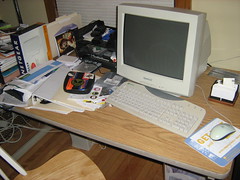
    A couch is comfortable…but not for marathon game development sessions! My back still hurts. I need to clean my office. Right now, I am using it as a giant inbox:

    Why I Use My Couch Instead of My Office

    I prefer development with my laptop because the CRT of my desktop is harsh on my eyes. Still, it would be nice to sit in a real chair while working. Alternatively, I can finally buy an LCD for my desktop.

  • My cats love to hang out with me.

    Even if I was sitting in my office, I know from experience that my cats would still jump up into my lap and try to rest their heads on my arm. When you’re using a laptop, there isn’t room for it AND a cat or two. Having an office door to close would help, of course, but the cats were quite a distraction for LD#11.

    Gizmo prevents me from game programming

  • I didn’t practice using SDL before the competition.

    It was a problem especially since I had decided not to depend on the Kyra Sprite Engine for future projects, but I really only used libSDL for input and creating a window prior to this project. When the first 24 hours are finished and all you have is a window rendered and the knowledge that the mouse handling is working (even if it isn’t visible), you might be afraid that you won’t have anything to show at the end of 48 hours. I did manage to pull it off, but by the next competition, I want to be able to work with less of a focus on technical details and more of a focus on game development.

  • I spent too long in the beginning trying to mock something up in the GIMP.

    Similar to the previous point, I was spending more time on technical issues than on creation. I thought I was more familiar with the GIMP than I was, and I spent a lot of my early hours fighting with it instead of just using pencil and paper. The worst part about it was that the initial idea was one I ended up discarding, and if I wasn’t wasting time with figuring out how to do some simple things in it, I might have been able to figure it out sooner.

What I Learned:

  • My kitchen goes to entropy during LD.

    When you’re focused on game development for most of your waking hours for two days, other things have to take a lower priority. One of those things was cleaning. I had a bit of a mess to deal with after the competition was over.

  • Even something incredibly simple can be a good game mechanic.

    I knew I wasn’t going to be drinking multiple cans of Mountain Dew or Red Bull, and I don’t drink coffee, so staying up for 48 hours wasn’t going to happen. I needed to work on a game I could finish, so I picked the simplest thing I could. Surprisingly, it was fun, and some of the judges have said so as well. At the end of the competition I already had a list of ideas that could improve it, and I hope to release an updated version with those improvements.

  • It’s possible to do a lot in a single day.

    Even though I spent some time learning how to use SDL, I still managed to make a game. The best part is that I can incorporate what I have learned into my personal library of code for my future projects. Also, there were over 70 games submitted, and it is amazing what some people were able to do in 48 hours. Some of them were learning how to program!

I set aside most of a 48 hour period, and I have a game, some new code, and more experience. If I could work on a project with a similar scope each month, I think it would go a long way towards improving my ability to create video games. Also, it’s a lot of fun, and I will definitely be participating in future Ludum Dare competitions.

To see my entry, check out the final version. There is a GNU/Linux and a Windows version.

[tags] postmortem, video games, game development, cats [/tags]

Categories
Game Design Game Development Games Geek / Technical Marketing/Business

Indie Lessons from Sins of a Solar Empire Post-mortem

Gamasutra has the Sins of a Solar Empire post-mortem up. It’s always a treat to read what goes on behind the scenes at Stardock, a prominent indie developer/publisher, although I’ll admit that I was a bit confused by the writing.

A single unspoken decision made early in the Stardock / Ironclad partnership led to a host of positive results that might seem obvious in hindsight, but were not at all straight forward at the time.

Er…what was that unspoken decision? The What Went Right section lists a number of decisions, and they all sound like they were not only spoken but also written down as a formal agreement. Perhaps it was just a case of bad writing, but luckily all of the important points of the article offer some insight into the development of the game.

As for what went right, I think it can be summed up in two points.

  • Stardock and Ironclad worked together as a team rather than have a stereotypical publisher-developer relationship.
  • The game was made for the customers.

Stardock and Ironclad worked together on marketing and design. I think that the employees of Ironclad probably felt more invested in their project, especially since they did do much of the up front work on their own.

And as for the paying customer? The game was delayed to make it better. The hardware requirements were brought down to a sane level so that people other than those with the latest hardware could enjoy it. Copy protection was considered more of a hindrance to paying customers than anything else. It isn’t a game in a popular genre like MMO FPS/RTS, so making the game run on more hardware and making it easier for people to play it were really good decisions.

And it has been paying off. Hundreds of thousands of copies have sold, mostly online, in the first few weeks of release. The game is in retail stores now, so I imagine that sales have increased even more now that the game is much more easily available.

As for what went wrong, most of the issues raised deal with technical issues, such as providing lower-quality artificial intelligence or a single-player campaign due to a lack of time. One problem was a feature of the game that was removed due to the feedback coming from beta testers. I wish the post-mortem went into detail on this point. All I know is that the feature was considered “better left untouched”, but there was no information to suggest how they came to this conclusion.

Stardock wasn’t able to finish Impulse, their digital distribution platform. I’m not so sure it is a problem. Many people already have Steam, and Penny Arcade is releasing its game on Greenhouse. Not that I don’t think competition in this space is a good thing, but does everyone need their own platform?

From Stardock’s perspective, the experience on Sins of a Solar Empire cemented its commitment to ensuring that any games it publishes are developed by studios that view game design as an iterative, collaborative process where the strengths of both teams are combined.

So what can an indie game developer learn from the post-mortem?

  • Your paying customers matter more than the non-paying non-customers.

    As Stardock’s Brad Wardell said on piracy and PC gaming, people who actually buy your games don’t want to deal with the hassles of copy protection. Most of them don’t upgrade their hardware every few weeks. They also appreciate it if you put together a good game, even if it is delayed. If you focus on satisfying the customer, how can you go wrong?

  • Do it, then do it better.

    Ironclad spent a year working on prototypes to make sure that the game mechanics would work well before starting production in earnest. PopCap’s James Gwetzman also promotes prototype-heavy game development. Create a small prototype that is meant to be thrown away. It is better to learn early on that something isn’t fun or just doesn’t work than after millions of dollars and thousands of man-hours have been sunk into a project.

While Sins of a Solar Empire may be benefiting from a lack of competition from major titles, I am sure that the above two practices, focusing on the customer and iterating the game design, helped create a hit.

One side note: why isn’t there a game demo available? Or rather, why is news of it buried in the forums instead of the front page of the website? I mean, at least provide a link from the front page to let me know that it exists. The Sins of a Solar Empire demo does exist, so why not tell people who aren’t already on your forums?

[tags] post-mortem, video games, indie, game design, marketing [/tags]

Categories
Game Development Personal Development

Thousander Club Update: April 28th

For this week’s Thousander Club update:

Game Hours: 409.25(previous two years) + 72.5 (current year) = 481.5 / 1000
Game Ideas: 710 (previous two years) + 35 (current year) = 745 / 1000

This past week was spent partially recovering from Ludum Dare the previous week. I did manage to work on game development, but it was mostly fixing a few problems with my build scripts. There isn’t much to report.

[tags]game, game design, productivity, personal development, video game development, indie[/tags]

Categories
Game Design Game Development Games

Game Design for the Color Blind Player

Thanks to ButtonMashing.com, I found Gaming While Color Blind, a post at the Amazon Game Room’s blog. The author talked about the problems he had playing the beta for Battlefield: Bad Company:

Starting out by the blue people, I saw a green guy, and shot him… minus 10 points for killing a team member. I re-spawned and move out again. There’s a green guy. I won’t shoot him this time… oh, he shot me. Eventually I became hesitant to shoot as I didn’t want to be a team-killer. Instead I wandered the fringes playing with the destructible environment. Taking out half a building is great fun. Not knowing who to shoot isn’t.

Eventually I realized there were blue, green, AND red people in the game. *sigh* Green and blue guys are teammates. Red guys are enemies. That seems simple enough, except that I couldn’t tell the green guys from the red guys.

When it comes to the game interface, we try to make things as intuitive as possible. One way to make it obvious that two objects on a screen are different is by using different colors. In fact, I remember going to a Chicago IGDA meeting in 2003 to see John Tobias (of Mortal Kombat fame) give a talk on character design. He said that when he works on character design, he always applies the concepts of shape, size, and color to differentiate characters and objects.

When you’ve locked the shape and size of various objects, such as orbs in a puzzle game or soldiers in an FPS, the other option you have is color. But as Osver points out, color might not be enough for a significant percentage of your players, especially if you pick colors without considering their impact on the color blind. My beta testing for Killer Kittens has uncovered a number of problems, and one of them was the color scheme I used. Currently I have a blue ship on a green background, and as far as I am concerned, it is very easy to see the player’s ship, but I’ve had players complain that the “blue-on-blue” scheme is hard to see. GameProducer.net also documented a problem that a color blind player had during a demo.

What can you do? One tool you can use is this Color Scheme Generator. While it is aimed at web developers to help them pick a good color scheme for the Web, it can also be used to give you an idea what kinds of problems color blind players of your games may have. There is a drop-down menu at the bottom that lets you see the difference between normal vision and any of the various forms of color blindness.

Another option is to actually change how your objects look. Rather than have the same image with a different color, add something unique to each. The version of Frozen Bubble on this site allows for you to toggle “colorblind mode” with a key press. Notice the difference between these two images:

Play Frozen Bubble for free! Play Frozen Bubble for free!

Whether you are color blind or not, you can play Frozen Bubble. As I understand it, the history of this feature came about because a few color blind players really wanted to play Frozen Bubble, and they were able to talk with the developers and add a feature that would allow them to do so.

Snood got around this problem entirely by having different shapes as well as colors. Even if you couldn’t tell the snoods apart by their colors, they had unique faces which made it easy to do so.

One nice side effect of making your game accessible to color blind players is that it also makes it more accessible to everyone. Perhaps one of your players has a monitor that doesn’t display colors quite the way it should. Your game can still entertain that player if your design makes use of more than color as a differentiator.

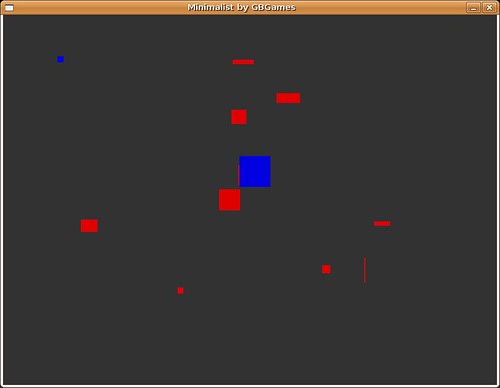
Another example is my Ludum Dare #11 entry , which involves moving your mouse to the goal while avoiding the randomly shaped obstacles. The goal and your mouse cursor are the same color, and the obstacles are a different color. I picked blue for the mouse and goal, and red for the obstacles. Even if you have some form of color blindness, you should be able to see the difference.

LD11 Minimalist by GBGames

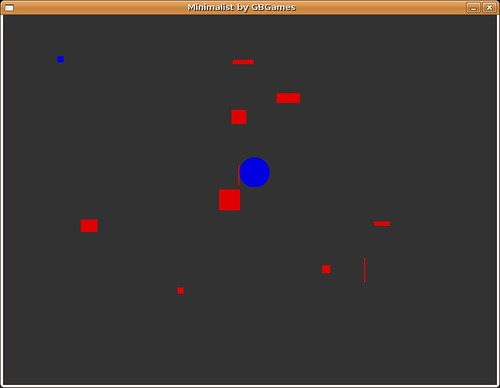
Now, just in case, I could also improve upon this design by making use of shapes. Since the obstacles are going to be randomly sized rectangles, I could make the goal a circle to differentiate it better.

LD11 Minimalist by GBGames

I could even use a very detailed sprite to help differentiate it from the solid colors of the obstacles. There are quite a few options, but the point is that by taking into account the fact that some people are color blind, you could make your game more accessible, which means more people can play it. By ignoring this issue, you are putting up artificial barriers that prevent a significant number of people from enjoying your game.

[tags] video games, video game development, color blind, graphic design, character design [/tags]

Categories
Game Development Geek / Technical Linux Game Development

Linux Game Development: Frustrations with GLIBC_2.4 and Ubuntu

I have already written about the solution to GLIBC_2.4 dependencies. The solution is still valid, but I wanted to share this bit of frustration that made me question if it worked in Ubuntu.

This past weekend, I participated in the 48 hour game development competition known as Ludum Dare #11. You can see my submission.

I found out that my submission had a GLIBC_2.4 dependency. How embarrassing! Since I wasn’t using my laptop at the time, I used my Debian-based desktop and built the game. No dependency existed in this build, so I uploaded it. I wasn’t sure why the previous build didn’t work since the build scripts and code should all be the same.

When I used my laptop, which runs Ubuntu, I found that the binary that gets produced has the GLIBC_2.4 dependency. I can see that it has the dependency using objdump -x BINARY_NAME | grep GLIBC_2\.4. You can see it in the following output:


$ objdump -x source/ld11-minimalist.bin | grep GLIBC_2\.4
0x0d696914 0x00 10 GLIBC_2.4
00000000 F *UND* 00000046 __stack_chk_fail@@GLIBC_2.4

I double and triple checked, and I am using -fno-stack-protector in all of the right places. The build still works on my Debian system just fine. What else could be going wrong?

After spending a few hours gutting out all of the code and making it link to the bare minimum of game classes and libraries, I found that it kept requiring GLIBC_2.4, and I was getting frustrated. I compared my Ludum Dare project’s build scripts with my Killer Kittens from Katis Minor build scripts, which should be roughly the same. The only major difference was that my LD entry wasn’t using the Kyra Sprite Engine. I didn’t see anything else that was different.

Getting desperate, I added Kyra to see if it might help. It didn’t.

I learned that the .o files didn’t have the dependency, so the problem gets introduced when it is all linked together. After another hour or two, I finally saw something odd:

LIBS := -static-libgcc -L. -L${LIB_INSTALL_DIR}/lib $(shell ${LIB_INSTALL_DIR}/bin/sdl-config --libs) -lSDL_image -lSDL_mixer #-L/usr/X11R6/lib -lX11

Do you see the “-L.” right after “-static-libgcc”? What’s the purpose of it? Well, it turns out that my build scripts provide a link to the static libstdc++.a library file, so -L. allows it to link. When I remove -L., it still builds the game, but now the game depends on libstdc++.so.6. While I don’t have GLIBC_2.4 symbols, I now have CXXABI_1.3 and GLIBCXX_3.4 symbols.

I learned that when I built my Killer Kittens project on my laptop, it also has those dependencies. See, for some reason Kyra prevents it from linking to libstdc++ statically, so it has a dependency on libstdc++. On my Debian system, the dependency doesn’t exist. It builds it just fine.

When I run objdump -x BINARY_NAME I see different results depending on the system I built the game on:

My Debian Testing system:

Dynamic Section:
NEEDED libkyra.so.0
NEEDED libSDL-1.2.so.0
NEEDED libpthread.so.0
NEEDED libSDL_mixer-1.2.so.0
NEEDED libm.so.6
NEEDED libc.so.6
NEEDED ld-linux.so.2
NEEDED libengine.so.0

My Ubuntu Feisty system:

Dynamic Section:
NEEDED libkyra.so.0
NEEDED libSDL-1.2.so.0
NEEDED libpthread.so.0
NEEDED libSDL_mixer-1.2.so.0
NEEDED libstdc++.so.6
NEEDED libm.so.6
NEEDED libc.so.6
NEEDED libengine.so.0

Why is there a discrepancy? It turns out that Ubuntu and Debian differ in their implementation in terms of using stack protection when building software. Debian’s default is “Do not use stack protection.” Ubuntu’s maintainers decided that stack protection was better even if things wouldn’t be completely compatible with Debian.

In my case, since I am trying to link to the system’s libraries statically, my binary is taking in stack protection and so depends on GLIBC_2.4. If I don’t statically link to libstdc++, my binary now depends upon my system’s version of libstdc++.so. Since -fno-stack-protector is a compile-time flag, it has no effect at link time when the system’s GLIBC_2.4-depending libraries are linked in to my binary.

Essentially, Ubuntu’s decision to use stack protection by default has made it very difficult for me to create a binary compatible build for older systems on my laptop. I would like for my build to work the same across systems, but I guess until I find a better way, I will need to make sure I deploy my games from my Debian-based desktop system.

I guess this example is just one more reason why people have a tough time creating games for GNU/Linux, or at least why C++ isn’t as popular as C or Python.

For more information:

Categories
Game Development Geek / Technical Linux Game Development Marketing/Business

Linux Game Development: GLIBC_2.4 Errors Solved

Last week, I wrote about the `GLIBC_2.4′ not found errors your game might get when an application built on a new distribution is run on an older distribution, such as Debian Stable and Slackware 11.

Judging from my search logs, this problem seems to be common enough to warrant a follow-up post. I have since solved the problem and haven’t added new dependencies, and it doesn’t involve using strange, mysterious scripts or older compilers.

In my last article, I referred to a compiler flag that was supposed to use a specific C++ ABI. I found some success with it, but it would add X11 dependencies to my libraries. Ideally you would like to remove these dependencies along with the dependency on GLIBC_2.4.

The Solution

While researching this issue, I found multiple websites referring to an entirely different compiler flag. This flag disables a feature that is specific to GLIBC_2.4 and higher, and so programs would no longer depend on 2.4 if the flag was used.

I spent way too much time trying to figure out what I was doing wrong when I discovered that each of these websites spelled the compiler flag wrong!

It is NOT -fnostack-protector! It is -fno-stack-protector!

In my custom library build scripts, I have:


export CC=gcc
export CXX=g++
export CFLAGS="-fno-stack-protector"
export CXXFLAGS="-fno-stack-protector"

In my game build script, I just add -fno-stack-protector to the beginning of my CFLAGS variable in the Makefile.

The Results

When my custom libraries are built using these flags, they no longer depended on GLIBC_2.4.

Unfortunately, I saw that libSDL did have a new dependency on libvga. I fixed that issue quickly enough! When I passed parameters to the configure script for libSDL, I added “–disable-video-svga”, and the dependency no longer exists.

If you’re curious, my full configure parameters for libSDL are:


--prefix=$LIB_DIR --enable-X11-shared --disable-rpath --disable-ipod --disable-video-directfb --enable-sdl-dlopen --disable-video-svga

where LIB_DIR points to wherever my project is installing the custom libs. If you’re curious about why I have custom libraries or how I chose these parameters, I can’t recommend Troy Hepfner’s Linux Game Development series enough.

GLIBC_2.4 No More!

By using the compiler flag -fno-stack-protector for my custom libraries and my game, I remove the dependency on GLIBC_2.4, allowing my game to run on newer systems and older systems alike. So far my beta testers inform me that my game continues to run fine on newer systems, and the people with older systems are now able to play my game, too.

If you’re concerned about what -fno-stack-protector does, it removes checks that help protect against stack-smashing attacks. Ideally if everyone was using up-to-date systems with stack protection on, you wouldn’t need to worry about trying to make your game run on older systems. If you are concerned about security, you could provide two binaries, one for the older systems and one for the newer systems, and have a script dynamically determine which to use.

For more information on this issue:

[tags] linux, game development, business, programming [/tags]

Categories
Game Development Personal Development

Thousander Club Update: April 21st

For this week’s Thousander Club update:

Game Hours: 409.25(previous two years) + 68 (current year) = 477.25 / 1000
Game Ideas: 710 (previous two years) + 35 (current year) = 745 / 1000

This past week is the first time I managed to work over 20 hours. From 42 hours last week to 68 hours this week, I did 26 hours of game development!

And of course, most of it was this past weekend’s Ludum Dare #11 competition. You can see a time lapse of my desktop during that time below.

If you have a Linux-based system, you can try out my entry. Download https://www.gbgames.com/downloads/ld11/ld11-minimalist-gbgames-linux-x86-r12.tar.gz, a 1.3MB download.

Extract it with


tar xzf ld11-minimalist-gbgames-linux-x86-r12.tar.gz

and run the script in the directory:


cd ld11-minimalist-gbgames-linux-x86-r12
./ld11-minimalist

[tags]game, game design, productivity, personal development, video game development, indie[/tags]

Categories
Game Design Game Development Games Geek / Technical Linux Game Development Personal Development

LD#11: GBGames presents Minimalist – the final version

I did it! I finished a game for Ludum Dare #11!

You can see my final post at the Ludum Dare blog.

https://www.gbgames.com/downloads/ld11/LD11-Minimalism-GBGames.zip is a 12.4MB download.

It includes the entirety of my project’s source in a zip file (LD11-Minimalism-GBGames-source.zip) and a GNU/Linux-ready tar.gz file (ld11-minimalist-gbgames-linux-x86-r12.tar.gz).

The source is ready to be used to build a linux-x86 distributable tar.gz. I created it using my Ubuntu system. I am sure it can be made to build a Win32 version without too many changes, if any.

EDIT: mrfun was kind enough to create a Windows version of my game. You can get it at the official final version post.

I’ll write a post-mortem after I’ve had some sleep and cleaned my apartment. If I learned anything, it is that the kitchen goes to entropy during Ludum Dare.

Categories
Game Design Game Development Games Geek / Technical Linux Game Development Personal Development

LD#11: My Grandma’s Birthday Won’t Slow Me Down

But I will eat some food while I am there.

LD11 Birthday dinner

Dessert was a bit better, especially those Nutella-filled spiral thingies:

LD11 Birthday dessert

I’m back, and I have a few hours to add sound and upload a completed entry.

Happy birthday, Nana!