Categories
Game Development Geek / Technical

State of the Art Game Objects

Years ago, I wrote about Component-based Game Design, in which I talked about the advantages of breaking down your game objects into components. Inspiration came from a number of places, including:

My Experience

Over four years ago, I even managed to implement a simple test program as part of my application for my last day job, and at the time I thought it was easy and fun to do. The hardest part was setting up all of the basic infrastructure to support registering components.

In four years, however, I never wrote code that resembled that test program.

Why not? Because it turned out that it wasn’t all that easy or fun, and I didn’t like the idea of making a full game with it because even a small test program was a bit painful to build up. My implementation of a board game was heavily based on Hannah’s concepts of States and Actions, so it might be a bit more complex than what is typically considered the state of the art. Actually, it’s probably more accurate to say that the implementation was based on my understanding of Hannah’s article, so I probably did things terribly wrong and made it more painful than it had to be.

Each Action typically interacted with multiple States, and so there was a lot of dynamic_cast calls. Practically speaking, adding a new State and its associated Action meant a lot more work than I would have liked. I might as well have stuck with the monolithic game object, and in the years following my original post on the topic, I pretty much did. Most of my projects were small in scope and had very specific designs that didn’t change much, and the code base was manageable enough that it wasn’t a problem when the designs did change.

The Motivation

With Stop That Hero!, I wanted the flexibility to change the design of the game as it was being developed. That isn’t to say that I wanted the ability to make a first-person shooter halfway through the project, but I did want the option of experimenting with new monster types, different player actions, and objectives for a level. I want to be able to change the design of the game without requiring me to change the code drastically. I also wanted the ability to drive the game through the data, which would allow me to create custom scenarios and interesting game experiences, and it would allow players to create their own mods.

I already understood the basic concept of component-based game objects. Instead of monolithic, inheritance-based objects that are hard to change, objects should be identifiers with the components that make up an object being tied to that object identifier. If the design changes, the impact on the project might simply be the assigning or removing of components. For instance, I could have enemies that walk on land or fly in the air. I could introduce a new amphibious enemy by assigning it the ability to walk on land and create a new component related to swimming in water. The code involved is minimal and low-impact on the rest of the project.

What I didn’t understand was how to go about implementing a component-based game object system that wasn’t cumbersome and annoying to use. In my experience, having ready-made components was great for game design, but creating the components and the system to use them was a pain.

The Research

And so, once again, I find myself looking into component-based game design. I found quite a few more resources over the span of a few days as well as some that I have read in the last few years. I’ll quickly list them in case you’re interested in pursuing this topic yourself:

Terrance Cohen’s presentation led me to discover that Insomniac Games has a public-facing research and development page, which led me to his presentation Three Big Lies: Typical Design Failures in Game Programming, which introduced me to the concept of data-oriented design.

And from there, I realized I needed to clarify what it was that I was looking for.

I wanted to learn how to do data-driven, component-based game development in a relatively simple way. What I realized was that I was looking for three different things that had little to do with each other.

One, I wanted my game to be data-driven, which isn’t all that hard. So long as the game is pulling in data from somewhere and acting on that data, it’s data-driven. It’s possible to have the inheritance-based hierarchy of game objects and still run the game based on external data, and it’s possible to use that external data for component-based systems.

Two, I wanted my game design to be easy to change. A component-based system is superior to the inheritance-based one in this regard. With an inheritance-based system, any design change might impact the carefully-planned hierarchy. It can quickly be hard to manage, and changes become more and more painful. Components are easier to change. Add them or remove them, and an object’s behavior changes, and it works on the fly as well.

Three, I wanted to figure out how to write the code for such a system without the complexity I dealt with last time. Seriously, dynamic_cast everywhere a component needed to talk to another component made the creation of new components quite painful. There had to be a new way.

Data-driven games are much more powerful with a component-based system, but it’s outside of the scope of what I want to focus on here. What I was most interested in was the answer to the question “What is the best way for me to implement a game object in my game?”, and frankly, it wasn’t enough to know I wanted components aggregated together. I wanted to know how.

Which brings me back to data-oriented design. According to DOD, the only purpose of code is to transform data. That’s it. Traditionally, programming was focused on algorithms and code, modeling the problem in terms of classes and objects. The problem is that the models tend to add more complexity to the original problem of modifying data.

Now, data-oriented design isn’t the same thing as data-driven design. The former is about programming, while the latter is about game design. See Noel Llopis’ Data-Oriented Design (Or Why You Might Be Shooting Yourself in The Foot With OOP):

OOP is so ingrained in the current game development culture that it’s hard to think beyond objects when thinking about a game. After all, we’ve been creating classes representing vehicles, players, and state machines for many years. What are the alternatives? Procedural programming? Functional languages? Exotic programming languages?

Data-oriented design is a different way to approach program design that addresses all these problems. Procedural programming focuses on procedure calls as its main element, and OOP deals primarily with objects. Notice that the main focus of both approaches is code: plain procedures (or functions) in one case, and grouped code associated with some internal state in the other. Data-oriented design shifts the perspective of programming from objects to the data itself: The type of the data, how it is laid out in memory, and how it will be read and processed in the game.

One thing that wasn’t clear to me while doing all this research is that data-oriented design is not terribly compatible with object-oriented programming, and since most of us game developers know OOP as THE way to program, it’s difficult to see it any other way.

The thing is, it isn’t a normally a problem. OOP can still get you to a correct implementation, especially when performance isn’t your primary concern. The code will run the way it is expected. One of the major advantages touted by all of the data-oriented design articles I found was efficiency. As an indie game developer who doesn’t work on games that push the processor or memory requirements of my customers’ machines, I’m not usually worried about cache thrashing or performance issues. I’m not concerned about throughput on PS3 Cell processors or processing shaders quickly on the GPU. I’m not one of those people who thinks that processor speed is fast enough and memory is large enough for whatever horrible implementation I can come up with, but at the same time, I am not using the Crysis engine and gigabytes of data for my games. I don’t currently make games that take advantage of parallel processing and I most definitely wasn’t going to worry about the cost of calling virtual functions, so initially data-oriented design wasn’t very appealing.

But why I kept pursuing information on it was that it was supposed to be great for unit testing and modularity. Since I’m a big fan of unit tests, being able to write them more easily and with less dependencies would be a huge win. Being able to write simpler code would be another huge win because it can help in the creation of components.

So bottom line: data-oriented design looks like a fantastic way to help me develop a game object system. The code will be simpler and easier to test, and I get the extra benefits of having more efficient code! Nice!

Well, at least at a high level. I still need to figure out what it all means when I don’t have the benefit of an existing company’s proprietary engine. I figured that I needed to explore this data-oriented design thing a bit more.

EDIT: Here’s a talk by Andrew Kelley with practical ways to implement data-oriented design: Andrew Kelley – Practical DOD

The first three examples helped me understand how the actual code might be laid out, but it was that last one that really made me understand where OOP is causing problems. It focuses mainly on performance problems related to caching, but the idea of performing a bunch of unrelated actions on a single object at a time versus doing one action for lots of objects at once was really made clear, especially after seeing images 12 and 30-32.

The Frustration

Unless you’re one of the mainstream game developers who have used or implemented a component-based system as part of your job, it seems getting started is the hard part. Game development forums have a number of threads in which people are convinced of the benefits but don’t know how to get a system built.

The article in Game Programming Gems 5 by Bjarne Rene has sample code on the book’s CD, and the good news is that it is a complete solution, but it seems that the complexity of inter-component communication can be a problem. Plus, is it still relevant? It seems as if game developers have moved away from components that perform actions, at least according to what I’ve read.

I haven’t had a chance to look at Game Programming Gems 6, but apparently there is an article on game objects there as well, although it sounds like there is no example code so I’m not sure how hard it would be to follow. The blog T=Machine argues that there is a difference between Entity Systems and component-based systems. Fine, but your entity system is still aggregating components, so regardless of the differences, I need to know how to create a component system.

It seems that anytime there is code in any article or presentation, it’s incomplete or hard to follow. The article might say that you should use IDs and not create an actual object class, and yet the example code has a class. It might show a class deriving from some base that was never introduced or create a function signature without an explanation for why it is there. I almost wish the articles would unit test their way through their sample code just so I could follow along with the author’s intent. Also, it seems that there is no shortage of article series on the subject that never get finished. Some examples are MMO-specific, some are concerned about performance, and none seem straightforward. One article will suggest doing something that another says you shouldn’t do.

And so I felt like pulling my hair out when I sat down to try to implement my own system. At a high, conceptual level, it makes sense to me that an object is nothing but an ID, and it’s the components aggregated together that make up a game object. I understand that I should be able to create an object by creating components, associating them with the object ID, and adding those components to some manager. What was difficult was implementation, and part of the difficulty was about ownership of the data.

I had written an entity manager with a couple of components, only to throw it away after becoming frustrated with how limited it was. I apologize if you’ve read this far and were hoping for more insight into a component-based system. It was too much for me at this time, and I had to stop if I wanted to make progress on my game.

Ultimately, it seems that the component-based system isn’t going to happen, but I need to figure out how to make progress on the game itself. Somehow, in learning a lot more about components, entity systems, and data-oriented design, I feel frustrated and incompetent. Every time I want to write code, I have a dozen different alarms going off in my head warning me that what I want to do isn’t what this author suggests or is against what that author says. My existing code, which I was happy with before, is now feeling too constricting. Whenever I try to make progress, I feel like I have game developer’s block. I can’t see the next step, and even when I think I have, I don’t know how to start. It’s a bizarre feeling.

This post came off more whiny than I would have liked, but I’m not blaming anyone or feeling entitled. I’m just frustrated, and I’m trying to figure out why.

Categories
Game Design Game Development Geek / Technical

Stop That Hero! Sprite Rendering Questions

In the previous post, I reported that levels could be loaded and rendered. So why isn’t it drawing the towers and chests? The short answer is that I didn’t get to them yet, but in all seriousness, it took a little thinking before I could start.

In the original implementation, almost everything was done in a single file of code. The code to draw a tower was:

pHardwareLayer->renderSprite(towerSpriteName, m_towerLocations.at(towerIndex).first * TILE_WIDTH + WORLD_X_START, m_towerLocations.at(towerIndex).second * TILE_HEIGHT + WORLD_Y_START);

TILE_WIDTH and TILE_HEIGHT were each 16, since each tile was 16×16. WORLD_X_START was 0 since it started drawing from the left side of the screen, and WORLD_Y_START was 87 since the UI was drawn at the top.

So depending on which tower I was drawing, I would get the x and y world map offsets, then multiply them by the tile dimensions, and offset by the top left corner of where the world was being rendered.

Why can’t I do the same thing now? Because I didn’t want to hack out everything in one file. A tower is no longer represented by data strewn across different data structures in the game code. A tower is now its own class. A Tower class has these members:

Point m_position;
std::string m_sprite;
int m_type;
int m_status;

There are more variables associated with monster creation and ownership status, but these are the variables relevant to this post.

The Problem

To draw a Tower, I could use the sprite specified by the name in m_sprite and the coordinates in m_position. The problem is that m_position isn’t screen coordinates. It’s map coordinates.

No problem. I’ll change m_position so that it specifies the screen coordinates.

Except m_position is being used in pathfinding, and it is important that it represents a specific tile in the world.

No problem. I’ll just multiply m_position by the tile dimensions, just like in the original implementation.

Er, but, why should the Tower know anything about the tile dimensions? It should only know about towers. Maybe it knows how large it is in terms of tiles, but why should it know how large a tile is? It doesn’t need to, except when it renders a sprite.

No problem. I’ll provide a second Point variable called m_spritePosition which represents its screen coordinates.

That would probably work for stationary towers, but what happens when I need to render moving entities such as Slimes? Unless the on-screen position is mathematically tied to the entity’s position, I can see those two numbers diverging. I could update both pieces of data each time I update one, but what a pain that would be!

The Solution

Create a Sprite class to encapsulate all of it, and let the Sprite class worry about where to render.

Since towers are now encapsulated in their own class, it makes sense that the way I render them (and almost everything else in the game!) should be encapsulated somewhere. The Tower class no longer has its data members polluted with a bunch of members related to sprite drawing, and it doesn’t need to worry about what to do with that data, making its interface and internals a bit cleaner. Also, Sprite classes can be reused for other objects, such as monsters and treasure chests, in a standard way.

To handle the rendering of images, I created a SpriteImage class with the following members and commented explanation:

Point m_position; // The sprite's position
std::string m_imageName; // Name of the sprite in the sprite collection which stores this particular image.
Rectangle m_imageRect; // What rectangular area in that sprite that holds this particular image
IViewPort * m_viewPort; // Explanation to follow.

At first, this solution doesn’t seem to solve the major problem identified above. It looks like the last problem in that the tower’s position and the tower sprite’s position are stored in two different areas.

The trick is that a Sprite defaults to a 1 to 1 mapping between its position and the screen coordinates, but it’s possible to scale it between arbitrary mappings, too! The secret is in m_viewPort.

If a SpriteImage is given a view port, it will scale its position based on what the view port says the scale should be.

How is this useful? Imagine having an 800×600 screen resolution, and you wanted to render a UI button near the bottom right corner. You could make a SpriteImage of a button at position (700, 500), and it would probably work fine.

But then what if you change the screen resolution to 400×300? It’s possible that you’ll port your game to a mobile device with such a resolution. The button would render off of the viewable screen. You’d have to change the button location manually in order to see it at the bottom right corner again. This goes for every image in the game. It could be tedious and error-prone.

Alternatively, you could use a view port that knows the screen resolution is 800×600, and it could be configured to scale based on a percentage. Now, instead of placing a button at (700, 500), you’d set its position at (87.5%, 83.3%). Then, if the screen resolution changes, you simply change the view port, and any sprites associated with it would know the correct scale to use! It’s very powerful and easy to move elements of the screen by horizontal and vertical percentages.

That’s great for rendering sprites anywhere on the screen, but what about my example above? How does a Tower draw on an arbitrarily-sized and arbitrarily-positioned area of the screen, and how does it know where to do so if its position is based on tile position?

As I said, the view port can do arbitrary mappings. In my case, if the world is made up of 50 tiles x 33 tiles, and the area to render everything is 800×528, and it is offset from the top of the screen by (0,87), how would a sprite use this information? Offsetting is easy so I’ll address it first. Wherever a sprite ends up wanting to render itself after scaling, the view port will tell it to move down the screen 87 pixels. As I said before, I use this offset to give room for the UI at the top.

Scaling is almost exactly as it was at the top of the screen. Mapping 50 tiles to 800 pixels requires multiplying by 16, which is the size of each tile. Similarly, 33 maps to 528 with a factor of 16. So if a Tower is set at (50, 33), its going to render at the bottom of the viewable area, whereas a Tower at (25, 0) would be centered at the top just under the UI. Below is a quick example of how I load level data from tiny PNGs.

Level Data To World Map Rendering

If you click on the image above, you should be able to get a better idea. The level is described in the small PNG that consists of almost all green pixels and a single white pixel in the middle. When this level data gets loaded, what you see on the screen is a lot of grass tiles and a single tower where the white pixel corresponds. While the PNG is 50×33 pixels, the tower renders in the correct location on the 800×528 view port, even though the tower’s location is in terms of the 50×33 level.

And does it work for moving objects? Absolutely! Let’s say I have a Slime monster located at (2, 3) on the world map, which corresponds to (32, 48) on the screen. When a slime moves to the right, I can’t simply change its position to (3, 3). It would jump the entire width of a tile to get there! Slimes are slow. So why not move it in fractional increments? The scaling still works. A slime moved to (2.1, 3) would correspond with the sprite rendering at (33, 48), which is one pixel over. Technically, it would render at (33.6, 48), but fractional pixels don’t make sense, so for purposes of rendering, we can truncate or round it to the nearest integer.

Again, this view port mapping allows me to do spatial logic at an arbitrary level and not worry about the screen resolution. The only thing I would have to worry about is loading a set of sprites that make sense at lower and higher resolutions. Otherwise, sprites would either overlap or have space in between them. This functionality could also be used to render minimaps and allow zooming and panning.

I like this implementation because the sprites don’t need to have any special logic about what they represent. They just need to know what scale and offsets they’re being rendered at. The object that owns the towers knows where it wants them to go, so it can be in charge of the view port. Tower positions can still be used in pathfinding, and the sprites can still render correctly. The only tricky part might be knowing when I’m loading a sprite at the default scale of the screen resolution and when I’m loading one based on a view port’s scale. To render an image centered at the far right of an 800×600 screen, a sprite at (700, 300) makes sense, but it wouldn’t work if the scale settings assume that positions will be specified in percentages. It would be rendered far off to the right by 700 screen lengths! To specify it in percentages using pixels, (700/800, 300/600) would work.

Also, I’m really happy to have a higher-level sprite class. How did I survive so long without one?

Categories
Game Design Game Development

Loading An Arbitrary Stop That Hero! Level

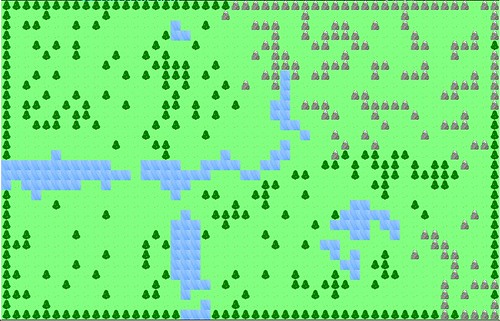
Since last week, I made some significant progress in terms of loading a level for Stop That Hero!. Here’s what renders so far:

Stop That Hero! Level Map

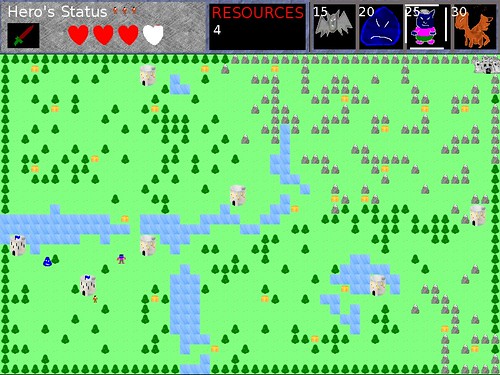
Does this look familiar? Compared to the original game’s finished level, it looks pretty naked:

Stop That Hero! is finished

What’s missing is the rendering of the towers and treasure chests, but otherwise the level is being loaded from the same map data.

In the original game, each individual tile was rendered every frame. This time, when I initialize a level, I load the map data and generate a single surface made up of tiles corresponding to the data. Then, when it is time to render the level, I make a single large blit instead of hundreds of tiny ones. It’s much more efficient.

And it’s also not hard-coded to load the same level each time. Depending on what level you choose, it can load a different map. Right now, that boils down to loading an image just as I did during the original Ludum Dare event and mentioned in My, What a Fancy World You Have There!, but I can easily change it to load meta data in the future. For instance, if I do want to change the game to allow arbitrary level objectives, I would need some configuration file associated with the level, too. For now, I’m assuming every level will use the same game play and differ only in level layout.

The level knows where the towers and treasure chests should go, but at this point, they aren’t rendering. Also, the level provides the hero’s original spawn point, and it knows the difference between a basic tower and the castle as well as the difference between a health chest and a weapon chest.

Categories
Game Design Game Development Marketing/Business

Balancing Current and Future Needs

Related to the fact that I’m having slow project progress on Stop That Hero!, I wanted to expand upon this thought:

I’m using Test-Driven Development on this new version of the game to ensure that bug fixes and game updates are as easy as possible. If a paying customer finds a bug or if I release a new feature, I want to make sure that new code works and that old code doesn’t break.

I also wanted to discuss over-engineering.

Estimated Project Progress

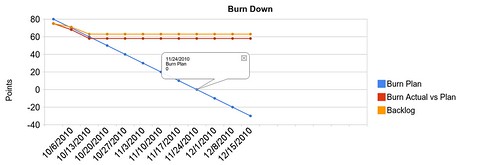
This chart shows my estimated burn down if I was working at the ideal rate of 20 story points per week, assuming my project doesn’t exceed 80 story points.

BurnDown-20

In the last two iterations, I’ve found that I’ve only accomplished 7 and 10 points. Assuming I can continue at 10 points per week, here’s my updated chart:

BurnDown at 10 points per iteration

It might be a bit hard to tell since Google Docs don’t give me much ability to change the axis in these charts, but in the first case, I am well on my way to hitting the October 31st date. In the second case, this project won’t be finished until the end of November.

With Thanksgiving coming and plans to move out of my apartment, November isn’t an ideal development month either, so it’s more likely that it will be December before the game is finished. And what about playtesting and game balancing?

Yeesh. Well, the solution is simple, isn’t it? I just need to do 20 points worth of work each week. Quit being so lazy, Self!

In all seriousness, though, the 20 points was an estimate of the points I could complete each iteration, and that estimate wasn’t based on hard data yet. Two weeks later, armed with some data, I was able to generate a few charts such as the ones above and analyze them.

My Analysis

My original estimates didn’t take into account how much time I’d spend getting the basic infrastructure of the game under test. More importantly, I didn’t specify how data-driven this game would be at the outset.

The more data-driven the game is, the easier it is to modify, configure, and improve. I read that a game such as Age of Empires literally used a database to specify each entity in the game. It allowed designers to modify the database values for various units and see those changes in the game quickly.

The original Stop That Hero! is almost completely code-based. The only data loaded is the level layout, and out of all of the things I could tweak in the game, that level layout was the easiest to change. The level was loaded based on this image file, which is blown up to make it easier to see:

The Tile Map

I could update that image in an art program, then see the update the next time I ran the game. It would have been even faster if I could reload the file on the fly instead of having to restart the game. Still, the point was that it was easy to change the terrain and the location of towers and treasure chests without recompiling the game first.

But what about the enemies in the game? They are all implemented as instances of the same class. In fact, the Hero is just another instance of that class. Couldn’t they be loaded from a file, too? Sure! I could load a file that specifies what sprite to use, the dimensions of the monster, the speed, the strength, and a number of other attributes. If I had done so, I’m sure balancing at the end of the Ludum Dare Jam would have been easier and more effective.

Variables such as enemy stats, resource costs, and chest contents are great to put in configuration files and scripts, but how far do you take it?

Ideally, even game logic could be loaded at run-time. Instead of hard-coding that you win when the Hero has no more lives left, why not make it a specific instance of a Victory Condition? This way, I could create other Victory Conditions for different kinds of game modes. I could make a tutorial level where the Victory Condition involves creating one of each type of monster, for instance.

And speaking of levels, the original game only had one. How do I create multiple levels? I’d have to create some kind of level collection or campaign, and each level might have its own Victory Conditions. And if I’m going to be able to do so much configurable work, I might as well let the players come up with their own mods, too! I wonder how quickly someone would make a Tower Defense game out of Stop That Hero!

Yes, the more data-driven the game is, the more interesting it could be. Bug fixes, patches, expansion packs, and feature updates can be as simple as adding or changing data, and if code is needed, it should be relatively simple to write.

The thing is, to get to such an ideal data-driven game in the future, I’d have to do a lot of work NOW. Maybe later balancing and game play tweaks and entire rule changes can be easy to implement, but for now, I’d need to lay down a lot of infrastructure.

Infrastructure and Over-engineering

The biggest source of stress for me is the oscillation between wanting to implement just enough of the game to sell a complete copy by October 31st and wanting to implement a game that I can easily update.

Again, October 31st isn’t a hard deadline for my business. It’s a deadline for an inspiring challenge, but missing that deadline isn’t the end of the world. Besides, once the game is finished, there’s still a lot of work to do. Customer support and maintenance are my chief concerns.

If I really want to hit the challenge deadline, I probably can’t make the game very configurable or provide multiple game modes. Still, if it means having a finished game out and selling sooner, maybe lassoing in the scope is a good thing. After all, I could always update the game later with new features, and I can even have the benefit of customer feedback. “Release early, release often.”

On the other hand, I might implement the game in a way that is hard to change. After a weekend of Ludum Dare, I have a rigid, hard-to-change game. If I make this new release fairly rigid as well, what happens when customers complain about bugs? How hard will it be to fix them? I could always add features later, but how much more effort would it require if the code isn’t set up to make it easy?

By taking my time, I could end up with a much better game. It can be slow-baked to perfection instead of being rushed out. It would be easier to configure and mod, and I believe it would result in a much better value proposition for the customer.

Of course, it’s all speculation. It could be that I’m putting in all this effort and over-engineering the implementation for nothing. While it is good to think long-term, what if I don’t need to do everything now? I could forget about creating configurable Victory Conditions and other rules for the moment. If I focus on loading variables from files while assuming that the rules are still the same, I could go a long way.

I think you could only say that something is over-engineered if it anticipated future needs before they became real needs. In this sense, making the game configurable is a real need, and so writing the code to allow it wouldn’t be over-engineering.

But I’d have to make such a need explicit, and I don’t believe I had at the start of the project. Oddly, I felt torn between two different assumptions: I’m releasing at the end of October with as good of a game as I could make by then, and I’m releasing the game only when it full-featured and highly polished. My anxiousness about wanting to develop just enough to release something soon versus wanting to make something with more value was because I hadn’t spent much time on project specifications.

It sounds more formal than it is. Basically, I haven’t decided on exactly what game I’m making, and I was hoping to offload that work to the configurable nature of the engine I’m writing. I wanted to make the game so easy to modify and change that I can experiment quickly and see what works best. While it can ultimately work out really well, it’s a recipe for taking as much time as I am allowed. Of course, I work for myself, so no one is there to hold me to a deadline but me.

A concern is that until I start earning income from paying customers, I’m relying on my savings to live and work. I can’t afford to spend 3 years on a single game, but even spending six months in development would translate into losing a huge chunk of my savings. It’s too risky. On the other hand, I don’t want to try to churn out lots of games in mere days or weeks. I can’t see making anything worth being paid for in that time frame, and spending months releasing poor work isn’t a good use of my time, either.

In the case of Stop That Hero!, releasing it sooner, even with fewer features, is better than spending forever trying to make it perfect. I can always make it perfect with the benefit of customer feedback, and earning any potential income sooner rather than later is a nice bonus, too. B-)

Categories
Game Design Game Development Marketing/Business

Agile Alert: Slow Project Progress

There are less than three weeks left before the Ludum Dare October Challenge ends, and I’m worried.

I’ve been doing weekly iterations on the assumption that I would accomplish about 20 points worth of work each iteration. After the first week, I only did 7 points of work. Not only that, but I added a few points of unforeseen work. Ok, no need to panic yet. I lost some time that first week. I can see how the next week goes. Maybe I’ll do things faster than expected.

Now that Iteration 2 is coming to a close, it looks like the first one: less than half of the work was accomplished, and extra work was found.

Ok, time to panic!

Wait, don’t panic! Part of the benefit of managing the project in an Agile way is to gain some insight into the health of the project. I’m not happy about how slow I’m going, but I am pleased that I can tell that I am going slow so early in the project. Let’s figure out why progress is slower than I’d like it to be.

In three days, I made Stop That Hero! for the Ludum Dare Jam. In two weeks, I’m barely able to draw arbitrary sprites and process input.

Why the difference?

With the Jam version of the game, I hacked it together during the time I didn’t spend eating or sleeping. My current work schedule is less intense. I spend between 4-5 hours a day on game development. Why not more?

Since I work for myself, I have no fixed hours given to me by someone else. In an attempt to give my days some semblance of structure, I’ve decided that certain hours of the day are dedicated to exercise, game development, writing, reading, and organization. I don’t have enough hours in a day to do more game development without taking time from other aspects that I deemed important. Maybe it’s too lax for a newly full-time indie game developer, but I don’t need to force myself into crunch time yet. Besides, any time outside of the scheduled time is mine to do with as I please. If it means that I occasionally have days where I work more hours, all the better. All that said, I don’t believe my work schedule is the culprit here.

As I mentioned in the post on development challenges and concerns, I’m using Test-Driven Development on this new version of the game to ensure that bug fixes and game updates are as easy as possible. If a paying customer finds a bug or if I release a new feature, I want to make sure that new code works and that old code doesn’t break.

Unfortunately, I’m paying up front for it. I’m reasonably confident that the code I’ve written works correctly. I just wish I had more working features!

What I am finding, however, is that the code is easy to use in small pieces. There’s more cohesion and less coupling. Even without explicitly trying, my code is organizing itself in a way that would let me script it more easily. It’s more data-driven, in other words.

But is TDD slowing me down? I have a deadline to sell a game by October 31st. If I can’t get a playable demo of the game completed by next week, this project is in danger of not shipping on time.

On the other hand, October 31st isn’t a hard date for my business. It’s a good target date for a fun challenge and some motivation, but I don’t have sales projections and quarterly revenues depending on it. If I take a few weeks longer to make the game good versus shoveling something out the door, I think I’ll be better for it. As an indie, I have that freedom.

So what’s the solution to my project planning?

The latest issue of Game Developer has a post-mortem about Final Fantasy XIII, and one of the things that went wrong is the development of a “universal engine”. Basically, since Square Enix wanted to create an engine that worked across all the new console hardware for all games in development, they spent a lot of time trying to make sure they accommodated every team’s needs. It wasn’t until they decided to give priority to Final Fantasy XIII over the other games in development that they were able to make good progress.

Similarly, I need to be extra wary of overengineering. With TDD and Agile, I should be implementing only what I need when I need it. You Ain’t Gonna Need It (YAGNI) is the principle I need to follow more closely. I think a big reason for my slowdown is that the things I have coded are a bit more general purpose than I need them to be right now. It will be great to reuse a lot of these features and pieces of code in different games, but it’s not helping THIS game get finished faster.

For instance, I created a basic data-driven menu system as opposed to the relatively hard-coded system I had before with code strewn about here and there in my game. I based the design off of what I read in Game Programming Gems 5. It’s easy to create menus and their buttons, and it can be extended later, and it’s unit tested to boot!

But couldn’t this game have been served by menus that aren’t general purpose? Maybe it wouldn’t be as nice, but it would have been workable and I could have spent more time on the game entities and their interactions. I clearly didn’t learn the lesson from my last post-mortem:

As in previous Ludum Dare compos, I’ve found my biggest problem is deciding where to spend my time and for how long.

I think I should continue to use TDD. It’s helping me design almost naturally-scriptable code, and there are many other benefits. What I need to focus on is finishing the game with the smallest amount of basic features implemented as opposed to spending an inordinate amount of time on any one feature. Otherwise, I’m just creating a game engine for unknown future projects and their unknown requirements.

Categories
Game Design Game Development

Designing Resource Usage in Stop That Hero!

As I mentioned in the post on Stop That Hero!’s development challenges and concerns, the original Ludum Dare implementation has a flaw related to how resources are obtained and used in the game.

Current Implementation

The original implementation works as follows:

  • Assign the player a small starting number of resources.
  • Every so many seconds, increment the player’s resources by a tiny base amount plus a small amount per tower controlled.
  • If a monster kills the hero, increment the player’s resources according to how strong the monster is. The weaker the monster, the more resources obtained. If the hero is killed by a bat, the player is rewarded more than if the hero is killed by a dragon.

Again, I only had so much time to tweak values and work on game balance during the compo. I was trying to prevent the player from using a dominant strategy, spamming the world with dragons right away when the hero was weakest. It’s harder to do now, so I succeeded, but there are a few problems with this setup.

First, it takes forever for the player to gain enough resources to do anything. I had no intention of making the player feel impotent as the hero marches through the world, but when you don’t have enough resources to create even a bat most of the time, it can get quite frustrating and boring. In any given game session, you might create only a handful of monsters, and usually you can’t have them all on the screen at the same time since the hero would have killed some of them by the time you receive enough resources to create another.

Second, as the game session goes on, it gets worse. As the hero conquers towers, the player is getting even fewer resources! Here’s the actual code:

m_numResources += 1 + getNumActiveTowers()/2;

Every 15 seconds (assuming you don’t use the fast mode), you get 1 resource, plus one resource for every two towers you control. In the current game with 7 towers, that means you get a total of 4 resources (the fractional part is ignored) every 15 seconds. It takes one minute to have enough resources to purchase a bat. Every two towers the hero conquers results in the lowering of your puny income by 1, which means you have to wait even longer.

If the hero has conquered all of the towers and is coming for your castle, it would take you almost 4 minutes before you’d have enough resources to create one bat. Even if you did have that much time, which you wouldn’t, you’d lose that bat immediately since the hero would be way too powerful for a bat to bother him anyway. This end game example illustrates the pacing and balance issues more than any other example I can think of. I wish I had thought to do the math on it during the Ludum Dare weekend. I would have realized immediately how badly it was going to work out.

Third, it is disastrous when the hero takes out a tower after you’ve created a monster from it. When the hero takes out a tower, any monsters that originated from it are automatically destroyed. On the one hand, it gives the player an interesting decision to make. Do you create a monster near the hero so you can attack right away, or do you play it safe and wait for the monster to find its way to the hero? On the other hand, imagine creating two dragons at a single tower. That’s 60 resources out in the world depending on that tower to exist. If the hero manages to make it to the tower, boom. Those two dragons are gone. Since the player is getting fewer resources by virtue of losing the tower, it’s even harder to make up those 60. Losing a tower can be a harsh double-whammy.

Alternative Designs

So if the current design isn’t going to cut it, what can I do instead? I’ve come up with a number of options.

  • Mine resources.
  • Each tower produces resources for itself.
  • A tower gains resources based on distance to resource reservoirs.
  • Gain resources from treasure chests that monsters collect and return to tower.
  • Player starts with no towers and conquers them to gain more resources.
  • Collect resources by raiding towns.
  • Gain resources based on each monster in existence.
  • The area around the tower develops like farm land, requiring the player to click on the tower once the crops are ready to collect them as resources.
  • Unlimited resources.

Each option could change the feel of the game in subtle or drastic ways. By creating mines, raidable towns, player-conquerable towers, and treasure chests that monsters could collect, I think there should be a way for the player to tell monsters to go to specific locations. I’m not sure if I like the idea of directing individual monsters, though, and partly because of the UI challenge if the graphics are tiny or if there is a swarm of monsters on the screen.

One of the things I wanted the game to do was mimic what typical games do: the hero encounters weaker enemies at first and stronger enemies later. With the current setup, I couldn’t figure out how to make it easier to create stronger monsters as you lost towers while preventing you from being super powerful at the beginning of the game. If a tower produces resources for itself, it changes the game slightly. The player wouldn’t be able to create monsters at any tower at will. Each tower would indicate what monsters you could afford. Perhaps if towers nearer to the castle gained resources faster than towers further away, it would work how I would like. The first monsters the hero encounters would be weaker since the player couldn’t create anything stronger, and as the session went on, the hero would encounter stronger and stronger resistance since later towers would gain resources faster.

I also like the idea of clicking on the towers to collect resources if only because it becomes a new activity for the player. I’m not sure if it makes sense to combine it with individual tower resource pools versus a single resource pool, though.

And of course, unlimited resources is an option. Just get rid of the concept entirely. I would need to limit monster creation in other ways. Perhaps there is a maintenance limit, so you can only build so many monsters and have to be strategic with which ones you choose. Maybe you can create monsters at any tower, but they take time to summon, and while you’re summoning one, that tower can’t be used to summon another until it is finished.

So as you can see, the nature of the game can change completely depending on how I approach resources.

My Decision

Of course, depending on how scriptable the finished game is, any of these design choices could become a mod or special mode, but in the interest of actually finishing the game anytime soon, I’ll be focusing on one. I’ll wait to see if customers actually like the game before I release an update with scriptable tools.

I think I’ll try a combination of the current setup with the idea of towers gaining resources faster based on their vicinity to the castle. If I can make the monsters weaker and the hero stronger, maybe it will be more fun simply because the player will be able to create many more monsters. Even in the late game, it should be possible to create relatively strong monsters. My design concern then becomes a matter of balance. The player shouldn’t easily kill the hero at the end simply by waiting on built up resources. And I’ll toy with the idea of clicking on ready resources to collect them.

Categories
Game Design Game Development Marketing/Business

Stop That Hero! Development Challenges and Concerns

Even before the Ludum Dare October Challenge was announced, I knew I wanted to flesh out and polish Stop That Hero! as a full and complete game.

In 72 hours, the code for Stop That Hero! isn’t terrible, but it is not exactly a good base for me to use. Thinking ahead to the future, if I sell the game, that means I have customers to support. If bugs are found, either during production or after release, I’d rather have code that I can easily work with. So I’ll be rewriting the game mostly from scratch using UnitTest++. In fact, the new project started a few days before October did.

Well, actually, it’s when I started writing code and laying out the project directory structure. I spent a couple of weeks at the end of September looking at the game’s current status, analyzing my design options, and figuring out what directions to go in. With PoV’s challenge, I had a deadline to try to reach, so it helped me determine what the project’s scope should be.

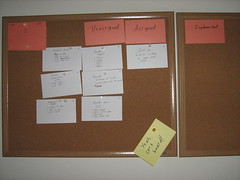
I came up with a list of interrelated concerns I wanted to keep in mind during this project’s run. I posted this list up on my cork board next to my current iteration story cards so I can always see it as a reminder.

  • Player interest/boredom
  • Interface simplicity/complexity
  • Screen size vs world size
  • Game balance/dominant strategies
  • The Feel of Being a Villain

I might not be able to address everything here in the time I have, but having these concerns written out can help me whenever I wrestle with a design decision.

Player interest/boredom: Some of the feedback I received about the Ludum Dare version of the game was that it wasn’t very fun. One of the concerns I had during development was that the player wouldn’t have much control over the game. In the end, the player’s choices boiled down to which monster to create, when to create it, and which tower to create it from. Once a monster is created, the AI controls the show, and the player can only watch what happens. If the AI was complex, it would make intricate decisions about where to go and what to do, which is fascinating during development, but it probably isn’t too much fun for the player. While I was relatively pleased with how the AI worked out, I didn’t want the game to be more fun to program than to play.

There is a small amount of randomness in the pathfinding to help prevent each play session from looking the same, but I didn’t want the randomness to affect the game too much either. It would be pretty frustrating if you couldn’t predict how useful it would be to summon a monster at a specific tower. So oddly, making the AI simple and more predictable created a much better player experience. He/She could make a decision and feel confident about it or know why it was the wrong move to make. Still, I think there is room for improvement in terms the player’s interaction choices to make it more interesting and compelling. At the very least, there should be better feedback for the player to let him/her know why the AI is doing what it is doing.

In terms of pacing, there are a few issues to address, namely game speed and resource increments.

The game runs very slowly by default. The thinking behind this speed was that I wanted this game to have a more epic feel. The hero would slowly be making his way to your castle, tackling towers along the way, and you’ll be working on armies to deal with him. In other games, when you’re in the role of the hero, you are progressing through the game level by level, screen by screen, enemy by enemy, and I didn’t want the game to be over too quickly.

Unfortunately, I learned that testing AI and other feature changes was annoying at this speed. With 72 hours to make a game, waiting 20 minutes to see what happens when the hero makes it to the castle was way too long. Eventually, I created a debug speed for myself. In the end, I found that I enjoyed playing at this increased speed. Game sessions were quick and easy to replay again and again, reminding me of how easy it is to get sucked into hours of playing Strange Adventures in Infinite Space even though each session might not last more than a few minutes at most.

Pressing “F” speeds Stop That Hero! up 10x, but unfortunately I didn’t provide such documentation in the original release of the game itself so most people probably played the slower-paced (and less fun) version.

Regardless of the game speed, the resource increments came in too slowly and only got worse as a game session went on. As I explained in the Stop That Hero! post-mortem, I was trying to prevent the player from creating overpowered monsters very quickly, and since I had mere hours of playtesting, I ended up with low starting resources and a very slow increment over time. To make matters worse, I tried to tie those regular resource increments to the number of towers you controlled. In practice, it means that you’re strongest at the beginning of the game when you have hardly any resources, and it only gets worse as the hero clears the towers. In the mid and late game, when you need resources the most, you get less. While you can gain resources depending on the strength of the monster that killed the hero, it was almost impossible to do it with a bat, which would give you the most resources, and if you could kill the hero with a dragon, you’re probably doing well enough that the smaller amount of extra resources are enough. I wasn’t happy with how I handled resources, but again, I had limited time to find a better way.

I spent quite a bit of time since the compo trying to come up with alternative ways to handle resources. I’ll write about those alternatives later. In any case, I wish I had thought to make the monsters much weaker than the hero so you could create an army instead of a handful of monsters.

Interface simplicity/complexity: I liked that the player’s input was limited to clicking, but it put a lot more responsibility on me as the game designer to make sure that the player could do meaningful things with those clicks. Since I am also interested in giving the player more interesting choices and options, I need to worry about how complex the interface can get.

Right now, the player is limited to clicking on the UI at the top of the screen and on the towers. If I wanted the player to have a bit more influence on the AI, how would I provide those controls without making things confusing? One thing I’d like to experiment with is the inclusion of a flag or banner. You can click to place it in any valid location on the map, and your minions will try to reach it, giving you a bit more control over the monsters in your army. Maybe you want them to move towards a specific tower to defend it, or maybe you want to head the hero off at some location. Either way, you no longer have to worry if the AI is capable of figuring out where the best place to go is.

So how do I do it? Do I simply provide a banner icon in the UI, and clicking on it changes the mouse cursor so that the next click places the banner? Does clicking on any non-tower result in the placement of the banner by default, eliminating the need for the icon? Can the player choose to influence particular individuals and leave others alone, or is it all or nothing? Is the banner always present, or should it disappear after some time? Maybe it should disappear when the first monster touches it? Maybe monsters will ignore it after they do touch it, allowing existing monsters to continue moving toward it. Should new monsters created when a banner is out go toward the banner, or should they use independent pathfinding until a new banner is placed? Maybe each tower should have its own banner to direct new monsters. As you can see, even this one feature requires a lot more design and can impact a number of different parts of the game.

Basically, even though the player can only click on the screen, I want to make sure the simple interface doesn’t result in simple play. The player’s choice on where, what, and when to click should be powerful enough to allow the player to do everything he/she wants to do. At the same time, I don’t want to clutter up the screen with a million things to click on. I’d rather not make the interface terribly intimidating.

Screen size vs World size:

The game’s graphics are tiny, but the current screen resolution is 800×600. Each tile is 16×16 pixels. It’s playable and works well. For now, I’m focusing on the desktop, but I want to keep in mind the option of porting to mobile? For example, newer versions of the iPhone might support the current resolution, but older models would only support 400×300. Halving the tiles to 8×8 would functionally work, but the hero and monster entities are smaller still! Would they even be recognizable at such a tiny resolution?

Could the graphics be blown up? I could try to make the game using 32×32 tiles, and then the smaller resolution version would use what I have now, and both would be fine. The question then becomes: will the game world be large enough?

I’d rather not let the player have the option of scrolling on the map simply because doing so would complicate the interface more, so I’d like the entire world to fit on the screen. If the world is currently 50×32 tiles, and halving that would be 25×16 tiles.

Since the game currently runs relatively quickly, it’s hard for me to see how good it would be to shorten it. Then again, pacing might work out better. I’d like to experiment with the world size and graphic resolution to see how it all feels.

Game balance/dominant strategies:

I don’t want the player to find a single, unbeatable way to play. It removes the challenge and stops it from being a game. Of course, I also don’t want the game to be too hard. I don’t want the player to feel like he/she should only use one or two of the monsters. The bat flies but is super weak. The blob is slow and land-based, but a little stronger. The ogre is stronger still. The dragon can fly and is fastest and strongest. With the current version of the game, I found that I rarely used blobs or ogres since I either couldn’t afford anything other than bats or I wanted to wait until I had enough resources for the dragons. When I used the blobs or ogres, they moved slowly and stupidly. Of course, that was what I originally wanted them to do, but it only became obvious after release how annoying those two units were. Making them somewhat smarter might have changed the feel of the game, but I may end up with completely different monsters by the time this project is over.

The Feel of Being a Villain:

The game needs to let the player feel like he/she is doing evil. A big part of it will come from the graphics and audio, but what about the game play? Creating monsters should feel good for being so wrong. Killing the hero should result in a mini-celebration. Could towns be razed? Does the land look worse as you do better in the game? Is there a way to convey the player’s evil power whenever he/she does an action in the game? Can the mouse cursor look like an evil, gnarled hand? What would I do for mobile phones with no mouse cursor?

What do you think? I’d love to get feedback on some of these thoughts.

Categories
Game Design Game Development Games Geek / Technical Linux Game Development Personal Development Post-mortem

LD18: Stop That Hero! Post-Mortem

Ludum Dare 18 was over a month ago. While I didn’t get the game finished in time for the main compo, the Ludum Dare Jam was running simultaneously and offered an extra day to let me finish and submit it.

Stop That Hero! was my most ambitious game yet. It was partially inspired by a book I was reading about artificial intelligence in games and what ended up becoming the winning theme: Enemies as Weapons. I liked the idea of a hero controlled by the computer while you sent enemies to try to stop him. My initial vision was more like Super Mario Bros. That is, the game was going to be a platformer with multiple levels, and you were going to send enemies such as Goombas and Koopa Troopas at the hero. I realized right away that learning how to implement a platformer was not going to be an efficient use of my time, especially since implementing new AI techniques was already going to be a challenge. So I switched from a “reverse Super Mario Bros.” to a “reverse Legend of Zelda” game. The hero would be trying to conquer your towers and ultimately your home castle, and you would use a variety of minions to kill him first.

What Went Right

  1. Early Prototyping Saved Time.

    More prototyping

    During the Ludum Dare #15, I was able to leverage my newly learned rapid prototyping knowledge to good effect, as I explain in the Mineral Miner post-mortem. Even though I had an idea of what I wanted to do before this latest competition started, I still spent some time fleshing it out on paper. Doing so helped me realize requirements I didn’t know I had, such as the need for AI visibility. I also got a feel for the game play, including how the player should spawn enemies and what they’ll do. Prototypes still work well!

  2. Simple Controls Forced Creativity. I wanted the player to do everything with the mouse for a few reasons. One, it would make the game more accessible and easier to play. Two, it would force me to make a simpler game. If the player can’t do too much, then there shouldn’t be a lot of complexity for me to implement. Since I knew that I was going to have enough difficulty implementing AI more advanced than any I’ve ever implemented before, I didn’t want to let the rest of the project’s scope get too large. With simple controls, I would have to figure out other ways to make the game compelling. While simple controls still left me with a lot of design choices and directions to go in, I was able to focus my efforts, and I think the game turned out much better for it.
  3. A Focus on Artificial Intelligence Was Smart. Right away, I knew that most of my time would be spent working on the AI. The game depended on it. I had just finished reading AI for Game Developers shortly before the compo started, and I realized that I never did so in all the time it was on my shelf! I learned some really cool and basic techniques, and I learned that sometimes simple AI tech is better than more complex AI tech. I was also glad I had Artificial Intelligence for Games, Second Edition to act as a more in-depth, up-to-date resource. Between these two books, I was able to create a decent bit of AI. My game’s AI needs related to behavior and pathfinding. Behavior was easily handled by a state machine, but the biggest dependency was on pathfinding. My implementation of A* was somewhat flawed from the start due to the fact that my AI agents didn’t necessarily have a single target at any given time and it was possible they didn’t see anything near them in the first place, but I was pleased with the results considered how much time I had to work within. Seeing a bunch of AI monsters moving about the screen on their own, avoiding each other, and otherwise looking like they had agendas of their own was a proud moment for me.
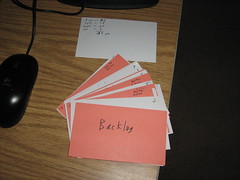
  4. Agile Planning Kept Me Focused and Aware of Priorities.

    Agile backlog First iteration

    Since I had a good sense of what the game was going to involve, I was able to plan quite a bit up front. It’s fairly common knowledge that the waterfall model doesn’t work in software development, but I wasn’t planning down to every detail. With Agile story cards, I knew what features to implement, but the implementation details were dealt with when I assigned a story card to myself. The problem with working alone is that no one is there to act as a check against my estimates for how difficult any particular story should be, but for the most part, things worked out well enough. I got two big benefits from using an Agile process to manage my project. One was that I always had a task in front of me. I never floundered, wondering what I should work on next, so my time in front of the computer was highly focused and productive. The other big benefit was knowing what features to focus on and what to cut as the deadline loomed. I originally wanted to have animations and special effects, but as the weekend went on, I knew these tasks weren’t nearly as important as getting working AI. Out they went, and I felt good about the decision.

What Went Wrong

  1. I Spent Too Much Time On The UI and Menus. I took time to prototype and come up with Agile story cards early in the process, but where I went wrong was not giving myself deadlines for those story cards. Ludum Dare was almost halfway through when I finally had an implementation of a window that I could close by clicking a menu item. Granted, clicking was an important aspect of the game, but I probably could have done so without worrying about how the menus would work.
  2. I Broke My Rule About Keeping the Art Simple. In past LDs, I realized that I would spend way too much time trying to create decent-looking art. Mineral Miner benefited from low-quality art because I was able to spend my time finishing it. For this LD, I thought keeping the graphics tiny would help, and it did, but I still found myself trying to draw a decent looking dragon when it wasn’t that important to make it look good. It simply had to be functional. Again, implementing AI was supposed to be my biggest challenge, but trying to create monsters that looked somewhat like what they were supposed to be was where I spent a lot of my time.
  3. I Missed the 48 Hour Deadline. Ludum Dare is normally a 48-hour competition, but LD 18 was a combination 48-hour compo and 72-hour game jam. I normally try to get a good night’s sleep, but I stayed up late this time around. While I was able to get a lot of work done, I found myself making mistakes and having difficulty keeping the code structure in my head. By the end of the second day, I was disappointed that I didn’t have a finished game, so I went to bed. That third day was when everything came together for me, but missing out on the 48-hour deadline meant that I missed out on feedback from other entrants. The compo has rated entries while the jam did not, so entering a compo game would guarantee some feedback in the form of ratings and comments. As I was only able to enter the Jam, my game was ignored by and large. This is the first time that the Jam format was tried for Ludum Dare, and next time there might be some changes to address these concerns, so hopefully entering a game in the Jam won’t feel like second-class LD.
  4. The Game’s Balance Is Off. On the last day of the Ludum Dare Jam, I found I had time to actually play the game. I tried to change values such as the Hero’s strength and speed and the amount of resources you obtain. I didn’t want the player to be able to create a dragon or two right away, so I lowered the starting resources, and then I didn’t want the dragons to come out soon after the game started, so I slowed down the resource increase. While I was able to make such a dominant strategy hard to do in the beginning of the game, it can still work well for the player so long as he/she has patience. Also, it had the side-effect of slowing down the pace of the game. You can only create a handful of minions in any game session, which isn’t nearly as fun as having an entire army swarming on the map. I would have liked more time to balance the game so that it was harder to pull off dominant strategies AND was fun to play.

What I Learned

  1. Simple AI Can Do Wonders! The AI in my game didn’t turn out nearly as complex as I originally thought it needed to be, but maybe it’s good that it didn’t. The AI boiled down to a few pathfinding algorithms and the selection of a target to move to, which isn’t very different from a game such as Pac-man. Once I fixed a number of bugs with the pathfinding, Stop That Hero! came alive. It really did feel like you were creating minions to do your bidding.
  2. Agile Project Planning Is Quick and Useful. Creating a prioritized requirements list and a schedule estimate helped me keep tabs on my progress throughout the weekend. I always knew what task to focus on, and I was able to change my plans when I realized that things were going too slowly for me to get it all done. I received advice that I should have deadlines for my tasks since a schedule doesn’t mean much without them, and I’m inclined to agree. With deadlines/milestones, I probably would have realized how slow my progress was earlier on.
  3. I Need Sleep. Working through the night and into the morning, I learned that my most productive spurts were soon after waking up and having breakfast. Otherwise, even if it felt like I was making progress, I was actually creating problems by inserting bugs and implementing badly thought-out designs. I was able to recover, but in general, I think getting regular sleep is still more beneficial to my project’s health (and my own!) than not.

As in previous Ludum Dare compos, I’ve found my biggest problem is deciding where to spend my time and for how long. Creating a simple menu infrastructure and twiddling with image editors to try to make good looking art took away time from implementing AI and fixing the game’s balance. Project management suffered since I didn’t give myself deadlines, but it did keep me focused. In the end, I had a complete game, with sound, and I’ve decided I liked this project so much that I’ll be updating it and polishing it up for PoV’s inspiring challenge to sell a game by the end of October.

For future projects, I’ll need to give myself milestone deadlines to ensure that I don’t spend too much time on tasks, and I’ll also need to make sure that any art assets I create are primarily functional. Alternatively, I need to dedicate the time to learn how to create quality art and how to use the Gimp.

Categories
Game Development Marketing/Business Personal Development

An Inspiring Challenge

Mike Kasprzak, or PoV from Ludum Dare fame, issued a challenge the other day:

Make a game — take it to market — sell (or license) 1 copy

Many of you have done the first part, but let’s go all the way this time. The simplest definition of a professional game developer is someone that has made money selling games. So lets create-us some new “professionals” and get some games out!

Think of this as a race. Have something new for sale and in a store by the end of October. And if you can sell a copy (or sign a licensing deal), you win.

Creating a game in a weekend is doable, but to polish it up and make it marketable in a little over a month? That’s a bit more daunting. It will take a lot more work, focus, and determination, and in the end, there’s no guarantee that you’ll have any customers.

But the key to the challenge is to realize that you don’t win by being a best-seller or getting to the top of the sales charts. You win by selling one copy.

Just one copy? That’s quite doable. It’s not easy, but it’s definitely possible. While PoV says there are no restrictions, I don’t think it counts if you ask your mother to pay you a few bucks for your game, so to rise up to this challenge, there’s a bit more work left to do even after the game is finished. Setting up payment processing and a website, signing up for an app store of some kind, or joining a contest are just some of the ways to attempt it.

Personally, as a relatively new full-time indie game developer, I know that I’ve been struggling with the fact that I need to make a game that sells. Do I spend six months working on a single game, or do I restrict the scope to make a game in a matter of weeks? What’s the income potential of each? How risky is to base so much of my potential income on a single game versus making a bunch of smaller games with possibly little market appeal? How much time do I have to figure it out before my savings disappear?

It’s a lot of responsibility to make such a high level decision for a business. It impacts everything the business will do. There’s plenty of analysis paralysis potential in that decision.

But selling one copy of a game by the end of next month? It will take some infrastructure and hard work, and I may still “fail” at this challenge, but the effort will still put me way ahead.

Categories
Game Design Game Development

My Game Design Prototype Toolbox

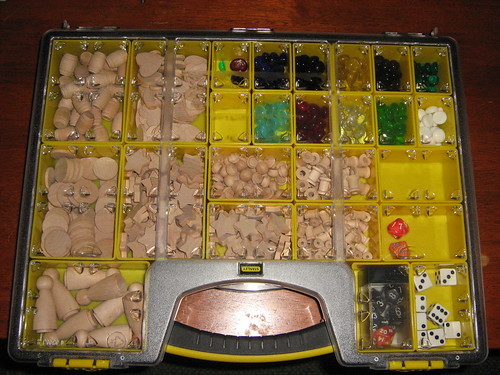
Last year I posted about my shopping trip to a hobby store to buy game design prototyping tools. Some weeks ago, I bought even more items, such as tiny wooden barrels and glass beads. These tools are great for doing quick and easy paper prototypes of game designs.

I’ve been keeping them in small plastic bags, and all of those bags were in a larger freezer bag. While this was functional, it felt unsuitable. I’m a game designer, and some of my most important tools are in plastic food bags? It’s not right.

So I went shopping again and found a nice toolbox for less than $15. It has these cool compartments that I can move about relatively easily, and when the lid is closed, everything stays in place.

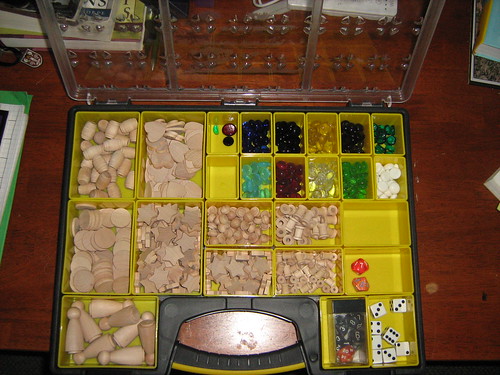
I put all of my wooden pieces and glass beads in the toolbox, and each gets its own compartment. I realized I had a lot more star-shaped wooden pieces than any other piece, though. I even had room for more things, so I put in some dice. My dice collection isn’t much, but I had them separate from my prototyping tools before. Now they’re all together.

Here’s a shot of the toolbox opened.

Prototyping Toolbox

And here’s a shot of the closed toolbox.

Prototyping Toolbox

The plastic bags were a bit more portable. I could put the entire collection in my bookbag when I left home, but this toolbox is its own luggage. By and large, I don’t find myself going out to do prototyping, so it isn’t that big of a deal.

What’s in your game design prototype toolbox? How do you store your physical paper prototyping tools?