Categories
Game Design Game Development Linux Game Development

Stop That Hero! November Development Summary

I wrote up a October challenge post-mortem at the end of the previous month, and almost an entire month has gone by. I haven’t written much, partly because I went off of my self-imposed schedule to do more game dev work at the expense of writing and reading time.

What progress have I made with Stop That Hero! in the month since?

First, I implemented my own component-based object system. I know, I know. I wrote about the frustrations of trying to implement state of the art game objects and said I would give up, but eventually I found my own way. In trying to proceed with the game’s development and putting the frustration behind me, I found that I was very close to doing the same kind of work anyway. I’ll write more about the details of my implementation in another post.

Even after I had the infrastructure for the object system, I still had to figure out how to use it. In a running game session, I understand that the game’s systems will make use of the object system and components, querying and updating them as needed, but what about initialization? Specifically, how does the hero get created? Should that object and all of its relevant components get created when the level is loaded, when the level is initialized, or as part of the first update to a new game?

Some entities will get created during the course of a game session, such as when the player creates a monster at a tower, but the hero is there from the beginning, and I was having trouble trying to figure out how to treat his creation.

I already have a number of components:

  • Position (current location data)
  • Sprite (the current sprite image to display)
  • Spawn Point (a position where an entity will be initialized when created)
  • Movement (speed and direction data)
  • Targeting (a list of potential target type IDs and the current object ID targeted)
  • Targetable (a target type ID)
  • Pathfinding (a list of traversable terrain IDs and the current path)

With the above components, I can already see the hero moving from a start location (the spawn point) to a target, which is an object made up of only Targetable and Position components. The hero picks the nearest object with a target ID matching the set of IDs he is allowed to target, avoids obstacles such as trees and water, and moves along the path generated by the pathfinding system.

The pathfinding system was surprisingly difficult. A* is such a common algorithm, and there are plenty of code examples around. Essentially, it’s a solved problem, right? The problem was that all of the code examples and most tutorials and pseudocode were node-based, whereas I was looking for something that gave much more focus to the connections. That is, it should be possible to get from one node to another in more than one way. For example, if you have a bridge, you can jump off of it very easily but you wouldn’t be able to get back up unless there was a ladder, and climbing the ladder would cost more than jumping down. Or, if the height is great, climbing down the ladder would be less risky than jumping and potentially hurting yourself.

The book “Artificial Intelligence for Games” has a focus on connections, but the pseudocode was a little difficult to follow. When the pseudocode makes use of whitespace, it’s hard to tell what code block you’re in when the source spans multiple pages. While the book says that there is a working code example on its website, I couldn’t find any code related to the pathfinding chapter. I emailed this error but the website still doesn’t reflect it, and I haven’t heard back from anyone about it.

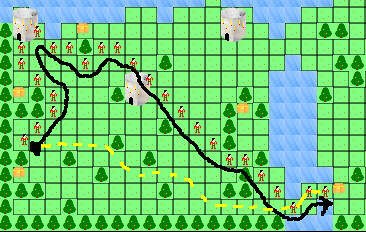
I thought I had my pathfinding system working since my unit tests passed. Obstacles were avoided, and short paths seemed to finish as expected. It wasn’t until I gave the hero a target about a quarter of the map away that I saw a problem:

Debug Path

The hero’s path is specified by the multiple hero sprites and the black line. The dotted yellow line is what I think a more appropriate path should be if the pathfinding algorithm was working correctly. I found it very odd that the path was complete yet so suboptimal. I eventually realized that part of the problem was a bug in my node sorting, and here’s the relevant line:

lessThan == costSoFar < r.costSoFar

I didn't see the problem for a long time, but I eventually posted the code online. Phil Hassey pointed out that I was testing equality instead of assigning a value. Doh! Sometimes you just need a fresh pair of eyes.

There was also another bug in that line. "Artificial Intelligence for Games" argues that you should be using the costSoFar value to sort nodes in the open list, saying it is the only value that isn't a guess. I didn't quite understand why, but I figured such a thick text book written by experts who have worked on more games than I have would know better than I would. So, here's a lesson: never implement an algorithm without understanding it. Everyone else in the world argues you should use the estimated total cost to sort nodes. After all, you're trying to guess which one will get you to the target node in the fastest way. Sorting by cost so far means that there will be a bunch of nodes, possibly in multiple directions, that can be first. Once I changed the value checked from costSoFar to totalEstimatedCost, my paths were straighter and shorter.

Still, my pathfinding system isn't working quite as I expected. The hero can only walk on grass, but other entities could fly over everything. While they might prefer flatter areas, they should still be able to fly over trees, mountains, and water. I created a hero with the ability to move over all of these different terrain types, and I was disappointed to find that the path didn't change. He was still avoiding them as obstacles.

I realized that part of the problem is how I mapped the world representation to the pathfinding graph. Does the terrain have an absolute cost, or should terrain costs be entity-specific? That is, is a mountain always harder to traverse than grass, or should a mountain troll bias towards mountains while a slime prefer the plains? If every entity had the same kind of movement restrictions, it makes sense to have absolute terrain costs. An obstacle for one will be an obstacle for another. But if some can move through water or fly in the air, does it make sense for terrain to have an absolute cost? If I give each entity weights for terrain types, why not just get rid of the absolute costs entirely since the weights are what ultimately matter? How does a game such as Advance Wars handle it?

Other issues I had to deal with included problems with using floating points versus ints. I was using floats to represent world positions for objects, which is fine, but when I was integrating different aspects of the system together, I found that other data structures were implemented using ints. I was losing all of the precision I needed, and it wasn't until I was printing out text every few lines that I could see the problem. Unit tests didn't catch this issue because separate objects and components worked just fine.

But with pathfinding and targeting working fairly well, Stop That Hero! is much further along. Once I can move an entity to an expected target, the rest of the game will hopefully come together much more quickly. Hopefully.

Categories
General

Happy Thanksgiving!

I’m in the middle of packing and moving this week, but I’m taking a moment to reflect and be thankful. It’s been an exciting year, especially since quitting my day job and going full-time as an indie game developer!

I’m especially thankful for the love and support I’ve received from friends and family. There’s been a lot of big decisions, and as independent as I like to think I am, I know I couldn’t have done so well on my own.

Thank you to the people who follow my adventures on this blog, on IRC, in the ASP newsgroups, on Twitter, and elsewhere. It helps to know you’re there and keeping me honest. B-)

I’m grateful for how close the Internet makes everyone. 20 years ago, it would have been unheard of for me to get feedback almost instantly after sending a question at the same speed. Now, I can come in contact with so many people and learn so much.

I’m thankful for the opportunities I have.

What are you thankful for?

Categories
Game Development Marketing/Business

Planning an Indie Agile Project

I’ve mentioned story cards, points, iterations, and burn down charts, but I’ve never explained it here on this blog. Unless you’ve done similar Agile project planning, you might not know exactly what I’m talking about. Thanks to Erik Yuzwa and Casey Dunham for asking me to explain my project planning process!

In traditional waterfall development, Big Design Up Front (BDUF) is the rule. BDUF is done on the belief that if you plan every detail early and hand off the design to the development team, the development should be smooth sailing. The reality is that requirements evolve, technical requirements might not be fully understood at first, and not everything can be anticipated. Agile software development practices are an attempt to work within the true nature of development to deliver working software to the customer. Things change, so make sure your methods make it easy to change.

In a project, you have stakeholders and developers. Stakeholders are usually game designers, product managers, project managers, CEOs, customers, or anyone who has input into the direction a project should take. Developers are the ones who put the project together to the satisfaction of the stakeholders. Stakeholders know best about what the project’s priorities are and can determine the value of the finished project and feature set. Developers know best about how long specific tasks might take or how difficult features might be to implement. During the planning phase of an Agile project, the two groups work together to figure out a prioritized feature set and estimated schedule.

I’ll start by warning you now. I’m not an expert. I have very little knowledge and experience with project management and the role of a game producer. What I’ve done is based on my experience as a cube dweller at my last day job. The company was pursuing Agile development methodologies, and I got some training as a developer, and I was able to see how the stakeholders were trained as well. To make it worse, I work alone, so I have to put in extra effort to wear the hats of business owner, project manager, and other stakeholders. Sometimes I took shortcuts, but only because there’s no need to communicate with myself explicitly.

If you’re a fan of Joel on Software, you might find the article on Evidence-based Schedules more helpful. Instead of settling on an arbitrary date, it gives you a confidence distribution curve over a range of ship dates, which gets more accurate as the project progresses.

When you have a specific date as a hard deadline you can’t miss (hahaha), the following explanation of an instance of Agile project planning might help.

Introduction to Paddles of War

Let’s assume you’ve green-lit a project and have picked a date for when you would like to see it finished. I’ll illustrate with a simple example called Paddles of War. It’s based off of a game I tried to implement in college in QBasic. It was inspired by an Atari 2600 game I loved called Warlords.

Paddles Of War is a multiplayer, real-time battle game. Each player controls a paddle, defending a castle made up of walls and the king behind them. A cannon ball is ricocheting around the play area, and each time it hits one of the castle walls, it destroys that part of the wall, eventually exposing the king behind it. If the cannon ball hits the king, the king is killed and the associated player is eliminated from the game. The last player with a surviving king is the winner. If the cannon ball hits the paddle, it is deflected away.

A fairly simple game, it’s like Pong meets Arkanoid with some battle elements thrown in. Let’s say that the deadline for the project is three months from now.

Stock Up On Supplies

First, you’ll need some tools. To start, when you’re in the project planning stages, you’ll need a lot of index cards and something to write with. Sharpie markers are usually suggested, but pens are fine. I also like having different colored index cards to help with visually differentiating between different kinds of cards. I’ll get to specifics later in this article.

During a project, you should be able to look at a wall of index cards and know at a quick glance what is currently being worked upon, what is scheduled for the current iteration, what’s finished, and what’s blocked. I purchased two cork boards and put them side-by-side. Why not one large cork board? Well, it was more expensive and I’m an indie on a budget. Also, with two boards, I could rearrange and separate them at will, so it seemed more flexible. I also have pins to put index cards up on the boards.

And that’s it. All you need to do this kind of Agile project planning is a writing utensil, a bunch of index cards, and a place to post them. I suppose sticky notes might work, but I’d worry that the paper would curl and the glue would stop working. Pins and index cards seem to work great.

You can also make use of a spreadsheet to create a chart to make progress easier to track, and I find such charts really useful for project health checkups. I’ll explain how I use Google Docs for such charts, but you won’t need to worry about it until the project starts.

Identifying the Project Requirements

Now you are in what is known as Iteration Zero. Agile project scheduling is based on iterations, and iterations are an arbitrary unit of time. Usually, a week is good, although some projects will have two or three week iterations.

Iteration Zero is the time to identify the work required for the project and figure out what the implicit and hidden requirements are. Find a room with a large table (or use the floor if your pets will leave you alone long enough), and bring the index cards and writing utensils.

At this time, everyone can create what are called User Stories. See this introduction to user stories for more details, but you can think of it as a high level, basic description of a feature or requirement. Some people argue that only stakeholders can create user stories, but developers might be more familiar with the underlying requirements. If your publisher has standards for what should be in every single game, such as translations to other languages or configuration options, the game designer might not necessarily be aware of their existence, yet the developers still have to expend the effort to get them done.

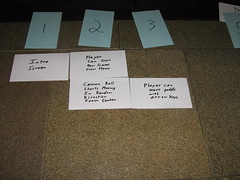
When creating a user story, you want it to be easy to identify what the story is, which requires a minimum number of words and big writing:

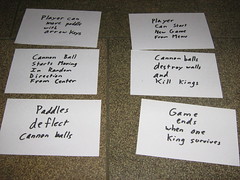
Creating a StoryInitial Stories

As you can see, each story card is very easy to read from a distance, assuming you write them legibly.

In the case of Paddles of War, the game designer might come up with these initial stories:

  • The player can start a new game from the menu.
  • The player can move the paddle with arrow keys.
  • The cannon ball starts moving from center in random direction.
  • The cannon ball can destroy castle walls and kill kings
  • Paddles can deflect the cannon ball.
  • Game ends when there is only one king left.

There will be many, many more, but with just these high-level stories, it’s enough to start thinking about the software needs. A developer might wonder if these stories say everything accurately and poses the question: “Is it possible for there to be more than one cannon ball in play?”

The designer might respond, “Oh, that’s a good idea! Multi-ball might be fun!”

Before the designer creates a new story card about allowing multiple balls in play, the developer points out that with more than one ball, there’s the potential for two kings to be killed simultaneously, which means it is possible that there will be no more kings left. Since the game ends when there is only one king left, what happens when there isn’t one? Are draw games allowed, or should there always be a victor? How does the designer want to handle this situation?

While the programmer can provide input into this story, it’s ultimately the designer’s call if it should be one. The designer is the stakeholder, and he/she is the one who determines the value of features and whether they should exist in the first place.

The programmers might see ricocheting cannon balls and collision responses, and they’ll recognize the need for a physics system. Is there an in-house system available? Do they have to build it themselves? Will they use a third-party solution?

No matter what the answer, the important thing is that questions are being asked. Stakeholders and developers are communicating about what the project will actually be. The producer might have to look into existing solutions, but maybe there isn’t much of a budget for such things. For now, a story can be written related to the creation of a physics system. An implicit requirement is now explicit.

When you’re finished with user story creation, you might have many tens or hundreds of cards, depending on the complexity of the project. For my Ludum Dare 18 version of Stop That Hero!, for instance, I had 31 cards in the end, and I’m sure I remember that some important aspects of the game had no story cards associated, so there could have been more. Since the game was being done in a weekend, I didn’t bother creating the story cards towards the end to reflect to newly identified work. Since I was working on my own, it’s not like I had to stop and communicate my intentions to anyone but myself, so I took a shortcut. When you work with someone else, you’re not going to be able to do the same without repercussions.

Now, by figuring out all of these stories, aren’t we doing the same thing as Big Design Up Front, which means it has all of the rigidity disadvantages as well? No. Agile Development is meant to respond to change, but you can’t respond to change if you don’t know what the change is from. By trying to identify all of the stories that make up the project, you have a good, high-level idea of what the project actually looks like. Also, you save time. The details for any given story can be planned when that story is being worked upon, so lower-level details benefit from a kind of a “Just-in-Time” planning. After all, if the project is likely to change, the stakeholders might decide that a particular story doesn’t need to be implemented at all. By waiting to plan the details until you actually work on it, you aren’t wasting time on making plans that never needed to be carried out.

Estimating Cost

Now that the user stories are finished, it’s time to estimate how much effort will be required for each story. Now, remember, the developers are the only ones who can make estimates with any accuracy. Implementing stories is their domain. Stakeholders can question estimates or ask for explanations, but in the end, if a developer thinks that a story is going to be tricky, the stakeholders have to accept that estimate.

To do estimates, each story card is given a numerical score. This score doesn’t necessarily correlate with a time estimate, although some teams like to think that a number represents the number of hours or days it would take to accomplish anything. The point of the numerical score is to indicate the estimated cost of a story, whether in time or effort. Also, this estimate will be different depending on who is doing the estimation. A veteran game developer is going to create more low scores than a junior developer would. The team of developers must agree on the score for each card.

This is the part that could be incredibly time-consuming, but a nice way to speed it up is to take all of the story cards and throw them into separate collections: easy, medium, and hard. Then for each collection, you can probably quickly separate them into sub-collections of easy, medium, and hard, or maybe just easy and harder, or whatever the developers find appropriate. Boom. You’re done. Now you just have to write down numbers on the cards corresponding to what collection and sub-collection they’re in, and you’re done assigning story points. To illustrate:

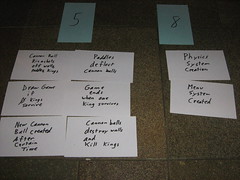
Separating the cards into columns by expected relative difficulty from left to right:
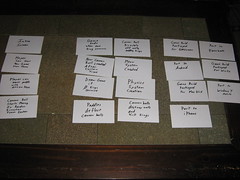
Separating the stories

Assigning numbers to the columns:
Categorizing the stories by difficulty00010More categorization

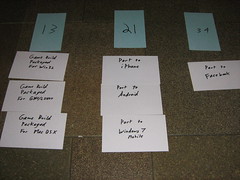
Putting the score on the story cards in the upper right hand corner:
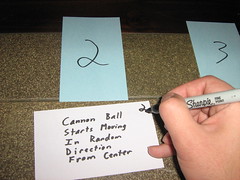
Scoring a story according to its category

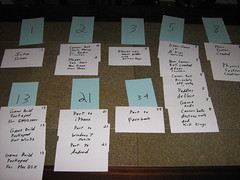
The entire project at a glance:

All of the stories in scoring categories

You’ll note that the numbering isn’t sequential. When you’re trying to decide the relative difficulty of a story compared to other stories, what does it mean to be a 5 versus a 4 or 6? If you are measuring difficulty based on estimated number of hours, then sequential numbers make more sense. Using the Fibonacci sequence, it makes it very clear how a story’s estimated cost compares to another’s. You might choose a different sequence entirely.

The last thing the developers need to estimate is how much they think they can do as a team in an iteration. Let’s say that each iteration in this project is one week, which means there are 12 iterations over the course of three months. Now, what’s important to understand is that the estimate is not divided among the development team members. Doing 10 points in an iteration with two developers doesn’t mean each developer does 5 points, and adding a third developer doesn’t necessarily mean you can expect 15 points of work in a week. The estimation is a team effort. It’s not an important distinction when you work alone like I do, but with multiple team members, you can’t treat them as if they are replaceable cogs in a machine.

What the developers usually do is grab a sample iteration from the full collection of cards. They’ll put stories together that sound doable in an iteration, and then they sum the scores on those cards. The total is the estimated iteration velocity. For this example, let’s say the developers think they can do 10 points of work in a week.

Prioritizing Iteration Requirements

Now the developers get out of the way, and the stakeholders get to play. Armed with the collection of story cards, their scores, and the iteration velocity estimate, the stakeholders start putting together iterations according to what they want to see finished first. Again, stakeholders are in charge of the value assessment, so while developers can provide input (“Er, you can’t have the Foo until the BarWidget subsystem is ready, so the BarWidget subsystem needs to be in this iteration if you want the Foo as well.”), the stakeholders get the last word on what story goes into what iteration.

Each iteration has only as many story points as the iteration velocity at most. The developers have already indicated what they think they can do in an iteration, and the stakeholders have to respect the estimate. They can’t expect more work to be done in the same amount of time. Expecting crunch time or assuming that the developers are padding the estimates isn’t sustainable or healthy.

It’s usually at this point that the producer gets heavily involved. If sound assets are going to be ready in a month, for example, then it would be nice if the game was capable of playing sounds within four iterations. Plan those iterations accordingly.

Also, is it all possible? 12 iterations at an iteration velocity of 10 points means that at the end of three months there will be 120 points worth of work possibly finished. According to the example project’s scoring, there are 190 points estimated in the backlog (and you’ll note important things are missing, such as sound and animation work, so there should be more cards, but as this is just an example, I’m not going through all the effort).

Does this mean that the developers need to try to do more per iteration? Should the estimated velocity be changed from 10 to 16?

No! It means that the stakeholders need to make some decisions. Is it more important to hit their ship date, or do they want to have everything in the project plan finished before shipping? Can they be happy with shipping only on desktop computers and not porting to Facebook or mobile platforms? Is multi-ball a must-have feature? In this example, a lot of the estimated hard work was in packaging for builds, but in a real project, there could be all sorts of wishlist items, feature creep, and legitimately important requirements reflected in the story cards. It’s up to the stakeholders to put together the iterations according to their priorities. After all, what those priorities should be is their domain of expertise.

While all of the iterations could be planned up front, the plan can change depending on the progress of individual iterations. It might not be worth the work to plan more than the next iteration or two. I usually have the current iteration planned and the remaining backlog somewhere nearby the cork boards to easily look through if I feel like it.

Development Time

It’s time to get those developers working! During Iterations 1 through 12, the current iteration’s cards can be put in a highly-visible place. An iteration meeting usually ends a previous iteration and kicks off the next one. Stakeholders and developers meet, talk about the previous iteration’s progress, and introduce the next iteration.
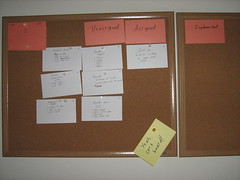
First iteration

Above is an example of the first iteration of LD18’s Stop That Hero!. I had colored index cards to label a number of columns, and since I worked alone, I left a few out, but here are the different column label explanations:

  • Approved (not pictured): Place stories under this label when the stakeholders agree that a story is finished. Again, I work alone, so when I say something is finished as a developer, who would disagree?
  • Implemented: When a story is considered finished by the developer, the story goes here and awaits approval from the stakeholder.
  • Assigned: This column is for each story actively being worked upon by the developers.
  • Unassigned: This column is for all stories in the iteration that aren’t approved, implemented, or are actively being worked upon. At the start of an iteration, all of the iteration’s stories go here.
  • Blocked (not pictured): If a developer cannot implement a story, whether due to an unforeseen technical issue or waiting for an external resource, the associated card goes under here. Since I work alone, blocked stories are just stories with requirements or dependencies I haven’t planned for, usually. I just consider it part of the work, so it’s not really blocked if I’m the one doing the unblocking.

While stakeholders determine what stories are in a particular iteration, developers get to choose which story in the iteration to work on at any given time. The developer, or developers if the team makes use of pair-programming, will pick a card from the Unassigned column and move it to the Assigned column. It indicates to stakeholders and other developers that this story is actively being implemented. When a story is finished, the card gets moved to the Implemented column. If the developer finds that there is some obstacle preventing the completion of a story, the card is moved to the Blocked section, and the developer picks an Unassigned story to work on in the meantime.

At a glance, anyone can see the Big Board and know what the iteration looks like. If it’s the beginning of the iteration, it’s not very alarming if no cards are in the Implemented column. If the iteration is almost over and there are still no implemented stories, you know that something is wrong.

In development, sometimes you don’t realize the true nature of a requirement until you start working on it. Maybe a story that made sense in Iteration 0 now seems too vague. Perhaps there are details missing that require a decision from the game designer. Or perhaps a completely new requirement is conceived, and the stakeholders really want it. Whatever it is, requirements change.

What’s nice about using index cards to represent project requirements and user stories is how easy they are to move, create, and destroy. Is there a need for a new user story? Pull out a new index card and write it! Is there a user story that encompasses too much? Split it up by creating multiple stories and ripping up the original card! Is a feature in a later iteration suddenly more important for the big boss to see sooner? Move the cards between iterations!

Creating new stories and working on them aren’t necessarily done in the same iteration. A new story requires the developers to score it, and this work can be done during the iteration meeting. If work wasn’t completed in the previous iteration, the stakeholders can decide if they still want to see it done in the next iteration or if they can push it off to another one. Those iteration meetings act as milestones and opportunities for project assessment.

Within an iteration, it can be useful for the project team to meet for quick stand-up meetings daily. These aren’t hour long meetings. Each member of the team quickly says what they worked on the day before, what they will do today, and whether or not anything is blocking them. Any further discussion can usually be handled outside of this meeting, allowing non-interested parties to get back to work.

Since I work alone, I don’t have daily stand-ups. My cats don’t usually provide much useful input anyway. I do, however, have iteration “meetings” each week, in which I assess the previous iteration’s progress and put together the next iteration. Since I wear all the hats (my cats don’t wear hats), it’s probably more important for me to be conscious of what needs to be said in this meeting. The developer might just want to get back to work, but the producer is going to want to know why progress is slower than expected, and the president might need to decide if the game can be shipped later and still meet the company’s sales goals. Or maybe things are going very well, and the designer wants to know if a new feature can be added. Without multiple people in those roles, there’s less worry about miscommunication, but there’s more concern that an important business role has been forgotten.

Assessing the Health of the Project

For you chart junkies, this is the fun part. You have lots of data here: estimated iteration velocity, the backlog’s total score, the deadline, the number of points completed in each iteration, and the number of points added during an iteration. What can we do with it?

I’ve found that creating a chart to be incredibly useful for at-a-glance project assessments. Here’s an example showing my current project’s first 7 iterations:
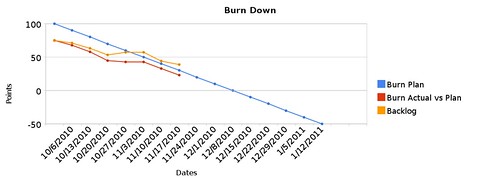
7 iterations of project

The blue line tells you the ideal plan. Basically, if I have constant iteration velocity from an estimated total project backlog, I can see when I’ll expect the backlog to hit 0 points. In this example, the expected project completion date is December 8th at a velocity of 10 points per week.

The orange line represents the actual backlog. At the beginning of this project, I had identified 75 points worth of stories. If stories are always being completed, you can expect this line to go down, but if work is getting added, it can go up. In this case, the line went up in the 4th iteration, and since nothing was done in the 5th iteration, it stayed horizontal.

The red line represents the amount of work getting completed, or the actual iteration velocities. Except for the 5th iteration, it has been going down at various slopes. The steeper it is, the more work is getting done, and a horizontal line again indicates that nothing was done.

Some people might argue that the orange line is the only one that matters, and it would be if all you cared about was the project being done. However, from a project management standpoint, the orange and red lines don’t mean much unless you compare it to the blue line. Knowing that there is progress is good, but knowing if the progress is good enough is better. The blue line, again, is the ideal, and if you compare the other lines to it, you can get an idea of how healthy the project is.

The red line can also be compared to the orange line. If no work is being added, the slopes will be the same, but if the orange line is more horizontal than the red line, you know that more work was added to the iteration. If the orange line pulls away from the red line too much, it indicates that requirements weren’t identified up front. If either of those lines ends up extremely high compared to the blue line, you know that the project is not on track to meet its deadline.

For example, early in this project, my estimated velocity was 20 points, and it was frankly a guess.

BurnDown at 20 points per iteration

Ignore the fact that the lines extend to the right for so long since it was based on data that wasn’t filled in yet. Still, right away, in the first iteration, you can see that the red and orange lines were above the blue line. The second iteration wasn’t much better. I only did 7 points of work in the first iteration and 10 points in the second. To make it worse, I was adding more stories to the backlog. It took me a few weeks, but I had to face the facts and realize that I wasn’t working as fast as I thought I would.

So I changed my estimated velocity as well as the initial estimated backlog. and as you can see in the earlier chart, things look healthier. But wait a minute! The project isn’t actually healthy! It’s late! Is this just slight-of-hand?

It would if I was trying to deceive, but what I’m trying to do is get as accurate a picture of the project as I can. The project was going to take longer than I originally anticipated, but by getting more accurate data, I could make better decisions. Do I continue the project with the new deadline? Do I cut features to try to get closer to the original deadline? Do I hire contractors to help me speed up development (keeping in mind Brooks’ Law)? Do I cancel the project outright? I decided to continue the project, and I felt confident about getting the game finished before Christmas.

That is, until I realized that there were various aspects of the project I hadn’t given enough thought to. At the end of iteration 7, I created a number of new stories related to glossed over details. Here’s the latest chart:
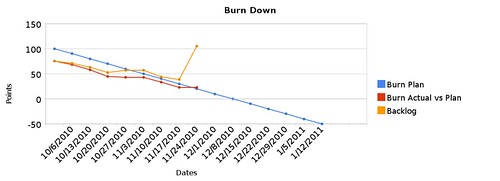
Start of 8th iteration

See that spike in the orange line? Yeah, that represents the project nearly doubling in size due to all of the stories I didn’t anticipate originally. Things like a system to let the player choose what level to play in a campaign or a way to save progress. As fundamental as these stories were, I failed to identify them as actual requirements for the project, and so they were never part of the original plan. Even though work is getting done steadily, as the red line demonstrates, the orange line makes it very clear how much trouble the project is in.

Again, it’s way better to have more accurate data than to be happy with flawed data. The project was always in trouble, and now the data reflects this fact. Since I’m an indie without obligations to a sales force or contracts, it’s not as big of a deal to let the deadline slip as it would be if I was working on a multi-million dollar project with sales estimates and stockholders expecting me to meet them. Still, I only have so much in savings, so I’d like to try to get to my first sale sooner rather than later.

The good news is that I expected that spike in the backlog. As I explained in my Stop That Hero! October Challenge post-mortem:

While I knew what tools I would use at a fundamental level, such as which compilers and libraries I would use, I didn’t realize I needed to figure out what technology I needed to create. If I did, I probably would have planned for it in the schedule or I would have pursued a simpler project in the first place.

So I knew there were going to be stories to identify that I missed during my project’s Iteration Zero. I just didn’t expect there to be so much! Hopefully in future projects, I can learn from this experience and try to be a bit more thorough in the technical feasibility assessment. Plus, I’ll have the benefit of this project’s codebase.

Still, the point is that with this kind of Agile planning and this chart, I had an early warning and a rough idea of the project’s health. Without this data, I would have to rely on intuition, and well, let’s just say I don’t have a dartboard.

So how do you create your own chart? I create a spreadsheet with the labels and data indicated below:

Burndown Chart Creation

If you click on that image, it’s probably easier to read. The iteration column is just numbered 0 through whatever. The dates column is straightforward. I put the end date of the iteration in each cell.

Under Burn Plan, I have each cell subtract the Estimated Points Completed Each Iteration from the previous amount. So if the estimate is 10 points and the burn plan’s initial value is 200, then the next cell will have 190, and the one below that will be 180, and so on. This column along with the dates will give you your blue line. How do you pick the initial estimated backlog? You can choose a number based on a target date, or you could try to estimate the size of the finished project. My initial number was based on the original estimated velocity of 20 points and an original target date of October 31st. Since then, I’ve tried to use this column’s data to indicate when I can expect to finish my project if i don’t cut features. I’ve had ranges between November and March based on different starting values and estimated velocities. At the start, I didn’t realize how large of a project this game was going to be, but with my latest data and this blue line, I know when I can expect to finish.

Points Completed and Points Added are manually changed each iteration as you complete and add points. Initially, you’re just adding a massive number of points to represent the start of the project with all of the identified work so far.

The Backlog tracks the currently known work, so each cell takes the previous cell’s value, adds the points added to the iteration, and subtracts the points completed in the iteration. This column gives you the orange line.

The Burn Actual vs Plan column will generally subtract the Points Completed in the iteration from the previous cell’s value. So if the first cell is 75 and 3 points were completed in the first iteration, the next cell down would be 72. For this column, you’d ignore the Points Added column. The Burn Actual vs Plan column gives you the red line.

I wish Google Docs let you set the minimum value of each axis. It’s a little annoying to see negative values when the data stays above 0 (seriously, Google, what’s up with that? According to your support forums, this is a highly requested feature). Of course, applications such as Excel and OpenOffice.org’s Calc wouldn’t have this problem, but I like the flexibility of being able to view my burndown chart and data anywhere.

Conclusion

Hopefully this article has given you insight into how I plan my projects and how you can do something similar for your own projects. By using tools as simple as index cards, you can quickly get an idea of the size and scope of your project. Developers and stakeholders can work together from their strengths to create the plan, and by using a simple spreadsheet, you can track the health of that plan.

Once again, I’m not an expert project manager, so I’m doing what I can and am still learning. For instance, while the orange line gives me a lot of useful info compared to the blue line, I don’t know what the red line means when it’s so much further down the chart and starts to go negative. In a few iterations, this burn down chart representing a revised date of February will have a negative red line:
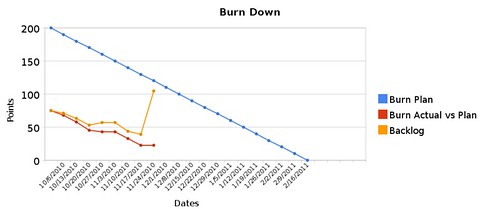
Burn down towards February

The red line still represents work getting done relative to the backlog, but I wonder if there’s a better way. I’d love to hear any feedback you might have, and feel free to ask questions!

Categories
Game Design Game Development Linux Game Development Personal Development

Stop That Hero! Development Continues

With the Ludum Dare October Challenge over, I am still working on Stop That Hero!. Even though I had said that the Challenge deadline wasn’t important to me, I still had this desire to meet it, and I think I had a lot of competing thoughts in my head since I never made a firm decision to hit the date or ignore it. On the one hand, it’s mentally freeing to not have a deadline breathing down my neck. On the other hand, I don’t want to take forever working on the game.

Project Estimation

My old project schedule estimates were based on a few key pieces of data. I had a deadline I wanted to meet, which was October 31st. I had the number of estimated story points for the entire project, which came out to 75 points total. Going backwards, if I did 20 points of work each week, I’d hit the date with some time to spare. Putting together a sample iteration, I felt 20 points was reasonable at the time.

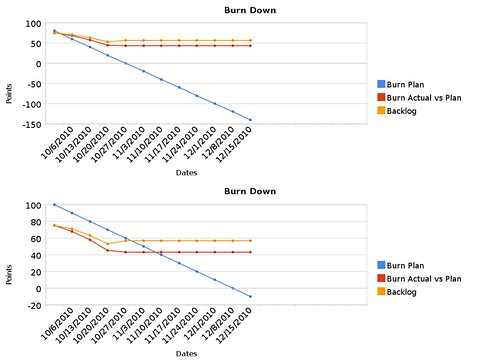
In the last month, I found that I added new stories each week, so now the project’s total story points have increased to 89 points. I’ve also found that 20 points per iteration was overly optimistic, and it seems 10 points per iteration might be more doable. With this new data, I decided to estimate the project with a different set of data, and you can see the project comparison below.

Burn Plan Comparison

The flat lines to the right are basically projecting into the future based on no work being done, so you can ignore them. The blue line indicates the ideal. In the first case, I was expecting to hit 0 points on October 27th. In the new schedule estimates, I’m likely to be finished by December 8th.

What’s nice about these graphs is how much they can show you in an instant. So long as my actual burn rate and the actual backlog stay under or at the blue line, my project is healthy and progressing nicely. If they cross over to the top of the blue line, something has gone wrong. In the first case, you can see that the project was in trouble from the start. I thought that if I could start hitting 20-point iterations that it wouldn’t be that bad, but I couldn’t do it.

With the new estimates, those weak iterations were actually relatively strong, even though the last week was very poor. I only managed 2 points of work then, and I ended up adding 6. I hit a snag in development, but I am recovering from it. Still, you can see that over the life of the project, I’ve been adding to the backlog, and with the previous week, my backlog matches the estimated backlog at this time. It doesn’t give me much room to add more to the backlog, but it isn’t scary yet. If it is mid-November and my backlog is far on the upper-left side of the blue line, however, then I’ll have to question what’s going wrong.

My main concern is that there will be many more stories added to the backlog, especially since I was surprised to learn how much of the basic technology I needed to build in the last month. Also, I worry about not being able to dedicate all of my time to the project that I normally would. Besides the fact that Thanksgiving and Christmas are coming, I’m also moving at the end of the month. I’m more than certain that my project’s schedule will be negatively impacted, but since I am aware of it now, I can take steps to plan for it.

The Game’s Status

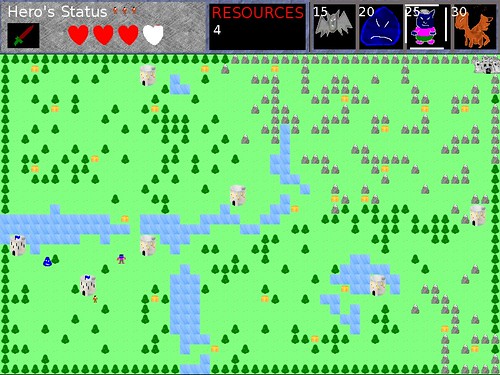
What’s implemented so far? I have a menu system which allows me to select what level I want to load. A level loader will populate a level instance with map data from a PNG file. The level uses that map data on initialization to know where to place towers and treasure chests, as well as what type for each, and it also knows where the hero’s initial spawn point is. The level loader also sets the hero’s starting lives to a hard-coded value.

There’s still a lot left to do, but the biggest thing missing is the concept of an entity.

Near the end of the previous month, I ran into trouble when it came to actually implementing the hero. The large number of added points were partly because I took a vague story for implementing an Entity and broke it down into multiple, specific stories related to various aspects of the creation of an Entity. Now instead of trying to create an entity and all of its behaviors at once (and not knowing when I’m finished or how to start), I will be working on rendering an entity, moving an entity according to its speed and direction, and other very specific tasks that are easy to understand and focus on.

Other major components include pathfinding and player actions. The prototype had a poor-but-workable pathfinding solution. While I was happy with it in terms of a weekend project, I knew it wasn’t as good as it could be, and I learned a bit more about A* implementations since then.

While the main activity for the player involves picking a monster type and deciding which tower to create it at, I’d like to investigate other things the player can do to impact the game. In previous posts I’ve mentioned ideas such as banners that all monsters will gravitate towards or clicking on resources at controlled towers in order to collect them. I’ll hold off until I get the fundamental activities implemented, but I think they could change the feel of the game in a positive way.

Once I have the ability to create entities and some way for them to move, fight, and die, the rest of the game will fall into place relatively easily. Victory and defeat conditions depend on the entities actually doing things, animation requires things to animate, and there are details and balance issues that can only be addressed when I have something to detail and balance in the first place.

Of course, I’ll continue to write about the game’s development. B-) Is there any aspect of the game’s development that you’d like for me to explain in the coming weeks? Let me know by leaving a comment!

Categories
Game Design Game Development Games Marketing/Business Personal Development Post-mortem

Stop That Hero! October Challenge Post-Mortem

October 31st came and went, and Stop That Hero! was not in a position to be sold, even as a beta or alpha project. Partway through the month I realized that even if I was able to finish the project, the work of setting up the payment systems, customer support, and even the website was going to take some time as well. According to my estimates, I’d finish the game sometime between the end of October and the beginning of December. As disappointing as it would be not to finish in time for the October Challenge deadline, I also knew that it was a “fun” deadline as opposed to a hard “must-hit-this date” for my business.

I will continue to work on Stop That Hero! because I believe in the project, but I’d also like to get better at project management. Now that the deadline has passed, I can look back on the month and think critically about how I did. Even though there was no business-related urgency in getting the game finished for the Ludum Dare challenge, I still wanted to do so, and it was demoralizing to realize that the game wasn’t going to be finished in time.

For the unfamiliar reader, Stop That Hero! was originally created for the Ludum Dare 18 Jam. The player was an evil villain in charge of a castle and a number of towers, and a hero character was trying to conquer the castle, liberating towers and collecting treasure chests along the way. The player would create minions at any of the towers, and those minions would try to kill the hero. Kill the hero three times, and you win. Lose the castle, and you lose the game.

For this project, I wanted to make Stop That Hero! a commercial-quality game that required no proprietary dependencies and ran on at least GNU/Linux (my preferred platform) and Windows, with plans for a Mac OS X port and an eye toward mobile devices. I wanted the game to be data-driven instead of hard-coded. I wanted the game to have multiple game modes and levels, and I wanted me and the players to have the ability to create our own custom levels with custom rules. I realized that it was a lot to do for a first release, so my intention was to make the game hard-coded yet easy to change so that it was using external data and scripts. Future updates would involve replacing the hard-coded bits with loadable data.

What Went Right

While it might seem strange to think that anything went right for a project that wasn’t finished, I do believe there were some good things that positively impacted the project.

  1. Planning and Preproduction Time. Even before the October Challenge was announced, I knew I wanted to take Stop That Hero! and make a full game out of it. I spent a few weeks at the end of September looking at every aspect of the game, from resource handling to monster variety to game modes.

    While I think the original LD18 game’s mechanics were marred by a lack of game balance and probably could stand on their own, I wanted to investigate every possibility for making this game the best it could be. I identified major design challenges that I wanted to focus on early on. I also speculated on how much of the game could be data-driven or scriptable. This early planning helped me visualize how I wanted the finished game to look and feel.

  2. A Regular Work Schedule. As an indie game developer, I have no boss imposing a schedule on me. Keeping my job doesn’t require my presence during official office hours anymore. Since I determine my own schedule, I can do whatever I want, whenever I want. It’s not a license to slack off and take vacations every week, of course. My income depends on the output of my efforts.

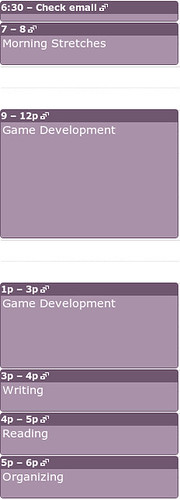
    The thing is, my time usage wasn’t very productive or balanced, and it hasn’t been for months. If I spent time on game development, I’d find that my writing would slip. If I wrote, I’d find that magazines and books would pile up in my inbox. If I read, I’d realize that I almost missed paying an important bill. Coinciding with the time I started preproduction for this project, I realized that I needed to do something to change my situation. To make my productivity a bit more predictable, I created a regular set of hours for myself. Until I had a game to sell, I wasn’t going to make any money, so production took up the lion’s share of the time I spent in a day. To ensure that there was balance between game development and everything else I wanted to get done, I gave myself regular hours for writing, reading, and organization. I use Google Calendar to setup recurring events. You can see an example of my day below:

    Regular Hours I discovered I wasn’t very good about waking up early enough for the morning stretches part, which is something I want to work on next month, but I tried to stick to the schedule. If I missed stretches, I wasn’t making it up at the expense of being late for game development. If I was late for game development, I wasn’t going to encroach on writing time. If I did make such allowances, it would destroy the whole point. For the most part I stuck to the schedule, which meant I was doing about 4-5 hours of game development per day, an hour of writing per day, an hour of business or game development reading per day, and an hour of organization per day. While part of me wondered if I needed more time dedicated to game development, the balance allowed me the time I wanted to learn, share, and prevent things from slipping through the cracks. While I might tweak the hours going forward, I definitely prefer this self-imposed, organized, and regular schedule over letting each day’s activities be determined by whim.

  3. Agile Scheduling As Early Warning System. Once again, I’m pleased with the knowledge I learned from using nothing more than a couple of cork boards, some index cards, and pins. Before the project started in earnest, I created an estimate of the work I needed to do as well as an estimate of how much I thought I could do per week. As the weeks passed, I realized how poorly I was doing in terms of keeping with the schedule.

    I wrote about it in Agile Alert: Slow Project Progress as well as Balancing Current and Future Needs, but the point was that without using story cards and a burndown chart, I wouldn’t have any idea when this project would be finished or what I could do to improve my situation. It allowed me to make project decisions earlier rather than later as well as weighing the advantages and disadvantages of delivering the finished project later.

What Went Wrong

  1. Not Planning Time For Art and Sound Work. The Jam version of the game features all art and sound created by me. I’m not that great of an artist, and I’m no sound designer. If this game is going to be polished, I was going to need to hire someone else to do the work. Of course, until I needed the higher quality assets, I could use my current art/sound assets as placeholders.

    The thing is, I never really had a plan for how I was going to go about finding contractors to provide the replacements. For a project that was originally expected to be sold by the end of the month, I should have had a plan in place for getting all of the final polish in. It would have been hard to ask for finished art when the game itself was nowhere near playable, so it isn’t a total negative, but I could have started a search for artists and composers. At the very least, I could have looked into pre-made art and sound packages. Otherwise, I would be spending a lot of time learning how to create half-way decent art and settling for lame sound effects and no music.

  2. Underestimating the Complexity of the Software Architecture Hacking a game together in a weekend is relatively easy because the code is prototype-quality. It’s meant to be used for a few days, and you don’t need to worry about maintenance or future updates. The future is mere minutes later, and then it is over. For the October Challenge, I wasn’t interested in a single sale. I was interested in the health of my business. When there is one sale, I expect more to come later, and so I wanted to make high-quality software that is easy to provide support for.

    Unfortunately, I didn’t realize until late in the month how little experience I have with creating a full-fledged project from scratch. When all of the code is in a single, monolithic file with almost no external data driving it, it takes no work to determine what data structures should live where. When you’re working on software with flexibility and maintenance in mind, it’s a completely different mindset. Since I didn’t have much in the way of reusable code that was of the quality I desired, I was spending a lot more time working on infrastructure and scaffolding than I expected. I could write an individual piece of code well enough, but I had very little experience with knowing what individual pieces of code I needed to write in the first place.

    Also, with unit testing, the code that “works” would only work in tests, whereas the actual game still needed a number of other parts of the project finished before I could see anything that looked like progress on the screen. It’s good to see the green bar as often as I do, but it’s frustrating that the actual game doesn’t do anything more than it did the week before. I now understand what the stakeholders felt like at my last day job whenever I would say “Yes, I’m making great progress. No, there’s nothing new for you to see yet.” Sometimes you just need to throw something, anything, up on the screen every once in awhile.

  3. Not Being Decisive About What Game I Was Making. Since I wanted the game to be data-driven and scriptable, I thought that the major design work would take place with malleable data rather than rigid code. I wanted multiple game modes, and I had an idea of what each one might include. I thought that there could be single level instances as well as campaigns of levels that tie together somehow. I wanted victory and defeat conditions to be scriptable, but I also wanted some core mechanics to be as well. For instance, while the basic game might provide all of the towers up front for the player with no way to retake a tower that the hero has liberated, a different level configuration could require the player to conquer independent towers first and provide the ability to retake them if they are liberated.

    The problem with the game designer’s “I want it all” approach is that it put a lot of pressure on the programmer to make the software incredibly flexible. Since the designer and the programmer positions are both filled by me, it meant that I was asking a lot of myself. I knew better than to make a game engine that could be any genre, any game, but I didn’t realize that making a Stop That Hero! engine that essentially allowed for endless variety of game modes and mechanics wasn’t any less difficult. While the previous sentence sounds like it should have been self-evident, I didn’t have 20/20 hindsight to help me write it back when this project started. It seemed to be so simple. So long as the game was driven by data and scripts, I could make any mode I wanted.

    At the beginning of the project, I had supposedly made a decision to implement a particular game mode as part of the version 1.0 of the game, but I didn’t want to give up on the flexibility to do any of the others I had thought of. If I really wanted to hit the end of the month deadline, I probably could have pared down the feature requirements list. Flexibility can be retroactively coded in after 1.0 was released. Instead, I gave myself the impossible task of getting everything done and hoping it could be done in time without regard to how long it would take. It’s no wonder the schedule slipped.

  4. Getting Into a Developer Funk. Towards the end of the month, I hit a point where I could not make forward progress no matter how much I wanted to do so. I was second-guessing myself, partly because I probably felt overwhelmed with the architecture work, and partly because I made the mistake of doing research and development on the state of the art for component-based game objects. Basically, I wanted a component-based game object system since it would help me in my quest for a flexible and data-driven game, but I learned a number of competing ideas, and I found that any new code I wanted to write had all of these new mental filters in the way. Data-driven Programming vs Object-oriented Programming, game objects vs game entities, encapsulation vs getting things done, etc. It was a lot to take in, and I had difficulty getting all of the new information to settle down in my head.

    When I finally abandoned my attempt at the component-based system, I still couldn’t make progress on a less flexible entity system. How hard can this be? I did a working version in the original Jam version of the game, right? Well, once again, I wasn’t throwing all variables and data structures in the same class anymore. I couldn’t make decisions because I was paralyzed with the fear that I would make a poor one.

    I experienced a smaller version of this when I was getting into unit testing for the first time. For instance, I’m not used to the need for as much Dependency Injection as I did on test-driven work, and I was losing confidence that I was doing software development “right”. Early in a project, you might think of one reference to an interface that an object needs, so you provide that reference in the constructor of the object. Weeks later, and you might have 4, 5, or 6 such references as parameters, and suddenly you’re faced with the need for another one. At this point, it starts to feel wrong, especially since it can hard to keep it all straight in my head. Since I was working alone, I didn’t feel I had anyone to discuss it with, so I would have to move forward reluctantly. Eventually, the fear that I was doing something wrong paralyzed me.

    I did eventually get out of my funk and started making forward progress again, but it was only after a long phone conversation with a more software architecture-knowledgeable friend. Thanks, Larry! When you think you’re lost, sometimes all you need is some guidance and advice.

What I Learned

  1. How Much Technology I Needed and Didn’t Have. If I didn’t care about making my game available for GNU/Linux or avoiding proprietary solutions, I could probably have used technology such as GameMaker, Unity, or Flash to make a game. They offer plenty of game development-specific support, either directly or through libraries. Instead, I had to do a lot of work myself. While libSDL provided a number of basic hardware abstraction services, I still needed to write a lot more game-specific code.

    Again, I understood I wasn’t writing an end-all, be-all game engine, but I still lacked a repertoire of code to help me make the game. A lot of my time was spent laying down the basic infrastructure to allow me to work on the game. It’s odd since I can easily hack together a working game in a weekend, but when the project’s seriousness demands more, I found that I lacked the basics. While I knew what tools I would use at a fundamental level, such as which compilers and libraries I would use, I didn’t realize I needed to figure out what technology I needed to create. If I did, I probably would have planned for it in the schedule or I would have pursued a simpler project in the first place. For instance, while I knew I needed AI pathfinding, it didn’t occur to me that I’d need something more sophisticated to track all of the objects in my game than a bunch of independent collections of data.

  2. How Much I Still Need to Learn Between software architecture and the basics of game engine requirements, I hit a number of stumbling blocks that forced me to pull books off of shelves and search online for answers. I would have thought I knew enough about game development to make a game, but I had underestimated how much more work there was to take an otherwise working game that was hacked together and writing the code in a way that made it easier to debug, fix, and change.

    Working with others would help us all glean knowledge from each other, but as an indie, I’m going to need to interact with game developers in more than a social way. Also, I need to get better at project estimations. I was too optimistic this time around.

  3. How Difficult It Is To Talk About Game Development When It Is Not a Hack Fest. Most of the people I talked to on IRC were helpful when it came to particular aspects of what I was doing, but they almost all seemed to perceive that I was hampering my efforts with the use of unit tests and the desire for high code quality. “Just finish the game” is easy to say when you’re working on an LD48 competition entry for fun, but when your business depends partly on the ability to provide customer support without introducing bugs and problems, it’s not just fun and games anymore.

    Selling a copy would have been nice at the end of the month, but I also want the ability to sell more copies later. Selling a hard-to-support game isn’t a good way to improve my ability to stay an indie long term. The October Challenge wasn’t an end in itself for me. I saw it as a kick in the pants to get me focused on moving my business forward. By and large, it worked. I have a project that is still moving forward even if it is at a slower rate than I would like. Still, it was difficult at times to talk about game development as a business-related endeavor since not everyone had the same long-term goals.

As I said, I am continuing this project even though the October Challenge is over. Using the project data so far and assuming I continue to work at the same rate, I can expect to finish the game by December. It’s still just an estimate, but it is a much better informed one than the one I made at the beginning of the project. While it is disappointing that I couldn’t finish this project in the month, I am pleased with some things. My schedule helped me make consistent progress, and I have a much better understanding of the game’s design questions since I spent so much time thinking about them before the month started. Still, while I had done a simple technical feasibility assessment, I needed to do a deeper study to realize all of the things I needed for this project. Basically, as much as I tried to plan ahead, there were some things that just weren’t on my radar. I know better now. Besides having done a lot of work for this project that can be reused, future projects should benefit from pursuing a better understanding of their technology requirements.

Categories
Game Development Games Marketing/Business Personal Development

Results of the Ludum Dare October Challenge

November begins, and that means the Ludum Dare October Challenge is over. Creating a game and selling a single copy was the goal, and you can see the results of the 2010 October Challenge.

At the time of this writing, there were 13 19 20 entries submitted. Some of the games are still awaiting their first bit of revenue, but others have sold their first copies as soon as release day!

Congratulations to everyone who has risen to the challenge!

Categories
Game Development Geek / Technical

State of the Art Game Objects

Years ago, I wrote about Component-based Game Design, in which I talked about the advantages of breaking down your game objects into components. Inspiration came from a number of places, including:

My Experience

Over four years ago, I even managed to implement a simple test program as part of my application for my last day job, and at the time I thought it was easy and fun to do. The hardest part was setting up all of the basic infrastructure to support registering components.

In four years, however, I never wrote code that resembled that test program.

Why not? Because it turned out that it wasn’t all that easy or fun, and I didn’t like the idea of making a full game with it because even a small test program was a bit painful to build up. My implementation of a board game was heavily based on Hannah’s concepts of States and Actions, so it might be a bit more complex than what is typically considered the state of the art. Actually, it’s probably more accurate to say that the implementation was based on my understanding of Hannah’s article, so I probably did things terribly wrong and made it more painful than it had to be.

Each Action typically interacted with multiple States, and so there was a lot of dynamic_cast calls. Practically speaking, adding a new State and its associated Action meant a lot more work than I would have liked. I might as well have stuck with the monolithic game object, and in the years following my original post on the topic, I pretty much did. Most of my projects were small in scope and had very specific designs that didn’t change much, and the code base was manageable enough that it wasn’t a problem when the designs did change.

The Motivation

With Stop That Hero!, I wanted the flexibility to change the design of the game as it was being developed. That isn’t to say that I wanted the ability to make a first-person shooter halfway through the project, but I did want the option of experimenting with new monster types, different player actions, and objectives for a level. I want to be able to change the design of the game without requiring me to change the code drastically. I also wanted the ability to drive the game through the data, which would allow me to create custom scenarios and interesting game experiences, and it would allow players to create their own mods.

I already understood the basic concept of component-based game objects. Instead of monolithic, inheritance-based objects that are hard to change, objects should be identifiers with the components that make up an object being tied to that object identifier. If the design changes, the impact on the project might simply be the assigning or removing of components. For instance, I could have enemies that walk on land or fly in the air. I could introduce a new amphibious enemy by assigning it the ability to walk on land and create a new component related to swimming in water. The code involved is minimal and low-impact on the rest of the project.

What I didn’t understand was how to go about implementing a component-based game object system that wasn’t cumbersome and annoying to use. In my experience, having ready-made components was great for game design, but creating the components and the system to use them was a pain.

The Research

And so, once again, I find myself looking into component-based game design. I found quite a few more resources over the span of a few days as well as some that I have read in the last few years. I’ll quickly list them in case you’re interested in pursuing this topic yourself:

Terrance Cohen’s presentation led me to discover that Insomniac Games has a public-facing research and development page, which led me to his presentation Three Big Lies: Typical Design Failures in Game Programming, which introduced me to the concept of data-oriented design.

And from there, I realized I needed to clarify what it was that I was looking for.

I wanted to learn how to do data-driven, component-based game development in a relatively simple way. What I realized was that I was looking for three different things that had little to do with each other.

One, I wanted my game to be data-driven, which isn’t all that hard. So long as the game is pulling in data from somewhere and acting on that data, it’s data-driven. It’s possible to have the inheritance-based hierarchy of game objects and still run the game based on external data, and it’s possible to use that external data for component-based systems.

Two, I wanted my game design to be easy to change. A component-based system is superior to the inheritance-based one in this regard. With an inheritance-based system, any design change might impact the carefully-planned hierarchy. It can quickly be hard to manage, and changes become more and more painful. Components are easier to change. Add them or remove them, and an object’s behavior changes, and it works on the fly as well.

Three, I wanted to figure out how to write the code for such a system without the complexity I dealt with last time. Seriously, dynamic_cast everywhere a component needed to talk to another component made the creation of new components quite painful. There had to be a new way.

Data-driven games are much more powerful with a component-based system, but it’s outside of the scope of what I want to focus on here. What I was most interested in was the answer to the question “What is the best way for me to implement a game object in my game?”, and frankly, it wasn’t enough to know I wanted components aggregated together. I wanted to know how.

Which brings me back to data-oriented design. According to DOD, the only purpose of code is to transform data. That’s it. Traditionally, programming was focused on algorithms and code, modeling the problem in terms of classes and objects. The problem is that the models tend to add more complexity to the original problem of modifying data.

Now, data-oriented design isn’t the same thing as data-driven design. The former is about programming, while the latter is about game design. See Noel Llopis’ Data-Oriented Design (Or Why You Might Be Shooting Yourself in The Foot With OOP):

OOP is so ingrained in the current game development culture that it’s hard to think beyond objects when thinking about a game. After all, we’ve been creating classes representing vehicles, players, and state machines for many years. What are the alternatives? Procedural programming? Functional languages? Exotic programming languages?

Data-oriented design is a different way to approach program design that addresses all these problems. Procedural programming focuses on procedure calls as its main element, and OOP deals primarily with objects. Notice that the main focus of both approaches is code: plain procedures (or functions) in one case, and grouped code associated with some internal state in the other. Data-oriented design shifts the perspective of programming from objects to the data itself: The type of the data, how it is laid out in memory, and how it will be read and processed in the game.

One thing that wasn’t clear to me while doing all this research is that data-oriented design is not terribly compatible with object-oriented programming, and since most of us game developers know OOP as THE way to program, it’s difficult to see it any other way.

The thing is, it isn’t a normally a problem. OOP can still get you to a correct implementation, especially when performance isn’t your primary concern. The code will run the way it is expected. One of the major advantages touted by all of the data-oriented design articles I found was efficiency. As an indie game developer who doesn’t work on games that push the processor or memory requirements of my customers’ machines, I’m not usually worried about cache thrashing or performance issues. I’m not concerned about throughput on PS3 Cell processors or processing shaders quickly on the GPU. I’m not one of those people who thinks that processor speed is fast enough and memory is large enough for whatever horrible implementation I can come up with, but at the same time, I am not using the Crysis engine and gigabytes of data for my games. I don’t currently make games that take advantage of parallel processing and I most definitely wasn’t going to worry about the cost of calling virtual functions, so initially data-oriented design wasn’t very appealing.

But why I kept pursuing information on it was that it was supposed to be great for unit testing and modularity. Since I’m a big fan of unit tests, being able to write them more easily and with less dependencies would be a huge win. Being able to write simpler code would be another huge win because it can help in the creation of components.

So bottom line: data-oriented design looks like a fantastic way to help me develop a game object system. The code will be simpler and easier to test, and I get the extra benefits of having more efficient code! Nice!

Well, at least at a high level. I still need to figure out what it all means when I don’t have the benefit of an existing company’s proprietary engine. I figured that I needed to explore this data-oriented design thing a bit more.

EDIT: Here’s a talk by Andrew Kelley with practical ways to implement data-oriented design: Andrew Kelley – Practical DOD

The first three examples helped me understand how the actual code might be laid out, but it was that last one that really made me understand where OOP is causing problems. It focuses mainly on performance problems related to caching, but the idea of performing a bunch of unrelated actions on a single object at a time versus doing one action for lots of objects at once was really made clear, especially after seeing images 12 and 30-32.

The Frustration

Unless you’re one of the mainstream game developers who have used or implemented a component-based system as part of your job, it seems getting started is the hard part. Game development forums have a number of threads in which people are convinced of the benefits but don’t know how to get a system built.

The article in Game Programming Gems 5 by Bjarne Rene has sample code on the book’s CD, and the good news is that it is a complete solution, but it seems that the complexity of inter-component communication can be a problem. Plus, is it still relevant? It seems as if game developers have moved away from components that perform actions, at least according to what I’ve read.

I haven’t had a chance to look at Game Programming Gems 6, but apparently there is an article on game objects there as well, although it sounds like there is no example code so I’m not sure how hard it would be to follow. The blog T=Machine argues that there is a difference between Entity Systems and component-based systems. Fine, but your entity system is still aggregating components, so regardless of the differences, I need to know how to create a component system.

It seems that anytime there is code in any article or presentation, it’s incomplete or hard to follow. The article might say that you should use IDs and not create an actual object class, and yet the example code has a class. It might show a class deriving from some base that was never introduced or create a function signature without an explanation for why it is there. I almost wish the articles would unit test their way through their sample code just so I could follow along with the author’s intent. Also, it seems that there is no shortage of article series on the subject that never get finished. Some examples are MMO-specific, some are concerned about performance, and none seem straightforward. One article will suggest doing something that another says you shouldn’t do.

And so I felt like pulling my hair out when I sat down to try to implement my own system. At a high, conceptual level, it makes sense to me that an object is nothing but an ID, and it’s the components aggregated together that make up a game object. I understand that I should be able to create an object by creating components, associating them with the object ID, and adding those components to some manager. What was difficult was implementation, and part of the difficulty was about ownership of the data.

I had written an entity manager with a couple of components, only to throw it away after becoming frustrated with how limited it was. I apologize if you’ve read this far and were hoping for more insight into a component-based system. It was too much for me at this time, and I had to stop if I wanted to make progress on my game.

Ultimately, it seems that the component-based system isn’t going to happen, but I need to figure out how to make progress on the game itself. Somehow, in learning a lot more about components, entity systems, and data-oriented design, I feel frustrated and incompetent. Every time I want to write code, I have a dozen different alarms going off in my head warning me that what I want to do isn’t what this author suggests or is against what that author says. My existing code, which I was happy with before, is now feeling too constricting. Whenever I try to make progress, I feel like I have game developer’s block. I can’t see the next step, and even when I think I have, I don’t know how to start. It’s a bizarre feeling.

This post came off more whiny than I would have liked, but I’m not blaming anyone or feeling entitled. I’m just frustrated, and I’m trying to figure out why.

Categories
Game Design Game Development Geek / Technical

Stop That Hero! Sprite Rendering Questions

In the previous post, I reported that levels could be loaded and rendered. So why isn’t it drawing the towers and chests? The short answer is that I didn’t get to them yet, but in all seriousness, it took a little thinking before I could start.

In the original implementation, almost everything was done in a single file of code. The code to draw a tower was:

pHardwareLayer->renderSprite(towerSpriteName, m_towerLocations.at(towerIndex).first * TILE_WIDTH + WORLD_X_START, m_towerLocations.at(towerIndex).second * TILE_HEIGHT + WORLD_Y_START);

TILE_WIDTH and TILE_HEIGHT were each 16, since each tile was 16×16. WORLD_X_START was 0 since it started drawing from the left side of the screen, and WORLD_Y_START was 87 since the UI was drawn at the top.

So depending on which tower I was drawing, I would get the x and y world map offsets, then multiply them by the tile dimensions, and offset by the top left corner of where the world was being rendered.

Why can’t I do the same thing now? Because I didn’t want to hack out everything in one file. A tower is no longer represented by data strewn across different data structures in the game code. A tower is now its own class. A Tower class has these members:

Point m_position;
std::string m_sprite;
int m_type;
int m_status;

There are more variables associated with monster creation and ownership status, but these are the variables relevant to this post.

The Problem

To draw a Tower, I could use the sprite specified by the name in m_sprite and the coordinates in m_position. The problem is that m_position isn’t screen coordinates. It’s map coordinates.

No problem. I’ll change m_position so that it specifies the screen coordinates.

Except m_position is being used in pathfinding, and it is important that it represents a specific tile in the world.

No problem. I’ll just multiply m_position by the tile dimensions, just like in the original implementation.

Er, but, why should the Tower know anything about the tile dimensions? It should only know about towers. Maybe it knows how large it is in terms of tiles, but why should it know how large a tile is? It doesn’t need to, except when it renders a sprite.

No problem. I’ll provide a second Point variable called m_spritePosition which represents its screen coordinates.

That would probably work for stationary towers, but what happens when I need to render moving entities such as Slimes? Unless the on-screen position is mathematically tied to the entity’s position, I can see those two numbers diverging. I could update both pieces of data each time I update one, but what a pain that would be!

The Solution

Create a Sprite class to encapsulate all of it, and let the Sprite class worry about where to render.

Since towers are now encapsulated in their own class, it makes sense that the way I render them (and almost everything else in the game!) should be encapsulated somewhere. The Tower class no longer has its data members polluted with a bunch of members related to sprite drawing, and it doesn’t need to worry about what to do with that data, making its interface and internals a bit cleaner. Also, Sprite classes can be reused for other objects, such as monsters and treasure chests, in a standard way.

To handle the rendering of images, I created a SpriteImage class with the following members and commented explanation:

Point m_position; // The sprite's position
std::string m_imageName; // Name of the sprite in the sprite collection which stores this particular image.
Rectangle m_imageRect; // What rectangular area in that sprite that holds this particular image
IViewPort * m_viewPort; // Explanation to follow.

At first, this solution doesn’t seem to solve the major problem identified above. It looks like the last problem in that the tower’s position and the tower sprite’s position are stored in two different areas.

The trick is that a Sprite defaults to a 1 to 1 mapping between its position and the screen coordinates, but it’s possible to scale it between arbitrary mappings, too! The secret is in m_viewPort.

If a SpriteImage is given a view port, it will scale its position based on what the view port says the scale should be.

How is this useful? Imagine having an 800×600 screen resolution, and you wanted to render a UI button near the bottom right corner. You could make a SpriteImage of a button at position (700, 500), and it would probably work fine.

But then what if you change the screen resolution to 400×300? It’s possible that you’ll port your game to a mobile device with such a resolution. The button would render off of the viewable screen. You’d have to change the button location manually in order to see it at the bottom right corner again. This goes for every image in the game. It could be tedious and error-prone.

Alternatively, you could use a view port that knows the screen resolution is 800×600, and it could be configured to scale based on a percentage. Now, instead of placing a button at (700, 500), you’d set its position at (87.5%, 83.3%). Then, if the screen resolution changes, you simply change the view port, and any sprites associated with it would know the correct scale to use! It’s very powerful and easy to move elements of the screen by horizontal and vertical percentages.

That’s great for rendering sprites anywhere on the screen, but what about my example above? How does a Tower draw on an arbitrarily-sized and arbitrarily-positioned area of the screen, and how does it know where to do so if its position is based on tile position?

As I said, the view port can do arbitrary mappings. In my case, if the world is made up of 50 tiles x 33 tiles, and the area to render everything is 800×528, and it is offset from the top of the screen by (0,87), how would a sprite use this information? Offsetting is easy so I’ll address it first. Wherever a sprite ends up wanting to render itself after scaling, the view port will tell it to move down the screen 87 pixels. As I said before, I use this offset to give room for the UI at the top.

Scaling is almost exactly as it was at the top of the screen. Mapping 50 tiles to 800 pixels requires multiplying by 16, which is the size of each tile. Similarly, 33 maps to 528 with a factor of 16. So if a Tower is set at (50, 33), its going to render at the bottom of the viewable area, whereas a Tower at (25, 0) would be centered at the top just under the UI. Below is a quick example of how I load level data from tiny PNGs.

Level Data To World Map Rendering

If you click on the image above, you should be able to get a better idea. The level is described in the small PNG that consists of almost all green pixels and a single white pixel in the middle. When this level data gets loaded, what you see on the screen is a lot of grass tiles and a single tower where the white pixel corresponds. While the PNG is 50×33 pixels, the tower renders in the correct location on the 800×528 view port, even though the tower’s location is in terms of the 50×33 level.

And does it work for moving objects? Absolutely! Let’s say I have a Slime monster located at (2, 3) on the world map, which corresponds to (32, 48) on the screen. When a slime moves to the right, I can’t simply change its position to (3, 3). It would jump the entire width of a tile to get there! Slimes are slow. So why not move it in fractional increments? The scaling still works. A slime moved to (2.1, 3) would correspond with the sprite rendering at (33, 48), which is one pixel over. Technically, it would render at (33.6, 48), but fractional pixels don’t make sense, so for purposes of rendering, we can truncate or round it to the nearest integer.

Again, this view port mapping allows me to do spatial logic at an arbitrary level and not worry about the screen resolution. The only thing I would have to worry about is loading a set of sprites that make sense at lower and higher resolutions. Otherwise, sprites would either overlap or have space in between them. This functionality could also be used to render minimaps and allow zooming and panning.

I like this implementation because the sprites don’t need to have any special logic about what they represent. They just need to know what scale and offsets they’re being rendered at. The object that owns the towers knows where it wants them to go, so it can be in charge of the view port. Tower positions can still be used in pathfinding, and the sprites can still render correctly. The only tricky part might be knowing when I’m loading a sprite at the default scale of the screen resolution and when I’m loading one based on a view port’s scale. To render an image centered at the far right of an 800×600 screen, a sprite at (700, 300) makes sense, but it wouldn’t work if the scale settings assume that positions will be specified in percentages. It would be rendered far off to the right by 700 screen lengths! To specify it in percentages using pixels, (700/800, 300/600) would work.

Also, I’m really happy to have a higher-level sprite class. How did I survive so long without one?

Categories
Game Design Game Development

Loading An Arbitrary Stop That Hero! Level

Since last week, I made some significant progress in terms of loading a level for Stop That Hero!. Here’s what renders so far:

Stop That Hero! Level Map

Does this look familiar? Compared to the original game’s finished level, it looks pretty naked:

Stop That Hero! is finished

What’s missing is the rendering of the towers and treasure chests, but otherwise the level is being loaded from the same map data.

In the original game, each individual tile was rendered every frame. This time, when I initialize a level, I load the map data and generate a single surface made up of tiles corresponding to the data. Then, when it is time to render the level, I make a single large blit instead of hundreds of tiny ones. It’s much more efficient.

And it’s also not hard-coded to load the same level each time. Depending on what level you choose, it can load a different map. Right now, that boils down to loading an image just as I did during the original Ludum Dare event and mentioned in My, What a Fancy World You Have There!, but I can easily change it to load meta data in the future. For instance, if I do want to change the game to allow arbitrary level objectives, I would need some configuration file associated with the level, too. For now, I’m assuming every level will use the same game play and differ only in level layout.

The level knows where the towers and treasure chests should go, but at this point, they aren’t rendering. Also, the level provides the hero’s original spawn point, and it knows the difference between a basic tower and the castle as well as the difference between a health chest and a weapon chest.

Categories
Game Design Game Development Marketing/Business

Balancing Current and Future Needs

Related to the fact that I’m having slow project progress on Stop That Hero!, I wanted to expand upon this thought:

I’m using Test-Driven Development on this new version of the game to ensure that bug fixes and game updates are as easy as possible. If a paying customer finds a bug or if I release a new feature, I want to make sure that new code works and that old code doesn’t break.

I also wanted to discuss over-engineering.

Estimated Project Progress

This chart shows my estimated burn down if I was working at the ideal rate of 20 story points per week, assuming my project doesn’t exceed 80 story points.

BurnDown-20

In the last two iterations, I’ve found that I’ve only accomplished 7 and 10 points. Assuming I can continue at 10 points per week, here’s my updated chart:

BurnDown at 10 points per iteration

It might be a bit hard to tell since Google Docs don’t give me much ability to change the axis in these charts, but in the first case, I am well on my way to hitting the October 31st date. In the second case, this project won’t be finished until the end of November.

With Thanksgiving coming and plans to move out of my apartment, November isn’t an ideal development month either, so it’s more likely that it will be December before the game is finished. And what about playtesting and game balancing?

Yeesh. Well, the solution is simple, isn’t it? I just need to do 20 points worth of work each week. Quit being so lazy, Self!

In all seriousness, though, the 20 points was an estimate of the points I could complete each iteration, and that estimate wasn’t based on hard data yet. Two weeks later, armed with some data, I was able to generate a few charts such as the ones above and analyze them.

My Analysis

My original estimates didn’t take into account how much time I’d spend getting the basic infrastructure of the game under test. More importantly, I didn’t specify how data-driven this game would be at the outset.

The more data-driven the game is, the easier it is to modify, configure, and improve. I read that a game such as Age of Empires literally used a database to specify each entity in the game. It allowed designers to modify the database values for various units and see those changes in the game quickly.

The original Stop That Hero! is almost completely code-based. The only data loaded is the level layout, and out of all of the things I could tweak in the game, that level layout was the easiest to change. The level was loaded based on this image file, which is blown up to make it easier to see:

The Tile Map

I could update that image in an art program, then see the update the next time I ran the game. It would have been even faster if I could reload the file on the fly instead of having to restart the game. Still, the point was that it was easy to change the terrain and the location of towers and treasure chests without recompiling the game first.

But what about the enemies in the game? They are all implemented as instances of the same class. In fact, the Hero is just another instance of that class. Couldn’t they be loaded from a file, too? Sure! I could load a file that specifies what sprite to use, the dimensions of the monster, the speed, the strength, and a number of other attributes. If I had done so, I’m sure balancing at the end of the Ludum Dare Jam would have been easier and more effective.

Variables such as enemy stats, resource costs, and chest contents are great to put in configuration files and scripts, but how far do you take it?

Ideally, even game logic could be loaded at run-time. Instead of hard-coding that you win when the Hero has no more lives left, why not make it a specific instance of a Victory Condition? This way, I could create other Victory Conditions for different kinds of game modes. I could make a tutorial level where the Victory Condition involves creating one of each type of monster, for instance.

And speaking of levels, the original game only had one. How do I create multiple levels? I’d have to create some kind of level collection or campaign, and each level might have its own Victory Conditions. And if I’m going to be able to do so much configurable work, I might as well let the players come up with their own mods, too! I wonder how quickly someone would make a Tower Defense game out of Stop That Hero!

Yes, the more data-driven the game is, the more interesting it could be. Bug fixes, patches, expansion packs, and feature updates can be as simple as adding or changing data, and if code is needed, it should be relatively simple to write.

The thing is, to get to such an ideal data-driven game in the future, I’d have to do a lot of work NOW. Maybe later balancing and game play tweaks and entire rule changes can be easy to implement, but for now, I’d need to lay down a lot of infrastructure.

Infrastructure and Over-engineering

The biggest source of stress for me is the oscillation between wanting to implement just enough of the game to sell a complete copy by October 31st and wanting to implement a game that I can easily update.

Again, October 31st isn’t a hard deadline for my business. It’s a deadline for an inspiring challenge, but missing that deadline isn’t the end of the world. Besides, once the game is finished, there’s still a lot of work to do. Customer support and maintenance are my chief concerns.

If I really want to hit the challenge deadline, I probably can’t make the game very configurable or provide multiple game modes. Still, if it means having a finished game out and selling sooner, maybe lassoing in the scope is a good thing. After all, I could always update the game later with new features, and I can even have the benefit of customer feedback. “Release early, release often.”

On the other hand, I might implement the game in a way that is hard to change. After a weekend of Ludum Dare, I have a rigid, hard-to-change game. If I make this new release fairly rigid as well, what happens when customers complain about bugs? How hard will it be to fix them? I could always add features later, but how much more effort would it require if the code isn’t set up to make it easy?

By taking my time, I could end up with a much better game. It can be slow-baked to perfection instead of being rushed out. It would be easier to configure and mod, and I believe it would result in a much better value proposition for the customer.

Of course, it’s all speculation. It could be that I’m putting in all this effort and over-engineering the implementation for nothing. While it is good to think long-term, what if I don’t need to do everything now? I could forget about creating configurable Victory Conditions and other rules for the moment. If I focus on loading variables from files while assuming that the rules are still the same, I could go a long way.

I think you could only say that something is over-engineered if it anticipated future needs before they became real needs. In this sense, making the game configurable is a real need, and so writing the code to allow it wouldn’t be over-engineering.

But I’d have to make such a need explicit, and I don’t believe I had at the start of the project. Oddly, I felt torn between two different assumptions: I’m releasing at the end of October with as good of a game as I could make by then, and I’m releasing the game only when it full-featured and highly polished. My anxiousness about wanting to develop just enough to release something soon versus wanting to make something with more value was because I hadn’t spent much time on project specifications.

It sounds more formal than it is. Basically, I haven’t decided on exactly what game I’m making, and I was hoping to offload that work to the configurable nature of the engine I’m writing. I wanted to make the game so easy to modify and change that I can experiment quickly and see what works best. While it can ultimately work out really well, it’s a recipe for taking as much time as I am allowed. Of course, I work for myself, so no one is there to hold me to a deadline but me.

A concern is that until I start earning income from paying customers, I’m relying on my savings to live and work. I can’t afford to spend 3 years on a single game, but even spending six months in development would translate into losing a huge chunk of my savings. It’s too risky. On the other hand, I don’t want to try to churn out lots of games in mere days or weeks. I can’t see making anything worth being paid for in that time frame, and spending months releasing poor work isn’t a good use of my time, either.

In the case of Stop That Hero!, releasing it sooner, even with fewer features, is better than spending forever trying to make it perfect. I can always make it perfect with the benefit of customer feedback, and earning any potential income sooner rather than later is a nice bonus, too. B-)