Categories
Game Design Game Development Geek / Technical Linux Game Development

Stop That Hero!’s End of January Progress Update

Halfway through January I gave a progress update for Stop That Hero!, and in the two weeks since, I’ve accomplished a fair bit.

Recap

In the beginning of the month, I did work to create a command system, separated the game’s simulation from the rendering of it, and even added some game play related to the Hero conquering towers. There were other things accomplished, but they were slight changes compared to these major pieces.

Treasure Collection

Since then, one of the things I worked on was treasure collection. Items can be collected, which basically means running an arbitrary command. Since I don’t have much game play in, there isn’t much implemented in this regard. Right now, if the Hero comes across a treasure chest, it just disappears. Well, actually, it has its targetable component turned off so that the Hero ignores it, and it changes its renderable component so that it draws something other than the treasure chest sprite.

Why? Because I haven’t needed to delete game objects before, so there’s no way to do it. Also, I apparently never needed to hide sprites before, so there’s no way to do that, either. The “hacks” are functional for now, so I can move on to other things. I’ll come back to change these when I need to, and I may be surprised to find that I won’t need to. I already do enough unnecessary work as it is, so there is no need to add to my burden. B-)

Enemies

The next major thing I did was create a slime monster to chase after the hero. With the command system, it was as easy as creating a new command which populates the datastore with components that make up that monster. I simply took the CreateHero command, did some copy-and-paste magic, then modified its speed and the renderable component. Now I can create a slime as easily as a Hero!

Except I had no way to interact with the game yet. How did I test that the command worked? I changed the level loading code. Any treasure chests or towers defined in the level would create slimes instead. When I ran the level, the Hero had to find his way to the Castle past an entire army of slimes slowly approaching him like zombies!

Stop That Hero! - Slimes Everywhere!

Once I was satisfied that the new Slime would work within the game, I changed the level loading code back.

Front-end Architecture

The game simulation is well-defined and is easy to update. If I want to add a feature, it can be as simple as creating a new UpdateSystem, perhaps with associated components that entities can make use of.

As happy as I am with the internals of the game, I was getting frustrated with the user-facing parts. Getting from initialization to the menu to the level selection screen to the game session was poorly-defined and hard to change. I haven’t even provided a way to quit the game outside of clicking the application window’s X. When I wanted to work on providing menus for the player to click on in-game, I realized I had to do something about the front-end if I was going to make the UI work easier on me.

Here’s how my application’s architecture looked:

Old Game Architecture

As you can see, the game took up the lion’s share of the application. There was no concept of screen transitions or anything like that. You were either in a complex menu, or you were playing the game. I had no concept that a game application was anything other than a game.

I spent a few days figuring out the approach I should take. I didn’t realize that my game isn’t everything at first. It’s a tiny part of the full application. To flesh out that application, I settled on creating a state machine. I don’t know why I didn’t think to do it before. I’ve done it for Game in a Day back in 2005.

I spent a few days coding up an implementation of a state manager, and I spent a good chunk of my time at the Global Game Jam getting individual states implemented. My application is now run by a high level state machine, which looks close to what I designed on my white board.

Stop That Hero! state machine design

In fact, something like this has been scribbled down multiple times in notebooks and scrap pieces of paper every time I stopped to think about the high level, and it is only now that the state machine is actually implemented.

Also, note that there is one state I call “In-Game Session”. It’s in this state that the game runs. In terms of number of states, it only makes up about 10% of the application!

And additions and changes are easier now. If I wanted to add an Options screen, it would have been difficult to shoehorn it in my old architecture, but now I can simply create a new state. It’s kind of like programming tiny applications that work together.

Now the application’s front-end feels as good to work with as the game code, and since it makes adding and updating application states/modes so easy, I wish I had implemented the high level state machine in the first place.

User interaction

As great as all that rearchitecting is, I still didn’t have a way for the player to interact with the game simulation. Without interaction, it’s not a game.

So how do I add interaction?

Well, it’s the part that I don’t have working yet. Here’s how I approached it so far:

I have the game running as a LevelInstance, which has a collection of UpdateSystems and the database of game objects/components. I created a View that has a collection of RenderingSystems and access to the LeveInstance object.

I didn’t use Model-View-Controller because I didn’t feel it was a very good fit based on my understanding of how it would apply to a game.

If you’re familiar with MVC, the LevelInstance is the Model. So the V part of MVC is obvious, right? Not exactly.

My View is quite dumb. All it does is get information from the model and render it. The game simulation doesn’t care how it is being rendered, and in fact, I can have multiple views attached to a running game.

Ok, so far, so good. What about the Controller?

If you read about MVC, you don’t typically put business logic in the Controller. If I was making a game where you controlled an avatar with direction keys and a jump button, I think I could make things work fairly easily. The Controller would detect button presses and send commands to my game that make sense. For example, if I press the Spacebar, the Controller maps that to the Jump command, and the model knows that the player should jump, never caring that the Spacebar or another key was pressed.

But in Stop That Hero!, you’re not controlling an avatar directly. You are clicking UI elements. Here’s how I envision the player’s interface:

Stop That Hero! Pie Menu Demo

When the player clicks on a tower he/she controls, a pie menu appears around that tower. Each of the four items represent what monster can be created.

Here’s where I’ve been struggling.

If the View knows nothing but to render what’s in the model, and the Controller simply handles input and processes commands, who owns the in-game UI? Does the Model need to provide logic for the View to know what menus to display and how to display them? How does the knowledge that a mouse click (Controller) happened over a tower (View using Model data) get turned into a menu, and then who is in charge of that menu? These struggles were why I wasn’t happy with MVC as the way forward.

Until I had a discussion with Larry, that is. He is way more knowledgeable than I am when it comes to software architecture, and he pointed out that Web MVC is different from MVC.

In Web MVC, the View is simple and dumb.

In a regular MVC, however, the View might have so much logic and data that it rivals the complexity of the Model.

I’ve never thought about the View in this way before! And yet, it seems to make sense. Using StarCraft as an example, the actual game simulation is a complex RTS. Yet, there is a bunch of code to implement the interface that the simulation doesn’t ever care about.

For instance, if you’re playing as the Terran,what happens when you click on an SCV?
StarCraft SCV Unit

  • The SCV in question gets a little circle drawn around it to let you know what unit is selected.
  • The Status Display changes to reflect information about the SCV, such as health, armor strength, how many kills it has, etc.
  • The command buttons at the bottom right change to reflect actions the SCV can take.
  • The portrait changes to static before showing the face of the SCV’s driver.

StarCraft SCV

And until I had this discussion about heavy vs light Views, it never occurred to me that all of those things happen without the game simulation knowing.

If you tell the SCV to move to a specific location, the game cares. If you command the SCV to harvest minerals, the game cares. If you make an SCV repair a bunker, the game cares. Yet, all of the logic dealing with clicking on buttons and units is in the View. It’s only when the player actually does something that results in a command to a specific unit that the game model cares, and even then, it doesn’t know you clicked anything or hit a hotkey. It merely receives a command from somewhere saying “SCV 1 MOVE TO X, Y” or something like that.

Sometimes I struggle with knowing where code should live in my game’s architecture. With the restructuring of my application into a state machine and a good discussion about MVC, the way forward seems clearer. Stop That Hero!‘s player-facing code needs to be a lot more involved than I originally expected. While the game logic is where a lot of the simulation occurs, the interface has a lot of its own logic. It was logic that I knew needed to be implemented, but now I know where the code’s home is.
Categories
Game Design Game Development Linux Game Development

Stop That Hero! November Development Summary

I wrote up a October challenge post-mortem at the end of the previous month, and almost an entire month has gone by. I haven’t written much, partly because I went off of my self-imposed schedule to do more game dev work at the expense of writing and reading time.

What progress have I made with Stop That Hero! in the month since?

First, I implemented my own component-based object system. I know, I know. I wrote about the frustrations of trying to implement state of the art game objects and said I would give up, but eventually I found my own way. In trying to proceed with the game’s development and putting the frustration behind me, I found that I was very close to doing the same kind of work anyway. I’ll write more about the details of my implementation in another post.

Even after I had the infrastructure for the object system, I still had to figure out how to use it. In a running game session, I understand that the game’s systems will make use of the object system and components, querying and updating them as needed, but what about initialization? Specifically, how does the hero get created? Should that object and all of its relevant components get created when the level is loaded, when the level is initialized, or as part of the first update to a new game?

Some entities will get created during the course of a game session, such as when the player creates a monster at a tower, but the hero is there from the beginning, and I was having trouble trying to figure out how to treat his creation.

I already have a number of components:

  • Position (current location data)
  • Sprite (the current sprite image to display)
  • Spawn Point (a position where an entity will be initialized when created)
  • Movement (speed and direction data)
  • Targeting (a list of potential target type IDs and the current object ID targeted)
  • Targetable (a target type ID)
  • Pathfinding (a list of traversable terrain IDs and the current path)

With the above components, I can already see the hero moving from a start location (the spawn point) to a target, which is an object made up of only Targetable and Position components. The hero picks the nearest object with a target ID matching the set of IDs he is allowed to target, avoids obstacles such as trees and water, and moves along the path generated by the pathfinding system.

The pathfinding system was surprisingly difficult. A* is such a common algorithm, and there are plenty of code examples around. Essentially, it’s a solved problem, right? The problem was that all of the code examples and most tutorials and pseudocode were node-based, whereas I was looking for something that gave much more focus to the connections. That is, it should be possible to get from one node to another in more than one way. For example, if you have a bridge, you can jump off of it very easily but you wouldn’t be able to get back up unless there was a ladder, and climbing the ladder would cost more than jumping down. Or, if the height is great, climbing down the ladder would be less risky than jumping and potentially hurting yourself.

The book “Artificial Intelligence for Games” has a focus on connections, but the pseudocode was a little difficult to follow. When the pseudocode makes use of whitespace, it’s hard to tell what code block you’re in when the source spans multiple pages. While the book says that there is a working code example on its website, I couldn’t find any code related to the pathfinding chapter. I emailed this error but the website still doesn’t reflect it, and I haven’t heard back from anyone about it.

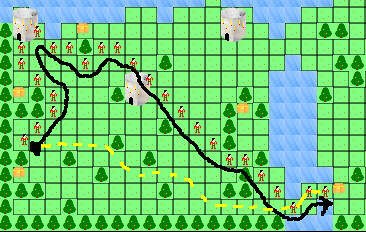
I thought I had my pathfinding system working since my unit tests passed. Obstacles were avoided, and short paths seemed to finish as expected. It wasn’t until I gave the hero a target about a quarter of the map away that I saw a problem:

Debug Path

The hero’s path is specified by the multiple hero sprites and the black line. The dotted yellow line is what I think a more appropriate path should be if the pathfinding algorithm was working correctly. I found it very odd that the path was complete yet so suboptimal. I eventually realized that part of the problem was a bug in my node sorting, and here’s the relevant line:

lessThan == costSoFar < r.costSoFar

I didn't see the problem for a long time, but I eventually posted the code online. Phil Hassey pointed out that I was testing equality instead of assigning a value. Doh! Sometimes you just need a fresh pair of eyes.

There was also another bug in that line. "Artificial Intelligence for Games" argues that you should be using the costSoFar value to sort nodes in the open list, saying it is the only value that isn't a guess. I didn't quite understand why, but I figured such a thick text book written by experts who have worked on more games than I have would know better than I would. So, here's a lesson: never implement an algorithm without understanding it. Everyone else in the world argues you should use the estimated total cost to sort nodes. After all, you're trying to guess which one will get you to the target node in the fastest way. Sorting by cost so far means that there will be a bunch of nodes, possibly in multiple directions, that can be first. Once I changed the value checked from costSoFar to totalEstimatedCost, my paths were straighter and shorter.

Still, my pathfinding system isn't working quite as I expected. The hero can only walk on grass, but other entities could fly over everything. While they might prefer flatter areas, they should still be able to fly over trees, mountains, and water. I created a hero with the ability to move over all of these different terrain types, and I was disappointed to find that the path didn't change. He was still avoiding them as obstacles.

I realized that part of the problem is how I mapped the world representation to the pathfinding graph. Does the terrain have an absolute cost, or should terrain costs be entity-specific? That is, is a mountain always harder to traverse than grass, or should a mountain troll bias towards mountains while a slime prefer the plains? If every entity had the same kind of movement restrictions, it makes sense to have absolute terrain costs. An obstacle for one will be an obstacle for another. But if some can move through water or fly in the air, does it make sense for terrain to have an absolute cost? If I give each entity weights for terrain types, why not just get rid of the absolute costs entirely since the weights are what ultimately matter? How does a game such as Advance Wars handle it?

Other issues I had to deal with included problems with using floating points versus ints. I was using floats to represent world positions for objects, which is fine, but when I was integrating different aspects of the system together, I found that other data structures were implemented using ints. I was losing all of the precision I needed, and it wasn't until I was printing out text every few lines that I could see the problem. Unit tests didn't catch this issue because separate objects and components worked just fine.

But with pathfinding and targeting working fairly well, Stop That Hero! is much further along. Once I can move an entity to an expected target, the rest of the game will hopefully come together much more quickly. Hopefully.

Categories
Game Design Game Development Linux Game Development Personal Development

Stop That Hero! Development Continues

With the Ludum Dare October Challenge over, I am still working on Stop That Hero!. Even though I had said that the Challenge deadline wasn’t important to me, I still had this desire to meet it, and I think I had a lot of competing thoughts in my head since I never made a firm decision to hit the date or ignore it. On the one hand, it’s mentally freeing to not have a deadline breathing down my neck. On the other hand, I don’t want to take forever working on the game.

Project Estimation

My old project schedule estimates were based on a few key pieces of data. I had a deadline I wanted to meet, which was October 31st. I had the number of estimated story points for the entire project, which came out to 75 points total. Going backwards, if I did 20 points of work each week, I’d hit the date with some time to spare. Putting together a sample iteration, I felt 20 points was reasonable at the time.

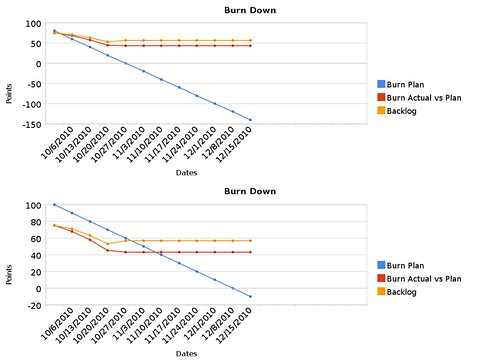
In the last month, I found that I added new stories each week, so now the project’s total story points have increased to 89 points. I’ve also found that 20 points per iteration was overly optimistic, and it seems 10 points per iteration might be more doable. With this new data, I decided to estimate the project with a different set of data, and you can see the project comparison below.

Burn Plan Comparison

The flat lines to the right are basically projecting into the future based on no work being done, so you can ignore them. The blue line indicates the ideal. In the first case, I was expecting to hit 0 points on October 27th. In the new schedule estimates, I’m likely to be finished by December 8th.

What’s nice about these graphs is how much they can show you in an instant. So long as my actual burn rate and the actual backlog stay under or at the blue line, my project is healthy and progressing nicely. If they cross over to the top of the blue line, something has gone wrong. In the first case, you can see that the project was in trouble from the start. I thought that if I could start hitting 20-point iterations that it wouldn’t be that bad, but I couldn’t do it.

With the new estimates, those weak iterations were actually relatively strong, even though the last week was very poor. I only managed 2 points of work then, and I ended up adding 6. I hit a snag in development, but I am recovering from it. Still, you can see that over the life of the project, I’ve been adding to the backlog, and with the previous week, my backlog matches the estimated backlog at this time. It doesn’t give me much room to add more to the backlog, but it isn’t scary yet. If it is mid-November and my backlog is far on the upper-left side of the blue line, however, then I’ll have to question what’s going wrong.

My main concern is that there will be many more stories added to the backlog, especially since I was surprised to learn how much of the basic technology I needed to build in the last month. Also, I worry about not being able to dedicate all of my time to the project that I normally would. Besides the fact that Thanksgiving and Christmas are coming, I’m also moving at the end of the month. I’m more than certain that my project’s schedule will be negatively impacted, but since I am aware of it now, I can take steps to plan for it.

The Game’s Status

What’s implemented so far? I have a menu system which allows me to select what level I want to load. A level loader will populate a level instance with map data from a PNG file. The level uses that map data on initialization to know where to place towers and treasure chests, as well as what type for each, and it also knows where the hero’s initial spawn point is. The level loader also sets the hero’s starting lives to a hard-coded value.

There’s still a lot left to do, but the biggest thing missing is the concept of an entity.

Near the end of the previous month, I ran into trouble when it came to actually implementing the hero. The large number of added points were partly because I took a vague story for implementing an Entity and broke it down into multiple, specific stories related to various aspects of the creation of an Entity. Now instead of trying to create an entity and all of its behaviors at once (and not knowing when I’m finished or how to start), I will be working on rendering an entity, moving an entity according to its speed and direction, and other very specific tasks that are easy to understand and focus on.

Other major components include pathfinding and player actions. The prototype had a poor-but-workable pathfinding solution. While I was happy with it in terms of a weekend project, I knew it wasn’t as good as it could be, and I learned a bit more about A* implementations since then.

While the main activity for the player involves picking a monster type and deciding which tower to create it at, I’d like to investigate other things the player can do to impact the game. In previous posts I’ve mentioned ideas such as banners that all monsters will gravitate towards or clicking on resources at controlled towers in order to collect them. I’ll hold off until I get the fundamental activities implemented, but I think they could change the feel of the game in a positive way.

Once I have the ability to create entities and some way for them to move, fight, and die, the rest of the game will fall into place relatively easily. Victory and defeat conditions depend on the entities actually doing things, animation requires things to animate, and there are details and balance issues that can only be addressed when I have something to detail and balance in the first place.

Of course, I’ll continue to write about the game’s development. B-) Is there any aspect of the game’s development that you’d like for me to explain in the coming weeks? Let me know by leaving a comment!

Categories
Game Design Game Development Games Geek / Technical Linux Game Development Personal Development Post-mortem

LD18: Stop That Hero! Post-Mortem

Ludum Dare 18 was over a month ago. While I didn’t get the game finished in time for the main compo, the Ludum Dare Jam was running simultaneously and offered an extra day to let me finish and submit it.

Stop That Hero! was my most ambitious game yet. It was partially inspired by a book I was reading about artificial intelligence in games and what ended up becoming the winning theme: Enemies as Weapons. I liked the idea of a hero controlled by the computer while you sent enemies to try to stop him. My initial vision was more like Super Mario Bros. That is, the game was going to be a platformer with multiple levels, and you were going to send enemies such as Goombas and Koopa Troopas at the hero. I realized right away that learning how to implement a platformer was not going to be an efficient use of my time, especially since implementing new AI techniques was already going to be a challenge. So I switched from a “reverse Super Mario Bros.” to a “reverse Legend of Zelda” game. The hero would be trying to conquer your towers and ultimately your home castle, and you would use a variety of minions to kill him first.

What Went Right

  1. Early Prototyping Saved Time.

    More prototyping

    During the Ludum Dare #15, I was able to leverage my newly learned rapid prototyping knowledge to good effect, as I explain in the Mineral Miner post-mortem. Even though I had an idea of what I wanted to do before this latest competition started, I still spent some time fleshing it out on paper. Doing so helped me realize requirements I didn’t know I had, such as the need for AI visibility. I also got a feel for the game play, including how the player should spawn enemies and what they’ll do. Prototypes still work well!

  2. Simple Controls Forced Creativity. I wanted the player to do everything with the mouse for a few reasons. One, it would make the game more accessible and easier to play. Two, it would force me to make a simpler game. If the player can’t do too much, then there shouldn’t be a lot of complexity for me to implement. Since I knew that I was going to have enough difficulty implementing AI more advanced than any I’ve ever implemented before, I didn’t want to let the rest of the project’s scope get too large. With simple controls, I would have to figure out other ways to make the game compelling. While simple controls still left me with a lot of design choices and directions to go in, I was able to focus my efforts, and I think the game turned out much better for it.
  3. A Focus on Artificial Intelligence Was Smart. Right away, I knew that most of my time would be spent working on the AI. The game depended on it. I had just finished reading AI for Game Developers shortly before the compo started, and I realized that I never did so in all the time it was on my shelf! I learned some really cool and basic techniques, and I learned that sometimes simple AI tech is better than more complex AI tech. I was also glad I had Artificial Intelligence for Games, Second Edition to act as a more in-depth, up-to-date resource. Between these two books, I was able to create a decent bit of AI. My game’s AI needs related to behavior and pathfinding. Behavior was easily handled by a state machine, but the biggest dependency was on pathfinding. My implementation of A* was somewhat flawed from the start due to the fact that my AI agents didn’t necessarily have a single target at any given time and it was possible they didn’t see anything near them in the first place, but I was pleased with the results considered how much time I had to work within. Seeing a bunch of AI monsters moving about the screen on their own, avoiding each other, and otherwise looking like they had agendas of their own was a proud moment for me.
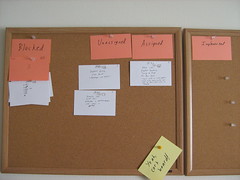
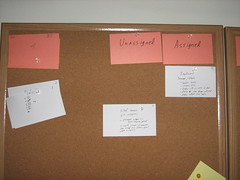
  4. Agile Planning Kept Me Focused and Aware of Priorities.

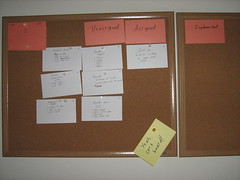
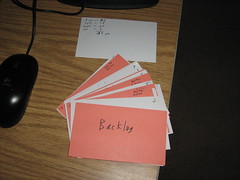
    Agile backlog First iteration

    Since I had a good sense of what the game was going to involve, I was able to plan quite a bit up front. It’s fairly common knowledge that the waterfall model doesn’t work in software development, but I wasn’t planning down to every detail. With Agile story cards, I knew what features to implement, but the implementation details were dealt with when I assigned a story card to myself. The problem with working alone is that no one is there to act as a check against my estimates for how difficult any particular story should be, but for the most part, things worked out well enough. I got two big benefits from using an Agile process to manage my project. One was that I always had a task in front of me. I never floundered, wondering what I should work on next, so my time in front of the computer was highly focused and productive. The other big benefit was knowing what features to focus on and what to cut as the deadline loomed. I originally wanted to have animations and special effects, but as the weekend went on, I knew these tasks weren’t nearly as important as getting working AI. Out they went, and I felt good about the decision.

What Went Wrong

  1. I Spent Too Much Time On The UI and Menus. I took time to prototype and come up with Agile story cards early in the process, but where I went wrong was not giving myself deadlines for those story cards. Ludum Dare was almost halfway through when I finally had an implementation of a window that I could close by clicking a menu item. Granted, clicking was an important aspect of the game, but I probably could have done so without worrying about how the menus would work.
  2. I Broke My Rule About Keeping the Art Simple. In past LDs, I realized that I would spend way too much time trying to create decent-looking art. Mineral Miner benefited from low-quality art because I was able to spend my time finishing it. For this LD, I thought keeping the graphics tiny would help, and it did, but I still found myself trying to draw a decent looking dragon when it wasn’t that important to make it look good. It simply had to be functional. Again, implementing AI was supposed to be my biggest challenge, but trying to create monsters that looked somewhat like what they were supposed to be was where I spent a lot of my time.
  3. I Missed the 48 Hour Deadline. Ludum Dare is normally a 48-hour competition, but LD 18 was a combination 48-hour compo and 72-hour game jam. I normally try to get a good night’s sleep, but I stayed up late this time around. While I was able to get a lot of work done, I found myself making mistakes and having difficulty keeping the code structure in my head. By the end of the second day, I was disappointed that I didn’t have a finished game, so I went to bed. That third day was when everything came together for me, but missing out on the 48-hour deadline meant that I missed out on feedback from other entrants. The compo has rated entries while the jam did not, so entering a compo game would guarantee some feedback in the form of ratings and comments. As I was only able to enter the Jam, my game was ignored by and large. This is the first time that the Jam format was tried for Ludum Dare, and next time there might be some changes to address these concerns, so hopefully entering a game in the Jam won’t feel like second-class LD.
  4. The Game’s Balance Is Off. On the last day of the Ludum Dare Jam, I found I had time to actually play the game. I tried to change values such as the Hero’s strength and speed and the amount of resources you obtain. I didn’t want the player to be able to create a dragon or two right away, so I lowered the starting resources, and then I didn’t want the dragons to come out soon after the game started, so I slowed down the resource increase. While I was able to make such a dominant strategy hard to do in the beginning of the game, it can still work well for the player so long as he/she has patience. Also, it had the side-effect of slowing down the pace of the game. You can only create a handful of minions in any game session, which isn’t nearly as fun as having an entire army swarming on the map. I would have liked more time to balance the game so that it was harder to pull off dominant strategies AND was fun to play.

What I Learned

  1. Simple AI Can Do Wonders! The AI in my game didn’t turn out nearly as complex as I originally thought it needed to be, but maybe it’s good that it didn’t. The AI boiled down to a few pathfinding algorithms and the selection of a target to move to, which isn’t very different from a game such as Pac-man. Once I fixed a number of bugs with the pathfinding, Stop That Hero! came alive. It really did feel like you were creating minions to do your bidding.
  2. Agile Project Planning Is Quick and Useful. Creating a prioritized requirements list and a schedule estimate helped me keep tabs on my progress throughout the weekend. I always knew what task to focus on, and I was able to change my plans when I realized that things were going too slowly for me to get it all done. I received advice that I should have deadlines for my tasks since a schedule doesn’t mean much without them, and I’m inclined to agree. With deadlines/milestones, I probably would have realized how slow my progress was earlier on.
  3. I Need Sleep. Working through the night and into the morning, I learned that my most productive spurts were soon after waking up and having breakfast. Otherwise, even if it felt like I was making progress, I was actually creating problems by inserting bugs and implementing badly thought-out designs. I was able to recover, but in general, I think getting regular sleep is still more beneficial to my project’s health (and my own!) than not.

As in previous Ludum Dare compos, I’ve found my biggest problem is deciding where to spend my time and for how long. Creating a simple menu infrastructure and twiddling with image editors to try to make good looking art took away time from implementing AI and fixing the game’s balance. Project management suffered since I didn’t give myself deadlines, but it did keep me focused. In the end, I had a complete game, with sound, and I’ve decided I liked this project so much that I’ll be updating it and polishing it up for PoV’s inspiring challenge to sell a game by the end of October.

For future projects, I’ll need to give myself milestone deadlines to ensure that I don’t spend too much time on tasks, and I’ll also need to make sure that any art assets I create are primarily functional. Alternatively, I need to dedicate the time to learn how to create quality art and how to use the Gimp.

Categories
Game Design Game Development Geek / Technical Linux Game Development Personal Development

LD18: Stop That Hero! Ported to Win32!

I’ve updated my LD final entry page, but I wanted to let you know that I finally created a Stop That Hero! Windows port (2.2MB)!

Now you have no excuse not to play! Well, assuming you don’t use a Mac. Or some other OS. Then you have an excuse.

Categories
Game Design Game Development Geek / Technical Linux Game Development Personal Development

LD18: Stop That Hero! Development Time Lapse!

Here’s the time lapse for my 72 hours of development on Stop That Hero!

Categories
Game Design Game Development Geek / Technical Linux Game Development Personal Development

LD18: Stop That Hero! Is Finished!

I apparently needed sleep and a third day to get this game completed, but here it is!

Stop That Hero! is finished

So far, the Stop That Hero! Linux version (1.6MB) is all I have. I just started using CMake for my build scripts, so please let me know if the game won’t run on your computer.
Get the Stop That Hero! source

I’ll work on a Windows port, but for now, I’m going to relax! It’s been a grueling 72 hours!

UPDATE: Windows port (2.2MB) created and available for you!

I also updated the Linux build. It’s the same code, but the build was done on an older Linux-based system, so it should run on more systems without a problem.

Categories
Game Design Game Development Geek / Technical Linux Game Development Personal Development

LD18: I’m In the Home Stretch

I’m at the final iteration!

The home stretch!

Basically, the tasks I have left:

  • create instructions screen
  • add sound effects
  • package this baby up!

In the last iteration, I was play testing and balancing as best as I could. I decided that the bat was too expensive, so I moved it down in front of the slime in terms of costs. I lowered the starting health of the Hero and gave him fewer lives. I also tweaked the level design a bit to accommodate the AI’s inability to see too far ahead. There are also victory and defeat screens now.

I finally got the AI working well enough that I realized that I wasn’t just debugging the program anymore. I was playing the game! And it’s actually not that lame! B-)

Categories
Game Design Game Development Geek / Technical Linux Game Development Personal Development

LD18: Let’s Keep on Jammin’!

I missed the deadline for the main compo, but I can still submit my game to the Ludum Dare Jam. The deadline is 24 hours after the end of the compo, so I have until 9PM tonight to finish this game.

After a good night’s rest, I woke up with bug fixes. Seriously, I was lying in bed, slowly waking up, and I thought, “Oh, yeah, I implemented cooldown for the entities after they attack, but I forgot to ensure that cooldown ends.” I fixed a crash bug which also prevents the creatures from trying to leave the world map. And I improved the exploration mode of the AI so that the entities should no longer wiggle or fidget. They pick a direction and go until they reach it. I found that the reason why the hero was getting stuck in place. It was due to the fact that I was checking if he had reached a very exact location, and with his speed, he sometimes overshoots it. When he tries to go back to it, he overshoots again, forever. I enlarged the collision detection box to compensate.

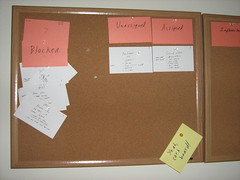
When I finished Iteration 4, I found out that accidentally implemented some stories from Iteration which deal with entities attacking each other. I’ve simplified combat so if entities are not in cooldown and are touching, they’re attacking. That implementation left Iteration 5 fairly moot. In fact, I decided to skip the remaining story in Iteration 5 which dealt with some nuanced AI that I’m not even going to look at, so I’m on to Iteration 6. You can see the backlog of skipped story cards under the Iteration card.

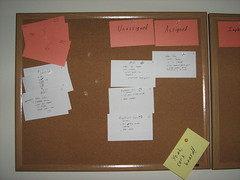
Iteration 5 finished quickly; On to Iteration 6

I’m pretty excited. It’s only 10AM, and I’m on the last two iterations. Iteration 7 is basically sound effects and packaging the game up, and frankly (and sadly), sound is optional at this point. B-)

Categories
Game Design Game Development Geek / Technical Linux Game Development Personal Development

LD18: Missed the Deadline but Continuing On

I got to Iteration 3 by scrapping some of the art and animations I had planned for Iteration 2. Those story points go back into the backlog.

Iteration 3

Iteration 3 was a bear. It was where a lot of the advanced AI had to be implemented. I’ve never done A*. Most of my AI was very simplistic, which went with the simplistic games I’ve done before. This game was going to be different.

Or at least I hoped it would. Entities would bumble about, get stuck, and fly off the world map even though I explicitly told them not to!

I had a quick lunch which was easy to make while I continued to work.

Vegan pizza and applce juice

Unfortunately, the deadline for the main Ludum Dare compo passed when I finally figured out the A* algorithm (it turned out that there was a greater-than sign when there should have been a less-than sign, which is why the entities were moving so strangely). After the pathfinding, the entities still had to interact.

I had the Hero moving toward targets it sees nearby, although every so often I see that he gets stuck in a certain tile for some reason. Enemies seem to have trouble moving to the Hero like I expect, but they find him soon enough.

But with Iteration 4, they fight!

Iteration 4

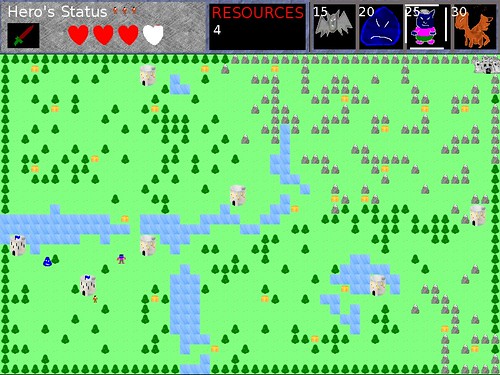
Do you see how the Hero’s health is down?

See enemies put on the hurt!

That’s the first time it has been like that outside of arbitrary tests being conducted. One of the dragons did that! Good job, my babies!

Since the main compo is over, the only option I have left is to continue on. I can still try to enter the Ludum Dare Jam, which gives me an extra 24 hours before the submission deadline.

For now, though, I’m going to bed. These last 48 hours have been grueling, frustrating, and exciting.